
1. 背景介绍
SAP HANA Cloud在Cloud环境中提供了功能及其丰富的HANA多租户(Multi-tenant)相关服务。在安全性和隔离性方面也做的非常完善。但是从数据库使用用户的角度来讲,需要一定的适应过程,甚至要经历一段学习曲线才能熟练使用和掌握。
本文希望用稍短点的文字,介绍一下这个背景下的hana shared instance如何进行初始化。它实际上也是HANA在CAP (Cloud Application Platform)下开发的基础,虽然CAP把这个初始化基本上能做到自动化。了解其底层运行机制,也是非常有用的。
2.准备工作
初始使用Hana Cloud Database,有必要介绍下相关历史,Hana Cloud上的
Hana DB经历了Dedicated, DBaaS,然后才发展到现在无缝支持multitenant
的Hana Cloud Instance. 有两种模式,资源消耗大。每个Tenant(客户)需要
占用一个tenant DB的资源。规模大了以后,系统开销极大。
在引入Hana Cloud Instance之后,Tenant DB演化成Tenant -> Shared
Instance的概念。也就是说,我可以面向Tenant,用一个Hana shared
Instance来管理和存储他的数据。
Hana Cloud本身有一个全局的Database Id与它完全对应起来。相当于一个全局
的实例。然后基于这个实例,有如下几种plan支持具体的service instance的
创建:

第2、3、4是平台使用的。第一种是给外部用户使用的。它支持4种plan。常用的是
hdi-shared和schema。
表示的意思是:每个hdi-shared instance代表一个customer, 如果是schema
这个plan,则表示每个schema代表一个customer.
在HANA数据库里,只要有创建schema的权限,用户就可以创建一个schema。也就
是说,一个用户,可以创建多个schema, 用以支持多个不同的tenant.但是
schema方式下,用户可以使用数据库客户端连上数据库,执行SQL操作。
为了进一步加强安全性,又提供了hdi-shared这种plan。它将真正访问数据库的用
户和设计开发部署阶段的用户进行了分离,通过单独授权来限制运行时用户的权限。
有一个hdi的用户,专门负责部署和生成表结构及其它对象,而真正的运行时用户,
则只能对那些创建好的表和其它对象进行相应的CRUD操作。
以CloudFoundry平台为例 :
cf service mycloud-hana --guid
这个命令可以得到hana instance的唯一id,根据这个id以及plan,就可以生成不同
的hdi-shared 实例,每个实例可以代表不同的租户。
cf cs hana hdi-shared myinstance -c "{\"database_id\":\"<guid>\"}"
这样生成以后,就可以得到可用的myinstance 了。
当然,如果你能进到Hana Cloud在Cloud Cockpit (或叫控制台页面),一样可以通过简单的点击菜单得到那个Database ID (或叫做Instance ID):
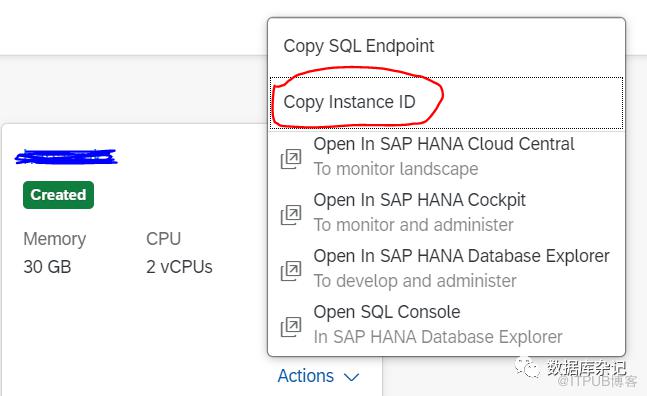
用database Id 和参数,并使用上边的命令行就可以创建出一个独立的hdi-shared instance,代表着一个数据源,对应一个Tenant.
那么如何将表和其它对象的DDL应用到这个instance上呢?
3、连接信息获取
建完hdi-shared instance之后,将它绑到一个部署到Cloud上边的app之后,可以通过绑定的instance,看到对应的连接信息。
也可以通过命令行创建一个service key, 通过创建的service key来得到相应在的连接信息。
cf csk hanacloud-hana test-hana-key
上边头一个参数是前边建出来的实例名,后边是那个service key.
你最终看到的是类似于下边的乖乖:
{
"database_id": "aaaaaaa-xxxx-bbbb-xxxxxxxxxxxxxxx",
"host": "XXXXXXXXXXXXXXXXXXXX.com",
"port": "443",
"driver": "com.sap.db.jdbc.Driver",
"url": "jdbc:sap://<host>:443?encrypt=true&validateCertificate=true¤tschema=<schema>",
"schema": "XXXXXXXXXXXXXXXXXXXX",
"hdi_user": "<hdi_user>",
"hdi_password": "<hdi_password>",
"user": "<user>
"password": "<password>",
"certificate": "-----BEGIN CERTIFICATE-----\nMIIDrzCCAYYYYYYYYYYYYYYYY1ZWVbd4=\n-----END CERTIFICATE-----"
}
利用其中的url的jdbc串,以及后边的user, password值,你确实可以通过第三方工具如DBEaver连到这个实例上。
但是,你没有什么DDL权限,大概也只能做些SELECT操作。可是第一次你连的时候,整个实例都是空的,什么也做不了。典型的会报下边这样的错:

4、使用hdi-deploy和dynamic-hdi-deploy
唯一的方法就是使用SAP提供的hdi-deploy功能。
代码倒是不多, 基于nodejs,整个放到src目录下边:
1) package.json
{
  "name": "deploy",
  "dependencies": {
    "@sap/hdi-deploy": "4.5.1"
  },
  "scripts": {
    "start": "node node_modules/@sap/hdi-deploy/"
  }
}
2) 一些hdi-deploy相关的插件及表或其它对象的DDL定义
一个.hdbconfig文件:
{
    "file_suffixes" : {
        "hdbtable" : {
            "plugin_name" : "com.sap.hana.di.table"
        },
        "hdbdropcreatetable" : {
            "plugin_name" : "com.sap.hana.di.dropcreatetable"
        },
        "hdbindex" : {
            "plugin_name" : "com.sap.hana.di.index"
        },
        "hdbconstraint" : {
            "plugin_name" : "com.sap.hana.di.constraint"
        },
        "hdbtrigger" : {
            "plugin_name" : "com.sap.hana.di.trigger"
        },
        "hdbview" : {
            "plugin_name" : "com.sap.hana.di.view"
        },
        "hdbcalculationview" : {
            "plugin_name" : "com.sap.hana.di.calculationview"
        },
        "hdbprojectionview" : {
            "plugin_name" : "com.sap.hana.di.projectionview"
        },
        "hdbprojectionviewconfig" : {
            "plugin_name" : "com.sap.hana.di.projectionview.config"
        },
        "hdbresultcache" : {
            "plugin_name" : "com.sap.hana.di.resultcache"
        },
        "hdbfunction" : {
            "plugin_name" : "com.sap.hana.di.function"
        },
        "hdbvirtualfunction" : {
            "plugin_name" : "com.sap.hana.di.virtualfunction"
        },
        "hdbvirtualfunctionconfig" : {
            "plugin_name" : "com.sap.hana.di.virtualfunction.config"
        },
        "hdbtabletype" : {
            "plugin_name" : "com.sap.hana.di.tabletype"
        },
        "hdbprocedure" : {
            "plugin_name" : "com.sap.hana.di.procedure"
        },
        "hdbvirtualprocedure" : {
            "plugin_name" : "com.sap.hana.di.virtualprocedure"
        },
        "hdbvirtualprocedureconfig" : {
            "plugin_name" : "com.sap.hana.di.virtualprocedure.config"
        },
        "hdblibrary" : {
            "plugin_name" : "com.sap.hana.di.library"
        },
        "hdbsequence" : {
            "plugin_name" : "com.sap.hana.di.sequence"
        },
        "hdbrole" : {
            "plugin_name" : "com.sap.hana.di.role"
        },
        "hdbroleconfig" : {
            "plugin_name" : "com.sap.hana.di.role.config"
        },
        "hdbstructuredprivilege" : {
            "plugin_name" : "com.sap.hana.di.structuredprivilege"
        },
        "hdbanalyticprivilege" : {
            "plugin_name" : "com.sap.hana.di.analyticprivilege"
        },
        "hdbtabledata" : {
            "plugin_name" : "com.sap.hana.di.tabledata"
        },
        "csv" : {
            "plugin_name" : "com.sap.hana.di.tabledata.source"
        },
        "properties" : {
            "plugin_name" : "com.sap.hana.di.tabledata.properties"
        },
        "tags" : {
            "plugin_name" : "com.sap.hana.di.tabledata.properties"
        },
        "hdbgraphworkspace" : {
            "plugin_name" : "com.sap.hana.di.graphworkspace"
        },
        "hdbflowgraph" : {
            "plugin_name" : "com.sap.hana.di.flowgraph"
        },
        "hdbreptask" : {
            "plugin_name" : "com.sap.hana.di.reptask"
        },
        "hdbsearchruleset" : {
            "plugin_name" : "com.sap.hana.di.searchruleset"
        },
        "txt" : {
            "plugin_name" : "com.sap.hana.di.copyonly"
        },
        "hdbmigrationtable" : {
           "plugin_name" : "com.sap.hana.di.table.migration"
        }
    }
}
到时候我们主要定义.hdbmigrationtable, .hdbindex等几种类型的文件来定义表。
在同一个目录中放一个简单的表定义:(BUG1234.hdbmigrationtable)
== version = 1

ROW TABLE "BUG1234" (
    "APPID" NVARCHAR(255) NOT NULL,
    "USERNAME" NVARCHAR(255) NOT NULL,
    PRIMARY KEY (APPID)
)
如果后需要在线变更表结构,你主要在这个文件里,把version值增大,外加一个 == migration = 2的动作。
这个表定义的语法也比较简单,省去了CREATE关键字,但要指明它是行表(Row table)还是列表。HANA默认是使用列表的。
如:
== version = 2

ROW TABLE "BUG1234" (
    "APPID" NVARCHAR(255) NOT NULL,
    "USERNAME" NVARCHAR(255) NOT NULL,
    "ISREGISTRATION" SMALLINT NOT NULL DEFAULT 0,
    PRIMARY KEY (APPID)
)

== migration = 2
ALTER TABLE "BUG1234" ADD ("ISREGISTRATION" SMALLINT NULL DEFAULT 0);
这里表示的就是额外添加一列:ISREGISTRATION的动作。而索引之类的都在单独的文件<INDEX>.hdbindex里头定义。
单独的index定义文件,如:(BUG11234.hdbindex)
INDEX "IDX_BUG1234_USERNAME" ON "BUG1234" (USERNAME)
最后,就是需要构造默认的deploy env文件了(default-env.json)
{
    "TARGET_CONTAINER" : "<container-uuid>",
    "VCAP_SERVICES": {
        "hana": [
            {
                "label": "hana",
                "provider": null,
                "plan": "hdi-shared",
                "name": "<uuid>",
......
其实只要关注VCAP_SERVICES那一部分的内容即可。它从Cloud控制台管理页面上可以从绑定的instance里头对应的环境变量里可以得到。
有了这几个文件:.hdbconfig, package.json, src/table.hdbmigration, default-env.json,就可以做一次命令行调用了。
然后在根目录执行:
npm run start -- --exit
即可完成部署。
一个成功的执行,会显示如下类似的log:
@sap/hdi-deploy, version 4.5.1 (mode default), server version 4.00.000.00.1678788773 (4.0.0.0), node version 16.14.0, HDI version 1010, container API version 1005
Deployment started at 2023-03-23 10:57:23
Using hana-client for connection
Using default environment variables from file "default-env.json"
Collecting files...
Collecting files... ok (0s 8ms)
1 directories collected
3 files collected
0 reusable modules collected
Target service: 166120f1-e481-46cf-ba26-96a778369c66
Session variable APPLICATION is set to "SAP_HDI//".
Previous build with request ID 3094 finished at 2023-03-23 10:56:53.176731000 with status Canceled and message: Make failed (4 errors, 0 warnings): tried to deploy 2 files, undeploy 0 files, redeploy 0 dependent files.
Processing revoke files...
Processing revoke files... ok (0s 2ms)
Processing grants files...
Processing grants files... ok (0s 0ms)
Preprocessing files...
Preprocessing files... ok (0s 0ms)
Connecting to the container "container_id"...
Connecting to the container "container_id"... ok (0s 221ms)
Locking the container "container_id"...
Locking the container "container_id"... ok (0s 284ms)
Synchronizing files with the container "container_id"...
  Deleting files...
  Deleting files... ok
  Writing files...
  Writing files... ok
Synchronizing files with the container "container_id"... ok (0s 472ms)
added files: [
  "src/BUG1234.hdbmigrationtable",
  "src/BUG1234_IDX.hdbindex"
]
modified files: []
Undeploy allowlist file "undeploy.json" found; deleted files will be filtered by the allowlist
deleted files: []
2 modified or added files are scheduled for deploy based on delta detection
0.............
  Migrating libraries...
  Migrating libraries... ok  (0s 8ms)
  Making...
   Preparing...
   Preparing the make transaction...
   Adding "src/BUG1234.hdbmigrationtable" for deploy...
   Preparing the make transaction... ok  (0s 16ms)
   Adding "src/BUG1234.hdbmigrationtable" for deploy... ok  (0s 17ms)
   Adding "src/BUG1234_IDX.hdbindex" for deploy...
   Adding "src/BUG1234_IDX.hdbindex" for deploy... ok  (0s 0ms)
   Preparing... ok  (0s 34ms)
   Calculating dependencies...
    Expanding...
     Expanding "src/BUG1234.hdbmigrationtable"...
     Expanding "src/BUG1234.hdbmigrationtable"... ok  (0s 5ms)
    Expanding... ok  (0s 23ms)
    Precompiling...
     Precompiling "src/BUG1234.hdbmigrationtable"...
     Precompiling "src/BUG1234_IDX.hdbindex"...
     Precompiling "src/BUG1234.hdbmigrationtable"... ok  (0s 6ms)
     Precompiling "src/BUG1234_IDX.hdbindex"... ok  (0s 6ms)
    Precompiling... ok  (0s 18ms)
    Merging...
    Merging... ok  (0s 5ms)
   Calculating dependencies... ok  (0s 65ms)
   Processing work list...
    Deploying "src/BUG1234.hdbmigrationtable"...
    Deploying "src/BUG1234.hdbmigrationtable"... ok  (0s 27ms)
    Deploying "src/BUG1234_IDX.hdbindex"...
    Deploying "src/BUG1234_IDX.hdbindex"... ok  (0s 4ms)
   Processing work list... ok  (0s 43ms)
   Postprocessing deployed files...
    Postprocessing "src/DEBUG.hdbrole"...
    Postprocessing "src/DEBUG.hdbrole"... ok  (0s 73ms)
   Postprocessing deployed files... ok  (0s 84ms)
   Finalizing...
   Finalizing... ok  (0s 21ms)
   Make succeeded (0 warnings): 2 files deployed (effective 2), 0 files undeployed (effective 0), 0 dependent files redeployed
  Making... ok  (0s 284ms)
  Enabling table replication for the container schema "container_id"...
  Enabling table replication for the container schema "container_id"... ok  (0s 8ms)
 Starting make in the container "container_id" with 2 files to deploy, 0 files to undeploy... ok  (0s 320ms)
Deploying to the container "container_id"... ok (0s 598ms)
No default-access-role handling needed; global role "container_id::access_role" will not be adapted
Unlocking the container "container_id"...
Unlocking the container "container_id"... ok (0s 1ms)
Deployment to container container_id done [Deployment ID: none].
Deployment ended at 2023-03-23 10:57:26
(3s 106ms)
如果我们再有工具连到目标数据库,就可以正常访问表BUG1234了。
SET SCHEMA D5B7157F149C4EF6B8376DC04E040E96;
INSERT INTO BUG1234 VALUES('appid',  'Tom Jerry');
可以成功的进行后续的CUD操作。
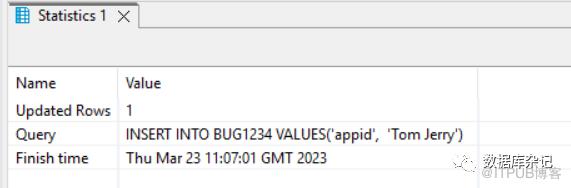
这就把DDL的变更与实际 运行时对表数据的操作完全分离出来了,确保了最大的安全性。
题外话:这用户名、密码都是特别特别长,所以,基本上也别想破解什么的。还有,使用了"encrypt=true&validateCertificate=true"连接属性,传输也不是明文的。这在Cloud环境里头基本上是标配。数据层的加密自不必说,以后有机会再单独介绍。数据层的加密也完全做到了按需加密,由Customer自己决定。
上边是最简单的不需要去部署一个dynamic-hdi-deploy的nodejs,然后发POST请求去生成表结构的方法。
一般大多做法是部署一个webapp (包含上边package),这个webapp要绑定前边生成的hdi-shared instance。然后:
POST <url>/v1/deploy
结果跟上边命令行执行的效果一样。不过,命令行的方式会方便的多,也省时间,便于排错。
-- END --
SAP在安全性方面,做的确实非常细致,有时候细的简直让人有些难以适应,但就因为做到了非常细,反而一些比较严谨的客户会非常喜欢这方面的特性。
如果有同学刚好在SAP的Cloud上使用HANA, 那么上边的一些内容无疑是非常有用的。

原文作者:数据库杂记;如有侵权,请联系管理员删除。

最新文章
- PostgreSQL Internals之路 Part-II 第10章 WAL日志
- 从Oracle过渡到PostgreSQL: 理解模式的概念
- PostgreSQL是Oracle的一个可行的替代方案——原因如下
- PostgreSQL Internals之路Part II: Buffer Cache和WAL第9章 Buffer Cache
- 天纵奇才 - "林诗栋"
- 没有PostgreSQL样例数据库,不用担心, 帮你搞定!
- 推荐几本数据库技术图书
- 由浅入深高可用:HAProxy + PostgreSQL配置逐步详解(二)
- PostgreSQL Internals之路 Part-I 第7,8章 冻结、重建表和索引
- 乒坛最新消息引发巨震 - 世界第一王楚钦惨败林诗栋,王曼昱0-4遭横扫,还有孙颖莎4-2稳胜张本美和
