点击上方蓝字 👆关注【云原生百宝箱】公众号,别让消息溜走
后台回复【加群】,与牛人互动不停
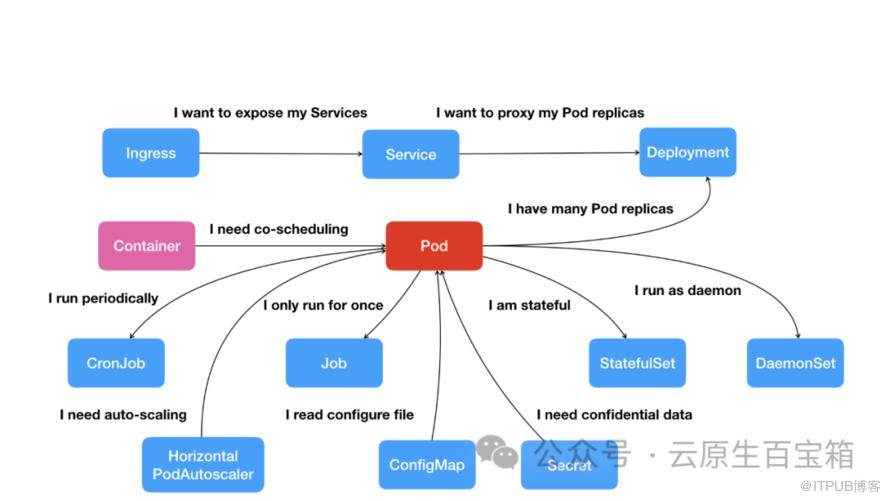
"kubectl-tree 是一款强大的 kubectl 插件,通过 ownerReferences 实现 Kubernetes 对象之间的所有权关系探索。相较于 kubectl lineage,它不仅更全面理解 API 对象的逻辑关系,而且借助ownerReferences。这使得揭示 Kubernetes 中对象间复杂的所有权结构变得更加简便,为用户提供更直观、全面的视角,助力更深入的集群管理与分析。"
kubectl-tree
一个 kubectl 插件,用于通过ownerReferences探索 Kubernetes 对象之间的所有权关系。
插件kubectl lineage[1] 与kubectl tree非常相似,但它只能理解 一些 API 对象之间的逻辑关系[2],而不需要ownerReferences。
安装插件管理器(Krew )
注意: krew 仅兼容
kubectlv1.12或更高版本。
Krew 目前支持macOS/Linux: bash/zsh[3], fish[4] 和**Windows[5]**
macOS/Linux环境
Bash or ZSH shellsde
1.确保git已安装。
2.运行此命令以下载并安装krew:
(
  set -x; cd "$(mktemp -d)" &&
  OS="$(uname | tr '[:upper:]' '[:lower:]')" &&
  ARCH="$(uname -m | sed -e 's/x86_64/amd64/' -e 's/\(arm\)\(64\)\?.*/\1\2/' -e 's/aarch64$/arm64/')" &&
  KREW="krew-${OS}_${ARCH}" &&
  curl -fsSLO "https://github.com/kubernetes-sigs/krew/releases/latest/download/${KREW}.tar.gz" &&
  tar zxvf "${KREW}.tar.gz" &&
  ./"${KREW}" install krew
)3.将$HOME/.krew/bin目录添加到你的 PATH 环境变量。为此,需要在你的.bashrc或者.zshrc文件并添加如下内容:
# vim ~/.bashrc 在文件末尾添加一下内容
export PATH="${KREW_ROOT:-$HOME/.krew}/bin:$PATH"
并重新启动你的shell。
或者直接使用如下命令,更方便快捷
echo 'export PATH=$HOME/.krew/bin:$PATH' >> ~/.bashrc
source ~/.bashrc4.运行kubectl krew以检查安装。
$ kubectl krew
krew is the kubectl plugin manager.
You can invoke krew through kubectl: "kubectl krew [command]"

Usage:
  kubectl krew [command]

Available Commands:
  completion  generate the autocompletion script for the specified shell
  help        Help about any command
  index       Manage custom plugin indexes
  info        Show information about an available plugin
  install     Install kubectl plugins
  list        List installed kubectl plugins
  search      Discover kubectl plugins
  uninstall   Uninstall plugins
  update      Update the local copy of the plugin index
  upgrade     Upgrade installed plugins to newer versions
  version     Show krew version and diagnostics

Flags:
  -h, --help      help for krew
  -v, --v Level   number for the log level verbosity

Use "kubectl krew [command] --help" for more information about a command.
Fish shell
1.确保git已安装。
2.在你的终端中运行此命令以下载并安装krew:
begin
  set -x; set temp_dir (mktemp -d); cd "$temp_dir" &&
  set OS (uname | tr '[:upper:]' '[:lower:]') &&
  set ARCH (uname -m | sed -e 's/x86_64/amd64/' -e 's/\(arm\)\(64\)\?.*/\1\2/' -e 's/aarch64$/arm64/') &&
  set KREW krew-$OS"_"$ARCH &&
  curl -fsSLO "https://github.com/kubernetes-sigs/krew/releases/latest/download/$KREW.tar.gz" &&
  tar zxvf $KREW.tar.gz &&
  ./$KREW install krew &&
  set -e KREW temp_dir &&
  cd -
end3.将$HOME/.krew/bin目录添加到你的 PATH 环境变量。为此,为此,需要在你的config.fish文件并添加如下内容:
set -gx PATH $PATH $HOME/.krew/bin并重新启动你的shell。
1. 运行
kubectl krew以检查安装。
Windows环境
1. 确保
git已安装。2. 从https://github.com/kubernetes-sigs/krew/releases页面下载`krew.exe`
3. 使用管理员权限启动
cmd.exe。4. 运行以下命令安装 krew:
.\krew install krew5. 将
%USERPROFILE%\.krew\bin目录添加到你的PATH环境变量6. 启动一个新的命令行窗口。
7. 运行
kubectl krew以检查安装。
安装kubectl-tree
使用krew[6]插件管理器安装:
kubectl krew install tree
kubectl tree --help
演示
示例(Deployment):
示例((Knative Service):
示例(Agones Fleet)):
示例(Kserve Inferenceservices)):
注意
默认情况下,插件将仅搜索与指定对象相同的命名空间中的“命名空间”对象。
可以使用-A或--all-namespaces标志来搜索所有命名空间中的命名空间和非命名空间对象。
引用链接
[1] kubectl lineage: https://github.com/tohjustin/kube-lineage[2] API 对象之间的逻辑关系: https://github.com/tohjustin/kube-lineage#supported-relationships[3] bash/zsh: https://krew.sigs.k8s.io/docs/user-guide/setup/install/#bash[4] fish: https://krew.sigs.k8s.io/docs/user-guide/setup/install/#fish[5] Windows: https://krew.sigs.k8s.io/docs/user-guide/setup/install/#windows[6] krew: https://krew.sigs.k8s.io/

原文作者:云原生AI百宝箱;如有侵权,请联系管理员删除。

