
最近在做Spark从Azure Data Lake Gen2读写数据时协议的升级,即由原来的WASB协议升级到ABFS协议,测试下来,性能确实有了很大的提升,大约带来50%左右的提升。但是也出现了几个坑,一个是之前介绍过SAS token里包含问号的bug,详见:发现一个Azure Databricks Bug
今天介绍另外一个坑,简单描述一下:
切换到abfss协议之后,测试时发现:
- 用下面的代码,即Spark用之前创建好的SAS Token往Azure Data Lake Gen2里,以Delta格式写数据时,抛下面的异常。
// configue spark with SAS token access wayspark.conf.set("fs.azure.account.auth.type.%s.dfs.core.windows.net".format(storageAccountName ), "SAS")spark.conf.set("fs.azure.sas.token.provider.type.%s.dfs.core.windows.net".format(storageAccountName ), "org.apache.hadoop.fs.azurebfs.sas.FixedSASTokenProvider")spark.conf.set("fs.azure.sas.fixed.token.%s.dfs.core.windows.net".format(storageAccountName ), sasToken)df.write.format("delta").mode("append").save("abfss://containername@storageaccountname.dfs.windows.net/foldername")
异常信息如下:
AbfsRestOperationException:Operation failed:"Server failed to authenticate the request. Make sure the value of Authorization header is formed correctly including the signature.",403, PUT, https://storageaccountname.dfs.core.windows.net/containername/foldername/tablename/_delta_log/0000000000000.json?timeout=90&sv=2017-07-29&ss=b&srt=sco&sp=rwdlac&se=2024-02-20&st=2024-02-20&spr=https&sig=xxxxxx, Authenticationfailed, "Server failed to authenticate the request. Make sure the value of Authorization header is formed correctly including the signature.RequestId:xxxxxxxxxxxxxxxx Time: 2023-02-11T06:24:44.3421245Z"
大概意思是说认证头的格式不对,特别是签名的格式。
于是又测试了一下Spark用之前的SAS Token从Azure Data Lake Gen2里读数据(parquet格式),往里写parquet格式的数据也是没问题的。
那初步判定只有在以delta格式保存数据时有问题。
再次看错误信息,里面有一个PUT操作,还有一个PUT操作的对象:0000000000000.json,也就是做更改文件操作时失败了。
于是查看当前SAS token都有哪些权限,但是如何查呢?还得看微软官方文档,于是找到了下面的文档:
- https://learn.microsoft.com/en-us/azure/storage/common/storage-sas-overview?source=recommendations#sas-token

- https://learn.microsoft.com/en-us/rest/api/storageservices/create-service-sas
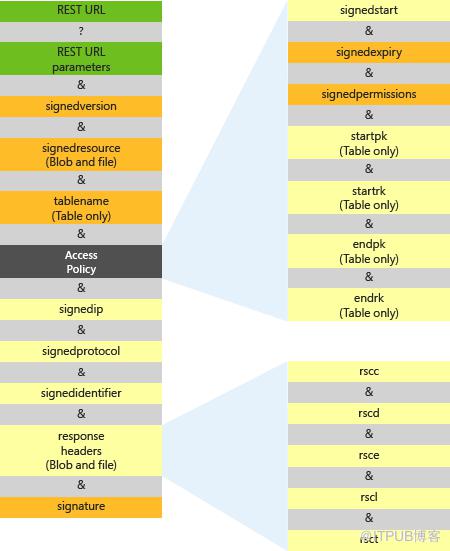
- https://learn.microsoft.com/en-us/rest/api/storageservices/create-account-sas#specify-the-account-sas-parameters

再吐槽一下,这3份文档找了半天,微软就不能放在一个地方解释清楚么?
现在清楚了,异常信息里的URL里包含了权限字段:sp=rwdlac
r:读,w:写,d:删除,l:列出,a:添加,c:创建
看来确实缺少更新操作的权限,但是在上面介绍sp详情里的u只针对queue messages和table有效。
我用的SAS token是由Terraform创建的,于是检查Terraform创建token的代码如下,也确实能对的上。
resource "azurerm_resource_group" "example" {name = "resourceGroupName"location = "West Europe"}resource "azurerm_storage_account" "example" {name = "storageaccountname"resource_group_name = azurerm_resource_group.example.namelocation = azurerm_resource_group.example.locationaccount_tier = "Standard"account_replication_type = "GRS"tags = {environment = "staging"}}data "azurerm_storage_account_sas" "example" {connection_string = azurerm_storage_account.example.primary_connection_stringhttps_only = truesigned_version = "2017-07-29"resource_types {service = truecontainer = trueobject = true}services {blob = truequeue = falsetable = falsefile = false}start = "2023-02-11T00:00:00Z"expiry = "2024-02-11T00:00:00Z"permissions {read = truewrite = truedelete = truelist = trueadd = truecreate = trueupdate = falseprocess = false}}
所以怀疑Azure Storage Account服务本身有更新,于是尝试在Azure门户网页上手动创建一个SAS token。
果然多了一个权限y:Permanent delete,详见下图。
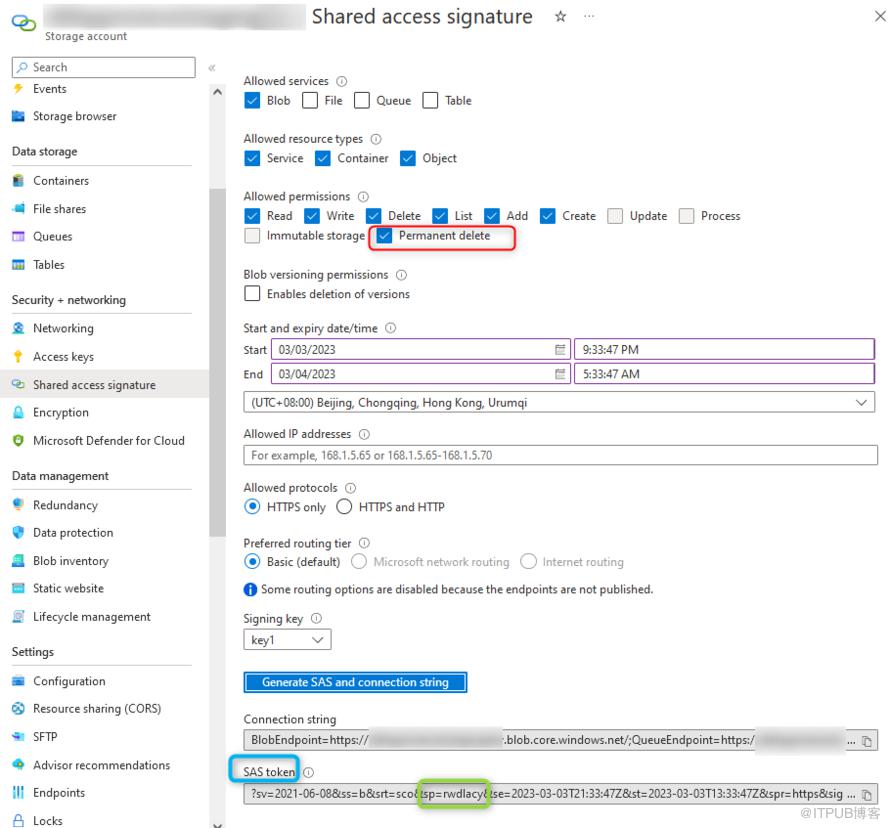
经过测试,用手动创建的这个SAS Token往Azure Data Lake Gen2里以delta格式写数据不再报任何异常了。
原因找到了,现在想办法解决,查看了最新的Terraform关于azurerm provider文档,里面还是没有这个权限。此路不通了。
于是尝试另外一种方式:用terraform创建Storage Account Container级别的Shared access tokens
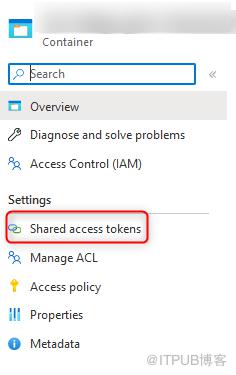
经过一番测试,这个还真管用,就用这个了,至此问题解决。
点击关注本公众号,避开Azure更多坑!
👇
原文作者:BPShare;如有侵权,请联系管理员删除。

