上期我们介绍了Databricks有自带数据集供大家学习相关Databricks,Spark等相关知识。以及自带数据集的路径:
/databricks-datasets上次着重介绍了众多数据集中的一个:Rdatasets
具体路径是:
/databricks-datasets/Rdatasets/data-001/csv可以看到数据格式只有csv格式的数据,那今天我们介绍另外几种数据集,而且数据格式是JSON格式的,这样大家在Databricks中做练习时,如果需要JSON的数据就很方便的找到了。
数据集路径:
display(dbutils.fs.ls("/databricks-datasets/iot-stream/"))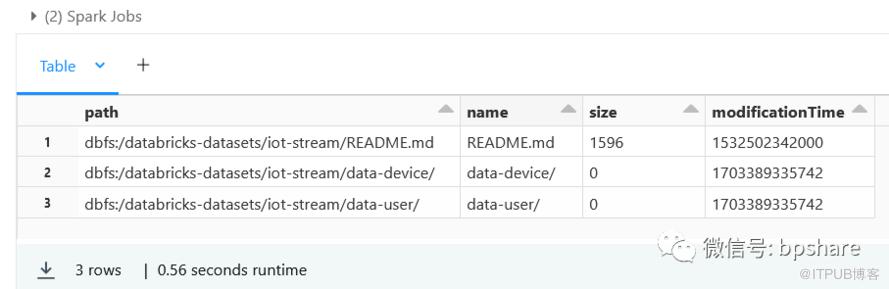
可以看到,包含了README文件,data-device和data-user文件夹,其中data-device是json格式文件,data-user下面是csv文件。
先看看README文件怎么说:
shcat /databricks-datasets/iot-stream/README.md
# README文件内容==========================================IOT Device Data==========================================This dataset was created by Databricks.It contains fake generated data in json and csv formats.e.g.`{"user_id": 12, "calories_burnt": 489.79998779296875, "num_steps": 9796, "miles_walked": 4.8979997634887695, "time_stamp": "2018-07-24 03:54:00.893775", "device_id": 10}`=========================================Data Set Information=========================================Schema for data-device:```[StructField(id,LongType,false),StructField(user_id,LongType,true),StructField(device_id,LongType,true),StructField(num_steps,LongType,true),StructField(miles_walked,FloatType,true),StructField(calories_burnt,FloatType,true),StructField(timestamp,StringType,true),StructField(value,StringType,true)]```Schema for data-user:```[StructField(userid,IntegerType,true),StructField(gender,StringType,true),StructField(age,IntegerType,true),StructField(height,IntegerType,true),StructField(weight,IntegerType,true),StructField(smoker,StringType,true),StructField(familyhistory,StringType,true),StructField(cholestlevs,StringType,true),StructField(bp,StringType,true),StructField(risk,IntegerType,true)]```=========================================License and/or Citation=========================================Copyright (2018) Databricks, Inc.This dataset is licensed under a Creative Commons Attribution 4.0 International License<https://creativecommons.org/licenses/by/4.0/>.
README文件简单介绍了该数据集的信息和数据schema。
再来看看data-device文件夹:
display(dbutils.fs.ls("/databricks-datasets/iot-stream/data-device/"))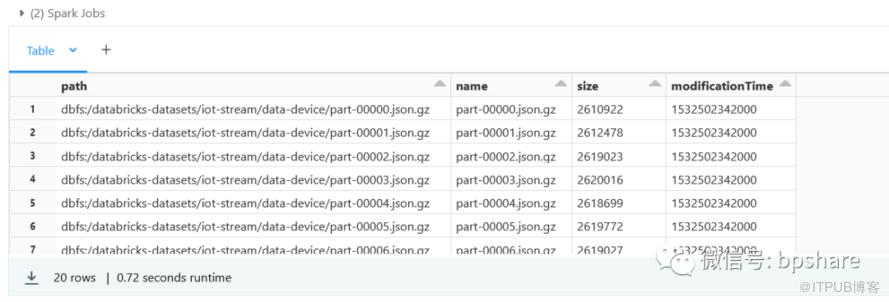
一共20个文件,以gz的格式保存,用spark以json格式读取没问题,可以放心。比如:
display(spark.read.format('json').load('/databricks-datasets/iot-stream/data-device/part-00000.json.gz'))
再来看看data-user数据:
display(dbutils.fs.ls("/databricks-datasets/iot-stream/data-user/"))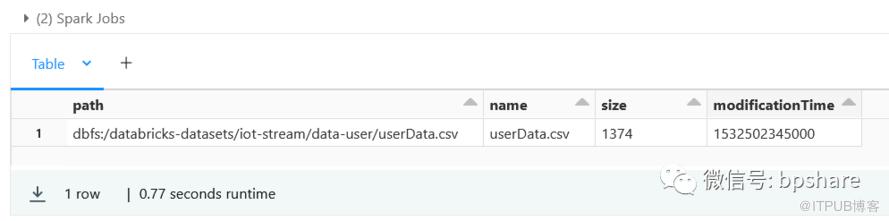
display(spark.read.format('csv').option('header', True).load('/databricks-datasets/iot-stream/data-user/userData.csv'))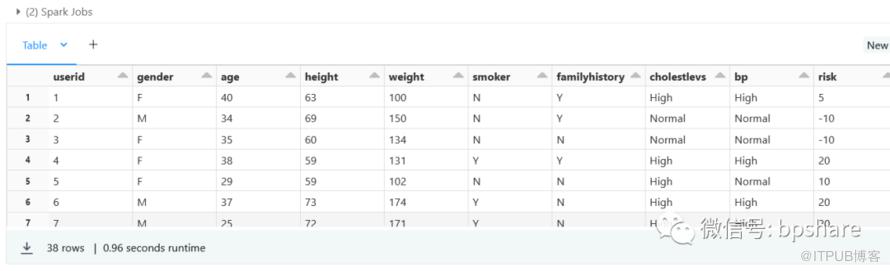
点击关注本公众号,解锁更多Databricks知识!
原文作者:BPShare;如有侵权,请联系管理员删除。

请登录后发表评论
登录
全部评论
