Vector 增加 GreptimeDB 日志写入支持,连接数十种数据源
Vector 是一个高速、可扩展的数据管道工具,用于收集、转换和传输日志、指标、事件等数据。它支持将不同来源的数据(如应用程序日志、系统指标等)聚合并发送到各种目标(如数据库、监控系统)。Vector 的优势在于其灵活的配置和高效的数据处理能力,使得用户能够轻松构建复杂的数据管道,并在流量高峰时确保系统稳定。
在去年上线的 Vector v0.32.0 中,已上线了 GreptimeDB 指标数据的写入支持, 详情可见此文《开源可观测数据采集工具 Vector 已内置 GreptimeDB 支持》。
现在,随着 GreptimeDB 全面支持对日志数据的存储和分析,日志接收功能(greptime log sink)已经集成到 Vector 中。用户可以通过
greptime_logs sink 将 Vector 中的各种数据源记录写入到 GreptimeDB 中存储。下文将详细说明如何通过 Vector 快速采集日志数据至 GreptimeDB。
配置 greptime_logs Sink
以下是一个使用
greptime_logs sink 的配置示例:
[sinks.my_sink_id]

type = "greptimedb_logs"

inputs = [ "my-source-or-transform-id" ]

compression = "gzip"

dbname = "public"

endpoint = "http://localhost:4000"

username = "username"

password = "password"

pipeline_name = "pipeline_name"

table = "mytable"


  [sinks.my_sink_id.extra_params]

  source = "vector"
参数说明
-
inputs:指定从my-source-or-transform-id处获取数据。
-
compression:Vector 和 GreptimeDB 之间传输数据时使用的压缩方式
-
dbname:要写入的 GreptimeDB 中的 database
-
endpoint:GreptimeDB 的 HTTP 服务地址。
-
username和password:GreptimeDB 用户名与密码。
-
pipeline_name:使用的 Pipeline 名称。
-
table:数据写入的表名。
-
extra_params:向 GreptimeDB 日志接口发送的额外 HTTP 查询参数,在这里,source 被设为 vector。
通过此配置,Vector 会将数据写入 GreptimeDB 的
public 数据库下的
mytable 表。
什么是 Pipeline?
Pipeline 是 GreptimeDB 用来处理日志数据的概念,支持对数据进行过滤、解析和提取等操作。简而言之,将非结构化或者半结构化的日志文本,处理成 GreptimeDB 结构化的表数据。
虽然 Vector 的
transform 组件也能执行类似功能,但 Pipeline 属于 GreptimeDB 的内置工具,和 GreptimeDB 提供的功能结合更紧密。能够创建、管理并优化日志数据处理。并且可以在表的基础上指定索引,定义字段类型的功能。
接下来,我们将介绍如何通过 Pipeline 来处理日志数据。
pipeline_name 表示 GreptimeDB 中 Pipeline 的名称,用于唯一标识一个 Pipeline。我们可以通过 GreptimeDB 的 HTTP API 创建 Pipeline,并在 Vector 中使用该 Pipeline 来处理日志数据。
Pipeline 示例
以下是一个定义简单的 Pipeline 示例:
processors:
-
date:


fields:


-
timestamp


formats:


-
"%Y-%m-%dT%H:%M:%S%.3fZ"


-
dissect:


fields:


-
message


patterns:


-
'
%{ip} -
%{user} [
%{datetime}] "
%{method}
%{path}
%{protocol}"
%{status}
%{size}'


-
date:


fields:


-
datetime


formats:


-
"%d/%b/%Y:%H:%M:%S %z"


transform:


-
fields:


-
message


-
ip


-
user


-
method


-
path


-
protocol


type:
string


-
fields:


-
status


-
size


type:
int64


-
fields:


-
datetime


type:
timestamp


index:
tag


-
fields:


-
timestamp


type:
timestamp


index:
timestamp
这个 Pipeline 把 log 数据中的
message 字段解析成多个字段,然后把
timestamp 字段解析成
timestamp 类型。
可以看到我们把原本的 message 拆分成了以下几个字段:
- ip
- user
- datetime
- method
- path
- protocol
- status
- size
更加结构化的数据可以帮助我们快速定位我们想要的数据。
启动 GreptimeDB 和创建 Pipeline
首先,使用默认的参数启动 GreptimeDB 实例:
greptime standalone start
接着,通过 GreptimeDB 的 HTTP API 创建一个 Pipeline:
## add pepeline

curl -X
"POST"
"http://localhost:4000/v1/events/pipelines/test?db=public" \

     -H
'Content-Type: application/x-yaml' \

     -d $
'processors:

  - date:

      fields:

      - timestamp

      formats:

      - "%Y-%m-%dT%H:%M:%S%.3fZ"

  - dissect:

      fields:

        - message

      patterns:

        - \'%{ip} - %{user} [%{datetime}]
"%{method} %{path} %{protocol}" %{status} %{size}\
'

  - date:

      fields:

        - datetime

      formats:

        - "%d/%b/%Y:%H:%M:%S %z"

transform:

  - fields:

      - message

      - ip

      - user

      - method

      - path

      - protocol

    type: string

  - fields:

      - status

      - size

    type: int64

  - fields:

      - datetime

    type: timestamp

    index: tag

  - fields:

      - timestamp

    type: timestamp

    index: timestamp

'


## {"pipelines":[{"name":"test","version":"2024-09-22 13:19:10.315487388"}],"execution_time_ms":2}
此命令会创建名为
test 的 Pipeline,Vector 通过配置
pipeline_name = "test" 用以指定处理日志内容的 Pipeline。
除了开源的 GreptimeDB,我们也提供全托管开箱即用的云上数据库服务 GreptimeCloud 。这里,我们也在 GreptimeCloud 上申请了一个 DB service 并将上述的 Pipeline 通过 API 接口同步一份到 GreptimeCloud 的 DB 中。
启动 Vector 并写入 GreptimeDB
您可以访问 Vector 的官方网站下载页面下载适用于您操作系统的安装包。
配置 Vector 使其将数据双写入 GreptimeDB 和 GreptimeCloud:
[sources.my_source_id]

type = "demo_logs"

format = "apache_common"

interval = 1


[sinks.local]

type = "greptimedb_logs"

endpoint = "http://localhost:4000"

table = "logs"

dbname = "public"

pipeline_name = "test"

compression = "none"

inputs = [ "my_source_id" ]


[sinks.cloud]

type = "greptimedb_logs"

endpoint = "https://ervqd5nxnb8s.us-west-2.aws.greptime.cloud"

table = "logs"

dbname = "z3294clox11alog_test-public"

username = "username"

password = "password"

pipeline_name = "test"

compression = "gzip"

inputs = [ "my_source_id" ]
sinks.cloud 中
dbname 以及
endpoint 都将用户在 GreptimeCloud 创建完 DB 后提供。在 Vector 中可同时配置 local 和 cloud 两个 sink 并使用同一数据源将一份数据双写到本地和 Cloud 上的 DB 中。
将该配置保存为
demo.toml 文件后,运行以下命令启动 Vector:
vector --config-toml demo.toml
此配置会将
demo_logs source 中的数据写入 GreptimeDB 的
public.logs 表和 GreptimeCloud 中的
z3294clox11alog_test-public.logs 表中,并使用
test Pipeline 进行数据处理。
查看数据
GreptimeDB
GreptimeDB 支持多种协议查询数据,如 PostgreSQL、MySQL 和 HTTP API。以下示例展示了如何通过 MySQL 客户端连接 GreptimeDB 并查看写入的数据。
首先,在 MySQL 客户端链接 GreptimeDB,如下所示我们已经通过 MySQL 协议成功连接上了 GreptimeDB:
mysql -h 127.0.0.1 -P 4002


Welcome to the MySQL monitor.  Commands end with ; or \g.

Your MySQL connection id is 8

Server version: 8.4.2 Greptime


Copyright (c) 2000, 2024, Oracle and/or its affiliates.


Oracle is a registered trademark of Oracle Corporation and/or its

affiliates. Other names may be trademarks of their respective

owners.


Type
'help;' or
'\h'
for
help. Type
'\c' to clear the current input statement.
如下所示此时用户可以通过执行 SQL 来查询表结构:
mysql> desc logs;

+
-----------+---------------------+------+------+---------+---------------+

| Column    | Type                | Key  | Null | Default | Semantic Type |

+
-----------+---------------------+------+------+---------+---------------+

| message   | String              |      | YES  |         | FIELD         |

| ip        | String              |      | YES  |         | FIELD         |

| user      | String              |      | YES  |         | FIELD         |

| method    | String              |      | YES  |         | FIELD         |

| path      | String              |      | YES  |         | FIELD         |

| protocol  | String              |      | YES  |         | FIELD         |

| status    | Int64               |      | YES  |         | FIELD         |

| size      | Int64               |      | YES  |         | FIELD         |

| datetime  | TimestampNanosecond | PRI  | YES  |         | TAG           |

| timestamp | TimestampNanosecond | PRI  | NO   |         | TIMESTAMP     |

+
-----------+---------------------+------+------+---------+---------------+

10 rows in
set (
0.00 sec)
如下所示可以看到 Pipeline 已经将原始的日志内容拆分成更加结构化的数据来帮助我们可以更精确的查询以便迅速定位问题。
mysql>
select ip,
user,method,
path,protocol,
status,
size,
timestamp
from
logs
order
by
timestamp
limit
10;

+
----------------+--------------+--------+------------------------------+----------+--------+-------+----------------------------+

| ip             | user         | method | path                         | protocol | status | size  | timestamp                  |

+
----------------+--------------+--------+------------------------------+----------+--------+-------+----------------------------+

| 57.139.106.246 | b0rnc0nfused | POST   | /apps/deploy                 | HTTP/1.1 |    503 | 29189 | 2024-09-23 08:30:31.147581 |

| 92.244.202.215 | CrucifiX     |
DELETE | /secret-info/
open-sesame     |
HTTP/
2.0 |
503 |
32896 |
2024
-09
-23
08:
30:
32.148556 |

|
156.19
.88
.115  | devankoshal  |
HEAD   | /wp-
admin                    |
HTTP/
1.0 |
550 |
8650 |
2024
-09
-23
08:
30:
33.148113 |

|
180.46
.246
.211 | benefritz    |
HEAD   | /secret-info/
open-sesame     |
HTTP/
1.1 |
302 |
23108 |
2024
-09
-23
08:
30:
34.147865 |

|
234.52
.58
.58   | b0rnc0nfused |
HEAD   | /booper/bopper/mooper/mopper |
HTTP/
1.0 |
302 |
37767 |
2024
-09
-23
08:
30:
35.147550 |

|
95.166
.109
.178 | b0rnc0nfused |
GET    | /
do-
not-
access/needs-
work    |
HTTP/
1.1 |
500 |
11546 |
2024
-09
-23
08:
30:
36.148012 |

|
46.172
.171
.167 | benefritz    |
OPTION | /booper/bopper/mooper/mopper |
HTTP/
1.1 |
302 |
28860 |
2024
-09
-23
08:
30:
37.148466 |

|
185.150
.37
.231 | devankoshal  | PUT    | /this/endpoint/prints/money  |
HTTP/
1.0 |
304 |
11566 |
2024
-09
-23
08:
30:
38.147247 |

|
76.150
.197
.27  | BryanHorsey  |
HEAD   | /apps/deploy                 |
HTTP/
1.1 |
501 |
46186 |
2024
-09
-23
08:
30:
39.148455 |

|
128.175
.97
.190 | BryanHorsey  |
OPTION | /
user/booperbot124           |
HTTP/
1.1 |
400 |
15037 |
2024
-09
-23
08:
30:
40.147901 |

+
----------------+--------------+--------+------------------------------+----------+--------+-------+----------------------------+


10
rows
in
set (
0.08 sec)
通过以上步骤,用户可以方便地使用 Vector 将日志数据接入 GreptimeDB,并通过 Pipeline 进行日志数据的处理和管理。
GreptimeCloud
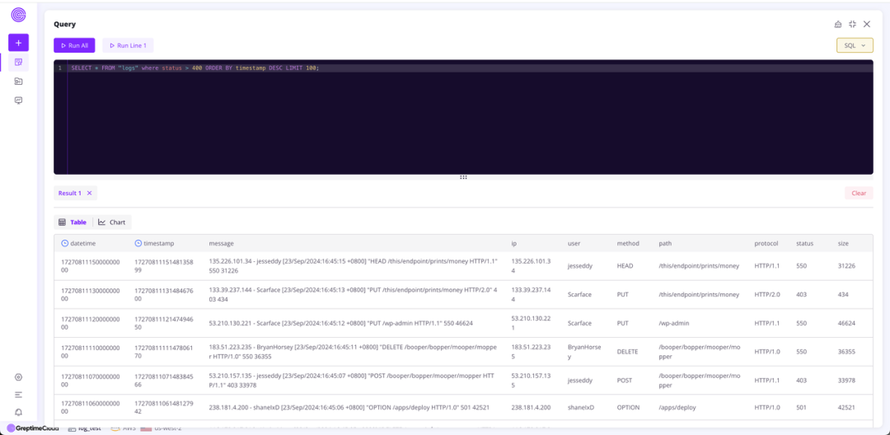
同时,在 Vector 中我们双写了一份数据到 GreptimeCloud 中。我们可以在 GreptimeCloud 中通过提供的 console 界面来查询数据,同时进行数据可视化。
下图展示了使用 SQL 语句查询了所有 status 大于 400 的请求,来帮助我们快速定位问题。
总结
Vector 中集成 Greptime log sink 的功能,使得日志数据从采集、处理到存储的全过程更加高效流畅。通过结合 GreptimeDB 的 Pipeline 能力,用户可以灵活地对日志进行处理,并高效存储到 GreptimeDB 以及 GreptimeCloud 中,极大提升了日志数据的管理和查询效率。
❝关于 Greptime
Greptime 格睿科技专注于为可观测、物联网及车联网等领域提供实时、高效的数据存储和分析服务,帮助客户挖掘数据的深层价值。目前基于云原生的时序数据库 GreptimeDB 已经衍生出多款适合不同用户的解决方案,更多信息或 demo 展示请联系下方小助手( 微信号:greptime)。
欢迎对开源感兴趣的朋友们参与贡献和讨论,从带有 good first issue 标签的 issue 开始你的开源之旅吧~期待在开源社群里遇见你!添加小助手微信即可加入“技术交流群”与志同道合的朋友们面对面交流哦~
Star us on GitHub Now: https://github.com/GreptimeTeam/greptimedb
官网: https://greptime.cn/
文档: https://docs.greptime.cn/
Twitter: https://twitter.com/Greptime
Slack: https://greptime.com/slack
LinkedIn: https://www.linkedin.com/company/greptime/
来自 “ ITPUB博客 ” ,链接:https://blog.itpub.net/70031880/viewspace-3043828/ ,如需转载,请注明出处,否则将追究法律责任。

最新文章
- 导师倾情陪练,助力学生玩转开源|Greptime 参与「开源之夏」的第二年正式收官!
- 签约案例|GreptimeDB 为数据驱动的汽车应用带来安全高效的车云一体解决方案
- 商业开源的最佳起步实践 PPT 分享中|QCon・北京站圆满落幕
- 用户指南 | 快速迁移 InfluxDB v2 数据至 GreptimeDB
- 可观测场景如何使用 Vector Remap 优化日志数据的解析与存储
- GreptimeDB 监控自举 | 如何用 GreptimeDB 监控 GreptimeDB
- Rust 错误处理在 GreptimeDB 的实践
- GreptimeDB v0.10 重磅上线:日志场景增强、功能性能双重升级
- 克服 Prometheus 单值数据模型的局限性 — GreptimeDB 的新路径
- Procedure 框架的设计和应用

暂无留言