来源:京东云开发者

2.1 主要特点
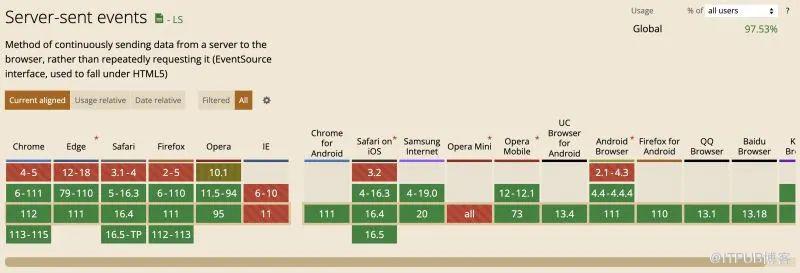
单向通信:SSE 专为从服务器到客户端的单向通信设计。客户端不能通过SSE直接发送数据到服务器,但可以通过其他方法如AJAX与服务器进行交互。 基于HTTP:SSE 基于 HTTP 协议运行,不需要新的协议或端口。这使得它能够轻松地在现有的Web应用架构中使用,并且通过标准的HTTP代理和中间件进行支持。 自动重连:如果连接断开,浏览器会自动尝试重新连接到服务器。 格式简单:SSE 使用简单的文本格式发送消息,每个消息都以两个连续的换行符分隔。 原生浏览器支持:许多现代浏览器(如 Chrome、Firefox 和 Safari)已原生支持SSE,但需要注意的是,某些浏览器,如Internet Explorer和早期的Edge版本,不支持SSE。
2.2 SSE 与 WebSockets
| WebSockets | ||
3.1 SSE 的协议机制
Content-Type: text/event-stream: 这表示返回的内容为事件流。 Cache-Control: no-cache: 这确保服务器推送的消息不会被缓存,以保障消息的实时性。 Connection: keep-alive: 这指示连接应始终保持开放,以便服务器可以随时发送消息。
3.2 消息的格式和结构
event: 定义了事件的类型。这可以帮助客户端确定如何处理接收到的消息。 id: 提供事件的唯一标识符。如果连接中断,客户端可以使用最后收到的事件 ID 来请求服务器从某个点重新发送消息。 retry: 指定了当连接断开时,客户端应等待多少毫秒再尝试重新连接。这为连接中断和重连提供了一种机制。 data: 这是消息的主体内容。它可以是任何 UTF-8 编码的文本,而且可以跨多行。每行数据都会在客户端解析时连接起来,中间使用换行符分隔。
id: 123event: updatedata: {"message": "This is a test message"}4.1 如何建立连接
const options = {withCredentials: true // 允许跨域请求携带凭证};// 创建一个 EventSource 对象以开始监听const eventSource = new EventSource('your_server_url', options);
4.2 如何处理收到的事件
通用事件处理:
// 监听连接打开事件eventSource.onopen = function(event) {console.log('Connection to SSE server established!');};// 监听标准消息事件eventSource.onmessage = function(event) {console.log('Received data from server: ', event.data);};// 监听错误事件eventSource.onerror = function(event) {console.error('An error occurred while receiving data:', event);};
自定义事件处理:
// 监听一个名为 "update" 的自定义事件eventSource.addEventListener('update', function(event) { console.log('Received update event:', event.data);});4.3 关闭连接
eventSource.close();
5.1 服务端
const http = require('http');const fs = require('fs');// 初始化 HTTP 服务器http.createServer((req, res) => {// 为了简洁,将响应方法抽离成函数function serveFile(filePath, contentType) {fs.readFile(filePath, (err, data) => {if (err) {res.writeHead(500);res.end('Error loading the file');} else {res.writeHead(200, {'Content-Type': contentType});res.end(data);}});}function handleSSEConnection() {res.writeHead(200, {'Content-Type': 'text/event-stream','Cache-Control': 'no-cache','Connection': 'keep-alive'});let id = 0;const intervalId = setInterval(() => {const message = {event: 'customEvent',id: id++,retry: 30000,data: { id, time: new Date().toISOString() }};for (let key in message) {if (key !== 'data') {res.write(`${key}: ${message[key]}\n`);} else {res.write(`data: ${JSON.stringify(message.data)}\n\n`);}}}, 1000);req.on('close', () => {clearInterval(intervalId);res.end();});}switch (req.url) {case '/':serveFile('index.html', 'text/html');break;case '/events':handleSSEConnection();break;default:res.writeHead(404);res.end();break;}}).listen(3000);console.log('Server listening on port 3000');
5.2 客户端
<html lang="en"><head><meta charset="UTF-8"><meta http-equiv="X-UA-Compatible" content="IE=edge"><meta name="viewport" content="width=device-width, initial-scale=1.0"><title>SSE Demotitle>head><body><h1>SSE Demoh1><button onclick="connectSSE()">建立 SSE 连接button><button onclick="closeSSE()">断开 SSE 连接button><br /><br /><div id="message">div><script>const messageElement = document.getElementById('message');let eventSource;// 连接 SSEfunction connectSSE() {eventSource = new EventSource('/events');eventSource.addEventListener('customEvent', handleReceivedMessage);eventSource.onopen = handleConnectionOpen;eventSource.onerror = handleConnectionError;}// 断开 SSE 连接function closeSSE() {eventSource.close();appendMessage(`SSE 连接关闭,状态${eventSource.readyState}`);}// 处理从服务端收到的消息function handleReceivedMessage(event) {const data = JSON.parse(event.data);appendMessage(`${data.id} --- ${data.time}`);}// 连接建立成功的处理函数function handleConnectionOpen() {appendMessage(`SSE 连接成功,状态${eventSource.readyState}`);}// 连接发生错误的处理函数function handleConnectionError() {appendMessage(`SSE 连接错误,状态${eventSource.readyState}`);}// 将消息添加到页面上function appendMessage(message) {messageElement.innerHTML += `${message}
`;}script>body>html>

6.1 存在问题
默认请求仅支持 GET 方法。当前端需要向后端传递参数时,参数只能拼接在请求的 URL 上,对于复杂的业务场景来说实现较为麻烦。 对于服务端返回的数据格式有固定要求,必须按照 event、id、retry、data 的结构返回。 服务端发送的数据可以在浏览器控制台中查看,这可能会暴露敏感数据,导致数据安全问题。
6.2 优化技巧
/*** Utf8ArrayToStr: 将Uint8Array的数据转为字符串* @param {Uint8Array} array - Uint8Array数据* @return {string} - 转换后的字符串*/function Utf8ArrayToStr(array) {const decoder = new TextDecoder();return decoder.decode(array);}/*** fetchStream: 建立一个SSE连接,并支持多种HTTP请求方式* @param {string} url - 请求的URL地址* @param {object} params - 请求的参数,包括HTTP方法、头部、主体内容等* @return {Promise} - 返回一个Promise对象*/const fetchStream = (url, params) => {const { onmessage, onclose, ...otherParams } = params;return fetch(url, otherParams).then(response => {let reader = response.body?.getReader();return new ReadableStream({start(controller) {function push() {reader?.read().then(({ done, value }) => {if (done) {controller.close();onclose?.();return;}const decodedData = Utf8ArrayToStr(value);console.log(decodedData);onmessage?.(decodedData);controller.enqueue(value);push();});}push();}});}).then(stream => {return new Response(stream, {headers: { "Content-Type": "text/html" }}).text();});};// 示例:调用fetchStream函数fetchStream("/events", {method: "POST", // 使用POST方法headers: {"content-type": "application/json"},credentials: "include",body: JSON.stringify({// 这里列出了一些示例数据,实际业务场景请替换为你的数据boxId: "exampleBoxId",sessionId: "exampleSessionId",queryContent: "exampleQueryContent"}),onmessage: res => {console.log(res); // 当接收到消息时的回调},onclose: () => {console.log("Connection closed."); // 当连接关闭时的回调}});
6.3 封装插件
// 定义请求主体的接口,需要根据具体的应用场景定义具体的属性interface RequestBody {// 示例属性,具体属性需要根据实际需求定义key?: string;}// 错误响应的结构interface ErrorResponse {error: string;detail: string;}// 返回值类型定义type TextStream = ReadableStreamDefaultReader<Uint8Array>;// 获取数据并返回TextStreamasync function fetchData(url: string,body: RequestBody,accessToken: string,onError: (message: string) => void): Promise<TextStream | undefined> {try {// 尝试发起请求const response = await fetch(url, {method: "POST",cache: "no-cache",keepalive: true,headers: {"Content-Type": "application/json",Accept: "text/event-stream",Authorization: `Bearer ${accessToken}`,},body: JSON.stringify(body),});// 检查是否有冲突,例如重复请求if (response.status === 409) {const error: ErrorResponse = await response.json();onError(error.detail);return undefined;}return response.body?.getReader();} catch (error) {onError(`Failed to fetch: ${error.message}`);return undefined;}}// 读取流数据async function readStream(reader: TextStream): Promise<string | null> {const result = await reader.read();return result.done ? null : new TextDecoder().decode(result.value);}// 处理文本流数据async function processStream(reader: TextStream,onStart: () => void,onText: (text: string) => void,onError: (error: string) => void,shouldClose: () => boolean): Promise<void> {try {// 开始处理数据onStart();while (true) {if (shouldClose()) {await reader.cancel();return;}const text = await readStream(reader);if (text === null) break;onText(text);}} catch (error) {onError(`Processing stream failed: ${error.message}`);}}/*** 主要的导出函数,用于处理流式文本数据。** @param url 请求的URL。* @param body 请求主体内容。* @param accessToken 访问令牌。* @param onStart 开始处理数据时的回调。* @param onText 接收到数据时的回调。* @param onError 错误处理回调。* @param shouldClose 判断是否需要关闭流的函数。*/export async function streamText(url: string,body: RequestBody,accessToken: string,onStart: () => void,onText: (text: string) => void,onError: (error: string) => void,shouldClose: () => boolean): Promise<void> {const reader = await fetchData(url, body, accessToken, onError);if (!reader) {console.error("Reader is undefined!");return;}await processStream(reader, onStart, onText, onError, shouldClose);}
-end-
来自 “ ITPUB博客 ” ,链接:https://blog.itpub.net/70027828/viewspace-2993077/ ,如需转载,请注明出处,否则将追究法律责任。
上一篇:
大模型在代码缺陷检测领域的应用实践
下一篇:
晨报 |「2023.11.7」星期二

请登录后发表评论
登录
全部评论
