来源:得物技术
目录
一、背景
二、图片拉伸优化
1. 本地图拉伸
2. .9图拉伸
3. 网络图FIT_CENTER拉伸
4. 网络图CENTER_CROP拉伸
三、本地相册加载优化
四、动图缓存、闪烁优化
五、未来展望
六、总结
一
背景
图片的加载体验对于交易、社区为核心的社交电商类应用来说可以说是生命线,好的图片加载体验决定了用户分享欲、购买欲。
二
图片拉伸优化


本地图拉伸
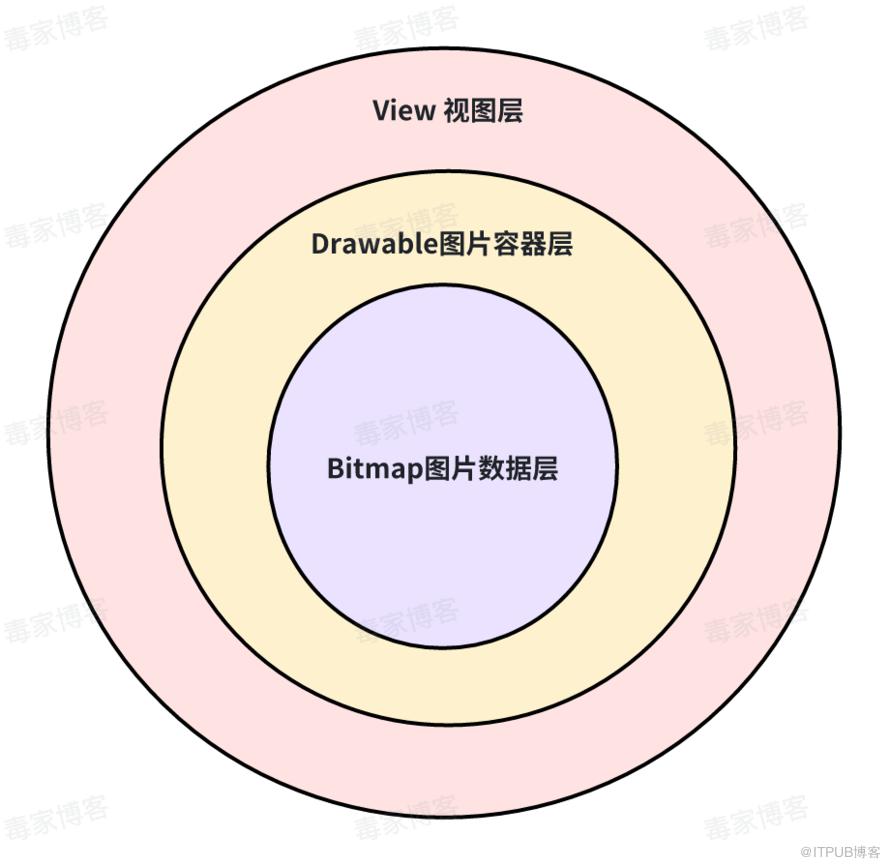
private void updatePaint() { if (mLastBitmap == null || mLastBitmap.get() != mBitmap) { mLastBitmap = new WeakReference<>(mBitmap); mPaint.setShader(new BitmapShader(mBitmap, Shader.TileMode.CLAMP, Shader.TileMode.CLAMP)); mIsShaderTransformDirty = true; } if (mIsShaderTransformDirty) { mPaint.getShader().setLocalMatrix(mTransform); mIsShaderTransformDirty = false; } mPaint.setFilterBitmap(getPaintFilterBitmap());}


//设置path的核心代码if (mIsCircle) {mPath.addCircle(mRootBounds.centerX(),mRootBounds.centerY(),Math.min(mRootBounds.width(), mRootBounds.height()) / 2,Path.Direction.CW);} else if (mScaleDownInsideBorders) {if (mInsideBorderRadii == null) {mInsideBorderRadii = new float[8];}for (int i = 0; i < mBorderRadii.length; i++) {mInsideBorderRadii[i] = mCornerRadii[i] - mBorderWidth;}mPath.addRoundRect(mRootBounds, mInsideBorderRadii, Path.Direction.CW);} else {mPath.addRoundRect(mRootBounds, mCornerRadii, Path.Direction.CW);}//设置RootBounds的核心代码if (mTransformCallback != null) {mTransformCallback.getTransform(mParentTransform);mTransformCallback.getRootBounds(mRootBounds);} else {mParentTransform.reset();mRootBounds.set(getBounds());}


targetDensity = 手机设备 √(水平像素数^2 + 垂直像素数^2)/ 屏幕尺寸(以英寸为单位) = 560
sdensity = 本地图存放的drawable文件夹对应的density,xxhdpi = 480
android DisplayMetrics源码
mdpi --> DisplayMetrics.DENSITY_MEDIUM --> 160
hdpi --> DisplayMetrics.DENSITY_HIGH --> 240
xhdpi --> DisplayMetrics.DENSITY_XHIGH --> 320
xxhdpi --> DisplayMetrics.DENSITY_XXHIGH --> 480
xxxhdpi --> DisplayMetrics.DENSITY_XXXHIGH --> 640

.9图拉伸

@JvmStatic fun loadNinePatchBackground(image: ImageView, url: String) { //获取.9图的cdn下载文件 loadImageAsFile(url, { //通过BitmapFactory进行解码 获取bitmap val bitmap = BitmapFactory.decodeFile(it.path) ?: return@loadImageAsFile val chunk = bitmap.ninePatchChunk image.resources?.apply { //将bitmap数据封装到NinePatchDrawable中 val defaultDrawable = if (NinePatch.isNinePatchChunk(chunk)) { NinePatchDrawable(this, bitmap, chunk, Rect(), null) } else { BitmapDrawable(this, bitmap) } //设置核心图片背景 image.background = defaultDrawable } })}


问题.9图仍旧为xxhdpi的标准图片BitmapDensity为480。
网络图取决于手机实际分辨率情况,问题设备上为640。


对于问题图片来说,inDensity为480,而inTargetDensity则为 DisplayMetrics.DENSITY_DEVICE_STABLE的值。
* density 对应本地图的匹配density,默认为0,不进行inDensity配置。对于部分可变分辨率手机,可能会存在.9拉伸的问题,需要指定输入输出density。* 参数说明:* mdpi--> DisplayMetrics.DENSITY_MEDIUM* hdpi --> DisplayMetrics.DENSITY_HIGH* xhdpi -->DisplayMetrics.DENSITY_XHIGH* xxhdpi -->DisplayMetrics.DENSITY_XXHIGH* xxxhdpi -->DisplayMetrics.DENSITY_XXXHIGHfun loadNinePatchBackgroundForView(view: View, url: String, density: Int = 0) {loadImageAsFile(url, {var options: BitmapFactory.Options? = nulloptions = BitmapFactory.Options()options.inDensity = densityoptions.inTargetDensity = DisplayMetrics.DENSITY_DEVICE_STABLEBitmapFactory.decodeFile(it.path)val bitmap = BitmapFactory.decodeFile(it.path, options) ?: return@loadImageAsFileval chunk = bitmap.ninePatchChunkview.resources?.apply {val defaultDrawable = if (NinePatch.isNinePatchChunk(chunk)) {val rect = if (DuImageGlobalConfig.enableNewNinePatchLoad) {Rect(chunk[12].toInt(), chunk[20].toInt(), chunk[16].toInt(), chunk[24].toInt())}NinePatchDrawable(this, bitmap, chunk, rect, null)} else {BitmapDrawable(this, bitmap)}view.background = defaultDrawable}})}
网络图FIT_CENTER拉伸


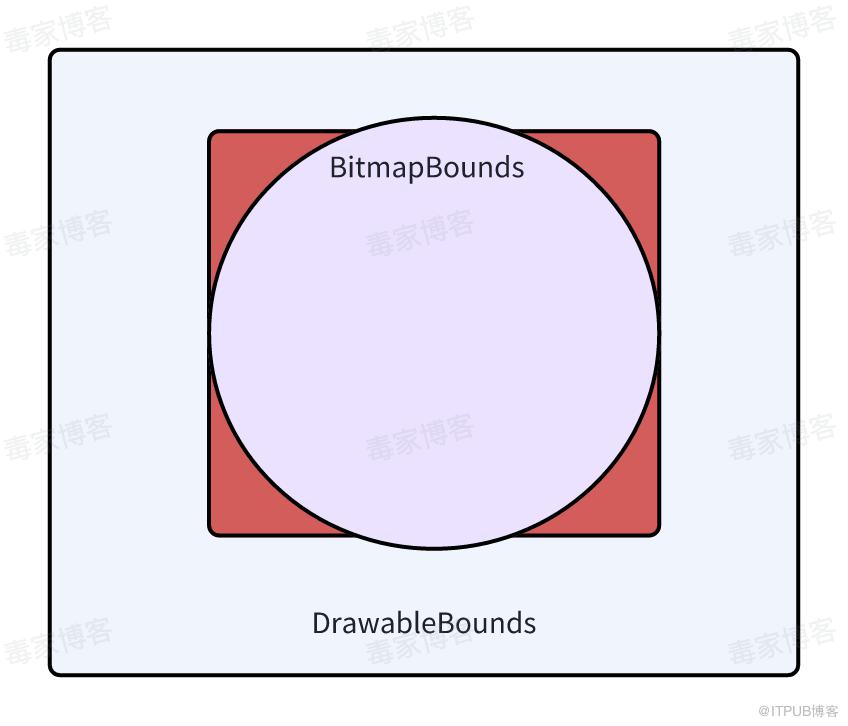
网络图CENTER_CROP拉伸


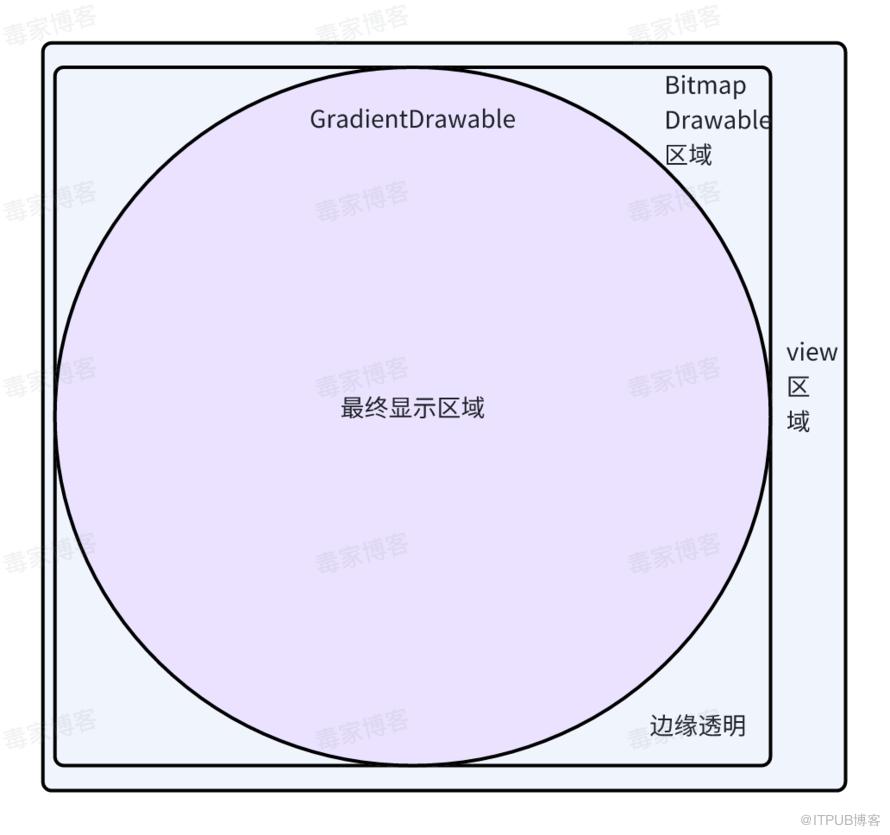


改变Bitmap宽高的方式,即类似.9图的优化加载处理,通过BitmapFactory等解码density配置,增大输出Bitmap的宽高,但大面积使用场景会导致整体app使用内存上升,甚至增加线上OOM crash的发生概率,这无疑是不可能接受的。网上也有类似处理方案https://github.com/JessYanCoding/AndroidAutoSize/issues/209,故我们并没有从Bitmap角度持续做文章。 那么改变BitmapDrawable的测量宽高呢?其实思考过后,我们是可以实现的,即对继承于android源码BitmapDrawable进行方法重写,当Bitmap存在时,优先获取Bitmap的宽高作为Drawable的测量宽高。
//重写测量宽高的实现public int getIntrinsicHeight() {Bitmap bitmap = this.mBitmap;if (bitmap != null) {return bitmap.getHeight();}return super.getIntrinsicHeight();}public int getIntrinsicWidth() {Bitmap bitmap = this.mBitmap;if (bitmap != null) {return bitmap.getWidth();}return super.getIntrinsicWidth();}
为什么用户之前在2k分辨率下网络图都是正常,会突然出现拉伸的情况? 我猜测为类似.9图中提到的部分设备支持分辨率切换的能力,屏幕分辨率已经被切换为高dpi,历史DisplayMetrics.DENSITY_DEVICE_STABLE仍旧保持低分辨率,但是厂商OTA或者特殊场景覆写,这一错误被纠正了。当targetDensity变大后,会导致测量宽高增大,最终导致拉伸情况产生。 为什么android的源码实现不直接将测量宽高优先以Bitmap宽高为准? 因为单用Bitmap的宽高作为测量宽高,其实是无法实现单个图片尺寸在不同的屏幕密度上均表现正常的。这也是困扰我们较久的原因,重写圆角图下android源码实现会不会带来什么新问题。梳理了整体view-多级drawable的关系后,其实图片库逻辑中会根据view的测量宽高对Bitmap进行兜底裁剪,由于View的宽高计算逻辑我们并没有改动,仍旧是基于density进行动态调整的。Drawable绘制时填充满View区域,故最终整体方案是可行的。
三
本地相册加载优化

缩略图获取


左图为android Q及以上,右图为android Q及以下


旋转参数兼容

//cursor 获取具体的pathNamefinal String pathname = cursor.getString(cursor.getColumnIndex(MediaStore.Images.ImageColumns.DATA));if (pathname != null) {try {//通过ExifInterface获取图片的旋转角度ExifInterface exif = new ExifInterface(pathname);orientation = exif.getAttributeInt(ExifInterface.TAG_ORIENTATION, ExifInterface.ORIENTATION_NORMAL);rotationAngle = JfifUtil.getAutoRotateAngleFromOrientation(orientation);} catch (IOException ioe) {FLog.e(PRODUCER_NAME, ioe, "Unable to retrieve thumbnail rotation for %s", pathname);}}..... //此处省略部分代码实现//构造CloseableStaticBitmap时,传入旋转的角度与方向CloseableStaticBitmap closeableStaticBitmap =new CloseableStaticBitmap(loadThumbnail,SimpleBitmapReleaser.getInstance(),ImmutableQualityInfo.FULL_QUALITY,rotationAngle, orientation)
异常读取兜底
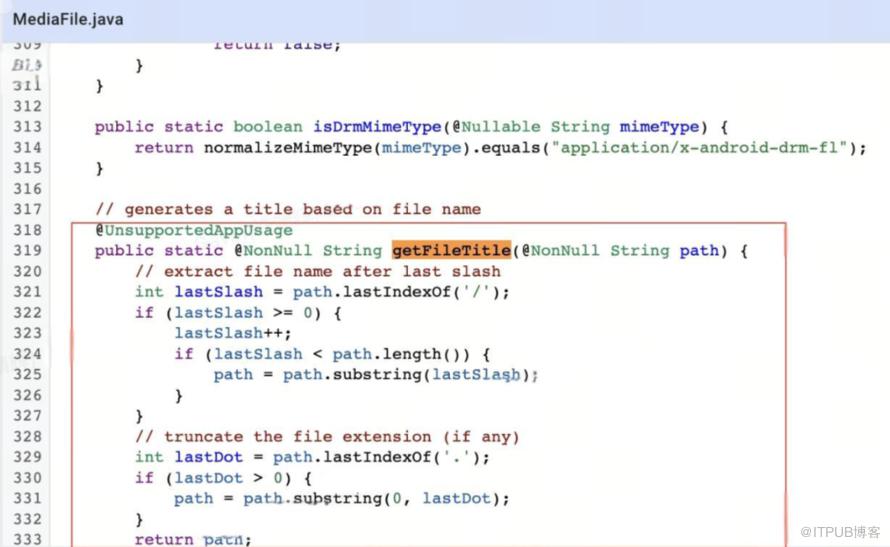

try {loadThumbnail = mContentResolver.loadThumbnail(imageRequest.getSourceUri(), new Size(imageRequest.getPreferredWidth(), imageRequest.getPreferredHeight()), cancellationSignal);} catch (IOException exception) {if (exception.getMessage() != null && exception.getMessage().contains("Failed to create thumbnail")) {if (imageRequest.getMimeType() != null && HEIF_MIME_TYPE.contains(imageRequest.getMimeType())) {String path = getRealPathFromUri(mContentResolver, imageRequest.getSourceUri());if (path != null) {File file = new File(path);FileInputStream fileInputStream = new FileInputStream(file);//读取头文件 做实际的判断String type = ImageFormatChecker.getInstance().determineImageFormat(fileInputStream).getFileExtension();//暂时只判断heif, avif格式的误判 暂时没做头文件 format检测if (type != null && !type.equals(HEIF_FORMAT_EXTENSION)) {loadThumbnail = createImageThumbnail(file, new Size(imageRequest.getPreferredWidth(), imageRequest.getPreferredHeight()), cancellationSignal);if (loadThumbnail != null) {//补充异常兜底事件抛到业务层producerContext.getProducerListener().onProducerEvent(producerContext, PRODUCER_NAME, THUMBNAIL_FALL_BACK_EVENT);}}}} else {//此处抛出异常 会被onProducerFailed 处理 上层能监控到throw exception;}}}
视频缩略图兼容 & 大图压缩
if (Build.VERSION.SDK_INT >= Build.VERSION_CODES.Q) { loadThumbnail = mContentResolver.loadThumbnail(imageRequest.getSourceUri(), new Size(imageRequest.getPreferredWidth(), imageRequest.getPreferredHeight()), null);} else { long videoId = -1; try { videoId = ContentUris.parseId(imageRequest.getSourceUri()); } catch (Exception e) { FLog.w(PRODUCER_NAME, imageRequest.getSourceUri().toString() + " find exception " + e.getLocalizedMessage()); } if (videoId > 0) { loadThumbnail = MediaStore.Video.Thumbnails.getThumbnail( mContentResolver, videoId, calculateKind(imageRequest), null ); }}if (imageRequest.isResizingThumbnail() && imageRequest.getResizeOptions() != null) {if (bitmap.getHeight() <= 0 || bitmap.getWidth() <= 0) return;ResizeOptions resizeOptions = imageRequest.getResizeOptions();int resizeWidth = resizeOptions.width;int resizeHeight = resizeOptions.height;if (resizeWidth <= 0 || resizeHeight <= 0 ) return;//计算缩略图的宽高比float radio = (float) bitmap.getWidth() / bitmap.getHeight();float tempWidth = resizeWidth;float tempHeight = resizeHeight;// 如果 resize的宽高比 大于 实际原图的话,那就需要对图片做调整if (tempWidth / tempHeight > radio) {resizeHeight = (int) (tempWidth / radio);} else {resizeWidth = (int) (tempHeight * radio);}bitmap = Bitmap.createScaledBitmap(bitmap, resizeWidth, resizeHeight, true);}
冷启动链路耗时: 从跳转发布工具相册首页-相册缩略图全部展示:1994.8 -> 991 从开始加载相册缩略图-相册缩略图全部展示:1141 -> 359 热启动链路耗时: 从跳转发布工具相册首页-相册缩略图全部展示:1022.8 -> 573.2 从开始加载相册缩略图-相册缩略图全部展示:560.39 -> 222
四
动图缓存、闪烁优化


private void prepareFrame(final int frameNumber) { // 先从缓存中取 BitmapFrameCache mBitmapFrameCache = mAnimationBackend.mBitmapFrameCache; CloseableReference<Bitmap> bitmapReference = mBitmapFrameCache.getCachedFrame(frameNumber); if (bitmapReference == null || !bitmapReference.isValid()) { // 缓存中没有,new Bitmap并保存 try { bitmapReference = mAnimationBackend.mPlatformBitmapFactory.createBitmap(mAnimationBackend.getIntrinsicWidth(), mAnimationBackend.getIntrinsicHeight(), Bitmap.Config.ARGB_8888); } catch (OutOfMemoryError e) { //埋点上报逻辑 } // 新建出来的对象也不可用 丢弃当前帧 if (bitmapReference == null || !bitmapReference.isValid()) { return; } Bitmap bitmap = bitmapReference.get(); if (bitmap.isRecycled()) { return; } mAnimationBackend.mAnimatedImageCompositor.renderFrame(frameNumber, bitmap); // 动图不再写入内存缓存 mBitmapFrameCache.onFrameRendered(frameNumber, bitmapReference, BitmapAnimationBackend.FRAME_TYPE_CACHED); } mAnimationBackend.mCurrentFrame.put(frameNumber, bitmapReference);}动图cacheKey重写


重写AnimationFrameCacheKey的hashCode与equals方法,保证LruCountingMemoryCache的key对象一致。
public boolean equals(Object obj) {if (this == obj) {return true;}if (obj == null || getClass() != obj.getClass()) {return false;}AnimationFrameCacheKey that = (AnimationFrameCacheKey) obj;//equals 仅对比mAnimationUriStringreturn mAnimationUriString.equals(that.mAnimationUriString);}public int hashCode() {//hashCode 仅对比mAnimationUriString的hashCode 即 anim:// + 图片URI hashcodereturn mAnimationUriString.hashCode();}
取消原有根据AnimatedImageResult对象的hashCode作为imageId逻辑,参考静图逻辑,改用图片URIString的hashCode,对于相等的URIString内容来说,hashCode保持固定。
private BitmapFrameCache createBitmapFrameCache(AnimatedImageResult animatedImageResult) { int cacheKeyHash; if (DuImageGlobalConfig.isEnableAnimatedCompareOnlyUri() && animatedImageResult.getSourceUri() != null && !animatedImageResult.getSourceUri().isEmpty()) { //动图cacheKeyHash 仅采用SourceUri cacheKeyHash = animatedImageResult.getSourceUri().hashCode(); } else { //原有逻辑 cacheKeyHash = animatedImageResult.hashCode(); } return new FrescoFrameCache(new AnimatedFrameCache(new AnimationFrameCacheKey(cacheKeyHash, DuImageGlobalConfig.isEnableNewAnimatedCache()), mBackingCache), DuImageGlobalConfig.isEnableNewAnimatedCache());}支持重用帧配置

// 先从内存缓存中取 BitmapFrameCache mBitmapFrameCache = mAnimationBackend.mBitmapFrameCache; CloseableReference<Bitmap> bitmapReference = mBitmapFrameCache.getCachedFrame(frameNumber); if (DuImageGlobalConfig.isEnableNewAnimatedCache() && (bitmapReference == null || !bitmapReference.isValid())) { //从无引用的缓存中在尝试取一次 bitmapReference = mBitmapFrameCache.getBitmapToReuseForFrame(frameNumber, mAnimationBackend.getIntrinsicWidth(), mAnimationBackend.getIntrinsicHeight()); //获取到后重新写入内存缓存 mBitmapFrameCache.onFramePrepared(frameNumber, bitmapReference, BitmapAnimationBackend.FRAME_TYPE_CACHED);}
优化前

优化后
绑定view加载Tag
//当前view的tag 与 加载url不相等if(view.tag != image.url){ view.loadwith(image.url).apply view.tag=image.url}五
未来展望
网络库精细化监控 图片动、大图缓存独立、磁盘全局锁优化、解码流程监控、全局图片质量压缩、全链路监控平台建设 cdn异常备份降级、弱网离屏场景断点续下 ...
六
总结
来自 “ ITPUB博客 ” ,链接:https://blog.itpub.net/70027824/viewspace-3015201/ ,如需转载,请注明出处,否则将追究法律责任。

