
来源:阿里开发者
阿里妹导读
一、背景
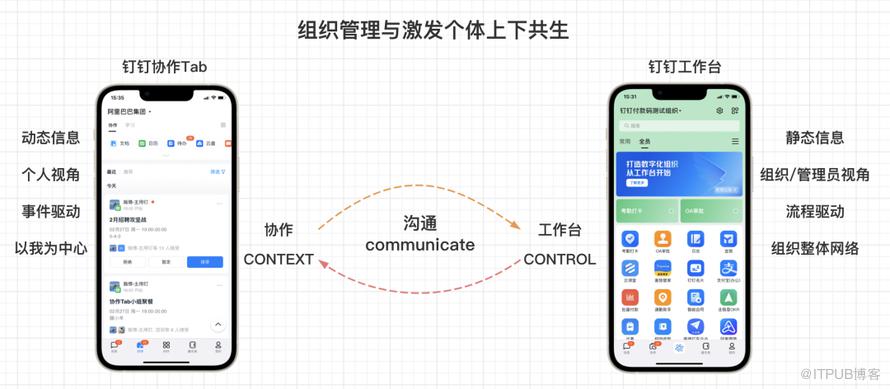
1.1 新版协作Tab心智
1.2 业务目标
二、产品能力升级背后的前端技术支撑

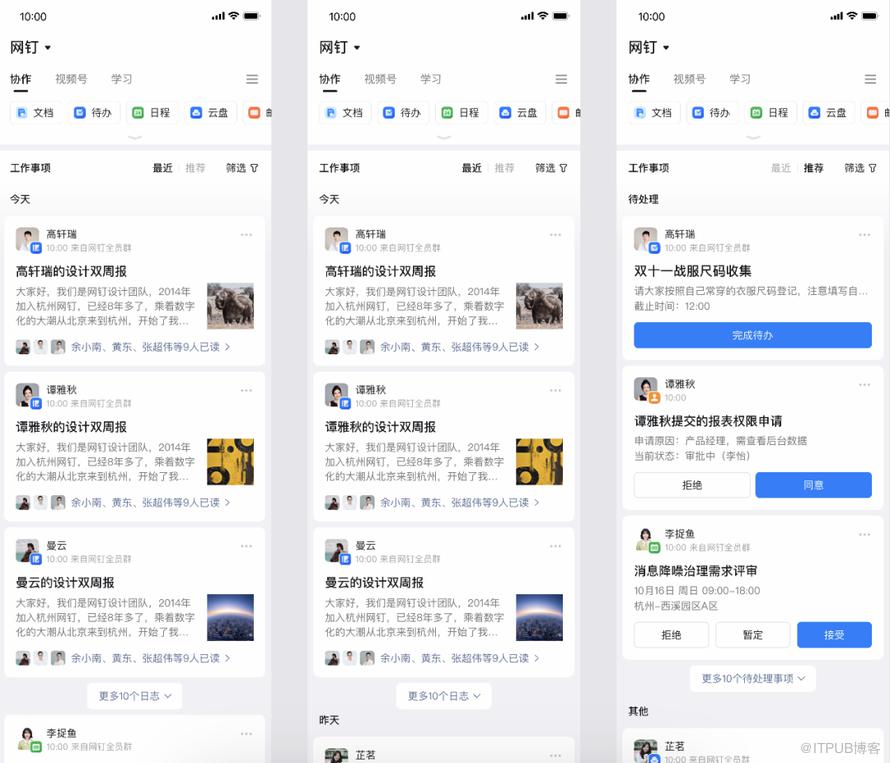
before:旧版本
after:协作新版
第一版,以时间为中心,强调顺序。
第二版本,以事件为中心,强调操作。
2. 1 协作前端主体架构设计之feeds流卡片动态化
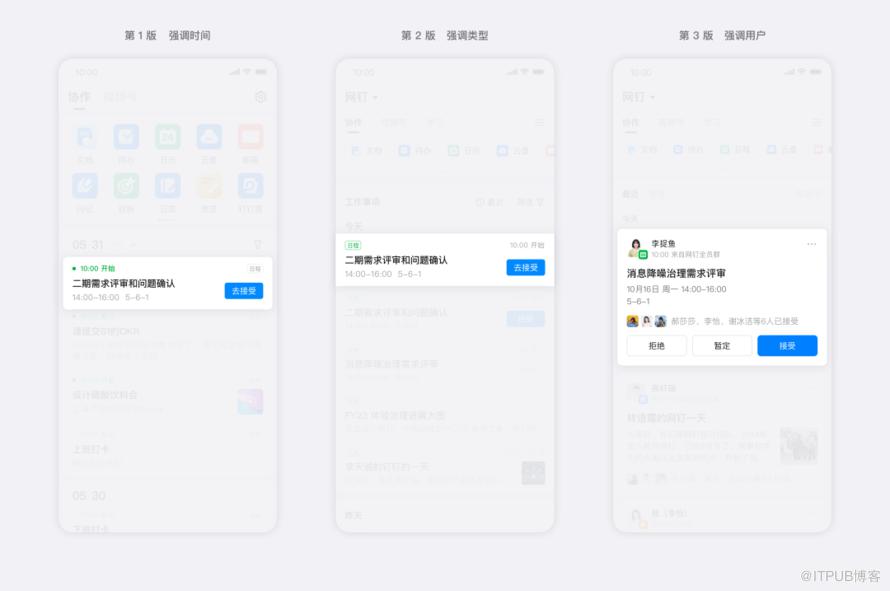
前端设计实现上的思考
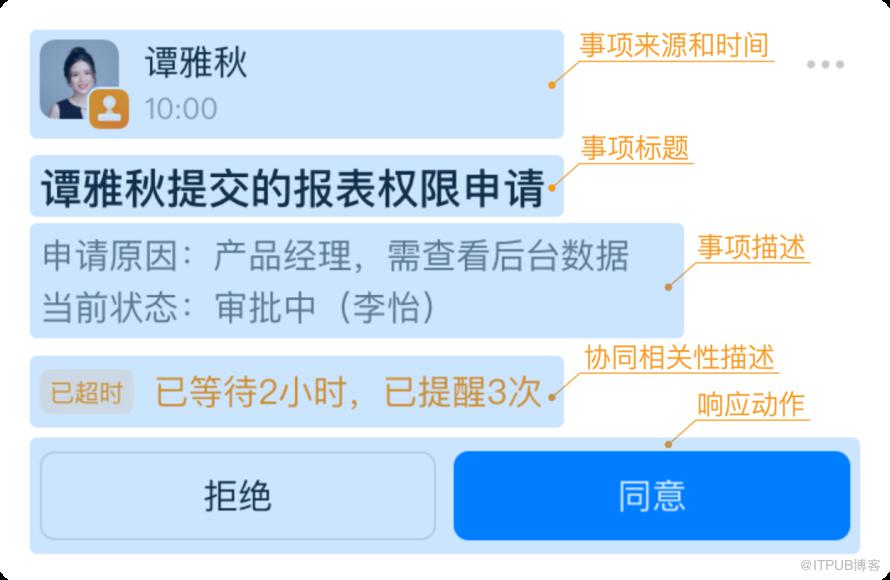

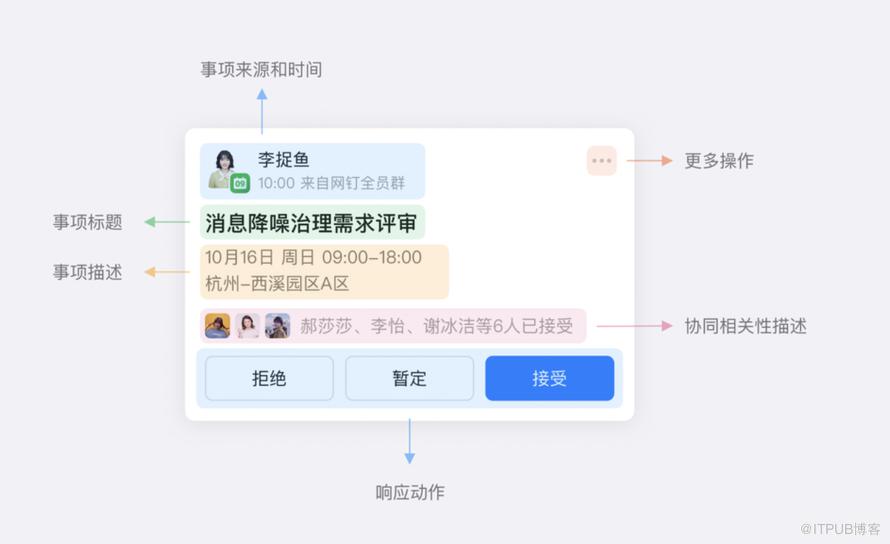
前端组件结构化事件卡片
//卡片引用<common-card-box onClickCardBtn="onClickCardBtn" componentData={{feedItem.componentData}} swipeIndex={{swipeIndex}} childrenFeed={{feedItem.children}} //卡片内部组件拼装<div> //卡片头部第一层 事项来源和事项时间 <common-card-head userInfo={{componentData.userInfoVO || {} }} totalBadge={{totalBadge}} //红点能力覆盖 />//卡片内事项标题 事项描述 <common-card-content props={{...props}}/>//互动卡片SDK小程序插件引用条件渲染 <component id="{{componentData.flowId}}" componentProps="{{pluginComponentProps}}" is="dynamic-plugin://5000000002721132/card" a:if="{{ isReady && componentData.isPlugin }}"></component>// 卡片补充3C推荐内容 <common-card-recommend props={{...props}}/>// ButtonList 卡片响应动作 <common-card-buttons props={{...props}}/>//卡片折叠 递归引用 此处不需要UI变更<view a:if="{{childrenFeed && childrenFeed.length > 0}}" class="children-contain"> <common-card-box a:for="{{childrenFeed}}" componentData={{item}} isReady={{isReady}} ut={{ut}} from={{from}} onClickCardBtn="onClickCardBtn"/> </view></div>卡片操作逻辑层能力建设(以不变应万变)
卡片内容操作:jsapi类型(发起Ding催办等) 跳转类型(半屏等卡片详情)
卡片本身操作:卡片删除、卡片置顶,卡片折叠展开
modifyFeedFlowsCommon( flowId: string, type: string, targetName: string, feedFlows: IComponentInfo[], newFeed?: IComponentData) { // step1 找到对应卡片在协作卡片或子卡片(折叠卡片)中的index const feedFlowsIndex = this.findFeedFlowsIndex(flowId, feedFlows); // step2 通过小程序提供的$spliceData函数进行局部更新 if (feedFlowsIndex) { this.modifyData(targetName, type, feedFlows, feedFlowsIndex, newFeed); }}, modifyData( targetName: string, type: string, feedFlows: IComponentInfo[], feedFlowsIndex: IFeedFlowIndex, newFeed?: IComponentData) { // 分发操作事件,局部更新 this.$spliceData({ [targetName]: [parentIndex, 1, newFeedItem], }); }};2.2 协作场域互动卡片SDK能力集成
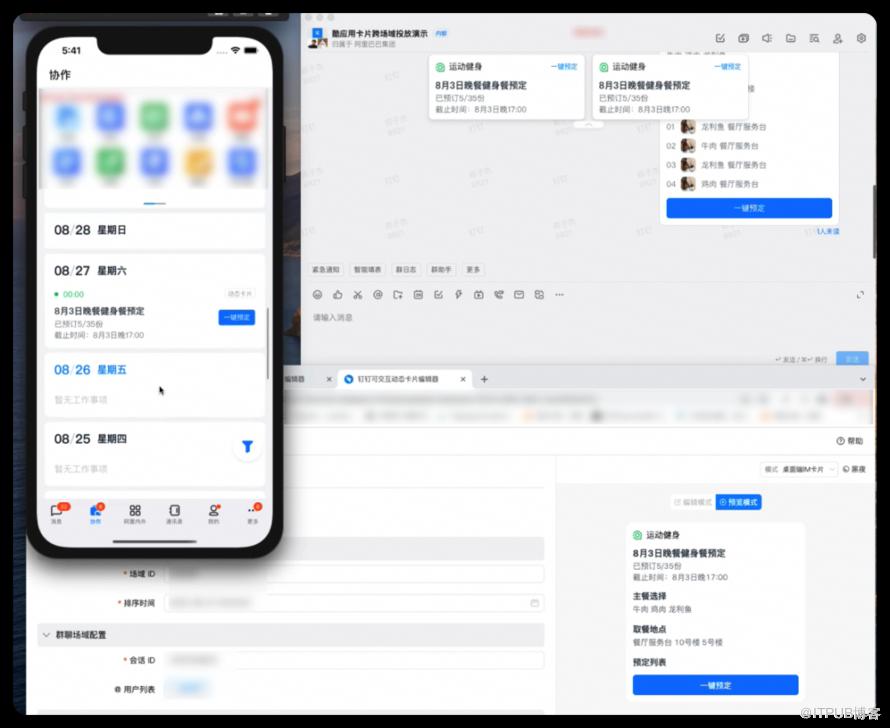
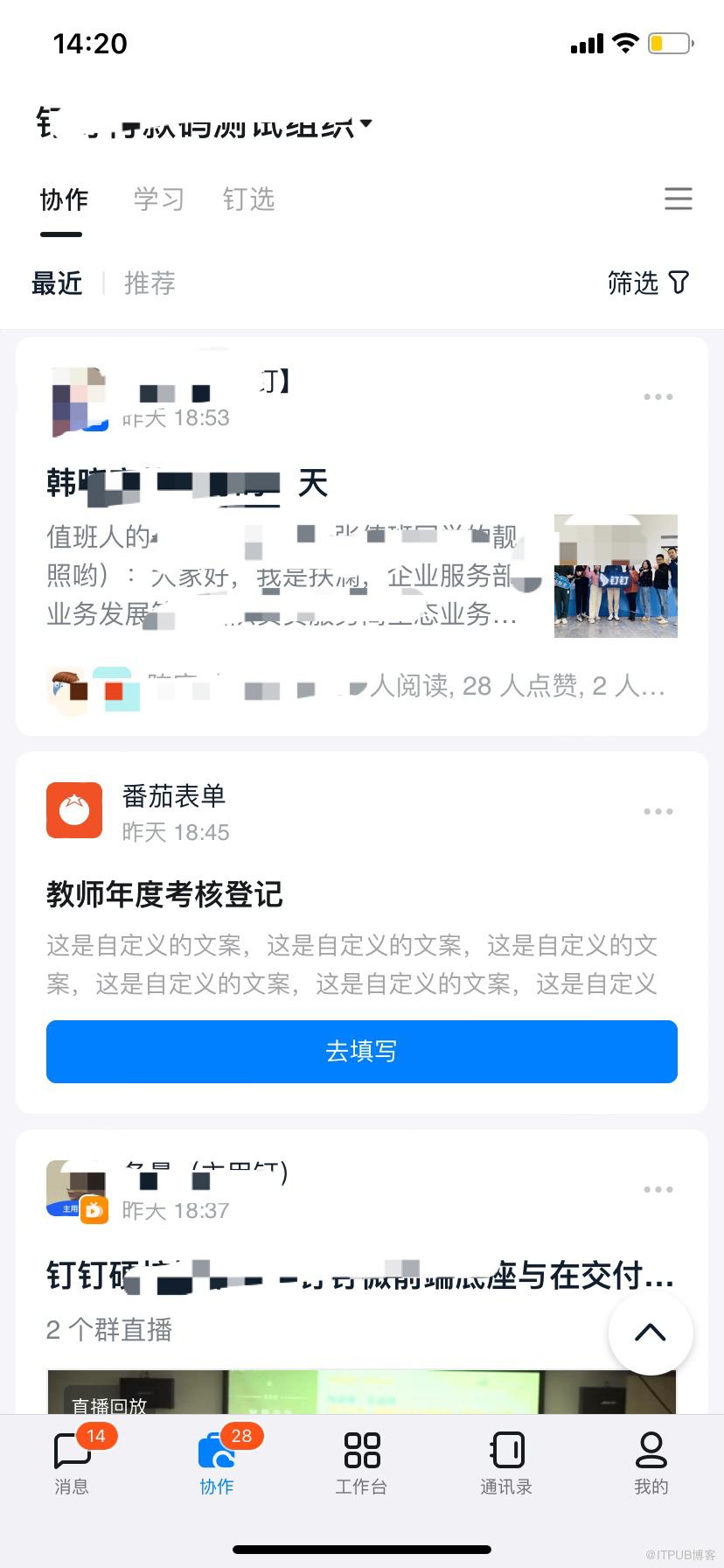
互动卡片在协作中的应用方案-业务套壳互动卡片
// 互动卡片插件初始化 initCard() { try { if (dd && dd.loadPlugin) { dd.loadPlugin({ plugin: '5000000002721132@*', success: (res: any) => { this.setData({ isReady: true }); }, fail: (err: any) => { logErrorUser('插件加载失败',JSON.stringify(err)) }, }); app.globalData.hasInitCard = true; } else { logApiError('dd.loadPlugin', Date.now(), {}, 'dd.loadPlugin load fail', 'jaspi') } } catch(e) { logApiError('initCard fail', e); } }, <component id="{{componentData.flowId}}" componentProps="{{pluginComponentProps}}" is="dynamic-plugin://50000000027211321/card" a:if="{{ isReady && componentData.isPlugin }}"> </component>卡片 多场域投放埋点问题解决
export interface IRenderContext { /** 场域标识,聊天为 'im', 吊顶为 'topbox' 等, 未定义的场域可以先填写 standard */ bizScene: string; /** * 多场域埋点规则 */ trackRuleModel?: ITrackRuleModel; /** * 多场域埋点数据源 */ trackSourceDataModel?: Omit<TrackSourceDataModel, 'extension'> & { extension?: never; };}互动卡片在协作中的应用
2.3. 算法推荐序接入
为什么要接入算法:
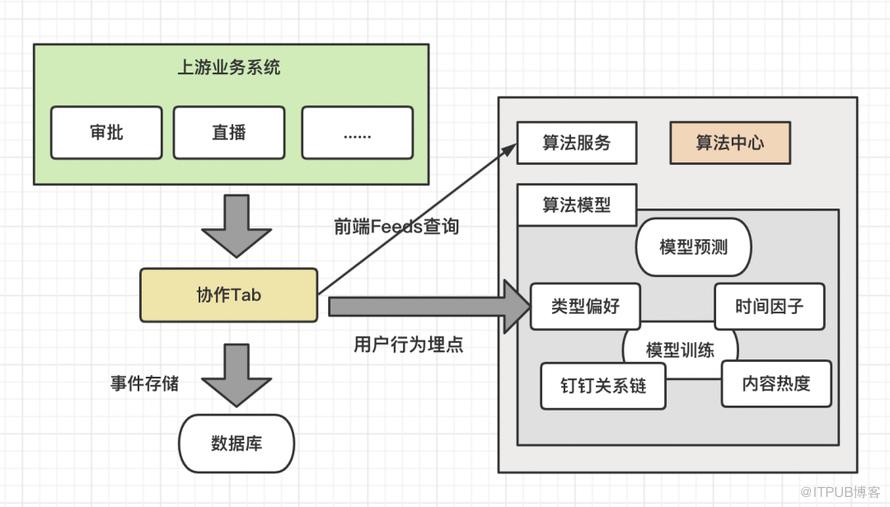
协同关系模型接入方案架构设计:
前端设计实现:
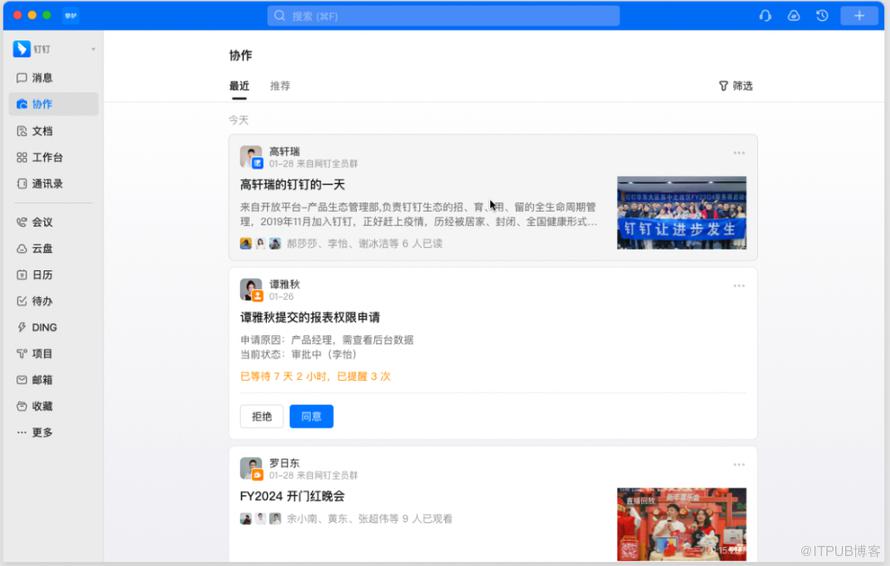
2.4. 协作PC 跨端产品能力补齐
2.5. 数据运营能力建设
APN统一推送能力建设
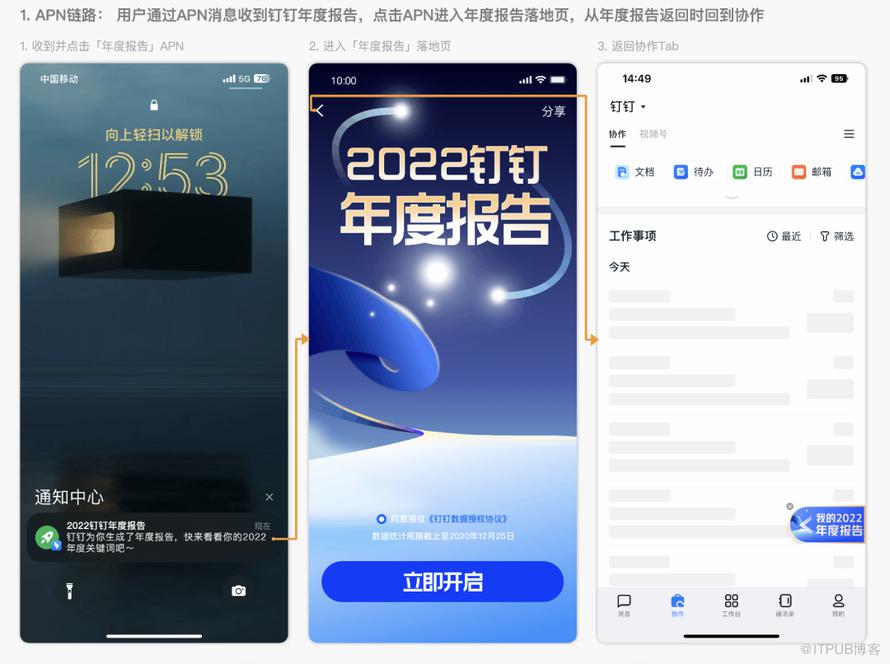
import { getChannel } from '@ali/dingtalk-jsapi/plugin/uniEvent';export function ddSubscribe(channelName: string,eventName: string,handler: (data: any) => void,useCache = true,) {try {const channel = getChannel(channelName);channel.subscribe(eventName, handler, { useCache });} catch (e) {logApiError('ddSubscribe fail',safeJson(e));}}// 客户端开启订阅统一跳转协议监听事件,并建立两端通道ddSubscribe('channel.jumpAction.switchtab', 'cooperate_cooperate', (data) => {if(data?.data.from==='nianzong'){sendUT('Page_Work_New_Year_Summary');openLink$({url:yearSummaryUrl||'https://page.dingtalk.com/wow/dingtalk/default/dingtalk/yearsummary?dd_nav_translucent=true&wtid=yearsummary__xiezuo'})}});
协作顶部应用区
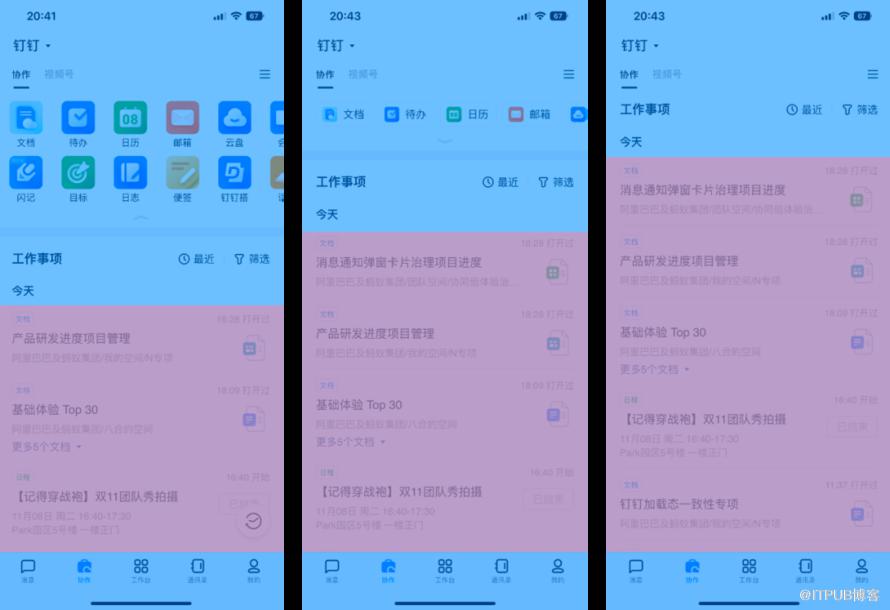
应用区展示逻辑:纯前端实现,此处无服务端交互
//灰度key获取到联动降噪红点设置统一管理export const getGrayValueFromCacheByKeys = async (keys: KeysType[] = []) => { const result: any[] = []; const promiseAllArr: Array<Promise<any>> = []; const promiseAllArrKeys: KeysType[] = []; keys.forEach((key) => { if (cacheGrays[key]) { result.push(cacheGrays[key]); return; } const defaultGrayKeysConfig = allGrayKeys[key]; if (!defaultGrayKeysConfig) { result.push(true); return; } if (!defaultGrayKeysConfig) { result.push(!!defaultGrayKeysConfig); return; } promiseAllArrKeys.push(key); promiseAllArr.push(grayLemonFnFactory(...defaultGrayKeysConfig)()); }); const promiseResult = await Promise.all(promiseAllArr); promiseAllArrKeys.forEach((key: KeysType, i: number) => { cacheGrays[key] = promiseResult[i]; }); return cacheGrays;};三、前端技术视角性能体验优化及稳定性建设
3.1 性能建设
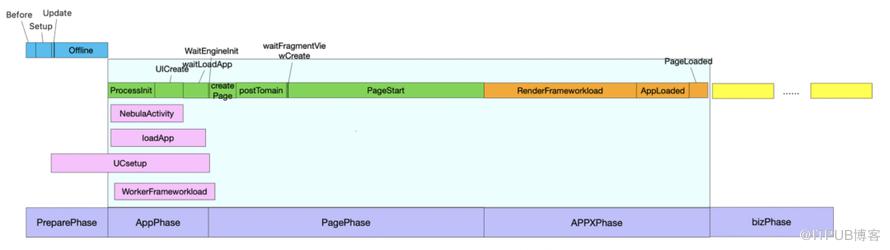
常见性能问题规避
白屏时间太长
协作移动端性能体验建设大图
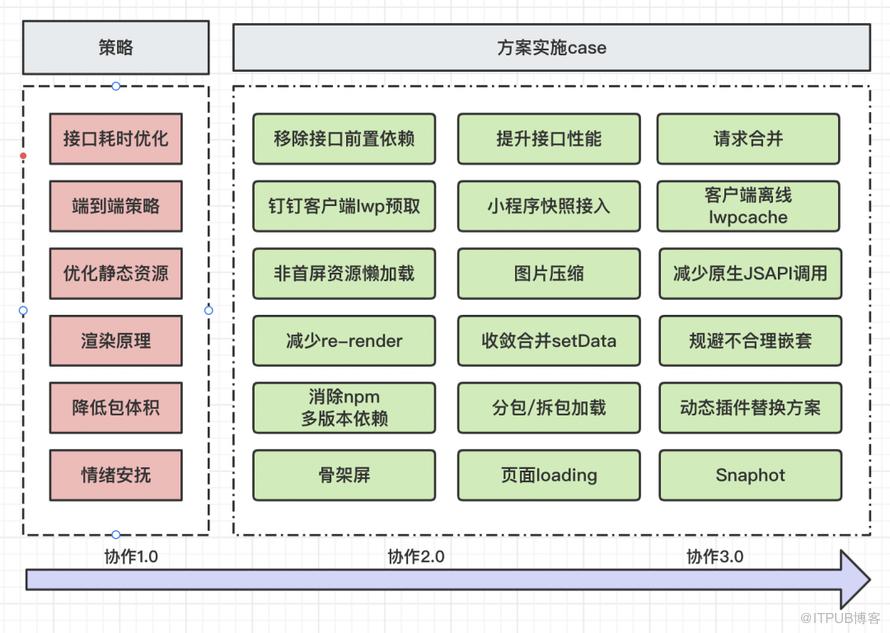
策略:联合客户端容器、小程序本身实施用户视角端到端的性能策略和稳定性建设
案例1:首屏渲染体验优化-优化策略包和效果
优化静态资源
降低包体积
渲染原理
考虑动态插件
案例2:首屏渲染体验优化 - 钉钉客户端lwp预取接入
谋定而后动


钉钉lwp预取 客户端、服务端、前端全链路方案
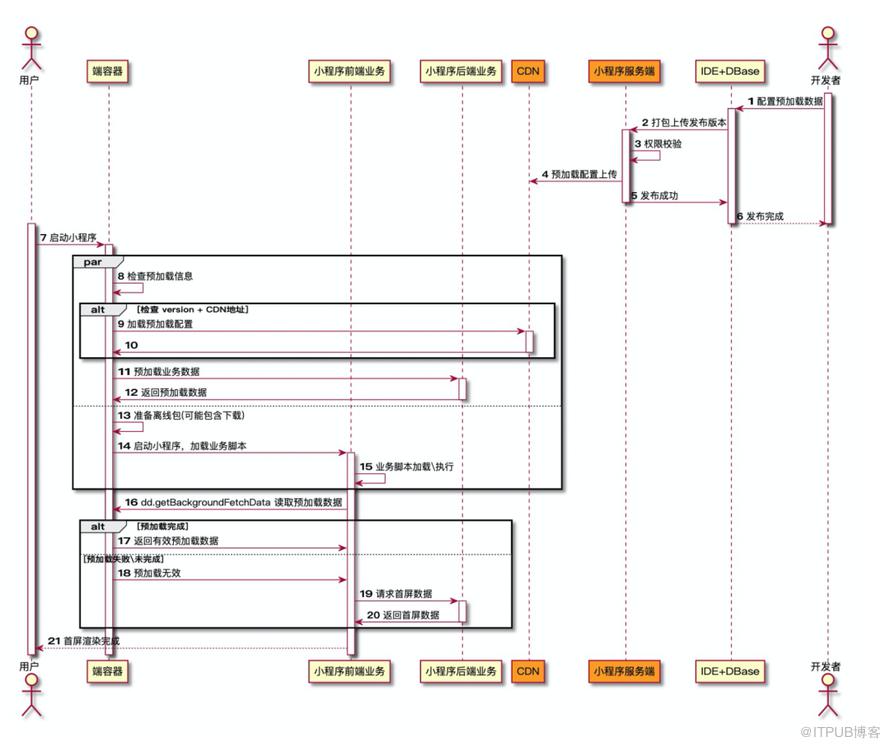
业务接入
dd.getBackgroundFetchData({ type: "lwp", wait: true, success(res) { console.log(res.fetchedData); // 缓存数据 console.log(res.timeStamp); // 客户端拿到缓存数据的时间戳 console.log(res.path); // 页面路径 console.log(res.query); // query 参数 console.log(res.scene); // 场景值 }});//调用时可以传入 wait 参数,表示是否等待预加载结果。如果为 true,会等待预加载任务完成后收到回调。

iphone xR 苹果中端机型
3.2 稳定性建设
案例:钉钉lwpcache 无网弱网体验升级
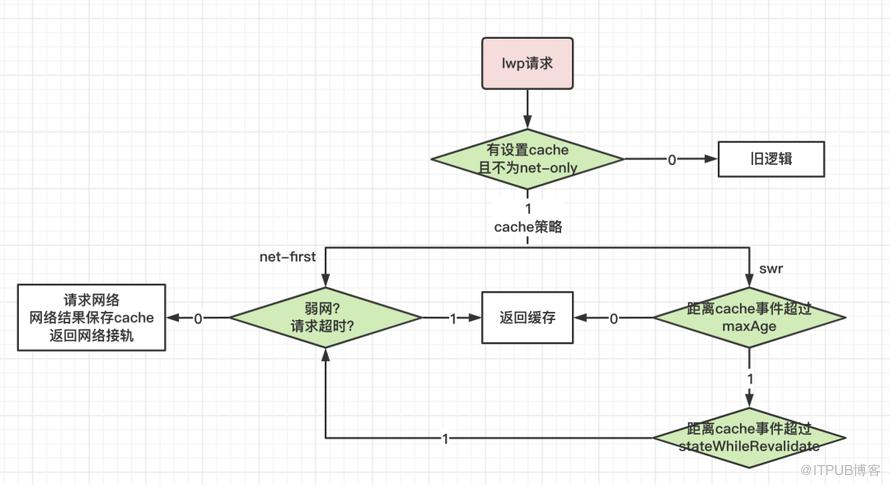
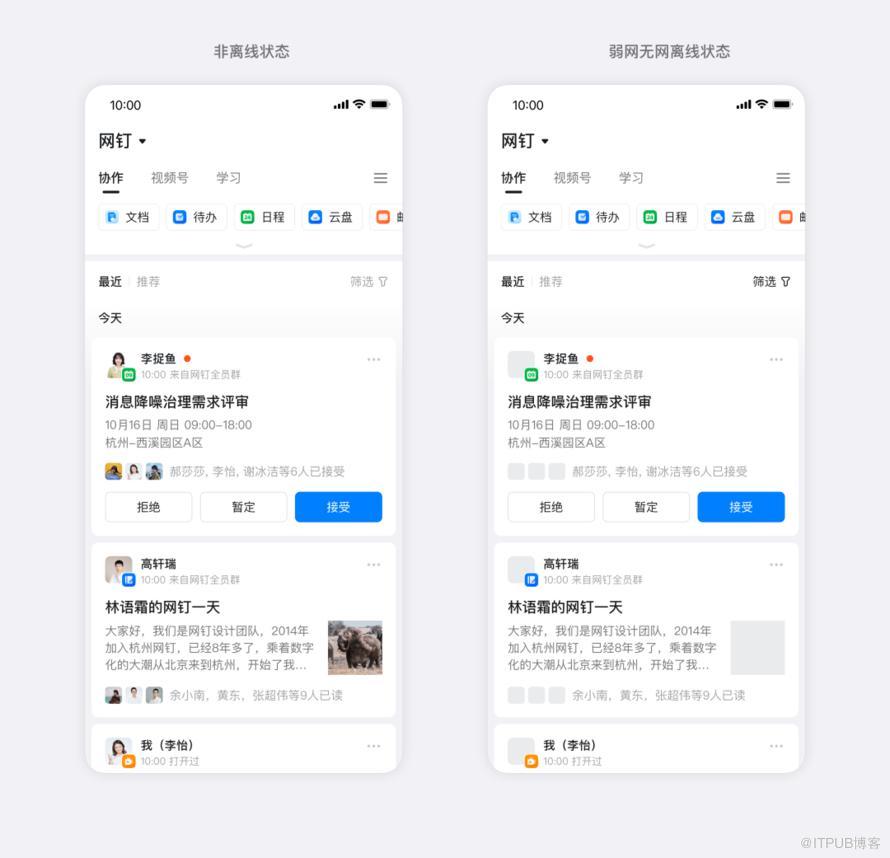
四、前端视角下的业务思考

