安装MySQL5.7
下载rpm包
wget
https://cdn.mysql.com/archives/mysql-5.7/mysql-community-client-5.7.32-1.el7.x86_64.rpm
wget
https://cdn.mysql.com/archives/mysql-5.7/mysql-community-common-5.7.32-1.el7.x86_64.rpm
wget
https://cdn.mysql.com/archives/mysql-5.7/mysql-community-libs-5.7.32-1.el7.x86_64.rpm
wget
https://cdn.mysql.com/archives/mysql-5.7/mysql-community-libs-compat-5.7.32-1.el7.x86_64.rpm
wget
https://cdn.mysql.com/archives/mysql-5.7/mysql-community-server-5.7.32-1.el7.x86_64.rpm
安装
yum install -y mysql-community-*-5.7.32-1.el7.x86_64.rpm
启动mysql查看密码
cat /var/log/mysqld.log | grep password

登录mysql
mysql -u root -p

主从同步
关闭每台 服务器的防火墙和selinux
systemctl disable --now firewalld
setenforce 0

主从服务器时间同步
主服务器使用本地时钟源
yum -y install ntp
修改ntp配置文件
vi /etc/ntp.conf
添加
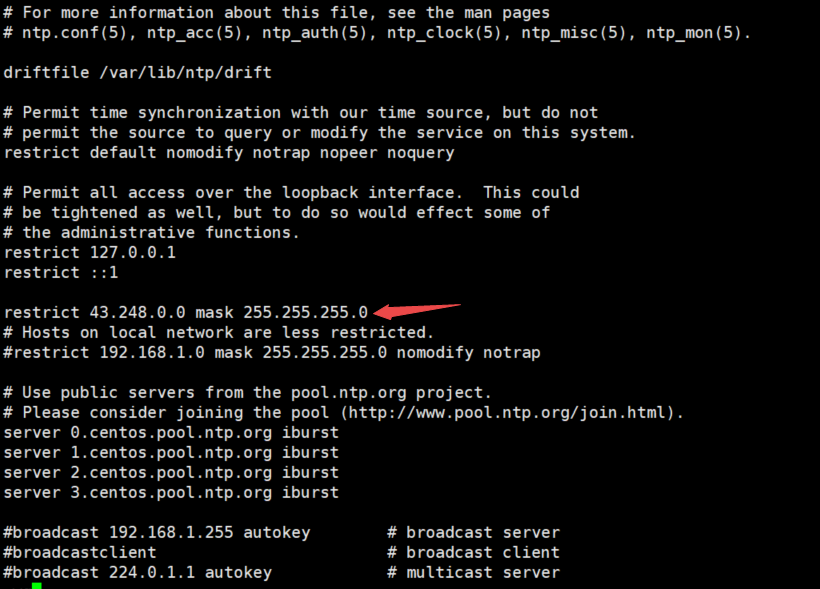
restrict IP段 mask 子网段
restrict 43.248.0.0 mask 255.255.255.0#添加此行–自己设置主机的ip加子网掩码;这句是手动增加的,意思是指定的43.248.0.0–43.248.0.254的服务器段都可以使用此段服务器
开启ntpd
systemctl start ntpd
从服务器同步主服务器时间
vi /etc/ntp.conf
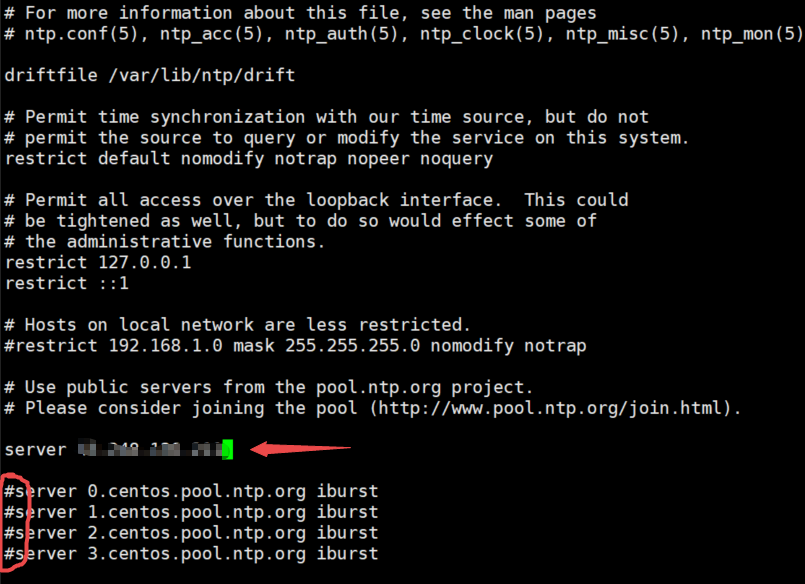
添加主服务器ip,并注释
server 主服务器ip
主服务器mysql配置
修改配置文件
vi /etc/my.conf

重启mysql
systemctl restart mysqld
给从服务器权限
grant replication slave on . to 'myslave'@'43.248.136.%' identified by '1234';

配置从服务器并重启
vi /etc/my.conf

登录mysql配置主从同步
change master to master_host='43.248.136.97',master_user='myslave',master_password='1234',master_log_file='master-bin.000001',master_log_pos=154;
start slave;
show slave status\G;

这样子mysql的主从同步就已经配置好了,大家缺乏机器练手的话可以去cnaaa看看!
来自 “ ITPUB博客 ” ,链接:https://blog.itpub.net/70021617/viewspace-2915500/ ,如需转载,请注明出处,否则将追究法律责任。

