jQuery 尺寸
jQuery 尺寸 方法
jQuery 提供多个处理尺寸的重要方法:
- width()
- height()
- innerWidth()
- innerHeight()
- outerWidth()
-
outerHeight()
jQuery 尺寸
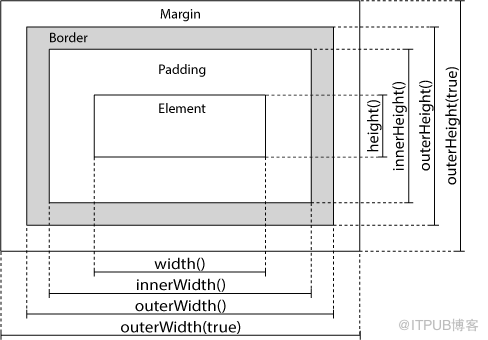
jQuery width() 和 height() 方法
width() 方法设置或返回元素的宽度(不包括内边距、边框或外边距)。
height() 方法设置或返回元素的高度(不包括内边距、边框或外边距)。
下面的例子返回指定的 <div> 元素的宽度和高度:
$("button").click(function(){
  var txt="";
  txt+="Width: " + $("#div1").width() + "</br>";
  txt+="Height: " + $("#div1").height();
  $("#div1").html(txt);
});
jQuery innerWidth() 和 innerHeight() 方法
innerWidth() 方法返回元素的宽度(包括内边距)。
innerHeight() 方法返回元素的高度(包括内边距)。
下面的例子返回指定的 <div> 元素的 inner-width/height:
$("button").click(function(){
  var txt="";
  txt+="Inner width: " + $("#div1").innerWidth() + "</br>";
  txt+="Inner height: " + $("#div1").innerHeight();
  $("#div1").html(txt);
});
jQuery outerWidth() 和 outerHeight() 方法
outerWidth() 方法返回元素的宽度(包括内边距和边框)。
outerHeight() 方法返回元素的高度(包括内边距和边框)。
下面的例子返回指定的 <div> 元素的 outer-width/height:
$("button").click(function(){
  var txt="";
  txt+="Outer width: " + $("#div1").outerWidth() + "</br>";
  txt+="Outer height: " + $("#div1").outerHeight();
  $("#div1").html(txt);
});
提示: outerWidth(true) 方法返回元素的宽度(包括内边距、边框和外边距);outerHeight(true) 方法返回元素的高度(包括内边距、边框和外边距)。
来自 “ ITPUB博客 ” ,链接:https://blog.itpub.net/70018469/viewspace-2908113/ ,如需转载,请注明出处,否则将追究法律责任。
上一篇:
jQuery CSS 类
下一篇:
jQuery 遍历

请登录后发表评论
登录
全部评论
