已成为高性能、高并发以及高时效性的代名词。在面向海量数据的复杂查询需求时,除硬件配置、集群规模、网络带宽等因素外,提升性能的核心在于如何最 大程度地降低 SQL 执行时的 CPU、内存和 IO 开销,而这其中数据库索引扮演着至关重要的角色。合理的索引结构设计可以跳过大量不必要的底层数据读取、快速检索定位到所需数据,并进一步提升后续计算的执行效率、降低查询 SQL 的运行时间和资源消耗。
Apache Doris 提供了丰富的索引以加速数据的读取和过滤,依据是否需要用户手工创建,索引类型大体可以分为智能内建索引和用户创建索引两类,其中智能内建索引是指在数据写入时自动生成的索引,无需用户干预,包括前缀索引和 ZoneMap 索引。用户创建索引需要用户根据业务特点手动创建,包括 Bloom Filter 索引和 2.0 版本新增的倒排索引与 NGram Bloom Filter 索引。
相较于用户比较熟悉的前缀索引、Bloom Filter 索引,2.0 版本所新增的 和 NGram Bloom Filter 在文本检索、模糊匹配以及非主键列检索等场景有着更为明显的性能提升。本文将以 Amazon customer reviews 数据集为例,介绍 Apache Doris 在查询该数据集以及类似场景中,如何充分利用倒排索引以及 NGram Bloom Filter 索引进行查询加速,并详细解析其工作原理与最 佳实践。
数据集样例
在本文中,我们使用的数据集包含约 1.3 亿条亚马逊产品的用户评论信息。该数据集以 Snappy 压缩的 Parquet 文件形式存在,总大小约为 37GB。以下为数据集的样例:

在子集中,每行包含用户 ID(
customer_id
)、评论 ID(
review_id
)、已购买产品 ID(
product_id
)、产品分类(
product_category
)、评分(
star_rating
)、评论标题(
review_headline
)、评论内容(
review_body
)等 15 列信息。
根据上述可知,列中包含了适用于索引加速的各种特征。例如,
customer_id
是高基数的数值列,
product_id
是低基数的定长短文本列,
product_title
是适合文本检索的短文本列,
review_body
则是适合文本搜索的长文本列。
通过这些列,我们可以模拟两个典型索引查询场景,具体如下:
-
文本搜索查询:搜索
review body字段中包含特定内容的产品信息。 -
非主键列明细查询:查询特定产品 ID(
product_id)或者特定用户 ID(customer_id)的评论信息。
接下来,我们将以文本搜索和非主键列明细查询为主要方向,对比在有索引和无索引的情况下查询性能的差异。同时,我们也将详细解析索引减少查询耗时、提高查询效率的原理。
环境搭建
为了快速搭建环境,并进行集群创建和数据导入,我们使用单节点集群(1FE、1BE)并按照以下步骤进行操作:
-
搭建 Apache Doris :具体操作请参考:
-
创建数据表:按照下列建表语句进行数据表创建
CREATE
TABLE
`amazon_reviews`
(


`review_date`
int
(
11
)
NULL
,


`marketplace`
varchar
(
20
)
NULL
,


`customer_id`
bigint
(
20
)
NULL
,


`review_id`
varchar
(
40
)
NULL
,


`product_id`
varchar
(
10
)
NULL
,


`product_parent`
bigint
(
20
)
NULL
,


`product_title`
varchar
(
500
)
NULL
,


`product_category`
varchar
(
50
)
NULL
,


`star_rating`
smallint
(
6
)
NULL
,


`helpful_votes`
int
(
11
)
NULL
,


`total_votes`
int
(
11
)
NULL
,


`vine`
boolean
NULL
,


`verified_purchase`
boolean
NULL
,


`review_headline`
varchar
(
500
)
NULL
,


`review_body` string
NULL


)
ENGINE
=OLAP


DUPLICATE
KEY
(
`review_date`
)


COMMENT
'OLAP'


DISTRIBUTED
BY
HASH
(
`review_date`
) BUCKETS
16


PROPERTIES
(


"replication_allocation"
=
"tag.location.default: 1"
,


"compression"
=
"ZSTD"


)
;
3.下载数据集:从下方链接分别下载数据集,数据集为 Parque 格式,并经过 Snappy 压缩,总大小约为 37GB
4.导入数据集:下载完成后,分别执行以下命令,导入数据集
curl
--location-trusted
-u root:
-T amazon_reviews_2010.snappy.parquet
-H
"format:parquet" http://
${BE_IP}:
${BE_PORT}/api/
${DB}/amazon_reviews/_stream_load


curl
--location-trusted
-u root:
-T amazon_reviews_2011.snappy.parquet
-H
"format:parquet" http://
${BE_IP}:
${BE_PORT}/api/
${DB}/amazon_reviews/_stream_load


curl
--location-trusted
-u root:
-T amazon_reviews_2012.snappy.parquet
-H
"format:parquet" http://
${BE_IP}:
${BE_PORT}/api/
${DB}/amazon_reviews/_stream_load


curl
--location-trusted
-u root:
-T amazon_reviews_2013.snappy.parquet
-H
"format:parquet" http://
${BE_IP}:
${BE_PORT}/api/
${DB}/amazon_reviews/_stream_load


curl
--location-trusted
-u root:
-T amazon_reviews_2014.snappy.parquet
-H
"format:parquet" http://
${BE_IP}:
${BE_PORT}/api/
${DB}/amazon_reviews/_stream_load


curl
--location-trusted
-u root:
-T amazon_reviews_2015.snappy.parquet
-H
"format:parquet" http://
${BE_IP}:
${BE_PORT}/api/
${DB}/amazon_reviews/_stream_load
5.查看与验证:完成上述步骤后,可以在 MySQL 客户端执行以下语句,来查看导入的数据行数和所占用空间。从下方代码可知:共导入 135589433 行数据,在 Doris 中占用空间 25.873GB,比压缩后的 Parquet 列式存储进一步降低了 30%。
mysql
>
SELECT
COUNT
()
FROM amazon_reviews
;


+-----------+


|
count
(
*
)
|


+-----------+


|
135589433
|


+-----------+


1
row
in
set
(
0.02 sec
)


mysql
>
SHOW
DATA
FROM amazon_reviews
;


+----------------+----------------+-----------+--------------+-----------+------------+


| TableName
| IndexName
| Size
| ReplicaCount
| RowCount
| RemoteSize
|


+----------------+----------------+-----------+--------------+-----------+------------+


| amazon_reviews
| amazon_reviews
|
25.873 GB
|
16
|
135589433
|
0.000
|


|
| Total
|
25.873 GB
|
16
|
|
0.000
|


+----------------+----------------+-----------+--------------+-----------+------------+


2 rows
in
set
(
0.00 sec
)
文本搜索查询加速
无索引硬匹配
环境及数据准备就绪后,我们尝试对
review_body
列进行文本搜索查询。具体需求是在数据集中查出评论中包含“is super awesome”关键字的前 5 种产品,并按照评论数量降序排列,查询结果需显示每种产品的 ID、随机一个产品标题、平均星级评分以及评论总数。
review_body
列的特征是评论内容比较长,因此进行文本搜索会有一定的性能压力。
首先我们直接进行查询,以下是查询的示例语句:
SELECT


    product_id
,


    any
(product_title
)
,


AVG
(star_rating
)
AS rating
,


COUNT
()
AS
count


FROM


    amazon_reviews


WHERE


    review_body
LIKE
'%is super awesome%'


GROUP
BY


    product_id


ORDER
BY


count
DESC
,


    rating
DESC
,


    product_id


LIMIT
5
;
执行结果如下,查询耗时为 7.6 秒
+------------+------------------------------------------+--------------------+-------+


| product_id
| any_value
(product_title
)
| rating
|
count
|


+------------+------------------------------------------+--------------------+-------+


| B00992CF6W
| Minecraft
|
4.8235294117647056
|
17
|


| B009UX2YAC
| Subway Surfers
|
4.7777777777777777
|
9
|


| B00DJFIMW6
| Minion Rush
: Despicable Me Official Game
|
4.875
|
8
|


| B0086700CM
| Temple Run
|
5
|
6
|


| B00KWVZ750
| Angry Birds Epic RPG
|
5
|
6
|


+------------+------------------------------------------+--------------------+-------+


5 rows
in
set
(
7.60 sec
)
利用 Ngram BloomFilter 索引加速查询
接下来,我们尝试使用 Ngram BloomFilter 索引进行查询加速
ALTER
TABLE amazon_reviews
ADD
INDEX review_body_ngram_idx
(review_body
)
USING NGRAM_BF PROPERTIES
(
"gram_size"
=
"10"
,
"bf_size"
=
"10240"
)
;
添加 Ngram BloomFilter 索引之后,再次执行相同的查询。执行结果如下, 查询耗时缩短至 0.93 秒,相较于未开启索引,查询效率提高了 8 倍。
+------------+------------------------------------------+--------------------+-------+


| product_id
| any_value
(product_title
)
| rating
|
count
|


+------------+------------------------------------------+--------------------+-------+


| B00992CF6W
| Minecraft
|
4.8235294117647056
|
17
|


| B009UX2YAC
| Subway Surfers
|
4.7777777777777777
|
9
|


| B00DJFIMW6
| Minion Rush
: Despicable Me Official Game
|
4.875
|
8
|


| B0086700CM
| Temple Run
|
5
|
6
|


| B00KWVZ750
| Angry Birds Epic RPG
|
5
|
6
|


+------------+------------------------------------------+--------------------+-------+


5 rows
in
set
(
0.93 sec
)
接下来,我们根据代码示例展开说明。使用
ALTER TABLE
语句为表增加 Ngram BloomFilter 索引时,
gram_size
和
bf_size
参数具有特定的含义:
-
gram_size:表示 n-gram 中的 n 值,即连续字符的长度。在上述代码示例中,"gram_size"="10"表示每个 n-gram 包含 10 个字符。这意味着文本将被切割成数个字符长度为 10 的字符串,这些字符串将用于构建索引。 -
bf_size:表示 Bloom Filter 的大小,以字节(Byte)为单位。例如,"bf_size"="10240"表示所使用 Bloom Filter 数据大小占用空间为 10240 字节。
在了解基本的参数定义后,我们来探索 Ngram BloomFilter 加速查询的原理:
-
Ngram 分词:使用
gram_size对每行数据进行分词,当gram_size=5时,"hello world" 被切分为 ["hello", "ello ", "llo w", "lo wo", "o wor", " worl", "world"]。这些子字符串经过哈希函数计算后,将被添加到相应大小(bf_size)的 Bloom Filter 中。由于 Doris 数据是按页面(page)组织存储,相应的 Bloom Filter 也会按页面(page)生成。 -
查询加速:以“hello”为例,在匹配过程中也将被切分并生成对应的 Bloom Filter,用于与各页面的 Bloom Filter 进行对比。如果 Bloom Filter 判断为包含匹配字符串(可能会出现假阳性),则加载相应的页面以进一步匹配;否则,将跳过该页面。其原理即通过跳过不需要加载的页面(page),减少需要扫描的数据量,从而显著降低了查询延时。
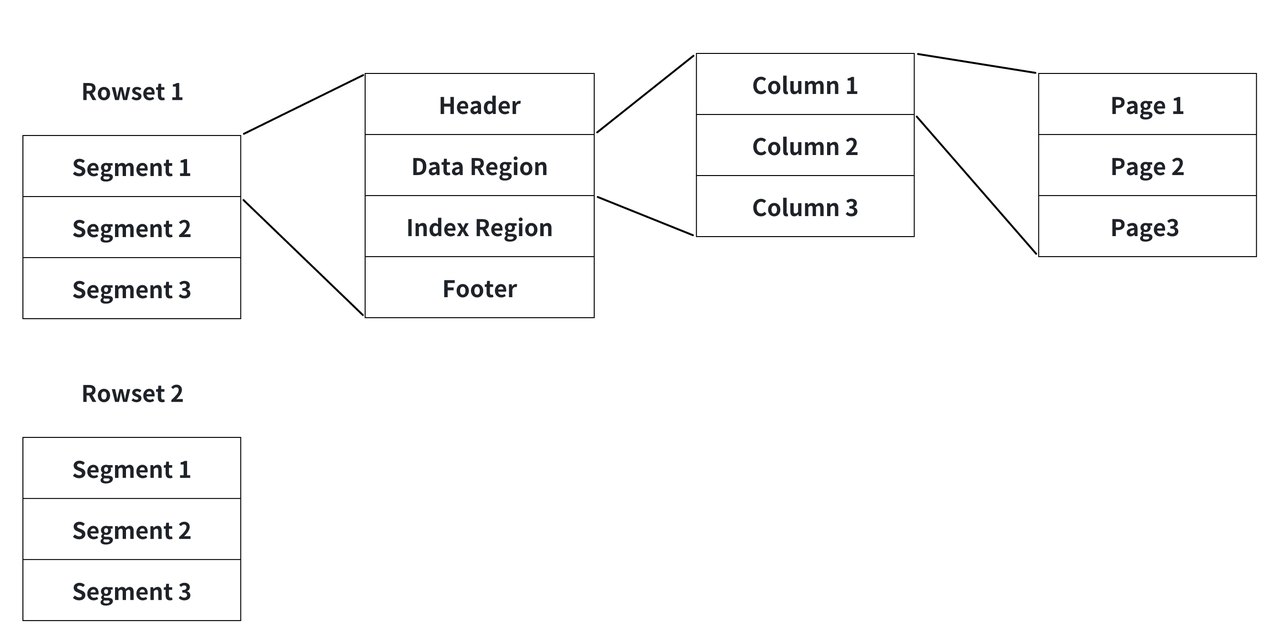

通过上述原理描述可以看出,针对不同的场景合理的配置 Ngram BloomFilter 的参数会达到更好的效果,
gram_size
的大小直接影响匹配时效率,而
bf_size
的大小影响存储容量和误判率。通常情况下,较大的
bf_size
可以降低误判率,但这样也会占用更多的存储空间。因此,我们建议从以下两方面综合考量配置参数:
数据特性: 考虑要索引的数据类型。对于文本数据,需要根据文本的平均长度和字符分布来确定。
-
对于较短的文本(如单词或短语):较小的
gram_size(例如 2-4)和较小的bf_size可能更合适。 -
对于较长的文本(如句子或大段描述:较大的
gram_size(例如 5-10)和较大的bf_size可能更有效。
查询模式: 考虑查询的典型模式。
-
如果查询通常包含短语或接近完整的单词,较大的
gram_size可能更好。 -
对于模糊匹配或包含多种变化的查询,较小的
gram_size可以提供更灵活的匹配。
利用倒排索引加速查询
除了采用 Ngram BloomFilter 索引进行查询加速,还可以选择基于 进一步加速文本搜索的效率。可以通过以下步骤来构建倒排索引:
1.
新增倒排索引:
对
amazon_reviews
表的
review_body
列添加倒排索引,该索引采用英文分词,并支持 Phrase 短语查询,短语查询即进行文本搜索时,分词后的词语顺序将会影响搜索结果。
2.
为历史数据创建索引:
按照新增索引信息对历史数据进行索引构建,使历史数据就也可以使用倒排索引进行查询。
ALTER
TABLE amazon_reviews
ADD
INDEX review_body_inverted_idx
(
`review_body`
)


USING INVERTED PROPERTIES
(
"parser"
=
"english"
,
"support_phrase"
=
"true"
)
;


BUILD
INDEX review_body_inverted_idx
ON amazon_reviews
;
3. 查看及验证: 构建完索引之后,可以通过以下方式对索引构建情况进行查看:
mysql
>
show BUILD
INDEX
WHERE TableName
=
"amazon_reviews"
;


+-------+----------------+----------------+-----------------------------------------------------------------------------------------------------------------------------------+-------------------------+-------------------------+---------------+----------+------+----------+


| JobId
| TableName
| PartitionName
| AlterInvertedIndexes
| CreateTime
| FinishTime
| TransactionId
| State
| Msg
| Progress
|


+-------+----------------+----------------+-----------------------------------------------------------------------------------------------------------------------------------+-------------------------+-------------------------+---------------+----------+------+----------+


|
10152
| amazon_reviews
| amazon_reviews
|
[
ADD
INDEX review_body_inverted_idx
(


review_body


)
USING INVERTED PROPERTIES
(
"parser"
=
"english"
,
"support_phrase"
=
"true"
)]
,
|
2024
-
01
-
23
15
:
42
:
28.658
|
2024
-
01
-
23
15
:
48
:
42.990
|
11
| FINISHED
|
|
NULL
|


+-------+----------------+----------------+-----------------------------------------------------------------------------------------------------------------------------------+-------------------------+-------------------------+---------------+----------+------+----------+


1
row
in
set
(
0.00 sec
)
mysql
>
SELECT TOKENIZE
(
'I can honestly give the shipment and package 100%, it came in time that it was supposed to with no hasels, and the book was in PERFECT condition.


super awesome buy, and excellent for my college classs'
,
'"parser" = "english","support_phrase" = "true"'
)
;


+---------------------------------------------------------------------------------------------------------------------------------------------------------------------------------------------------------------------------------------------------------------------------------------------------------------------+


| tokenize
(
'I can honestly give the shipment and package 100%, it came in time that it was supposed to with no hasels, and the book was in PERFECT condition. super awesome buy, and excellent for my college classs'
,
'"parser" = "english","support_phrase" = "true"'
)
|


+---------------------------------------------------------------------------------------------------------------------------------------------------------------------------------------------------------------------------------------------------------------------------------------------------------------------+


|
[
"i"
,
"can"
,
"honestly"
,
"give"
,
"the"
,
"shipment"
,
"and"
,
"package"
,
"100"
,
"it"
,
"came"
,
"in"
,
"time"
,
"that"
,
"it"
,
"was"
,
"supposed"
,
"to"
,
"with"
,
"no"
,
"hasels"
,
"and"
,
"the"
,
"book"
,
"was"
,
"in"
,
"perfect"
,
"condition"
,
"super"
,
"awesome"
,
"buy"
,
"and"
,
"excellent"
,
"for"
,
"my"
,
"college"
,
"classs"
]
|


+---------------------------------------------------------------------------------------------------------------------------------------------------------------------------------------------------------------------------------------------------------------------------------------------------------------------+


1
row
in
set
(
0.05 sec
)
在倒排索引创建完成后,我们使用
MATCH_PHRASE
来查询包含关键词"is super awesome"的产品评论信息(具体需求可回顾前文)。
SELECT


    product_id
,


    any
(product_title
)
,


AVG
(star_rating
)
AS rating
,


COUNT
()
AS
count


FROM


    amazon_reviews


WHERE


    review_body MATCH_PHRASE
'is super awesome'


GROUP
BY


    product_id


ORDER
BY


count
DESC
,


    rating
DESC
,


    product_id


LIMIT
5
;
以上述代码示例进行说明,
review_body MATCH_PHRASE 'is super awesome'
表示对
review_body
列进行短语匹配查询。具体而言,查询会在
review_body
中按照英文分词后,寻找同时包含 "is"、"super" 和 "awesome" 这三个词语的文本片段,同时要求这三个词语的顺序是 "is" 在前,"super" 在中间,"awesome" 在后,并且词语之间没有间隔(不区分大小写)。
这里需要说明的是,MATCH 与 LIKE 查询的差异在于,MATCH 查询时会忽略大小写,把句子切分成一个个词来匹配,能够更快速定位符合条件的结果,特别是在大规模数据集情况下,MATCH 的效率提升更为明显。
执行结果如下所示, 开启倒排索引后查询耗时仅 0.19 秒,性能较仅开启 Ngram BloomFilter 索引时提升了 4 倍,较未开启索引时提升了近 40 倍,极大幅度提升了文本检索的效率。
+------------+------------------------------------------+-------------------+-------+


| product_id
| any_value
(product_title
)
| rating
|
count
|


+------------+------------------------------------------+-------------------+-------+


| B00992CF6W
| Minecraft
|
4.833333333333333
|
18
|


| B009UX2YAC
| Subway Surfers
|
4.7
|
10
|


| B00DJFIMW6
| Minion Rush
: Despicable Me Official Game
|
5
|
7
|


| B0086700CM
| Temple Run
|
5
|
6
|


| B00KWVZ750
| Angry Birds Epic RPG
|
5
|
6
|


+------------+------------------------------------------+-------------------+-------+


5 rows
in
set
(
0.19 sec
)
究其加速原因可知,倒排索引是通过将文本分解为单词,并建立从单词到行号列表的映射。这些映射关系按照单词进行排序,并构建跳表索引。在查询特定单词时,可以通过跳表索引和二分查找等方法,在有序的映射中快速定位到对应的行号列表,进而获取行的内容。 这种查询方式避免了逐行匹配,将算法复杂度从 O(n) 降低到 O(logn),在处理大规模数据时能显著提高查询性能。
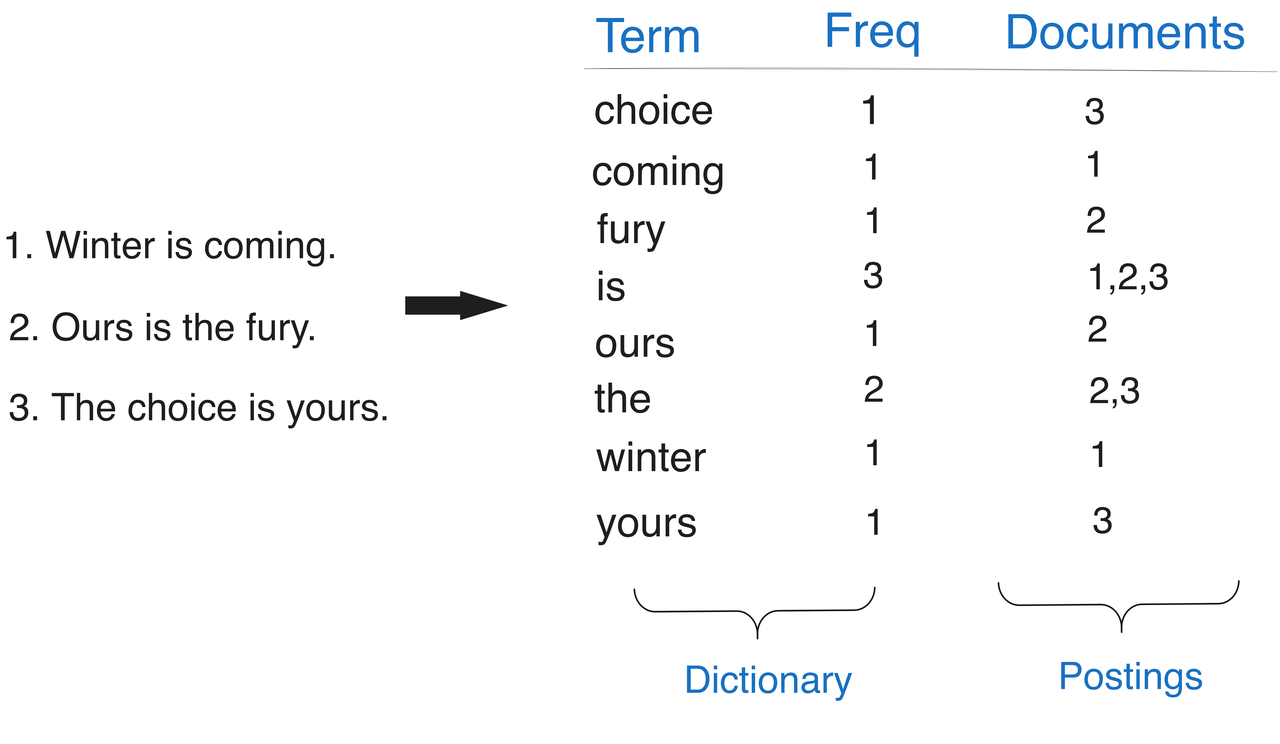
为深入了解倒排索引的加速原理,需从倒排索引内部引读写逻辑说起。在 Doris 中,从逻辑角度来看,倒排索引应用于表的列级别,而从物理存储和实现角度来看,倒排索引实际是建立在数据文件级别上的。具体如下:
-
写入阶段: 数据在写入数据文件的同时,也将同步写入排索引文件中,对于每个写入数据的行号,均与倒排索引中的行号一一对应的。
-
查询阶段: 如果查询
WHERE条件中包含已建立倒排索引的列,Doris 会自动查询索引文件,返回满足条件的行号列表,再利用 Doris 通用的行号过滤机制,跳过不必要的行和页面,只读取满足条件的行,以达到查询加速的效果。
总的来说,Doris 的倒排索引机制在物理层面是通过数据文件和索引文件配合工作,而在逻辑层面则通过列和行的映射来实现高效的数据检索和查询加速。
非主键列查询加速
为了进一步验证倒排索引对非主键列查询加速的影响,我们选择对产品 ID 和用户 ID 的维度信息进行查询。
未开启倒排索引
当查询用户 13916588 对产品 B002DMK1R0 的评论信息时,执行以下 SQL 语句进行查询时,需要对全表数据进行扫描, 查询耗时为 1.81 秒。
mysql
>
SELECT product_title
,review_headline
,review_body
,star_rating


FROM amazon_reviews


WHERE product_id
=
'B002DMK1R0'
AND customer_id
=
13916588
;


+-----------------------------------------------------------------+----------------------+-----------------------------------------------------------------------------------------------------------------------------+-------------+


| product_title
| review_headline
| review_body
| star_rating
|


+-----------------------------------------------------------------+----------------------+-----------------------------------------------------------------------------------------------------------------------------+-------------+


| Magellan Maestro
4700
4.7
-Inch Bluetooth Portable GPS Navigator
| Nice Features But...
| This
is a great GPS. Gets you
where you are going. Don
't forget to buy the seperate (grr!) cord for the traffic kit though! |           4 |


+-----------------------------------------------------------------+----------------------+-----------------------------------------------------------------------------------------------------------------------------+-------------+


1 row in set (1.81 sec)
倒排索引查询加速
接下来,我们为
product_id
和
customer_id
添加倒排索引。在这个场景中,倒排索引的使用与文本搜索时不同,该场景无需对
product_id
和
customer_id
进行分词,只需对这两列的 Value→RowID 的创建倒排映射表。
首先,通过执行以下 SQL 语句创建倒排索引:
ALTER
TABLE amazon_reviews
ADD
INDEX product_id_inverted_idx
(product_id
)
USING INVERTED
;


ALTER
TABLE amazon_reviews
ADD
INDEX customer_id_inverted_idx
(customer_id
)
USING INVERTED
;


BUILD
INDEX product_id_inverted_idx
ON amazon_reviews
;


BUILD
INDEX customer_id_inverted_idx
ON amazon_reviews
;
其次,当索引构建完成后,执行同样的查询语句, 查询耗时从 1.81 秒降到了 0.06 秒 ,查询耗时显著降低,相比未添加索引的情况, 查询效率提升了约 30 倍。
mysql
>
SELECT product_title
,review_headline
,review_body
,star_rating
FROM amazon_reviews
WHERE product_id
=
'B002DMK1R0'
AND customer_id
=
'13916588'
;


+-----------------------------------------------------------------+----------------------+-----------------------------------------------------------------------------------------------------------------------------+-------------+


| product_title
| review_headline
| review_body
| star_rating
|


+-----------------------------------------------------------------+----------------------+-----------------------------------------------------------------------------------------------------------------------------+-------------+


| Magellan Maestro
4700
4.7
-Inch Bluetooth Portable GPS Navigator
| Nice Features But...
| This
is a great GPS. Gets you
where you are going. Don
't forget to buy the seperate (grr!) cord for the traffic kit though! |           4 |


+-----------------------------------------------------------------+----------------------+-----------------------------------------------------------------------------------------------------------------------------+-------------+


1 row in set (0.06 sec)
通过观察可发现,倒排索引在于类似非主键列的维度查询中具有非常出色的加速效果。为更深入且直观的查看加速效果,可通过 Doris Profile 信息来进一步探索。
Profile 分析
需要注意的是,在开启查询的 Profile 之前,需先在 MySQL 客户端执行
SET enable_profile=true;
命令。完成后再执行查询语句,并访问
http://FE_IP:FE_HTTP_PORT/QueryProfile
, 来查看与本次查询相关的 Profile ID 以及详细的 Profile 信息。
本文中仅截取一个特定片段的 SegmentIterator Profile 信息来说明倒排索引查询加速原因。
SegmentIterator
:


  -
FirstReadSeekCount
:
0


  -
FirstReadSeekTime
: 0ns


  -
FirstReadTime
: 13.119ms


  -
IOTimer
: 19.537ms


  -
InvertedIndexQueryTime
: 11.583ms


  -
RawRowsRead
:
1


  -
RowsConditionsFiltered
:
0


  -
RowsInvertedIndexFiltered
: 16.907403M (16907403)


  -
RowsShortCircuitPredInput
:
0


  -
RowsVectorPredFiltered
:
0


  -
RowsVectorPredInput
:
0


  -
ShortPredEvalTime
: 0ns


  -
TotalPagesNum
:
27


  -
UncompressedBytesRead
: 3.71 MB


  -
VectorPredEvalTime
: 0ns
从上述 Profile 中的
RowsInvertedIndexFiltered: 16.907403M (16907403)以及RawRowsRead: 1
,我们可以观察到:倒排索引过滤了 16907403 行数据,最终只保留 1 行数据(即命中的那条数据)。根据
FirstReadTime: 13.119ms
可知,在读取这行数据所在的页面(page)耗时 13.119 ms,而根据
InvertedIndexQueryTime: 11.583ms
可知,倒排索引执行时间仅耗时 11.58 ms。
这意味着倒排索引仅在 11.58 ms 内过滤了 16907403 行数据,执行效率非常高。
为更直接对比,接下来展示未增加倒排索引情况下 SegmentIterator 的执行情况:
SegmentIterator
:


  -
FirstReadSeekCount
: 9.374K (9374)


  -
FirstReadSeekTime
: 400.522ms


  -
FirstReadTime
: 3s144ms


  -
IOTimer
: 2s564ms


  -
InvertedIndexQueryTime
: 0ns


  -
RawRowsRead
: 16.680706M (16680706)


  -
RowsConditionsFiltered
: 226.698K (226698)


  -
RowsInvertedIndexFiltered
:
0


  -
RowsShortCircuitPredInput
:
1


  -
RowsVectorPredFiltered
: 16.680705M (16680705)


  -
RowsVectorPredInput
: 16.680706M (16680706)


  -
RowsZonemapFiltered
: 226.698K (226698)


  -
ShortPredEvalTime
: 2.723ms


  -
TotalPagesNum
: 5.421K (5421)


  -
UncompressedBytesRead
: 277.05 MB


  -
VectorPredEvalTime
: 8.114ms
根据上述 Profile 观察可知,由于没有索引进行过滤, FirstRead 需要花费 3.14s 的时间来加载 16680706 行数据,然后使用 Predicate Evaluate 进行条件过滤,过滤掉其中 16680705 行,而条件过滤本身只消耗了不到 10ms 的时间,由此可见,大部分时间被消耗在加载原始数据上。
通过对比可知,建立倒排索引可以大大减少加载原始数据的时间,提高查询的执行效率。索引能够快速定位满足条件的行,从而减少不必要的数据加载和处理,节省时间和资源。
低基数文本列索引加速
众所周知,倒排索引对于高基数文本列的查询来说,加速效果十分显著。然而,在低基数列的情况下,可能由于需创建过多的索引项而导致更大的开销,从而对查询性能产生负面影响。接下来,我们将以
product_category
作为谓词列进行过滤,来检验 Apache Doris 倒排索引在低基数文本列的加速效果如何。
mysql
>
SELECT
COUNT
(
DISTINCT product_category
)
FROM amazon_reviews
;


+----------------------------------+


|
count
(
DISTINCT product_category
)
|


+----------------------------------+


|
43
|


+----------------------------------+


1
row
in
set
(
0.57 sec
)
通过上述操作可知,到
product_category
仅有 43 种分类,是一个典型的低基数文本列。接下来,我们对其增加倒排索引
ALTER
TABLE amazon_reviews
ADD
INDEX product_category_inverted_idx
(
`product_category`
)
USING INVERTED
;


BUILD
INDEX product_category_inverted_idx
ON amazon_reviews
;
添加倒排索引之后,运行如下 SQL 查询,指查询产品分类为 Mobile_Electronics 产品中评价数量最多的前三名产品信息
SELECT
    product_id,
    product_title,
    AVG(star_rating) AS rating,
    any(review_body),
    any(review_headline),
    COUNT(*) AS count
FROM
    amazon_reviews
WHERE
    product_category = 'Mobile_Electronics'
GROUP BY
    product_title, product_id
ORDER BY
    count DESC
LIMIT 10;
从下方结果可知,增加倒排索引之后,查询耗时为 1.54s。
+------------+--------------------------------------------------------------------------------------------------------------------------------------------------------------------------------------------------------+--------------------+----------------------------------------------------------------------------------------------------------------------------------------------------------------------------------------------------------------------------------------------------------------------------------------------------------------------------------------------------------------------------------------------------------------------------------------------------------------------------------------------------------+---------------------------------+-------+


| product_id
| product_title
| rating
| any_value
(review_body
)
| any_value
(review_headline
)
|
count
|


+------------+--------------------------------------------------------------------------------------------------------------------------------------------------------------------------------------------------------+--------------------+----------------------------------------------------------------------------------------------------------------------------------------------------------------------------------------------------------------------------------------------------------------------------------------------------------------------------------------------------------------------------------------------------------------------------------------------------------------------------------------------------------+---------------------------------+-------+


| B00J46XO9U
| iXCC Lightning Cable
3ft
, iPhone charger
,
for iPhone X
,
8
,
8 Plus
,
7
,
7 Plus
,
6s
,
6s Plus
,
6
,
6 Plus
, SE
5s
5c
5
, iPad Air
2 Pro
, iPad mini
2
3
4
, iPad
4th Gen
[Apple MFi Certified
](Black
and White
)
|
4.3766233766233764
| Great cable
and works well. Exact fit
as Apple cable. I would recommend this
to anyone who
is looking
to save money
and
for a quality cable.
| Apple certified lightning cable
|
1078
|


| B004911E9M
| Wall AC Charger USB Sync
Data Cable
for iPhone
4
,
3GS
,
and iPod
|
2.4281805745554035
| A total waste of money
for me because I needed it
for a iPhone
4.  The plug will only
go
in upside down
and thus won
't work at all.                                                                                                                                                                                                                                                                                                                                                                      | Won't
work
with a iPhone
4
!
|
731
|


| B002D4IHYM
| New Trent Easypak
7000mAh Portable Triple USB Port External Battery Charger/Power Pack
for Smartphones
, Tablets
and more
(w/built
-
in USB cable
)
|
4.5216095380029806
| I bought this product based
on the reviews that i
read
and i am very glad that i did. I did have a problem
with the product charging my itouch
after i received it but i emailed the company
and they corrected the problem immediately. VERY GOOD customer service
, very
prompt. The product itself
is very good. It charges my power hungry itouch very quickly
and the imax battery power lasts
for a
long
time.
All
in
all a very good purchase that i would recommend
to anyone who owns an itouch.
| Great product
& company
|
671
|


+------------+--------------------------------------------------------------------------------------------------------------------------------------------------------------------------------------------------------+--------------------+----------------------------------------------------------------------------------------------------------------------------------------------------------------------------------------------------------------------------------------------------------------------------------------------------------------------------------------------------------------------------------------------------------------------------------------------------------------------------------------------------------+---------------------------------+-------+


3 rows
in
set
(
1.54 sec
)
接下来,我们关闭倒排索引,以观察未加倒排索引时的查询耗时。这里需要说明的是,当需要关闭索引或在增加索引后发现效果不理想,可以在 MySQL 客户端中执行
set enable_inverted_index_query=false;
,便捷且快速地临时关闭倒排索引。我们再次运行查询 SQL,如下所示,查询耗时为 1.8s。
+------------+--------------------------------------------------------------------------------------------------------------------------------------------------------------------------------------------------------+--------------------+------------------------------------------------------------------------------------------------------------------------------------------------------------------------------------------------------------------------------------------------------------------------------------------------------------------------------------------------------------------------------------------------------------------------------------------------------------------------------------------------------------------------------------------------------------------------------------------------------------------------------------------------------------------------------------------------------------------------------------------------------------------------------------------------------------------------------------+---------------------------------------+-------+


| product_id
| product_title
| rating
| any_value
(review_body
)
| any_value
(review_headline
)
|
count
|


+------------+--------------------------------------------------------------------------------------------------------------------------------------------------------------------------------------------------------+--------------------+------------------------------------------------------------------------------------------------------------------------------------------------------------------------------------------------------------------------------------------------------------------------------------------------------------------------------------------------------------------------------------------------------------------------------------------------------------------------------------------------------------------------------------------------------------------------------------------------------------------------------------------------------------------------------------------------------------------------------------------------------------------------------------------------------------------------------------+---------------------------------------+-------+


| B00J46XO9U
| iXCC Lightning Cable
3ft
, iPhone charger
,
for iPhone X
,
8
,
8 Plus
,
7
,
7 Plus
,
6s
,
6s Plus
,
6
,
6 Plus
, SE
5s
5c
5
, iPad Air
2 Pro
, iPad mini
2
3
4
, iPad
4th Gen
[Apple MFi Certified
](Black
and White
)
|
4.3766233766233764
| These cables are great. They feel quality
,
and best of
all
, they
work
as they should. I have
no issues
with them whatsoever
and will be buying more
when needed.
| Just
like the original
from Apple
|
1078
|


| B004911E9M
| Wall AC Charger USB Sync
Data Cable
for iPhone
4
,
3GS
,
and iPod
|
2.4281805745554035
| I ordered two of these chargers
for an Iphone
4.
Then I started experiencing weird behavior
from the touch screen. It would
select the wrong area of the screen
,
or it would refuse
to scroll beyond a certain point
and jump back up
to the top of the page. This behavior occurs whenever either of the two that I bought are attached
and charging.
When I
remove them
, it works fine once again. Needless
to say
, these items are being returned.
| Beware
- these chargers are defective
|
731
|


| B002D4IHYM
| New Trent Easypak
7000mAh Portable Triple USB Port External Battery Charger/Power Pack
for Smartphones
, Tablets
and more
(w/built
-
in USB cable
)
|
4.5216095380029806
| I received this
in the mail
4 days ago
,
and
after charging it
for
6 hours
, I
've been using it as the sole source for recharging my 3Gs to see how long it would work.  I use my Iphone A LOT every day and usually by the time I get home it's down
to
50
%
or less.
After
4 days of
using the IMAX
to recharge my Iphone
, it finally went
from
3 bars
to
4 this afternoon
when I plugged my iphone
in.  It charges the iphone very quickly
,
and I
've been topping my phone off (stopping around 95% or so) twice a day.  This is a great product and the size is very similar to a deck of cards (not like an iphone that someone else posted) and is very easy to carry in a jacket pocket or back pack.  I bought this for a 4 day music festival I'm going
to
,
and I have
no worries
at
all of my iphone running
out of juice
!
| FANTASTIC product
!
|
671
|


+------------+--------------------------------------------------------------------------------------------------------------------------------------------------------------------------------------------------------+--------------------+------------------------------------------------------------------------------------------------------------------------------------------------------------------------------------------------------------------------------------------------------------------------------------------------------------------------------------------------------------------------------------------------------------------------------------------------------------------------------------------------------------------------------------------------------------------------------------------------------------------------------------------------------------------------------------------------------------------------------------------------------------------------------------------------------------------------------------+---------------------------------------+-------+


3 rows
in
set
(
1.80 sec
)
综上可知,倒排索引对于低基数列场景也有 15% 的查询性能提升,虽不如高基数列场景的提升效果,但并未产生退化效果或负面影响。此外,Apache Doris 针对低基数列采用了较好的编码(如字典编码)方式和压缩技术,并且可以通过内置索引(如 zonemap)进行有效过滤。因此,即使不添加倒排索引仍能展现较好的查询效果。
总结语
总而言之,Apache Doris 中的倒排索引显著优化了针对谓词列的过滤操作,即 SQL 查询中的 Where 子句。通过精确匹配行号,减少了存储层需要扫描的数据量,从而提高了查询性能。即使在性能提升有限的情况下,倒排索引也不会对查询效率产生负面影响。此外,倒排索引还支持轻量级的索引管理操作,如对增加或删除索引(ADD/DROP INDEX)以及构建索引(BUILD INDEX)操作进行管理。同时,还提供了在 MySQL 客户端便捷地启用或关闭索引(enable_inverted_index_query=true/false)的功能,使用户能够轻松利用倒排索引来检验查询加速效果。
倒排索引和 NGram Bloom Filter 索引为不同场景提供了查询加速方案,在选择索引类型时,数据集的特定特征和查询模式是关键考虑因素。以下是一些常见的适配场景:
-
大规模数据非主键列点查场景: 在这种场景下,往往存在大量分散的数值列在值,且查询的值命中量很低。为了加速查询,除了在建表时利用 Doris 内置的智能索引能力之外,还可以通过给对应的列增加倒排索引来加速查询。倒排索引对字符类型、数值类型、日期等标量类型支持比较完整。
-
短文本列的文本检索场景: 如果短文本分布比较离散(即文本之间相似度低),则适合使用 Ngram Bloom Filter 索引,能够有效地处理短文本的模糊匹配查询(LIKE)。同时,在短文本场景下 Apache Doris 的向量化处理能力可以得到更加充分和高效的应用和发挥。如果短文本分布比较集中(如大量文本相似,少量文本不同),则适合使用倒排分词索引,这样可以保证词典比较小,适合快速检索获取行号列表。
-
长文本列的文本搜索场景: 针对长文本列,倒排分词索引是更好的方案。相比于暴力字符串匹配,倒排索引提供了更高效的查询性能,避免了大量的 CPU 资源消耗。
自 Apache Doris 最早引入倒排索引至今已有近一年时间,从 早期 2.0 Preview 版本至最近发布的 2.0.4,这一年间经历了大量开源用户在真实业务环境海量数据下的打磨和验证,性能与稳定性已经得到充分验证。而在后续的规划中,我们也将持续在现有基础上进行迭代和优化,包括:
-
自定义倒排索引分词能力, 针对用户在不同场景下分词效果的需求,提供用户对自定义分词器。
-
支持更多类型的倒排索引,
来自 “ ITPUB博客 ” ,链接:https://blog.itpub.net/70017904/viewspace-3005312/ ,如需转载,请注明出处,否则将追究法律责任。

最新文章
- Apache Doris x Fluss:面向湖流一体的统一查询与分析
- Apache Doris 高性能 Open Lake Variant 读写技术解析(含对比数据)
- StarRocks 迁移至 Apache Doris 完整指南:三步完成结构、数据与业务平滑切换
- 快手基于 Apache Doris 千亿多模态检索的实践
- 某头部保险公司基于 SelectDB 的统一 OLAP 架构实践
- Doris 直查 Paimon 索引:快手湖上向量检索的共建与落地
- Apache Doris+ Paimon 2.0:构建 Agentic AI 数据闭环
- Apache Doris + Lance:让多模态数据真正进入智能驾驶与具身智能的分析闭环
- Apache Doris 5.0 年度版本前瞻(一):构建统一的多模湖仓实时分析平台
- 统一全文检索与 SQL 分析:Apache Doris 日志分析实践
