传送门:

在物联网场景中,常常会有全量设备消息广播诉求。如何把消息瞬间推送到海量在线设备上?
阿里云IoT企业物联网实例为开发者提供了 PubBroadcast 接口,可以在 秒级触达100万 在线设备,使得企业面在面对高并发需求时无后顾之忧。
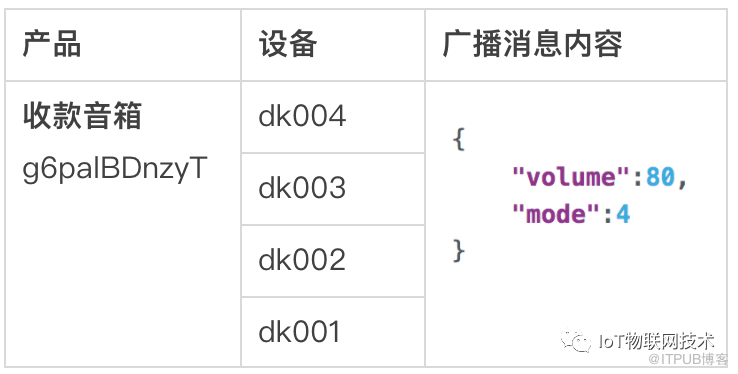
创建4个设备和广播内容
我们以收款音箱场景消息广播为例,演示全量设备广播功能。
设备和广播消息体
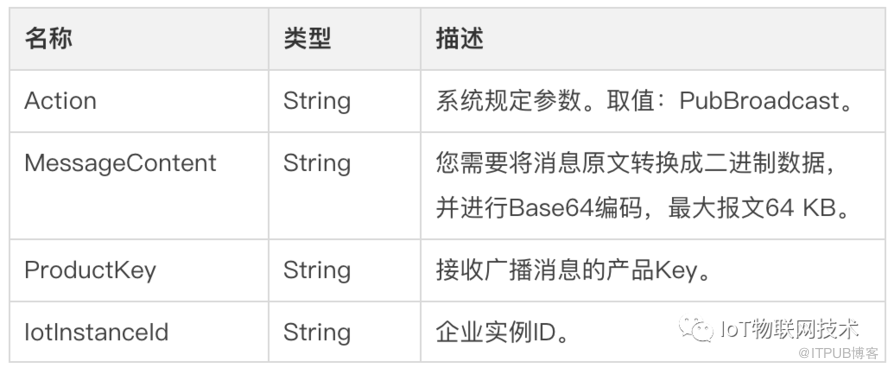
全量设备广播接口 PubBroadcast
设备端收到的消息报文示例:
Topic示例:
/sys/g6palBDnzyT/dk004/broadcast/request/1386995865331441413
Payload示例:
{
    "volume": 80,
    "mode": 4
}
全量广播开发实战
设备端开发
IoT物联网平台默认提供全量广播Topic,设备端无需预先订阅,即可接收到云端的广播消息。
设备端应用程序代码 (Node.js 示例):
// node broadcast-device.js
const mqtt = require('aliyun-iot-mqtt');
//1.设备身份三元组+区域
const options = require("./iot-device-config.json");
// 2. 建立MQTT连接
const client = mqtt.getAliyunIotMqttClient(options);
//系统全量广播 Topic 前缀
const allBroadcastTopic = `/sys/${options.productKey}/${options.deviceName}/broadcast/request`;
client.on('message', function(topic, message) {
    //过滤全量广播消息
    if (topic.indexOf(allBroadcastTopic) > -1) {

       console.log("设备收到全量广播消息:")
       console.log("\ttopic=" + topic)
       console.log("\tmessage=" + message)
    }
})
iot-device-config.json 设备配置参数:
{
    productKey: "g6palBDnzyT",
    deviceName: "dk004",
    deviceSecret: "424ed56661980c604255507d1b81464e",
    host: "iot-060a08kg.mqtt.iothub.aliyuncs.com"
}
云端后台开发
云端业务系统调用IoT物联网实例的PubBroadcast接口,即可发送广播消息,触达全量在线设备。调用代码 示例 (Node.js ):
// node broadcast.js
const co = require('co');
const RPCClient = require('@alicloud/pop-core').RPCClient;
const options = {
    accessKey: "自己的accessKey",
    accessKeySecret: "自己的accessKeySecret"
};
//1.创建client
const client = new RPCClient({
    accessKeyId: options.accessKey,
    secretAccessKey: options.accessKeySecret,
    endpoint: '
    apiVersion: '2018-01-20'
});
// 2.构造iot API
// 这里是POP API的Action
const action = 'PubBroadcast';
// 广播内容
const payload = {
    volume: 80,
    mode: 4
};
// 完整入参 params
const params = {
    ProductKey: "g6palBDnzyT",
    IotInstanceId: "iot-064a04kg",
    MessageContent: new Buffer(JSON.stringify(payload)).toString("base64")
};
co(function*() {
    //3.发起全量广播PubBroadcast API调用
    try {
         const response = yield client.request('PubBroadcast', params);

         console.log("PubBroadcast 成功 =====>", JSON.stringify(response));
    } catch (err) {
       console.log("PubBroadcast 失败 =====>", JSON.stringify(err));
    }
});
全量广播联调
业务服务器调用 PubBroadcast API 日志:

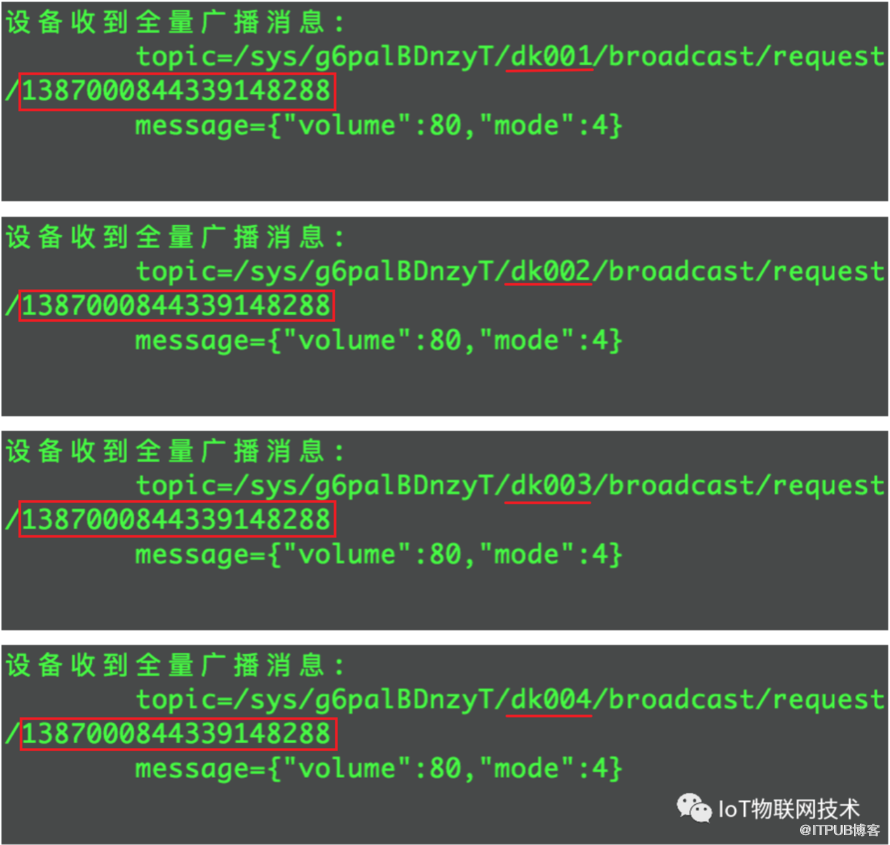
4个设备端收到的广播消息日志:
Topic的消息id相同,deviceName不同
往期推荐
物联网平台产品介绍详情:

阿里云物联网平台客户交流群
来自 “ ITPUB博客 ” ,链接:https://blog.itpub.net/70017009/viewspace-2936785/ ,如需转载,请注明出处,否则将追究法律责任。

请登录后发表评论
登录
全部评论
最新文章
- 基于阿里云物联网平台的光伏电站智能运维方案
- 车联网场景中的MQTT协议应用
- 物联网数据应用开发最 佳实践——数据价值类
- 阿里云AIoT物联网平台如何实现设备全球就近接入——设备接入类
- GuavaCache与物模型大对象引起的内存暴涨分析——设备管理运维类
- 技术详解 阿里云AIoT物模型支撑设备规模已超亿级——设备管理运维类
- 温湿度计设备通过阿里云IoT物联网套件上报数据到钉钉群机器人实践——数据价值类
- 谷歌Android things物联网硬件接入阿里云IoT物联网套件实战——设备接入类
- 阿里云IoT物联网平台基础版和高 级版数据进入规则引擎的流转详解——普及类
- 通过HTTP/2通道实时获取IoT设备状态和数据——设备管理运维类
