背景
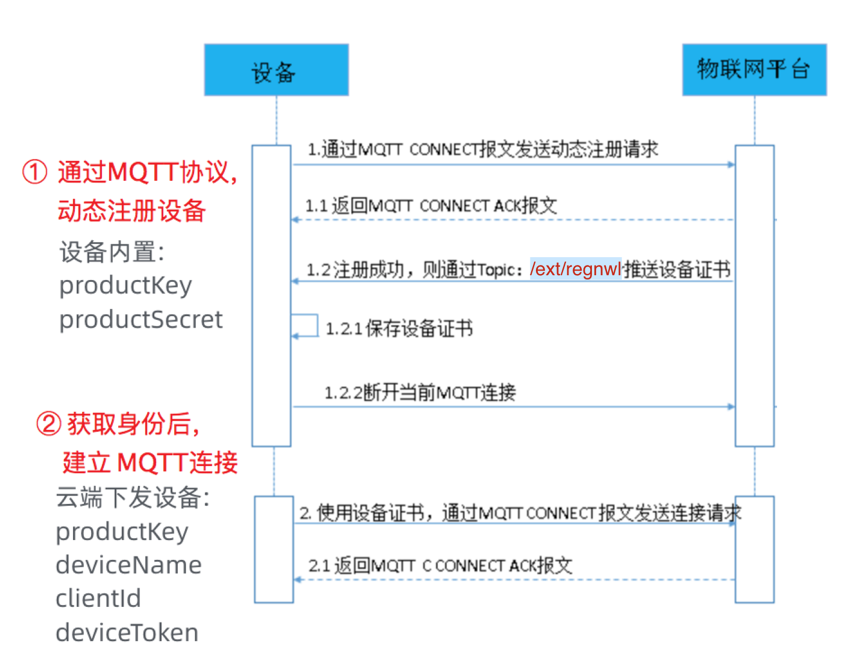
物联网场景中,设备产线烧录不同三元组成本很高,Android设备更是无法独立烧录三元组,IoT 存量设备迁移更是无法预置身份三元组,面对这种场景,IoT物联网平台提供了无需预注册三元组,在设备运行时通过MQTT动态注册,获取认证信息,再发起设备业务连接的方案。
安全提示
对于一型一密免预注册方式,请在设备端使用4.X版C SDK。该SDK包含DAS(设备取证服务),可以对设备可能产生的安全事件进行风控。物联网平台不承担因设备端没有使用该SDK而导致的安全风险。
流程图
设备动态注册三元组流程如下:
开发实战
创建产品
我们接入 IoT 物联网平台,注册一个新产品:Android设备。
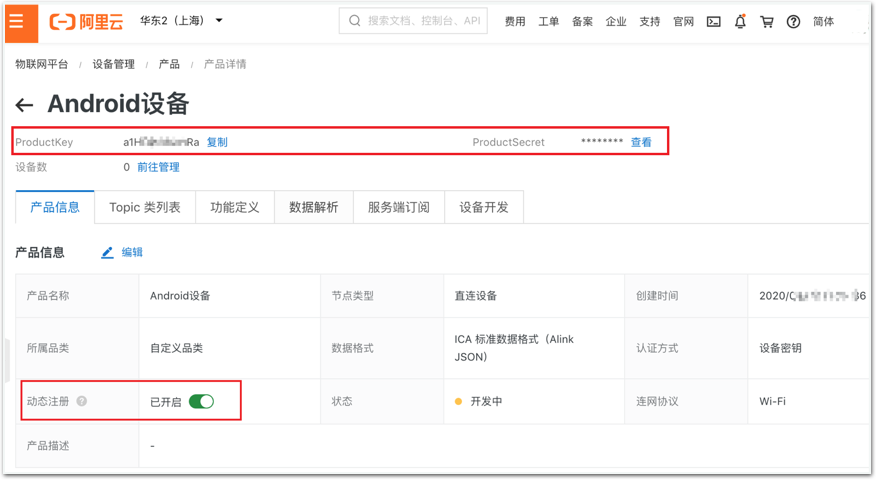
进入产品详情,获取
productKey和productSecret。
开启动态注册功能,如下图:
接下来,我们无需按常规流程,在控制台注册设备,而是直接开发设备端程序。
设备端开发
我们以Node.js代码演示设备动态注册原理。
动态注册
设备发送CONNECT报文,报文中包含动态注册参数,请求建立连接。
• MQTT连接域名:公共实例的连接域名为${YourProductKey}.iot-as-mqtt.${YourRegionId}.aliyuncs.com:1883。
MQTT动态注册的CONNECT报文参数和取值结构如下:
mqttClientId: clientId+"|securemode=2,authType=regnwl,random=xxxx,signmethod=xxx|"mqttUserName: deviceName+"&"+productKeymqttPassword: sign_hmac(productSecret,content)
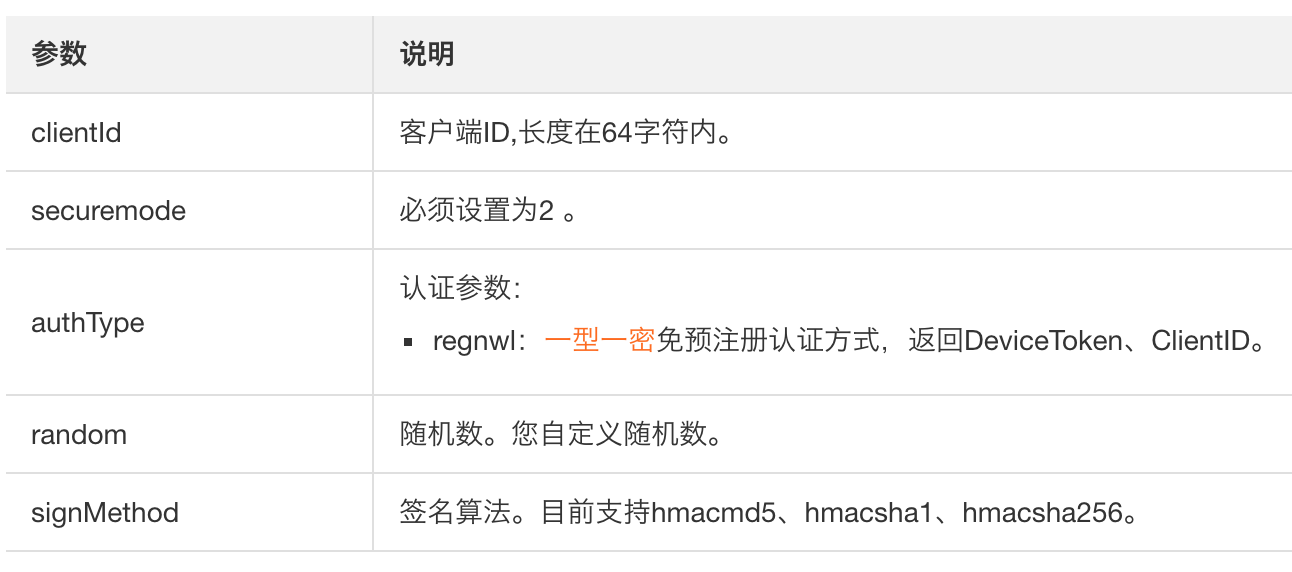
• mqttClientId组成结构:clientId+"|securemode=2,authType=regnwl,random=xxxx,signmethod=xxx|"
参数取值中包含的详细参数如下表。
• mqttUserName组成结构:deviceName+"&"+productKey示例:device1&al123456789。
• mqttPassword计算方法:sign_hmac(productSecret,content)其中,content的值是拼接串("deviceName"+device1+"productKey"+al123456789+"random"+123456)
hmac_sha1(h1nQFYPZS0mW2352, deviceNamedevice1productKeyal123456789random123)
免预注册认证方式,设备注册成功后,物联网平台使用Topic:/ext/regnwl,返回ClientID、DeviceToken。
IoT 物联网平台推送的设备身份消息Payload格式如下:
{ "productKey" : "xxx", "deviceName" : "xxx", "clientId" : "xxx", "deviceToken" : "xxx"}
动态注册示例代码:
function doDeviceRegister() {    // 1.产品信息
    const productInfo = {        productKey: "产品 productKey",        productSecret: "产品 productSecret",        regionId: "cn-shanghai"
    }    // 2.程序读取的设备唯一标识,比如 MAC,Serial Number 等
    productInfo.deviceName = Math.random().toString(36).substr(2)    // 3.生成设备动态注册的参数
    var options = getRegisterOptions(productInfo, trustedCA);    // 4.发起动态注册,获取设备连接 clientId 和 deviceToken
    var registerClient = mqtt.connect(options);
    registerClient.on('message', function(topic, message) {        // 5. 解析注册结果
        if ('/ext/regnwl' == topic) {            // 6.断开注册连接
            registerClient.end();            // 7.发起设备 MQTT 连接
            //deviceOnline(JSON.parse(message),"cn-shanghai")
        }
    })
}
生成设备动态注册的参数
参考文档:
https://help.aliyun.com/document_detail/132111.html
function getRegisterOptions(productInfo, rootCA) {    var random = Date.now();    var content = {        deviceName: productInfo.deviceName,        productKey: productInfo.productKey,        random: random
    }    var options = {}
    options.clientId = Date.now() + "|securemode=2,authType=regnwl,random=" + random + ",signmethod=hmacsha1|"
    options.username = productInfo.deviceName + "&" + productInfo.productKey
    options.password = signHmacSha1(content, productInfo.productSecret)
    options.port = 1883;
    options.host = `${productInfo.productKey}.iot-as-mqtt.${productInfo.regionId}.aliyuncs.com`;
    options.protocol = 'mqtts';
    options.ca = rootCA
    options.keepalive = 120
    return options;
}
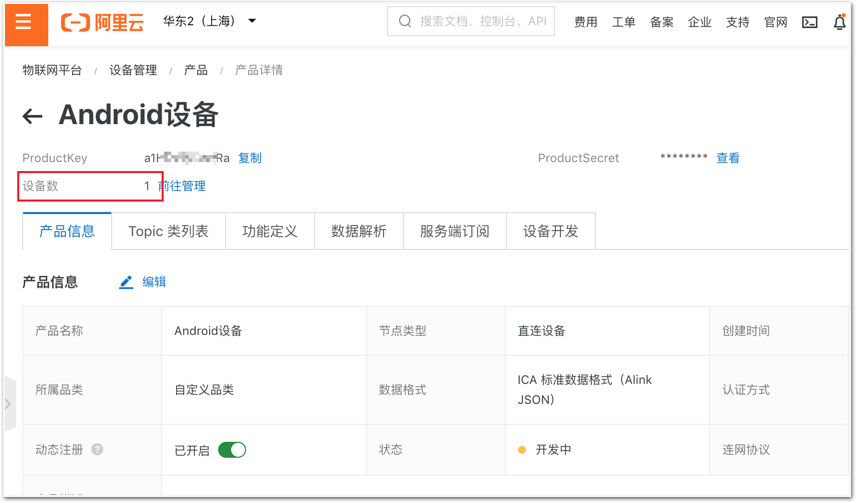
动态注册成功后,产品下会设备数量会更新:
设备在线和上报数据
设备收到并保存ClientID和DeviceToken的组合,断开当前MQTT连接,发起设备直连IoT平台的请求的CONNECT参数如下:
mqttClientId: clientId+"|securemode=-2,authType=connwl|"mqttUsername: deviceName+"&"+productKeymqttPassword: deviceToken
• mqttClientId:设备动态注册时获得的ClientID拼接固定字符串。
• mqttUserName:组成结构:deviceName+"&"+productKey示例:device1&al123456789。
• mqttPassword:设备动态注册时获得的DeviceToken
实例代码:
function deviceOnline(opts,regionId) {    // 设备 MQTT 连接参数
    var options = {}
    options.clientId = opts.clientId + "|securemode=-2,authType=connwl|"
    options.username = opts.deviceName + "&" + opts.productKey
    options.password = opts.deviceToken
    options.port = 1883
    options.host = `${opts.productKey}.iot-as-mqtt.${regionId}.aliyuncs.com`
    options.protocol = 'mqtt'
    options.keepalive = 120
    // 设备建立 MQTT 连接
    var deviceClient = mqtt.connect(options);    // 上报业务数据
    deviceClient.publish(`/${opts.productKey}/${opts.deviceName}/user/update`, "sdk client " + Date.now(), { qos: 1 });

}
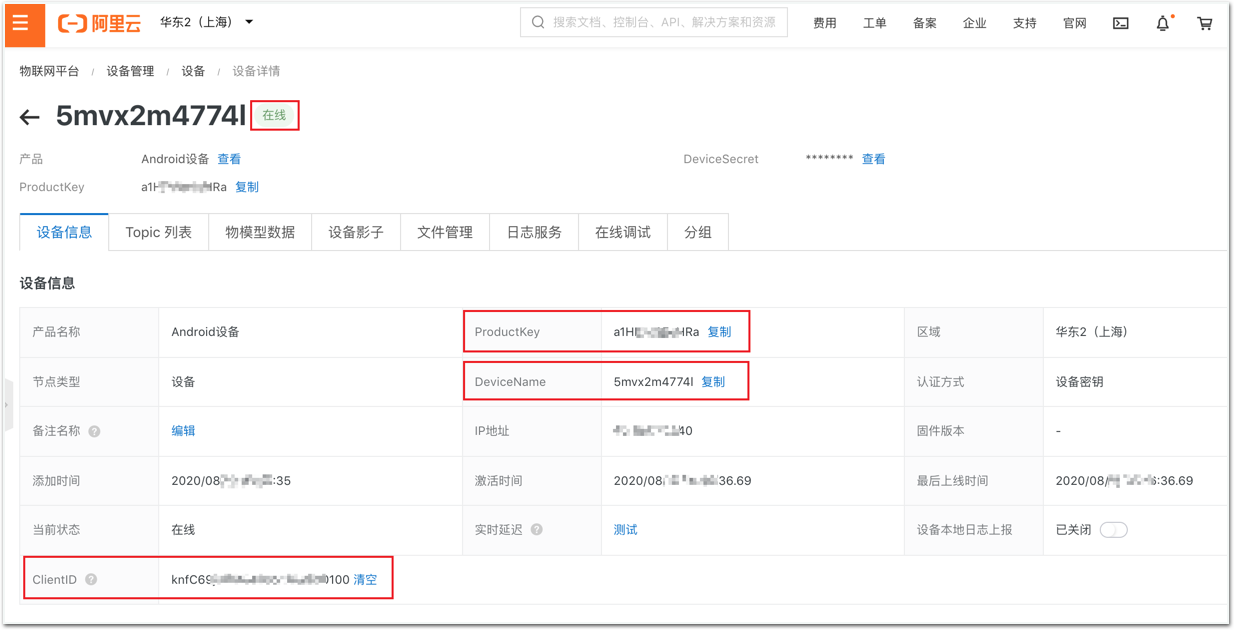
在控制台可以看到设备在线,并展示ClientID信息,如下:

物联网平台产品介绍详情:

阿里云物联网平台客户交流群
来自 “ ITPUB博客 ” ,链接:https://blog.itpub.net/70017009/viewspace-2918080/ ,如需转载,请注明出处,否则将追究法律责任。

最新文章
- 基于阿里云物联网平台的光伏电站智能运维方案
- 车联网场景中的MQTT协议应用
- 物联网数据应用开发最 佳实践——数据价值类
- 阿里云AIoT物联网平台如何实现设备全球就近接入——设备接入类
- GuavaCache与物模型大对象引起的内存暴涨分析——设备管理运维类
- 技术详解 阿里云AIoT物模型支撑设备规模已超亿级——设备管理运维类
- 温湿度计设备通过阿里云IoT物联网套件上报数据到钉钉群机器人实践——数据价值类
- 谷歌Android things物联网硬件接入阿里云IoT物联网套件实战——设备接入类
- 阿里云IoT物联网平台基础版和高 级版数据进入规则引擎的流转详解——普及类
- 通过HTTP/2通道实时获取IoT设备状态和数据——设备管理运维类
