-
如何以契约的形式表达业务场景的逻辑 -
如何将Solidity合约转换为Java类 -
如何配置Java开发工具包 -
如何构建应用程序并将Java SDK集成到应用程序工程中 -
如何通过Java SDK调用合约接口,并理解其原理
-
能够在区块链上注册资产 -
能够从不同的账户转移资金 -
能够检查账户中的资产数量
-
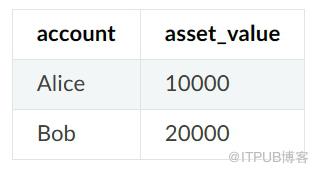
账户:主键、资产账户(字符串类型) -
asset_value:资产金额(UINT256型)
// query the amount of assetsfunction select(string account) public constant returns(int256, uint256)// asset registrationfunction register(string account, uint256 amount) public returns(int256)// asset transferfunction transfer(string from_asset_account, string to_asset_account, uint256 amount) public returns(int256)
pragma solidity ^ 0.4 .24;import "./Table.sol";contract Asset {// eventevent RegisterEvent( int256 ret, string account, uint256 asset_value);event TransferEvent( int256 ret, string from_account, string to_account, uint256 amount);constructor() public {// create a t_asset table in the constructorcreateTable();}function createTable() private {TableFactory tf = TableFactory( 0x1001);// asset management table, key : account, field : asset_value// | account(primary key) | amount |// |-------------------- |-------------------|// | account | asset_value |// |---------------------|-------------------|//// create tabletf.createTable( "t_asset", "account", "asset_value");}function openTable() private returns( Table) {TableFactory tf = TableFactory( 0x1001);Table table = tf.openTable( "t_asset");return table;}/*description: query asset amount according to asset accountparameter:account: asset accountreturn value:parameter1: successfully returns 0, the account does not exist and returns -1parameter2: valid when the first parameter is 0, the amount of assets*/function select( string account) public constant returns( int256, uint256) {// open tableTable table = openTable();// queryEntries entries = table. select(account, table.newCondition());uint256 asset_value = 0;if ( 0 == uint256(entries.size())) {return ( -1, asset_value);} else {Entry entry = entries. get( 0);return ( 0, uint256(entry.getInt( "asset_value")));}}/*description : asset registrationparameter :account : asset accountamount : asset amountreturn value:0 regist successfully-1 asset account already exists-2 other error*/function register( string account, uint256 asset_value) public returns( int256){int256 ret_code = 0;int256 ret= 0;uint256 temp_asset_value = 0;// to query whather the account exists(ret, temp_asset_value) = select(account);if(ret != 0) {Table table = openTable();Entry entry = table.newEntry();entry. set( "account", account);entry. set( "asset_value", int256(asset_value));// insertint count = table.insert(account, entry);if (count == 1) {// trueret_code = 0;} else {// false. no permission or other errorret_code = -2;}} else {// account already existsret_code = -1;}emit RegisterEvent( ret_code, account, asset_value);return ret_code;}/*description : asset transferparameter :from_account : transferred asset accountto_account :received asset accountamount : transferred amountreturn value:0 transfer asset successfully-1 transfe asset account does not exist-2 receive asset account does not exist-3 amount is insufficient-4 amount is excessive-5 other error*/function transfer( string from_account, string to_account, uint256 amount) public returns( int256) {// query transferred asset account informationint ret_code = 0;int256 ret = 0;uint256 from_asset_value = 0;uint256 to_asset_value = 0;// whather transferred asset account exists?(ret, from_asset_value) = select(from_account);if(ret != 0) {ret_code = -1;// not existemit TransferEvent( ret_code, from_account, to_account, amount);return ret_code;}// whather received asset account exists?(ret, to_asset_value) = select(to_account);if(ret != 0) {ret_code = -2;// not existemit TransferEvent( ret_code, from_account, to_account, amount);return ret_code;}if(from_asset_value < amount) {ret_code = -3;// amount of transferred asset account is insufficientemit TransferEvent( ret_code, from_account, to_account, amount);return ret_code;}if (to_asset_value + amount < to_asset_value) {ret_code = -4;// amount of received asset account is excessiveemit TransferEvent( ret_code, from_account, to_account, amount);return ret_code;}Table table = openTable();Entry entry0 = table.newEntry();entry0. set( "account", from_account);entry0. set( "asset_value", int256(from_asset_value - amount));// update transferred accountint count = table.update(from_account, entry0, table.newCondition());if(count != 1) {ret_code = -5;// false? no permission or other error?emit TransferEvent( ret_code, from_account, to_account, amount);return ret_code;}Entry entry1 = table.newEntry();entry1. set( "account", to_account);entry1. set( "asset_value", int256(to_asset_value + amount));// update received accounttable.update(to_account, entry1, table.newCondition());emit TransferEvent( ret_code, from_account, to_account, amount);return ret_code;}}
$ mkdir -p ~/fisco# download console$ cd ~/fisco && curl -#LO https://github.com/FISCO-BCOS/console/releases/download/v2.9.2/download_console.sh && bash download_console.sh# switch to the fisco/console/ directory$ cd ~/fisco/console/# compile the contract, specify a Java package name parameter later, you can specify the package name according to the actual project path.$ ./sol2java.sh -p org.fisco.bcos.asset.contract
|-- abi # The generated abi directory, which stores the abi file generated by Solidity contract compilation.| |-- Asset.abi| |-- Table.abi|-- bin # The generated bin directory, which stores the bin file generated by Solidity contract compilation.| |-- Asset.bin| |-- Table.bin|-- contracts # The source code file that stores Solidity contract. Copy the contract that needs to be compiled to this directory.| |-- Asset.sol # A copied Asset.sol contract, depends on Table.sol| |-- Table.sol # The contract interface file that implements the CRUD operation|-- java # Storing compiled package path and Java contract file| |-- org| |--fisco| |--bcos| |--asset| |--contract| |--Asset.java # Java file generated by the Asset.sol contract| |--Table.java # Java file generated by the Table.sol contract|-- sol2java.sh
package org.fisco.bcos.asset.contract;public class Asset extends Contract {// Asset.sol contract transfer interface generationpublic TransactionReceipt transfer (String from_account, String to_account, BigInteger amount);// Asset.sol contract register interface generationpublic TransactionReceipt register (String account, BigInteger asset_value);// Asset.sol contract select interface generationpublic Tuple2<BigInteger, BigInteger> select (String account) throws ContractException;// Load the Asset contract address, to generate Asset objectpublic static Asset load (String contractAddress, Client client, CryptoKeyPair credential);// Deploy Assert.sol contract, to generate Asset objectpublic static Asset deploy (Client client, CryptoKeyPair credential) throws ContractException;}
$ mkdir -p ~/fisco# get the Java project project archive$ cd ~/fisco$ curl -#LO https://github.com/FISCO-BCOS/LargeFiles/raw/master/tools/asset-app.tar.gz# extract the Java project project asset-app directory$ tar -zxf asset-app.tar.gz
|-- build.gradle // gradle configuration file|-- gradle| |-- wrapper| |-- gradle-wrapper.jar // related code implementation for downloading Gradle| |-- gradle-wrapper.properties // Configuration information used by the wrapper, such as the version of gradle|-- gradlew // shell script for executing wrapper commands under Linux or Unix|-- gradlew.bat // batch script for executing wrapper commands under Windows|-- src| |-- main| | |-- java| | |-- org| | |-- fisco| | |-- bcos| | |-- asset| | |-- client // the client calling class| | |-- AssetClient.java| | |-- contract // the Java contract class| | |-- Asset.java| |-- test| |-- resources // resource files| |-- applicationContext.xml // project configuration file| |-- contract.properties // file that stores the deployment contract address| |-- log4j.properties // log configuration file| |-- contract // Solidity contract files| |-- Asset.sol| |-- Table.sol||-- tool |-- asset_run.sh // project running script
-
您需要将maven远程存储库添加到文件中:build.gradle
repositories { mavenCentral() maven { url "http://maven.aliyun.com/nexus/content/groups/public/" } maven { url "https://oss.sonatype.org/content/repositories/snapshots" }}-
介绍Java SDKjar包
compile ('org.fisco-bcos.java-sdk:fisco-bcos-java-sdk:2.7.2')-
区块链节点证书配置
# go to the ~ directory# copy the node certificate to the project's resource directory$ cd ~/fisco$ cp -r nodes/127.0.0.1/sdk/* asset-app/src/test/resources/conf# if you want to run this app in IDE, copy the certificate to the main resource directory$ mkdir -p asset-app/src/main/resources/conf$ cp -r nodes/127.0.0.1/sdk/* asset-app/src/main/resources/conf
-
应用程序上下文.xml
-
初始化
@SuppressWarnings("resource")ApplicationContext context = new ClassPathXmlApplicationContext("classpath:applicationContext.xml");bcosSDK = context.getBean(BcosSDK.class);// init the client that can send requests to the group oneclient = bcosSDK.getClient(1);// create the keyPaircryptoKeyPair = client.getCryptoSuite().createKeyPair();client.getCryptoSuite().setCryptoKeyPair(cryptoKeyPair);logger.debug("create client for group1, account address is " + cryptoKeyPair.getAddress());-
构造协定类对象
// deploy contractAsset asset = Asset.deploy(client, cryptoKeyPair);// load contract addressAsset asset = Asset.load(contractAddress, client, cryptoKeyPair);
-
接口调用
// select interface calling Tuple2<BigInteger, BigInteger> result = asset.select(assetAccount);// register interface callingTransactionReceipt receipt = asset.register(assetAccount, amount);// transfer interfaceTransactionReceipt receipt = asset.transfer(fromAssetAccount, toAssetAccount, amount);
-
汇编
# switch to project directory$ cd ~/asset-app# compile project$ ./gradlew build
-
部署合约Asset.sol
# enter dist directory$ cd dist$ bash asset_run.sh deployDeploy Asset successfully, contract address is 0xd09ad04220e40bb8666e885730c8c460091a4775
-
注册资产
$ bash asset_run.sh register Alice 100000Register account successfully => account: Alice, value: 100000$ bash asset_run.sh register Bob 100000Register account successfully => account: Bob, value: 100000
-
查询资产
$ bash asset_run.sh query Aliceaccount Alice, value 100000$ bash asset_run.sh query Bobaccount Bob, value 100000
-
转移资产
$ bash asset_run.sh transfer Alice Bob 50000Transfer successfully => from_account: Alice, to_account: Bob, amount: 50000$ bash asset_run.sh query Aliceaccount Alice, value 50000$ bash asset_run.sh query Bobaccount Bob, value 150000
来自 “ ITPUB博客 ” ,链接:https://blog.itpub.net/70012206/viewspace-2988490/ ,如需转载,请注明出处,否则将追究法律责任。
上一篇:
EOS系统合约链账户介绍
下一篇:
区块链支持物联网的4种方式

请登录后发表评论
登录
全部评论
