MySQL8.0后续版本中主推使用MySQL Shell进行相关日常管理及维护操作,如果后续移除了mysqldump等命令后,如何进行数据库备份等相关操作呢?本文开始进行数据库备份的操作。
1. MySQL Shell 安装
1.1 下载
可以在MySQL官网进行下载,地址https://dev.mysql.com/downloads/shell/
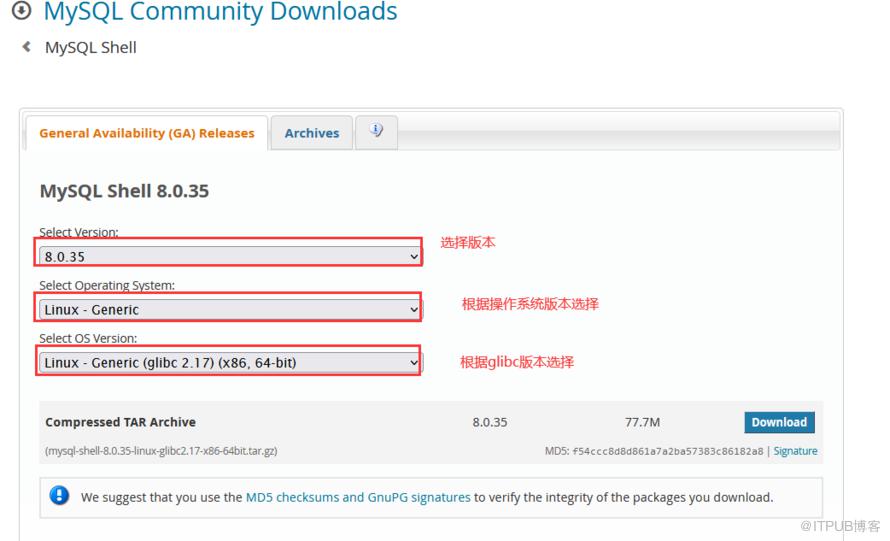
需要根据操作系统类型、版本及glibc版本选择对应的文件下载,例如:
[root@VM-4-14-centos ~]# uname -aLinux VM-4-14-centos 3.10.0-1160.99.1.el7.x86_64 #1 SMP Wed Sep 13 14:19:20 UTC 2023 x86_64 x86_64 x86_64 GNU/Linux[root@VM-4-14-centos ~]# ldd --versionldd (GNU libc) 2.17Copyright (C) 2012 Free Software Foundation, Inc.This is free software; see the source for copying conditions. There is NOwarranty; not even for MERCHANTABILITY or FITNESS FOR A PARTICULAR PURPOSE.Written by Roland McGrath and Ulrich Drepper.

因此可以选择如下版本下载
1.2 部署
上传文件至目标目录后解压文件
解压后建议配置软链接
tar -zxvf mysql-shell-8.0.35-linux-glibc2.17-x86-64bit.tar.gz可以看到对应的工具了
ln -s mysql-shell-8.0.35-linux-glibc2.17-x86-64bit mysql-shell建议再配置一下环境变量
将“/usr/local/mysql-shell/bin"追加至/etc/profile中
在其他位置直接运行mysqlsh命令,即可得到如下结果:

此时,完成了mysql shell部署。
2. 进行数据库备份
2.1 登录数据库
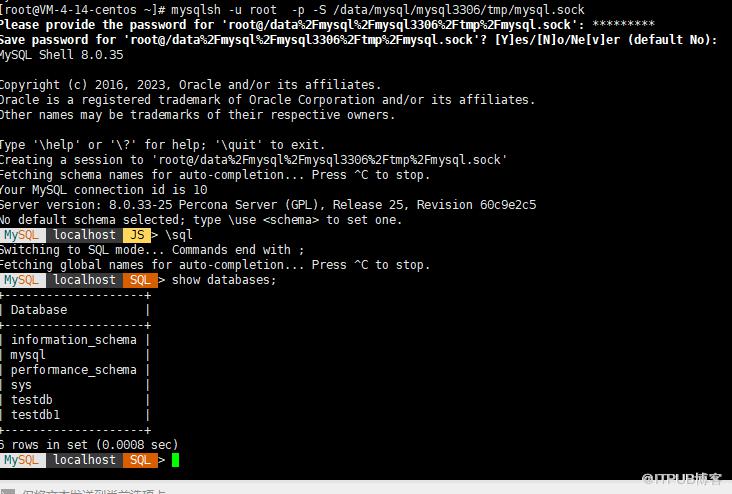
使用mysqlsh登录数据库,并列出库名,例如:
[root@VM-4-14-centos ~]# mysqlsh -u root -p -S /data/mysql/mysql3306/tmp/mysql.sockPlease provide the password for 'root@/data%2Fmysql%2Fmysql3306%2Ftmp%2Fmysql.sock': *********Save password for 'root@/data%2Fmysql%2Fmysql3306%2Ftmp%2Fmysql.sock'? [Y]es/[N]o/Ne[v]er (default No):MySQL Shell 8.0.35Copyright (c) 2016, 2023, Oracle and/or its affiliates.Oracle is a registered trademark of Oracle Corporation and/or its affiliates.Other names may be trademarks of their respective owners.Type '\help' or '\?' for help; '\quit' to exit.Creating a session to 'root@/data%2Fmysql%2Fmysql3306%2Ftmp%2Fmysql.sock'Fetching schema names for auto-completion... Press ^C to stop.Your MySQL connection id is 10Server version: 8.0.33-25 Percona Server (GPL), Release 25, Revision 60c9e2c5No default schema selected; type \use <schema> to set one.MySQL localhost JS > \sqlSwitching to SQL mode... Commands end with ;Fetching global names for auto-completion... Press ^C to stop.MySQL localhost SQL > show databases;+--------------------+| Database |+--------------------+| information_schema || mysql || performance_schema || sys || testdb || testdb1 |+--------------------+6 rows in set (0.0008 sec)MySQL localhost SQL >
其中登录语法为:
mysqlsh -u root -p -S /data/mysql/mysql3306/tmp/mysql.sock输入密码后即可登录成功,输入密码后会确认是否保存密码,建议选择No(默认值)。
登录成功后,可以选择\sql ,即SQL命令模式。
2.2 备份整个实例
创建备份目录
mkdir -p /data/backup登录数据库
mysqlsh -u root -p -S /data/mysql/mysql3306/tmp/mysql.sock登录后是在js模式下,备份数据是在JS模式下进行,因此不用切换。
备份整个实例
MySQL localhost JS > util.dumpInstance("/data/backup")Acquiring global read lockGlobal read lock acquiredInitializing - done2 out of 6 schemas will be dumped and within them 12 tables, 0 views.2 out of 5 users will be dumped.Gathering information - doneAll transactions have been startedLocking instance for backupGlobal read lock has been releasedWriting global DDL filesWriting users DDLRunning data dump using 4 threads.NOTE: Progress information uses estimated values and may not be accurate.Writing schema metadata - doneWriting DDL - doneWriting table metadata - doneStarting data dump129% (870 rows / ~670 rows), 0.00 rows/s, 0.00 B/s uncompressed, 0.00 B/s compressedDump duration: 00:00:00sTotal duration: 00:00:00sSchemas dumped: 2Tables dumped: 12Uncompressed data size: 14.06 MBCompressed data size: 4.88 MBCompression ratio: 2.9Rows written: 870Bytes written: 4.88 MBAverage uncompressed throughput: 14.06 MB/sAverage compressed throughput: 4.88 MB/sMySQL localhost JS >
如无异常,即完成了实例备份。可见,备份效率比较高(4线程处理)。
备份后,备份目录结果里可以查看结果如下:
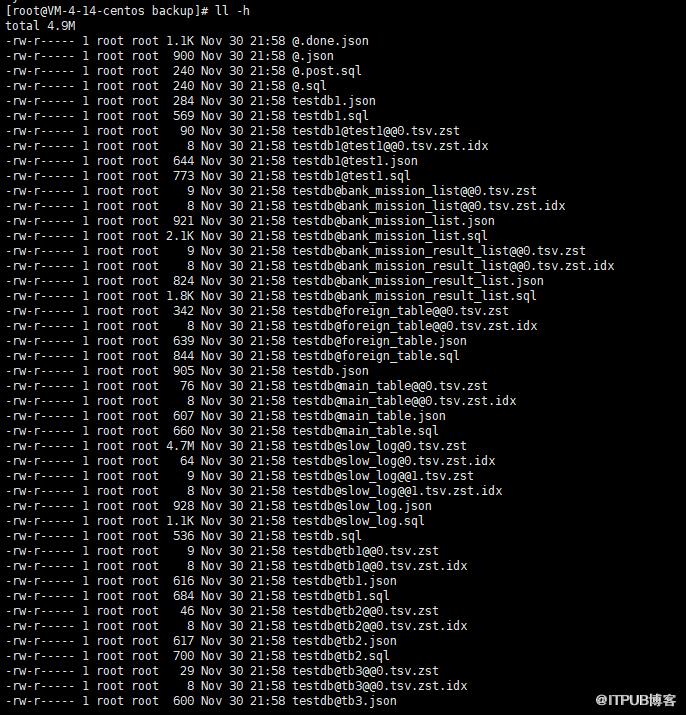
其中的主要文件解释:
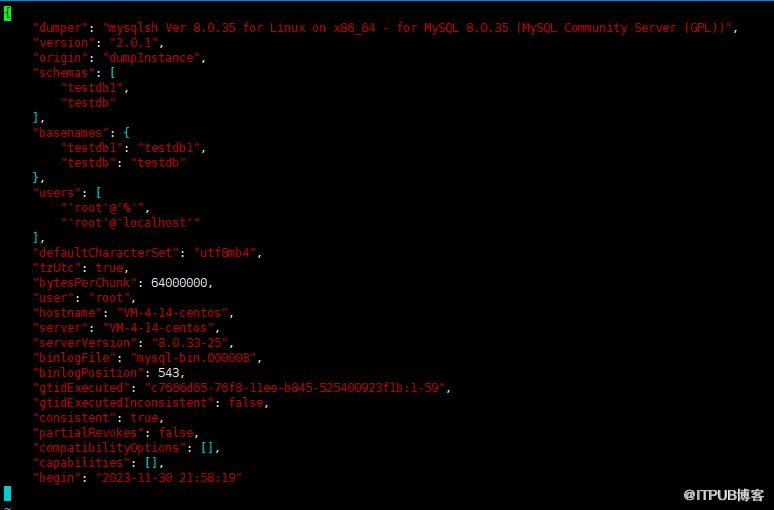
@.done.json: 该文件记录了备份结束时间,每个库下每个表的大小等信息,例如,
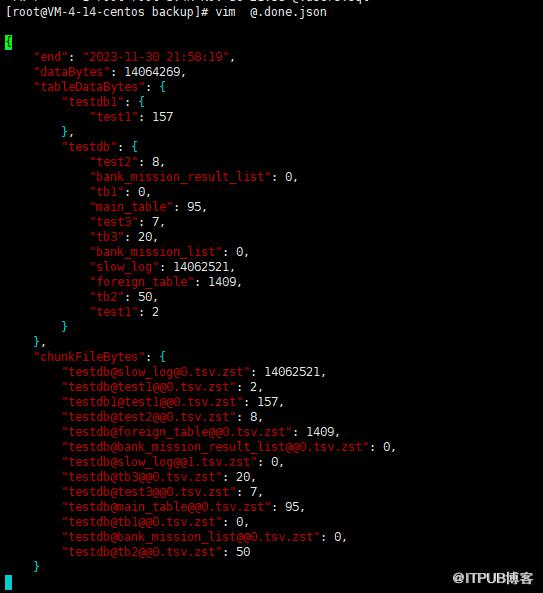
@.json:该文件记录了客户端版本,备份类型(实例、库或表等),元数据信息以及binlog信息(点位及GTID)。例如
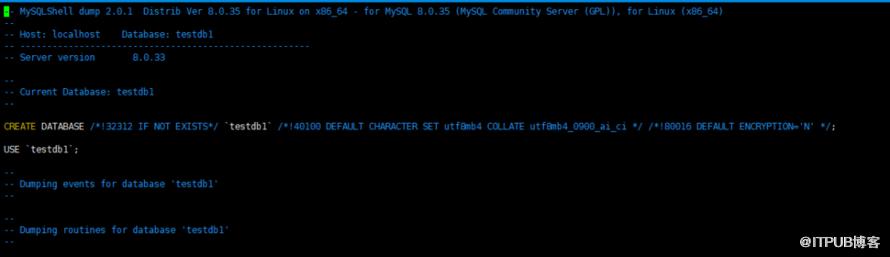
@.sql, @.post.sql:这两个文件记录注释信息. 导入数据时, 我们可以通过这两个文件自定义的SQL. 在数据导入前和数据导入后执行,本次为全量备份,因此只有版本等注释信息
库名.json: 记录的是对应库名、表等信息

库名.sql: 具体的建库SQL脚本
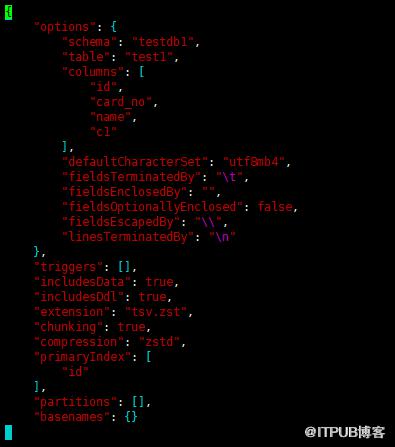
库名@表名.json:记录了对于的表的元数据信息,包括库名,表名,字段名,主键等信息
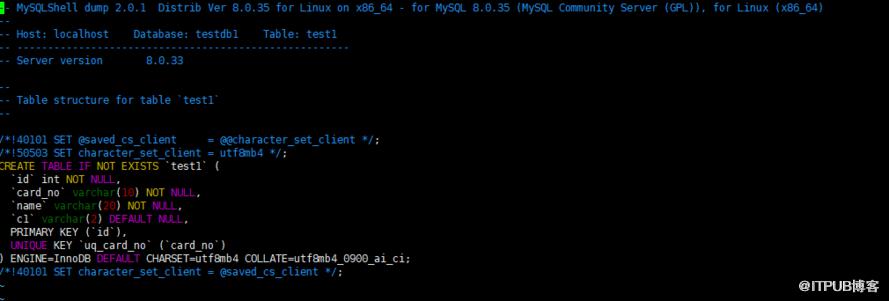
库名@表名.sql: 具体的建表SQL脚本
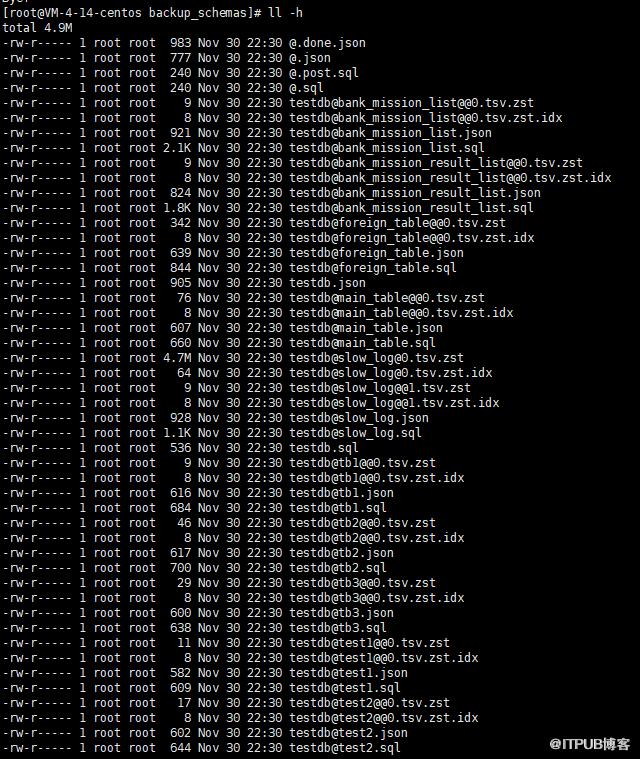
库名@表名@@*.tsv.zst: 具体数据文件

库名@表名@@*.tsv.zst.idx: 具体索引文件

@.users.sql : 数据库用户信息,包含创建用户以及授权的SQL脚本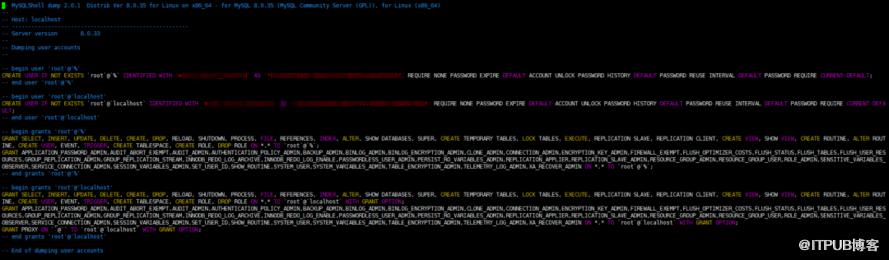
2.3 备份指定库
创建备份目录:重新创建一个专用于备份指定库的目录
mkdir -p data/backup/backup_schemas
使用shellsh登录数据库,并查看当前有哪些库
# mysqlsh -u root -p -S /data/mysql/mysql3306/tmp/mysql.sockPlease provide the password for 'root@/data%2Fmysql%2Fmysql3306%2Ftmp%2Fmysql.sock': *********Save password for 'root@/data%2Fmysql%2Fmysql3306%2Ftmp%2Fmysql.sock'? [Y]es/[N]o/Ne[v]er (default No):MySQL Shell 8.0.35Copyright (c) 2016, 2023, Oracle and/or its affiliates.Oracle is a registered trademark of Oracle Corporation and/or its affiliates.Other names may be trademarks of their respective owners.Type '\help' or '\?' for help; '\quit' to exit.Creating a session to 'root@/data%2Fmysql%2Fmysql3306%2Ftmp%2Fmysql.sock'Fetching schema names for auto-completion... Press ^C to stop.Your MySQL connection id is 28Server version: 8.0.33-25 Percona Server (GPL), Release 25, Revision 60c9e2c5No default schema selected; type \use <schema> to set one.MySQL localhost JS > \sqlSwitching to SQL mode... Commands end with ;Fetching global names for auto-completion... Press ^C to stop.MySQL localhost SQL > show databases;+--------------------+| Database |+--------------------+| information_schema || mysql || performance_schema || sys || testdb || testdb1 |+--------------------+6 rows in set (0.0010 sec)
备份指定的库(schema),如果多个库,则用逗号分隔
MySQL localhost SQL > \jsSwitching to JavaScript mode...MySQL localhost JS > util.dumpSchemas(['testdb'],'/data/backup/backup_schemas')Acquiring global read lockGlobal read lock acquiredInitializing - done1 schemas will be dumped and within them 11 tables, 0 views.Gathering information - doneAll transactions have been startedLocking instance for backupGlobal read lock has been releasedWriting global DDL filesRunning data dump using 4 threads.NOTE: Progress information uses estimated values and may not be accurate.Writing schema metadata - doneWriting DDL - doneWriting table metadata - doneStarting data dump130% (862 rows / ~662 rows), 0.00 rows/s, 0.00 B/s uncompressed, 0.00 B/s compressedDump duration: 00:00:00sTotal duration: 00:00:00sSchemas dumped: 1Tables dumped: 11Uncompressed data size: 14.06 MBCompressed data size: 4.88 MBCompression ratio: 2.9Rows written: 862Bytes written: 4.88 MBAverage uncompressed throughput: 14.06 MB/sAverage compressed throughput: 4.88 MB/sMySQL localhost JS >
以上则备份完成。
到对于目录下查看备份结果如下:
2.4 备份指定表
再次先创建目录
[root@VM-4-14-centos ~]# mkdir -p /data/backup/backup_tables[root@VM-4-14-centos ~]# cd /data/backup/backup_tables[root@VM-4-14-centos backup_tables]#
登录数据库,并查看库及表名
[root@VM-4-14-centos backup_tables]# mysqlsh -u root -p -S /data/mysql/mysql3306/tmp/mysql.sockPlease provide the password for 'root@/data%2Fmysql%2Fmysql3306%2Ftmp%2Fmysql.sock': *********Save password for 'root@/data%2Fmysql%2Fmysql3306%2Ftmp%2Fmysql.sock'? [Y]es/[N]o/Ne[v]er (default No):MySQL Shell 8.0.35Copyright (c) 2016, 2023, Oracle and/or its affiliates.Oracle is a registered trademark of Oracle Corporation and/or its affiliates.Other names may be trademarks of their respective owners.Type '\help' or '\?' for help; '\quit' to exit.Creating a session to 'root@/data%2Fmysql%2Fmysql3306%2Ftmp%2Fmysql.sock'Fetching schema names for auto-completion... Press ^C to stop.Your MySQL connection id is 35Server version: 8.0.33-25 Percona Server (GPL), Release 25, Revision 60c9e2c5No default schema selected; type \use <schema> to set one.MySQL localhost JS > \sqlSwitching to SQL mode... Commands end with ;Fetching global names for auto-completion... Press ^C to stop.MySQL localhost SQL > show databases;+--------------------+| Database |+--------------------+| information_schema || mysql || performance_schema || sys || testdb || testdb1 |+--------------------+6 rows in set (0.0009 sec)MySQL localhost SQL > use testdb1Default schema set to `testdb1`.Fetching global names, object names from `testdb1` for auto-completion... Press ^C to stop.MySQL localhost testdb1 SQL > show tables;+-------------------+| Tables_in_testdb1 |+-------------------+| test1 |+-------------------+1 row in set (0.0014 sec)MySQL localhost testdb1 SQL >
进行指定表的备份,如果多个表,则表名用逗号分隔
MySQL localhost testdb1 JS > util.dumpTables('testdb1',['test1'],'/data/backup/backup_tables')Acquiring global read lockGlobal read lock acquiredInitializing - done1 tables and 0 views will be dumped.Gathering information - doneAll transactions have been startedLocking instance for backupGlobal read lock has been releasedWriting global DDL filesRunning data dump using 4 threads.NOTE: Progress information uses estimated values and may not be accurate.Writing schema metadata - doneWriting DDL - doneWriting table metadata - doneStarting data dump100% (8 rows / ~8 rows), 0.00 rows/s, 0.00 B/s uncompressed, 0.00 B/s compressedDump duration: 00:00:00sTotal duration: 00:00:00sSchemas dumped: 1Tables dumped: 1Uncompressed data size: 157 bytesCompressed data size: 90 bytesCompression ratio: 1.7Rows written: 8Bytes written: 90 bytesAverage uncompressed throughput: 157.00 B/sAverage compressed throughput: 90.00 B/sMySQL localhost testdb1 JS >
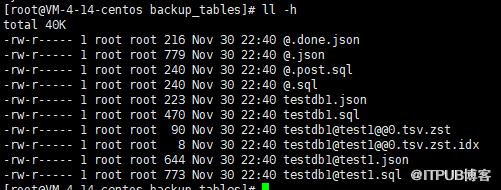
查看备份结果:
至此,备份数据库实例、库、表的命令已简单演示完毕,实际生产使用过程基本会用脚本实现,大家可以自行编写,也可以联系我加群沟通。

2. mysql8.0新增用户及加密规则修改的那些事
3. 比hive快10倍的大数据查询利器-- presto
4. 监控利器出鞘:Prometheus+Grafana监控MySQL、Redis数据库
5. PostgreSQL主从复制--物理复制
6. MySQL传统点位复制在线转为GTID模式复制



原文作者:数据库干货铺;如有侵权,请联系管理员删除。

