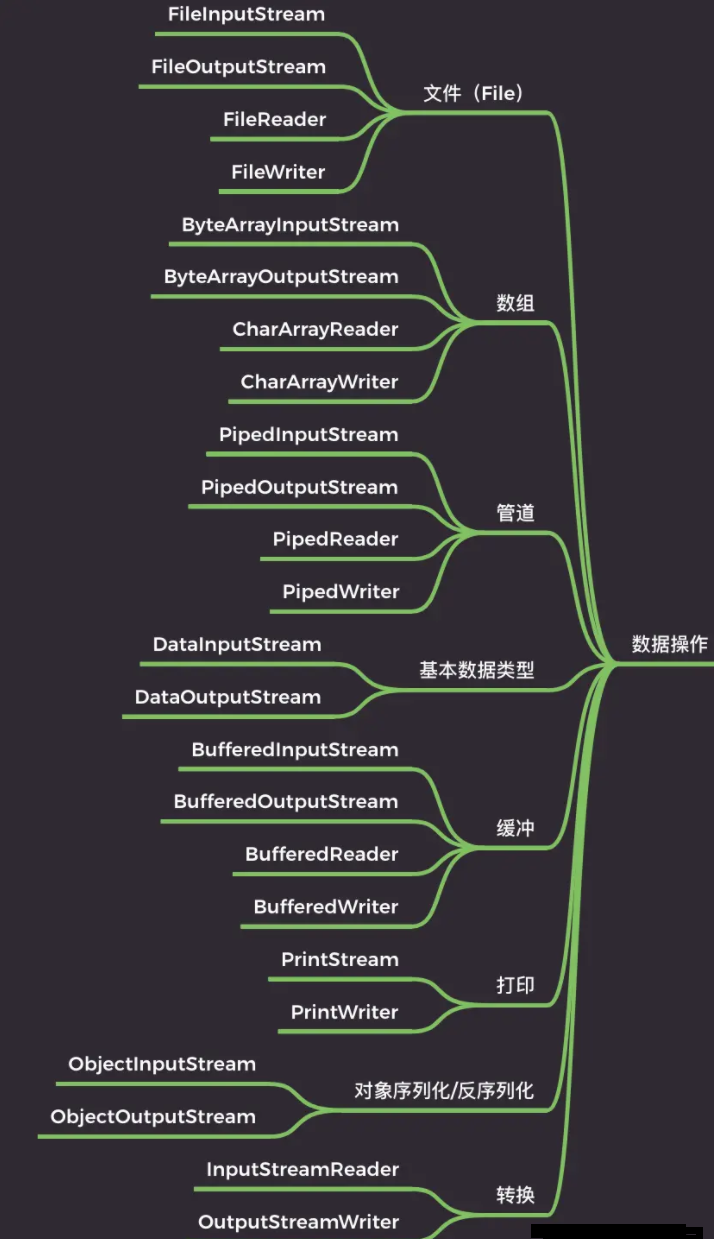
1)文件
文件流也就是直接操作文件的流,可以细分为字节流(FileInputStream 和 FileOuputStream)和字符流(FileReader 和 FileWriter)。
FileInputStream 的例子:
int b
;

FileInputStream fis1
=
new
FileInputStream
(
"fis.txt"
)
;


// 循环读取


while
(
(b
= fis1
.
read
(
)
)
!=
-
1
)
{

    System
.out
.
println
(
(char
)b
)
;


}


// 关闭资源

fis1
.
close
(
)
;
FileOutputStream 的例子:
FileOutputStream fos
=
new
FileOutputStream
(
"fos.txt"
)
;

fos
.
write
(
"Hello World"
.
getBytes
(
)
)
;

fos
.
close
(
)
;
FileReader 的例子:
int b
=
0
;

FileReader fileReader
=
new
FileReader
(
"read.txt"
)
;


// 循环读取


while
(
(b
= fileReader
.
read
(
)
)
!=
-
1
)
{


// 自动提升类型提升为 int 类型,所以用 char 强转

    System
.out
.
println
(
(char
)b
)
;


}


// 关闭流

fileReader
.
close
(
)
;
FileWriter 的例子:
FileWriter fileWriter
=
new
FileWriter
(
"fw.txt"
)
;

char
[
] chars
=
"Hello World"
.
toCharArray
(
)
;

fileWriter
.
write
(chars
,
0
, chars
.length
)
;

fileWriter
.
close
(
)
;
当掌握了文件的输入输出,其他的自然也就掌握了,都大差不差。
2)数组
通常来说,针对文件的读写操作,使用文件流配合缓冲流就够用了,但为了提升效率,频繁地读写文件并不是太好,那么就出现了数组流,有时候也称为内存流。
ByteArrayInputStream 的例子:
InputStream is
=
new
BufferedInputStream
(


new
ByteArrayInputStream
(


"Hello World"
.
getBytes
(StandardCharsets
.
UTF_8
)
)
)
;


//操作

byte
[
] flush
=
new
byte
[
1024
]
;

int len
=
0
;


while
(
-
1
!=
(len
=is
.
read
(flush
)
)
)
{

    System
.out
.
println
(
new
String
(flush
,
0
,len
)
)
;


}


//释放资源

is
.
close
(
)
;
ByteArrayOutputStream 的例子:
ByteArrayOutputStream bos
=
new
ByteArrayOutputStream
(
)
;

byte
[
] info
=
"Hello World"
.
getBytes
(
)
;

bos
.
write
(info
,
0
, info
.length
)
;


//获取数据

byte
[
] dest
=bos
.
toByteArray
(
)
;


//释放资源

bos
.
close
(
)
;
3)管道
Java 中的管道和 Unix/Linux 中的管道不同,在 Unix/Linux 中,不同的进程之间可以通过管道来通信,但 Java 中,通信的双方必须在同一个进程中,也就是在同一个 JVM 中,管道为线程之间的通信提供了通信能力。
一个线程通过 PipedOutputStream 写入的数据可以被另外一个线程通过相关联的 PipedInputStream 读取出来。
final PipedOutputStream pipedOutputStream
=
new
PipedOutputStream
(
)
;

final PipedInputStream pipedInputStream
=
new
PipedInputStream
(pipedOutputStream
)
;


Thread thread1
=
new
Thread
(
new
Runnable
(
)
{

    @Override


public
void
run
(
)
{


try
{

            pipedOutputStream
.
write
(
"Hello World"
.
getBytes
(StandardCharsets
.
UTF_8
)
)
;

            pipedOutputStream
.
close
(
)
;


}
catch
(IOException e
)
{

            e
.
printStackTrace
(
)
;


}


}


}
)
;

//vx耗:mbz_java_panlong 十年开发经验程序员,免费解答,备注“MI”即可

Thread thread2
=
new
Thread
(
new
Runnable
(
)
{

    @Override


public
void
run
(
)
{


try
{

            byte
[
] flush
=
new
byte
[
1024
]
;

            int len
=
0
;


while
(
-
1
!=
(len
=pipedInputStream
.
read
(flush
)
)
)
{

                System
.out
.
println
(
new
String
(flush
,
0
,len
)
)
;


}


            pipedInputStream
.
close
(
)
;


}
catch
(IOException e
)
{

            e
.
printStackTrace
(
)
;


}


}


}
)
;

thread1
.
start
(
)
;

thread2
.
start
(
)
;
4)基本数据类型
基本数据类型输入输出流是一个字节流,该流不仅可以读写字节和字符,还可以读写基本数据类型。
DataInputStream 提供了一系列可以读基本数据类型的方法:
DataInputStream dis
=
new
DataInputStream
(
new
FileInputStream
(“das
.txt”
)
)
;

byte b
= dis
.
readByte
(
)
;

short s
= dis
.
readShort
(
)
;

int i
= dis
.
readInt
(
)
;

long l
= dis
.
readLong
(
)
;

float f
= dis
.
readFloat
(
)
;

double d
= dis
.
readDouble
(
)
;

boolean bb
= dis
.
readBoolean
(
)
;

char ch
= dis
.
readChar
(
)
;
DataOutputStream 提供了一系列可以写基本数据类型的方法:
DataOutputStream das
=
new
DataOutputStream
(
new
FileOutputStream
(“das
.txt”
)
)
;

das
.
writeByte
(
10
)
;

das
.
writeShort
(
100
)
;

das
.
writeInt
(
1000
)
;

das
.
writeLong
(
10000L
)
;

das
.
writeFloat
(
12.34F
)
;

das
.
writeDouble
(
12.56
)
;

das
.
writeBoolean
(
true
)
;

das
.
writeChar
(
'A'
)
;
5)缓冲
CPU 很快,它比内存快 100 倍,比磁盘快百万倍。那也就意味着,程序和内存交互会很快,和硬盘交互相对就很慢,这样就会导致性能问题。
为了减少程序和硬盘的交互,提升程序的效率,就引入了缓冲流,也就是类名前缀带有 Buffer 的那些,比如说 BufferedInputStream、BufferedOutputStream、BufferedReader、BufferedWriter。
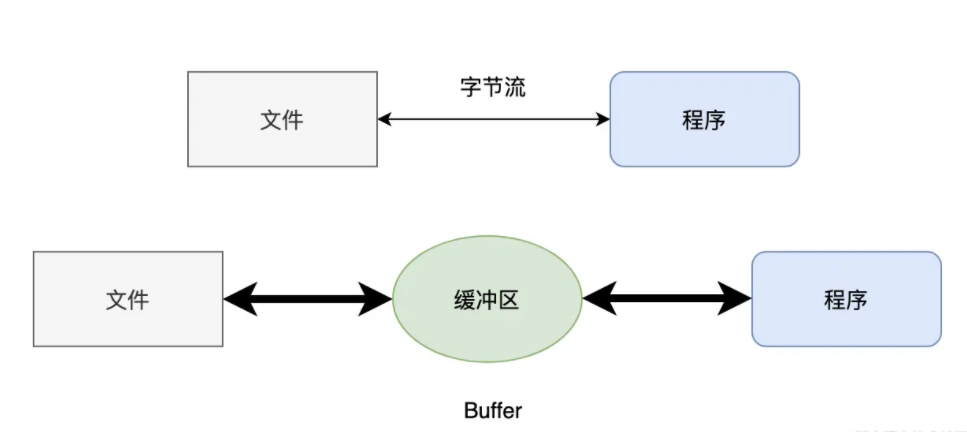
缓冲流在内存中设置了一个缓冲区,只有缓冲区存储了足够多的带操作的数据后,才会和内存或者硬盘进行交互。简单来说,就是一次多读/写点,少读/写几次,这样程序的性能就会提高。
6)打印
恐怕 Java 程序员一生当中最常用的就是打印流了:
System.out 其实返回的就是一个 PrintStream 对象,可以用来打印各式各样的对象。
System.out.println("Hello World!");
PrintStream 最终输出的是字节数据,而 PrintWriter 则是扩展了 Writer 接口,所以它的
print()/println() 方法最终输出的是字符数据。使用上几乎和 PrintStream 一模一样。
StringWriter buffer
=
new
StringWriter
(
)
;


try
(PrintWriter pw
=
new
PrintWriter
(buffer
)
)
{

    pw
.
println
(
"Hello World"
)
;


}

System
.out
.
println
(buffer
.
toString
(
)
)
;
7)对象序列化/反序列化
序列化本质上是将一个 Java 对象转成字节数组,然后可以将其保存到文件中,或者通过网络传输到远程。
ByteArrayOutputStream buffer
=
new
ByteArrayOutputStream
(
)
;


try
(ObjectOutputStream output
=
new
ObjectOutputStream
(buffer
)
)
{

    output
.
writeUTF
(
"Hello World"
)
;


}

System
.out
.
println
(Arrays
.
toString
(buffer
.
toByteArray
(
)
)
)
;
与其对应的,有序列化,就有反序列化,也就是再将字节数组转成 Java 对象的过程。
try
(ObjectInputStream input
=
new
ObjectInputStream
(
new
FileInputStream
(


new
File
(
"Person.txt"
)
)
)
)
{

    String s
= input
.
readUTF
(
)
;


}
8)转换
InputStreamReader 是从字节流到字符流的桥连接,它使用指定的字符集读取字节并将它们解码为字符。
InputStreamReader isr
=
new
InputStreamReader
(


new
FileInputStream
(
"demo.txt"
)
)
;

char
[
]cha
=
new
char
[
1024
]
;

int len
= isr
.
read
(cha
)
;

System
.out
.
println
(
new
String
(cha
,
0
,len
)
)
;

isr
.
close
(
)
;
OutputStreamWriter 将一个字符流的输出对象变为字节流的输出对象,是字符流通向字节流的桥梁。
File f
=
new
File
(
"test.txt"
)
;

Writer out
=
new
OutputStreamWriter
(
new
FileOutputStream
(f
)
)
;
// 字节流变为字符流

out
.
write
(
"hello world!!"
)
;
// 使用字符流输出

out
.
close
(
)
;
经过我的梳理,是不是感觉 IO 也没多少东西!针对不同的场景、不同的业务,选择对应的 IO 流就可以了,用法上就是读和写。
来自 “ ITPUB博客 ” ,链接:https://blog.itpub.net/70010294/viewspace-2848650/ ,如需转载,请注明出处,否则将追究法律责任。

