字符串,是Java中最常用的一个数据类型了。我们在日常开发时候会经常使用字符串做很多的操作。比如字符串的拼接、截断、替换等。
这一篇文章,我们介绍一个比较常见又容易被忽略的一个操作,那就是移除字符串中的空格。
其实,在Java中从字符串中删除空格有很多不同的方法,如trim,replaceAll等。但是,在Java 11添加了一些新的功能,如strip、stripLeading、stripTrailing等。
大多数时候,我们只是使用trim方法来删除多余的空格。但是好像很多人并没有去思考过,是否有更好的方式呢?
当然,trim()在大多数情况下都工作得很好,但是Java中有许多不同的方法。每一种都有自己的优点和缺点。我们如何决定哪种方法最适合我们呢?
接下来我们将介绍几种方法,并对比下他们的区别和优缺点等。
在java中从字符串中删除空格的不同方法
首先,我们来看一下,想要从String中移除空格部分,有多少种方法,作者根据经验,总结了以下7种(JDK原生自带的方法,不包含第三方工具类库中的类似方法):
-
trim() : 删除字符串开头和结尾的空格。
-
strip() : 删除字符串开头和结尾的空格。
-
stripLeading() : 只删除字符串开头的空格
-
stripTrailing() : 只删除字符串的结尾的空格
-
replace() : 用新字符替换所有目标字符
-
replaceAll() : 将所有匹配的字符替换为新字符。此方法将正则表达式作为输入,以标识需要替换的目标子字符串
-
replaceFirst() : 仅将目标子字符串的第一次出现的字符替换为新的字符串
需要注意的最重要的一点是,在Java中String对象是不可变的,这意味着我们不能修改字符串,因此以上所有的方法我们得到的都是一个新的字符串。
接下啦,我们分别针对以上这几个方法学习下用法,了解下其特性。
PS:本文代码都是使用在线运行工具(https://www.jdoodle.com/online-java-compiler/ )执行的,因为我的测试机并未安装Java 11,并且Unicode字符也不完整。如果大家也想实验,建议使用在线工具,选择对应的JDK即可。
trim
trim()是Java开发人员最常用的删除字符串开头和结尾的空格方法。其用法也比较简单:
public
class
StringTest
{


public
static
void
main
(
String
[
] args
)
{

        String stringWithSpace
=
"   Hollis   Is   A   Java   Coder   "
;

        StringTest
.
trimTest
(stringWithSpace
)
;


}


private
static
void
trimTest
(
String stringWithSpace
)
{

        System
.out
.
println
(
"Before trim : \'"
+ stringWithSpace
+
"\'"
)
;

        String stringAfterTrim
= stringWithSpace
.
trim
(
)
;

        System
.out
.
println
(
"After trim : \'"
+ stringAfterTrim
+
"\'"
)
;


}


}
输出结果:
Before trim
:
'   Hollis   Is   A   Java   Coder   '

After trim
:
'Hollis   Is   A   Java   Coder'
如上,使用trim之后,原字符串中开头和结尾部分的空格内容都被移除掉了。
但是不知道大家有没有思考过,trim方法移除的空白内容都包含哪些东西?除了空格以外,还有其他的字符吗?
其实, trim移除的空白字符指的是指ASCII值小于或等于32的任何字符(‘ U+0020 ‘):
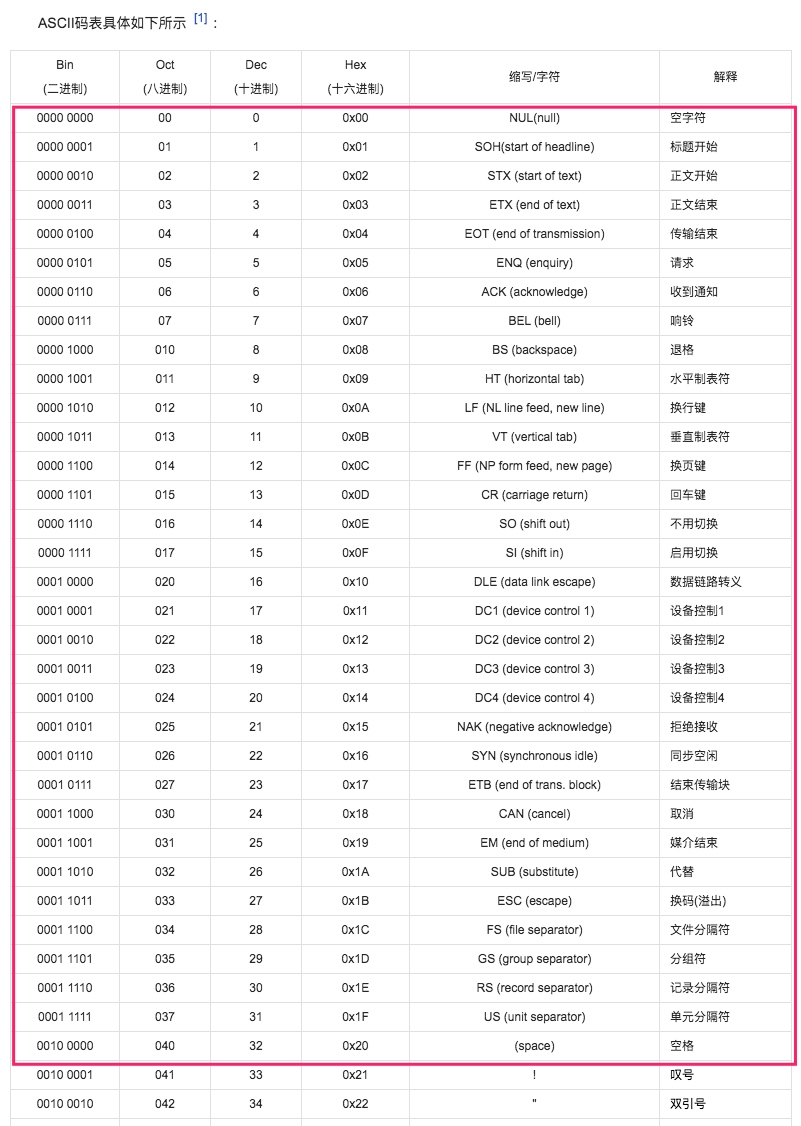
其中包含了空格、换行、退格等字符。
strip()
不知道大家有没有注意到, 在Java 11的发行版中,添加了新的strip()方法来删除字符串中的前导和末尾空格。
已经有了一个trim方法,为什么还要新增一个strip呢?
这其实是是因为trim方法只能针对ASCII值小于等于32的字符进行移除,但是 根据Unicode标准,除了ASCII中的字符以外,还是有很多其他的空白字符的。
而且为了识别这些空格字符,从Java 1.5开始,还在Character类中添加了新的isWhitespace(int)方法。该方法使用unicode来标识空格字符。你可以在http://jkorpela.fi/chars/spaces.html 了解更多关于unicode空格字符的信息。
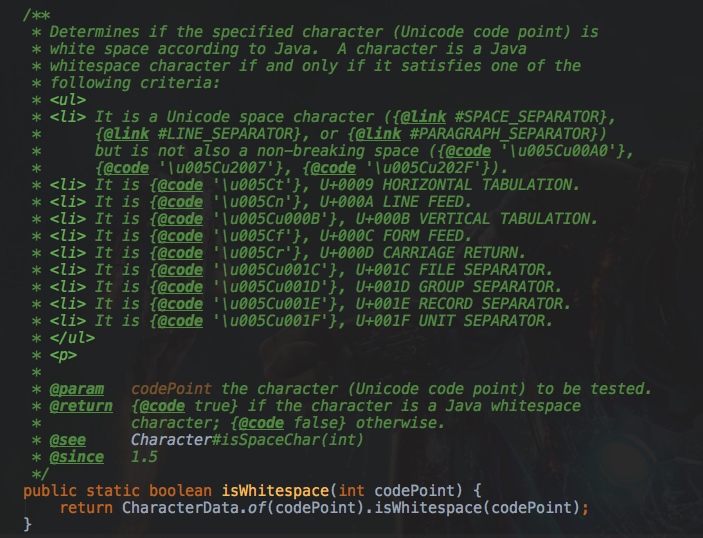
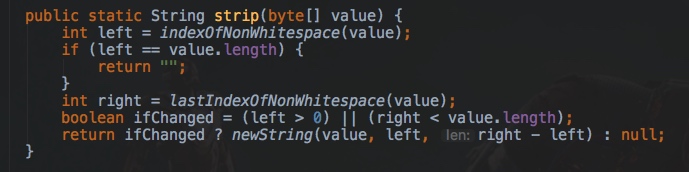
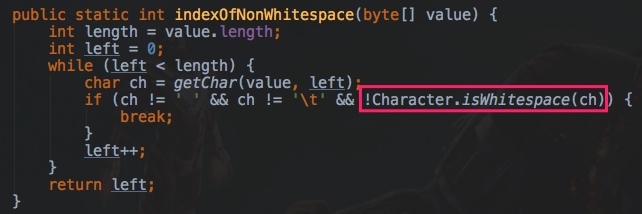
而在Java 11中新增的这个strip方法就是使用这个Character.isWhitespace(int)方法来判断是否为空白字符并删除它们的:
下面我们来看一个使用strip例子:
public
class
StringTest
{


public
static
void
main
(
String args
[
]
)
{

      String stringWithSpace
=
'\u2001'
+
"  Hollis   Is   A   Java   Coder  "
+
'\u2001'
;

        System
.out
.
println
(
"'"
+
'\u2001'
+
"' is space : "
+  Character
.
isWhitespace
(
'\u2001'
)
)
;

        StringTest
.
stripTest
(stringWithSpace
)
;


}

//java学习交流:737251827  进入可领取学习资源及对十年开发经验大佬提问,免费解答!


private
static
void
stripTest
(
String stringWithSpace
)
{

        System
.out
.
println
(
"Before strip : \'"
+ stringWithSpace
+
"\'"
)
;

        String stringAfterTrim
= stringWithSpace
.
strip
(
)
;

        System
.out
.
println
(
"After strip : \'"
+ stringAfterTrim
+
"\'"
)
;


}


}
我们在字符串前后都增加了一个特殊的字符\u2001,这个字符是不在ASCII中的,经过Character.isWhitespace判断他是一个空白字符。然后使用strip进行处理,输出结果如下:
' ' is space
:
true

Before strip
:
'   Hollis   Is   A   Java   Coder   '

After strip
:
'Hollis   Is   A   Java   Coder'
所以,
Java 11 中的 strip 方法要比trim方法更加强大,他可以移除很多不在ASCII中的空白字符,判断方式就是通过Character.isWhitespace方法。
trim 和 strip 方法的区别
上面我们介绍了两个都可以移除字符串开头和结尾的方法,分别是trim 和 strip,再来对比下他们的区别:
trimstripJava 1引入Java 11引入 使用ASCII使用Unicode值 删除开头和结尾的空白字符删除开头和结尾的空白字符删除ASCII值小于或等于’ U+0020 ‘或’ 32 ‘的字符根据unicode删除所有空格字符
stripLeading() 和 stripTrailing()
stripLeading()和stripTrailing()方法也都是在Java 11中添加的。作用分别是删除字符串的开头的空格以及删除字符串的末尾的空格。
与strip方法类似,stripLeading、stripTrailing也使用Character.isWhitespace(int)来标识空白字符。用法也和strip类似:
public
class
StringTest
{


public
static
void
main
(
String args
[
]
)
{

      String stringWithSpace
=
'\u2001'
+
"  Hollis   Is   A   Java   Coder  "
+
'\u2001'
;

        System
.out
.
println
(
"'"
+
'\u2001'
+
"' is space : "
+  Character
.
isWhitespace
(
'\u2001'
)
)
;

        StringTest
.
stripLeadingTest
(stringWithSpace
)
;

        StringTest
.
stripTrailingTest
(stringWithSpace
)
;


}


private
static
void
stripLeadingTest
(
String stringWithSpace
)
{

        System
.out
.
println
(
"Before stripLeading : \'"
+ stringWithSpace
+
"\'"
)
;

        String stringAfterTrim
= stringWithSpace
.
stripLeading
(
)
;

        System
.out
.
println
(
"After stripLeading : \'"
+ stringAfterTrim
+
"\'"
)
;


}


private
static
void
stripTrailingTest
(
String stringWithSpace
)
{

        System
.out
.
println
(
"Before stripTrailing : \'"
+ stringWithSpace
+
"\'"
)
;

        String stringAfterTrim
= stringWithSpace
.
stripTrailing
(
)
;

        System
.out
.
println
(
"After stripTrailing : \'"
+ stringAfterTrim
+
"\'"
)
;


}


}
输出结果:
' ' is space
:
true

Before stripLeading
:
'   Hollis   Is   A   Java   Coder   '

After stripLeading
:
'Hollis   Is   A   Java   Coder   '

Before stripTrailing
:
'   Hollis   Is   A   Java   Coder   '

After stripTrailing
:
'   Hollis   Is   A   Java   Coder'
replace
移除字符串中的空白字符,除了使用trim、strip以外,还有一个办法,那就是使用replace方法把其中的空白字符替换掉。
replace是从java 1.5中添加的,可以用指定的字符串替换每个目标子字符串。
此方法替换所有匹配的目标元素,使用方式如下:
public
class
StringTest
{


public
static
void
main
(
String args
[
]
)
{

        String stringWithSpace
=
"  Hollis   Is   A   Java   Coder  "
;

        StringTest
.
replaceTest
(stringWithSpace
)
;


}


private
static
void
replaceTest
(
String stringWithSpace
)
{

        System
.out
.
println
(
"Before replace : \'"
+ stringWithSpace
+
"\'"
)
;

        String stringAfterTrim
= stringWithSpace
.
replace
(
" "
,
""
)
;

        System
.out
.
println
(
"After replace : \'"
+ stringAfterTrim
+
"\'"
)
;


}


}
结果:
Before replace
:
'  Hollis   Is   A   Java   Coder  '

After replace
:
'HollisIsAJavaCoder'
可见,以上使用replace方法可以替换掉字符串中的所有空白字符。
特别需要注意的是,replace方法和trim方法一样,只能替换掉ASCII中的空白字符。
replaceAll
replaceAll是Java 1.4中添加的 最强大的字符串操作方法之一。我们可以将这种方法用于许多目的。
使用replaceAll()方法,我们可以使用正则表达式来用来识别需要被替换的目标字符内容。使用正则表达式,就可以实现很多功能,如删除所有空格,删除开头空格,删除结尾空格等等。
我们只需要用正确的替换参数创建正确的正则表达式。一些正则表达式的例子如下:
\s
+   所有的空白字符


^\s
+      字符串开头的所有空白字符

\s
+$      字符串结尾的所有空白字符
注意,在java中要添加
/我们必须使用转义字符,所以对于
\s+ 我们必须使用
\\s+
public
class
StringTest
{


public
static
void
main
(
String args
[
]
)
{

        String stringWithSpace
=
"  Hollis   Is   A   Java   Coder  "
;

        StringTest
.
replaceAllTest
(stringWithSpace
,
" "
)
;

        StringTest
.
replaceAllTest
(stringWithSpace
,
"\\s+"
)
;

        StringTest
.
replaceAllTest
(stringWithSpace
,
"^\\s+"
)
;

        StringTest
.
replaceAllTest
(stringWithSpace
,
"\\s+$"
)
;


}


private
static
void
replaceAllTest
(
String stringWithSpace
,String regex
)
{

        System
.out
.
println
(
"Before replaceAll with '"
+ regex
+
"': \'"
+ stringWithSpace
+
"\'"
)
;

        String stringAfterTrim
= stringWithSpace
.
replaceAll
(regex
,
""
)
;

        System
.out
.
println
(
"After replaceAll with '"
+ regex
+
"': \'"
+ stringAfterTrim
+
"\'"
)
;


}


}
结果:
Before replaceAll
with
' '
:
'  Hollis   Is   A   Java   Coder  '

After replaceAll
with
' '
:
'HollisIsAJavaCoder'

Before replaceAll
with
'\s+'
:
'  Hollis   Is   A   Java   Coder  '

After replaceAll
with
'\s+'
:
'HollisIsAJavaCoder'

Before replaceAll
with
'^\s+'
:
'  Hollis   Is   A   Java   Coder  '

After replaceAll
with
'^\s+'
:
'Hollis   Is   A   Java   Coder  '

Before replaceAll
with
'\s+$'
:
'  Hollis   Is   A   Java   Coder  '

After replaceAll
with
'\s+$'
:
'  Hollis   Is   A   Java   Coder'
正如我们所看到的,如果将replaceAll()与适当的正则表达式一起使用,它将是非常强大的方法。
replaceFirst
replaceFirst方法也是在java 1.4中添加的,它只将给定正则表达式的第一个匹配项替换为替换字符串。
如果您只需要替换第一次出现的情况,那么这个方法非常有用。例如,如果我们只需要删除前导空格,我们可以使用
\\s+或
^\\s+。
我们还可以通过使用
\\s+$正则表达式使用此方法来删除末尾空格。因为这个表达式将只匹配行的最后一个空格。因此最后的空格被认为是这个方法的第一个匹配。
让我们举一个从字符串中删除前导和尾随空格的例子
public
class
StringTest
{


public
static
void
main
(
String args
[
]
)
{

        String stringWithSpace
=
"  Hollis   Is   A   Java   Coder  "
;

        StringTest
.
replaceFirstTest
(stringWithSpace
,
" "
)
;

        StringTest
.
replaceFirstTest
(stringWithSpace
,
"\\s+"
)
;

        StringTest
.
replaceFirstTest
(stringWithSpace
,
"^\\s+"
)
;

        StringTest
.
replaceFirstTest
(stringWithSpace
,
"\\s+$"
)
;


}

//java学习交流:737251827  进入可领取学习资源及对十年开发经验大佬提问,免费解答!


private
static
void
replaceFirstTest
(
String stringWithSpace
,String regex
)
{

        System
.out
.
println
(
"Before replaceFirst with '"
+ regex
+
"': \'"
+ stringWithSpace
+
"\'"
)
;

        String stringAfterTrim
= stringWithSpace
.
replaceFirst
(regex
,
""
)
;

        System
.out
.
println
(
"After replaceFirst with '"
+ regex
+
"': \'"
+ stringAfterTrim
+
"\'"
)
;


}


}
结果:
Before replaceFirst
with
' '
:
'  Hollis   Is   A   Java   Coder  '

After replaceFirst
with
' '
:
' Hollis   Is   A   Java   Coder  '

Before replaceFirst
with
'\s+'
:
'  Hollis   Is   A   Java   Coder  '

After replaceFirst
with
'\s+'
:
'Hollis   Is   A   Java   Coder  '

Before replaceFirst
with
'^\s+'
:
'  Hollis   Is   A   Java   Coder  '

After replaceFirst
with
'^\s+'
:
'Hollis   Is   A   Java   Coder  '

Before replaceFirst
with
'\s+$'
:
'  Hollis   Is   A   Java   Coder  '

After replaceFirst
with
'\s+$'
:
'  Hollis   Is   A   Java   Coder'
总结
本文介绍了7种移除字符串中的空白字符的方法。
想要直接移除掉字符串开头的空白字符,可以使用stripLeading、replaceAll和replaceFirst
想要直接移除掉字符串末尾的空白字符,可以使用stripTrailing、replaceAll和replaceFirst
想要同时移除掉字符串开头和结尾的空白字符,可以使用strip、trim
想要移除掉字符串中的所有空白字符,可以使用replace和replaceAll
而Java 11种新增的strip、stripTrailing以及stripLeading方法,可以移除的字符要比其他方法多,他可以移除的空白字符不仅仅局限于ASCII中的字符,而是Unicode中的所有空白字符,具体判断方式可以使用Character.isWhitespace进行判断。
(全文完)
来自 “ ITPUB博客 ” ,链接:https://blog.itpub.net/70010294/viewspace-2847704/ ,如需转载,请注明出处,否则将追究法律责任。

