2.1 文件对象
文件和文件夹都是用File代表
-
创建一个文件对象
使用绝对路径或者相对路径创建File对象
package file
;


import java
.io
.File
;


public
class
TestFile
{


public
static
void
main
(
String
[
] args
)
{


// 绝对路径

        File f1
=
new
File
(
"d:/LOLFolder"
)
;

        System
.out
.
println
(
"f1的绝对路径:"
+ f1
.
getAbsolutePath
(
)
)
;


// 相对路径,相对于工作目录,如果在eclipse中,就是项目目录

        File f2
=
new
File
(
"LOL.exe"
)
;

        System
.out
.
println
(
"f2的绝对路径:"
+ f2
.
getAbsolutePath
(
)
)
;


// 把f1作为父目录创建文件对象

        File f3
=
new
File
(f1
,
"LOL.exe"
)
;

        System
.out
.
println
(
"f3的绝对路径:"
+ f3
.
getAbsolutePath
(
)
)
;


}


}

-
文件常用方法1
注意1: 需要在D:\LOLFolder确实存在一个LOL.exe,才可以看到对应的文件长度、修改时间等信息
注意2: renameTo方法用于对物理文件名称进行修改,但是并不会修改File对象的name属性。
package file
;


import java
.io
.File
;


import java
.util
.Date
;


public
class
TestFile
{


public
static
void
main
(
String
[
] args
)
{


        File f
=
new
File
(
"d:/LOLFolder/LOL.exe"
)
;

        System
.out
.
println
(
"当前文件是:"
+f
)
;


//文件是否存在

        System
.out
.
println
(
"判断是否存在:"
+f
.
exists
(
)
)
;


//是否是文件夹

        System
.out
.
println
(
"判断是否是文件夹:"
+f
.
isDirectory
(
)
)
;


//是否是文件(非文件夹)

        System
.out
.
println
(
"判断是否是文件:"
+f
.
isFile
(
)
)
;


//文件长度

        System
.out
.
println
(
"获取文件的长度:"
+f
.
length
(
)
)
;


//文件最后修改时间

        long time
= f
.
lastModified
(
)
;

        Date d
=
new
Date
(time
)
;

        System
.out
.
println
(
"获取文件的最后修改时间:"
+d
)
;


//设置文件修改时间为1970.1.1 08:00:00

        f
.
setLastModified
(
0
)
;


//文件重命名

        File f2
=
new
File
(
"d:/LOLFolder/DOTA.exe"
)
;

        f
.
renameTo
(f2
)
;

        System
.out
.
println
(
"把LOL.exe改名成了DOTA.exe"
)
;


        System
.out
.
println
(
"注意: 需要在D:\\LOLFolder确实存在一个LOL.exe,\r\n才可以看到对应的文件长度、修改时间等信息"
)
;


}


}
-
文件常用方法2
package file
;


import java
.io
.File
;


import java
.io
.IOException
;


public
class
TestFile
{


public
static
void
main
(String
[
] args
) throws IOException
{


        File f
=
new
File
(
"d:/LOLFolder/skin/garen.ski"
)
;


// 以字符串数组的形式,返回当前文件夹下的所有文件(不包含子文件及子文件夹)

        f
.
list
(
)
;


// 以文件数组的形式,返回当前文件夹下的所有文件(不包含子文件及子文件夹)

        File
[
]fs
= f
.
listFiles
(
)
;


// 以字符串形式返回获取所在文件夹

        f
.
getParent
(
)
;


// 以文件形式返回获取所在文件夹

        f
.
getParentFile
(
)
;


// 创建文件夹,如果父文件夹skin不存在,创建就无效

        f
.
mkdir
(
)
;


// 创建文件夹,如果父文件夹skin不存在,就会创建父文件夹

        f
.
mkdirs
(
)
;


// 创建一个空文件,如果父文件夹skin不存在,就会抛出异常

        f
.
createNewFile
(
)
;


// 所以创建一个空文件之前,通常都会创建父目录

        f
.
getParentFile
(
)
.
mkdirs
(
)
;


// 列出所有的盘符c: d: e: 等等

        f
.
listRoots
(
)
;


// 刪除文件

        f
.
delete
(
)
;


// JVM结束的时候,刪除文件,常用于临时文件的删除

        f
.
deleteOnExit
(
)
;


}


}
-
练习-遍历文件夹
一般说来操作系统都会安装在C盘,所以会有一个 C:\WINDOWS目录。
遍历这个目录下所有的文件(不用遍历子目录)
找出这些文件里,最大的和最小(非0)的那个文件,打印出他们的文件名
注: 最小的文件不能是0长度
package file
;


import java
.io
.File
;


public
class
TestFile
{


public
static
void
main
(
String
[
] args
)
{

        File f
=
new
File
(
"c:\\windows"
)
;

        File
[
] fs
= f
.
listFiles
(
)
;


if
(
null
==fs
)


return
;

        long minSize
= Integer
.
MAX_VALUE
;

        long maxSize
=
0
;

        File minFile
=
null
;

        File maxFile
=
null
;


for
(File file
: fs
)
{


if
(file
.
isDirectory
(
)
)


continue
;


if
(file
.
length
(
)
>maxSize
)
{

                maxSize
= file
.
length
(
)
;

                maxFile
= file
;


}


if
(file
.
length
(
)
!=
0
&& file
.
length
(
)
<minSize
)
{

                minSize
= file
.
length
(
)
;

                minFile
= file
;


}


}

        System
.out
.
printf
(
"最大的文件是%s,其大小是%,d字节%n"
,maxFile
.
getAbsoluteFile
(
)
,maxFile
.
length
(
)
)
;

        System
.out
.
printf
(
"最小的文件是%s,其大小是%,d字节%n"
,minFile
.
getAbsoluteFile
(
)
,minFile
.
length
(
)
)
;


}


}
-
练习-遍历子文件夹
使用递归来进行文件夹的遍历
package file
;


!
[image
.png
]
(https
:
/
/p1
-juejin
.byteimg
.com
/tos
-cn
-i
-k3u1fbpfcp
/
0fb606b0616d4de291553986e8058a93
~tplv
-k3u1fbpfcp
-watermark
.image
?
)


import java
.io
.File
;


public
class
TestFile
{


static long minSize
= Integer
.
MAX_VALUE
;


static long maxSize
=
0
;


static File minFile
=
null
;


static File maxFile
=
null
;


//使用递归来遍历一个文件夹的子文件


public
static
void
listFiles
(
File file
)
{


if
(file
.
isFile
(
)
)
{


if
(file
.
length
(
)
>maxSize
)
{

                maxSize
= file
.
length
(
)
;

                maxFile
= file
;


}


if
(file
.
length
(
)
!=
0
&& file
.
length
(
)
<minSize
)
{

                minSize
= file
.
length
(
)
;

                minFile
= file
;


}


return
;


}


if
(file
.
isDirectory
(
)
)
{

            File
[
] fs
= file
.
listFiles
(
)
;


if
(
null
!=fs
)


for
(File f
: fs
)
{


listFiles
(f
)
;


}


}


}


public
static
void
main
(
String
[
] args
)
{

        File f
=
new
File
(
"c:\\windows"
)
;


listFiles
(f
)
;

        System
.out
.
printf
(
"最大的文件是%s,其大小是%,d字节%n"
,maxFile
.
getAbsoluteFile
(
)
,maxFile
.
length
(
)
)
;

        System
.out
.
printf
(
"最小的文件是%s,其大小是%,d字节%n"
,minFile
.
getAbsoluteFile
(
)
,minFile
.
length
(
)
)
;


}


}
2.2 什么是流
什么是流(Stream),流就是一系列的数据
-
什么是流
当不同的介质之间有数据交互的时候,JAVA就使用流来实现。 数据源可以是文件,还可以是数据库,网络甚至是其他的程序。
比如读取文件的数据到程序中,站在程序的角度来看,就叫做输入流: 输入流: InputStream 输出流:OutputStream

-
文件输入流
如下代码,就建立了一个文件输入流,这个流可以用来把数据从硬盘的文件,读取到JVM(内存)。
目前代码只是建立了流,还没有开始读取,真正的读取在下个章节讲解。
package stream
;


import java
.io
.File
;


import java
.io
.FileInputStream
;


import java
.io
.IOException
;


public
class
TestStream
{


public
static
void
main
(
String
[
] args
)
{


try
{

            File f
=
new
File
(
"d:/lol.txt"
)
;


// 创建基于文件的输入流

            FileInputStream fis
=
new
FileInputStream
(f
)
;


// 通过这个输入流,就可以把数据从硬盘,读取到Java的虚拟机中来,也就是读取到内存中


}
catch
(IOException e
)
{


// TODO Auto-generated catch block

            e
.
printStackTrace
(
)
;


}


}


}
-
练习-流
public
class
TestStream
{


public
static
void
main
(
String
[
] args
)
{


try
{

            File f
=
new
File
(
"d:/lol.txt"
)
;

            FileOutputStream fos
=
new
FileOutputStream
(f
)
;


}
catch
(IOException e
)
{

            e
.
printStackTrace
(
)
;


}


}


}
2.3 字节流
InputStream字节输入流,OutputStream字节输出流,用于以字节的形式读取和写入数据。
-
ASCII码 概念
所有的数据存放在计算机中都是以数字的形式存放的。 所以 字母就需要转换为数字才能够存放。 比如A就对应的数字65,a对应的数字97. 不同的字母和符号对应不同的数字,就是一张码表。ASCII是这样的一种码表。 只 包含简单的英文字母,符号,数字等等。 不包含中文,德文,俄语等复杂的。
-
以字节流的形式读取文件内容
InputStream是字节输入流,同时也是抽象类,只提供方法声明,不提供方法的具体实现。 FileInputStream 是InputStream子类,以FileInputStream 为例进行文件读取
package stream
;


import java
.io
.File
;


import java
.io
.FileInputStream
;


import java
.io
.IOException
;


public
class
TestStream
{


public
static
void
main
(
String
[
] args
)
{


try
{


//准备文件lol.txt其中的内容是AB,对应的ASCII分别是65 66

            File f
=
new
File
(
"d:/lol.txt"
)
;


//创建基于文件的输入流

            FileInputStream fis
=
new
FileInputStream
(f
)
;


//创建字节数组,其长度就是文件的长度

            byte
[
] all
=
new
byte
[
(int
) f
.
length
(
)
]
;


//以字节流的形式读取文件所有内容

            fis
.
read
(all
)
;


for
(byte b
: all
)
{


//打印出来是65 66

                System
.out
.
println
(b
)
;


}


//每次使用完流,都应该进行关闭

            fis
.
close
(
)
;


}
catch
(IOException e
)
{


// TODO Auto-generated catch block

            e
.
printStackTrace
(
)
;


}


}


}
-
以字节流的形式向文件写入数据
OutputStream是字节输出流,同时也是抽象类,只提供方法声明,不提供方法的具体实现。FileOutputStream 是OutputStream子类,以FileOutputStream 为例向文件写出数据。
注: 如果文件d:/lol2.txt不存在,写出操作会自动创建该文件。 但是如果是文件 d:/xyz/lol2.txt,而目录xyz又不存在,会抛出异常
package stream
;


import java
.io
.File
;


import java
.io
.FileOutputStream
;


import java
.io
.IOException
;


public
class
TestStream
{


public
static
void
main
(
String
[
] args
)
{


try
{


// 准备文件lol2.txt其中的内容是空的

            File f
=
new
File
(
"d:/lol2.txt"
)
;


// 准备长度是2的字节数组,用88,89初始化


//其对应的字符分别是X,Y

            byte data
[
]
=
{
88
,
89
}
;


// 创建基于文件的输出流

            FileOutputStream fos
=
new
FileOutputStream
(f
)
;


// 把数据写入到输出流

            fos
.
write
(data
)
;


// 关闭输出流

            fos
.
close
(
)
;


}
catch
(IOException e
)
{


// TODO Auto-generated catch block

            e
.
printStackTrace
(
)
;


}


}


}
-
练习-写入数据到文件
中的例子,当lol2.txt不存在的时候,是会自动创建lol2.txt文件的。但是,如果是写入数据到d:/xyz/lol2.txt,而目录xyz又不存在的话,就会抛出异常。 那么怎么自动创建xyz目录? 如果是多层目录 d:/xyz/abc/def/lol2.txt 呢?
// 准备文件lol2.txt其中的内容是空的

            File f
=
new
File
(
"d:/xyz/abcd/lol.txt"
)
;


//获取文件所在的目录

            File dir
= f
.
getParentFile
(
)
;


if
(
!dir
.
exists
(
)
)
{


//dir.mkdir(); //使用mkdir会抛出异常,因为该目录的父目录也不存在

                dir
.
mkdirs
(
)
;
//使用mkdirs则会把不存在的目录都创建好


}
-
练习-拆分文件
找到一个大于100k的文件,按照100k为单位,拆分成多个子文件,并且以编号作为文件名结束。 比如文件 eclipse.exe,大小是309k。 拆分之后,成为 eclipse.exe-0 eclipse.exe-1 eclipse.exe-2 eclipse.exe-3
package com
.company
;


import java
.io
.File
;


import java
.io
.FileInputStream
;


import java
.io
.FileOutputStream
;


import java
.io
.IOException
;


import java
.util
.Arrays
;


public
class
TestStream
{


/**

     * 拆分的思路,先把源文件的所有内容读取到内存中,然后从内存中挨个分到子文件里

     * @param srcFile 要拆分的源文件

     * @param eachSize 按照这个大小,拆分

     */


private
static
void
splitFile
(
File srcFile
,int eachSize
)
{


if
(srcFile
.
length
(
)
==
0
)


throw
new
RuntimeException
(
"文件长度为0,不可拆分"
)
;

        byte
[
] fileContent
=
new
byte
[
(int
) srcFile
.
length
(
)
]
;


try
{


//创建基于文件的输入流

            FileInputStream fis
=
new
FileInputStream
(srcFile
)
;

            fis
.
read
(fileContent
)
;

            fis
.
close
(
)
;


}
catch
(IOException e
)
{

            e
.
printStackTrace
(
)
;


}


// 计算需要被划分成多少份子文件

        int fileNumber
;


if
(
0
== fileContent
.length
% eachSize
)

            fileNumber
=
(int
)
(fileContent
.length
/ eachSize
)
;


else

            fileNumber
=
(int
)
(fileContent
.length
/ eachSize
)
+
1
;


for
(int i
=
0
;i
< fileNumber
;i
++
)
{

            String eachFileName
= srcFile
.
getName
(
)
+
"-"
+ i
;

            File eachFile
=
new
File
(srcFile
.
getParent
(
)
,eachFileName
)
;

            byte
[
] eachContent
;


// 从源文件的内容里,复制部分数据到子文件


// 除开最后一个文件,其他文件大小都是100k


// 最后一个文件的大小是剩余的


if
(i
!= fileNumber
-
1
)
{

                eachContent
= Arrays
.
copyOfRange
(fileContent
,eachSize
*i
,eachSize
)
;


}


else
{

                eachContent
= Arrays
.
copyOfRange
(fileContent
, eachSize
* i
, fileContent
.length
)
;


}


try
{


// 写出去

                FileOutputStream fos
=
new
FileOutputStream
(eachFile
)
;

                fos
.
write
(eachContent
)
;

                fos
.
close
(
)
;

                System
.out
.
printf
(
"输出子文件%s,其大小是 %d字节%n"
, eachFile
.
getAbsoluteFile
(
)
, eachFile
.
length
(
)
)
;


}


catch
(IOException e
)
{

                e
.
printStackTrace
(
)
;


}


}


}


public
static
void
main
(
String
[
] args
)
{

        int eachSize
=
100
*
1024
;
// 100k

        File srcFile
=
new
File
(
"d:/eclipse.exe"
)
;


splitFile
(srcFile
, eachSize
)
;


}


}
-
练习-合并文件
把上述拆分出来的文件,合并成一个原文件。
以是否能正常运行,验证合并是否正确
package com
.company
;


import java
.io
.
*
;


import java
.util
.Arrays
;


public
class
TestStream
{


/**

     * 合并的思路,就是从eclipse.exe-0开始,读取到一个文件,就开始写出到 eclipse.exe中,直到没有文件可以读

     * @param folder

     *            需要合并的文件所处于的目录

     * @param fileName

     *            需要合并的文件的名称

     * @throws FileNotFoundException

     */


private
static
void
mergeFile
(
String folder
, String fileName
)
{


try
{


// 合并的目标文件

            File destFile
=
new
File
(folder
, fileName
)
;

            FileOutputStream fos
=
new
FileOutputStream
(destFile
)
;

            int index
=
0
;


while
(
true
)
{


//子文件

                File eachFile
=
new
File
(folder
, fileName
+
"-"
+ index
++
)
;


//如果子文件不存在了就结束


if
(
!eachFile
.
exists
(
)
)


break
;


//读取子文件的内容

                FileInputStream fis
=
new
FileInputStream
(eachFile
)
;

                byte
[
] eachContent
=
new
byte
[
(int
) eachFile
.
length
(
)
]
;

                fis
.
read
(eachContent
)
;

                fis
.
close
(
)
;


//把子文件的内容写出去

                fos
.
write
(eachContent
)
;

                fos
.
flush
(
)
;

                System
.out
.
printf
(
"把子文件 %s写出到目标文件中%n"
,eachFile
)
;


}

            fos
.
close
(
)
;

            System
.out
.
printf
(
"最后目标文件的大小:%,d字节"
, destFile
.
length
(
)
)
;


}
catch
(FileNotFoundException e
)
{


// TODO Auto-generated catch block

            e
.
printStackTrace
(
)
;


}
catch
(IOException e
)
{


// TODO Auto-generated catch block

            e
.
printStackTrace
(
)
;


}


}


public
static
void
main
(
String
[
] args
)
{


mergeFile
(
"d:/"
,
"eclipse.exe"
)
;


}


}
2.4 关闭流的方式
所有的流,无论是输入流还是输出流,使用完毕之后,都应该关闭。 如果不关闭,会产生对资源占用的浪费。 当量比较大的时候,会影响到业务的正常开展。
-
在try中关闭
在try的作用域里关闭文件输入流,在前面的示例中都是使用这种方式,这样做有一个弊端; 如果文件不存在,或者读取的时候出现问题而抛出异常,那么就不会执行这一行关闭流的代码,存在巨大的资源占用隐患。 不推荐使用
try
{

            File f
=
new
File
(
"d:/lol.txt"
)
;

            FileInputStream fis
=
new
FileInputStream
(f
)
;

            byte
[
] all
=
new
byte
[
(int
) f
.
length
(
)
]
;

            fis
.
read
(all
)
;


for
(byte b
: all
)
{

                System
.out
.
println
(b
)
;


}


// 在try 里关闭流

            fis
.
close
(
)
;


}
catch
(IOException e
)
{

            e
.
printStackTrace
(
)
;


}
-
在finally中关闭
这是标准的关闭流的方式
-
首先把流的引用声明在try的外面,如果声明在try里面,其作用域无法抵达finally.
-
在finally关闭之前,要先判断该引用是否为空
-
关闭的时候,需要再一次进行try catch处理
这是标准的严谨的关闭流的方式,但是看上去很繁琐,所以写不重要的或者测试代码的时候,都会采用上面的 有隐患try的方式,因为不麻烦~
public
static
void
main
(
String
[
] args
)
{

        File f
=
new
File
(
"d:/lol.txt"
)
;

        FileInputStream fis
=
null
;


try
{

            fis
=
new
FileInputStream
(f
)
;

            byte
[
] all
=
new
byte
[
(int
) f
.
length
(
)
]
;

            fis
.
read
(all
)
;


for
(byte b
: all
)
{

                System
.out
.
println
(b
)
;


}


}
catch
(IOException e
)
{

            e
.
printStackTrace
(
)
;


}
finally
{


// 在finally 里关闭流


if
(
null
!= fis
)


try
{

                    fis
.
close
(
)
;


}
catch
(IOException e
)
{


// TODO Auto-generated catch block

                    e
.
printStackTrace
(
)
;


}


}


}
-
使用try()的方式
把流定义在try()里,try,catch或者finally结束的时候,会自动关闭 这种编写代码的方式叫做 try-with-resources, 这是从JDK7开始支持的技术
所有的流,都实现了一个接口叫做 AutoCloseable,任何类实现了这个接口,都可以在try()中进行实例化。 并且在try, catch, finally结束的时候自动关闭,回收相关资源。
package stream
;


import java
.io
.File
;


import java
.io
.FileInputStream
;


import java
.io
.IOException
;


public
class
TestStream
{


public
static
void
main
(
String
[
] args
)
{

        File f
=
new
File
(
"d:/lol.txt"
)
;


//把流定义在try()里,try,catch或者finally结束的时候,会自动关闭


try
(FileInputStream fis
=
new
FileInputStream
(f
)
)
{

            byte
[
] all
=
new
byte
[
(int
) f
.
length
(
)
]
;

            fis
.
read
(all
)
;


for
(byte b
: all
)
{

                System
.out
.
println
(b
)
;


}


}
catch
(IOException e
)
{

            e
.
printStackTrace
(
)
;


}


}


}
2.5 字符流
Reader字符输入流,Writer字符输出流,专门用于字符的形式读取和写入数据。
-
使用字符流读取文件
FileReader 是Reader子类,以FileReader 为例进行文件读取。
ackage stream
;


import java
.io
.File
;


import java
.io
.FileReader
;


import java
.io
.IOException
;


public
class
TestStream
{


public
static
void
main
(
String
[
] args
)
{


// 准备文件lol.txt其中的内容是AB

        File f
=
new
File
(
"d:/lol.txt"
)
;


// 创建基于文件的Reader


try
(FileReader fr
=
new
FileReader
(f
)
)
{


// 创建字符数组,其长度就是文件的长度

            char
[
] all
=
new
char
[
(int
) f
.
length
(
)
]
;


// 以字符流的形式读取文件所有内容

            fr
.
read
(all
)
;


for
(char b
: all
)
{


// 打印出来是A B

                System
.out
.
println
(b
)
;


}


}
catch
(IOException e
)
{


// TODO Auto-generated catch block

            e
.
printStackTrace
(
)
;


}


}


}
-
使用字符流把字符串写入到文件
FileWriter 是Writer的子类,以FileWriter 为例把字符串写入到文件
package stream
;


import java
.io
.File
;


import java
.io
.FileWriter
;


import java
.io
.IOException
;


public
class
TestStream
{


public
static
void
main
(
String
[
] args
)
{


// 准备文件lol2.txt

        File f
=
new
File
(
"d:/lol2.txt"
)
;


// 创建基于文件的Writer


try
(FileWriter fr
=
new
FileWriter
(f
)
)
{


// 以字符流的形式把数据写入到文件中

            String data
=
"abcdefg1234567890"
;

            char
[
] cs
= data
.
toCharArray
(
)
;

            fr
.
write
(cs
)
;


}
catch
(IOException e
)
{


// TODO Auto-generated catch block

            e
.
printStackTrace
(
)
;


}


}


}
-
练习-文件加密
准备一个 文本文件(非二进制),其中包含 的字符和中文字符,设计一个方法。
public static void encodeFile(File encodingFile, File encodedFile);
在这个方法中把encodingFile的内容进行加密,然后保存到encodedFile文件中。 加密算法: 数字: 如果不是9的数字,在原来的基础上加1,比如5变成6, 3变成4 如果是9的数字,变成0 字母字符: 如果是非z字符,向右移动一个,比如d变成e, G变成H 如果是z,z->a, Z-A。 字符需要保留大小写 非字母字符 比如',&^ 保留不变,中文也保留不变 建议: 使用以前学习的练习题中的某个Java文件,比如循环练习,就有很多的字符和数字
package com
.company
;


import java
.io
.
*
;


public
class
TestStream
{


public
static
void
encodeFile
(
File encodingFile
, File encodedFile
)
{


//encoding file  encoded file

        char
[
]all
=
new
char
[
(int
)encodingFile
.
length
(
)
]
;


try
(FileReader fr
=
new
FileReader
(encodingFile
)
)
{


// 以字符流的形式读取文件所有内容

            fr
.
read
(all
)
;


}
catch
(FileNotFoundException e
)
{

            e
.
printStackTrace
(
)
;


}
catch
(IOException e
)
{

            e
.
printStackTrace
(
)
;


}

//java学习交流:737251827  进入可领取学习资源及对十年开发经验大佬提问,免费解答!


try
(FileWriter fw
=
new
FileWriter
(encodedFile
)
)
{


for
(int index
=
0
;index
< all
.length
;index
++
)
{


if
(Character
.
isLetter
(all
[index
]
)
| Character
.
isDigit
(all
[index
]
)
)

                    all
[index
]
=
encodeChar
(all
[index
]
)
;


}

            fw
.
write
(all
)
;


}
catch
(FileNotFoundException e
)
{

            e
.
printStackTrace
(
)
;


}
catch
(IOException e
)
{

            e
.
printStackTrace
(
)
;


}


}


public
static char
encodeChar
(
char sourceChar
)
{

        char result
=
'\u0000'
;

        int asciiNum
=
(int
) sourceChar
;


// 当转换后的编码大于127时,可以判断不是ascii码,直接返回


if
(asciiNum
>
127
)


return sourceChar
;


if
(asciiNum
>=
65
&& asciiNum
<=
90
|| asciiNum
>=
97
&& asciiNum
<=
122
)


{


if
(asciiNum
>=
65
&& asciiNum
<
90


|| asciiNum
>=
97
&& asciiNum
<
122
)


return
(char
)
(asciiNum
+
1
)
;


else


return
(char
)
(asciiNum
-
25
)
;


}


return result
;


}


public
static
void
main
(
String
[
] args
)
{


try
{

            File encondingFile
=
new
File
(
"d:/lol.txt"
)
;

            File encondedFile
=
new
File
(
"d:/lol.txt"
)
;


encodeFile
(encondingFile
,encondedFile
)
;


}
catch
(Exception e
)
{

            e
.
printStackTrace
(
)
;


}


}


}
2.6 中文问题
-
编码概念
计算机存放数据只能存放数字,所有的字符都会被转换为不同的数字。就像一个棋盘一样,不同的字,处于不同的位置,而不同的位置,有不同的数字编号。 有的棋盘很小,只能放数字和英文;有的大一点,还能放中文;有的“足够”大,能够放下世界人民所使用的所有文字和符号。
如图所示,英文字符 A 能够放在所有的棋盘里,而且位置都差不多 中文字符, 中文字符 中 能够放在后两种棋盘里,并且位置不一样,而且在小的那个棋盘里,就放不下中文
-
常见编码
工作后经常接触的编码方式有如下几种: ISO-8859-1 ASCII 数字和西欧字母 GBK GB2312 BIG5 中文 UNICODE (统一码,万国码)
其中 ISO-8859-1 包含 ASCII GB2312 是简体中文,BIG5是繁体中文,GBK同时包含简体和繁体以及日文。 UNICODE 包括了所有的文字,无论中文,英文,藏文,法文,世界所有的文字都包含其中

UNICODE和UTF
根据前面的学习,我们了解到不同的编码方式对应不同的 棋盘,而UNICODE因为要存放所有的数据,那么它的棋盘是最大的。不仅如此,棋盘里每个数字都是很长的(4个字节),因为不仅要表示字母,还要表示汉字等。
如果完全按照UNICODE的方式来存储数据,就会有很大的浪费。 比如在ISO-8859-1中, a 字符对应的数字是0x61 而UNICODE中对应的数字是 0x00000061,倘若一篇文章大部分都是英文字母,那么按照UNICODE的方式进行数据保存就会消耗很多空间
在这种情况下,就出现了UNICODE的各种 减肥子编码, 比如UTF-8对数字和字母就使用一个字节,而对汉字就使用3个字节,从而达到了 减肥还能保证健康的效果。
UTF-8,UTF-16和UTF-32 针对不同类型的数据有不同的 减肥效果,一般说来UTF-8是比较常用的方式。UTF-8,UTF-16和UTF-32 彼此的区别在此不作赘述,有兴趣的可以参考

-
Java采用的是Unicode
写在.java源代码中的汉字,在执行之后,都会变成JVM中的字符。 而这些中文字符采用的编码方式, 都是使用UNICODE. "中"字对应的UNICODE是 4E2D,所以在内存中,实际保存的数据就是十六进制的0x4E2D, 也就是十进制的20013。
package stream
;


public
class
TestStream
{


public
static
void
main
(
String
[
] args
)
{

        String str
=
"中"
;


}


}
-
一个汉字使用不同编码方式的表现
以字符 中 为例,查看其在不同编码方式下的值是多少,也即在不同的 棋盘上的位置
package stream
;


import java
.io
.UnsupportedEncodingException
;


public
class
TestStream
{


public
static
void
main
(
String
[
] args
)
{

        String str
=
"中"
;


showCode
(str
)
;


}


private
static
void
showCode
(
String str
)
{

        String
[
] encodes
=
{
"BIG5"
,
"GBK"
,
"GB2312"
,
"UTF-8"
,
"UTF-16"
,
"UTF-32"
}
;


for
(String encode
: encodes
)
{


showCode
(str
, encode
)
;


}


}


private
static
void
showCode
(
String str
, String encode
)
{


try
{

            System
.out
.
printf
(
"字符: \"%s\" 的在编码方式%s下的十六进制值是%n"
, str
, encode
)
;

            byte
[
] bs
= str
.
getBytes
(encode
)
;


for
(byte b
: bs
)
{

                int i
= b
&
0xff
;

                System
.out
.
print
(Integer
.
toHexString
(i
)
+
"\t"
)
;


}

            System
.out
.
println
(
)
;

            System
.out
.
println
(
)
;


}
catch
(UnsupportedEncodingException e
)
{

            System
.out
.
printf
(
"UnsupportedEncodingException: %s编码方式无法解析字符%s\n"
, encode
, str
)
;


}


}


}
-
文件的编码方式-记事本
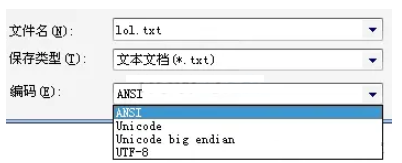
接下来讲,字符在文件中的保存 字符保存在文件中肯定也是以数字形式保存的,即对应在不同的 棋盘上的不同的数字 用 记事本打开任意文本文件,并且 另存为,就能够在编码这里看到一个下拉。 ANSI 这个 不是ASCII的意思,而是采用 本地编码的意思。如果你是中文的操作系统,就会使GBK,如果是英文的就会是ISO-8859-1
Unicode UNICODE原生的编码方式 Unicode big endian 另一个 UNICODE编码方式 UTF-8 最常见的UTF-8编码方式,数字和字母用一个字节, 汉字用3个字节。
-
文件的编码方式-eclipse
eclipse也有类似的编码方式,右键任意文本文件,点击最下面的"property" 就可以看到 Text file encoding 也有ISO-8859-1,GBK,UTF-8等等选项。 其他的US-ASCII,UTF-16,UTF-16BE,UTF-16LE不常用。

-
为了能够正确的读取中文内容
-
必须了解文本是以哪种编码方式保存字符的
-
使用字节流读取了文本后,再使用对应的 编码方式去识别这些数字,得到正确的字符
如本例,一个文件中的内容是字符 中,编码方式是GBK,那么读出来的数据一定是D6D0。 再使用GBK编码方式识别D6D0,就能正确的得到字符 中
注: 在GBK的棋盘上找到的 中字后,JVM会自动找到 中在UNICODE这个棋盘上对应的数字,并且以 。
package stream
;


import java
.io
.File
;


import java
.io
.FileInputStream
;


import java
.io
.IOException
;


public
class
TestStream
{


public
static
void
main
(
String
[
] args
)
{

        File f
=
new
File
(
"E:\\project\\j2se\\src\\test.txt"
)
;


try
(FileInputStream fis
=
new
FileInputStream
(f
)
;
)
{

            byte
[
] all
=
new
byte
[
(int
) f
.
length
(
)
]
;

            fis
.
read
(all
)
;


//文件中读出来的数据是

            System
.out
.
println
(
"文件中读出来的数据是:"
)
;


for
(byte b
: all
)


{

                int i
= b
&
0x000000ff
;
//只取16进制的后两位

                System
.out
.
println
(Integer
.
toHexString
(i
)
)
;


}

            System
.out
.
println
(
"把这个数字,放在GBK的棋盘上去:"
)
;

            String str
=
new
String
(all
,
"GBK"
)
;

            System
.out
.
println
(str
)
;


}
catch
(IOException e
)
{


// TODO Auto-generated catch block

            e
.
printStackTrace
(
)
;


}


}


}

-
用FileReader 字符流正确读取中文
FileReader得到的是字符,所以一定是已经把字节 根据某种编码识别成了字符了 而FileReader使用的编码方式是Charset.defaultCharset()的返回值,如果是中文的操作系统,就是GBK FileReader是不能手动设置编码方式的,为了使用其他的编码方式,只能使用InputStreamReader来代替,像这样:
new InputStreamReader(new FileInputStream(f),Charset.forName("UTF-8"));
在本例中,用记事本另存为UTF-8格式,然后用UTF-8就能识别对应的中文了。
解释: 为什么中字前面有一个? 如果是使用记事本另存为UTF-8的格式,那么在第一个字节有一个 标示符,叫做BOM用来标志这个文件是用UTF-8来编码的。
package stream
;


import java
.io
.File
;


import java
.io
.FileInputStream
;


import java
.io
.FileNotFoundException
;


import java
.io
.FileReader
;


import java
.io
.IOException
;


import java
.io
.InputStreamReader
;


import java
.io
.UnsupportedEncodingException
;


import java
.nio
.charset
.Charset
;


public
class
TestStream
{


public
static
void
main
(String
[
] args
) throws UnsupportedEncodingException
, FileNotFoundException
{

        File f
=
new
File
(
"E:\\project\\j2se\\src\\test.txt"
)
;

        System
.out
.
println
(
"默认编码方式:"
+Charset
.
defaultCharset
(
)
)
;


//FileReader得到的是字符,所以一定是已经把字节根据某种编码识别成了字符了


//而FileReader使用的编码方式是Charset.defaultCharset()的返回值,如果是中文的操作系统,就是GBK


try
(FileReader fr
=
new
FileReader
(f
)
)
{

            char
[
] cs
=
new
char
[
(int
) f
.
length
(
)
]
;

            fr
.
read
(cs
)
;

            System
.out
.
printf
(
"FileReader会使用默认的编码方式%s,识别出来的字符是:%n"
,Charset
.
defaultCharset
(
)
)
;

            System
.out
.
println
(
new
String
(cs
)
)
;


}
catch
(IOException e
)
{


// TODO Auto-generated catch block

            e
.
printStackTrace
(
)
;


}


//FileReader是不能手动设置编码方式的,为了使用其他的编码方式,只能使用InputStreamReader来代替


//并且使用new InputStreamReader(new FileInputStream(f),Charset.forName("UTF-8")); 这样的形式


try
(InputStreamReader isr
=
new
InputStreamReader
(
new
FileInputStream
(f
)
,Charset
.
forName
(
"UTF-8"
)
)
)
{

            char
[
] cs
=
new
char
[
(int
) f
.
length
(
)
]
;

            isr
.
read
(cs
)
;

            System
.out
.
printf
(
"InputStreamReader 指定编码方式UTF-8,识别出来的字符是:%n"
)
;

            System
.out
.
println
(
new
String
(cs
)
)
;


}
catch
(IOException e
)
{


// TODO Auto-generated catch block

            e
.
printStackTrace
(
)
;


}


}


}

-
练习-数字对应的中文
找出 E5 B1 8C 这3个十六进制对应UTF-8编码的汉字
package stream
;


import java
.io
.UnsupportedEncodingException
;


public
class
TestStream
{


public
static
void
main
(String
[
] args
) throws UnsupportedEncodingException
{


//      找出 E5 B1 8C 这3个十六进制对应UTF-8编码的汉字

        byte
[
] bs
=
new
byte
[
3
]
;

        bs
[
0
]
=
(byte
)
0xE5
;

        bs
[
1
]
=
(byte
)
0xB1
;

        bs
[
2
]
=
(byte
)
0x8C
;


        String str
=
new
String
(bs
,
"UTF-8"
)
;

        System
.out
.
println
(
"E5 B1 8C 对应的字符是:"
+str
)
;


}


}
-
练习-移除BOM
如果用记事本根据UTF-8编码保存汉字就会在最前面生成一段标示符,这个标示符用于表示该文件是使用UTF-8编码的。找出这段标示符对应的十六进制,并且开发一个方法,自动去除这段标示符
package com
.company
;


import java
.io
.File
;


import java
.io
.FileInputStream
;


import java
.io
.IOException
;


import java
.util
.Arrays
;


public
class
utf8Test
{


public
static
void
main
(
String
[
] args
)
{

        File f
=
new
File
(
"d:\\lol.txt"
)
;


try
(FileInputStream fis
=
new
FileInputStream
(f
)
)
{

            byte
[
] all
=
new
byte
[
(int
) f
.
length
(
)
]
;

            fis
.
read
(all
)
;

            System
.out
.
println
(
"首先确认按照UTF-8识别出来有?"
)
;

            String str
=
new
String
(all
,
"UTF-8"
)
;

            System
.out
.
println
(str
)
;


            System
.out
.
println
(
"根据前面的所学,知道'中'字对应的UTF-8编码是:e4 b8 ad"
)
;

            System
.out
.
println
(
"打印出文件里所有的数据的16进制是:"
)
;


for
(byte b
: all
)
{

                int i
= b
&
0xff
;

                System
.out
.
println
(Integer
.
toHexString
(i
)
+
" "
)
;


}

            System
.out
.
println
(
)
;


            System
.out
.
println
(
"通过观察法得出 UTF-8的 BOM 是 ef bb bf"
)
;

            byte
[
] bom
=
new
byte
[
3
]
;

            bom
[
0
]
=
(byte
)
0xef
;

            bom
[
1
]
=
(byte
)
0xbb
;

            bom
[
2
]
=
(byte
)
0xbf
;


            byte
[
] fileContentWithoutBOM
=
removeBom
(all
,bom
)
;

            System
.out
.
println
(
"去掉了BOM之后的数据的16进制是:"
)
;


for
(byte b
: fileContentWithoutBOM
)
{

                int i
= b
&
0xff
;

                System
.out
.
print
(Integer
.
toHexString
(i
)
+
" "
)
;


}

            System
.out
.
println
(
)
;

            System
.out
.
println
(
"对应的字符串就没有问号了:"
)
;

            String strWithoutBOM
=
new
String
(fileContentWithoutBOM
,
"UTF-8"
)
;

            System
.out
.
println
(strWithoutBOM
)
;


}
catch
(IOException e
)
{


// TODO Auto-generated catch block

            e
.
printStackTrace
(
)
;


}


}


private
static byte
[
]
removeBom
(
byte
[
] all
, byte
[
] bom
)
{


return Arrays
.
copyOfRange
(all
, bom
.length
, all
.length
)
;


}


}
2.7 缓存流
以介质是硬盘为例, 字节流和字符流的弊端:在每一次读写的时候,都会访问硬盘。 如果读写的频率比较高的时候,其性能表现不佳。
为了解决以上弊端,采用缓存流:缓存流在读取的时候, 会一次性读较多的数据到缓存中,以后每一次的读取,都是在缓存中访问,直到缓存中的数据读取完毕,再到硬盘中读取。
缓存流在写入数据的时候,会先把数据写入到缓存区,直到缓存区 达到一定的量,才把这些数据, 一起写入到硬盘中去。按照这种操作模式,就不会像字节流,字符流那样 每写一个字节都访问硬盘,从而减少了IO操作
-
使用缓存流读取数据
缓存字符输入流 BufferedReader 可以一次读取一行数据
package com
.company
;


import java
.io
.
*
;


import java
.util
.Arrays
;


public
class
utf8Test
{


public
static
void
main
(
String
[
] args
)
{

        File f
=
new
File
(
"d:/lol.txt"
)
;


// 创建文件字符流


// 缓存流必须建立在一个存在的流的基础上


try
(

                FileReader fr
=
new
FileReader
(f
)
;

                BufferedReader br
=
new
BufferedReader
(fr
)
;


)
{


while
(
true
)
{


// 一次读一行

                String line
= br
.
readLine
(
)
;


if
(
null
== line
)


break
;

                System
.out
.
println
(line
)
;


}


}
catch
(IOException e
)
{


// TODO Auto-generated catch block

            e
.
printStackTrace
(
)
;


}


}


}
-
使用缓存流写出数据
PrintWriter 缓存字符输出流, 可以一次写出一行数据
package stream
;


import java
.io
.File
;


import java
.io
.FileWriter
;


import java
.io
.IOException
;


import java
.io
.PrintWriter
;


public
class
TestStream
{


public
static
void
main
(
String
[
] args
)
{


// 向文件lol2.txt中写入三行语句

        File f
=
new
File
(
"d:/lol2.txt"
)
;


try
(


// 创建文件字符流

                FileWriter fw
=
new
FileWriter
(f
)
;


// 缓存流必须建立在一个存在的流的基础上

                PrintWriter pw
=
new
PrintWriter
(fw
)
;


)
{

            pw
.
println
(
"garen kill teemo"
)
;

            pw
.
println
(
"teemo revive after 1 minutes"
)
;

            pw
.
println
(
"teemo try to garen, but killed again"
)
;


}
catch
(IOException e
)
{


// TODO Auto-generated catch block

            e
.
printStackTrace
(
)
;


}


}


}
-
flush
有的时候,需要 立即把数据写入到硬盘,而不是等缓存满了才写出去。 这时候就需要用到flush
package stream
;


import java
.io
.File
;


import java
.io
.FileWriter
;


import java
.io
.IOException
;


import java
.io
.PrintWriter
;


public
class
TestStream
{


public
static
void
main
(
String
[
] args
)
{


//向文件lol2.txt中写入三行语句

        File f
=
new
File
(
"d:/lol2.txt"
)
;


//创建文件字符流


//缓存流必须建立在一个存在的流的基础上


try
(FileWriter fr
=
new
FileWriter
(f
)
;PrintWriter pw
=
new
PrintWriter
(fr
)
;
)
{

            pw
.
println
(
"garen kill teemo"
)
;


//强制把缓存中的数据写入硬盘,无论缓存是否已满

                pw
.
flush
(
)
;

            pw
.
println
(
"teemo revive after 1 minutes"
)
;

                pw
.
flush
(
)
;

            pw
.
println
(
"teemo try to garen, but killed again"
)
;

                pw
.
flush
(
)
;


}
catch
(IOException e
)
{


// TODO Auto-generated catch block

            e
.
printStackTrace
(
)
;


}


}


}
-
练习-移除注释
设计一个方法,用于移除Java文件中的注释
public void removeComments(File javaFile)
比如,移出以//开头的注释行
File f
=
new
File
(
"d:/LOLFolder/LOL.exe"
)
;

System
.out
.
println
(
"当前文件是:"
+f
)
;


//文件是否存在

System
.out
.
println
(
"判断是否存在:"
+f
.
exists
(
)
)
;


//是否是文件夹

System
.out
.
println
(
"判断是否是文件夹:"
+f
.
isDirectory
(
)
)
;
package com
.company
;


import java
.io
.
*
;


import java
.util
.Arrays
;


public
class
utf8Test
{


public
static
void
main
(
String
[
] args
)
{

        File f
=
new
File
(
"d:/lol.txt"
)
;


removeComments
(f
)
;


}


private
static
void
removeComments
(
File javaFile
)
{


try
(FileReader fr
=
new
FileReader
(javaFile
)
;BufferedReader br
=
new
BufferedReader
(fr
)
)
{


while
(
true
)
{

                String line
= br
.
readLine
(
)
;


if
(
null
== line
)


break
;


if
(line
.
startsWith
(
"//"
)
)


continue
;


else

                    System
.out
.
println
(line
)
;


}


}
catch
(IOException e
)
{

            e
.
printStackTrace
(
)
;


}


}


}

2.8 数据流
DataInputStream 数据输入流;DataOutputStream 数据输出流。
-
直接进行字符串的读写
使用数据流的writeUTF()和readUTF() 可以进行数据的 格式化顺序读写 如本例,通过DataOutputStream 向文件顺序写出 布尔值,整数和字符串。 然后再通过DataInputStream 顺序读入这些数据。
注: 要用DataInputStream 读取一个文件,这个文件必须是由DataOutputStream 写出的,否则会出现EOFException,因为DataOutputStream 在写出的时候会做一些特殊标记,只有DataInputStream 才能成功的读取。
package stream
;


import java
.io
.DataInputStream
;


import java
.io
.aDataOutputStream
;


import java
.io
.File
;


import java
.io
.FileInputStream
;


import java
.io
.FileOutputStream
;


import java
.io
.IOException
;


public
class
TestStream
{


public
static
void
main
(
String
[
] args
)
{


write
(
)
;


read
(
)
;


}


private
static
void
read
(
)
{

        File f
=
new
File
(
"d:/lol.txt"
)
;


try
(

                FileInputStream fis
=
new
FileInputStream
(f
)
;

                DataInputStream dis
=
new
DataInputStream
(fis
)
;


)
{

            boolean b
= dis
.
readBoolean
(
)
;

            int i
= dis
.
readInt
(
)
;

            String str
= dis
.
readUTF
(
)
;


            System
.out
.
println
(
"读取到布尔值:"
+b
)
;

            System
.out
.
println
(
"读取到整数:"
+i
)
;

            System
.out
.
println
(
"读取到字符串:"
+str
)
;


}
catch
(IOException e
)
{

            e
.
printStackTrace
(
)
;


}


}


private
static
void
write
(
)
{

        File f
=
new
File
(
"d:/lol.txt"
)
;


try
(

                FileOutputStream fos
=
new
FileOutputStream
(f
)
;

                DataOutputStream dos
=
new
DataOutputStream
(fos
)
;


)
{

            dos
.
writeBoolean
(
true
)
;

            dos
.
writeInt
(
300
)
;

            dos
.
writeUTF
(
"123 this is gareen"
)
;


}
catch
(IOException e
)
{

            e
.
printStackTrace
(
)
;


}


}


}
2.9 对象流
对象流指的是可以直接 把一个对象以流的形式传输给其他的介质,比如硬盘。
一个对象以流的形式进行传输,叫做序列化。 该对象所对应的类,必须是实现Serializable接口。
-
序列化一个对象
创建一个Hero对象,设置其名称为garen。 把该对象序列化到一个文件garen.lol。 然后再通过序列化把该文件转换为一个Hero对象
**注:**把一个对象序列化有一个前提是:这个对象的类,必须实现了Serializable接口
Hero.java
package charactor
;


import java
.io
.Serializable
;


public
class
Hero
implements
Serializable
{


//表示这个类当前的版本,如果有了变化,比如新设计了属性,就应该修改这个版本号


private
static final long serialVersionUID
=
1L
;


public String name
;


public float hp
;


}
TestStream.java
import java
.io
.File
;


import java
.io
.FileInputStream
;


import java
.io
.FileOutputStream
;


import java
.io
.IOException
;


import java
.io
.ObjectInputStream
;


import java
.io
.ObjectOutputStream
;


import charactor
.Hero
;


public
class
TestStream
{


public
static
void
main
(
String
[
] args
)
{


//创建一个Hero garen


//要把Hero对象直接保存在文件上,务必让Hero类实现Serializable接口

        Hero h
=
new
Hero
(
)
;

        h
.name
=
"garen"
;

        h
.hp
=
616
;


//准备一个文件用于保存该对象

        File f
=
new
File
(
"d:/garen.lol"
)
;

 //java学习交流:737251827  进入可领取学习资源及对十年开发经验大佬提问,免费解答!


try
(


//创建对象输出流

            FileOutputStream fos
=
new
FileOutputStream
(f
)
;

            ObjectOutputStream oos
=
new
ObjectOutputStream
(fos
)
;


//创建对象输入流

            FileInputStream fis
=
new
FileInputStream
(f
)
;

            ObjectInputStream ois
=
new
ObjectInputStream
(fis
)
;


)
{

            oos
.
writeObject
(h
)
;

            Hero h2
=
(Hero
) ois
.
readObject
(
)
;

            System
.out
.
println
(h2
.name
)
;

            System
.out
.
println
(h2
.hp
)
;


}
catch
(IOException e
)
{


// TODO Auto-generated catch block

            e
.
printStackTrace
(
)
;


}
catch
(ClassNotFoundException e
)
{


// TODO Auto-generated catch block

            e
.
printStackTrace
(
)
;


}


}


}
2.10 System.in
System.out 是常用的在控制台输出数据的;System.in 可以从控制台输入数据。
-
System.in
package stream
;


import java
.io
.IOException
;


import java
.io
.InputStream
;


public
class
TestStream
{


public
static
void
main
(
String
[
] args
)
{


// 控制台输入


try
(InputStream is
= System
.in
;
)
{


while
(
true
)
{


// 敲入a,然后敲回车可以看到


// 97 13 10


// 97是a的ASCII码


// 13 10分别对应回车换行

                int i
= is
.
read
(
)
;

                System
.out
.
println
(i
)
;


}


}
catch
(IOException e
)
{

            e
.
printStackTrace
(
)
;


}


}


}
-
Scanner读取字符串
package stream
;


import java
.util
.Scanner
;


public
class
TestStream
{


public
static
void
main
(
String
[
] args
)
{

            Scanner s
=
new
Scanner
(System
.in
)
;


while
(
true
)
{

                String line
= s
.
nextLine
(
)
;

                System
.out
.
println
(line
)
;


}


}


}
Scanner从控制台读取整数
package stream
;


import java
.util
.Scanner
;


public
class
TestStream
{


public
static
void
main
(
String
[
] args
)
{

        Scanner s
=
new
Scanner
(System
.in
)
;

        int a
= s
.
nextInt
(
)
;

        System
.out
.
println
(
"第一个整数:"
+a
)
;

        int b
= s
.
nextInt
(
)
;

        System
.out
.
println
(
"第二个整数:"
+b
)
;


}


}
-
2.11 综合练习
-
复制文件
复制文件是常见的IO操作,设计如下方法,实现复制源文件srcFile到目标文件destFile
public
static
void
copyFile
(
String srcFile
, String destFile
)
{


}
-
复制文件夹
复制文件夹,实现如下方法,把源文件夹下所有的文件 复制到目标文件夹下(包括子文件夹)
public
static
void
copyFolder
(


String srcFolder
,

  String destFolder
)
{


}
-
查找文件内容
public
static
void
search
(

  File folder
, String search


)
;
假设你的项目目录是 e:/project,遍历这个目录下所有的java文件(包括子文件夹),找出文件内容包括
Magic的那些文件,并打印出来。
2.12 流关系图
-
流关系图
这个图把本章节学到的流关系做了个简单整理
-
流分为字节流和字符流
-
字节流下面常用的又有数据流和对象流
-
字符流下面常用的又有缓存流

来自 “ ITPUB博客 ” ,链接:https://blog.itpub.net/70010294/viewspace-2847203/ ,如需转载,请注明出处,否则将追究法律责任。

