HarmonyOS卡片刷新服务,信息实时更新一目了然
如今衣食住行娱乐影音等App占据了大多数人的手机,一部手机可以满足日常大多需求,但对需要经常查看或进行简单操作的场景来说,总需要用户点开App操作未免过于繁琐。
针对该问题, HarmonyOS SDK为用户提供了 Form Kit (卡片开发服务),您可以将应用的重要信息或操作前置到卡片,以达到服务直达、减少体验层级的目的,用户无需打开App,根据引导将卡片添加到桌面,即可随时随地查看服务的重要信息和动态变化。
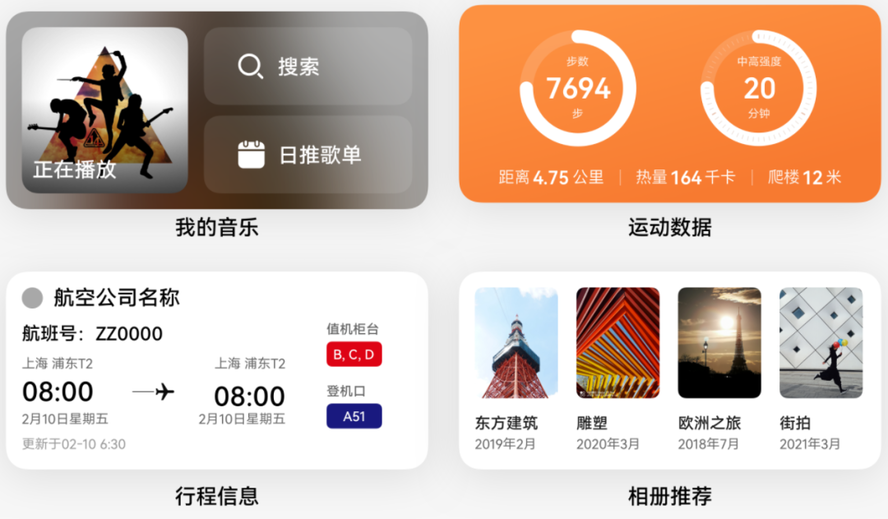
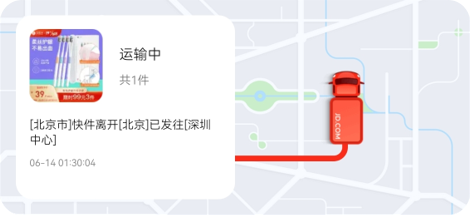
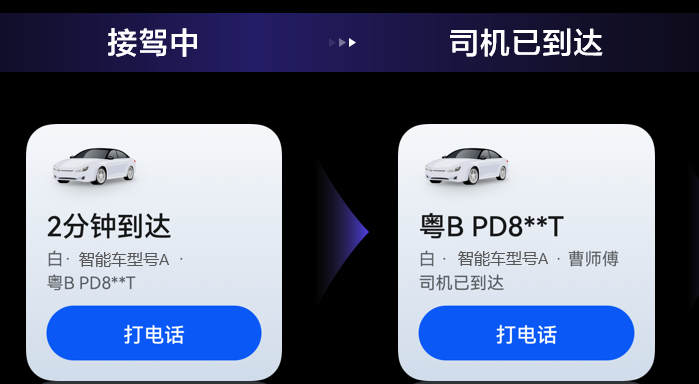
面对需要实时更新信息的App卡片, Push Kit (推送服务)向开发者提供了 卡片刷新服务。应用通过集成Push Kit后获取Push Token,基于Push Kit的系统级通道,便可以在合适场景向用户即时推送卡片内容,从而提升用户的感知度和活跃度。
能力优势
Ø 可靠、稳定
应用无论是否在后台运行,通过Push Kit都能即时刷新服务内容。通过华为终端设备的长连接,充分保障刷新内容送达;系统级通道最高可提供每秒千万级的推送速度。
Ø 实时、灵活
由开发者在合适场景即时推送卡片封面内容,实时更新;支持图片、文本等多种格式刷新;并及时返回送达回执。
开发步骤
为方便App开发者接入,仅需五步即可完成卡片刷新功能的开发及卡片内容刷新。
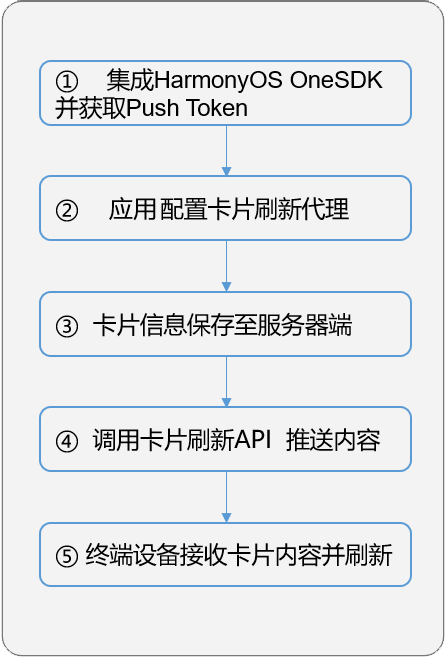
1. 参见 创建一个ArkTS 卡片 ,完成本地服务卡片的创建。
2. 在项目模块级别下的 src/main/resources/base/profile/form_config.json中配置 dataProxyEnabled 字段为 true,开启 卡片代理刷新 功能。
|
{ "forms": [ { "name": "WidgetCard", "src": "./ets/widget/pages/WidgetCard.ets", "uiSyntax": "arkts", "window": { "designWidth": 720, "autoDesignWidth": true }, "colorMode": "auto", "isDefault": true, "updateEnabled": true, "updateDuration": 1, "scheduledUpdateTime": "10:30", "defaultDimension": "2*2", "supportDimensions": ["2*2"], "dataProxyEnabled": true } ] } |
3. 在卡片生命周期管理文件(下以EntryFormAbility为例)的 onAddForm () 回调中获取 formId,定义需要在卡片页面文件(下以WidgetCard为例)中和通过Push Kit要刷新的字段,如下以 text_key和 image_key为例。
|
import { formBindingData, formInfo, FormExtensionAbility } from '@kit.FormKit'; import { Want } from '@kit.AbilityKit';
export default class EntryFormAbility extends FormExtensionAbility { onAddForm(want: Want): formBindingData.FormBindingData { // 获取 formId const formId = want.parameters![formInfo.FormParam.IDENTITY_KEY] as string;
// 定义需要在 WidgetCard 中刷新的字段 class CreateFormData { formId: string = ''; text_key: string = ''; image_key: string = ''; }
const obj: CreateFormData = { formId: formId, text_key: ' 默认文本 ', image_key: '', } const bindingData: formBindingData.FormBindingData = formBindingData.createFormBindingData(obj);
// 定义需要通过 Push Kit 代理刷新的字段,每个 key 均需要在上面 bindingData 中定义 const text_key: formBindingData.ProxyData = { key: 'text_key', subscriberId: formId, }; const image_key: formBindingData.ProxyData = { key: 'image_key', subscriberId: formId, }; bindingData.proxies = [text_key, image_key]; return bindingData; } } |
4. 卡片页面文件( src/main/ets/widget/pages/WidgetCard.ets 为例)中,创建 LocalStorage 变量并与 @Entry 装饰器绑定,使用 @LocalStorageProp 装饰器创建key-value的变量。
本文创建了formId、text和image三个变量,对应的key为 formId、 text_key和 image_key,需要注意的是卡片页面布局中image对应的组件是Image图片组件,图片组件传递的变量必须以 memory:// 开头。
|
// 定义页面级的 UI 状态存储 LocalStorage const storage = new LocalStorage();
// 绑定 @Entry(storage) @Component struct WidgetCard { @LocalStorageProp('formId') formId: string = ''; @LocalStorageProp('text_key') text: string = ''; @LocalStorageProp('image_key') image: string = '';
build() { Flex({ direction: FlexDirection.Column }) { Row() { Text() { // Span 是 Text 组件的子组件,用于显示行内文本 Span('formID:') Span(this.formId) } .fontSize(10) }
Row() { Text() { Span(' 文本 :') Span(this.text) } .fontSize(10) }
Row() { if (this.image) { Image('memory://' + this.image).height(80) } } } .padding(10) } } |
5. 建议您将 formId、 pushToken等信息上报到应用服务端,用于向应用发送卡片刷新消息。请参见指导 获取Push Token 。
|
// 以下为伪代码 import { Want } from '@kit.AbilityKit'; import { pushService } from '@kit.PushKit'; import { hilog } from '@kit.PerformanceAnalysisKit'; import { BusinessError } from '@kit.BasicServicesKit'; import { formInfo } from '@kit.FormKit';
async function saveFormInfo(want: Want): Promise<void> { try { const formId = want.parameters![formInfo.FormParam.IDENTITY_KEY] as string; const moduleName = want.moduleName; const abilityName = want.abilityName; const formName = want.parameters![formInfo.FormParam.NAME_KEY] as string; const pushToken: string = await pushService.getToken();
// 将 formId, moduleName, abilityName, formName, pushToken 上报到应用服务端 } catch (err) { let e: BusinessError = err as BusinessError; hilog.error(0x0000, 'testTag', 'Save form info failed: %{public}s', e.message); } } |
6. 应用服务端调用REST API推送卡片刷新消息,消息详情可参见 场景化消息API 接口功能介绍 ,请求示例如下:
|
// Request URL POST https://push-api.cloud.huawei.com/v3/[projectId]/messages:send
// Request Header Content-Type: application/json Authorization: Bearer eyJr*****OiIx---****.eyJh*****iJodHR--***.QRod*****4Gp---**** push-type: 1
// Request Body { "payload": { "moduleName": "entry", "abilityName": "EntryFormAbility", "formName": "widget", "formId": 423434262, "version": 123456, "formData": { "text_key": " 刷新文本内容 " }, "images": [ { "keyName": "image_key", "url": "***", "require": 1 } ] }, "target": { "token": [ "IQAAAAC*************************dRH7_bPbfMrVfsYw" ] }, "pushOptions": { "testMessage": true } } |
了解更多详情>>
获取 卡片开发服务开发指导文档
获取 推送 服务开发指导文档
来自 “ ITPUB博客 ” ,链接:https://blog.itpub.net/70003787/viewspace-3009506/ ,如需转载,请注明出处,否则将追究法律责任。

最新文章
- 【HarmonyOS API 26 】数字盾服务2.0:硬件级安全的随身虚拟U盾
- HarmonyOS智慧多窗,让应用在任意窗口都“恰到好处”
- AI 赋能 Push Kit 场景化消息开发,高效完成鸿蒙应用推送能力接入
- HarmonyOS Push Kit 自分类权益 Skill,助力提升权益申请通过率
- 基于增强QUIC协议优化弱网下的直播观看体验
- 焕新鸿蒙应用权限管理方案,应用授权体验再升级
- Account Kit 效率提升 ▏自动签名能力上线
- 从启动到畅玩:HarmonyOS SDK如何重塑一场连续的游戏体验
- 从“一屏一态”到“一屏多能”:WPS通过HarmonyOS多窗口能力重塑移动办公体验
- HarmonyOS SDK API诊断 Skill,一键定位功能故障问题
