
赵锦超,SphereEx 中间件研发工程师,Apache ShardingSphere Committer。目前专注于 ShardingSphere 高可用的设计和研发。
什么是数据库高可用
在这个以“数据”为王的时代,对现代业务系统可用性、可靠性以及稳定性要求极其高。数据库又作为现代业务系统的基石,因此数据库高可用就显得尤为重要。同时数据库高可用应具备主从切换以及自动选主的能力,当我们主库宕机时,可以快速地在从节点中选举最佳节点来作为主库。
MySQL 高可用介绍
MySQL 高可用方案比较多,且每个高可用方案都有各自的优缺点。在这里我们列举几个常用的高可用方案。
-
Orchestrator 是一款 Go 语言编写的 MySQL 高可用性和复制拓扑管理工具,优点是支持通过 Web 可视化控制台手动的调整主从拓扑结构、自动故障转移、自动或手动恢复主节点。缺点则是需要独立部署该程序,学习成本较高配置复杂;
-
MHA 也是一款相对成熟的 MySQL 高可用软件。支持故障切换和主从提升,其优点是在切换的过程中可以最大程度保证数据不丢失,同时可以工作在半同步复制或异步复制集群下。缺点则是 MHA 启动后只对主库进行监控,并且读库没有提供负载均衡功能;
-
MGR 是基于分布式 Paxos 协议实现组复制,从而保证数据的一致性。同时也是 MySQL 官方提供解决 MySQL 高可用的组件,使用它我们不需要单独的部署程序,只需要在每个数据源节点中安装 MGR Plugin,其特点具有高一致性、高容错性、高扩展性、高灵活性。
Apache ShardingSphere 高可用
Apache ShardingSphere 采用存算分离架构体系,存储节点代表底层数据库,如 MySQL、PostgreSQL、openGauss 等,计算节点则是指 ShardingSphere-JDBC 或 ShardingSphere-Proxy,并且存储节点和计算节点的高可用方案是不同的。对于无状态的计算节点来说,需要感知存储节点变化的同时,还需要独立架设负载均衡器,并具备服务发现和请求分发的能力。对于有状态的存储节点来说,需要其自身具备数据一致性同步、探活、主节点选举等能力。
ShardingSphere 虽然本身并不提供数据库的高可用能力,但可以借助数据库高可用能力,并通过自身数据库发现及动态感知的能力,帮助用户整合主从切换、故障发现、流量切换治理等一体化的数据库高可用方案。特别是在分布式场景下搭配主从流量控制的特性,可以提供更为完善的高可用读写分离方案。 同时我们在使用高可用功能时,再搭配使用 DistSQL 动态调整高可用规则的动态,获取主从的节点信息等,使我们更能方便地运维管控 ShardingSphere 集群。
最佳实践
Apache ShardingSphere 采用可插拔架构,所有增量的功能能单独使用也能相互组合。高可用功能通常和读写分离配合使用,在保证系统高可用的同时,配合读写分离将查询请求根据负载均衡算法分散到从库中,减少主库的压力,提升业务系统的吞吐量。以下实践内容将采用高可用 + 读写分离的配置,再配合使用 ShardingSphere DistSQL RAL语句进行演示。
需要注意的是,ShardingSphere 高可用的实现依赖于分布式治理的能力,所以目前只支持在集群模式下使用。同时读写分离规则在 ShardingSphere 5.1.0 版本中也进行了调整,详细内容请参考 官方文档读写分离。
配置参考
schemaName: database_discovery_db


dataSources:

  ds_0:

    url: jdbc:mysql:
//127.0.0.1:1231/demo_primary_ds?serverTimezone=UTC&useSSL=false

    username: root

    password:
123456

    connectionTimeoutMilliseconds:
3000

    idleTimeoutMilliseconds:
60000

    maxLifetimeMilliseconds:
1800000

    maxPoolSize:
50

    minPoolSize:
1

  ds_1:

    url: jdbc:mysql:
//127.0.0.1:1232/demo_primary_ds?serverTimezone=UTC&useSSL=false

    username: root

    password:
123456

    connectionTimeoutMilliseconds:
3000

    idleTimeoutMilliseconds:
60000

    maxLifetimeMilliseconds:
1800000

    maxPoolSize:
50

    minPoolSize:
1

  ds_2:

    url: jdbc:mysql:
//127.0.0.1:1233/demo_primary_ds?serverTimezone=UTC&useSSL=false

    username: root

    password:
123456

    connectionTimeoutMilliseconds:
3000

    idleTimeoutMilliseconds:
50000

    maxLifetimeMilliseconds:
1300000

    maxPoolSize:
50

    minPoolSize:
1


rules:

  - !READWRITE_SPLITTING

    dataSources:

      replication_ds:


type:
Dynamic

        props:

          auto-aware-data-source-
name: mgr_replication_ds

  - !DB_DISCOVERY

    dataSources:

      mgr_replication_ds:

        dataSourceNames:

          - ds_0

          - ds_1

          - ds_2

        discoveryHeartbeatName: mgr-heartbeat

        discoveryTypeName: mgr

    discoveryHeartbeats:

      mgr-heartbeat:

        props:

          keep-alive-cron:
'0/5 * * * * ?'

    discoveryTypes:

      mgr:


type: MGR

        props:

          group-
name: b13df29e-
90b6-
11e8-
8d1b-
525400fc3996
前置条件
-
ShardingSphere-Proxy 5.1.0 (Cluster mode + 高可用+动态读写分离规则)
-
Zookeeper 3.7.0
-
MySQL MGR 集群
SQL 脚本
CREATE
TABLE
`t_user` (


`id`
int(
8)
NOT
NULL,


`mobile`
char(
20)
NOT
NULL,


`idcard`
varchar(
18)
NOT
NULL,

  PRIMARY
KEY (
`id`)

)
ENGINE=
InnoDB
DEFAULT
CHARSET=utf8mb4;
查看主从关系
mysql> SHOW READWRITE_SPLITTING RULES;

+----------------+-----------------------------+------------------------+------------------------+--------------------+---------------------+


| name           | auto_aware_data_source_name
| write_data_source_name | read_data_source_names
| load_balancer_type | load_balancer_props
|

+----------------+-----------------------------+------------------------+------------------------+--------------------+---------------------+

| replication_ds
| mgr_replication_ds          | ds_
0
| ds_1,ds_2              | NULL
|                     |

+----------------+-----------------------------+------------------------+------------------------+--------------------+---------------------+


1 row
in set (
0.09 sec)
查看从库状态
mysql> SHOW READWRITE_SPLITTING READ RESOURCES;

+----------+---------+


| resource | status
|

+----------+---------+

| ds_1
| enabled |


| ds_2     | enabled
|

+----------+---------+
从上面的结果得知,当前我们的主库是
ds
0
,从库是
s
1
和
ds
2
。
我们测试 INSERT 一条数据:
mysql>
INSERT INTO
t_user(
id, mobile, idcard)
value (

10000,
'13718687777',
'141121xxxxx');

Query OK,
1
row
affected (

0.10 sec)
查看 ShardingSphere-Proxy 日志,查看路由的节点是否为主库
ds_0
。
[INFO ] 2022-02-28 15:28:21.495 [ShardingSphere-Command-2] ShardingSphere-SQL - Logic SQL:
INSERT
INTO t_user(
id, mobile, idcard)
value (
10000,
'13718687777',
'141121xxxxx')

[INFO ]
2022
-02
-28
15:
28:
21.495 [ShardingSphere-Command
-2] ShardingSphere-
SQL - SQLStatement: MySQLInsertStatement(setAssignment=Optional.empty, onDuplicateKeyColumns=Optional.empty)

[INFO ]
2022
-02
-28
15:
28:
21.495 [ShardingSphere-Command
-2] ShardingSphere-
SQL - Actual
SQL: ds_0 :::
INSERT
INTO t_user(
id, mobile, idcard)
value (
10000,
'13718687777',
'141121xxxxx')
我们测试 SELECT 一条数据(重复执行两次):
mysql>
SELECT id, mobile, idcard
FROM t_user
WHERE id =
10000;
查看 ShardingSphere-Proxy 日志,查看路由的节点是否为
ds
1
或
ds
2
。
[INFO ] 2022-02-28 15:34:07.912 [ShardingSphere-Command-4] ShardingSphere-SQL - Logic SQL:
SELECT
id, mobile, idcard
FROM t_user
WHERE
id =
10000

[INFO ]
2022
-02
-28
15:
34:
07.913 [ShardingSphere-Command
-4] ShardingSphere-
SQL - SQLStatement: MySQLSelectStatement(
table=Optional.empty,
limit=Optional.empty,
lock=Optional.empty, window=Optional.empty)

[INFO ]
2022
-02
-28
15:
34:
07.913 [ShardingSphere-Command
-4] ShardingSphere-
SQL - Actual
SQL: ds_1 :::
SELECT
id, mobile, idcard
FROM t_user
WHERE
id =
10000

[INFO ]
2022
-02
-28
15:
34:
21.501 [ShardingSphere-Command
-4] ShardingSphere-
SQL - Logic
SQL:
SELECT
id, mobile, idcard
FROM t_user
WHERE
id =
10000

[INFO ]
2022
-02
-28
15:
34:
21.502 [ShardingSphere-Command
-4] ShardingSphere-
SQL - SQLStatement: MySQLSelectStatement(
table=Optional.empty,
limit=Optional.empty,
lock=Optional.empty, window=Optional.empty)

[INFO ]
2022
-02
-28
15:
34:
21.502 [ShardingSphere-Command
-4] ShardingSphere-
SQL - Actual
SQL: ds_2 :::
SELECT
id, mobile, idcard
FROM t_user
WHERE
id =
10000
切换主库
关闭主库
ds_0
:
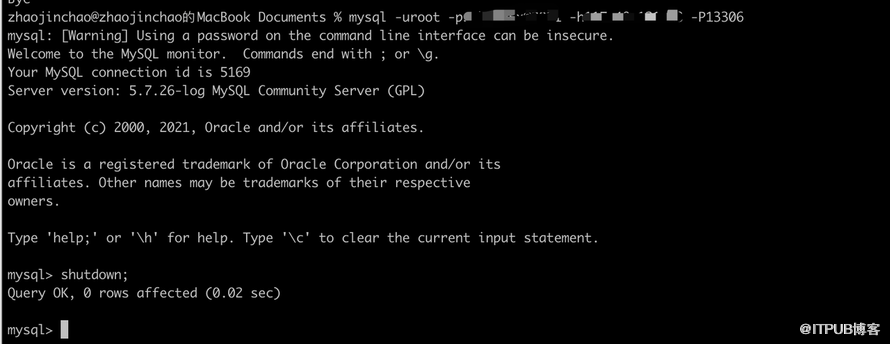
通过 DistSQL 查看主库是否发生改变,从库状态是否正确。
mysql> SHOW READWRITE_SPLITTING RULES;

+----------------+-----------------------------+------------------------+------------------------+--------------------+---------------------+


| name           | auto_aware_data_source_name
| write_data_source_name | read_data_source_names
| load_balancer_type | load_balancer_props
|

+----------------+-----------------------------+------------------------+------------------------+--------------------+---------------------+

| replication_ds
| mgr_replication_ds          | ds_1
| ds_2                   | NULL
|                     |

+----------------+-----------------------------+------------------------+------------------------+--------------------+---------------------+


1 row
in set (
0.
01 sec)


mysql> SHOW READWRITE_SPLITTING READ RESOURCES;

+----------+----------+


| resource | status
|

+----------+----------+

| ds_2
| enabled  |


| ds_0     | disabled
|

+----------+----------+

2 rows
in set (0.01 sec)
此时我们再次 INSERT 一条数据:
mysql>
INSERT INTO
t_user(
id, mobile, idcard)
value (

10001,
'13521207777',
'110xxxxx');

Query OK,
1
row
affected (

0.04 sec)
查看 ShardingSphere-Proxy 日志,查看路由的节点是否为主库
ds_1
。
[INFO ] 2022-02-28 15:40:26.784 [ShardingSphere-Command-6] ShardingSphere-SQL - Logic SQL:
INSERT
INTO t_user(
id, mobile, idcard)
value (
10001,
'13521207777',
'110xxxxx')

[INFO ]
2022
-02
-28
15:
40:
26.784 [ShardingSphere-Command
-6] ShardingSphere-
SQL - SQLStatement: MySQLInsertStatement(setAssignment=Optional.empty, onDuplicateKeyColumns=Optional.empty)

[INFO ]
2022
-02
-28
15:
40:
26.784 [ShardingSphere-Command
-6] ShardingSphere-
SQL - Actual
SQL: ds_1 :::
INSERT
INTO t_user(
id, mobile, idcard)
value (
10001,
'13521207777',
'110xxxxx')
最后我们测试 SELECT 一条数据(重复执行两次):
mysql>
SELECT id, mobile, idcard
FROM t_user
WHERE id =
10001;
查看 ShardingSphere-Proxy 日志,查看路由的节点是否为
ds_2
。
[INFO ] 2022-02-28 15:42:00.651 [ShardingSphere-Command-7] ShardingSphere-SQL - Logic SQL:
SELECT
id, mobile, idcard
FROM t_user
WHERE
id =
10001

[INFO ]
2022
-02
-28
15:
42:
00.651 [ShardingSphere-Command
-7] ShardingSphere-
SQL - SQLStatement: MySQLSelectStatement(
table=Optional.empty,
limit=Optional.empty,
lock=Optional.empty, window=Optional.empty)

[INFO ]
2022
-02
-28
15:
42:
00.651 [ShardingSphere-Command
-7] ShardingSphere-
SQL - Actual
SQL: ds_2 :::
SELECT
id, mobile, idcard
FROM t_user
WHERE
id =
10001

[INFO ]
2022
-02
-28
15:
42:
02.148 [ShardingSphere-Command
-7] ShardingSphere-
SQL - Logic
SQL:
SELECT
id, mobile, idcard
FROM t_user
WHERE
id =
10001

[INFO ]
2022
-02
-28
15:
42:
02.149 [ShardingSphere-Command
-7] ShardingSphere-
SQL - SQLStatement: MySQLSelectStatement(
table=Optional.empty,
limit=Optional.empty,
lock=Optional.empty, window=Optional.empty)

[INFO ]
2022
-02
-28
15:
42:
02.149 [ShardingSphere-Command
-7] ShardingSphere-
SQL - Actual
SQL: ds_2 :::
SELECT
id, mobile, idcard
FROM t_user
WHERE
id =
10001
上线从库

通过 DistSQL 查看最新的主从关系是否变化, ds 0 节点状态恢复为启用状态, ds 0 加入 read data source_names:
mysql> SHOW READWRITE_SPLITTING RULES;

+----------------+-----------------------------+------------------------+------------------------+--------------------+---------------------+


| name           | auto_aware_data_source_name
| write_data_source_name | read_data_source_names
| load_balancer_type | load_balancer_props
|

+----------------+-----------------------------+------------------------+------------------------+--------------------+---------------------+

| replication_ds
| mgr_replication_ds          | ds_1
| ds_0,ds_2              | NULL
|                     |

+----------------+-----------------------------+------------------------+------------------------+--------------------+---------------------+


1 row
in set (
0.
01 sec)


mysql> SHOW READWRITE_SPLITTING READ RESOURCES;

+----------+---------+


| resource | status
|

+----------+---------+

| ds_
0
| enabled |


| ds_2     | enabled
|

+----------+---------+

2 rows
in set (0.00 sec)
通过上面的实践,相信大家已经对 ShardingSphere 高可用和动态读写分离有了一定的认识。接下来为大家介绍基于底层数据库的存储节点的高可用方案实现原理。
实现原理
ShardingSphere 提供了高可用方案,允许用户进行二次定制开发及实现扩展。目前实现了基于 MGR 的 MySQL 高可用方案以及由社区同学开发贡献的 openGauss 数据库高可用方案。两种方案的实现思路整体一致,下文将以 MySQL 为例,详细介绍 ShardingSphere 实现数据库高可用的底层原理以及最佳实践。
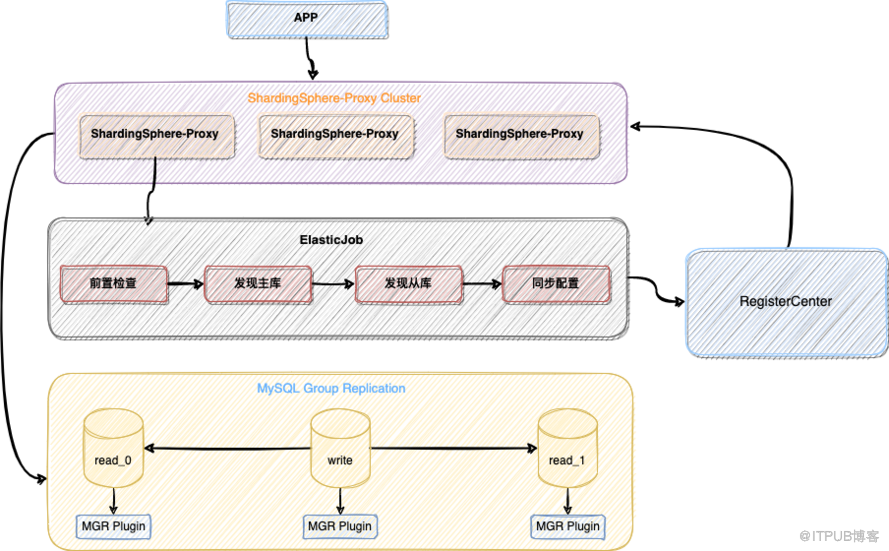
前置检查
ShardingSphere 通过执行以下 SQL 验证底层 MySQL 集群环境是否准备完成,未满足其中任意一个检查 ShardingSphere 均无法正常启动。
- 检查是否安装了 MGR 插件;
SELECT *
FROM information_schema.PLUGINS
WHERE PLUGIN_NAME=
'group_replication'
-
查看 MGR 组成员数量;
- 底层 MGR 集群最低要求是由三个节点组成;
SELECT
count(*)
FROM performance_schema.replication_group_members
-
校验 MGR 集群的 group name 是否与配置中的 group name 一致;
- group name 是 MGR 组的标识,一组 MGR 集群对应同一个 group name;
SELECT *
FROM performance_schema.global_variables
WHERE VARIABLE_NAME=
'group_replication_group_name'
-
查看当前 MGR 是否设置为单主模式;
- ShardingSphere 不支持双写或多写场景,只能是单写模式;
SELECT *
FROM performance_schema.global_variables
WHERE VARIABLE_NAME=
'group_replication_single_primary_mode'
- 查询 MGR 组集群中所有的节点地址,端口及状态。用于校验我们配置的数据源是否正确;
SELECT MEMBER_HOST, MEMBER_PORT, MEMBER_STATE
FROM performance_schema.replication_group_members
动态发现主库
- ShardingSphere 根据 MySQL 提供的查询主库 SQL 命令获取主库 URL。
private
String findPrimaryDataSourceURL(
final
Map<
String, DataSource> dataSourceMap) {


String result =
"";


String sql =
"SELECT MEMBER_HOST, MEMBER_PORT FROM performance_schema.replication_group_members WHERE MEMBER_ID = "

            +
"(SELECT VARIABLE_VALUE FROM performance_schema.global_status WHERE VARIABLE_NAME = 'group_replication_primary_member')";


for (DataSource each : dataSourceMap.values()) {


try (Connection connection = each.getConnection();

             Statement statement = connection.createStatement();

             ResultSet resultSet = statement.executeQuery(sql)) {


if (resultSet.next()) {


return
String.format(
"%s:%s", resultSet.getString(
"MEMBER_HOST"), resultSet.getString(
"MEMBER_PORT"));

            }

        }
catch (
final SQLException ex) {

            log.error(
"An exception occurred while find primary data source url", ex);

        }

    }


return result;

}
- 上面查询出来的主库 URL 与我们配置的 dataSources URL 逐一对比。命中的数据源则为主库,将主库更新至 ShardingSphere 当前内存中并持久化至注册中心,通过注册中心分发至集群内其它计算节点中。
动态发现从库
ShardingSphere 从库状态分为启动与禁用,并且从库的状态实时地同步至 ShardingSphere 内存中,以保证读流量可以被正确的路由。
- 获取 MGR 组中所有的节点
SELECT MEMBER_HOST, MEMBER_PORT, MEMBER_STATE
FROM performance_schema.replication_group_members
- 禁用从库
private
void determineDisabledDataSource(
final
String schemaName,
final
Map<
String, DataSource> activeDataSourceMap,


final
List<
String> memberDataSourceURLs,
final
Map<
String,
String> dataSourceURLs) {


for (Entry<
String, DataSource> entry : activeDataSourceMap.entrySet()) {

        boolean disable =
true;


String url =
null;


try (Connection connection = entry.getValue().getConnection()) {

            url = connection.getMetaData().getURL();


for (
String each : memberDataSourceURLs) {


if (
null != url && url.contains(each)) {

                    disable =
false;


break;

                }

            }

        }
catch (
final SQLException ex) {

            log.error(
"An exception occurred while find data source urls", ex);

        }


if (disable) {

            ShardingSphereEventBus.getInstance().post(
new DataSourceDisabledEvent(schemaName, entry.getKey(),
true));

        }
else
if (!url.isEmpty()) {

            dataSourceURLs.put(entry.getKey(), url);

        }

    }

}
从库的禁用,依据的是我们配置的数据源以及 MGR 组中所有的节点。ShardingSphere 会逐一检查我们配置的数据源是否可以正常的获取 Connection,并校验数据源 URL 是否包含 MGR 组中的节点。无法正常获取 Connection 或校验失败,ShardingSphere 会事件驱动禁用数据源,以及同步注册中心。
图片
- 启用从库
private
void determineEnabledDataSource(
final
Map<
String, DataSource> dataSourceMap,
final
String schemaName,


final
List<
String> memberDataSourceURLs,
final
Map<
String,
String> dataSourceURLs) {


for (
String each : memberDataSourceURLs) {

        boolean enable =
true;


for (Entry<
String,
String> entry : dataSourceURLs.entrySet()) {


if (entry.getValue().contains(each)) {

                enable =
false;


break;

            }

        }


if (!enable) {


continue;

        }


for (Entry<
String, DataSource> entry : dataSourceMap.entrySet()) {


String url;


try (Connection connection = entry.getValue().getConnection()) {

                url = connection.getMetaData().getURL();


if (
null != url && url.contains(each)) {

                    ShardingSphereEventBus.getInstance().post(
new DataSourceDisabledEvent(schemaName, entry.getKey(),
false));


break;

                }

            }
catch (
final SQLException ex) {

                log.error(
"An exception occurred while find enable data source urls", ex);

            }

        }

    }

}
恢复宕机从库,重新加入 MGR 组后,检查我们配置中是否使用了被恢复的数据源。如果使用则会事件驱动告诉 ShardingSphere 需要该数据源恢复成启用状态。
心跳检测机制
上面带大家了解了 ShardingSphere 动态发现和更新主从数据库状态的详细流程,同时,为了保证主从状态同步的实时性,高可用模块引入心跳检测机制,通过集成 ShardingSphere 子项目 ElasticJob,在高可用模块初始化时将上述的流程以 Job 的方式交由 ElasticJob 调度框架执行,实现了功能开发和作业调度的分离,开发者如果需要扩展高可用的功能,也无需关心作业如何开发运行的问题。
private
void initHeartBeatJobs(
final
String schemaName,
final
Map<
String, DataSource> dataSourceMap) {

    Optional<ModeScheduleContext> modeScheduleContext = ModeScheduleContextFactory.getInstance().
get();


if (modeScheduleContext.isPresent()) {


for (Entry<
String, DatabaseDiscoveryDataSourceRule> entry : dataSourceRules.entrySet()) {


Map<
String, DataSource> dataSources = dataSourceMap.entrySet().stream().filter(dataSource -> !entry.getValue().getDisabledDataSourceNames().contains(dataSource.getKey()))

                    .collect(Collectors.toMap(Entry::getKey, Entry::getValue));

            CronJob job =
new CronJob(entry.getValue().getDatabaseDiscoveryType().getType() +
"-" + entry.getValue().getGroupName(),

                each ->
new HeartbeatJob(schemaName, dataSources, entry.getValue().getGroupName(), entry.getValue().getDatabaseDiscoveryType(), entry.getValue().getDisabledDataSourceNames())

                            .execute(
null), entry.getValue().getHeartbeatProps().getProperty(
"keep-alive-cron"));

            modeScheduleContext.
get().startCronJob(job);

        }

    }

}
结语
Apache ShardingSphere 高可用目前支持 MySQL 和 openGauss 高可用方案,未来将集成更多 MySQL 高可用产品以及支持更多其它数据库高可用方案,欢迎大家一起参与。同时 ShardingSphere 高可用也是 SphereEx 中文社区 Governance 兴趣小组长期维护的模块之一,对分布式治理和高可用感兴趣的同学,也请关注 SphereEx 中文社区并加入我们的兴趣小组。
GitHub issue:
https://github.com/apache/shardingsphere/issues
贡献指南:
https://shardingsphere.apache.org/community/cn/contribute/
中文社区兴趣小组:
https://community.sphere-ex.com/t/topic/432
来自 “ ITPUB博客 ” ,链接:https://blog.itpub.net/70001955/viewspace-2867631/ ,如需转载,请注明出处,否则将追究法律责任。

最新文章
- DBPlusEngine 1.7.2 发布:数据安全闭环与联邦查询突破
- 定义 AI 时代的企业数据访问控制平面
- 定义 AI 时代的企业数据访问控制平面
- 定义 AI 时代的企业数据访问控制平面
- 倒计时 1 天 | SphereEx 即将亮相 2023 亚马逊云科技中国峰会!
- 围“桌”详谈|本周六,来一起聊聊「发版」那些事儿!
- 倒计时2天,解锁亚马逊云科技中国峰会 Dev Lounge 玩法
- 逛开发者集市啦,ShardingSphere 在亚马逊云科技中国峰会等你!
- ShardingSphere 荣获一等奖!2022 年中国开源创新大赛成绩单公布
- 📢 距离 ShardingSphere 社区成都线下 Meetup 活动仅剩1天‼️‼️
