一.Resin服务器简介
稍后补:
1、稍后补;
2、稍后补;
二.Resin服务器配置说明(resin.conf配置详解)
- Resin 3.1 configuration file.
<resin xmlns="http://caucho.com/ns/resin"
xmlns:resin="http://caucho.com/ns/resin/core">
<!-- adds all .jar files under the resin/lib directory -->
<!-- 加载resin/lib下的所有.jar文件 -->
<tree-loader path="${resin.home}/ext-lib"/>
<tree-loader path="${resin.root}/ext-lib"/>
<tree-loader path="${resin.home}/lib"/>
<tree-loader path="${resin.root}/lib"/>
- Management configuration
- Remote management requires at least one enabled admin user.
<management path="${resin.root}/admin">
<user name="admin" password="password" disable="true"/>
<resin:if test="${resin.professional}">
- Logging configuration for the JDK logging API.
<log name="" level="info" path="stdout:"
timestamp="[%H:%M:%S.%s] {%{thread}} "/>
- 'fine' or 'finer' for development and troubleshooting
- 日志信息的级别:'info' 生产环境 'fine' 开发环境 'finer' 调试环境
<logger name="com.caucho" level="info"/>
<logger name="com.caucho.java" level="config"/>
<logger name="com.caucho.loader" level="config"/>
- For production sites, change dependency-check-interval to something
- like 600s, so it only checks for updates every 10 minutes.
- 环境上下文的检测时间,对于生产站点, 这个要设置长一点,例如600秒,10分钟
<dependency-check-interval>2s</dependency-check-interval>
- SMTP server for sending mail notifications
<system-property mail.smtp.host="127.0.0.1"/>
<system-property mail.smtp.port="25"/>
- Sets the default character encoding to utf-8
- <character-encoding>utf-8</character-encoding>
- You can change the compiler to "javac", "eclipse" or "internal".
- 你可以把编译器改成 "javac", "eclipse" 或者 "internal"
<javac compiler="internal" args="-source 1.5"/>
- com.sun.net.ssl.internal.ssl.Provider
<!-- Uncomment to use Resin's XML implementations
- 去掉注释,如果你使用resin提供的xml应用
- <system-property javax.xml.parsers.DocumentBuilderFactory
- ="com.caucho.xml.parsers.XmlDocumentBuilderFactory"/>
- <system-property javax.xml.parsers.SAXParserFactory
- ="com.caucho.xml.parsers.XmlSAXParserFactory"/>
<!-- sets the content root for the cluster, relative to server.root -->
<!-- 设置集群上下文的根, 相对于server.root -->
<root-directory>.</root-directory>
<http address="*" port="8080"/>
- SSL port configuration:
- <http address="*" port="8443">
- <certificate-file>keys/gryffindor.crt</certificate-file>
- <certificate-key-file>keys/gryffindor.key</certificate-key-file>
- <password>test123</password>
<jvm-arg>-Xmx256m</jvm-arg>
<jvm-arg>-Xss1m</jvm-arg>
<jvm-arg>-Xdebug</jvm-arg>
<jvm-arg>-Dcom.sun.management.jmxremote</jvm-arg>
- Uncomment to enable admin heap dumps
- <jvm-arg>-agentlib:resin</jvm-arg>
- arguments for the watchdog process
<watchdog-jvm-arg>-Dcom.sun.management.jmxremote</watchdog-jvm-arg>
<watchdog-port>6600</watchdog-port>
- Configures the minimum free memory allowed before Resin
<memory-free-min>1M</memory-free-min>
<!-- Maximum number of threads. -->
<thread-max>256</thread-max>
<!-- Configures the socket timeout -->
<socket-timeout>65s</socket-timeout>
<!-- Configures the keepalive -->
<keepalive-max>128</keepalive-max>
<keepalive-timeout>15s</keepalive-timeout>
- If starting bin/resin as root on Unix, specify the user name
- and group name for the web server user.
- 如果使用的是UNIX,这里是启动的帐号和用户组
- <user-name>resin</user-name>
- <group-name>resin</group-name>
<!-- define the servers in the cluster -->
<server id="" address="127.0.0.1" port="6800"/>
- Configures the persistent store for single-server or clustered
- 配置独立服务器或者群集的持久化存储,专业版的功能
<resin:if test="${resin.professional}">
<persistent-store type="cluster">
- For security, use a different cookie for SSL sessions.
- 为了安全, 你可以为SSL会话(SSL sessions)定义一个不同的cookie
- <ssl-session-cookie>SSL_JSESSIONID</ssl-session-cookie>
- Enables the cache (available in Resin Professional)
<resin:if test="${resin.professional}">
<cache path="cache" memory-size="64M">
<!-- Vary header rewriting for IE -->
<rewrite-vary-as-private/>
- Enables periodic checking of the server status and
- All servers can add <url>s to be checked.
- 启用周期性的服务器状态检查和死锁检查,所有的服务器可以添加 <url> 来检查
<resin:if test="${resin.professional}">
<!-- <url>http://localhost:8080/test-ping.jsp</url> -->
- Defaults applied to each web-app.
- Extension library for common jar files. The ext is safe
- even for non-classloader aware jars. The loaded classes
- will be loaded separately for each web-app, i.e. the class
- itself will be distinct.
- 扩展库的公共jar文件,扩展是安全的即使没有类装载器知道的jars,装载的类将为每个应用分别装载,也就是这些类都是不同的
<tree-loader path="${resin.root}/ext-webapp-lib"/>
- Enable EL expressions in Servlet and Filter init-param
- Sets timeout values for cacheable pages, e.g. static pages.
<cache-mapping url-pattern="/" expires="5s"/>
<cache-mapping url-pattern="*.gif" expires="60s"/>
<cache-mapping url-pattern="*.jpg" expires="60s"/>
<cache-mapping url-pattern="*.png" expires="60s"/>
- for security, disable session URLs by default.
<enable-url-rewriting>false</enable-url-rewriting>
- For security, set the HttpOnly flag in cookies.
- 安全原因, 在cookies中设置HttpOnly标志
- Some JSP packages have incorrect .tld files. It's possible to
- set validate-taglib-schema to false to work around these packages.
- 一些JSP包有不正确的 .tld文件。可以把validate-taglib-schema设置成false,可能继续正常工作
<validate-taglib-schema>true</validate-taglib-schema>
<fast-jstl>true</fast-jstl>
<!-- includes the app-default for default web-app behavior -->
<resin:import path="${resin.home}/conf/app-default.xml"/>
- Sample database pool configuration
- The JDBC name is java:comp/env/jdbc/test
<jndi-name>jdbc/mysql</jndi-name>
<driver type="org.gjt.mm.mysql.Driver">
<url>jdbc:mysql://localhost:3306/test</url>
<prepared-statement-cache-size>8</prepared-statement-cache-size>
<max-connections>20</max-connections>
<max-idle-time>30s</max-idle-time>
- Default host configuration applied to all virtual hosts.
- With another web server, like Apache, this can be commented out
- because the web server will log this information.
- 如果和别的web服务器整合,这个可以被去掉,因为web服务器也可以记录这些信息
<access-log path="logs/access.log"
format='%h %l %u %t "%r" %s %b "%{Referer}i" "%{User-Agent}i"'
<!-- creates the webapps directory for .war expansion -->
<web-app-deploy path="webapps"/>
<!-- creates the deploy directory for .ear expansion -->
<ear-deploy path="deploy">
<config-directory>WEB-INF</config-directory>
<!-- creates the deploy directory for .rar expansion -->
<resource-deploy path="deploy"/>
<!-- configures a deployment directory for virtual hosts -->
<host-deploy path="hosts">
<resin:import path="host.xml" optional="true"/>
<!-- configures the default host, matching any host name -->
<host id="" root-directory=".">
- configures an explicit root web-app matching the
<web-app id="/" root-directory="webapps/ROOT"/>
<web-app id="/resin-admin" root-directory="${resin.home}/php/admin">
- Administration application /resin-admin
<resin:set var="resin_admin_external" value="false"/>
<resin:set var="resin_admin_insecure" value="true"/>
- Configuration for the web-tier/load-balancer
<resin:if test="${resin.professional}">
<http address="*" port="9080"/>
<server id="web-a" address="127.0.0.1" port="6700"/>
<cache path="cache" memory-size="64M"/>
<load-balance regexp="" cluster="app-tier"/>
三.Resin配置连接池
连接池的概念:
在动态web站点设计中,数据库已成为必不可少的一部分,但数据库连接和释放开销很大,对于一个访问量少的网站可能没有什么影响,但同时有很多用户来网站查询资料时,就会导致服务器响应慢甚至死机。连接池就是针对这个问题提出的。
数据库连接池负责分配、管理和释放数据库连接,它允许应用程序重复使用一个现有的数据库连接,而再不是重新建立一个;释放空闲时间超过最大空闲时间的数据库连接来避免因为没有释放数据库连接而引起的数据库连接遗漏。这项技术能明显提高对数据库操作的性能。
数据库连接池在初始化时将创建一定数量的数据库连接放到连接池中,这些数据库连接的数量是由最小数据库连接数来设定的。无论这些数据库连接是否被使用,连接池都将一直保证至少拥有这么多的连接数量。连接池的最大数据库连接数量限定了这个连接池能占有的最大连接数,当应用程序向连接池请求的连接数超过最大连接数量时,这些请求将被加入到等待队列中。
resin中相关配置:
Resin提供了一个良好的连接池来供开发人员来实现数据库连接,具体配置如下,在/conf/resin.conf中<resin></resin>标签中有以下内容:
- Sample database pool configuration
- The JDBC name is java:comp/env/jdbc/test
<jndi-name>jdbc/mysql</jndi-name>
<driver type="org.gjt.mm.mysql.Driver">
<url>jdbc:mysql://localhost:3306/test</url>
<prepared-statement-cache-size>8</prepared-statement-cache-size>
<max-connections>20</max-connections>
<max-idle-time>30s</max-idle-time>
resin对具体参数的解析:
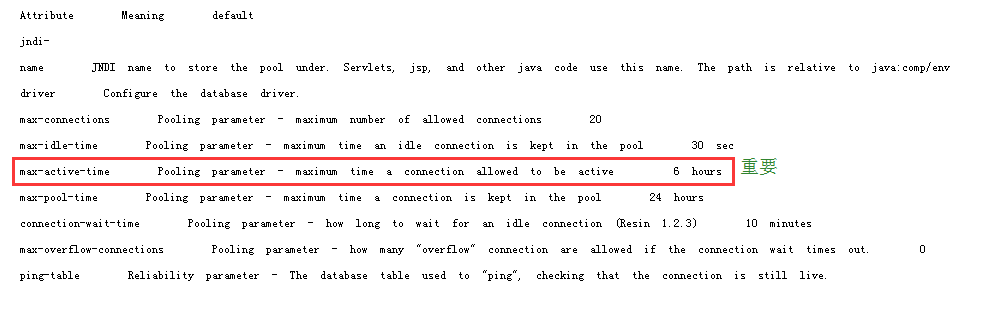
结合案例分析上述参数,稍后补;
四.与tomcat服务器性能比
1、移植性
tomcat是参照标准J2EE实现,移植性会更好(对于老手来说tomcat和resin都一样,当然不把EJB那包括进来)
2、速度
resin的速度要比tomcat快*3倍,官方的测试报告是针对resin-2.x与tomat4.x版本以前的比较了。
resin的 启动与关闭机制感觉要比tomcat好很多,首先,tomcat在windows下启动,双击完startup.bat后总要等几秒钟才会启动服务,并且 关闭的时候也是一样的,有的时候甚至双击了shutdown.bat后startup.bat的窗口还总是在那好长时间,并且如果你哪一次不小心直接关闭 了dos窗口而没有运行shutdown,那下一次肯定要出问题,在linux下启动速度还是很不错的,但如果启动错误报错真是很郁闷。而相 反,resin的启动就十分人性化了,运行httpd后会出来个窗口,其中有start和stop,你可以随时方便的启动和关闭服务,并且速度也十分的 快,并且如果你的配置文件如果有改动的话,启动程序会自动监测并自动重启的,这样在配置环境的时候就不需要像tomcat那样需要反复人工关闭再启动,这 点tomcat真是差的很远。
3、报错机制
resin更好的支持中文,更好的报错机制。
resin对于中文的支持要比 tomcat好很多,各种编码和转码很多都是对tomcat设计的,因为在resin平台下根本就不需要,这点对于开发也是很重要的,特别要提的一点就 是,用tomcat写的面页很多时候如果只在面页加上contentType="text/html; charset=gb2312"还是不能完成编码的还必须要加入一条看起来像是画蛇添足的一条语句 request.setCharacterEncoding("gb2312"),这一点真实让人不能忍受。
tomcat的报错机制,哪怕仅仅只是个小错误,tomcat都会用整页的篇幅来描述,如果时间长了还好,但新手肯定会望而生畏的,相反,resin的报错是十分简洁 而明确的,可以让你一眼就可以看出程序错误的类型和位置,这点对于刚开始学习的人来说无疑是很有帮助的。
4、方便性
resin支持自动编译 Servlet和Bean;
tomcat还不支持j2ee,至少在5以前还是这样的;
5、成本
个人认为,对于企业来说,效率高和成本低的开发,才符合创造最大经济消息的原则,用resin开发,一般的应用完全能胜任。
来自 “ ITPUB博客 ” ,链接:https://blog.itpub.net/70000523/viewspace-3125169/
,如需转载,请注明出处,否则将追究法律责任。

