TimescaleDB安装
TimescaleDB 是基于 PostgreSQL 开发的一款时序数据库,以插件化的形式打包提供。
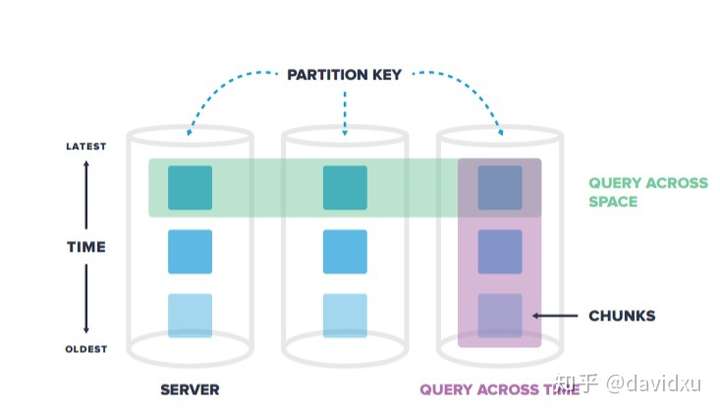
此版本主要新特性使用户可以将聚合数据保持为连续聚合,同时使用drop_chunks删除原始数据,这使用户可以通过仅保留聚合来节省存储空间。它可以支持复杂的SQL查询,并针对时间序列数据的快速插入和复杂查询进行了优化,特别适合用于监控,IoT,金融,物流等大数据领域。
主要介绍PostgreSQL 12.4,TimescaleDB 1.7.4的安装
安装PostgreSQL
yum install -y postgresql12-server
安装之后需要初始化数据库
/usr/pgsql-12/bin/postgresql-12-setup initdb
启动PostgreSQL
systemctl enable --now postgresql-12
安装TimescaleDB插件
-------使用yum方式安装timesacledb
安装timesacledb源
tee /etc/yum.repos.d/timescale_timescaledb.repo <<EOL
[timescale_timescaledb]
name=timescale_timescaledb
baseurl=https://packagecloud.io/timescale/timescaledb/el/7/\$basearch
repo_gpgcheck=1
gpgcheck=0
enabled=1
gpgkey=https://packagecloud.io/timescale/timescaledb/gpgkey
sslverify=1
sslcacert=/etc/pki/tls/certs/ca-bundle.crt
metadata_expire=300
EOL
更新
yum update –y
安装timescaledb
yum install -y timescaledb-postgresql-12
----------rpm 安装-----------------
[root@zabbix-tdb postgresql]# ll
total 11000
-rw-r--r--. 1 root root 1669272 Aug 12 19:25 postgresql12-12.4-1PGDG.rhel7.x86_64.rpm
-rw-r--r--. 1 root root 624492 Aug 12 19:25 postgresql12-contrib-12.4-1PGDG.rhel7.x86_64.rpm
-rw-r--r--. 1 root root 378456 Aug 12 19:25 postgresql12-libs-12.4-1PGDG.rhel7.x86_64.rpm
-rw-r--r--. 1 root root 5325020 Aug 12 19:25 postgresql12-server-12.4-1PGDG.rhel7.x86_64.rpm
-rw-r--r--. 1 root root 323752 Sep 10 03:14 timescaledb-postgresql-12-1.7.4-0.el7.x86_64.rpm
-rw-r--r--. 1 root root 2926276 Apr 17 2020 timescaledb-tools-0.8.1-0.el7.x86_64.rpm
[root@zabbix-tdb postgresql]# yum localinstall timescaledb-*
---------------------------
安装之后使用以下脚本进行参数初始化,一切按照默认,按y完成初始化
timescaledb-tune --pg-config=/usr/pgsql-12/bin/pg_config
重启pg数据库
systemctl restart postgresql-12
配置TimescaleDB
修改配置文件/var/lib/pgsql/12/data/postgresql.conf
侦听地址、端口、最大连接数
#------------------------------------------------------------------------------
# CONNECTIONS AND AUTHENTICATION
#------------------------------------------------------------------------------
# - Connection Settings -
listen_addresses = '*'          # what IP address(es) to listen on;
                                        # comma-separated list of addresses;
                                        # defaults to 'localhost'; use '*' for all
                                        # (change requires restart)
port = 5432                             # (change requires restart)
max_connections = 500                   # (change requires restart)
#superuser_reserved_connections = 3     # (change requires restart)
#unix_socket_directories = '/var/run/postgresql, /tmp'  # comma-separated list of directories
                                        # (change requires restart)
#unix_socket_group = ''                 # (change requires restart)
#unix_socket_permissions = 0777         # begin with 0 to use octal notation
                                        # (change requires restart)
#bonjour = off                          # advertise server via Bonjour
                                        # (change requires restart)
#bonjour_name = ''                      # defaults to the computer name
                                        # (change requires restart)
# - TCP Keepalives -
# see "man 7 tcp" for details
#tcp_keepalives_idle = 0                # TCP_KEEPIDLE, in seconds;
                                        # 0 selects the system default
#tcp_keepalives_interval = 0            # TCP_KEEPINTVL, in seconds;
                                        # 0 selects the system default
#tcp_keepalives_count = 0               # TCP_KEEPCNT;
                                        # 0 selects the system default
# - Authentication -
#authentication_timeout = 1min          # 1s-600s
password_encryption = md5               # md5 or scram-sha-256
#db_user_namespace = off
添加时序数据库支持
修改配置文件
# - Shared Library Preloading -
shared_preload_libraries = 'timescaledb'        # (change requires restart)
#local_preload_libraries = ''
#session_preload_libraries = ''
#jit_provider = 'llvmjit'               # JIT library to use
*通过timescaledb-tune开启支持(可选)
[root@timescaledb ~]# timescaledb-tune -pg-config /usr/pgsql-12/bin/pg_config
Using postgresql.conf at this path:
/var/lib/pgsql/12/data/postgresql.conf
Is this correct? [(y)es/(n)o]: y
Writing backup to:
/tmp/timescaledb_tune.backup202008050957
shared_preload_libraries needs to be updated
Current:
#shared_preload_libraries = ''
Recommended:
shared_preload_libraries = 'timescaledb'
Is this okay? [(y)es/(n)o]: y
success: shared_preload_libraries will be updated
Tune memory/parallelism/WAL and other settings? [(y)es/(n)o]: n
Saving changes to: /var/lib/pgsql/12/data/postgresql.conf
修改配置文件/var/lib/pgsql/12/data/pg_hba.conf,允许所有远程连接
# TYPE  DATABASE        USER            ADDRESS                 METHOD
# "local" is for Unix domain socket connections only
local   all             all                                     peer
# IPv4 local connections:
host    all             all             127.0.0.1/32            trust
# IPv6 local connections:
host    all             all             ::1/128                 ident
# Allow replication connections from localhost, by a user with the
# replication privilege.
local   replication     all                                     peer
host    replication     all             127.0.0.1/32            ident
host    replication     all             ::1/128                 ident
host    all             all             0.0.0.0/0               md5
开启timescaledb 插件
CREATE EXTENSION IF NOT EXISTS timescaledb CASCADE;
来源 https://zhuanlan.zhihu.com/p/269186880
来自 “ ITPUB博客 ” ,链接:https://blog.itpub.net/69999831/viewspace-3159256/ ,如需转载,请注明出处,否则将追究法律责任。

