HotDB表信息入门指引
基本了解
分布式数据库要能正常存储数据,就要知道表如何存储,HotDB当前采用的设计策略是人为指定哪张表以怎么样的规则存储在哪些数据节点中。这里说的人为指定存储方式,指的就是配置表信息,即告诉HotDB该如何存储接下来要创建的对应表。
当前,决定表如何存储的方式,有三种:
- 不在管理平台配置表信息,直接在3323端口执行常规create table 语句,那么表按照autocrc32分片规则分布到表所在逻辑库的默认数据节点;
- 不在管理平台配置表信息,直接在3323端口执行带有HotDB分片语法的create table语句,那么表按照HotDB分片语法存储;
- 在管理平台配置表信息,同步加载后,在3323端口执行常规create table 语句,那么表按照配置的表信息存储。
执行create语句创建表之前,通常建议使用方式3先配置表信息。而对于刚接触HotDB的朋友,可以直接使用方式1完成建表,后续对分片不满意时可以通过管理平台在线分片方案变更功能在线修改分片规则。至于2的语法,大家可以参考HotDB官方文档《【标准】功能使用手册》中“SQL语法支持”章节的“计算节点语法特殊功能”小节。
更多关于分片规则的信息,可以参考HotDB官方文档《【标准】功能使用手册》中“快速配置HotDB Server”章节的“添加分片规则”、“添加表信息”小节,同时可以参考《【管理平台】功能使用手册》,“配置”章节的“分片规则”、“表信息”小节。
本文对方式1和3做简单演示。
先在管理平台“配置”》》“表信息”》》“添加表信息”界面,配置即将create的3个表automodtb1、automodtb2、automodtb3分别为以country、id、name作为分片字段的auto_mod自动分片表。按如下方式填写后,点击“生成预览”,“保存”。注意填写说明“表名称与分片字段使用英文冒号间隔,未使用冒号,取默认分片字段”。
- 随后在管理平台“配置”》》“表信息”》》“添加表信息”界面,配置即将create的1个表globaltb1为全局表。按如下方式填写后,点击“生成预览”,“保存”。
- 此时,我们应该能在“表信息”界面看到我们设定的4个表信息,点击“动态加载”,使表信息配置立即生效。
- create表,并验证表的存储方式
#automodtb1以country为分片字段,列散到2个数据节点中
mysql -h192.168.0.250 -P3323 -uroot -proot
use hotdb
drop table if exists automodtb1;
create table automodtb1(id intauto_increment,name varchar(24),country int,primary key(id));
insert into automodtb1(name,country) values(1,1),(2,1),(3,1),(4,1),(5,1),(6,1),(7,1),(8,1),(9,2),(10,2),(11,2),(12,2),(13,2),(14,2) ,(15,2) ,(16,2) ,(17,3) ,(18,3) ,(19,3) ,(20,3) ,(21,3) ,(22,3) ,(23,3),(24,3);
set show_dnid=1;
select * from automodtb1 order by id;
quit
#automodtb2以id为分片字段,列散到3个数据节点中
mysql -h192.168.0.250 -P3323 -uroot -proot
use hotdb
drop table if exists automodtb2;
create table automodtb2(id intauto_increment,name varchar(24),country int,primary key(id));
insert into automodtb2(name,country) values (1,1),(2,1),(3,1),(4,1),(5,1),(6,1),(7,1),(8,1),(9,2),(10,2),(11,2),(12,2),(13,2),(14,2) ,(15,2) ,(16,2) ,(17,3) ,(18,3) ,(19,3) ,(20,3) ,(21,3) ,(22,3) ,(23,3),(24,3);
set show_dnid=1;
select * from automodtb2 order by id;
quit
#globaltb1在2个数据节点中,都有全部的表数据
mysql -h192.168.0.250 -P3323 -uroot -proot
use hotdb
drop table if exists globaltb1;
create table globaltb1(id int auto_increment,namevarchar(24),country int,primary key(id));
insert into globaltb1(name,country) values(1,1),(2,1),(3,1),(4,1),(5,1),(6,1),(7,1),(8,1),(9,2),(10,2),(11,2),(12,2),(13,2),(14,2) ,(15,2) ,(16,2) ,(17,3) ,(18,3) ,(19,3) ,(20,3) ,(21,3) ,(22,3) ,(23,3),(24,3);
set show_dnid=1;
select * from globaltb1 order by id;
set merge_result=0;
/!hotdb:dnid=all/select database(), country,count(*)from globaltb1 group by country;
quit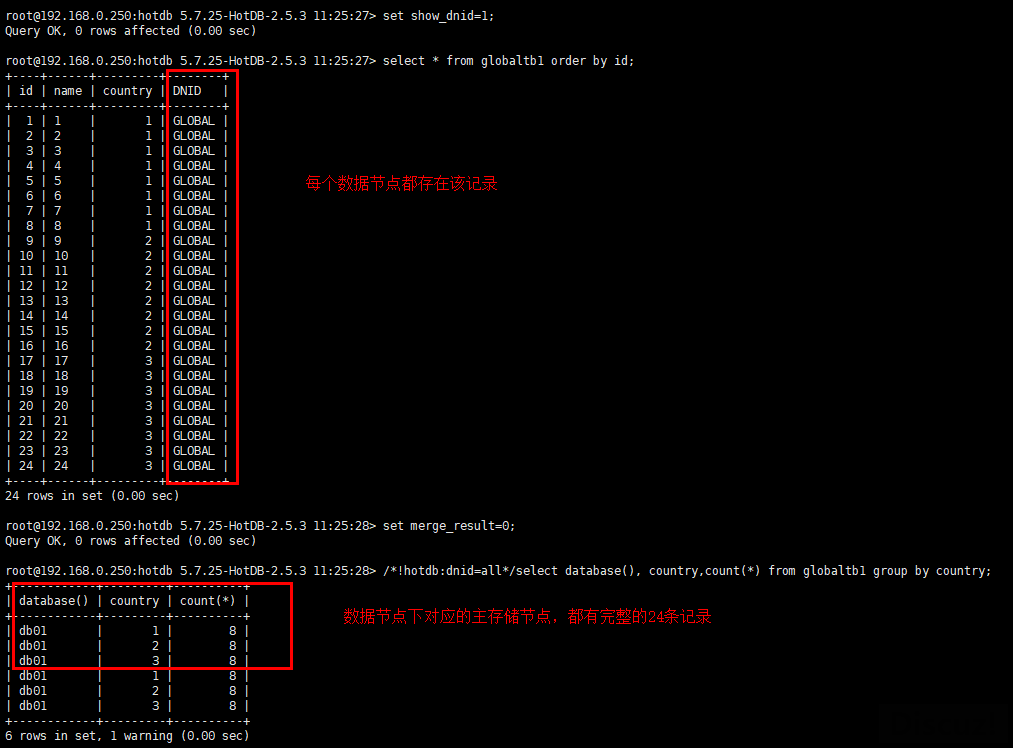
#unconfigtb1以auto_crc32规则,列散到逻辑库hotdb默认的分片节点中
mysql -h192.168.0.250 -P3323 -uroot -proot
use hotdb
drop table if exists unconfigtb1;
create table unconfigtb1(id intauto_increment,name varchar(24),country int,primary key(id));
insert into unconfigtb1(name,country) values(1,1),(2,1),(3,1),(4,1),(5,1),(6,1),(7,1),(8,1),(9,2),(10,2),(11,2),(12,2),(13,2),(14,2) ,(15,2) ,(16,2) ,(17,3) ,(18,3) ,(19,3) ,(20,3) ,(21,3) ,(22,3) ,(23,3),(24,3);
set show_dnid=1;
select * from unconfigtb1 order by id;
quit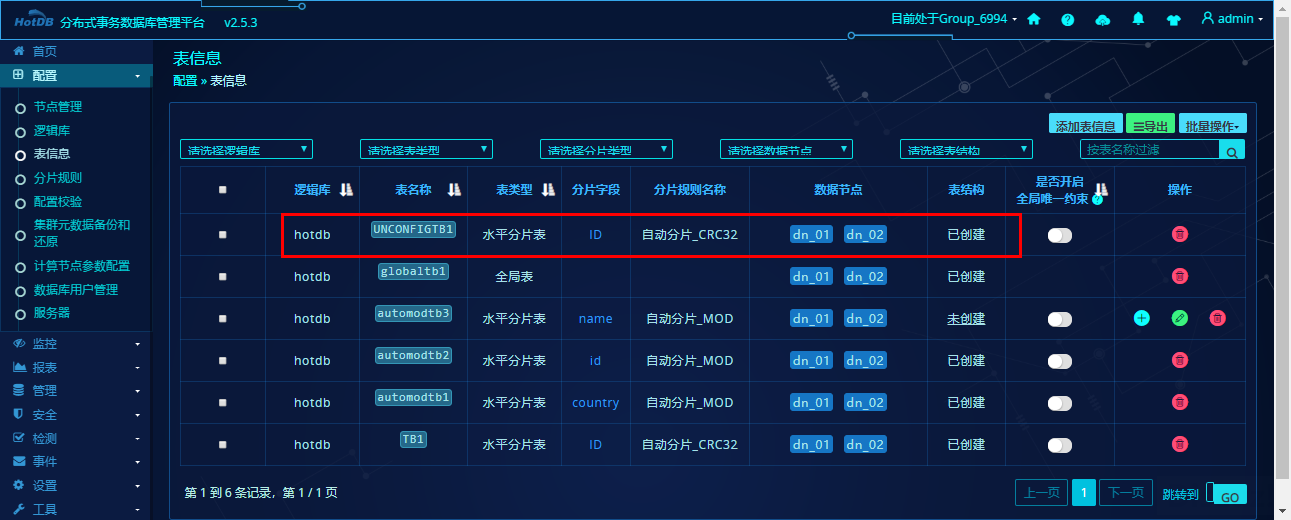
来源 https://www.modb.pro/db/81325
来自 “ ITPUB博客 ” ,链接:https://blog.itpub.net/69999831/viewspace-3128886/ ,如需转载,请注明出处,否则将追究法律责任。

