查看当前系统有哪些vg:lsvg
查看目标vg运行情况
[irsora2][/oracle/crs]#lsvg rootvg
VOLUME GROUP:
rootvg
VG IDENTIFIER:
00f8594500004c000000014762013168
VG STATE:
active
PP SIZE:
512 megabyte(s)
VG PERMISSION:
read/write
TOTAL PPs:
1116 (571392 megabytes)
MAX LVs:
256
FREE PPs:
660 (337920 megabytes)
LVs:
15
USED PPs:
456 (233472 megabytes)
OPEN LVs:
14
QUORUM:
1 (Disabled)
TOTAL PVs:
2
VG DESCRIPTORS: 3
STALE PVs:
0
STALE PPs:
0
ACTIVE PVs:
2
AUTO ON:
no
MAX PPs per VG:
32512
MAX PPs per PV:
1016
MAX PVs:
32
LTG size (Dynamic): 1024 kilobyte(s)
AUTO SYNC:
no
HOT SPARE:
no
BB POLICY:
relocatable
PV RESTRICTION:
none
INFINITE RETRY: no
FREE PPs 有数代表目前vg还有剩余空间可扩,继续执行如下步骤:
smitty fs
Move cursor to desired item and press Enter.
List All File Systems
List All Mounted File Systems
Add / Change / Show / Delete File Systems
Mount a File System
Mount a Group of File Systems
Unmount a File System
Unmount a Group of File Systems
Verify a File System
Backup a File System
Restore a File System
List Contents of a Backup
Create and back up a snapshot
4
选择 >> Add / Change / Show / Delete File Systems
>> Enhanced Journaled File Systems
>> Change / Show Characteristics of an Enhanced Journaled File System 回车
>> 选择需要扩的文件系统 例如/oracle/crs 回车
>> 光标切换到 Unit Size 按ESC + 4 选择 Gigabytes 回车
>> 光标切换到 Number of units 输入文件系统空间大小(此大小是文件系统最终的总大小,不是增加量)
>> 回车,等待扩文件系统完成
5
推出smitty界面
ESC + 0
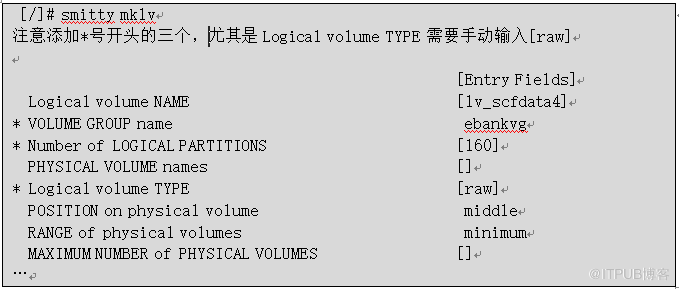
新增LV
以新增lv_scfdata4为例,创建LV,类型为raw,LP数量为480(大小30G多一点)
修改数据文件权限(如果是RAC,两台机器都要修改)

来自 “ ITPUB博客 ” ,链接:https://blog.itpub.net/69994536/viewspace-2764559/ ,如需转载,请注明出处,否则将追究法律责任。

