1、环境情况
redis版本 6.0.16
操作系统 CentOS Linux release 8.2.2004 (Core)
内核版本 4.18.0-348.7.1.el8_5.x86_64
2、目录规划
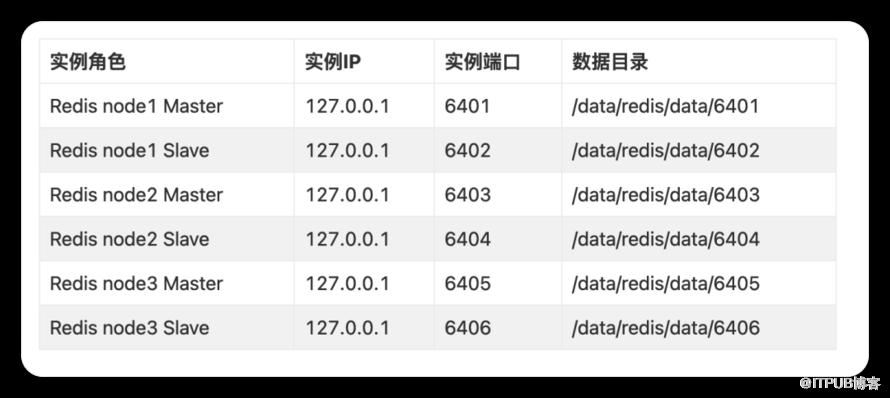
3、redis下载编译
## 创建目录cd /data/mkdir -p /data/redis/{bin,data,conf,log}mkdir -p /data/redis/data/{6401..6406}## 安装依赖yum -y install gcc tcl## 下载源码包 && 编译wget https://download.redis.io/releases/redis-6.0.16.tar.gztar -xvf redis-6.0.16.tar.gzcd redis-6.0.16/depsmake hiredis lua linenoise jemalloccd ../src/make && make install## 移动二进制文件和建软连接mv redis-benchmark redis-check-aof redis-check-rdb redis-cli redis-sentinel redis-server ../../bin/ln -s /data/redis/bin/* /usr/bin/
4、准备配置文件(以redis_6401.conf为例, 剩下的全局替换端口)
bind 0.0.0.0port 6401pidfile /var/run/redis_6401.pidlogfile "/data/redis/log/redis_6401.log"dir /data/redis/data/6401cluster-enabled yescluster-node-timeout 15000cluster-config-file "nodes-6401.conf"daemonize yesprotected-mode yestcp-backlog 511timeout 0tcp-keepalive 300supervised nologlevel noticedatabases 16always-show-logo yessave 900 1save 300 10save 60 10000stop-writes-on-bgsave-error yesrdbcompression yesrdbchecksum yesdbfilename dump.rdbreplica-serve-stale-data yesreplica-read-only yesrepl-diskless-sync norepl-diskless-sync-delay 5repl-disable-tcp-nodelay noreplica-priority 100lazyfree-lazy-eviction nolazyfree-lazy-expire nolazyfree-lazy-server-del noreplica-lazy-flush noappendonly noappendfilename "appendonly.aof"appendfsync everysecno-appendfsync-on-rewrite noauto-aof-rewrite-percentage 100auto-aof-rewrite-min-size 64mbaof-load-truncated yesaof-use-rdb-preamble yeslua-time-limit 5000slowlog-log-slower-than 10000slowlog-max-len 128latency-monitor-threshold 0notify-keyspace-events ""hash-max-ziplist-entries 512hash-max-ziplist-value 64list-max-ziplist-size -2list-compress-depth 0set-max-intset-entries 512zset-max-ziplist-entries 128zset-max-ziplist-value 64hll-sparse-max-bytes 3000stream-node-max-bytes 4096stream-node-max-entries 100activerehashing yesclient-output-buffer-limit normal 0 0 0client-output-buffer-limit replica 256mb 64mb 60client-output-buffer-limit pubsub 32mb 8mb 60hz 10dynamic-hz yesaof-rewrite-incremental-fsync yesrdb-save-incremental-fsync yes
5、启动各实例
nohup redis-server /data/redis/conf/redis_6401.conf &nohup redis-server /data/redis/conf/redis_6402.conf &nohup redis-server /data/redis/conf/redis_6403.conf &nohup redis-server /data/redis/conf/redis_6404.conf &nohup redis-server /data/redis/conf/redis_6405.conf &nohup redis-server /data/redis/conf/redis_6406.conf &
6、搭建redis cluster
redis-cli --cluster-replicas 1 --cluster create \127.0.0.1:6401 \127.0.0.1:6402 \127.0.0.1:6403 \127.0.0.1:6404 \127.0.0.1:6405 \127.0.0.1:6406# 输出信息如下>>> Performing hash slots allocation on 6 nodes... // 可以看到16383个槽均匀分发到3个Redis Master节点Master[0] -> Slots 0 - 5460Master[1] -> Slots 5461 - 10922Master[2] -> Slots 10923 - 16383Adding replica 127.0.0.1:6405 to 127.0.0.1:6401 // 为每一个Redis Master配置了Slave节点Adding replica 127.0.0.1:6406 to 127.0.0.1:6402Adding replica 127.0.0.1:6404 to 127.0.0.1:6403>>> Trying to optimize slaves allocation for anti-affinity[WARNING] Some slaves are in the same host as their masterM: b2b8d874cb650462d05e411f0947e258004f7784 127.0.0.1:6401slots:[0-5460] (5461 slots) masterM: eddff016e90610c84e37231902c640d6dc6746a4 127.0.0.1:6402slots:[5461-10922] (5462 slots) masterM: 32b8bd5bd189d3608928b1dc09411803e2d46459 127.0.0.1:6403slots:[10923-16383] (5461 slots) masterS: ef3c20a5dd0be9113b440550e45501faa003e18f 127.0.0.1:6404replicates 32b8bd5bd189d3608928b1dc09411803e2d46459S: e48a1af608b64f43d4adfd1e5dfd480b71bbe92a 127.0.0.1:6405replicates b2b8d874cb650462d05e411f0947e258004f7784S: b97736a34db550f9f3c460e88d90bf05f4dd286a 127.0.0.1:6406replicates eddff016e90610c84e37231902c640d6dc6746a4Can I set the above configuration? (type 'yes' to accept): yes>>> Nodes configuration updated>>> Assign a different config epoch to each node>>> Sending CLUSTER MEET messages to join the clusterWaiting for the cluster to join..>>> Performing Cluster Check (using node 127.0.0.1:6401)M: b2b8d874cb650462d05e411f0947e258004f7784 127.0.0.1:6401slots:[0-5460] (5461 slots) master1 additional replica(s)M: 32b8bd5bd189d3608928b1dc09411803e2d46459 127.0.0.1:6403slots:[10923-16383] (5461 slots) master1 additional replica(s)S: b97736a34db550f9f3c460e88d90bf05f4dd286a 127.0.0.1:6406slots: (0 slots) slavereplicates eddff016e90610c84e37231902c640d6dc6746a4S: e48a1af608b64f43d4adfd1e5dfd480b71bbe92a 127.0.0.1:6405slots: (0 slots) slavereplicates b2b8d874cb650462d05e411f0947e258004f7784S: ef3c20a5dd0be9113b440550e45501faa003e18f 127.0.0.1:6404slots: (0 slots) slavereplicates 32b8bd5bd189d3608928b1dc09411803e2d46459M: eddff016e90610c84e37231902c640d6dc6746a4 127.0.0.1:6402slots:[5461-10922] (5462 slots) master1 additional replica(s)[OK] All nodes agree about slots configuration.>>> Check for open slots...>>> Check slots coverage...[OK] All 16384 slots covered.
7、检查集群状态
redis-cli --cluster check 127.0.0.1:6401# 输出信息如下127.0.0.1:6401 (b2b8d874...) -> 0 keys | 5461 slots | 1 slaves.127.0.0.1:6403 (32b8bd5b...) -> 0 keys | 5461 slots | 1 slaves.127.0.0.1:6402 (eddff016...) -> 0 keys | 5462 slots | 1 slaves.[OK] 0 keys in 3 masters.
二、predixy搭建
1、部署配置
## 下载二进制包cd /datawget https://github.com/joyieldInc/predixy/releases/download/1.0.5/predixy-1.0.5-bin-amd64-linux.tar.gztar -xvf predixy-1.0.5-bin-amd64-linux.tar.gz## 创建目录mkdir /data/predixycd /data/predixy-1.0.5/conf/## 配置文件说明1、auth.conf 权限设置 write read admin 三种 测试环境可不配password 用自己的密码替代++++++++++++++++++++++++++++++## Authority control## Authority {## Auth [password] {## Mode read|write|admin## [KeyPrefix Prefix1 Prefix2...]## [ReadKeyPrefix Prefix1 Prefix2...]## [WriteKeyPrefix Prefix1 Prefix2...]## }...## }## Example:# Authority {##------------------------------------------------------------------------# Auth {# Mode read# }####### Mode read, client connection is readonly,#### No KeyPrefix or ReadKeyPrefix defined, all key can be visit##------------------------------------------------------------------------# Auth abc {# Mode write# }####### Mode write, client connection can read and write#### No KeyPrefix, ReadKeyPrefix, WriteKeyPrefix define, all key can be visit##------------------------------------------------------------------------# Auth bcd {# Mode admin# }####### Mode admin, client connection can read and write and admin,####### No KeyPrefix, ReadKeyPrefix, WriteKeyPrefix define, all key can be visit##------------------------------------------------------------------------# Auth cde {# Mode read# KeyPrefix User# }####### Mode read, client connection is readonly,#### KeyPrefix User, client can read UserXXX key, eg: GET User.123,#####------------------------------------------------------------------------# Auth def {# Mode write# ReadKeyPrefix User Stats# WriteKeyPrefix User# }####### Mode read, client connection can read and write, but read and write####### SET User.123 SomeValue, but SET Stats.123 will be deny##------------------------------------------------------------------------# }## Authority {# Auth {# Mode admin# }# }Authority {Auth password {Mode write}Auth password {Mode admin}}++++++++++++++++++++++++++++++2、try.conf++++++++++++++++++++++++++++++## This conf is only for testClusterServerPool {Servers {+ 127.0.0.1:6401+ 127.0.0.1:6402+ 127.0.0.1:6403+ 127.0.0.1:6404+ 127.0.0.1:6405+ 127.0.0.1:6406}}++++++++++++++++++++++++++++++++3、cluster.conf++++++++++++++++++++++++++++++++###ClusterServerPool {## [Password xxx]## [MasterReadPriority [0-100]]## [StaticSlaveReadPriority [0-100]]## [DynamicSlaveReadPriority [0-100]]## [RefreshInterval number[s|ms|us]]## [ServerTimeout number[s|ms|us]]## [ServerFailureLimit number]## [ServerRetryTimeout number[s|ms|us]]## [KeepAlive seconds]## Servers {## + addr## ...## }##}## Examples:ClusterServerPool {MasterReadPriority 50StaticSlaveReadPriority 50DynamicSlaveReadPriority 50RefreshInterval 1ServerTimeout 1ServerFailureLimit 10ServerRetryTimeout 1KeepAlive 120Servers {+ 127.0.0.1:6401+ 127.0.0.1:6402+ 127.0.0.1:6403+ 127.0.0.1:6404+ 127.0.0.1:6405+ 127.0.0.1:6406}}++++++++++++++++++++++++++++++++4、predixy.conf## 注意事项 1、bind 只能选一种,踩坑了,联系了项目作者答疑,感谢## 其他设置按照需求设置 本案例大多采用默认,性能是原生集群的一半,后期再进行压测优化调整一下################################### GENERAL ###################################### Predixy configuration file example## Specify a name for this predixy service#Name PredixyIsesolRedisCluster## Specify listen address, support IPV4, IPV6, Unix socket## Examples:#Bind 127.0.0.1:7617Bind 0.0.0.0:7617#Bind /tmp/predixy## Default is 0.0.0.0:7617# Bind 0.0.0.0:7617## Worker threadsWorkerThreads 4## Memory limit, 0 means unlimited## Examples:# MaxMemory 100M# MaxMemory 1GMaxMemory 0## MaxMemory can change online by CONFIG SET MaxMemory xxx## Default is 0# MaxMemory 0## Close the connection after a client is idle for N seconds (0 to disable)## ClientTimeout can change online by CONFIG SET ClientTimeout N## Default is 0ClientTimeout 300## IO buffer size## Default is 4096BufSize 4096################################### LOG ########################################## Log file path## Unspecify will log to stdout## Default is UnspecifiedLog /data/predixy/predixy.log## LogRotate support##1d rotate log every day#### nG rotate log evenry nG bytes## nM rotate log evenry nM bytes### Examples:##LogRotate 1d 2GLogRotate 1d## Default is disable LogRotate## In multi-threads, worker thread log need lock,## AllowMissLog can reduce lock time for improve performance## AllowMissLog can change online by CONFIG SET AllowMissLog true|false## Default is true# AllowMissLog false## LogLevelSample, output a log every N#LogVerbSample 0LogDebugSample 0LogInfoSample 10000LogNoticeSample 1LogWarnSample 1LogErrorSample 1################################### AUTHORITY ##################################Include auth.conf################################### SERVERS ##################################### Include cluster.conf# Include sentinel.confInclude try.conf################################### DATACENTER ################################### LocalDC specify current machine dc# LocalDC bj## Include dc.conf################################### COMMAND ###################################### Custom command define, see command.conf#Include command.conf################################### LATENCY ###################################### Latency monitor define, see latency.confInclude latency.conf
2、启动验证
cd /data/predixy-1.0.5/bin/nohup ./predixy ../conf/predixy.conf &redis-cli -h 127.0.0.1 -p 7617 -a 'password'
3、输入info命令查看信息
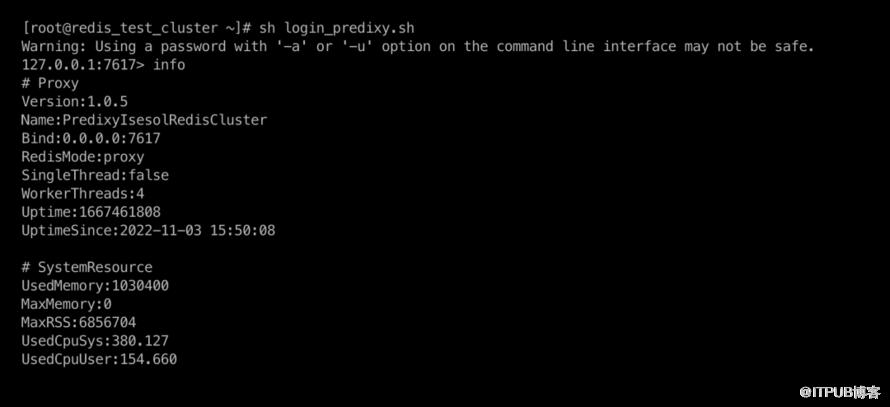
4、predixy的text目录下有作者写的2个python脚本可用于测试命令兼容性。

ps:本公众号已建立技术交流群,有兴趣的朋友后台私聊我加群。
原文作者:DBA札记;如有侵权,请联系管理员删除。

请登录后发表评论
登录
全部评论
