1、下载mysql-8.0.33 源码包(包含boost库)
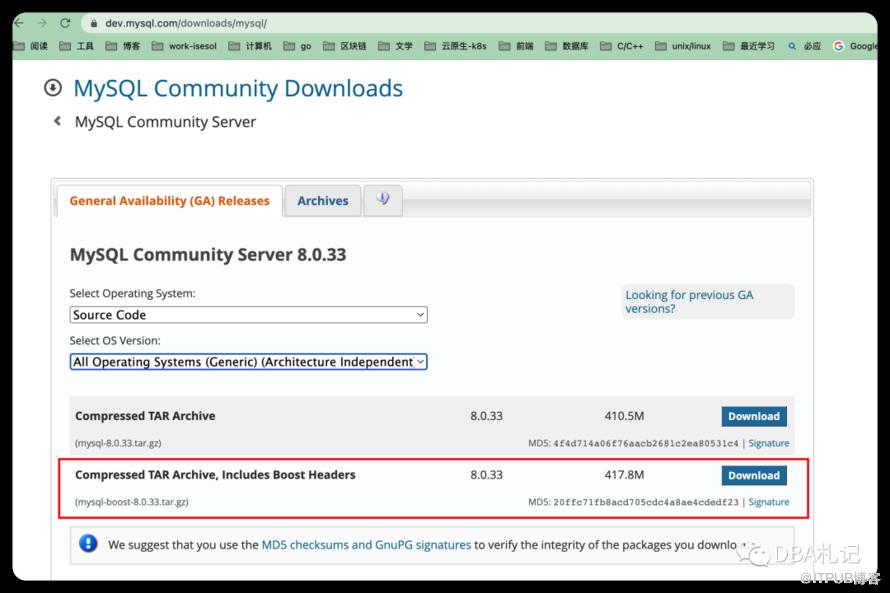 2、解压文件
tar -xvf mysql-boost-8.0.33.tar.gz
3、在解压后的mysql-8.0.33文件夹创建vscode的配置文件夹.vscode,并配置settings.json和launch.json
#settings.json
{
    "cmake.buildBeforeRun": true,
    "cmake.buildDirectory": "/Users/xxx/cpp/src_project/mysql-8.0.33/build",
    "cmake.configureSettings": {
        "WITH_DEBUG": "1",
        "CMAKE_INSTALL_PREFIX": "/Users/xxx/cpp/src_project/cmake-build-debug/bin",
        "MYSQL_DATADIR": "/Users/xxx/cpp/src_project/cmake-build-debug/data/mysql_data/",
        "SYSCONFDIR": "/Users/xxx/cpp/src_project/cmake-build-debug/etc/my33.cnf",
        "MYSQL_TCP_PORT": "3306",
        "WITH_BOOST": "/Users/xxx/cpp/src_project/mysql-8.0.33/boost/boost_1_77_0",
        "DOWNLOAD_BOOST": "1",
        "DOWNLOAD_BOOST_TIMEOUT": "600"
    }
}
#launch.json
{
    // 使用 IntelliSense 了解相关属性。
    // 悬停以查看现有属性的描述。
    // 欲了解更多信息,请访问: https://go.microsoft.com/fwlink/?linkid=830387
    "version": "0.2.0",
    "configurations": [
        {
            "type": "lldb",
            "request": "launch",
            "name": "Debug mysqld",
            "program": "/Users/xxx/cpp/src_project/cmake-build-debug/bin/bin/mysqld",
            "args": [
                "--defaults-file=/Users/xxx/cpp/src_project/cmake-build-debug/etc/my33.cnf"
            ],
        },
        {
            "type": "lldb",
            "request": "launch",
            "name": "Debug mysql",
            "program": "/Users/xxx/cpp/src_project/cmake-build-debug/bin/bin/mysql",
            "args": [
                "-uroot",
                "-P3307",
                "-h127.0.0.1"
            ],
        }
    ]
}
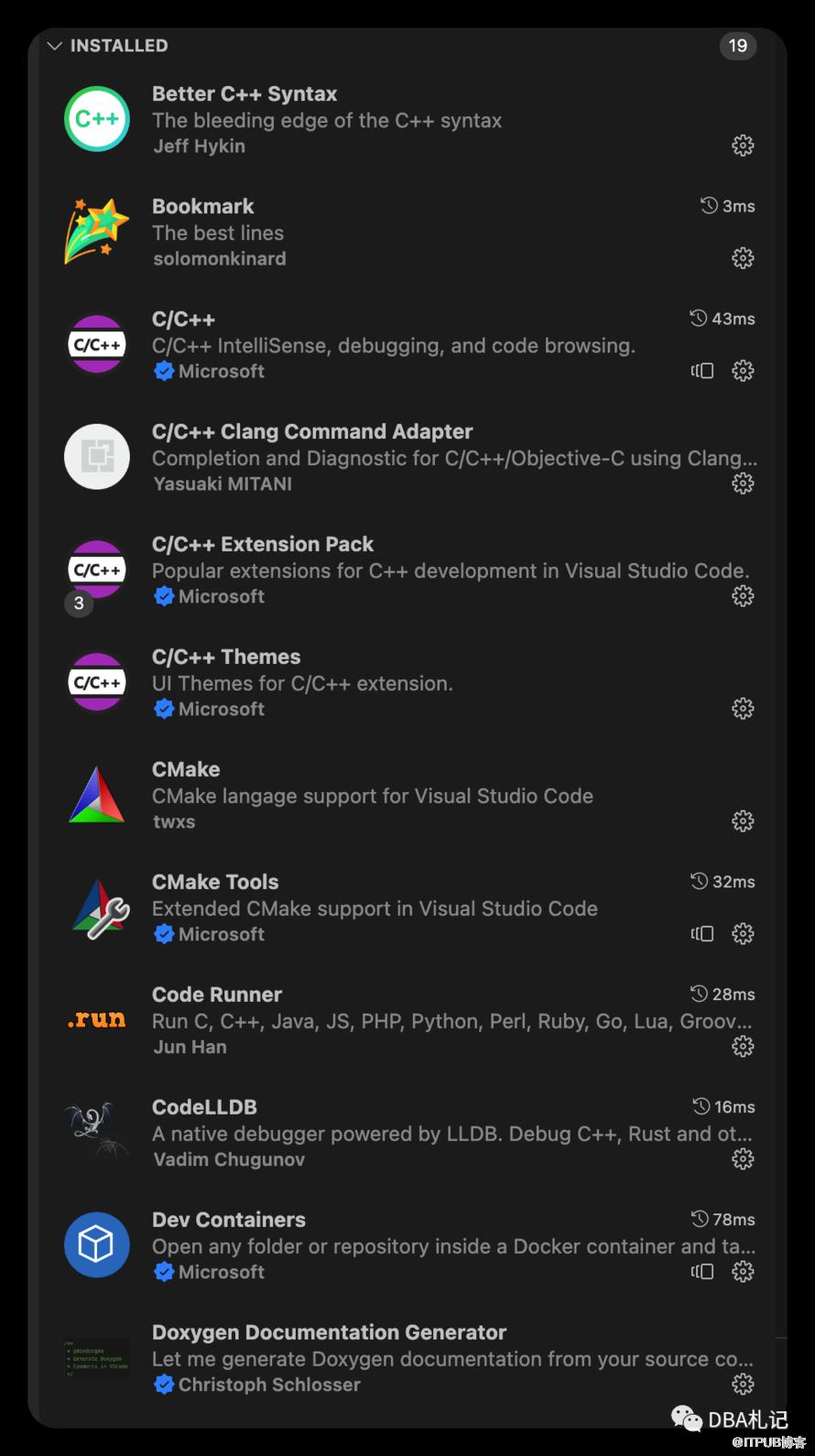
4、安装vscode相关插件
 5、新建build和数据配置目录(本文以我的环境为例,xxx是我的用户名,根据自己电脑环境配置)
mkdir -p /Users/xxx/cpp/src_project/cmake-build-debug
cd /Users/xxx/cpp/src_project/cmake-build-debug/
mkdir -p {bin,data,etc}
mkdir -p /data/{mysql_data,mysql_log, mysql_slow}
6、设置mysql配置文件,放在/etc/目录下
#cat my33.cnf
[client]
port            = 3306
socket          = /tmp/mysql.sock
default-character-set=utf8mb4

[mysqld]
# generic configuration options
#skip-grant-tables
port            = 3306
socket          = /tmp/mysql.sock
datadir=/Users/xxx/cpp/src_project/cmake-build-debug/data/mysql_data/
skip-name-resolve
default_time_zone='+8:00'
character-set-server=utf8mb4
collation-server = utf8mb4_unicode_ci
init_connect='SET NAMES utf8mb4'
lower_case_table_names=1

bind-address = 0.0.0.0

#memlock

log-bin=/Users/xxx/cpp/src_project/cmake-build-debug/data/mysql_log/mysql-bin
binlog_format = ROW
sync_binlog = 1
log_output=file
log_slave_updates

server-id = 20230420

slow_query_log_file=/Users/xxx/cpp/src_project/cmake-build-debug/data/mysql_slow/slow.log
slow_query_log
long_query_time=1
log_error_verbosity = 1
log_error = /Users/xxx/cpp/src_project/cmake-build-debug/data/mysql_log/error.log
tmpdir =/tmp
relay-log=/Users/xxx/cpp/src_project/cmake-build-debug/data/mysql_log/relay-bin
slave-parallel-type=LOGICAL_CLOCK
slave-parallel-workers=4
slave_preserve_commit_order=1
sql_mode=STRICT_TRANS_TABLES,NO_ZERO_IN_DATE,NO_ZERO_DATE,ERROR_FOR_DIVISION_BY_ZERO,NO_ENGINE_SUBSTITUTION
log_timestamps = SYSTEM

#*** MyISAM Specific options
key_buffer_size = 64M

# *** INNODB Specific options ***
#default_table_type = InnoDB
transaction_isolation = REPEATABLE-READ
innodb_buffer_pool_size = 1G
innodb_data_file_path = ibdata1:1000M:autoextend
innodb_file_per_table=1
innodb_flush_log_at_trx_commit = 1
innodb_log_buffer_size = 16M
innodb_log_file_size = 256M
innodb_log_files_in_group = 2
innodb_max_dirty_pages_pct = 90
lock_wait_timeout = 20
innodb_lock_wait_timeout = 20
innodb_flush_method=O_DIRECT_NO_FSYNC
innodb_io_capacity = 1000
slave-skip-errors=1062,1032,1872
explicit_defaults_for_timestamp = 0
default_authentication_plugin = mysql_native_password
binlog_expire_logs_seconds = 604800


[mysqldump]
quick
max_allowed_packet = 64M

[mysql]
no-auto-rehash
#safe-updates

[myisamchk]
key_buffer_size = 64M
sort_buffer_size = 64M
read_buffer = 8M
write_buffer = 8M

[mysqlhotcopy]
interactive-timeout
7、编译
【vscode菜单栏】->【view】->【command Palett...】-> 【CMake build target】->【mysqld】
8、到终端文件目录下
make install
9、初始化数据 在编译完成的二进制目录下
./mysqld --defaults-file=/Users/xxx/cpp/src_project/cmake-build-debug/etc/my33.cnf --initialize-insecure
10、启动调试
参考文章:https://shockerli.net/post/mysql-source-macos-vscode-debug-5-7/
调试过程中感谢富哥帮忙指导。
欢迎关注:DBA札记,后台回复“交流群”,添加技术交流群。
原文作者:DBA札记;如有侵权,请联系管理员删除。
上一篇:
ChatGTP在数据库中的应用
下一篇:
tpcc-mysql简介

请登录后发表评论
登录
全部评论
