PG恢复被打了删除标记的列
环境 PostgreSQL 12.1
一、创建测试数据
postgres=# create table ysl1(id int,name char(10));
CREATE TABLE
postgres=# insert into ysl1 values(1,'qwe');
INSERT 0 1
postgres=# insert into ysl1 values(2,'q32');
INSERT 0 1
postgres=# \dt+ ysl1
                      List of relations
 Schema | Name | Type  |  Owner   |    Size    | Description
--------+------+-------+----------+------------+-------------
 public | ysl1 | table | postgres | 8192 bytes |
(1 row)
postgres=#  select oid from pg_class where relname='ysl1';
  oid
-------
 65547
(1 row)
二、查看PG_ATTRIBUTE中存储的表的相关列
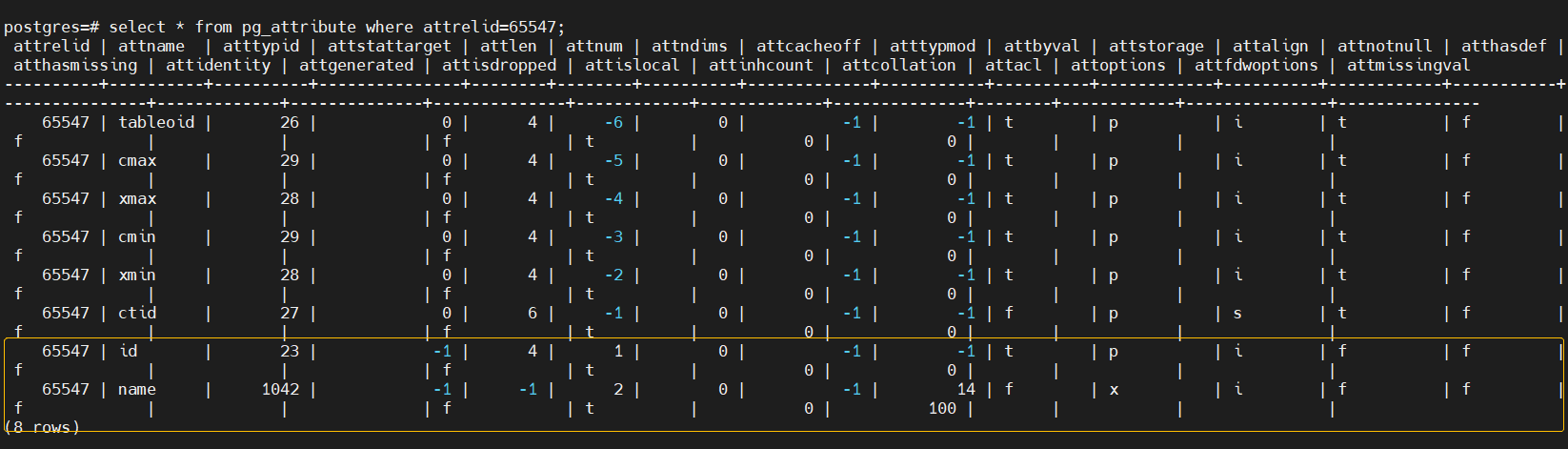
PG_ATTRIBUTE系统表存储关于表字段的信息。
select * from pg_attribute where attrelid=65547;
三、删除列
postgres=# alter table ysl1 drop column name;
ALTER TABLE
postgres=# select * from ysl1;
 id
----
  1
  2
(2 rows)
postgres=# \d ysl1
                Table "public.ysl1"
 Column |  Type   | Collation | Nullable | Default
--------+---------+-----------+----------+---------
 id     | integer |           |          |
postgres=# select * from pg_attribute where attrelid=65547;
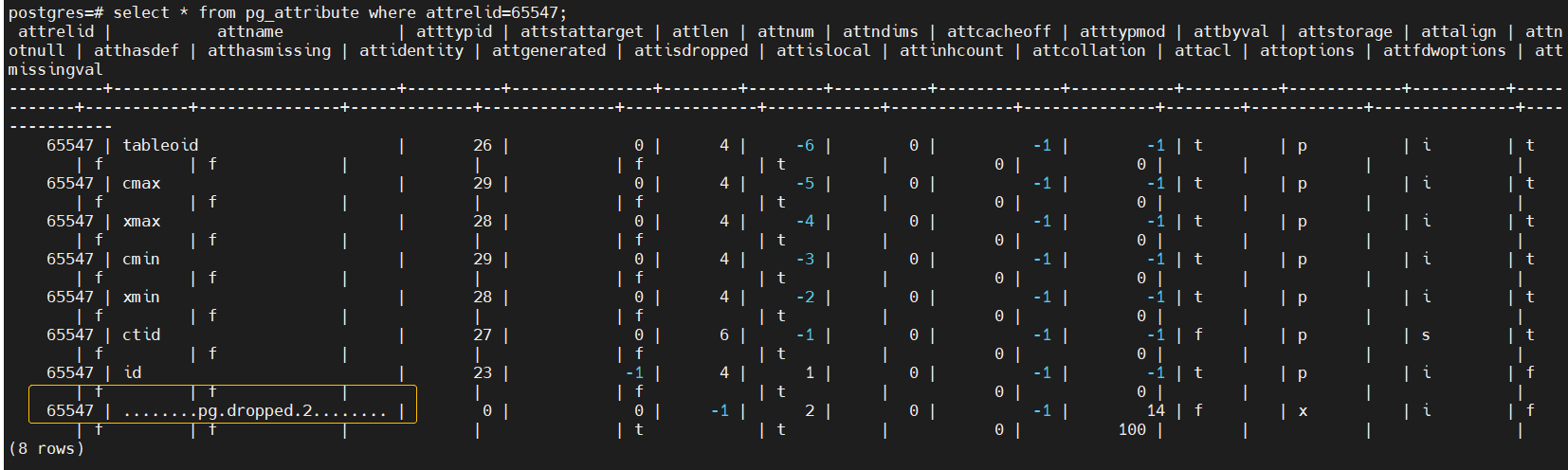
删除列后,查看到这个列对应的行的attname变为了 …pg.dropped.2…,且字段类型也从原有数值变为了0,attisdropped也从f变为了空,被打上了删除标记。
列被打上了标记,但是他的物理数据其实还存在表里,只需要根据pg_attribute里attrelid,attnum的找到对应的列的行,将attname,atttypid,attisdropped更新一下,就可以恢复。
| 名称 | 类型 | 描述 |
|---|---|---|
| attrelid | oid | 此字段所属表 |
| attnum | smallint | 字段编号 |
| 名称 | 类型 | 描述 |
|---|---|---|
| attname | name | 字段名。 |
| atttypid | oid | 字段类型。 |
| attisdropped | Boolean | 这个字段已经被删除了,不再有效。一个已经删除的字段物理上仍然存在表中,但会被分析器忽略,因此不能再通过SQL访问。 |
四、恢复被删除的列
update pg_attribute set attisdropped='f',attname='name',atttypid=1042 where attrelid=65547 and attnum =2;
执行如上语句恢复被删除的列,将原有被标记的列的名字复原,以及指定其字段类型,和清除删除标记。
注意:atttypid字段类型需要和原来的相对应,否则尽管数据恢复了,数据也是错的,可能原来相应的存储的字母变为数字等等。
postgres=# update pg_attribute set attisdropped='f',attname='name',atttypid=1042 where attrelid=65547 and attnum =2;
UPDATE 1
postgres=# \d ysl1
                   Table "public.ysl1"
 Column |     Type      | Collation | Nullable | Default
--------+---------------+-----------+----------+---------
 id     | integer       |           |          |
 name   | character(10) |           |          |
postgres=# select * from ysl1;
 id |    name
----+------------
  1 | qwe
  2 | q32
(2 rows)
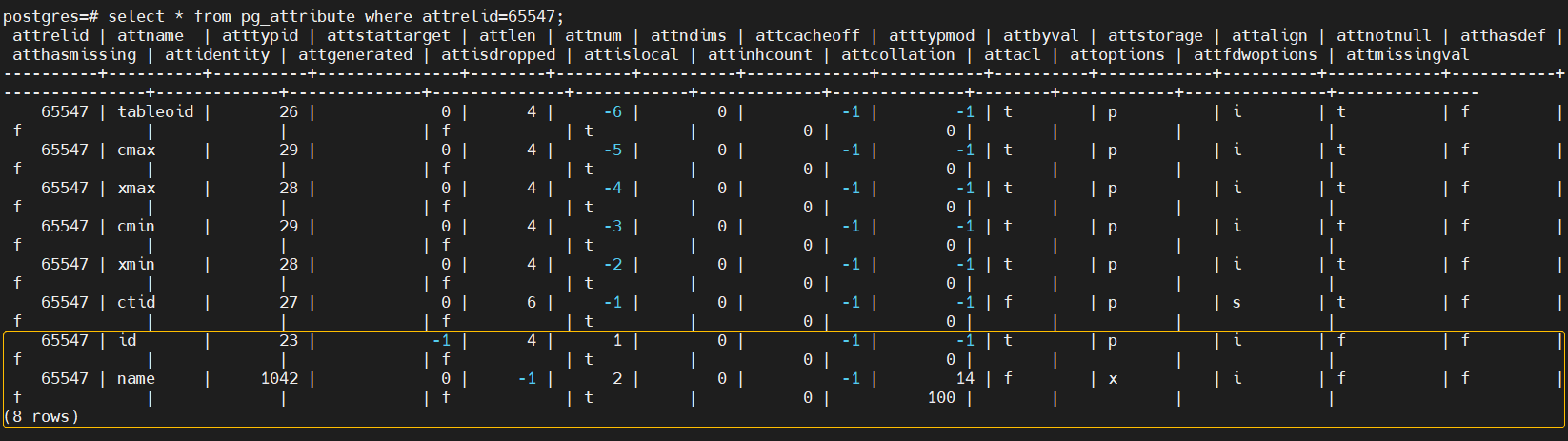
可以看到数据恢复了。
来自 “ ITPUB博客 ” ,链接:https://blog.itpub.net/69990629/viewspace-2852987/ ,如需转载,请注明出处,否则将追究法律责任。

请登录后发表评论
登录
全部评论
