Linux执行yum时提示:Another app is currently holding the yum lock
【问题描述】
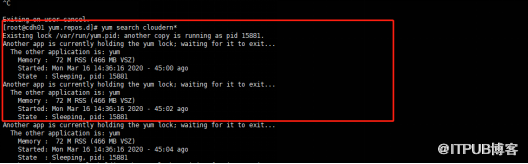
Linux执行yum search cloudera*提示:Another app is currently holding the yum lock,如下图所示:
【问题原因】
其他的进程在使用yum,导致yum加上了锁,导致其他人不能正常使用;
【问题解决】
方法一:找到相应进程,然后kill掉;
# ps aux|grep yum
root      6744  0.0  0.0 103260   900 pts/1    S+   14:59   0:00 grep yum
root     12609 0.0  0.0      0     0 ?        Z    Sep19   0:01 [yumBackend.py] <defunct>
# kill -s 9 12609
方法二:删除进程yum.pid文件,即删除使用yum的进程
rm -rf /var/run/yum.pid
来自 “ ITPUB博客 ” ,链接:https://blog.itpub.net/69985104/viewspace-2726901/ ,如需转载,请注明出处,否则将追究法律责任。

请登录后发表评论
登录
全部评论
