零门槛AI 绘图:教你为客户定制 ComfyUI Serverless API 应用
作者:鸥弋、筱姜
2023年下半年,ComfyUI 以其快速、流畅的图像生成能力,结合多样的自定义节点,迅速在创作者中流行起来。ComfyUI 的亮点就是能够批量化生成图像,一键加载大量工作流,让用户可以轻松实现人像生成、背景替换、风格迁移和图像动画化等功能。越来越多的企业及个人开发者希望借助 ComfyUI 能力进行 AI 绘画领域创业或者业务上新,获得高流量及商业价值,但使用原生的 ComfyUI 仍然存在一些问题:
1. 显卡资源昂贵且难以购买:GPU 卡池管理技术门槛高:高性能的 GPU 资源不仅价格昂贵,而且往往难以大规模采购。此外,GPU 卡池的有效管理和维护需要复杂的技术支持,也带来了额外的挑战。
2. 难以应对高并发:原生的 ComfyUI 出图需要排队,并发处理能力有限。在面对高并发场景时,尤其是并发请求具有大的波动性时,资源配置难以精确预测,从而可能导致系统错误和业务中断。
3. 门槛高,难以对外透出:ComfyUI 拥有一定的门槛,对于普通的创作者而言几乎无法使用,需要对其进行二次包装才能让更多用户享受到 AI 的便捷。
为了帮助用户高效率、低成本应对企业级复杂场景,以下介绍 ComfyUI API Serverless 版解决方案, 通过使用该方案,用户可以充分利用 ComfyUI + Serverless 技术优势快速开发上线 AI 绘画应用,期待为广大开发者 AI 绘画创业及变现提供思路。 相关文章: AI 绘画平台难开发,难变现?试试 Stable Diffusion API Serverless 版解决方案
阿里云X优酷联名发起的「Creat@AI江湖创作大赛」使用本文章中的解决方案,
基于函数计算FC 一键部署 AI 绘图平台,1分钟实现 “破次元壁合照”、5分钟实现 Stable Diffusion、ComfyUI 部署,生成以“少年江湖“为主题的画作赢万元奖金。
活动链接:
https://developer.aliyun.com/plan/create/snbm

方案优势
在以往的活动中,我们也面临了很多非技术相关的用户期望享受 AI 的魅力。结合实际需要我们给出了 Serverless 化的 ComfyUI 实践案例,解决了上述问题。
- 部署简单:提供基础 ComfyUI 镜像,不需要修改时一键即可拉起出图,需要修改时也只需要修改 ComfyUI 镜像地址即可
- 弹性 GPU:函数计算提供了 GPU 弹性的能力,根据实际请求控制实例个数,有突发流量时自动弹新实例承接请求,完全不需要增加额外的关注
- 按量付费:函数计算的按量实例为毫秒级粒度的计费策略,用多久就收多少钱,确保每分钱都花在刀刃上
- ComfyUI Serverless 化改造:对原本不适应 Serverless 弹性能力的 ComfyUI 改造,使其可以支持异步、并发、弹性等各种 Serverless 能力
- 前后端联动:活动开源了一个支持自定义参数,并且并发出图的前端页面,可直接提供给客户使用
应用场景
ComfyUI 提供了非常高的自由度和灵活性,支持定制化工作流,并且可以重复使用,批量出图,特别适用于需要创意图像生成场景:
- 艺术创作与设计:艺术家和设计师可以利用 ComfyUI 生成独特的艺术作品,包括概念艺术、插画、海报设计等。通过 ComfyUI,他们可以根据自己的创意想法生成初步的图像草稿,然后再进一步细化和完善。
- 内容制作与营销:在社交媒体、广告和营销领域,ComfyUI 可用于快速生成符合品牌风格的视觉素材,用于社交媒体内容、广告横幅、海报等
- 游戏开发:游戏开发者可能利用 ComfyUI 自动生成游戏内的景观或建筑物的纹理,减少手工制作这些元素所需的时间和成本。
- 视觉特效与影视后期:电影和电视行业的视觉特效团队可以使用 ComfyUI 来辅助创建逼真的背景、特殊效果或修复旧影片中的画面缺陷。
通过 API 接口调用 ComfyUI 解决方案
常规的 ComfyUI 出图的流程大致如下
- 调用
/prompt接口,发起出图任务 - 通过 WebSocket 获取出图进度
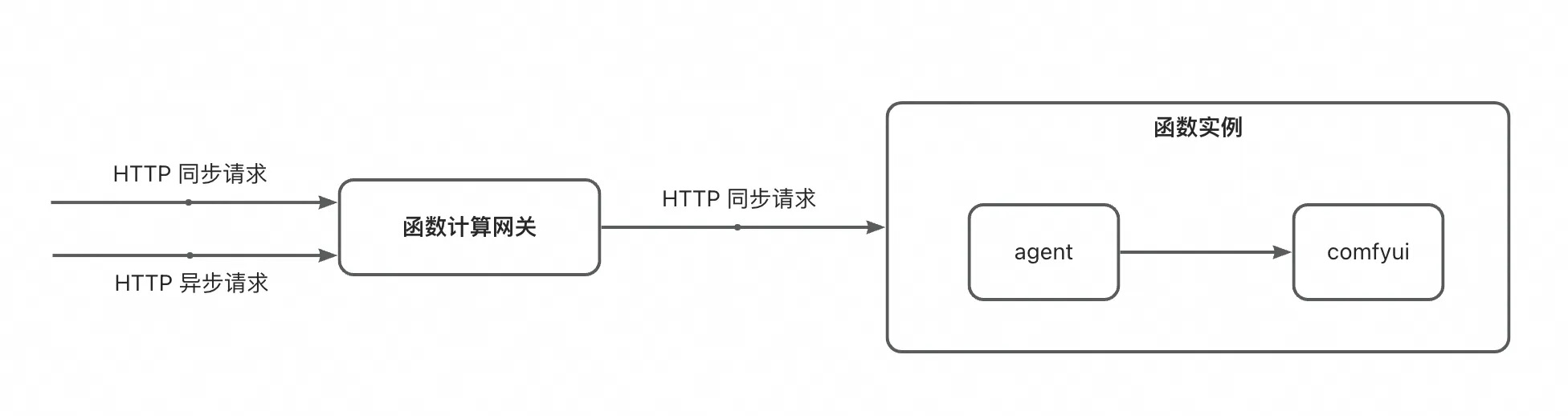
由于在 Serverless 场景下,无请求的时候实例会被冻结,因此 WebSocket 请求是必须要存在的,且需要保持连接到出图完成。
在并发请求数比较大的情况下,我们往往期望可以利用 Serverless 的弹性,动态创建多个函数实例处理出图任务。但由于 ComfyUI 本身是“有状态”的,难以确保出图的请求和获取状态的请求固定打到同一个实例上,这可能会导致接口的调用不符合预期。
为了让 ComfyUI 更加适配 Serverless 模式,需要针对 ComfyUI 进行一定的改造。 参考
fc-comfyui/src/images/agent 的代码,在 ComfyUI 镜像里内置 agent 程序,负责转换 ComfyUI 请求并且拉起 ComfyUI。
注意! 我们提供的代码仅用于运营活动使用,作为 Serverless 方式调用的实践参考。 功能未经过严格测试,请根据实际的业务需要开发或调整相关的代码,并构建 ComfyUI 镜像。
目前提供的 Agent 能力介绍
开启 Agent 能力,需要增加环境变量
-
USE_AGENT:1
当通过 Agent 的 API 调用时,建议您调整单实例并发度为 1 ~ 5,确保并发请求尽量使用单独的实例,提高出图效率
数据类型
出图 Prompt
与 ComfyUI 在 Dev Mode 导出的文件一致
type TPromptNode struct {
    Inputs    map[string]any `json:"inputs"`
    ClassType string         `json:"class_type"`
    Meta      map[string]any `json:"_meta"`
}
type TPrompt map[string]TPromptNode
LoadImage 节点的参数做了特殊处理,如果内容为 base64 或 http 地址,会自动将对应的文件上传,并转换为 ComfyUI 可识别的形式
进度
// key 为 node id 的 map 对象
type TProgress map[string]TProgressNode
type TProgressNode struct {
    Max         int                  `json:"max"` // 进度的最大值
    Value       int                  `json:"value"` // 当前进度
    Start       int64                `json:"start"` // 开始时间
    LastUpdated int64                `json:"last_updated"` // 最后一次更新时间
    Images      []TProgressNodeImage `json:"images"` // 当前节点输出的图片信息(路径)
    Results     []string             `json:"results,omitempty"` // 当前节点输出的图片 base64
}
接口
出图请求(HTTP 同步)
路径:
/api/run Body:json 格式的 prompt 数据 返回值:最后一次的进度(包含图片信息)
当需要异步请求时,需要增加
X-Fc-Invocation-Type 和
task-id,前者告知 FC 异步形式调用,后者用于记录当前任务的唯一 id,方便后续获取状态
curl http://xxxxx/api/run -v \
    -H 'X-Fc-Invocation-Type: Async' \
  -H "task-id: abcdefg" \
     -XPOST \
  -d '{
    "3": {
        "inputs": {
            "seed": 1586995582004891,
            "steps": 17,
            "cfg": 6,
            "sampler_name": "dpm_2",
            "scheduler": "karras",
            "denoise": 1,
            "model": [
                "33",
                0
            ],
            "positive": [
                "31",
                0
            ],
            "negative": [
                "32",
                0
            ],
            "latent_image": [
                "5",
                0
            ]
        },
        "class_type": "KSampler",
        "_meta": {
            "title": "KSampler"
        }
    },
    "4": {
        "inputs": {
            "ckpt_name": "majicMIX realistic_v7.safetensors"
        },
        "class_type": "CheckpointLoaderSimple",
        "_meta": {
            "title": "Load Checkpoint"
        }
    },
    "5": {
        "inputs": {
            "width": 1024,
            "height": 784,
            "batch_size": 1
        },
        "class_type": "EmptyLatentImage",
        "_meta": {
            "title": "Empty Latent Image"
        }
    },
    "6": {
        "inputs": {
            "text": "2 human\nhi quality,detailed",
            "clip": [
                "4",
                1
            ]
        },
        "class_type": "CLIPTextEncode",
        "_meta": {
            "title": "CLIP Text Encode (Prompt)"
        }
    },
    "8": {
        "inputs": {
            "samples": [
                "3",
                0
            ],
            "vae": [
                "4",
                2
            ]
        },
        "class_type": "VAEDecode",
        "_meta": {
            "title": "VAE Decode"
        }
    },
    "9": {
        "inputs": {
            "filename_prefix": "ComfyUI",
            "images": [
                "8",
                0
            ]
        },
        "class_type": "SaveImage",
        "_meta": {
            "title": "Save Image"
        }
    },
    "10": {
        "inputs": {
            "image": "https://serverless-tool-images.oss-cn-hangzhou.aliyuncs.com/aigc/json/couple/default.png",
            "upload": "image"
        },
        "class_type": "LoadImage",
        "_meta": {
            "title": "Load Image"
        }
    },
    "11": {
        "inputs": {
            "image": "https://serverless-tool-images.oss-cn-hangzhou.aliyuncs.com/aigc/json/couple/百里东君.png",
            "upload": "image"
        },
        "class_type": "LoadImage",
        "_meta": {
            "title": "Load Image",
            "edit": []
        }
    },
    "12": {
        "inputs": {
            "image": "https://serverless-tool-images.oss-cn-hangzhou.aliyuncs.com/aigc/json/couple/background.png",
            "upload": "image"
        },
        "class_type": "LoadImage",
        "_meta": {
            "title": "Load Image"
        }
    },
    "13": {
        "inputs": {
            "image": "https://serverless-tool-images.oss-cn-hangzhou.aliyuncs.com/aigc/json/couple/mask.png",
            "upload": "image"
        },
        "class_type": "LoadImage",
        "_meta": {
            "title": "Load Image"
        }
    },
    "15": {
        "inputs": {
            "threshold_r": 0.15,
            "threshold_g": 0.15,
            "threshold_b": 0.15,
            "remove_isolated_pixels": 0,
            "fill_holes": false,
            "image": [
                "13",
                0
            ]
        },
        "class_type": "MaskFromRGBCMYBW+",
        "_meta": {
            "title": "🔧 Mask From RGB/CMY/BW"
        }
    },
    "21": {
        "inputs": {
            "image_weight": 0.8,
            "prompt_weight": 1,
            "weight_type": "linear",
            "start_at": 0,
            "end_at": 1,
            "image": [
                "10",
                0
            ],
            "mask": [
                "15",
                0
            ],
            "positive": [
                "24",
                0
            ],
            "negative": [
                "25",
                0
            ]
        },
        "class_type": "IPAdapterRegionalConditioning",
        "_meta": {
            "title": "IPAdapter Regional Conditioning"
        }
    },
    "22": {
        "inputs": {
            "image_weight": 1,
            "prompt_weight": 1,
            "weight_type": "linear",
            "start_at": 0,
            "end_at": 1,
            "image": [
                "11",
                0
            ],
            "mask": [
                "15",
                1
            ],
            "positive": [
                "26",
                0
            ],
            "negative": [
                "25",
                0
            ]
        },
        "class_type": "IPAdapterRegionalConditioning",
        "_meta": {
            "title": "IPAdapter Regional Conditioning"
        }
    },
    "23": {
        "inputs": {
            "image_weight": 0.7000000000000001,
            "prompt_weight": 1,
            "weight_type": "linear",
            "start_at": 0,
            "end_at": 1,
            "image": [
                "12",
                0
            ],
            "mask": [
                "15",
                6
            ]
        },
        "class_type": "IPAdapterRegionalConditioning",
        "_meta": {
            "title": "IPAdapter Regional Conditioning"
        }
    },
    "24": {
        "inputs": {
            "text": "illustration of a body with black hair, presented in high definition with intricate details",
            "clip": [
                "4",
                1
            ]
        },
        "class_type": "CLIPTextEncode",
        "_meta": {
            "title": "CLIP Text Encode (Prompt)"
        }
    },
    "25": {
        "inputs": {
            "text": "(worst quality:1.6),(low quality:1.6),(lowres:1.6),(NSFW:1.5),watermark,monochrome,disconnected limbs,malformed limbs,extra limb,mutated hands,fused fingers,too many fingers,extra arms,missing fingers,bad hands,bad feet,mutated hands and fingers,malformed hands,extra legs,floating limbs,missing limb,mutation,mutated,deformed,bad body,poorly drawn hands,(badhandv4),(naked),(nude),",
            "clip": [
                "4",
                1
            ]
        },
        "class_type": "CLIPTextEncode",
        "_meta": {
            "title": "CLIP Text Encode (Prompt)"
        }
    },
    "26": {
        "inputs": {
            "text": "anime Aillustration of 1 boy with black hair, depicted in high definition showcasing rich details, in 8k resolution.",
            "clip": [
                "4",
                1
            ]
        },
        "class_type": "CLIPTextEncode",
        "_meta": {
            "title": "CLIP Text Encode (Prompt)"
        }
    },
    "28": {
        "inputs": {
            "params_1": [
                "21",
                0
            ],
            "params_2": [
                "22",
                0
            ],
            "params_3": [
                "23",
                0
            ]
        },
        "class_type": "IPAdapterCombineParams",
        "_meta": {
            "title": "IPAdapter Combine Params"
        }
    },
    "31": {
        "inputs": {
            "conditioning_1": [
                "21",
                1
            ],
            "conditioning_2": [
                "22",
                1
            ],
            "conditioning_3": [
                "6",
                0
            ],
            "conditioning_4": [
                "47",
                0
            ]
        },
        "class_type": "ConditioningCombineMultiple+",
        "_meta": {
            "title": "🔧 Conditionings Combine Multiple "
        }
    },
    "32": {
        "inputs": {
            "conditioning_1": [
                "47",
                1
            ],
            "conditioning_2": [
                "22",
                2
            ],
            "conditioning_3": [
                "25",
                0
            ]
        },
        "class_type": "ConditioningCombineMultiple+",
        "_meta": {
            "title": "🔧 Conditionings Combine Multiple "
        }
    },
    "33": {
        "inputs": {
            "combine_embeds": "concat",
            "embeds_scaling": "V only",
            "model": [
                "4",
                0
            ],
            "ipadapter": [
                "34",
                1
            ],
            "ipadapter_params": [
                "28",
                0
            ]
        },
        "class_type": "IPAdapterFromParams",
        "_meta": {
            "title": "IPAdapter from Params"
        }
    },
    "34": {
        "inputs": {
            "preset": "PLUS (high strength)",
            "model": [
                "4",
                0
            ]
        },
        "class_type": "IPAdapterUnifiedLoader",
        "_meta": {
            "title": "IPAdapter Unified Loader"
        }
    },
    "43": {
        "inputs": {
            "clip_name": "CLIP-ViT-H-14-laion2B-s32B-b79K.safetensors"
        },
        "class_type": "CLIPVisionLoader",
        "_meta": {
            "title": "Load CLIP Vision"
        }
    },
    "45": {
        "inputs": {
            "ipadapter_file": "ip-adapter-plus_sd15.safetensors"
        },
        "class_type": "IPAdapterModelLoader",
        "_meta": {
            "title": "IPAdapter Model Loader"
        }
    },
    "46": {
        "inputs": {
            "provider": "CPU"
        },
        "class_type": "IPAdapterInsightFaceLoader",
        "_meta": {
            "title": "IPAdapter InsightFace Loader"
        }
    },
    "47": {
        "inputs": {
            "strength": 0.8,
            "start_percent": 0,
            "end_percent": 1,
            "positive": [
                "21",
                1
            ],
            "negative": [
                "21",
                2
            ],
            "control_net": [
                "48",
                0
            ],
            "image": [
                "49",
                0
            ]
        },
        "class_type": "ControlNetApplyAdvanced",
        "_meta": {
            "title": "Apply ControlNet (Advanced)"
        }
    },
    "48": {
        "inputs": {
            "control_net_name": "control_v11p_sd15_openpose_fp16.safetensors"
        },
        "class_type": "ControlNetLoader",
        "_meta": {
            "title": "Load ControlNet Model"
        }
    },
    "49": {
        "inputs": {
            "detect_hand": "enable",
            "detect_body": "enable",
            "detect_face": "enable",
            "resolution": 512,
            "image": [
                "10",
                0
            ]
        },
        "class_type": "OpenposePreprocessor",
        "_meta": {
            "title": "OpenPose Pose"
        }
    }
}'
{"":{"max":0,"value":0,"start":0,"last_updated":1722234889,"images":null},"10":{"max":1,"value":0,"start":1722234844,"last_updated":1722234844,"images":null},"11":{"max":1,"value":0,"start":1722234844,"last_updated":1722234844,"images":null},"12":{"max":1,"value":0,"start":1722234844,"last_updated":1722234844,"images":null},"13":{"max":1,"value":0,"start":1722234844,"last_updated":1722234844,"images":null},"15":{"max":1,"value":0,"start":1722234844,"last_updated":1722234844,"images":null},"21":{"max":1,"value":0,"start":1722234844,"last_updated":1722234844,"images":null},"22":{"max":1,"value":0,"start":1722234844,"last_updated":1722234844,"images":null},"23":{"max":1,"value":0,"start":1722234844,"last_updated":1722234844,"images":null},"24":{"max":0,"value":0,"start":0,"last_updated":0,"images":null},"25":{"max":0,"value":0,"start":0,"last_updated":0,"images":null},"26":{"max":0,"value":0,"start":0,"last_updated":0,"images":null},"28":{"max":1,"value":0,"start":1722234844,"last_updated":1722234844,"images":null},"3":{"max":17,"value":17,"start":1722234848,"last_updated":1722234889,"images":null},"31":{"max":1,"value":0,"start":1722234848,"last_updated":1722234848,"images":null},"32":{"max":1,"value":0,"start":1722234848,"last_updated":1722234848,"images":null},"33":{"max":1,"value":0,"start":1722234844,"last_updated":1722234844,"images":null},"34":{"max":0,"value":0,"start":0,"last_updated":0,"images":null},"4":{"max":0,"value":0,"start":0,"last_updated":0,"images":null},"43":{"max":0,"value":0,"start":0,"last_updated":0,"images":null},"45":{"max":0,"value":0,"start":0,"last_updated":0,"images":null},"46":{"max":0,"value":0,"start":0,"last_updated":0,"images":null},"47":{"max":1,"value":0,"start":1722234848,"last_updated":1722234848,"images":null},"48":{"max":0,"value":0,"start":0,"last_updated":0,"images":null},"49":{"max":1,"value":1,"start":1722234846,"last_updated":1722234848,"images":null},"5":{"max":0,"value":0,"start":0,"last_updated":0,"images":null},"6":{"max":0,"value":0,"start":0,"last_updated":0,"images":null},"8":{"max":1,"value":0,"start":1722234889,"last_updated":1722234889,"images":null},"9":{"max":1,"value":0,"start":1722234889,"last_updated":1722234889,"images":[{"filename":"ComfyUI_00004_.png","subfolder":"","type":"output"}]}}
出图请求(WebSocket)
路径:
/api/run/ws Message:
- 客户端 -> 服务端:仅发送一次,json 格式的 prompt 信息
- 服务端 -> 客户端:中间状态
获取状态
路径:
/api/run/ws?id= Query 参数:
-
id:task id
curl http://xxxxx/api/status?id=abcdefg -v
{"":{"max":0,"value":0,"start":0,"last_updated":1722234889,"images":null},"10":{"max":1,"value":0,"start":1722234844,"last_updated":1722234844,"images":null},"11":{"max":1,"value":0,"start":1722234844,"last_updated":1722234844,"images":null},"12":{"max":1,"value":0,"start":1722234844,"last_updated":1722234844,"images":null},"13":{"max":1,"value":0,"start":1722234844,"last_updated":1722234844,"images":null},"15":{"max":1,"value":0,"start":1722234844,"last_updated":1722234844,"images":null},"21":{"max":1,"value":0,"start":1722234844,"last_updated":1722234844,"images":null},"22":{"max":1,"value":0,"start":1722234844,"last_updated":1722234844,"images":null},"23":{"max":1,"value":0,"start":1722234844,"last_updated":1722234844,"images":null},"24":{"max":0,"value":0,"start":0,"last_updated":0,"images":null},"25":{"max":0,"value":0,"start":0,"last_updated":0,"images":null},"26":{"max":0,"value":0,"start":0,"last_updated":0,"images":null},"28":{"max":1,"value":0,"start":1722234844,"last_updated":1722234844,"images":null},"3":{"max":17,"value":17,"start":1722234848,"last_updated":1722234889,"images":null},"31":{"max":1,"value":0,"start":1722234848,"last_updated":1722234848,"images":null},"32":{"max":1,"value":0,"start":1722234848,"last_updated":1722234848,"images":null},"33":{"max":1,"value":0,"start":1722234844,"last_updated":1722234844,"images":null},"34":{"max":0,"value":0,"start":0,"last_updated":0,"images":null},"4":{"max":0,"value":0,"start":0,"last_updated":0,"images":null},"43":{"max":0,"value":0,"start":0,"last_updated":0,"images":null},"45":{"max":0,"value":0,"start":0,"last_updated":0,"images":null},"46":{"max":0,"value":0,"start":0,"last_updated":0,"images":null},"47":{"max":1,"value":0,"start":1722234848,"last_updated":1722234848,"images":null},"48":{"max":0,"value":0,"start":0,"last_updated":0,"images":null},"49":{"max":1,"value":1,"start":1722234846,"last_updated":1722234848,"images":null},"5":{"max":0,"value":0,"start":0,"last_updated":0,"images":null},"6":{"max":0,"value":0,"start":0,"last_updated":0,"imag* Connection #0 to host photo-b-comfyui-ibiwqxodsh.cn-hangzhou.fcapp.run left intact
es":null},"8":{"max":1,"value":0,"start":1722234889,"last_updated":1722234889,"images":null},"9":{"max":1,"value":0,"start":1722234889,"last_updated":1722234889,"images":[{"filename":"ComfyUI_00004_.png","subfolder":"","type":"output"}]}}
其他
原样转发至 ComfyUI
调用方式
同步调用
/api/run 和
/api/run/ws 都是同步接口,直接调用即可,区别在于是否需要出图进度
- 在 WebSocket 内部获取:只调用
/api/run/ws - 不关心出图进度 / 起另一个线程获取进度:使用
/api/run+/api/status
注:当选择
/api/run+/api/status方式时,您需要挂载一个 NAS 实例或改造代码,将状态存放至 OTS 等数据库,否则在多实例时无法获取进度
异步调用
调用
/api/run 接口,并且添加 HTTP Header,借助函数计算自带的能力,将请求转换为异步形式
- Key:
X-Fc-Invocation-Type - Value:
Async
注:当选择异步调用时,您需要挂载一个 NAS 实例或改造代码,将状态存放至 OTS 等数据库,否则在多实例时无法获取进度
二次开发
我们提供的 agent 仅用作参考,正式使用时,请根据业务需要进行二次开发
状态存储
在
src/images/agent/pkg/store/fs.go 中,我们实现了基于文件系统的状态存储,您只需要挂载 NAS 系统,确保文件可被正常持久化,既可以在多个实例之间共享状态文件,确保可以正确拿到状态信息 更好的做法是,将状态信息写入到 OTS、MySQL 等数据库中,您只需要仿照
fs.go 实现
Stroe 接口针对其他数据库的实现即可
// Store KV 数据存储
type Store interface {
    // Save 存储 value 到 key
    Save(key string, value string) error
    // Load 从 key 加载 value
    Load(key string) (string, error)
}
Output 节点
目前,agent 仅针对 SaveImage 节点做了特殊处理,提取其中的图片信息。对于特殊的业务需要,您可能需要更加定制化的工作流处理,如
- 增加更多对于 Output 的解析
-
不解析图片节点,而是借助于其他接口获取图片文件
case "execution_error", "executed":
          // 节点执行结束
          log.Debugf("%s node %s finished", logPrefix, nodeid)
          // 节点已完成时,修改下 Max 和 Value 至少为 1
          if currentNodeProgress.Max == 0 && currentNodeProgress.Value == 0 {
              currentNodeProgress.Max = 1
              currentNodeProgress.Value = 1
          }
          if promptNode.ClassType == "SaveImage" && msg.Data.Output.Images != nil && len(msg.Data.Output.Images) > 0 {
              // 如果是图片节点,则记录一下图片数据
              if currentNodeProgress.Images == nil {
                  currentNodeProgress.Images = make([]store.TProgressNodeImage, 0, len(msg.Data.Output.Images))
              }
              for _, img := range msg.Data.Output.Images {
                  currentNodeProgress.Images = append(currentNodeProgress.Images, store.TProgressNodeImage{
                      Filename:  img.Filename,
                      SubFolder: img.SubFolder,
                      Type:      img.Type,
                  })
              }
          }
前端功能集成
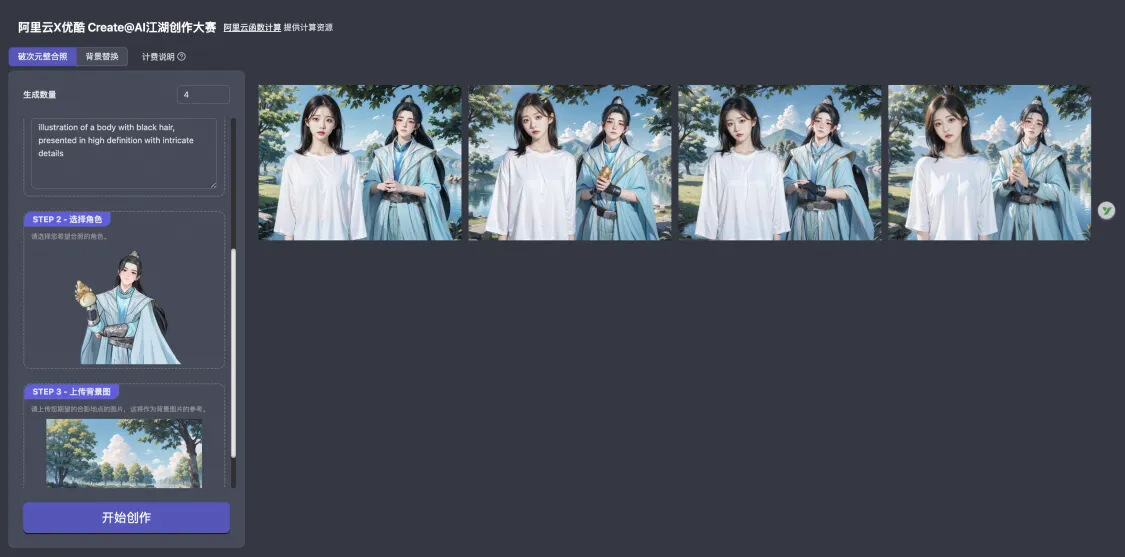
与 Agent 对应,我们也给出了一份前端页面 devsapp/fc-comfyui-couple-photo
在这里,我们针对 ComfyUI 的 prompt 做了一些特殊的约定,以适应自定义需要。 以函数计算支持活动 “阿里云X优酷江湖创作大赛” 为例,我们提供了预定义的 prompt 文件
[
  {
    "title": "破次元壁合照",
    "prompt": {},
    "params": [
      {
        "type": "group",
        "title": "STEP 1 - 上传您的照片",
        "children": [
          {
            "type": "image",
            "id": "10",
            "key": "image",
            "title": "参考图",
            "description": "请上传您的照片,帮助模型理解您的样貌。请尽量选择背景简单、主体突出的半身照,不要佩戴墨镜、帽子等可能影响您特征的衣物。"
          },
          {
            "type": "string",
            "id": "24",
            "key": "text",
            "title": "参考形象描述",
            "description": "为了确保模型更好地理解您的特点,您可以使用提示词来加强模型对您的印象(请使用因为描述)。"
          }
        ]
      },
      {
        "type": "image",
        "id": "11",
        "key": "image",
        "title": "STEP 2 - 选择角色",
        "description": "请选择您希望合照的角色。",
        "options": [
          "https://serverless-tool-images.oss-cn-hangzhou.aliyuncs.com/aigc/json/couple/百里东君.png",
          "https://serverless-tool-images.oss-cn-hangzhou.aliyuncs.com/aigc/json/couple/司空长风.png",
          "https://serverless-tool-images.oss-cn-hangzhou.aliyuncs.com/aigc/json/couple/玥瑶.png",
          "https://serverless-tool-images.oss-cn-hangzhou.aliyuncs.com/aigc/json/couple/叶鼎之.png",
          "https://serverless-tool-images.oss-cn-hangzhou.aliyuncs.com/aigc/json/couple/易文君.png",
          "https://serverless-tool-images.oss-cn-hangzhou.aliyuncs.com/aigc/json/couple/南宫春水.png",
          "https://serverless-tool-images.oss-cn-hangzhou.aliyuncs.com/aigc/json/couple/萧若风.png"
        ]
      },
      {
        "type": "image",
        "id": "12",
        "key": "image",
        "title": "STEP 3 - 上传背景图",
        "description": "请上传您期望的合影地点的图片,这将作为背景图片的参考。"
      }
    ]
  },
  {
    "title": "背景替换",
    "prompt": {},
    "params": [
      {
        "type": "image",
        "id": "10",
        "key": "image",
        "title": "STEP 1 - 选择角色",
        "description": "请选择您希望合照的角色。",
        "options": [
          "https://serverless-tool-images.oss-cn-hangzhou.aliyuncs.com/aigc/json/couple/百里东君.png",
          "https://serverless-tool-images.oss-cn-hangzhou.aliyuncs.com/aigc/json/couple/司空长风.png",
          "https://serverless-tool-images.oss-cn-hangzhou.aliyuncs.com/aigc/json/couple/玥瑶.png",
          "https://serverless-tool-images.oss-cn-hangzhou.aliyuncs.com/aigc/json/couple/叶鼎之.png",
          "https://serverless-tool-images.oss-cn-hangzhou.aliyuncs.com/aigc/json/couple/易文君.png",
          "https://serverless-tool-images.oss-cn-hangzhou.aliyuncs.com/aigc/json/couple/南宫春水.png",
          "https://serverless-tool-images.oss-cn-hangzhou.aliyuncs.com/aigc/json/couple/萧若风.png"
        ]
      },
      {
        "type": "image",
        "id": "12",
        "key": "image",
        "title": "STEP 2 - 上传背景图",
        "description": "请上传您期望的合影地点的图片,这将作为背景图片的参考。"
      }
    ]
  }
]
通过
params 字段,约定了如何渲染页面并允许用户填入自己的参数
export type ComfyUIPromptEditPanel = {
  type: 'image' | 'select' | 'number' | 'string' | 'group'; // 数据类型
  id?: string; // 对应 prompt 中的 node id
  key: string; // 要修改的参数
  title: string; // 标题
  description?: string; // 描述
  options?: string[] | string; // 可选项
  min?: number; // 最小值
  max?: number; // 最大值
  step?: number; // 调整步数
  hidden?: boolean; // 是否隐藏
  children?: ComfyUIPromptEditPanel[]; // group 类型的子节点
};
一些其他约定:
- 如果
seed字段为-1,则会被替换为随机数
如果您也希望创建自己的 ComfyUI 自定义页面提供给自己的客户,可以参考相关的前端代码。
最佳实践
为了方便大家直观体验一下该解决方案成效,函数计算Serverless 应用中心上线基于 ComfyUI Serverless API 解决方案搭建的 应用-
【少年白马专属】破次元壁合照 AI 绘画平台,作为一个实验demo 开放体验,期待为广大开发者 AI 绘画创业及变现提供一些有益思考。直接参加体验活动,送好礼!
活动链接:
https://developer.aliyun.com/plan/create/snbm
来自 “ ITPUB博客 ” ,链接:https://blog.itpub.net/69981534/viewspace-3023944/ ,如需转载,请注明出处,否则将追究法律责任。

