一般测量功能主要表现在两方面,一是
测量距离,二是
测量面积。面积的测量是根据鼠标绘制的范围,通过地理坐标系的转换而计算出实际面积大小,距离的测量是根据鼠标在地图上绘制的点,实时计算出两点之间的实际距离。如何在3D场景中测量面积?下面我就在ThingJS平台实现鼠标任意点绘制多边形面积,计算绘制总长度和占地面积,支持在数字孪生可视化场景内
任意绘制多边形并测量面积。
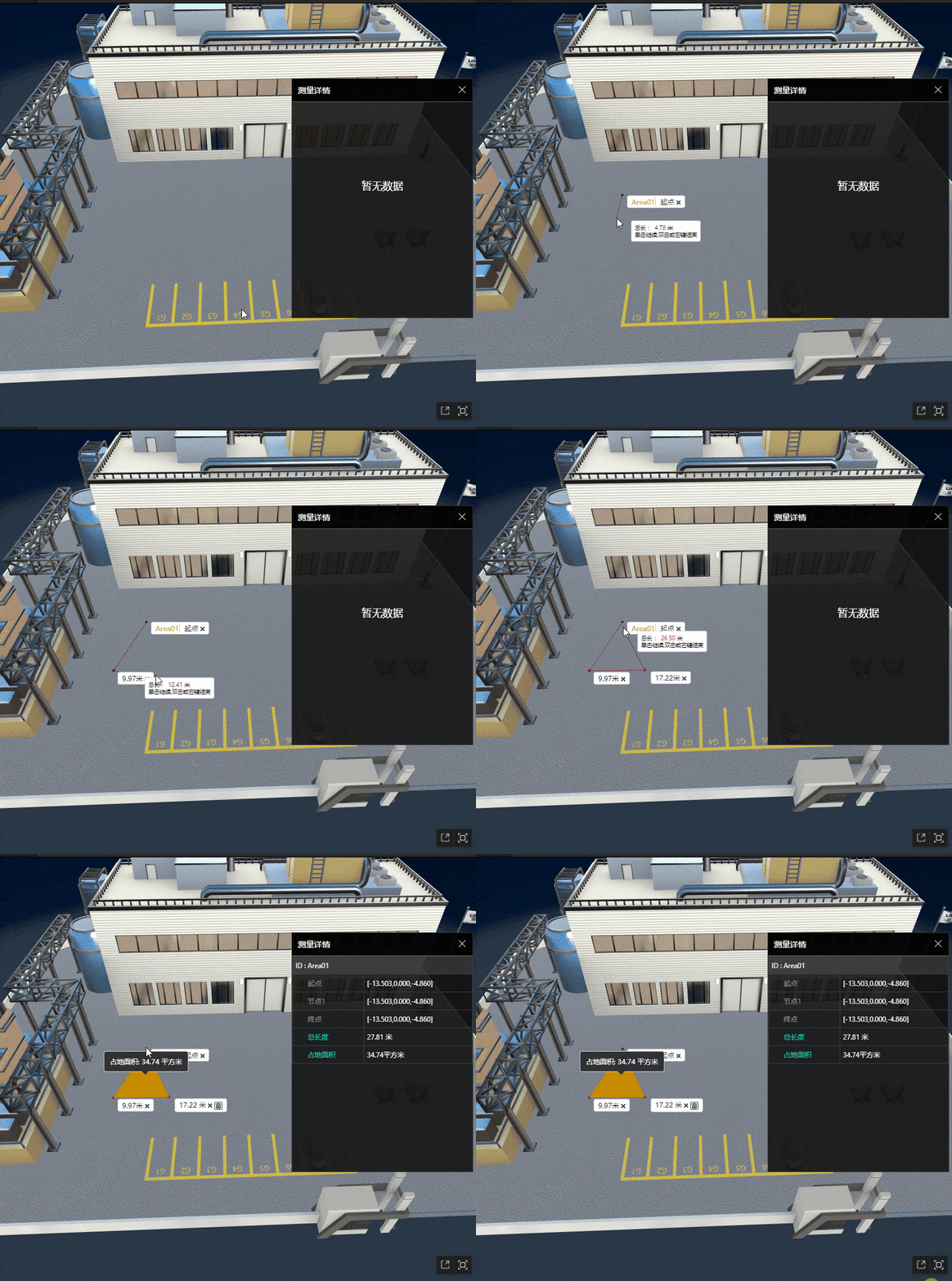
先来看一下实现效果:
实现思路
1、首先是添加注册事件,单击鼠标左键添加点位,鼠标移动持续绘制测量线段,双击或单击鼠标右键结束。
 appClick() {
 let _this = this;
 // 点击左键添加节点右键结束绘制
 _this.opts.app.on('SingleClick', function(e) {
 if (e.button == 0) {
 if (!e.picked) return;
 _this.numIndex++;
 _this.ePosition = e.pickedPosition;
 _this.createPoint(_this.ePosition);
 _this.coordinatesArr.push(_this.ePosition);
 _this.lineCoor.push(_this.ePosition);
  _this.createLine(_this.coordinatesArr);
 _this.getDistance();
 _this.template =
 `<div id="div` + _this.opts.modelNum + _this.numIndex + `" class="card-label card-label` + _this.opts.modelNum + `">
 <span class="text">`;
 if (_this.lineDistanceAll != null) {
 _this.template += _this.lineDistanceAll + `米`;
 } else {
 _this.template += `<span style="color:#f45905; border-right: 1px solid #ccc;margin-right: 5px">` + _this.planeId + `</span> 起点`
 }
 _this.template +=
 `</span>
 <span><img id="points` + _this.opts.modelNum + _this.numIndex + `" src="/guide/examples/images/measure/remove.png"></span>
 </div>`;
 _this.boardId = 'div' + _this.opts.modelNum + _this.numIndex;
 _this.createCard(_this.regionPoint);
 _this.pointsObj = {
 id: 'points' + _this.opts.modelNum + _this.numIndex, // 起点顶牌span标签id
 parent: 'div' + _this.opts.modelNum + _this.numIndex, // 起点顶牌div标签id
 coor: _this.opts.currPosition, // 起点坐标
 distance: 0
 };
 _this.pointsObjArr.push(_this.pointsObj);
 _this.cardClick();
 } else {
 if (_this.coordinatesArr.length < 2) {
 _this.destroyAll();
 _this.rianleyDom.css('display', 'none');
 return;
 };
 _this.end();
 }
 _this.rianleyDom.css('display', 'none');
 }, "点击");

 // 鼠标移动持续绘制测量线段
 _this.opts.app.on('MouseMove', function(e) {
 if (e.picked) {
 _this.ePosition = e.pickedPosition;
 _this.pointsArr = [..._this.coordinatesArr, _this.ePosition];
 _this.createLine(_this.pointsArr);
 _this.line.style.color = '#f88020';
 if (_this.pointsArr.length >= 2) {
 _this.moveDistance = THING.Math.getDistance(_this.pointsArr[_this.pointsArr.length - 1], _this.pointsArr[_this.pointsArr.length - 2]);
 let countNum = 0;
 _this.disArr.forEach(v => {
 countNum += parseFloat(v);
 });
 countNum = 1 * parseFloat(countNum).toFixed(2) + 1 * parseFloat(_this.moveDistance).toFixed(2);
 _this.rianleyDom.css('display', 'block');
 _this.rianleyDom.find('span.value').text(countNum.toFixed(2));
 _this.rianleyDom.css('left', e.clientX + 10 + 'px');
 _this.rianleyDom.css('top', e.clientY + 'px');
 }
 }
 }, '移动');

 // 结束绘制当前测量线段
 _this.opts.app.on('DBLClick', function(ev) {
 if (_this.coordinatesArr.length < 2) {
 _this.destroyAll();
 _this.rianleyDom.css('display', 'none');
 return;
 };
 if (_this.coordinatesArr.length >= 3) {
 _this.createPolygon(_this.coordinatesArr);
 }
 _this.end();
 }, '双击');
 }
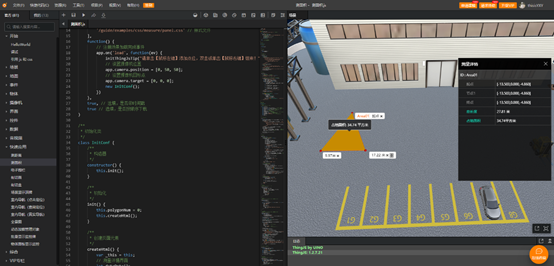
2、创建节点、线段和生成测量吗这些基本元素,确定起点、各个节点的坐标。通过节点和线段来创建参数组,统一所有鼠标点击后的坐标点集合,生成不规则图形的测量面积。
1、 createPoint(ePosition) {
2、  var _this = this;
3、  _this.regionPoint = app.create({
4、  type: 'Sphere',
5、  id: 'points' + _this.opts.modelNum + _this.numIndex,
6、  name: 'points' + _this.opts.modelNum,
7、  radius: 0.2, // 半径
8、  widthSegments: 16,
9、  heightSegments: 16,
10、  position: ePosition, // 球体坐标
11、  style: {
12、  color: '#c10000',
13、  roughness: 50,
14、  opacity: 0.8
15、  }
16、  });
17、  }
18、 createLine(coordinates) {
19、  if (this.line) {
20、  this.line.destroy();
21、  }
22、  let id = this.opts.modelNum > 10 ? this.opts.modelNum : '0' + this.opts.modelNum;
23、  this.line = app.create({
24、  type: 'PolygonLine',
25、  name: 'line',
26、  id: 'line' + id,
27、  width: 0.03,
28、  points: coordinates,
29、  style: {
30、  image: '/guide/examples/images/measure/redLine.png',
31、  opacity: 0.9
32、  }
33、  });
34、  }
3、面积测量的对象是带有地理位置(coordinates)的多边形要素,需要创建一个Constructor ()构造器,设置构造参数。
constructor(option) {
 this.opts = option;
 this.pointsArr = [this.opts.currPosition]; // 鼠标移动中坐标点的集合
 this.coordinatesArr = [this.opts.currPosition]; // 存储鼠标点击后坐标点的集合
 this.ePosition = null; // 存储触发事件后鼠标的位置
 this.lineCoor = [this.opts.currPosition]; // 存储当前两个坐标点
 this.disArr = []; // 存储所有坐标点与坐标点间的距离
 this.numIndex = 0; // 自增变量
 this.reSetDistance = 0; // 两点间的距离
 this.lastStatus = false; // 判断是否绘制结束值为false为未结束true为结束
 this.pointsObjArr = []; // 存储所有节点的id与顶牌id
 this.rianleyDom = $('#marker'); // 跟随鼠标的提示
 this.pointCardDom = $('#pointMarker'); // 鼠标移动至节点的提示
 this.init();
 this.appClick();
 }
4、创建完一个测量多边形面积的方法,停止画图的时候就会触发选定部分的面积的大小了,然后我们就需要在测量结束的时候弹出一个顶牌来显示测量的面积。
createTopCard(position) {
 $('#div3d').append(this.template);
 this.polygonCard = document.getElementById(this.boardId);
 this.uiTop = app.create({
 type: 'UIAnchor',
 element: this.polygonCard,
 position: [position[0], position[1], position[2]]
 });
 }
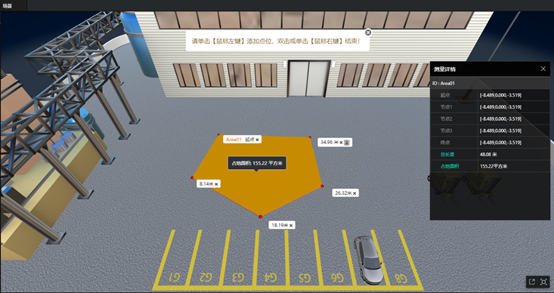
是不是非常简单就可以实现在数字孪生可视化场景中测量多边形面积?
来自 “ ITPUB博客 ” ,链接:https://blog.itpub.net/69980539/viewspace-2786827/ ,如需转载,请注明出处,否则将追究法律责任。
上一篇:
园区模型与全景图联动开启第一人称巡游
下一篇:
可视化场景内任意绘制线段并测量距离

请登录后发表评论
登录
全部评论
