MQTT是ThingJS平台支持的四种数据对接方式之一,
MQTT又称Message Queuing Telemetry Transport,消息队列遥测传输,是 ISO 标准(ISO/IEC PRF 20922)下基于发布 (Publish)或订阅 (Subscribe)范式的消息协议,可视为“资料传递的桥梁”。MQTT是一个轻量级协议,使用MQTT协议的中心是broker(服务器/代理),客户端通过订阅消息和发布消息进行数据交互。
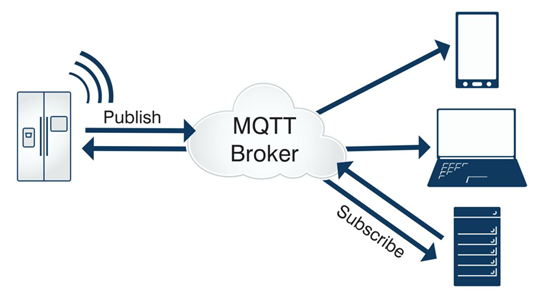
使用MQTT方式的步骤如下:
1.直接连接MQTT服务器(需支持websocket访问,Mosquitto支持websocket的配置可自行百度)。
2.引用第三方 mqtt库。
3.MQTT数据对接。
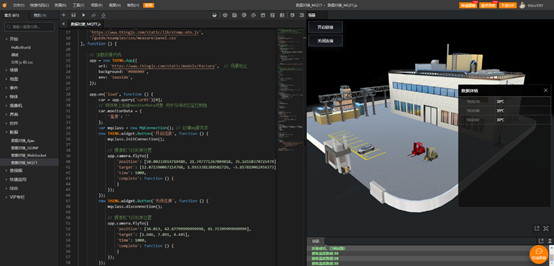
一个简单示例如下:
功能:通过MQTT方式读取数据并将数据挂接到物体(car01)身上,当温度>30℃时,car01变红。
var app; // App对象
var car; // 挂载数据的叉车

// 引入样式文件
THING.Utils.dynamicLoad([
 'https://www.thingjs.com/static/lib/stomp.min.js',
 '/guide/examples/css/measure/panel.css'
], function() {
 app = new THING.App({
 url: 'https://www.thingjs.com/static/models/storehouse'
 });

 app.on('load', function() {
 // 设置摄像机位置和目标点
 app.camera.position = [44.38316010361372, 22.256383671664036, 37.42310488848945];
 app.camera.target = [19.488379488180318, 0.17527928595920675, 5.827049588512047];
 car = app.query('car01')[0];
 // 物体身上创建monitorData对象 用于存储动态监控数据
 car.monitorData = {
 '温度': ''
 };
 var mqclass = new MQConnection(); // 创建mq服务类
 new THING.widget.Button('开启链接', function() {
 mqclass.initConnection();
 });
 new THING.widget.Button('关闭连接', function() {
 mqclass.disconnection();
 });

 createHtml();
 initThingJsTip("MQTT 是一个轻量级协议,使用 MQTT 协议的中心是 broker(服务器/代理),客户端通过订阅消息和发布消息进行数据交互。<br>点击【开启读取】进行数据读取,读取到的数据将在数据详情面板进行显示,当温度值大于30℃时,车辆设置红色效果,点击【关闭读取】停止数据读取!");
 })
})

class MQConnection {
 /**
 * 构造器
 */
 constructor() {
 this.init();
 }
 /**
 * 初始化
 */
 init() {
 // 数据推送的url,可修改为自己的服务地址
 this.socketUrl = 'wss://
 // 连接
 this.stompClient = null;
 // this.initConnection();
 }
 /**
 * 初始化连接
 */
 initConnection() {
 var _this = this;
 if (_this.stompClient != null) return;
 _this.stompClient = Stomp.client(_this.socketUrl);
 var success = function() {
 _this.successCallback();
 }
 var error = function(error) {
 _this.errorCallback(error);
 }
 _this.stompClient.connect({}, success, error);
 _this.stompClient.debug = null; // 如果需要Stomp日志打印,注释此行代码
 }
 /**
 * 连接成功后的回调,订阅主题
 */
 successCallback(data) {
 var _this = this;
 console.log('连接成功,订阅话题!');
 _this.stompClient.subscribe('/topic/monitor/temperature/one', function(message) {
 if (message.body) {
 let data = message.body;
 console.log('接收温度数据:' + data);
 updateState(data);
 } else {
 console.log('无数据推送!');
 }
 });
 }
 /**
 * 关闭连接
 */
 disconnection() {
 console.log('连接已关闭!');
 this.stompClient.disconnect();
 }
 /**
 * 连接失败后的回调
 */
 errorCallback(error) {
 console.log('连接失败!');
 console.log(error);
 }
}

/**
 * 接收推送数据后更新状态
 */
function updateState(data) {
 car.setAttribute("monitorData/温度", data);
 nowDatetime();
 if (($('.empty').length)) {
 $('.empty').remove();
 }
 if (!($('.tj-group').length)) {
 let tbody = `<tbody class="tj-group" id="tb-line"></tbody>`;
 $('.tj-table').prepend(tbody);
 }
 let tr =
 `<tr class="tj-group-content">
 <td class="tj-key">` + dateString + `</td>
 <td class="tj-value">` + data + `℃</td>
 </tr>`;
 $('.tj-group').prepend(tr);
 changeColor(car);
}

/**
 * 获取系统日期
 */
function nowDatetime() {
 var date = new Date();
 var hours = (date.getHours()) > 9 ? (date.getHours()) : "0" + (date.getHours());
 var minutes = (date.getMinutes()) > 9 ? (date.getMinutes()) : "0" + (date.getMinutes());
 var seconds = (date.getSeconds()) > 9 ? (date.getSeconds()) : "0" + (date.getSeconds());
 dateString =
 hours + ":" +
 minutes + ":" +
 seconds;
 return dateString;
}

/**
 * 当车辆的温度值超过20时,更改小车颜色
 */
function changeColor(obj) {
 var temper = obj.getAttribute("monitorData/温度");
 var value = temper;
 if (value > 30) {
 obj.style.color = 'rgb(255,0,0)';
 } else {
 obj.style.color = null;
 }
}

// 创建html界面
function createHtml() {
 // 数据详情界面
 let dataDetails =
 `<div id="dataDetails" class="tj-panel property-panel tj-has-title tj-sizable tj-property-panel tj-pinned" style="position: absolute; right: 10px; top: 220px; width: 315px; height: 416px; transform: none;">
 <div class="tj-close"></div>
 <div class="tj-title" style="cursor: move; user-select: none;">数据详情</div>
 <div class="tj-panel-body" style="padding-top: 0px;">
 <div class="tj-panel-container tj-scroll-bar">
 <table class="tj-table">
  <div class="empty">暂无数据</div>
 </table>
 </div>
 </div>
 </div>`;
 $('#div2d').append(dataDetails);
 // 点击按钮关闭面板
 $('#dataDetails .tj-close').on('click', function() {
 $('#dataDetails').css('display', 'none');
 });
}
MQTT是一个基于客户端-服务器的消息发布/订阅传输协议。MQTT协议是轻量、简单、开放和易于实现的,这些特点使它适用范围非常广泛。可以以极少的代码和有限的带宽,为连接远程设备提供实时可靠的消息服务。作为一种低开销、低带宽占用的即时通讯协议,使其在物联网3D可视化等方面有较广泛的应用。
—————————————————
来自 “ ITPUB博客 ” ,链接:https://blog.itpub.net/69980539/viewspace-2782926/ ,如需转载,请注明出处,否则将追究法律责任。
上一篇:
从零开始学习3D可视化之数据对接(2)
下一篇:
从零开始学习3D可视化之演示项目

请登录后发表评论
登录
全部评论
