PostgreSQL函数
1.引言
早就有想分享PostgreSQL中函数的想法了,去O的路上肯定会遇到大量的函数修改,开源的工具如Ora2pg、pg_chamelon等迁移表和数据一般问题不大,但是碰到大量函数、存储过程等就无能无力了,所以得先用好PostgreSQL的函数才行,正好我之前做过一阵子的国产化,也改过大量的函数,所以分享一点实战经验,人人都能写好函数。
2.查看支持的语言
|
mytest=# select lanname from pg_language; lanname ---------- internal c sql plpgsql (4 rows) |
其他的语言诸如PL/Tcl、PL/Perl、PL/Python等请参照官网:
https://www.postgresql.org/docs/12/xplang.html
还有一些外部插件如pllua唐成老师的一篇博文里也有介绍。
3.基于sql的函数
sql函数可以包含任意数量的查询,但是函数只返回最后一个查询(必须是select)的结果,若不是返回结果集,则只返回最后一条查询结果的第一行。如果最后一个查询不返回任何行,那么该函数将返回null值。如果需要该函数返回最后一条select语句的所有行,可以将函数的返回值定义为集合,即setof sometype。
sql函数的函数体应该是用分号分隔的sql语句列表,其中最后一条语句之后的分号是可选的。除非函数声明为返回void,否则最后一条语句必须是select。事实上,在sql函数中,不仅可以包含select查询语句,也可以包含insert、update和delete等其他标准的sql语句,但是和事物相关的语句不能包含其中,如begin、commit、rollback、savepoint和execute等。
demo1,返回最后一条查询结果的第一行:
|
mytest=# create table test(id int); create table mytest=# insert into test values(generate_series(1,10)); insert 0 10 create or replace function test_f() returns int as $$ select id from test; $$ language sql; mytest=# select test_f(); test_f -------- 1 (1 row) |
demo2,除非函数声明为返回void,否则最后一条语句必须是select。
|
create or replace function test_f2() returns int as $$ select id from test; insert into test values(11); $$ language sql; 报错: error: return type mismatch in function declared to return integer detail: function's final statement must be select or insert/update/delete returning. context: sql function "test_f2" 这种就是可以的,insert放在select前面,执行后test表中就会增加11这条数据 create or replace function test_f3() returns int as $$ insert into test values(11); select id from test; $$ language sql; 这种也是类似,在select前面可以放任意sql,不过要确保最后一条是select create or replace function test_f4() returns int as $$ update test set id = 99 where id = 1; insert into test values(11); select id from test; $$ language sql; 假如最后一条select不返回任何结果,则返回空 create or replace function test_f6() returns int as $$ select id from test where id = 666; --没有666这条数据 $$ language sql; mytest=# select test_f6(); test_f6 ---------
(1 row) |
demo3,函数声明为返回void,那就可以任意写了,最终结果返回空
|
create or replace function test_f5() returns void as $$ update test set id = 99 where id = 1; insert into test values(11); select id from test; $$ language sql; mytest=# select test_f5(); test_f5 ---------
(1 row) create or replace function test_f6() returns void as $$ update test set id = 99 where id = 1; insert into test values(11); select id from test; insert into test values(12); $$ language sql; |
demo4,返回结果集,需要加setof关键字,即return setof xxx
|
create or replace function test_f7() returns setof int as $$ select id from test; $$ language sql; |
demo5,通过returning的方式返回
|
create or replace function test_f8() returns setof int as $$ delete from test returning *; $$ language sql; 同理,不加setof返回第一条数据 create or replace function test_f9() returns int as $$ delete from test returning *; $$ language sql; |
另外,还可以通过指定return test(和表同名)的方式来处理,注意,这里的returns test并不是返回test表,实际上是返回与test表结构一样的复合类型,postgresql在建表后会默认创建一个和表结构一样的同名复合类型。当然也可以返回“表”,如下:
|
mytest=# create table test1(id int,info text); create table mytest=# create table test2(coo test1,t_time timestamp ); create table mytest=# insert into test2 values((1,'tom'),now()); insert 0 1 mytest=# select * from test2; coo | t_time ---------+---------------------------- (1,tom) | 2020-08-04 11:34:11.209674 (1 row) 同访问复合类型一样,注意需要添加括号: mytest=# select (coo).id,(coo).info,t_time from test2; id | info | t_time ----+------+---------------------------- 1 | tom | 2020-08-04 11:34:11.209674 (1 row) |
所以,我们可以通过return test来写函数
|
create or replace function test_f10() returns test as $$ select * from test; $$ language sql; 这里没有定义为集合,则返回第一条 create or replace function test_f11() returns setof test as $$ select * from test; $$ language sql; 定义返回集合,则返回所有行数 create or replace function test_f12() returns table(id int, info text) as $$ select * from test limit 10; $$ language sql; 返回“表” mytest=# select * from test_f12(); id | info ----+-------- 1 | 1test 2 | 2test 3 | 3test 4 | 4test 5 | 5test 6 | 6test 7 | 7test 8 | 8test 9 | 9test 10 | 10test (10 rows) 假如定义的返回的类型和实际返回的类型不一致会报错 mytest=# \d test1 table "public.test1" column | type | collation | nullable | default --------+---------+-----------+----------+--------- id | integer | | | info | text | | | create or replace function test_f12() returns setof test1 as $$ select id from test1; $$ language sql; error: return type mismatch in function declared to return test1 detail: final statement returns too few columns. context: sql function "test_f12" |
return test这种写法一般用在宽表,并且通过函数要返回很多字段的时候,就不需要自己一个字段一个字段的写。也可以定义为
最后需要说明的是sql函数中的参数,postgresql定义$1表示第一个参数,$2为第二个参数并以此类推。如果参数是复合类型,则可以使用点表示法,即$1.name访问复合类型参数中的name字段。需要注意的是函数参数只能用作数据值,而不能用于标识符,如:
insert into mytable values ($1); --合法
insert into $1 values (42); --不合法(表名属于标识符之一)
|
create or replace function test_f13(v_relname text) returns void as $$ insert into $1 values (998); $$ language sql; error: syntax error at or near "$1" line 3: insert into $1 values (998); create or replace function test_f14(v_id int) returns void as $$ insert into test values ($1); $$ language sql; |
3.1.不带参数
|
create or replace function xcc_test() returns int as $$ select 1; $$ language sql; |
3.2.含有参数名和参数类型
|
create or replace function xcc_test2(v_id int,t_id int) returns int as $$ select v_id + t_id; $$ language sql; |
3.3.不带参数名只有参数类型
如果不含参数名只有参数类型的话,我们可以用$1、$2这样的标识符来表示。为了增加可读性,我们可以为其声明别名(declare的方式,这个在plpgsql的章节会讲)。之后别名和数字标识符均可指向该参数值:
|
create or replace function xcc_test2(int,int) returns int as $$ select $1 + $2; $$ language sql; |
3.4.带输出参数
如果指定了输出参数,就不要再return的方式。作为规范,建议out、in写在参数最前面,如下,也可以sum out int,但是推荐out sum int这种写法。
|
create or replace function add_em2 (in x int, in y int, out sum int) as $$ select $1 + $2; $$ language sql; mytest=# select add_em2(1,5); add_em2 --------- 6 (1 row) mytest=# select * from add_em2(1,5); sum ----- 6 (1 row) |
输出参数的真正价值在于它为函数提供了返回多个字段的途径, 调用方式没有改变,只是返回结果多出一列。
|
create or replace function sum_n_product(x int, y int, out sum int, out product int) as $$ select $1 + $2, $1 * $2; $$ language sql; |
3.5.多态和重载
熟悉java和c++的应该知道多态,plpgsql与这类似。所以假如有同名函数,删除的时候就需要指明参数类型和个数来指定删除哪个函数。
|
create or replace function test_f14(v_id int,v_info text) returns void as $$ insert into test1 values ($1,$2); $$ language sql; mytest=# \df test_f14 list of functions schema | name | result data type | argument data types | type --------+----------+------------------+---------------------------+------ public | test_f14 | void | v_id integer | func public | test_f14 | void | v_id integer, v_info text | func (2 rows) mytest=# drop function test_f14(int,text); DROP FUNCTION; |
3.6.快速获取函数DDL
|
mytest=# \df+ test 或者 mytest=# \sf test(int) 或者 mytest=# select pg_get_functiondef('test'::regproc); |
更多可以查看官网:https://www.postgresql.org/docs/12/xfunc-sql.html
4.基于pl/pgsql的存储过程
pl/pgsql是postgresql数据库系统的一个可加载的过程语言。pl/pgsql 的设计目标是创建一种可加载的过程语言,可以用于创建函数和触发器过程, 为sql语言增加控制结构, 执行复杂的计算。继承所有用户定义类型、函数、操作符, 定义为被服务器信任的语言。pl/pgsql创建的函数可以在那些使用内置函数一样的情形下使用。比如,可以创建复杂的条件计算函数,并随后将之用于定义操作符或者用于函数索引中。
4.1.稳定性说明
Oracle中的函数创建时可以指定DETERMINISTIC,确定性函数,确定性函数的性能好处是如果使用相同的输入调用函数两次,Oracle可以缓存第一个调用的结果,避免重复调用。
在PostgreSQL里面,就是稳定性,默认是volatile,还有immustable和stable,这三个值用来告诉规划期当函数执行完毕后得到的结果是否可以缓存下来以供下次使用。
在实际工作中,会使用到函数索引,在创建函数索引中,也会提示:error: functions in index expression must be marked immutable。官方不建议在非immutable的函数上建立索引,不过我们可以根据实际场景需要再包一层UDF,但一定要注意函数索引稳定性可能带来的问题。
以下引用自德哥gihub:
在postgresql中,函数稳定性分为三档:
immutable,超级稳定,任何时候调用,只要函数的参数不变结果就不变。如果参数为常量或者无参数,在生成执行计划时,直接将这类函数替换为常量。
stable,稳定,在一个事务中调用时,只要函数的参数不变结果就不变。同样的参数值, stable函数多次执行返回的结果应该一致.
volatile指函数可以修改数据库(比如update), 函数参数值相同的情况下, 可以返回不同的结果, 所以volatile函数在执行过程中优化器对它的处理是每一行都需要执行一次volatile函数.
函数的稳定性会影响数据库的一些行为:
1、绑定变量,immutable函数(包含常量参数或不包含参数时)计算一次。stable函数每次bind的时候要重算。
2、生成执行计划,stable, immutable函数作为where条件时,可以被用于索引am。(即允许采用索引优化)
3、排除分区表不需要访问的分区,stable, immutable函数作为where条件时,可用于过滤不需要访问的子表。
4、是否可用于创建索引,只有immutable函数或操作符,可以用于创建表达式索引。
5、这里要注意的是volatile, stable, immutable这几种函数, 对数据的修改的可见性分两种情况。volatile , 调用该函数的SQL对数据的修改, 可见;stable, immutable , 调用该函数的SQL对数据的修改, 不可见.
|
create or replace function test_tmp() returns setof test1 as $$ begin select 1; end ; $$ language plpgsql volatile ; |
|
比如我们经常使用的now()函数,用来获取时间戳,now()是返回当前事务开始的时间 mytest=# select proname, CASE WHEN provolatile = 'i' THEN 'immutable' WHEN provolatile = 's' THEN 'stable' WHEN provolatile = 'v' THEN 'volatile' end as volatile from pg_proc where proname = 'now'; proname | volatile ---------+---------- now | stable (1 row) mytest=# begin; BEGIN mytest=# select now(); now ------------------------------- 2020-08-08 22:45:02.454335+08 (1 row) mytest=# select now(); now ------------------------------- 2020-08-08 22:45:02.454335+08 (1 row) mytest=# select now(); now ------------------------------- 2020-08-08 22:45:02.454335+08 (1 row) 可以看到,在一个事务里面,返回的时间戳是一致的。 mytest=# commit ; COMMIT mytest=# select now(); now ------------------------------- 2020-08-08 22:45:12.209252+08 (1 row) mytest=# select now(); now ------------------------------- 2020-08-08 22:45:13.032606+08 (1 row) 而不同事务,返回的时间戳则不是一致的。 再看看volatile函数 mytest=# select proname, CASE WHEN provolatile = 'i' THEN 'immutable' WHEN provolatile = 's' THEN 'stable' WHEN provolatile = 'v' THEN 'volatile' end as volatile from pg_proc where proname = 'clock_timestamp'; proname | volatile -----------------+---------- clock_timestamp | volatile (1 row) mytest=# begin; BEGIN mytest=# select clock_timestamp(); clock_timestamp ------------------------------ 2020-08-08 22:46:39.50264+08 (1 row) mytest=# select clock_timestamp(); clock_timestamp ------------------------------- 2020-08-08 22:46:40.265795+08 (1 row) mytest=# select clock_timestamp(); clock_timestamp ------------------------------- 2020-08-08 22:46:40.902451+08 (1 row) 可以看到,即使在一个事务里,返回的时间戳也不是一致的。 |
|
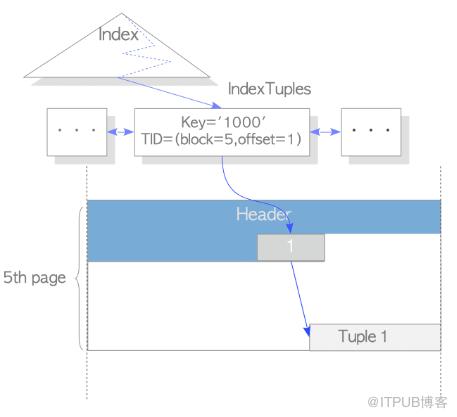
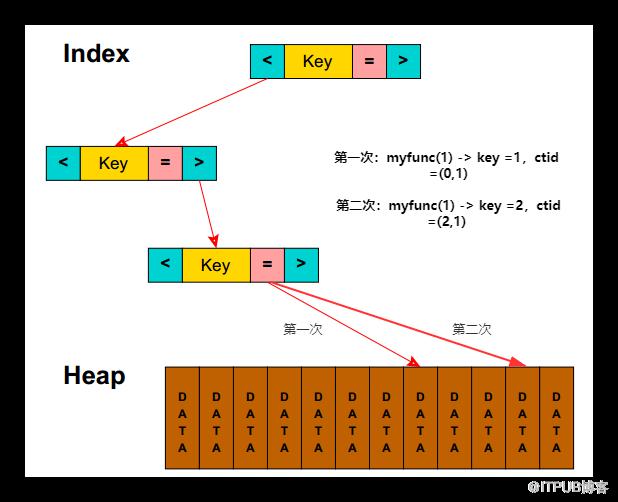
mytest=# create table test (id int, info text); CREATE TABLE mytest=# insert into test select generate_series(1,100000),random()::text; INSERT 0 100000 mytest=# create index idx_test_1 on test(id); CREATE INDEX create or replace function f_volatile(i_id int) returns text as $$ declare result text; begin -- update可以用在volatile函数中, 因为UPDATE要修改数据 update test set info='new' where id=i_id returning info into result; return result; end; $$ language plpgsql volatile; mytest=# select * from f_volatile(1); f_volatile ------------ new (1 row) mytest=# alter function f_volatile ( integer) immutable; ALTER FUNCTION mytest=# select * from f_volatile(1); ERROR: UPDATE is not allowed in a non-volatile function CONTEXT: SQL statement "update test set info='new' where id=i_id returning info" PL/pgSQL function f_volatile(integer) line 6 at SQL statement mytest=# alter function f_volatile ( integer) stable; ALTER FUNCTION mytest=# select * from f_volatile(1); ERROR: UPDATE is not allowed in a non-volatile function CONTEXT: SQL statement "update test set info='new' where id=i_id returning info" PL/pgSQL function f_volatile(integer) line 6 at SQL statement 另外,stable和immutable的函数可以走索引 create or replace function f_test() returns numeric as $$ declare begin return 1.5; end; $$ language plpgsql volatile; mytest=# explain analyze select * from test where id<=f_test()::int; QUERY PLAN --------------------------------------------------------------------------------------------------------- Seq Scan on test (cost=0.00..27142.00 rows=33333 width=36) (actual time=0.074..178.699 rows=2 loops=1) Filter: (id <= (f_test())::integer) Rows Removed by Filter: 99998 Planning Time: 0.051 ms Execution Time: 178.758 ms (5 rows) mytest=# alter function f_test ( ) stable; ALTER FUNCTION mytest=# explain analyze select * from test where id<=f_test()::int; QUERY PLAN ------------------------------------------------------------------------------------------------------------------------- Index Scan using idx_test_1 on test (cost=0.54..3519.87 rows=33333 width=36) (actual time=0.013..0.014 rows=2 loops=1) Index Cond: (id <= (f_test())::integer) Planning Time: 0.150 ms Execution Time: 0.027 ms (4 rows) mytest=# alter function f_test ( ) immutable; ALTER FUNCTION mytest=# explain analyze select * from test where id<=f_test()::int; QUERY PLAN ------------------------------------------------------------------------------------------------------------------------- Bitmap Heap Scan on test (cost=626.62..1685.29 rows=33333 width=36) (actual time=0.014..0.017 rows=2 loops=1) Recheck Cond: (id <= 2) Heap Blocks: exact=2 -> Bitmap Index Scan on idx_test_1 (cost=0.00..618.29 rows=33333 width=0) (actual time=0.009..0.009 rows=2 loops=1) Index Cond: (id <= 2) Planning Time: 0.139 ms Execution Time: 0.033 ms (7 rows) 再回到之前说的函数索引,为什么需要immutable的函数才能创建函数索引 先创建一个随机返回1 ~ 25整数的函数 create or replace function myfunc_v(id int) returns int as $$ declare result int; begin select floor(random()*(25-10)+1) * id into result; return result; end; $$ language plpgsql; 每次调用,返回的值是不一样的,虽然传的参数都是1: f_test=# select myfunc_v(1); myfunc_v ---------- 10 (1 row) f_test=# select myfunc_v(1); myfunc_v ---------- 13 (1 row) f_test=# select myfunc_v(1); myfunc_v ---------- 24 (1 row) 即使在一个事务里,返回的事也每次都不同 f_test=# begin; BEGIN f_test=# select myfunc_v(1); myfunc_v ---------- 11 (1 row) f_test=# select myfunc_v(1); myfunc_v ---------- 16 (1 row) f_test=# select myfunc_v(1); myfunc_v ---------- 18 (1 row) f_test=# create index test_idx on test3(myfunc_v(id)); CREATE INDEX 函数索引一旦建立后, 如果执行计划走索引扫描, PostgreSQL必须确保在任何情况下,函数得到的结果和建立函数索引时得到的结果是一致的,否则就会出现走索引检索到的和走全表扫描检索到的结果不一致.这可是灾难性的BUG. 根据select myfunc_v(1),假设第一次创建函数索引的时候根据id计算出来的值是10,ctid = (1,1);第二次真正查询的时候,根据你传进来的值是1,PostgreSQL认为都是1就给你返回ctid = (1,1)了,实际上第二次计算出来的key是13,所以会需要immutable的函数才能创建函数索引。
f_test=# create table test5 (id int,crt_time timestamp(0) with time zone); CREATE TABLE f_test=# create index idx_test on test5 (to_char(crt_time,'yyyymmddhh24')); ERROR: functions in index expression must be marked IMMUTABLE f_test=# alter function to_char(timestamp with time zone,text) immutable; ALTER FUNCTION f_test=# create index idx_test on test5 (to_char(crt_time,'yyyymmddhh24')); CREATE INDEX f_test=# show timezone; TimeZone --------------- Asia/Shanghai (1 row) f_test=# set timezone to 'PRC'; SET f_test=# insert into test5 values (1,'2012-01-01 12:00:00'); INSERT 0 1 f_test=# select to_char(crt_time,'yyyymmddhh24') from test5; to_char ------------ 2012010112 (1 row) f_test=# set timezone to 'GMT'; SET f_test=# select to_char(crt_time,'yyyymmddhh24') from test5; to_char ------------ 2012010104 (1 row) f_test=# explain select * from test5 where to_char(crt_time,'yyyymmddhh24')='2012010112'; QUERY PLAN ------------------------------------------------------------------------------------ Bitmap Heap Scan on test5 (cost=4.23..14.81 rows=10 width=12) Recheck Cond: (to_char(crt_time, 'yyyymmddhh24'::text) = '2012010112'::text) -> Bitmap Index Scan on idx_test (cost=0.00..4.23 rows=10 width=0) Index Cond: (to_char(crt_time, 'yyyymmddhh24'::text) = '2012010112'::text) (4 rows) f_test=# select * from test5 where to_char(crt_time,'yyyymmddhh24')='2012010112'; id | crt_time ----+------------------------ 1 | 2012-01-01 04:00:00+00 (1 row) f_test=# set enable_indexscan to off; SET f_test=# set enable_bitmapscan to off; SET 因为走全表扫描的话, 这个值to_char(crt_time,'yyyymmddhh24') 将被重新运算, f_test=# select * from test5 where to_char(crt_time,'yyyymmddhh24')='2012010112'; id | crt_time ----+---------- (0 rows) 而2012010104这个值才有 f_test=# select * from test5 where to_char(crt_time,'yyyymmddhh24')='2012010104'; id | crt_time ----+------------------------ 1 | 2012-01-01 04:00:00+00 (1 row) |
关于稳定性的更多信息可以查看:
https://www.postgresql.org/docs/12/xfunc-volatility.html
https://github.com/digoal/blog/blob/master/201804/20180410_01.md?spm=a2c4e.10696291.0.0.362d19a4dclgcw&file=20180410_01.md
https://github.com/digoal/blog/blob/master/201212/20121226_01.md?spm=a2c4e.10696291.0.0.5f2d19a4qv9aus&file=20121226_01.md
另外在官网上还有这么一句话,需要特别注意:The PL/pgSQL interpreter parses the function's source text and produces an internal binary instruction tree the first time the function is called (within each session). The instruction tree fully translates the PL/pgSQL statement structure, but individual SQL expressions and SQL commands used in the function are not translated immediately.
PL / pgSQL解释器解析函数的源文本,并在第一次调用函数时(在每个会话中)生成内部二进制指令树。指令树完全转换了PL / pgSQL语句结构,但是函数中使用的各个SQL表达式和SQL命令不会立即转换。
|
mytest=# \d test1 Table "public.test1" Column | Type | Collation | Nullable | Default --------+---------+-----------+----------+--------- id | integer | | | info | text | | | create or replace function mytestf22(v_id int ) returns text as $$ declare tmp text; begin select info_mytest from test1 where id = v_id into tmp; return tmp; end; $$ language plpgsql; 可以看到,还是可以正常的创建。 mytest=# create or replace function mytestf22(v_id int ) returns text mytest-# as $$ mytest$# declare mytest$# tmp text; mytest$# begin mytest$# select info_mytest from test1 where id = v_id into tmp; mytest$# return tmp; mytest$# end; mytest$# $$ language plpgsql; CREATE FUNCTION mytest=# select mytestf22(1); ERROR: column "info_mytest" does not exist LINE 1: select info_mytest from test1 where id = v_id ^ QUERY: select info_mytest from test1 where id = v_id CONTEXT: PL/pgSQL function mytestf22(integer) line 5 at SQL statement 这样可以带来的好处就是可以减少不必要的解析,但带来的坏处就是可能函数里面的bug和一些流程上的错误只有真正触发了才会发现: create or replace function mytestf22(v_id int ) returns text as $$ declare tmp text; begin if v_id > 2 then select info_mytest from test1 where id = v_id into tmp; return tmp; else select info from test1 where id = v_id into tmp; return tmp; end if; end; $$ language plpgsql; 正常调用: mytest=# select mytestf22(1); mytestf22 ----------- 1test (1 row) |
4.2.块结构
pl/pgsql是一个块结构语言。函数定义的所有文本都必须是一个块。一个块用下面的方法定义:
pl/pgsql程序由三个部分组成,即声明部分、执行部分、异常处理部分。
其中外面code层:code block代码块实际上为一个字符串,可以用“美元符引用”,$$书写字符串常量,$$中间可以包含标签名,可以自由命名,但是不能以数字开头,可以命名为$$,$_$,$a$,$a1$等等,该标签名必须成对出现,且大小写敏感。
pl/pgsql的结构如下:
declare
--声明部分: 在此声明pl/sql用到的变量,类型及游标.
begin
-- 执行部分: 过程及sql语句,即程序的主要部分
exception
-- 执行异常部分: 错误处理
end;
其中:执行部分不能省略。
1)块中的每一个declaration和每一条statement都由一个分号终止
2)块支持嵌套,嵌套时子块的end后面必须跟一个分号,最外层的块end后可不跟分号
3)begin后面不必也不能跟分号,end后跟的label名必须和块开始时的标签名一致
4)声明的变量在当前块及其子块中有效,子块开始前可声明并覆盖(只在子块内覆盖)外部块的同名变量
5)变量被子块中声明的变量覆盖时,子块可以通过外部块的label访问外部块的变量
4.2.1.匿名块
|
do $$ < declare counter integer := 0; begin counter := counter + 1; raise notice 'the current value of counter is %', counter; end first_block $$; 执行结果: notice: the current value of counter is 1 do |
注意do语句不属于块结构,它用于执行匿名块。first_block标签仅为了演示需要,没有啥意义。
4.2.2.子块
pl/pgsql可以一个块在另一个块的主体中。一个块嵌入在另一个块中称为子块,包含子块的块称为外部块。子块用于组织语句,这样大块能被分为更小和更多逻辑子块。子块的变量的名称可以与外部块变量名称同名,虽然这在实践中不建议。当在子块中声明一个与外部变量同名的变量,外部变量在子块中被隐藏。如果需要访问外部块的变量,可以使用块标签作为变量的限定符。如下:
|
do $$ < declare counter integer := 0; begin counter := counter + 1; raise notice 'the current value of counter is %', counter;
declare counter integer := 0; begin counter := counter + 10; raise notice 'the current value of counter in the subblock is %', counter; raise notice 'the current value of counter in the outer block is %', outer_block.counter; end;
raise notice 'the current value of counter in the outer block is %', counter; end; $$; 执行结果: notice: the current value of counter is 1 notice: the current value of counter in the subblock is 10 notice: the current value of counter in the outer block is 1 notice: the current value of counter in the outer block is 1 do |
4.3.注释
|
使用双减号加注释,它的作用范围是只能在一行有效。如下: -- select 1 使用 /* */ 来加一行或多行注释,如下: /* select 1; select 2; */ |
4.4.变量的声明
所有在块里使用的变量都必须在块的声明段里先进行声明,唯一的例外是for循环里的循环计数变量,该变量被自动声明为整型。变量声明的语法如下:
variable_name [ constant ] variable_type [ not null ] [ { default | := } expression ];
1.sql中的数据类型均可作为pl/pgsql变量的数据类型,如integer、varchar和char等。
2.如果给出了default子句,该变量在进入begin块时将被初始化为该缺省值,否则被初始化为sql空值。缺省值是在每次进入该块时进行计算的。因此,如果把now()赋予一个类型为timestamp的变量,那么该变量的缺省值将为函数实际调用时的时间,而不是函数预编译时的时间。
3.constant选项是为了避免该变量在进入begin块后被重新赋值,以保证该变量为常量。和C一样
4.如果声明了not null,那么赋予null数值给该变量将导致一个运行时错误。因此所有声明为not null的变量也必须在声明时定义一个非空的缺省值。
|
create function test() returns integer as $$ declare quantity integer := 30; -- -- 如果这边定义为quantity constant integer := 30,会报错。 -- begin raise notice 'quantity here is %', quantity; --在这里的数量是30 quantity := 50; -- -- 创建一个子块 -- declare quantity integer := 80; begin raise notice 'quantity here is %', quantity; --在这里的数量是80 end; raise notice 'quantity here is %', quantity; --在这里的数量是50 return quantity; end; $$ language plpgsql; |
4.5.参数的别名
4.5.1.在函数声明的同时给出参数变量名
|
create or replace function test(subtotal numeric) returns numeric as $$ begin return subtotal * 0.06; end; $$ language plpgsql; |
4.5.2.在声明段中为参数变量定义别名
|
create or replace function test(int) returns numeric as $$ declare subtotal alias for $1; begin return subtotal * 0.06; end; $$ language plpgsql; |
4.5.3.直接使用$1的方式
也可以直接使用$1的方式,不过不易阅读和维护,不建议直接使用这种方式。
|
create or replace function test(int) returns numeric as $$ begin return $1 * 0.06; end; $$ language plpgsql; |
4.6.默认值
我们可以在declare定义变量的时候声明默认值。
|
create or replace function mytestf() returns int as $$ declare tmp int default 10; begin return tmp; end; $$ language plpgsql; |
也可以给入参定义默认值
|
create or replace function mytestf2(v_id int default 10) returns text as $$ declare tmp text; begin select info from test1 where id = v_id into tmp; return tmp; end; $$ language plpgsql; 调用的时候可以传参也可以不传参,不传则使用默认值: mytest=# select mytestf2(); mytestf2 ---------- 10test (1 row) mytest=# select mytestf2(1); mytestf2 ---------- 1test (1 row) mytest=# \df mytestf2 List of functions Schema | Name | Result data type | Argument data types | Type --------+----------+------------------+-------------------------+------ public | mytestf2 | text | v_id integer DEFAULT 10 | func (1 row) |
也可以给入参赋值
|
create or replace function mytestf3(v_id int default 10) returns text as $$ declare tmp text; begin v_id = 3; select info from test1 where id = v_id into tmp; return tmp; end; $$ language plpgsql; mytest=# select mytestf3(1); mytestf3 ---------- 3test (1 row) mytest=# select mytestf3(2); mytestf3 ---------- 3test (1 row) |
出参不行,会报错:ERROR: only input parameters can have default values
|
create or replace function mytestf4(v_id int default 10,out v_ret text default 'mytest func') as $$ begin select info from test1 where id = v_id into v_ret; end; $$ language plpgsql; |
但出参赋值是可以的
|
create or replace function mytestf6(v_id int default 10,out v_ret text) as $$ begin select info from test1 where id = v_id into v_ret; v_ret = 'hello world'; end; $$ language plpgsql; |
4.7.输出参数
4.7.1.out参数
|
create or replace function test(subtotal numeric, out tax numeric) as $$ begin tax := subtotal * 0.06; end; $$ language plpgsql; |
4.7.2.inout参数
不建议用inout参数,用in和out即可,用inout可能会把情况搞复杂。如果要兼容Oracle的inout可以这么写,不过要小心里面的坑。比如给inout参数赋了一个默认值:
|
create or replace function mytestf5(inout v_id int default 10,inout v_ret text default 'mytest func') as $$ begin select info from test1 where id = v_id into v_ret; end; $$ language plpgsql; mytest=# select * from test1; id | info ----+-------- 1 | 1test 2 | 2test 3 | 3test 4 | 4test 5 | 5test 6 | 6test 7 | 7test 8 | 8test 9 | 9test 10 | 10test (10 rows) 若没有99这个结果,则把自己作为out输出了,即99 mytest=# select * from mytestf5(99); v_id | v_ret ------+------- 99 | (1 row) 若不传参,则和in一样,使用了默认值 mytest=# select * from mytestf5(); v_id | v_ret ------+-------- 10 | 10test (1 row) 若有5这个结果,则把5作为out输出 mytest=# select * from mytestf5(5); v_id | v_ret ------+------- 5 | 5test (1 row) |
4.8.拷贝类型
variable%type,%type表示一个变量或表字段的数据类型,pl/pgsql允许通过该方式声明一个变量,其类型等同于variable或表字段的数据类型。见如下示例(test表的id是int类型,info是text类型):
|
create or replace function test(out id int,out info text) as $$ declare test_v_id test1.id%type :=10; test_info test1.info%type :='hello'; begin id :=test_v_id * 10; info :=test_info||'world'; end; $$ language plpgsql; |
通过使用%type,一旦引用的变量类型今后发生改变,我们也无需修改该变量的类型声明。最后需要说明的是,我们可以在函数的参数和返回值中使用该方式的类型声明。如下:
|
出参 create or replace function test2(out id test1.id%type,out info test1.info%type) as $$ declare v_id int :=1; v_info text :='xcc_test'; begin id :=v_id * 10; info :=v_info||'hello world'; end; $$ language plpgsql; 入参 create or replace function test3(v_id test1.id%type) returns text as $$ declare myresult text; begin select info into myresult from test1 where id = v_id; return myresult; end; $$ language plpgsql; 入出参 create or replace function test20(in v_id int,out id test1.id%type,inout info test1.info%type) as $$ begin id :=v_id * 10; info := info||'hello world'; end; $$ language plpgsql; |
4.9.行类型
table_name%rowtype表示指定表的行类型,我们在创建一个表的时候,postgresql也会随之创建出一个与之相应的复合类型,该类型名等同于表名。由此方式声明的变量,可以保存select返回结果中的一行。如果要访问变量中的某个域字段,可以使用点表示法,如rowvar.field,但是行类型的变量只能访问自定义字段,无法访问系统提供的隐含字段,如oid等。对于函数的参数,我们只能使用复合类型标识变量的数据类型。最后需要说明的是,推荐使用%rowtype的声明方式,这样可以具有更好的可移植性,因为在oracle的pl/sql中也存在相同的概念,其声明方式也为%rowtype。
不能在函数的入参里声明rowtype类型的参数,如下会报错:
|
create or replace function test2(myrow test1%rowtype) returns void as $$ declare id int; info text; begin id := myrow.id * 1; info := myrow.info ||'xiongcancan'; raise notice 'id,info: %,%',id,info; end ; $$ language plpgsql; 可以换成如下: create or replace function test2(myrow test1) returns void as $$ declare id int; info text; begin id := (myrow).id * 1; info := (myrow).info ||'xiongcancan'; raise notice 'id,info: %,%',id,info; end ; $$ language plpgsql; 注意传值方式: mytest=# select test2((10,'hello world')); NOTICE: id,info: 10,hello worldxiongcancan test2 -------
(1 row) 无法访问系统提供的隐含字段 create or replace function test2(myrow test1) returns void as $$ declare id int; info text; t_oid int; begin id := (myrow).id * 1; info := (myrow).info ||'xiongcancan'; t_oid :=(myrow).oid; raise notice 'id,info,oid: %,%,%',id,info,oid; end ; $$ language plpgsql; mytest=# select * from test2((1,'hello')); ERROR: column "oid" not found in data type test1 LINE 1: SELECT (myrow).oid ^ QUERY: SELECT (myrow).oid CONTEXT: PL/pgSQL function test2(test1) line 9 at assignment |
可以用来定义变量
|
create or replace function test3() returns test1 as $$ declare test1_var test1%rowtype; begin select * from test1 into test1_var ; -- 返回第一条数据 return test1_var; end; $$ language plpgsql; |
4.10.记录类型
记录变量类似于行类型变量,但是它们没有预定义的结构,只能通过select或for命令来获取实际的行结构,因此记录变量在被初始化之前无法访问,否则将引发运行时错误。注:record不是真正的数据类型,只是一个占位符。
|
create or replace function test5() returns test1 as $$ declare var record; begin select * from test1 into var ; -- 返回第一条数据 return var; end; $$ language plpgsql; |
返回结果集:
|
create or replace function test5() returns setof test1 as $$ declare var record; t_sql text :='select * from test1'; begin for var in execute t_sql loop return next var; end loop; end; $$ language plpgsql; create or replace function test_func2() returns setof test1 as $$ declare ret record; begin for ret in execute 'select * from test1' loop return next ret; end loop; end; $$ language plpgsql; 不用execute也行: create or replace function test5() returns setof test1 as $$ declare var record; -- t_sql text :='select * from test1'; begin for var in select * from test1 loop return next var; end loop; end; $$ language plpgsql; |
|
create or replace function test_func1() returns setof int as $$ declare ret record; begin for ret in execute 'select * from test1' loop return next ret.id; end loop; end; $$ language plpgsql; 假如改成return next ret就会报错: ERROR: wrong record type supplied in RETURN NEXT DETAIL: Number of returned columns (2) does not match expected column count (1). CONTEXT: PL/pgSQL function test_func1() line 6 at RETURN NEXT |
如果需要在函数里返回record类型或record集合的话,需要注意如下:
|
create or replace function test6() returns record as $$ declare var record; begin select * from test1 into var limit 1; return var; end; $$ language plpgsql; 需要这样调用,因为返回的record没有预先的结构: mytest=# select * from test6() as (myid int,myinfo text); myid | myinfo ------+-------- 1 | 1test (1 row) 直接select * from test6()会报错: mytest=# select * from test6(); ERROR: a column definition list is required for functions returning "record" LINE 1: select * from test6(); |
|
create or replace function test7() returns setof record as $$ declare var record; t_sql text :='select * from test1'; begin for var in execute t_sql loop return next var; end loop; end; $$ language plpgsql; 同理需要这样调用: select * from test7() as (myid int,myinfo text); |
4.11.赋值语句
4.11.1.定义时赋值
pl/pgsql中赋值语句的形式为:identifier := expression,等号两端的变量和表达式的类型或者一致,或者可以通过postgresql的转换规则进行转换,否则将会导致运行时错误,见如下示例:
id int := 1
info text :='hello world'
4.11.2.select into
通过该语句可以为记录变量或行类型变量进行赋值,其表现形式为:select into target select_expressions from ...,该赋值方式一次只能赋值一个变量。表达式中的target可以表示为是一个记录变量、行变量,或者是一组用逗号分隔的简单变量和记录/行字段的列表。select_expressions以及剩余部分和普通sql一样。
如果将一行或者一个变量列表用做目标,那么选出的数值必需精确匹配目标的结构,否则就会产生运行时错误。如果目标是一个记录变量,那么它自动将自己构造成命令结果列的行类型。如果命令返回零行,目标被赋予空值。如果命令返回多行,那么将只有第一行被赋予目标,其它行将被忽略。在执行select into语句之后,可以通过检查内置变量found来判断本次赋值是否成功,如:
|
create or replace function test6() returns record as $$ declare var record; begin select * from test1 into var limit 1; if not found then raise exception 'error,no info found'; end if; return var; end; $$ language plpgsql; |
4.12.execute执行动态命令
通常一个QUERY在执行时分为几个步骤,语义解析、SQL REWRITE、生成所有可选执行路径、选择最优路径、执行等多个步骤。
对于同一类SQL,只是更换SQL中的一些FILTER变量时,实际上很多步骤是可以共享的。例如语义解析、SQL REWRITE、生成执行计划都是可共享的,这些步骤通常比较耗CPU资源(尤其是在分区表中,很多子表的情况下,select又没有根据分区键来写的话),通过prepared statement对于高并发的小事务来说,可以大幅降低CPU开销,降低延迟,性能提升非常明显。
由于plpgsql里面默认使用Plan Caching,plsql的解释器会把SQL以预备语句的方式执行,并在会话里保存这些预备语句。
|
As each expression and SQL command is first executed in the function, the PL/pgSQL interpreter parses and analyzes the command to create a prepared statement, using the SPI manager's SPI_prepare function. Subsequent visits to that expression or command reuse the prepared statement. Thus, a function with conditional code paths that are seldom visited will never incur the overhead of analyzing those commands that are never executed within the current session. A disadvantage is that errors in a specific expression or command cannot be detected until that part of the function is reached in execution. (Trivial syntax errors will be detected during the initial parsing pass, but anything deeper will not be detected until execution.) PL/pgSQL (or more precisely, the SPI manager) can furthermore attempt to cache the execution plan associated with any particular prepared statement. If a cached plan is not used, then a fresh execution plan is generated on each visit to the statement, and the current parameter values (that is, PL/pgSQL variable values) can be used to optimize the selected plan. If the statement has no parameters, or is executed many times, the SPI manager will consider creating a generic plan that is not dependent on specific parameter values, and caching that for re-use. Typically this will happen only if the execution plan is not very sensitive to the values of the PL/pgSQL variables referenced in it. If it is, generating a plan each time is a net win. See PREPARE for more information about the behavior of prepared statements. |
一个由execute语句运行的命令在服务器内并不会只prepare和保存一次。相反,该语句在每次运行的时候,命令都会prepare一次。因此命令字符串可以在函数里动态的生成以便于对各种不同的表和字段进行操作,从而提高函数的灵活性。然而由此换来的却是性能上的折损。
看一下plan caching可能带来的问题:
|
mytest=# create table test(id int,info text); CREATE TABLE mytest=# insert into test select 1,repeat(random()::text,10) from generate_series(1,500000); INSERT 0 500000 mytest=# insert into test values (2,'test'); INSERT 0 1 mytest=# select id,count(*) from test group by id; id | count ----+-------- 1 | 500000 2 | 1 (2 rows) mytest=# create index idx_test_1 on test(id); CREATE INDEX mytest=# explain analyze select count(*) from test where id=2; QUERY PLAN ---------------------------------------------------------------------------------------------------------------------------- Aggregate (cost=4.44..4.45 rows=1 width=8) (actual time=0.029..0.029 rows=1 loops=1) -> Index Only Scan using idx_test_1 on test (cost=0.42..4.44 rows=1 width=0) (actual time=0.022..0.023 rows=1 loops=1) Index Cond: (id = 2) Heap Fetches: 1 Planning Time: 0.073 ms Execution Time: 0.056 ms (6 rows) Time: 3.091 ms mytest=# explain analyze select count(*) from test where id=1; QUERY PLAN -------------------------------------------------------------------------------------------------------------------- Aggregate (cost=21360.01..21360.02 rows=1 width=8) (actual time=449.037..449.038 rows=1 loops=1) -> Seq Scan on test (cost=0.00..20110.01 rows=500001 width=0) (actual time=0.013..281.588 rows=500000 loops=1) Filter: (id = 1) Rows Removed by Filter: 1 Planning Time: 0.077 ms Execution Time: 449.067 ms (6 rows) Time: 453.871 ms CREATE OR REPLACE FUNCTION f_immutable(i_id integer) RETURNS bigint AS $$ declare result bigint; begin select count(*) into result from test where id=i_id; return result; end; $$ LANGUAGE plpgsql STRICT IMMUTABLE ;
mytest=# select * from f_immutable(1); f_immutable ------------- 500000 (1 row) Time: 178.087 ms mytest=# select * from f_immutable(1); f_immutable ------------- 500000 (1 row) Time: 183.562 ms mytest=# select * from f_immutable(1); f_immutable ------------- 500000 (1 row) Time: 178.387 ms mytest=# select * from f_immutable(1); f_immutable ------------- 500000 (1 row) Time: 177.079 ms mytest=# select * from f_immutable(1); f_immutable ------------- 500000 (1 row) Time: 179.910 ms mytest=# select * from f_immutable(1); f_immutable ------------- 500000 (1 row) Time: 182.556 ms mytest=# select * from f_immutable(1); f_immutable ------------- 500000 (1 row) Time: 188.073 ms mytest=# select * from f_immutable(1); f_immutable ------------- 500000 (1 row) Time: 190.739 ms mytest=# select * from f_immutable(1); f_immutable ------------- 500000 (1 row) Time: 179.006 ms mytest=# select * from f_immutable(1); f_immutable ------------- 500000 (1 row) Time: 187.267 ms mytest=# select * from f_immutable(1); f_immutable ------------- 500000 (1 row) Time: 180.634 ms mytest=# select * from f_immutable(2); f_immutable ------------- 1 (1 row) Time: 142.957 ms 可以看到,走了顺序扫描。 |
Plan Caching适用情况:1、在同一个session中执行大量的相同或相似的语句。2、并且语句非常复杂(如join很多表,查询的SQL几百行等),这些在plan和rewrite的时候会非常费时。如果在plan和rewrite的时候简单,但执行的时候非常耗费资源,则不适用,比如update tb1 set aa='1' where id>10,这一句在plan的时候会非常容易,但如果执行的时候涉及到10w条记录,则执行会非常消耗资源,这就属于这种不适用的情况。
总体来说在复杂的查询分析中比较适合,生成执行计划特别费时的SQL就可以考虑使用Plan Caching。
这里引用一下唐成老师的原话,方便理解:
绑定变量窥视功能是Oracle数据库的一个特性,自ORACLE9i版本开始引入,是可以通过参数数“_optim_peek_user_binds”来控制是否开启,默认是开启,即为TRUE。这就意味着,第一次以变量的方式执行某类SQL时,会生成第一个执行计划,后续执行该类SQL语句,即使变量的传入值不同,但因变量窥视的作用,依然会沿用第一次SQL语句执行时生成的执行计划,这种特性非常适用于业务表数据分布比较均匀的场景,执行计划比较稳定。但对于数据分布严重倾斜的业务表,可能会出现错误的执行计划,在极端情况下,会引发严重的性能问题。
当”_optim_peek_user_binds”参数设置为FALSE,即将绑定变量窥视参数特性禁用。那么已经执行过的某类值的执行计划将不会发生变化,一旦传入某个新值时,优化器会自动根据被访问对象的统计、直方图等信息,产生它认为效率最高、成本最低的执行计划。也就是说,在特性关闭的情况下,该类SQL语句可能会产生更优的执行计划。
所以为了让系统的性能不至于大起大落,在很多用户那里会关闭绑定变量窥视的功能。
在PostgreSQL如下:
当前5次执行时,每次都会根据实际传入的实际绑定变量新生成执行计划进行执行,即每次都是硬解析,同时会记录这5次的执行计划;
当第6次开始执行时,会生成一个通用的执行计划(generic plan),同时与前5次的执行计划进行比较,如果比较的结果是通用执行计划不比前5次的执行计划差,以后就会固定把这个通用的执行计划固定下来,这之后即使传入的值发生变化后,执行计划也不再变化。这就相当于Oracle打开了绑定变量窥视的功能。
在PostgreSQL12中提供了一个force_custom_plan这个参数,对于一些非常重要的系统,可以把“plan_cache_mode”配置成“force_custom_plan”,避免执行计划的错误。
auto: 这时默认值,即默认情况下与PostgreSQL11及以下版本相同的行为。
force_custom_plan: 相当于关闭绑定变量窥视,永远进行硬解析。
force_generic_plan: 走通用的固定执行计划(generic plan)
所以对于一些非常重要的系统,可以把“plan_cache_mode”配置成“force_custom_plan”,避免执行计划的错误
在plpgsql中,则可以使用execute来每次强制硬解析,避免生成错误的执行计划。
这里引用一下海波老师的图:百分比指解析占用总SQL的执行时间,PREPARE/EXECUTE 硬解析指最开始解析,PREPARE/EXECUTE 软解析指执行五次后
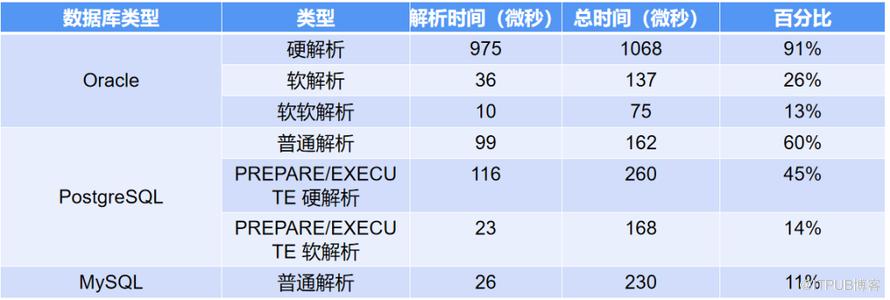
|
create or replace function test() returns void as $$ begin execute 'select 1'; end; $$ language plpgsql; |
|
create or replace function test_execute() returns setof int as $$ begin return query execute 'select * from test'; end; $$ language plpgsql; |
|
create or replace function test() returns void as $$ declare id int; begin execute 'select 1 ' into id; raise notice 'is %',id; end; $$ language plpgsql; 如果是如下则会报错: create or replace function test() returns void as $$ declare id int; begin execute 'select 1 into id '; raise notice 'is %',id; end; $$ language plpgsql; ERROR: EXECUTE of SELECT ... INTO is not implemented HINT: You might want to use EXECUTE ... INTO or EXECUTE CREATE TABLE ... AS instead. CONTEXT: PL/pgSQL function test() line 5 at EXECUTE |
另外由于此处的限制,Because PL/pgSQL saves prepared statements and sometimes execution plans in this way, SQL commands that appear directly in a PL/pgSQL function must refer to the same tables and columns on every execution; that is, you cannot use a parameter as the name of a table or column in an SQL command. To get around this restriction, you can construct dynamic commands using the PL/pgSQL EXECUTE statement — at the price of performing new parse analysis and constructing a new execution plan on every execution.
|
如下会报错: create or replace function f_get_rows(tablename text) returns setof record as $$ declare rec record; begin for rec in select * from $1 loop return next rec; end loop; return; end $$ language 'plpgsql'; ERROR: syntax error at or near "$1" LINE 6: for rec in select * from $1 loop create or replace function f_get_rows(tablename text) returns setof record as $$ declare rec record; t_sql text :='select * from' ||$1; begin for rec in t_sql loop return next rec; end loop; return; end $$ language 'plpgsql'; ERROR: syntax error at or near "t_sql" LINE 7: for rec in t_sql loop create or replace function f_get_rows(tablename text) returns setof record as $$ declare rec record; begin for rec in select * from tablename loop return next rec; end loop; return; end $$ language 'plpgsql'; mytest=# select f_get_rows('test1'); ERROR: relation "tablename" does not exist LINE 1: select * from tablename ^ QUERY: select * from tablename CONTEXT: PL/pgSQL function f_get_rows(text) line 5 at FOR over SELECT rows create or replace function f_get_rows2(tablename text) returns setof record as $$ declare rec record; begin for rec in EXECUTE 'select * from ' || tablename loop return next rec; end loop; return; end $$ language 'plpgsql'; mytest=# select * from f_get_rows2('test1') as(id int,info text); id | info ----+-------- 1 | 1test 2 | 2test 3 | 3test 4 | 4test 5 | 5test 6 | 6test 7 | 7test 8 | 8test 9 | 9test 10 | 10test (10 rows) |
关于绑定变量和plpgsql的plan cache可以参考官网和德哥的博客:
https://www.postgresql.org/docs/12/sql-prepare.html
https://www.postgresql.org/docs/12/plpgsql-implementation.html
5.流程控制语句
5.1.if和case条件语句
if和case语句让你可以根据某种条件执行命令。
pl/pgsql有三种形式的if:
|
if ... then ... end if; if ... then ... else ... end if; if ... then ... elsif ... then ... else ... end if; |
以及两种形式的case:
|
case ... when ... then ... else ... end case; case when ... then ... else ... end case; |
5.2.if条件语句
|
if search_condition then statement_list end if; if search_condition then statement_list else statement_list end if; if search_condition then statement_list elsif search_condition then statement_list else statement_list end if; |
|
create or replace function if_test(vc_empno numeric) returns void as $$ declare vn_sal numeric; begin select sal into vn_sal from emp where empno = vc_empno; if vn_sal is null then raise notice '该员工不存在!'; elsif vn_sal < 1500 then raise notice '老板;请多加点工资'; else raise notice '老板;请少加点工资'; end if; end; $$ language plpgsql; |
5.3.case条件语句
|
create or replace function case_test1(x numeric) returns void as $$ declare msg text; begin case x when 1, 2 then msg := 'one or two'; else msg := 'other value than one or two'; end case; raise notice 'look it, it is %' ,msg; end; $$ language plpgsql; |
|
create or replace function case_test1(x numeric) returns void as $$ declare msg text; begin case when x in(1, 2) then msg := 'one or two'; else msg := 'other value than one or two'; end case; raise notice 'look it, it is %' ,msg; end; $$ language plpgsql; |
6.循环
6.1.loop简单循环
|
[ < loop statements exit [ label ] [ when boolean-expression ]; end loop [ label ]; |
1.loop定义一个无条件的循环,无限循环,直到由exit或return语句终止。
2.可选的label可以由exit和continue语句使用,用于在嵌套循环中声明应该应用于哪一层循环。
3.如果声明了when,循环退出只有在boolean-expression为真的时候才发生, 否则控制会落到exit后面的语句上。
|
create or replace function loop_test_01() returns void as $$ declare n numeric := 0; begin loop n := n + 1; raise notice 'n 的当前值为: %',n; exit when n >= 10; -- return; end loop; end; $$ language plpgsql; |
6.2.while循环
|
while boolean-expression loop statements; end loop; |
只要条件表达式(boolean-expression)为真,while语句就会不停的在一系列语句上进行循环, 条件是在每次进入循环体的时候检查的。
|
create or replace function loop_test_02() returns void as $$ declare n numeric := 0; begin while n < 10 loop n := n + 1; raise notice 'n 的当前值为: %',n; end loop; end; $$ language plpgsql; |
6.3.for循环
|
for name in [ reverse ] expression .. expression [ by expression ] loop statements end loop [ label ]; |
每循环一次,循环变量自动加1;使用关键字reverse,循环变量自动减1。跟在in reverse 后面的数字必须是从小到大的顺序,而且必须是整数,不能是变量或表达式。可以使用exit 退出循环。
|
for i in 1..10 loop -- 每次加1 end loop; for i in reverse 10..1 loop -- 每次减1 end loop; for i in reverse 10..1 by 2 loop --- 每次减2 end loop; |
在实际的工作中,我经常用for循环来替代游标:
|
create or replace function loop_test_03() returns void as $$ declare i record; begin for i in select v_id,info from test1 limit 10 loop raise notice '% %', i.v_id ,i.info; end loop; end; $$ language plpgsql; |
6.4.continue语句
continue [ label ] [ when boolean-expression ]; |
continue可以用于所有类型的循环;它并不仅仅限于无条件循环,不会跳出循环。
|
create or replace function loop_test_04() returns void as $$ declare n numeric := 0; begin while n < 10 loop n := n + 1; continue when n = 5; raise notice 'n 的当前值为: %',n; end loop; end; $$ language plpgsql; mytest=# select loop_test_04(); NOTICE: n 的当前值为: 1 NOTICE: n 的当前值为: 2 NOTICE: n 的当前值为: 3 NOTICE: n 的当前值为: 4 NOTICE: n 的当前值为: 6 NOTICE: n 的当前值为: 7 NOTICE: n 的当前值为: 8 NOTICE: n 的当前值为: 9 NOTICE: n 的当前值为: 10 |
6.5.exit语句
exit [ label ] [ when boolean-expression ]; |
exit可以用于在所有的循环类型中,它并不仅仅限制于在无条件循环中使用。会跳出循环。
|
create or replace function loop_test_05() returns void as $$ declare n numeric := 0; begin while n < 10 loop n := n + 1; exit when n = 5; raise notice 'n 的当前值为: %',n; end loop; end; $$ language plpgsql; |
7.获取返回结果
7.1.return语句
有三种方式返回结果:
1.return
2.return next
3.return query
7.2.return命令
|
return return expression; |
如果没有使用表达式 return命令用于告诉这个函数已经完成执行了。如果返回标量类型,那么可以使用任何表达式,要返回一个复合(行)数值,你必须写一个记录或者行变量的expression。
|
create or replace function test_ret(int) returns int as $$ declare id int :=10; v_id alias for $1; -- 别名的另一种方式 begin id := id * v_id; return id; end; $$ language plpgsql; |
如果声明函数带输出参数,那么就只需要写无表达式的return。那么输出参数变量的当前值将被返回。
|
create or replace function getcompfoo2 (in_col1 in int,in_col2 in text,out_col1 out int, out_col2 out text) as $$ begin out_col1 := in_col1 + 1; out_col2 := in_col2 || '_result'; end; $$ language plpgsql; |
如果函数返回void,那么一个return语句可以用于提前退出函数。
|
create or replace function getreturn(in_col1 int) returns void as $$ begin if in_col1 > 0 then raise notice 'there is %',in_col1; else return; end if; end; $$ language plpgsql; |
7.3.return next命令
return next expression; |
可以用于标量和复合数据类型。对于复合类型,将返回一个完整的结果"table"。
|
create or replace function test5() returns setof test1 as $$ declare var record; t_sql text :='select * from test1'; begin for var in execute t_sql loop return next var; end loop; end; $$ language plpgsql; |
7.4.return query命令
|
return query query; return query execute command-string [ using expression [, ... ] ]; |
将一条查询的结果追加到一个函数的结果集中。
|
create or replace function gettest1() returns setof test1 as $$ begin return query select * from test1 limit 10; end $$ language plpgsql; 这里要注意: mytest=# select gettest1(); gettest1 ------------- (1,1test) (2,2test) (3,3test) (4,4test) (5,5test) (6,6test) (7,7test) (8,8test) (9,9test) (10,10test) (10 rows) mytest=# select * from gettest1(); id | info ----+-------- 1 | 1test 2 | 2test 3 | 3test 4 | 4test 5 | 5test 6 | 6test 7 | 7test 8 | 8test 9 | 9test 10 | 10test (10 rows) |
7.5.return query execute命令
|
create or replace function gettest1() returns setof test1 as $$ begin return query execute 'select * from test1 limit 10'; end $$ language plpgsql; 和execute类似,不过要防止SQL注入: create or replace function gettest2(text) returns setof test1 as $$ begin return query execute 'select * from '|| $1 || ' limit 10'; end $$ language plpgsql; |
8.游标
8.1.游标介绍
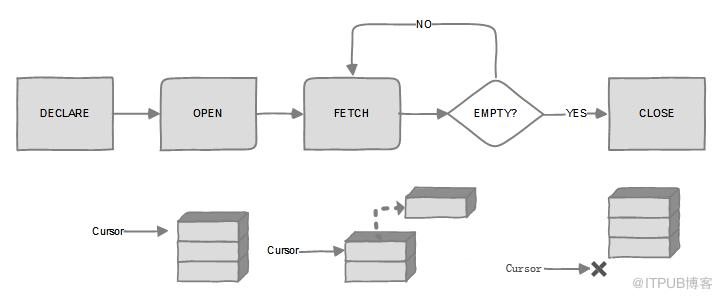
游标是一种从表中检索数据并进行操作的灵活手段,游标主要用在服务器上,处理由客户端发送给服务端的sql语句,或是批处理、存储过程、触发器中的数据处理请求。
游标的优点在于它允许应用程序对查询语句select 返回的行结果集中每一行进行相同或不同的操作,而不是一次对整个结果集进行同一种操作;它还提供对基于游标位置而对表中数据进行删除或更新的能力。缺点是处理大数据量时,效率低下,占用内存大。一般来说,能使用其他方式处理数据时,最好不要使用游标,除非是当你使用while循环,子查询,临时表,表变量,自建函数或其他方式都无法处理某种操作的时候,再考虑使用游标。
游标是系统为用户开设的一个数据缓冲区,存放SQL语句的执行结果。游标的一个常见用途就是保存查询结果,以便以后使用。游标的结果集是由SELECT语句产生,如果处理过程需要重复使用一个记录集,那么创建一次游标而重复使用若干次,比重复查询数据库要快的多。
PostgreSQL游标可以封装查询并对其中每一行记录进行单独处理。当我们想对大量结果集进行分批处理时可以使用游标,因为一次性处理可能造成内存溢出。另外我们可以定义函数返回游标类型变量,这是函数返回大数据集的有效方式,函数调用者根据返回游标对结果进行处理。
总结就是可以预防一次性处理大批量数据时可能导致的内存溢出。
8.2.游标的声明
在pl/pgsql中对游标的访问都是通过游标变量实现的,其数据类型为refcursor。创建游标变量的方法有以下两种:
1.和声明其他类型的变量一样,直接声明一个游标类型的变量即可。
2.使用游标专有的声明语法,如:name cursor [ ( arguments ) ] for query;for可以替换is,用于Oracle兼容。
其中arguments为一组逗号分隔的name datatype列表,见如下示例:
|
curs1 refcursor; curs2 cursor for select * from tenk1; curs3 cursor (key integer) is select * from test1 where unique1 = key; |
只有第一个是未绑定游标,剩下两个游标均已被绑定。
8.3.游标的打开
游标在使用之前必须先被打开,在pl/pgsql中有三种形式的open语句,其中两种用于未绑定的游标变量,另外一种用于绑定的游标变量。
1)open for
声明方式是:open unbound_cursor for query;;该形式只能用于未绑定的游标变量,其查询语句必须是select,或其他返回记录行的语句,如explain。在postgresql中,该查询和普通的sql命令平等对待,即先替换变量名,同时也将该查询的执行计划缓存起来,以供后用。如下:open curs1 for select * from test1 where v_id = mykey;
2)open for execute
声明方式是:open unbound_cursor for execute query-string; 和上面的形式一样,该形式也仅适用于未绑定的游标变量。execute将动态执行其后以文本形式表示的查询字符串。如下:open curs1 for execute 'select * from test1 limit 10'
3)打开一个绑定的游标
声明方式是:open bound_cursor [ ( argument_values ) ]; 该形式仅适用于绑定的游标变量,只有当该变量在声明时包含接收参数,才能以传递参数的形式打开该游标,这些参数将被实际代入到游标声明的查询语句中,如下: open curs2 open curs3(42);
8.4.游标的使用
游标一旦打开,就可以按照以下方式进行读取。然而需要说明的是,游标的打开和读取必须在同一个事物内,因为在postgresql中,如果事物结束,事物内打开的游标将会被隐含的关闭。
1)fetch
声明方式是:fetch cursor into target;fetch命令从游标中读取下一行记录的数据到目标中,其中目标可以是行变量、记录变量,或者是一组逗号分隔的普通变量的列表,读取成功与否,可通过pl/pgsql内置变量found来判断,其规则等同于select into。
1)FETCH ALL IN/FROM cursor
2)FETCH curs1 INTO rowvar;
3)FETCH curs2 INTO foo, bar, baz;
4)FETCH LAST FROM curs3 INTO x, y;
5)FETCH RELATIVE -2 FROM curs4 INTO x;
fetch默认是取下一行,即next,NEXT;还有如下:LAST、PRIOR、FIRST、ABSOLUTE count、RELATIVE count、FORWARD、BACKWARD
假如不关心检索,只是挪动的话,可以使用move来拨动游标,同样支持LAST、PRIOR、FIRST、ABSOLUTE count、RELATIVE count、FORWARD、BACKWARD
1)MOVE curs1;
2)MOVE LAST FROM curs3;
3)MOVE RELATIVE -2 FROM curs4;
4)MOVE FORWARD 2 FROM curs4;
2)close
声明方式是: close cursor;关闭当前已经打开的游标,以释放其占有的系统资源,见如下示例:close curs1;
8.5.游标Demo
8.5.1.使用未绑定的游标
|
create or replace function cursor_test() returns refcursor as $$ declare mycursor refcursor; begin open mycursor for select * from test1 ; return mycursor; end ; $$ language plpgsql; 或者 create or replace function cursor_test() returns refcursor as $$ declare mycursor refcursor; t_sql text := 'select * from test'; begin open mycursor for execute t_sql; return mycursor; end ; $$ language plpgsql; 调用方式: mytest=# begin; BEGIN mytest=# select * from cursor_test(); cursor_test -------------------- (1 row) fetch all from也可以 mytest=# fetch all in " id ---- 1 2 3 4 5 6 7 8 9 10 99 (11 rows) mytest=# commit; COMMIT |
上面这种方式不好调用,换个方式,自己传入一个游标
|
create or replace function cursor_test1(mycursor refcursor) returns refcursor as $$ begin open mycursor for select * from test1 ; return mycursor; end ; $$ language plpgsql; 执行结果如下: mytest=# begin; BEGIN mytest=# select cursor_test1('mycus'); cursor_test1 -------------- mycus (1 row) mytest=# fetch next in "mycus"; id | info ----+------- 1 | 1test (1 row) 拨动游标 mytest=# fetch next in "mycus"; id | info ----+------- 2 | 2test (1 row) mytest=# move last from "mycus"; MOVE 1 mytest=# fetch next in "mycus"; id | info ----+------ (0 rows) mytest=# commit; COMMIT |
8.5.2.使用绑定的游标
|
create or replace function cursor_test2() returns refcursor as $$ declare mycursor cursor for select * from test1; begin open mycursor; return mycursor; end ; $$ language plpgsql; |
8.5.3.游标的拨动
|
create or replace function cursor_test2() returns setof test1 as $$ declare mycursor cursor for select * from test1; myret test1; begin open mycursor; fetch mycursor into myret; while found loop raise notice 'id is %,info is %',myret.id,myret.info; return next myret; fetch next from mycursor into myret; end loop; close mycursor; end ; $$ language plpgsql; 执行结果: mytest=# select * from cursor_test2(); NOTICE: id is 1,info is 1test NOTICE: id is 2,info is 2test NOTICE: id is 3,info is 3test NOTICE: id is 4,info is 4test NOTICE: id is 5,info is 5test NOTICE: id is 6,info is 6test NOTICE: id is 7,info is 7test NOTICE: id is 8,info is 8test NOTICE: id is 9,info is 9test NOTICE: id is 10,info is 10test id | info ----+-------- 1 | 1test 2 | 2test 3 | 3test 4 | 4test 5 | 5test 6 | 6test 7 | 7test 8 | 8test 9 | 9test 10 | 10test (10 rows) |
游标的拨动,一定要小心无限循环,比如我稍加改动,就会一直处于循环中。
|
create or replace function cursor_test2() returns setof test1 as $$ declare mycursor cursor for select * from test1; myret test1; begin open mycursor; fetch mycursor into myret; while found loop raise notice 'id is %,info is %',myret.id,myret.info; move absolute 3 from mycursor; return next myret; fetch next from mycursor into myret; end loop; close mycursor; end ; $$ language plpgsql; |
8.5.4.含有参数的游标
|
create or replace function cursor_test3(id_con int) returns refcursor as $$ declare mycursor cursor(t_id_con int) for select * from test1 where id < t_id_con; begin open mycursor(id_con); return mycursor; end ; $$ language plpgsql; |
|
create or replace function cursor_test4(id_con int) returns refcursor as $$ declare mycursor cursor for select * from test1 where v_id < id_con; begin open mycursor; return mycursor; end ; $$ language plpgsql; |
8.5.5.fetch into
fetch的作用可以理解为循环取值。
|
create or replace function test_fetch() returns void as $$ declare mycus cursor for select id,info from test1; v_id int; v_info text; begin open mycus; fetch mycus into v_id,v_info; while found loop insert into log_table values(1,'dd'); fetch mycus into v_id,v_info; end loop; close mycus; end ; $$ language plpgsql; 调用方式: select test_fetch(); |
换种方式取值:
|
create or replace function test_fetch2() returns void as $$ declare mycus cursor for select id,info from test1; v_id int; v_info text; begin open mycus; loop fetch mycus into v_id,v_info; exit when not found ; insert into log_table values(1,'dd'); end loop; close mycus; end ; $$ language plpgsql; |
8.6.strict说明
8.6.1.修饰函数
其中一个strict在创建函数时指定
|
f_test=# \h create function Command: CREATE FUNCTION Description: define a new function Syntax: CREATE [ OR REPLACE ] FUNCTION name ( [ [ argmode ] [ argname ] argtype [ { DEFAULT | = } default_expr ] [, ...] ] ) [ RETURNS rettype | RETURNS TABLE ( column_name column_type [, ...] ) ] { LANGUAGE lang_name | TRANSFORM { FOR TYPE type_name } [, ... ] | WINDOW | IMMUTABLE | STABLE | VOLATILE | [ NOT ] LEAKPROOF | CALLED ON NULL INPUT | RETURNS NULL ON NULL INPUT | STRICT | [ EXTERNAL ] SECURITY INVOKER | [ EXTERNAL ] SECURITY DEFINER | PARALLEL { UNSAFE | RESTRICTED | SAFE } | COST execution_cost | ROWS result_rows | SUPPORT support_function | SET configuration_parameter { TO value | = value | FROM CURRENT } | AS 'definition' | AS 'obj_file', 'link_symbol' } ... URL: https://www.postgresql.org/docs/12/sql-createfunction.html CALLED ON NULL INPUT (the default) indicates that the function will be called normally when some of its arguments are null. It is then the function author's responsibility to check for null values if necessary and respond appropriately. RETURNS NULL ON NULL INPUT or STRICT indicates that the function always returns null whenever any of its arguments are null. If this parameter is specified, the function is not executed when there are null arguments; instead a null result is assumed automatically. CALLED ON NULL INPUT(默认值)表示该函数的某些参数为null时不影响使用。我们需要自行检查逻辑 当RETURNS NULL ON NULL INPUT或STRICT时,表示该函数在任何参数为null时始终返回null。如果指定此参数,则当参数为空时不执行该函数直接返回null。 create or replace function mytest_func1(v_id int,v_info text) returns text as $$ declare ret text; begin select info from test where id = v_id into ret; return ret; end; $$ language plpgsql strict; f_test=# select mytest_func1(1,'hello'); mytest_func1 -------------- test (1 row) f_test=# select mytest_func1(1,null); mytest_func1 --------------
(1 row) |
8.6.2.修饰变量
strict保证只产生一行,不多也不少。
|
create or replace function xcc_test() returns int as $$ declare total int; begin select id into strict total from test; return total; end; $$ language 'plpgsql'; 假如返回多行的话就会报错: ERROR: query returned more than one row HINT: Make sure the query returns a single row, or use LIMIT 1. CONTEXT: PL/pgSQL function xcc_test() line 5 at SQL statement |
8.7.found说明
确定命令效果的第二种方法是检查名为found的特殊变量,该变量的类型为boolean。 found在每个pl/pgsql函数调用中开始为false。它由以下每种类型的语句设置:
1.如果指定了行,则select into语句将found设置为true,如果未返回任何行,则设置为false。
2.如果perform语句生成(并丢弃)一行或多行,则设置found为true,如果没有生成行,则设置为false。 在调用一个表达式或执行一个命令时,如果对其返回的结果不感兴趣,可以考虑使用perform语句:perform query,该语句将执行perform之后的命令并忽略其返回的结果。其中query的写法和普通的sql select命令是一样的,只是把开头的关键字select替换成perform。
3.update,insert和delete语句设置found如果至少有一行受影响,则为true;如果没有行受影响,则为false。
4.如果fetch语句返回一行,则设置found为true;如果没有返回行,则设置为false。
5.如果成功重新定位光标,则move语句将found设置为true,否则设置为false。
6.for或foreach语句如果迭代一次或多次,则设置found为true,否则为false。当循环退出时,found以这种方式设置;在循环执行中,循环语句不会修改found,尽管它可能会被循环体内其他语句的执行所改变。
7.return query和return query execute语句设置found如果查询返回至少一行,则为true,如果不返回任何行则为false。
8.其他pl / pgsql语句不会更改found的状态。请特别注意,execute会更改get diagnostics的输出,但不会更改found。
9.found是每个pl / pgsql函数中的局部变量;对它的任何更改只会影响当前的功能。
8.8.get diagnostics说明
以与静态命令相同的方式检查动态命令的结果。例如,使用get diagnostics(最后一条命令影响的行数)或found。
|
create or replace function xcc_test2() returns void as $$ declare rc int; begin execute 'select * from generate_series(1,10)'; get diagnostics rc = row_count; raise notice 'count is %',rc; end; $$ language 'plpgsql'; |
8.9.异常的处理
8.9.1.异常处理
在pl/pgsql函数中,如果没有异常捕获,函数会在发生错误时直接退出,与其相关的事物也会随之回滚。我们可以通过使用带有exception子句的begin块来捕获异常并使其从中恢复。见如下声明形式:
[ <> ][ declare
declarations ]
begin
statements
exception
when condition [ or condition ... ] then
handler_statements
when condition [ or condition ... ] then
handler_statements
end;
如果没有错误发生,只有begin块中的statements会被正常执行,然而一旦这些语句中有任意一条发生错误,其后的语句都将被跳过,直接跳转到 exception块的开始处。此时系统将搜索异常条件列表,寻找匹配该异常的第一个条件,如果找到匹配,则执行相应的 handler_statements,之后再执行end的下一条语句。如果没有找到匹配,该错误就会被继续向外抛出,其结果与没有exception子 句完全等同。如果此时handler_statements中的语句发生新错误,它将不能被该exception子句捕获,而是继续向外传播,交由其外层 的exception子句捕获并处理。声明形式为:
raise level 'format' [, expression [, ...]];
这里包含的级别有debug(向服务器日志写信息)、log(向服务器日志写信息,优先级更高)、info、notice和warning(把信息写到服务器日志以及转发到客户端应用,优先级逐步升高)和exception抛出一个错误(通常退出当前事务)。某个优先级别的信息是报告给客户端还是写到服务器日志,还是两个均有,是由log_min_messages和client_min_messages这两个系统初始化参数控制的。
在format部分中,%表示为占位符,其实际值仅在raise命令执行时由后面的变量替换,如果要在format中表示%自身,可以使用%%的形式表示,见如下示例:
raise notice 'calling cs_create_job(%)',v_job_id; v_job_id变量的值将替换format中的%。
raise exception 'inexistent id --> %',user_id;
--抛出异常
raise exception '你出问题了。该修修!';
--使用sqlerrm 来显示错误信息。
raise exception '(%)', sqlerrm;
|
create or replace function test_exception() returns text as $$ declare ret text; begin select info from test3 where id = '999' into strict ret; -- 没有id为999的项 exception when no_data_found then raise notice '%',sqlerrm; return ret; end ; $$ language plpgsql; 执行结果: mytest=# select test_exception(); NOTICE: query returned no rows test_exception ----------------
(1 row) |
同样的,我们可以在异常这一块加入我们自己的逻辑:
|
create or replace function test_exception() returns text as $$ declare ret text; begin select info from test3 where id = '999' into strict ret; -- 没有id为999的项 exception when no_data_found then raise notice '%',sqlerrm; create table exception_test(id int); return ret; end ; $$ language plpgsql; 正常调用,可以看到没有报错: mytest=# select test_exception(); NOTICE: query returned no rows test_exception ----------------
(1 row) mytest=# \d exception_test Table "public.exception_test" Column | Type | Collation | Nullable | Default --------+---------+-----------+----------+--------- id | integer | | | |
特别注意,如果将raise notice '%',sqlerrm; 改为raise exception '%',sqlerrm;则也会报错,因为exception抛出一个错误(通常退出当前事务)。
8.9.2.自定义异常
|
如何自定义异常? raise level 'format' [, expression [, ...]]; 这里包含的级别有debug(向服务器日志写信息)、log(向服务器日志写信息,优先级更高)、 info、notice和warning(把信息写到服务器日志以及转发到客户端应用,优先级逐步升高)和 exception抛出一个错误(通常退出当前事务)。某个优先级别的信息是报告给客户端还是写到服务器日志, 还是两个均有,是由log_min_messages和client_min_messages这两个系统初始化参数控制的。 do $$ declare begin if 1=1 then raise exception '错误了1'; else raise exception '错误了2'; end if; exception when others then raise notice '错误信息:%',sqlerrm; end; $$; |
8.9.3.一些重要的预定义异常
可以参考官网
https://www.postgresql.org/docs/current/errcodes-appendix.html
异常 |
Oracle错误代码 |
SQLCODE |
描述 |
|
06530 |
|
当一个空对象被自动分配一个值时会引发它。 |
|
06592 |
|
当没有选择 |
|
06531 |
|
当程序尝试将 |
|
00001 |
|
当尝试将重复值存储在具有唯一索引的列中时引发此错误。 |
|
01001 |
|
当尝试进行不允许的游标操作(例如关闭未打开的游标)时会引发此错误。 |
|
01722 |
|
当字符串转换为数字时失败,因为字符串不代表有效的数字。 |
|
01017 |
|
当程序尝试使用无效的用户名或密码登录到数据库时引发。 |
|
01403 |
|
当 |
|
01012 |
|
当数据库调用没有连接到数据库时引发。 |
|
06501 |
|
当PL/SQL遇到内部问题时会引发。 |
|
06504 |
|
当游标在具有不兼容数据类型的变量中获取值时引发。 |
|
30625 |
|
当调用成员方法时引发,但对象类型的实例未初始化。 |
|
06500 |
|
当PL/SQL用尽内存或内存已损坏时引发。 |
|
01422 |
|
当 |
|
06502 |
|
当发生算术,转换,截断或者 |
|
01476 |
|
当尝试将数字除以零时引发。 |
8.10.postgresql错误调试
抛出错误行号是我们在写sql中常用到的,在sqlserver和oracle中都很简单,但是在postgresql怎么实现呢?在网上查了下资料只有pg_exception_context包含错误行,我们可以根据具体情况来截取。
还有一个就是可以通过插件pldebugger来进行函数调试。
|
do language plpgsql $$ declare v_state text; v_msg text; v_detail text; v_hint text; v_context text;begin create table yyy(a int); create table yyy(a int); -- this will cause an error exception when others then get stacked diagnostics v_state = returned_sqlstate, v_msg = message_text, v_detail = pg_exception_detail, v_hint = pg_exception_hint, v_context = pg_exception_context; raise notice e'got exception: state : % message: % detail : % hint : % context: %', v_state, v_msg, v_detail, v_hint, v_context; raise notice e'got exception: sqlstate: % sqlerrm: %', sqlstate, sqlerrm; raise notice '%', message_text; -- invalid. message_text is contextual to get stacked diagnostics only end; $$; |
|
do $$ declare v_num int ; v_text1 text; v_text2 text; begin v_num:=1/0; exception when others then get stacked diagnostics v_text1= message_text, v_text2=pg_exception_context; --raise notice '异常:%,%',sqlstate ,sqlerrm; raise notice '异常:%,%',v_text1,v_text2; end; $$; --其中,pg_exception_context会报告具体的错误行;排查错误很方便; |
name |
type |
description |
returned_sqlstate |
text |
the sqlstate error code of the exception |
column_name |
text |
the name of the column related to exception |
constraint_name |
text |
the name of the constraint related to exception |
pg_datatype_name |
text |
the name of the data type related to exception |
message_text |
text |
the text of the exception’s primary message |
table_name |
text |
the name of the table related to exception |
schema_name |
text |
the name of the schema related to exception |
pg_exception_detail |
text |
the text of the exception’s detail message,if any |
pg_exception_hint |
text |
the text of the exception’s hint message,if any |
pg_exception_context |
text |
line(s) of text describing the call stack at the time of the exception |
9.返回单个结果集
9.1.复合类型
可以自己先创建一个复合类型
|
create type test_cop as (id int,info text); --先创建一个复合类型 create or replace function xcc_test1(v_id int,v_info text) returns test_cop as $$ declare ret test_cop; begin ret.id = v_id * 10; ret.info = v_info||' hello world'; return ret; end ; $$ language plpgsql; |
|
create type test_cop as (id int,info text); --先创建一个复合类型 create or replace function xcc_test3() returns setof test_cop as $$ begin return query select * from test3; end ; $$ language plpgsql; |
也可以直接使用创建表时创建的复合类型
|
create or replace function test_func2() returns setof test1 as $$ declare ret record; begin for ret in execute 'select * from test1' loop return next ret; end loop; end; $$ language plpgsql; |
9.2.输出参数
使用输出参数返回一行多列
|
create or replace function xcc_test2(in in_col1 integer,in in_col2 text,out out_col1 integer, out out_col2 text) as $$ begin out_col1 := in_col1 * 2; out_col2 := in_col2 || '_result'; end; $$ language plpgsql; |
使用输出参数返回结果集
|
create or replace function out_f1(out o_id text,out o_info text) returns setof record as $$ declare v_rec record; begin for v_rec in select * from test1 loop o_id := v_rec.id; o_info := v_rec.info; return next; end loop; end; $$ language plpgsql; mytest=# select * from out_f1(); o_id | o_info ------+-------- 1 | 1test 2 | 2test 3 | 3test 4 | 4test 5 | 5test 6 | 6test 7 | 7test 8 | 8test 9 | 9test 10 | 10test (10 rows) 并且支持对函数的结果进行过滤 mytest=# select * from out_f1() where o_info like '4%'; o_id | o_info ------+-------- 4 | 4test (1 row) |
9.3.使用表返回多行多列
|
create or replace function xcc_test6(step int) returns table(col1 integer, col2 text) as $$ begin return query select n,n||'hello world' from generate_series(1,20,step) as n; end; $$ language plpgsql; |
9.4.通过游标返回多行多列
|
create or replace function splitstr_test3(src varchar,delimiter varchar) returns setof text as $$ declare ret text; mycus cursor for select regexp_replace(regexp_split_to_table(src,delimiter),e'(^\\s*)|(\\s*$)','','g'); begin open mycus; loop fetch mycus into ret; exit when not found; if ret is null then continue; end if; raise notice 'character is: %',ret; return next ret; end loop; end; $$ language plpgsql; |
9.5.创建临时表返回结果集
其实有点画蛇添足的味道,不过临时表可以在返回多个结果集的时候用到,往下看。
|
create or replace function test_tmp() returns setof test1 as $$ begin create temporary table test_tmp as select * from test1 limit 10; return query select * from test_tmp; drop table test_tmp; end ; $$ language plpgsql; |
10.返回多个结果集
在SQLServer和MySQL中,在函数里面可以有多个select,即返回多个结果集,在PostgreSQL中可以通过游标和拆分的方式来解决。
|
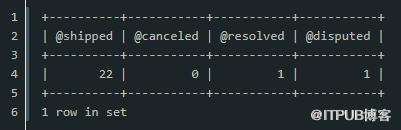
CREATE PROCEDURE get_order_by_cust( IN cust_no INT, OUT shipped INT, OUT canceled INT, OUT resolved INT, OUT disputed INT) BEGIN -- shipped SELECT count(*) INTO shipped FROM orders WHERE customerNumber = cust_no AND status = 'Shipped'; -- canceled SELECT count(*) INTO canceled FROM orders WHERE customerNumber = cust_no AND status = 'Canceled'; -- resolved SELECT count(*) INTO resolved FROM orders WHERE customerNumber = cust_no AND status = 'Resolved'; -- disputed SELECT count(*) INTO disputed FROM orders WHERE customerNumber = cust_no AND status = 'Disputed'; END $$ DELIMITER ; |
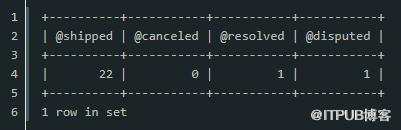
10.1.游标
|
create or replace function more_result1(refcursor,refcursor) returns setof refcursor as $$ begin open $1 for select * from public.config limit 5; return next $1; open $2 for select * from public.flink; return next $2; end; $$ language plpgsql; create or replace function more_result2(inout refcursor,inout refcursor) returns record as $$ begin open $1 for select * from test1 limit 5; open $2 for select * from test2; end; $$ language 'plpgsql'; mytest=# begin; BEGIN mytest=# select * from more_result2('mycus1','mycus2'); column1 | column2 ---------+--------- mycus1 | mycus2 (1 row) mytest=# fetch all in "mycus1"; id | info ----+------- 1 | 1test 2 | 2test 3 | 3test 4 | 4test 5 | 5test (5 rows) mytest=# fetch all in "mycus2"; coo | t_time ---------+---------------------------- (1,tom) | 2020-08-04 11:34:11.209674 (1 row) mytest=# rollback; ROLLBACK |
10.2.临时表
就如第9章的例子,那我可以创建一个临时表,把三者汇聚到一个临时表里,再通过返回临时表。
|
create or replace function func_test() returns setof record as $$ declare myret record; begin create temp table mytmp_t(xxx); insert into mytmp_t select count(*) FROM orders WHERE customerNumber = cust_no AND status = 'Shipped'; insert into mytmp_t select count(*) FROM orders WHERE customerNumber = cust_no AND status = 'Canceled'; insert into mytmp_t select count(*) FROM orders WHERE customerNumber = cust_no AND status = 'Resolved'; insert into mytmp_t select count(*) FROM orders WHERE customerNumber = cust_no AND status = 'Disputed'; for myret in select * from mytmp_t return next ret; end loop; drop temp table mytmp_p; end; $$ language plpgsql; 因为PostgreSQL支持调用函数并过滤,所以调用的时候可以使用类似string_agg()或者其他行转列的方法,比如select string_agg(xxx) from func_test(),达到和MySQL类似的效果,即一行。
|
10.3.拆分成多个单个结果集
通过拆分逻辑成多个单个结果集,不过就需要多个函数了。
11.可变参数
postgresql函数支持可变参数,就是参数模式关键字variadic,但有很多的限制,看起来很美,用起来一点都不方便。可以参考https://www.postgresql.org/docs/12/xfunc-sql.html
|
create or replace function vari(variadic int[]) returns void as $$ begin for i in array_lower($1,1)..array_upper($1,1) loop raise notice '%', $1[i]; end loop; end; $$ language plpgsql; |
12.实战Demo
12.1.兼容Oracle pipeline
|
CREATE TYPE mytype AS OBJECT ( field1 NUMBER, field2 VARCHAR2 (50) ); CREATE TYPE mytypelist AS TABLE OF mytype; CREATE OR REPLACE FUNCTION pipelineme RETURN mytypelist PIPELINEDIS v_mytype mytype; BEGIN FOR v_count IN 1 .. 20 LOOP v_mytype := mytype (v_count, 'Row ' || v_count); PIPE ROW (v_mytype); END LOOP; RETURN; END pipelineme; 管道化表函数与之相似,但是它像在构建时一样返回数据,而不是一次全部返回。管道化表函数更加有效,因为数据可以尽可能快地返回。 PostgreSQL中: CREATE TYPE mytype AS ( field1 numeric, field2 varchar(50) ); CREATE OR REPLACE FUNCTION testf() RETURNS SETOF mytype AS $$ DECLARE v_mytype mytype; BEGIN FOR v_count IN 1 .. 20 LOOP v_mytype := (v_count, 'Row ' || v_count)::mytype; return next v_mytype; END LOOP; END; $$ LANGUAGE plpgsql; |
12.2.兼容Oracle自治事务
1)https://developer.aliyun.com/article/4802(dblink、分block)
2)社区里面也有一个自治事务的patch,不过测试过,功能很有限
12.3.兼容Oracle dual
|
create or replace view dual as select null::"unknown" where 1 = 1; mytest=# select now() from dual; now ------------------------------- 2020-08-04 23:52:33.528432+08 (1 row) mytest=# select 1 from dual; ?column? ---------- 1 (1 row) |
12.4.兼容SQLServer中同时返回out和结果集的函数
|
create or replace function public.test_ref() returns setof refcursor as $$ declare cur_ret refcursor; cur_out refcursor; begin open cur_ret for 'select * from test1'; return next cur_ret; open cur_out for 'select 1 as out_total, 2 as out_total2'; return next cur_out; end ; $$ language plpgsql; |
12.5.适配mysql elt
|
elt(n,str1,str2,str3,...) :如果n=1,则返回str1,如果n=2,则返回str2,依次类推。如果n小于1或大于参数个数,返回null。elt()是field()的功能补充函数。 create or replace function elt(int, variadic text[]) returns text as $$ select $2[$1] $$ language sql immutable; mydb=# select elt(1,'xcc','hm','zs'); elt ----- xcc (1 row) mydb=# select elt(3,'xcc','hm','zs'); elt ----- zs (1 row) 或者不用variadic,这样就需要数组构造器 create or replace function elt(int, text[]) returns text as $$ select $2[$1] $$ language sql immutable; mytest=# select elt(1,array['xcc','hm']); elt ----- xcc (1 row) mytest=# select elt(2,array['xcc','hm']); elt ----- hm (1 row) |
12.6.适配mysql interval
|
interval()函数进行比较列表(n,n1,n2,n3等等)中的n值。该函数如果n<n1返回0< span="">,如果n<n2返回1< span="">,如果n<n3返回2 等等。如果n为null,它将返回-1。列表值必须是n1<n2<n3的形式才能正常工作。下面的代码是显示 interval()函数如何工作的一个简单的例子:</n2返回1<></n1返回0<> mysql>select interval(6,1,2,3,4,5,6,7,8,9,10); +---------------------------------------------------------+
| interval(6,1,2,3,4,5,6,7,8,9,10) | +---------------------------------------------------------+
| 6 |
+---------------------------------------------------------+
1 row in set (0.00 sec)
请记住,6是从零开始的索引,列表第一个值的值大于n. 在我们的例子中,7是错误的值,它是位于第六索引插槽。 create or replace function my_interval(int, variadic int[]) returns text as $$ declare length_t int; i int; ret int; begin length_t := array_length($2,1); i := 0; if $1 is null then ret := -1; else for i in 1..length_t loop raise notice 'num is %',$2[i]; if $1 < $2[i] then ret := i-1; end if; exit when ret > 0 or ret =0 ; end loop; end if; return ret; end; $$ language plpgsql; mydb=# select my_interval(null,2,3,4,5,6); my_interval ------------- -1 (1 row) mydb=# select my_interval(3,2,3,4,5,6); my_interval ------------- 2 (1 row) mydb=# select my_interval(5,2,3,4,5,6); my_interval ------------- 4 (1 row) |
12.7.兼容mysql conv
|
create or replace function conv(numb text,from_base int,to_base int) returns text as $$ declare ret varchar; begin case from_base when 16 then case to_base when 10 then select cast(cast(('x' || cast($1 as text)) as bit(8)) as int) into ret; when 2 then select $1::bit(8) into ret; end case;
when 10 then case to_base when 2 then select $1::int::bit(8) into ret; when 16 then select to_hex(cast($1 as int)) into ret; end case; end case; return ret; end; $$ language plpgsql; postgres=# select conv('ff',16,10); conv ------ 255 (1 row) postgres=# select conv('xff',16,2); conv ---------- 11111111 (1 row) postgres=# select conv('10',10,2); conv ---------- 00001010 (1 row) postgres=# select conv('15',10,16); conv ------ f (1 row) |
原文作者:PostgreSQL学徒;如有侵权,请联系管理员删除。

