关于WAL缓冲区的一点误解
前言
这两天我在整理Postgres的参数的时候,整理到wal_buffers这一块的时候,多思考了一下,发现我一直停留在一个之前的认知之上:wal_buffers默认为-1,最大为wal_segments_size,大约为3%的shared_buffers,其实可以说对,也可以说不对。
缓冲区
这个话题就有点老生常谈碎碎念了,wal_buffers和shared_buffers类似,但是又不同于buffer cache的基于clock的NFU,类似于一个"圆"的处理方式,新的record添加到"head",从"tail"写出,对应有几个函数,pg_current_wal_lsn()返回的是从"tail"写出的lsn,pg_current_wal_insert_lsn()是插入到"head"的lsn,而pg_current_wal_flush_lsn()则是从page cache刷出到storage的lsn。
WAL 的中心思想是先写日志,再写数据,数据文件的修改必须发生在这些修改已经记录在日志文件中之后。采用WAL日志的数据库系统在事务提交时,WAL机制可以从两个方面来提高性能:
1.同一个实例下各个数据库共用一个事务号系统,共用一份WAL日志,多个client写日志文件可以通过一次 fsync()来完成日志文件是顺序写的
2.同步日志的开销要远比同步数据页的开销要小
然后为了进一步的减少xlog日志文件的I/O操作,又引入了WAL共享缓存区,对产生的xlog日志进行缓存,合并I/O操作。因为WAL缓冲区也是一个类似的圆形缓冲区,也会出现和shared_buffers一样的情况,比如缓冲区空间不够、换页等,于是为了可维护性,又引入了类似bgwriter的walwriter进程,wal_buffers在官网注解上,有详细的描述:
The contents of the WAL buffers are written out to disk at every transaction commit, so extremely large values are unlikely to provide a significant benefit. However, setting this value to at least a few megabytes can improve write performance on a busy server where many clients are committing at once. The auto-tuning selected by the default setting of -1 should give reasonable results in most cases.
每次提交事务时,WAL缓冲区的内容都会被持久化写入磁盘,所以非常大的值可能不会带来显著的提升。但是,将这个值设置为至少几兆字节反而可以提高服务器的写性能,因为服务器很忙,很多客户端同时提交。
那么这个值该到底该怎么调呢?调成多大合适?
默认计算法
wal_buffers默认值是-1,基于shared_buffers来计算
/*
 * Initialization of shared memory for XLOG
 */
Size
XLOGShmemSize(void)
{
    Size    size;

    /*
     * If the value of wal_buffers is -1, use the preferred auto-tune value.
     * This isn't an amazingly clean place to do this, but we must wait till
     * NBuffers has received its final value, and must do it before using the
     * value of XLOGbuffers to do anything important.
     */
    if (XLOGbuffers == -1)
    {
        charbuf[32];

        snprintf(buf, sizeof(buf), "%d", XLOGChooseNumBuffers());
        SetConfigOption("wal_buffers", buf, PGC_POSTMASTER, PGC_S_OVERRIDE);
    }
    Assert(XLOGbuffers > 0);
然后进入到XLOGChooseNumBuffers()中
/*
 * Auto-tune the number of XLOG buffers.
 *
 * The preferred setting for wal_buffers is about 3% of shared_buffers, with
 * a maximum of one XLOG segment (there is little reason to think that more
 * is helpful, at least so long as we force an fsync when switching log files)
 * and a minimum of 8 blocks (which was the default value prior to PostgreSQL
 * 9.1, when auto-tuning was added).
 *
 * This should not be called until NBuffers has received its final value.
 */
static int
XLOGChooseNumBuffers(void)
{
    intxbuffers;

    xbuffers = NBuffers / 32;
    if (xbuffers > (wal_segment_size / XLOG_BLCKSZ))
        xbuffers = (wal_segment_size / XLOG_BLCKSZ);
    if (xbuffers < 8)
        xbuffers = 8;
    return xbuffers;
}
这里的逻辑很简单,NBuffers就是shared_buffers的块数,最终计算出来的结果是:
1.初始值:1/32 ,大约3% 的shared_buffers大小
2.最大值:wal_segment_size = 16MB(默认的blocksz情况下)
3.最小值:8 * XLOG_BLCKSZ = 64KB(默认的blocksz情况下)
这里的前提是,是wal_buffers保持为默认值-1的情况下,所以,这个值我们是可以自己随便手动调的,当然有个限制值1073741823 * 8KB
如何调优
先看看资料是怎么说的
wal_buffers
While the documentation on wal_buffers suggests that the default of 64 KB is sufficient as long as no single transaction exceeds that value, in practice, write-heavy benchmarks see optimal performance at higher values than you might expect from that, at least 1 MB or more. With the only downside being the increased use of shared memory, and as there's no case where more than a single WAL segment could need to be buffered, given modern server memory sizes the normal thing to do nowadays is to just set:

wal_buffers=16MB
Then, forget about it as a potential bottleneck or item to tune further. Only if you're tight on memory should you consider a smaller setting; a good starting point is shown at http://pgtune.leopard.in.ua/.
这里说16MB足以,wal_buffers通常不会成为bottleneck
Write-Ahead Logging (WAL) is a standard method for ensuring integrity of data. Much like in the shared_buffers setting, PostgreSQL writes WAL records into buffers and then these buffers are flushed to disk.

The default size of the buffer is set by the  wal_buffers setting- initially at 16MB. If the system being tuned has a large number of concurrent connections, then a higher value for  wal_buffers can provide better performance.
这里只是推荐一个更大的值
In tuning wal_buffers, it's helpful to understand how these buffers are used.  PostgreSQL backend processes initially write their write-ahead log records into these buffers, and then the buffers are flushed to disk.  Once the contents of any given 8kB buffer are durably on disk, the buffer can be reused.  Since insertions and writes are both sequential, the WAL buffers are in effect a ring buffer, with insertions filling the buffer and WAL flushes draining it.  Performance suffers when the buffer fills: no more WAL can be inserted until the current flush is complete.  The effects are mitigated by the fact that, when synchronous_commit is not turned off, every transaction commit waits for its WAL record to be flushed to disk; thus, with small transactions at low concurrency levels, a large buffer is not critical.

However,  the standard value in releases prior to PostgreSQL 9.1 was 64kB, which is an amazingly small value for any kind of buffer on a modern system.  In PostgreSQL 9.1, prompted by some good advice from Greg Smith (blog, book), we changed the value to auto-tune to 3% of shared_buffers up to a maximum of 16MB, the size of a single WAL segment.  This results in a substantially higher value than was used in previous releases, and that's a very good thing.  If you are using an older release and haven't set this value manually, it's probably worth plugging your value of shared_buffers into this formula and configuring the resulting value.   Even on versions which use this auto-tuning formula, I've discovered that an even higher value can sometimes improve performance dramatically.  On one test, involving 32 concurrent clients, I found that wal_buffers=64MB doubled performance as compared with wal_buffers=16MB; however, on another system I found that no setting I tried produced more than a 10% improvement over the auto-tuning formula.  Still, especially if you have a system with lots of concurrent activity, higher values may be worth experimenting with, particularly if you have frequent checkpoints: the first write to any given page after a checkpoint will emit a full-page image into WAL to protect against torn pages in the event of a crash, and these full-page writes can chew through WAL buffers very quickly.
这里就比较清晰了,在某个案例下,64MB、32个client的情况下,比16MB性能提升了一倍。
但是在一些其他系统上,尝试了很多设置,但最终带来的性能提升最多不过是默认情况下的10%,而且还要特别考虑频繁checkpoint的情况,FPI全页写可能会快速导致WAL缓冲区被写满,以此带来可观的性能影响。
小结
1. wal_buffers并没有所谓的最大只能配置为wal_segments_size大小的限制,前提是wal_buffers为-1的情况下,为Posgtres自动计算出来的,那么此时最大值为wal_segments_size,所以假如我们在initdb初始化时或者pg_resetwal时修改了wal_segments_size,并且配置了较大的shared_buffers,那么wal_buffers自动计算出来的值,可能过大,wal_buffers也会较大,此时反而可能会带来负面的性能影响
2. wal_buffers往往不会成为性能瓶颈,16MB ~ 128MB足以,大多数情况下让Postgres自己计算就行了。并且wal_buffers的调整通常是在synchronous_commit为off的情况调整效果明显,刷出的时机分别是walwriter的周期性写盘、wal缓冲区满和checkpoint,默认on的话,每个事务提交都要等待wal调用Xlogflush()落盘。
3. 针对事务提交,千万不要忘了还有commit_delay和commit_siblings这两个重要参数,将队列理论应用到了数据库中,使用分组提交,允许多个事务共用一个fsync()。对于高延迟的IO子系统,这样就能够尽量合并系统的提交请求来提升整体的吞吐量。一般来讲IO子系统的延迟越高,commit_delay可以设置得越长。对于低延迟的IO子系统,这个值可以设得低一些或者保留缺省值。官网上的建议如下https://www.postgresql.org/docs/13/wal-configuration.html,commit_delay建议以写入一个8k数据块平均时间的一半做为commit_delay的开始点,可以使用pg_test_fsync工具测量单个WAL刷新操作所花费的平均时间(以微秒为单位)。另外在一些平台上,休眠最高的精度是10ms,所以在这些平台上,commit_delay设置1到10000的效果都是一样的;
The pg_test_fsync program can be used to measure the average time in microseconds that a single WAL flush operation takes.A value of half of the average time the program reports it takes to flush after a single 8kB write operation is often the most effective setting for commit_delay, so this value is recommended as the starting point to use when optimizing for a particular workload.
Note that on some platforms, the resolution of a sleep request is ten milliseconds, so that any nonzero `commit_delay` setting between 1 and 10000 microseconds would have the same effect.Note also that on some platforms, sleep operations may take slightly longer than requested by the parameter.
另外对于tpcc PK的场景下,我们往往会把synchronous_commit设为off,这样的话,commit_delay和commit_siblings能调整的地方就多了,尤其对于IO延迟很大的盘,调整这俩参数,更多的分组提交,可以带来显著的性能提升。
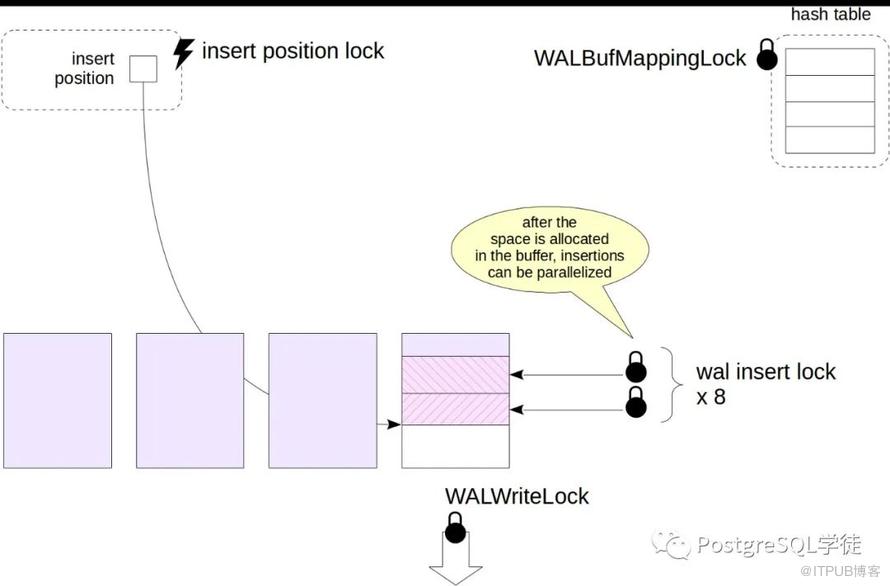
4. 调整了wal_buffers,还要调整和检查点有关的设置,毕竟FPI全页写会使WAL放大很多倍。关于wal_buffers的Lock主要是WALWriteLock和WALInsertLock,用来保护WAL,前者是页锁,分为share和exclusive模式;而后者是spinlock,只有exclusive模式。
To create a WAL record, the process must first allocate space in a WAL page. To do this, it acquires an *insert position lock* spinlock
WALInsertLock因为wal buffer是固定大小的,向wal buffer中写wal record需要竞争锁,如果把synchronous_commit关闭,这个锁的竞争会更加激烈,所以为什么说调整synchronous_commit和wal_buffers是成对的。而WALWriteLock是wal是刷盘需要的锁,那么刷盘就会竞争这个锁。
LWLockAcquireOrWait()这个函数在WALWriteLock中被使用,当一个backend需要flush WAL时,会加上WALWriteLock,然后会顺带把其它backend产生的WAL也flush了,因此,其它等锁去flush WAL的backend其实也并不需要再去flush WAL了。
/*
 * LWLockAcquireOrWait - Acquire lock, or wait until it's free
 *
 * The semantics of this function are a bit funky.  If the lock is currently
 * free, it is acquired in the given mode, and the function returns true.  If
 * the lock isn't immediately free, the function waits until it is released
 * and returns false, but does not acquire the lock.
 *
 * This is currently used for WALWriteLock: when a backend flushes the WAL,
 * holding WALWriteLock, it can flush the commit records of many other
 * backends as a side-effect.  Those other backends need to wait until the
 * flush finishes, but don't need to acquire the lock anymore.  They can just
 * wake up, observe that their records have already been flushed, and return.
 */
bool
LWLockAcquireOrWait(LWLock *lock, LWLockMode mode)
{
    PGPROC   *proc = MyProc;
    boolmustwait;
    intextraWaits = 0;
#ifdef LWLOCK_STATS
    lwlock_stats *lwstats;

    lwstats = get_lwlock_stats_entry(lock);
...
这两张图将buffer cache和wal buffer的差异简洁明了的展示了出来。

参考:
https://habr.com/en/company/postgrespro/blog/507036/
https://www.postgresql.org/docs/13/wal-configuration.html
原文作者:PostgreSQL学徒;如有侵权,请联系管理员删除。

