关于PostgreSQL的checksum
PostgreSQL checksum
媒介损坏是一名数据库管理员需要特别关注的事情。媒介损坏是指读取或写入存储在介质上的文件时暴露的问题。磁头崩溃是一个典型的媒介故障的例子,这会导致磁盘驱动上的所有文件丢失。这是一篇综合性的帖子,主要讨论PostgreSQL的磁盘故障以及如何在故障后从PostgreSQL数据库中检索数据(除了从备份中恢复)。在这篇文章中,我们将探究以下报错,并了解如何解决该错误。
WARNING: page verification failed, calculated checksum 21135 but expected 3252
ERROR: invalid page in block 0 of relation base/13455/16395
在这个过程中,您将学习到PostgreSQL中的一大堆新东西。
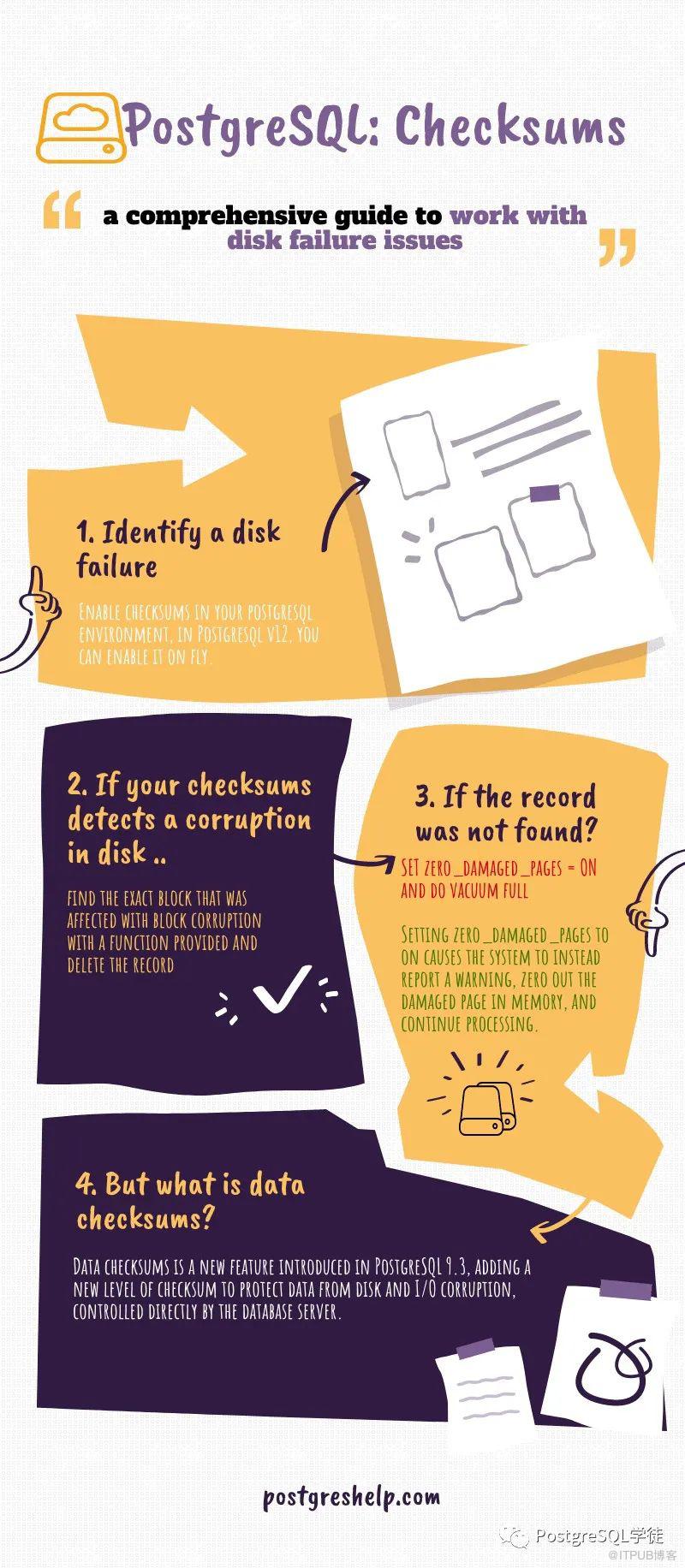
PostgreSQL checksum权威指南
在v9.3中,PostgreSQL引入了一个被称之为data checksums的特性,从该版本之后,经历了很多变化。现在我们在PostgreSQL v12中有了一个非常复杂的视图来查找checksum,称之为pg_checksums。
什么是PostgreSQL checksum?
当开启checksum时,一个很小的整数checksum值会被写入到存储在硬盘上的每一个PosgtreSQL数据页中。在读取该页时,会重新计算checksum值,并与存储在数据块中的checksum值进行比较。这可以检测数据是否损坏,数据一旦损坏了,(假如没有开启checksum的话)可能会在数据库中潜伏很长一段时间。
OK这很不错,checksum一旦开启,就可以用来检验数据是否损坏。
PostgreSQL checksum如何工作?
PostgreSQL主要在进出它自己的缓冲区过程中维护页面的合法有效性。可以参考以下材料:A comprehensive guide – PostgreSQL Caching,从这篇文章里我们明白了一点:PostgreSQL的页面在进入或离开共享缓冲区之前都会通过OS缓存。因此,页面有效性检验发生在离开共享缓冲区和进入共享缓冲区之前。
当PostgreSQL试图将页面复制到共享缓冲区时,它就会(如果可能的话)检测到一些错误的东西,它不允许无效的8K页面进入到共享缓冲区内,任何一个请求处理该无效页面的查询都会报如下错误:
ERROR: invalid page in block 0 of relation base/13455/16395
如果已经有一个磁盘级的无效数据块,而它的页面版本已经在缓冲区级了,那么在下一个检查点,页面刷出时,它就会更新无效的checksum,但这在实时环境中是很罕见的。
最后,如果PostgreSQL缓冲区内含有一部分的无效字节,那么PostgreSQL会很高兴地假设没有什么错误,并尝试处理页面上的数据。这样的话,结果是不可预料的,有时可能会得到一个错误,有时最终又可能得到错误的数据。
PostgreSQL如何检查页面的有效性?
在一个典型的页面中,如果启用了checksum,checksum信息会被存储在数据页页头后面的一个2字节的字段中,其中包含有标志位。可以阅读以下材料:A comprehensive guide on PostgreSQL: page header ,后面是3个2字节字段(pd_lower, pd_upper, 和pd_special),它们包含空闲空间的起始位置、空闲空间的结束位置和特殊空间的起始位置。
checksum值通常以零开始,每次读取该块时,checksum值就会重新计算,并与所存储的checksum值进行比较。这可以检验数据是否损坏。
当数据块在共享缓冲区时,PostgreSQL不会维护checksum值,因此如果你在使用pageinspect在PostgreSQL的页缓存里看到了某个buffer,并且看到了checksum值,注意,当你在缓冲区里面对某一已经存在的数据页做页检查时,你可能不会得到真实的checksum值。当将页面从缓冲区缓存写入到操作系统页面缓存时,就会计算checksum值并写入数据页中。
实践出真知
现有一个表叫check_corruption,表大小为8K,共有5条记录,当前正在使用的版本时PostgreSQL v12。
postgres=# select * from check_corruption;
aid | bid | abalance | filler
-----+-----+----------+--------------------------------------------------------------------------------------
1 | 1 | 0 | This is checksum example, checksum is for computing block corruption
2 | 1 | 0 | This is checksum example, checksum is for computing block corruption
3 | 1 | 0 | This is checksum example, checksum is for computing block corruption
4 | 1 | 0 | This is checksum example, checksum is for computing block corruption
5 | 1 | 0 | This is checksum example, checksum is for computing block corruption
(5 rows)

postgres=# SELECT * FROM page_header(get_raw_page('check_corruption',0));
    lsn    | checksum | flags | lower | upper | special | pagesize | version | prune_xid
-----------+----------+-------+-------+-------+---------+----------+---------+-----------
 0/17EFCA0 |        0 |     0 |    44 |  7552 |    8192 |     8192 |       4 |         0
(1 row)

postgres=# \dt+ check_corruption
List of relations
Schema | Name | Type | Owner | Size | Description
--------+------------------+-------+----------+------------+-------------
public | check_corruption | table | postgres | 8192 bytes |
(1 row)

postgres=# select pg_relation_filepath('check_corruption');
 pg_relation_filepath
----------------------
 base/13455/16490
(1 row)
首先,检查是否开启了checksum?
[postgres@stagdb ~]$ pg_controldata -D /u01/pgsql/data | grep checksum
Data page checksum version: 0
没有开启checksum
在PostgreSQL v12中开启checksum
语法:pg_checksums -D /u01/pgsql/data –enable –progress –verbose
[postgres@stagdb ~]$ pg_checksums -D /u01/pgsql/data --enable --progress --verbose
pg_checksums: checksums enabled in file "/u01/pgsql/data/global/2847"
pg_checksums: checksums enabled in file "/u01/pgsql/data/global/1260_fsm"
pg_checksums: checksums enabled in file "/u01/pgsql/data/global/4175"

..
..

23/23 MB (100%) computed
Checksum operation completed
Files scanned: 969
Blocks scanned: 3006
pg_checksums: syncing data directory

pg_checksums: updating control file
Data checksum version: 1
Checksums enabled in cluster
然后,再次检查PostgreSQL的checksum状态
postgres@stagdb ~]$ pg_controldata -D /u01/pgsql/data | grep checksum
Data page checksum version: 1
我们可以通过 -disable选项禁用checksum
[postgres@stagdb ~]$ pg_checksums -D /u01/pgsql/data --disable
pg_checksums: syncing data directory
pg_checksums: updating control file
Checksums disabled in cluster
让我们先检查当前数据目录是否有错误,然后再处理数据。
使用下面的命令检查数据页的错误
[postgres@stagdb ~]$ pg_checksums -D /u01/pgsql/data –check
Checksum operation completed
Files scanned: 969
Blocks scanned: 3006
Bad checksums: 0
Data checksum version: 1
表check_corruption的数据文件对应的是16490,我准备用操作系统的dd命令来损坏文件:
[postgres@stagdb 13455]$ dd bs=8192 count=1 seek=1 of=16490 if=16490
现在,登录查询一下结果:
postgres=# select * from check_corruption;
aid | bid | abalance | filler
-----+-----+----------+--------------------------------------------------------------------------------------
1 | 1 | 0 | This is checksum example, checksum is for computing block corruption
2 | 1 | 0 | This is checksum example, checksum is for computing block corruption
3 | 1 | 0 | This is checksum example, checksum is for computing block corruption
4 | 1 | 0 | This is checksum example, checksum is for computing block corruption
5 | 1 | 0 | This is checksum example, checksum is for computing block corruption
(5 rows)
为什么我还能获取到结果?因为是从shared buffers里面获取的,重启一下集群再试试
/usr/local/pgsql/bin/pg_ctl restart -D /u01/pgsql/data

postgres=# select * from check_corruption;
aid | bid | abalance | filler
-----+-----+----------+--------------------------------------------------------------------------------------
1 | 1 | 0 | This is checksum example, checksum is for computing block corruption
2 | 1 | 0 | This is checksum example, checksum is for computing block corruption
3 | 1 | 0 | This is checksum example, checksum is for computing block corruption
4 | 1 | 0 | This is checksum example, checksum is for computing block corruption
5 | 1 | 0 | This is checksum example, checksum is for computing block corruption
(5 rows)
为何还是能正常获取?
正如之前所述,PostgreSQL重启期间,会使用shared buffers里面的值来替代错误的checksum。那么该如何触发一个checksum告警呢?
我们需要从shared buffers中删除该行。在这个测试方案下,最快的方法是重启数据库,然后确保我们在进行磁盘修改之前没有查询该表的操作(例如SELECT)。一切就绪之后,checksum就会失败,然后如预期般一样,收到一个checksum报错。现在按照如下来进行操作:
/usr/local/pgsql/bin/pg_ctl stop -D /u01/pgsql/data
dd bs=8192 count=1 seek=1 of=16490 if=16490
/usr/local/pgsql/bin/pg_ctl start -D /u01/pgsql/data
再做一次查询时,我得到了如下的报错:
postgres=# select * from check_corruption;
2020-02-06 19:06:17.433 IST [25218] WARNING: page verification failed, calculated checksum 39428 but expected 39427
WARNING: page verification failed, calculated checksum 39428 but expected 39427
2020-02-06 19:06:17.434 IST [25218] ERROR: invalid page in block 1 of relation base/13455/16490
2020-02-06 19:06:17.434 IST [25218] STATEMENT: select * from check_corruption;
ERROR: invalid page in block 1 of relation base/13455/16490
让我们更深入地挖掘问题,并确认块已损坏
有一系列的方法,包括如下的这些Linux命令:
dd
od
hexdump
使用dd命令:dd if=16490 bs=8192 count=1 skip=1 | od -A d -t x1z -w16 | head -1
[postgres@stagdb 13455]$ dd if=16490 bs=8192 count=1 skip=1 | od -A d -t x1z -w16 | head -2
1+0 records in
1+0 records out
8192 bytes (8.2 kB) copied, 4.5e-05 seconds, 182 MB/s
0000000 00 00 00 00 a0 fc 7e 01 03 9a 00 00 2c 00 80 1d >……~…..,…<

here,

00 00 00 00 a0 fc 7e 01 the first 8 bytes indicate pd_lsn and the next two bytes
03 9a代表着checksum
使用hexdump命令:hexdump -C 16490 | head -1
[postgres@stagdb 13455]$ hexdump -C 16490 | head -1
00000000 00 00 00 00 a0 fc 7e 01 03 9a 00 00 2c 00 80 1d |……~…..,…|
[postgres@stagdb 13455]$
hexdump和dd都返回了同样的结果。现在让我们来理解一下pg_checksums的结果:
[postgres@stagdb 13455]$ pg_checksums -D /u01/pgsql/data –check
pg_checksums: error: checksum verification failed in file “/u01/pgsql/data/base/13455/16490”, block 1: calculated checksum 9A04 but block contains 9A03
Checksum operation completed
Files scanned: 968
Blocks scanned: 3013
Bad checksums: 1
Data checksum version: 1
[postgres@stagdb 13455]$
这里,通过pg_checksums检测出来的9A03,符合hexdump获取出来的9A03。将16进制的9A03转换为10进制,得到39427,这和错误是匹配的。
2020-02-06 19:06:17.433 IST [25218] WARNING: page verification failed, calculated checksum 39428 but expected 39427

如何处理这类PostgreSQL数据页损坏问题?
使用如下函数找出损坏的数据页的确切位置:
create or replace function find_bad_row(tablename text)
returns tid as $find_bad_row$
declare
	result tid;
	curs refcursor;
	row1 record;
	row2 record;
	tabname text;
	count bigint := 0;
begin
	select reverse(split_part(reverse($1), '.', 1)) into tabname;
	open curs for execute 'select ctid from ' || tablename;
	count := 1;
	fetch curs into row1;
	while row1.ctid is not null loop
		result = row1.ctid;
		count := count + 1;
		fetch curs into row1;
		execute 'select (each(hstore(' || tabname || '))).* from '|| tablename || ' where ctid = $1' into row2 using row1.ctid;
		if count % 100000 = 0 then
			raise notice 'rows processed: %', count;
		end if;
	end loop;
	close curs;
	return row1.ctid;
	exception
		when others then
			raise notice 'last ctid: %', result;
			raise notice '%: %', sqlstate, sqlerrm;
			return result;
end $find_bad_row$
language plpgsql;
现在,使用该find_bad_row()函数,来找出确切的损坏位置的ctid,你需要先创建hstore插件才能使用该函数:
postgres=# CREATE EXTENSION hstore;
CREATE EXTENSION
postgres=#

postgres=# select find_bad_row('check_corruption');
2020-02-06 19:44:24.227 IST [25929] WARNING: page verification failed, calculated checksum 39428 but expected 39427
2020-02-06 19:44:24.227 IST [25929] CONTEXT: PL/pgSQL function find_bad_row(text) line 21 at FETCH
WARNING: page verification failed, calculated checksum 39428 but expected 39427
NOTICE: LAST CTID: (0,5)
NOTICE: XX001: invalid page in block 1 of relation base/13455/16490
find_bad_row
————–
(0,5)
(1 row)
然后删除特定的CTID,理论上可以解决该问题
postgres=# delete from check_corruption where ctid='(0,6)’;
DELETE 1
如果删除CTID不能奏效,可以使用一个替代的方案:设置zero_damaged_pages参数
postgres=# select * from master;
WARNING: page verification failed, calculated checksum 8770 but expected 8769
ERROR: invalid page in block 1 of relation base/13455/16770
因为数据块损坏了,我不能查询表master,设置zero_damaged_pages来解决:
postgres=# SET zero_damaged_pages = on;
SETpostgres=# vacuum full master;
vacuum full
postgres=# select * from master;
WARNING: page verification failed, calculated checksum 8770 but expected 8769
WARNING: invalid page in block 1 of relation base/13455/16770; zeroing out page
id | name | city
----+---------+-----------
1 | Orson | hyderabad
2 | Colin | chennai
3 | Leonard | newyork
这个参数,会清理损坏的页面,然后获取出了剩下的结果。看下文档怎么说:
zero_damaged_pages (boolean):当PostgreSQL检测到损坏的页面时通常会报错,从而中止当前事务。将zero_damaged_pages设置为on会让系统变为告警,将内存中损坏的页面清零,然后继续处理。此行为将破坏数据,即损坏页面上的所有行。不过,这样做确实能允许你略过错误并从未损坏的页面中获取表中未受损的行。如果由于硬件或软件错误而发生损坏,它对于恢复数据很有用。通常,除非您已放弃从表的损坏页面中恢复数据的希望,否则不应该将其设置为on。抹零的页面并不会强制刷回磁盘,因此建议在重新关闭该选项之前重建受损的表或索引。默认设置为关闭,并且只能由超级用户更改。
不过使用该特性之前,需要关心一些事情。第一,首先,使用checksum会引入性能开销,因为它会为每个数据页引入额外的计算(默认为8kB),所以在使用checksum时要注意数据安全和性能之间的权衡。
当启用checksum时,有许多因素会影响速度,包括:
从shared buffers读取内容的可能性有多大,这取决于设置了多大的shared buffers,以及能容纳多少活跃数据库
你的服务器有多快,它(和编译器)优化checksum计算能力有多好
你有多少个数据页(这取决于你的数据类型)
写新的数据页频率(如copy、insert和update)
读取数据的频率(如select)
shared buffers的使用越多(有效使用shared buffers是一个通用目标),checksum需要做的就越少,checksum对数据库的性能影响也就越小。如果启用checksum,性能成本平均将超过2%,而对于插入,平均差异为6%。而对于select,这个数字会飙升到19%。完整的计算基准测试可以在这里找到:https://www.endpoint.com/blog/2015/12/31/postgres-checksum-performance-impact
额外操作
您可以在测试前后使用pg_filedump转储文件内容,然后使用diff命令分析数据差异和损坏情况:
pg_filedump -if 16770 > before_corrupt.txt
corrupt the disk block
pg_filedump -if 16770 > before_corrupt.txt
diff or beyond compare both the files.
小结
checksum 使 PostgreSQL具备检测因硬件故障或传输导致数据不一致的能力,一旦发生异常,会报错并终止当前事务,这样我们可以尽早察觉数据异常并予以恢复。另外,PostgreSQL 采用了先复制页,然后计算 checksum 的方式,这就有点像Redis RDB中的“写时复制”,不光是数据页,每条WAL记录里都保存了checksum信息,如果WAL的传输存储过程中出现错误也可及时发现,MySQL的binlog记录和数据页里也都包含了checksum。
不过checksum虽然美好,但是会带来可观的性能影响,另外还要考虑FPI的问题,分为以下情况:
假设未开启checksum,开启了wal_log_hints,修改标记位,会记录整页到WAL中
假设开启了checksum,不管wal_log_hints如何,checkpoint后第一次修改的页面都会记录整页到WAL中,即使是hint bits
假设未开启wal_log_hints,第一次使页面变脏的操作是修改hint bints,不会记录FPI
wal_log_hints (boolean)
When this parameter is on, the PostgreSQL server writes the entire content of each disk page to WAL during the first modification of that page after a checkpoint, even for non-critical modifications of so-called hint bits.
If data checksums are enabled, hint bit updates are always WAL-logged and this setting is ignored. You can use this setting to test how much extra WAL-logging would occur if your database had data checksums enabled.
This parameter can only be set at server start. The default value is off.
假如真的不幸,checksum校验失败了,GUC 参数 ignore_checksum_failure可以选择是告警还是error,不过还是保持false为好,因为蛰伏的越久,数据损坏的面积和风险也会越大。
还有值得注意的是,PostgreSQL本身也有一些简陋的校验机制,bufpage.c里面,为什么说简陋呢,因为它只是很简单的判断一下地址是否合法,是否越界等等,比如p->pd_lower <= p->pd_upper,p->pd_special <= BLCKSZ,注释也很fashion:这里的检查并不能保证page header是正确的,只是说它看上去是合理的
bool
PageIsVerified(Page page, BlockNumber blkno)
{
	PageHeader	p = (PageHeader) page;
	size_t	   *pagebytes;
	int			i;
	bool		checksum_failure = false;
	bool		header_sane = false;
	bool		all_zeroes = false;
	uint16		checksum = 0;

	/*
	 * Don't verify page data unless the page passes basic non-zero test
	 */
	if (!PageIsNew(page))
	{
		if (DataChecksumsEnabled())
		{
			checksum = pg_checksum_page((char *) page, blkno);

			if (checksum != p->pd_checksum)
				checksum_failure = true;
		}

		/*
		 * The following checks don't prove the header is correct, only that
		 * it looks sane enough to allow into the buffer pool. Later usage of
		 * the block can still reveal problems, which is why we offer the
		 * checksum option.
		 */
		if ((p->pd_flags & ~PD_VALID_FLAG_BITS) == 0 &&
			p->pd_lower <= p->pd_upper &&
			p->pd_upper <= p->pd_special &&
			p->pd_special <= BLCKSZ &&
			p->pd_special == MAXALIGN(p->pd_special))
			header_sane = true;

		if (header_sane && !checksum_failure)
			return true;
	}
前文译自:https://postgreshelp.com/postgresql-checksum/
原文作者:PostgreSQL学徒;如有侵权,请联系管理员删除。

