你真的了解备份吗
引言
在备份之前调用 pg_start_backup('label') 以及在之后调用 pg_stop_backup()的备份方式被称之为 "排它模式备份",这种模式将在未来被移除。本文描述了老式备份的问题,并讨论了仍然使用这种备份方法的人的可选项。
排它模式备份
在pg_basebackup被发行之前,只有一种在线文件系统级的备份方法
调用select pg_start_backup('label'),其中label是一个任意的字符串
使用任意方式备份PostgreSQL数据目录中的所有文件
调用select pg_stop_backup()
这个备份方式被称为exclusive backup,因为同一时刻只能执行一个这样的备份。
pg_start_backup会在data目录中创建一个名为backup_label的文件,该文件包含启动备份的检查点的位置。这确保了在启动过程中,PostgreSQL不会从pg_control控制文件中注册的最新检查点恢复。这样做会导致数据损坏,因为备份可能包含该检查点之前的数据文件。不要忘记数据库活动,包括检查点,检查点会在备份模式下正常继续运行。
排它模式备份的问题
如果 PostgreSQL或操作系统在备份模式下崩溃,这种备份方式可能会导致问题。当 PostgreSQL 在这样的崩溃后启动时,它会找到 backup_label 文件并推断它正在恢复备份。PostgreSQL无法辨别在备份模式下崩溃的服务器的数据目录。因此,PostgreSQL将尝试从backup_label文件中的检查点恢复。如果缺失带 restore_command 的 recovery.conf 文件,它将求助于 pg_wal 中的事务日志(=WAL)文件(旧版本的 pg_xlog)。
但是数据库在崩溃之前可能已经处于备份模式下的时间很长了,如果在那段时间内有足够的数据修改等活动,那么带有起始检查点的 WAL日志可能已经被归档和删除。
启动过程将失败并显示以下错误消息:
ERROR:  could not find redo location referenced by checkpoint record
HINT:  If you are not restoring from a backup, try removing the file "backup_label".
您必须手动删除备份失败所留下的 backup_label 文件才能重新启动 PostgreSQL。今天,在自动化配置的时代,需要人工干预的容忍度甚至比过去还要低。所以这种行为在很多情况下是无法接受的。
使用pg_basebackup处理该问题
在 PostgreSQL 9.1 中,引入了 pg_basebackup,它提供了一种更简单的方法来创建在线文件系统备份。它引入了"非独占"的备份方式,这意味着可以同时执行多个此类备份。backup_label 不会写入数据目录,而只会添加到对应备份中。因此,pg_basebackup 不易受到上述问题的影响。
pg_basebackup 使备份变得简单,但由于它通过单个数据库连接去复制所有的数据文件,因此备份大型数据库可能需要花费很长的时间。为了处理这样的数据库,你仍然不得不求助于 pg_start_backup 和 pg_stop_backup 提供的"低级备份 API" 以及他们可能带来的所有问题。
优化后的低级备份API
9.6版本为 pg_start_backup 和 pg_stop_backup 带来了非独占的备份方式。
现在可以像这样执行备份:
调用"select pg_start_backup('label', FALSE, FALSE)"开始备份,并保持数据库会话打开
使用任意备份方式备份PostgreSQL数据目录中的所有文件
在开启备份的会话中,调用"select pg_stop_backup(FALSE)"以结束备份,这会返回 backup_label 文件的内容,您必须自己将其添加到对应的备份中。
弃用独占模式的备份
从 9.6 版本开始,官方文档包含以下句子:
The non-exclusive method is recommended and the exclusive one is deprecated and will eventually be removed.
如果您仍在使用独占模式的备份方式,请不要恐慌。
PostgreSQL发行版的支持期限为发行日期之后的5年,这也是一个特性在被移除之前被弃用的习惯时间。因此,如果您使用的是独占的备份方式,那么您可能要到2021年才需要调整备份脚本。
Using a pre-backup and post-backup script
您的备份可能由公司级范围的备份软件驱动,或者也可能使用存储子系统上的快照来备份大型数据库。
在这两种情况下,备份软件在目标机器上提供运行"pre-backup"和"post-backup"命令的情况并不少见。pre-backup脚本为机器做好备份准备,post-backup脚本恢复正常运行。
在这种情况下,很难从独占模式备份切换到非独占模式备份:您无法轻松保持运行 pg_start_backup 的数据库会话保持打开状态,因为备份只会在pre-backup脚本结束后开始。但是您需要保持该会话处于打开状态,以便您可以在同一会话中运行 pg_stop_backup 来完成备份!拥有这种备份方案的人可能会发现最难摆脱独占模式的备份方式。
Pre-backup and post-backup scripts for non-exclusive backups
为了克服这个问题,我编写了使用非独占模式备份的pre-backup和post-backup脚本。链接在:https://github.com/cybertec-postgresql/safe-backup。它们的工作原理是在数据库 postgres 中创建一个表,并在pre-backup脚本完成时保留一个"协同进程"。post-backup 脚本通知协程完成备份并将backup_label文件的内容写到表中。后续可以从post-backup脚本的标准输出中或表中获取该信息。
您必须做的最后一件事是:您必须将带有检查点信息的backup_label文件与备份一起存储。备份恢复后,该文件必须存在。请记住,如果您在没有正确的backup_label文件的恢复数据目录上启动 PostgreSQL,结果将是数据损坏。这是因为备份中的 pg_control 文件通常包含比 pg_start_backup 期间采取的检查点更晚的检查点。
前文译自:https://www.cybertec-postgresql.com/en/exclusive-backup-deprecated-what-now/
排它模式备份
如前文所述,PostgreSQL提供了pg_start_backup和pg_stop_backup这两种API,第二步可以是任意命令,比如cp、scp等等

首先看一下排它模式的备份,pg_start_backup有三个参数,
SELECT pg_start_backup('label', false, false);
第一个是一个任意的字符串,第二个用于标识是否做一个immediate checkpoint,默认是false,也就意味着执行pg_start_backup会持续一段时间(假如脏数据很多需要落盘,同时还受checkpoint_compeletion_target参数的影响),设为true,就会立马做一个checkpoint,会带来一定的IO尖刺,会对性能带来冲击。而第三个参数则是用于标识是否是排它模式的备份,false则是non-exclusive,true是exclusive的,默认是排它模式的备份。如果pg_tblspc/目录中还有任何链接,则将表空间映射文件(tablespace_map)写入数据库集群的数据目录。
排它模式的备份,会生成一个backup_label文件,同时最多只能有一个进程在运行,并且会生成一个backup_label文件。
postgres=# select pg_start_backup('mytest');
 pg_start_backup
-----------------
 9/5000028
(1 row)

postgres=# select pg_start_backup('mytest');
ERROR:  a backup is already in progress
HINT:  Run pg_stop_backup() and try again.
[postgres@xiongcc ~]$ cat pgdata/backup_label
START WAL LOCATION: 9/5000028 (file 000000010000000900000005)
CHECKPOINT LOCATION: 9/5000060
BACKUP METHOD: pg_start_backup
BACKUP FROM: master
START TIME: 2021-08-05 16:17:11 CST
LABEL: mytest
START TIMELINE: 1
start wal location:流复制所需
checkpoint location:执行pg_start_backup会执行检查点,记录检查点的LSN位置
backup method:备份的方式
backup from:备份来自于哪里
start time:执行pg_start_backup命令时的时间戳
label:标签,执行pg_start_backup时指定的第一个参数
start timeline:备份开始的时间线,v11引入
recovery耗时特别久
当使用基础备份进行恢复的时候,就会从backup_label文件中取出checkpoint_location,基于此开始进行恢复。注意一个隐藏的问题,也正如前文所说,There is no way to distinguish the data directory of a server crashed while in backup mode from a backup!
If an exclusive backup is in progress, and a crash situation occurs, the presence of the
backup_labelfile means PostgreSQL is not able to determine whether it is starting as a backup or not, and will attempt to recover from the checkpoint location recorded in the file, which may reference WAL files no longer available.For this reason, non-exclusive backups (supported by the replication protocol since PostgreSQL 9.1, and by
pg_start_backup()since PostgreSQL 9.6) are the preferred method of making backups.
PostgreSQL目前无法做到准确的区分,那么就有可能产生两个问题:
数据库在执行pg_start_backup之后,crash了,重启之后会从backup_label中标识的checkpoint location进行回放,即使这个期间多次正常的checkpoint,pg_control里面更新了redo location。试想这样一个场景,两天前DBA做了pg_start_backup,但是由于什么原因忘记做了pg_stop_backup或者执行pg_stop_backup的时候报错了,那么backup_label的checkpoint location(redo location)就是两天前的,这个时候,一旦crash,意味着做recovery的时间就会特别长,应用也得一直等着,这个简直是一个巨大的隐患!
执行pg_start_backup的会话断了之后,backup_label文件也会存在,对比一下backup_label和pg_control
postgres=# select pg_start_backup('mytest',false,true);
 pg_start_backup
-----------------
 9/12000028
(1 row)

postgres=# \q
[postgres@xiongcc ~]$ cat pgdata/backup_label
START WAL LOCATION: 9/12000028 (file 000000010000000900000012)
CHECKPOINT LOCATION: 9/12000060
BACKUP METHOD: pg_start_backup
BACKUP FROM: master
START TIME: 2021-08-05 18:12:51 CST
LABEL: mytest
START TIMELINE: 1
另一边,模拟正常的写入,同时不断执行checkpoint,更新控制文件的redo location
[postgres@xiongcc ~]$ pgbench -T 3000 -c 10 -j 10
starting vacuum...end.

[postgres@xiongcc ~]$ pg_controldata | grep location
Latest checkpoint location:           9/127F50E0
Latest checkpoint's REDO location:    9/127CC180
Minimum recovery ending location:     0/0
Backup start location:                9/11000028
Backup end location:                  0/0

[postgres@xiongcc ~]$ pg_controldata | grep location
Latest checkpoint location:           9/13398D08
Latest checkpoint's REDO location:    9/1335DAB0
Minimum recovery ending location:     0/0
Backup start location:                9/11000028
Backup end location:                  0/0
然后使用kill -9的方式,杀掉checkpoint进程,模拟crash,可以看到 redo点是 9/12000028,而不是取的pg_control里面的redo。
2021-08-05 18:14:09.532 CST,"postgres","postgres",26137,"[local]",610bb9b4.6619,56651,"idle in transaction",2021-08-05 18:13:08 CST,13/8094,8833745,WARNING,57P02,"terminating connection because of crash of another server process","The postmaster has commanded this server process to roll back the current transaction and exit, because another server process exited abnormally and possibly corrupted shared memory.","In a moment you should be able to reconnect to the database and repeat your command.",,,,,,,"pgbench","client backend"
2021-08-05 18:14:09.533 CST,,,25990,,610bb6ec.6586,15,,2021-08-05 18:01:16 CST,,0,LOG,00000,"all server processes terminated; reinitializing",,,,,,,,,"","postmaster"
2021-08-05 18:14:09.549 CST,,,26156,,610bb9f1.662c,1,,2021-08-05 18:14:09 CST,,0,LOG,00000,"database system was interrupted; last known up at 2021-08-05 18:13:52 CST",,,,,,,,,"","startup"
2021-08-05 18:14:09.550 CST,,,26157,"[local]",610bb9f1.662d,1,"",2021-08-05 18:14:09 CST,,0,LOG,00000,"connection received: host=[local]",,,,,,,,,"","not initialized"
2021-08-05 18:14:09.550 CST,"postgres","",26157,"[local]",610bb9f1.662d,2,"",2021-08-05 18:14:09 CST,,0,FATAL,57P03,"the database system is in recovery mode",,,,,,,,,"","walsender"
2021-08-05 18:14:09.792 CST,,,26156,,610bb9f1.662c,2,,2021-08-05 18:14:09 CST,,0,LOG,00000,"redo starts at 9/12000028",,,,,,,,,"","startup"
2021-08-05 18:14:10.164 CST,,,26156,,610bb9f1.662c,3,,2021-08-05 18:14:09 CST,,0,LOG,00000,"invalid record length at 9/13A87710: wanted 24, got 0",,,,,,,,,"","startup"
2021-08-05 18:14:10.164 CST,,,26156,,610bb9f1.662c,4,,2021-08-05 18:14:09 CST,,0,LOG,00000,"redo done at 9/13A876E0",,,,,,,,,"","startup"
2021-08-05 18:14:10.170 CST,,,26156,,610bb9f1.662c,5,,2021-08-05 18:14:09 CST,,0,LOG,00000,"checkpoint starting: end-of-recovery immediate",,,,,,,,,"","startup"
2021-08-05 18:14:10.198 CST,,,26156,,610bb9f1.662c,6,,2021-08-05 18:14:09 CST,,0,LOG,00000,"checkpoint complete: wrote 584 buffers (1.8%); 0 WAL file(s) added, 0 removed, 0 recycled; write=0.005 s, sync=0.018 s, total=0.030 s; sync files=15, longest=0.017 s, average=0.002 s; distance=27165 kB, estimate=27165 kB",,,,,,,,,"","startup"
2021-08-05 18:14:10.202 CST,,,25990,,610bb6ec.6586,16,,2021-08-05 18:01:16 CST,,0,LOG,00000,"database system is ready to accept connections",,,,,,,,,"","postmaster"
recovery完成恢复之后,backup_label就变成了backup_label.old了
[postgres@xiongcc ~]$ ll pgdata/  | grep backup
-rw------- 1 postgres postgres   214 Aug  5 18:12 backup_label.old
之前,我曾经尝试使用pg_ctl stop -mi 的方式停库,这种数据库正常也会做recovery,但是PostgreSQL就比较聪明了,发现online backup报错了,便主动改成了backup_label.old,这样做recovery的时候,就可以正常的恢复了。
2021-08-05 18:01:16.362 CST,,,25810,,610bb556.64d2,13,,2021-08-05 17:54:30 CST,,0,LOG,00000,"archiver process (PID 25881) exited with exit code 2",,,,,,,,,"","postmaster"
2021-08-05 18:01:16.364 CST,,,25810,,610bb556.64d2,14,,2021-08-05 17:54:30 CST,,0,LOG,00000,"online backup mode canceled","File ""backup_label"" was renamed to ""backup_label.old"".",,,,,,,,"","postmaster"
2021-08-05 18:01:16.370 CST,,,25810,,610bb556.64d2,15,,2021-08-05 17:54:30 CST,,0,LOG,00000,"database system is shut down",,,,,,,,,"","postmaster"
recovery所需的WAL日志丢失
前面一个问题明了了之后,第二个可能的问题就呼之欲出了:backup_label指向的redo location所在的WAL日志可能被回收了!因为随着正常的checkpoint,会不断的recycle、rename老的WAL日志。
老样子,开启一个排它模式备份
postgres=# select pg_start_backup('mytest',false,true);
 pg_start_backup
-----------------
 9/15000028
(1 row)

[postgres@xiongcc ~]$ cat pgdata/backup_label
START WAL LOCATION: 9/15000028 (file 000000010000000900000015)
CHECKPOINT LOCATION: 9/15000060
BACKUP METHOD: pg_start_backup
BACKUP FROM: master
START TIME: 2021-08-05 19:23:14 CST
LABEL: mytest
START TIMELINE: 1

postgres=# select pg_walfile_name('9/15000028');
     pg_walfile_name
--------------------------
 000000010000000900000015
(1 row)
WAL日志是最新的一个
[postgres@xiongcc ~]$ ll pgdata/pg_wal/
total 294956
-rw------- 1 postgres postgres 16777216 Aug  5 16:17 000000010000000900000004
-rw------- 1 postgres postgres 16777216 Aug  5 16:18 000000010000000900000005
-rw------- 1 postgres postgres 16777216 Aug  5 16:19 000000010000000900000006
-rw------- 1 postgres postgres 16777216 Aug  5 17:34 000000010000000900000007
-rw------- 1 postgres postgres 16777216 Aug  5 17:34 000000010000000900000008
-rw------- 1 postgres postgres 16777216 Aug  5 17:43 000000010000000900000009
-rw------- 1 postgres postgres      325 Aug  5 17:43 000000010000000900000009.00000028.backup
-rw------- 1 postgres postgres 16777216 Aug  5 17:50 00000001000000090000000A
-rw------- 1 postgres postgres 16777216 Aug  5 17:51 00000001000000090000000B
-rw------- 1 postgres postgres 16777216 Aug  5 17:52 00000001000000090000000C
-rw------- 1 postgres postgres 16777216 Aug  5 17:53 00000001000000090000000D
-rw------- 1 postgres postgres 16777216 Aug  5 17:58 00000001000000090000000E
-rw------- 1 postgres postgres 16777216 Aug  5 18:00 00000001000000090000000F
-rw------- 1 postgres postgres 16777216 Aug  5 18:10 000000010000000900000010
-rw------- 1 postgres postgres 16777216 Aug  5 18:12 000000010000000900000011
-rw------- 1 postgres postgres 16777216 Aug  5 18:13 000000010000000900000012
-rw------- 1 postgres postgres 16777216 Aug  5 19:23 000000010000000900000013
-rw------- 1 postgres postgres 16777216 Aug  5 19:23 000000010000000900000014
-rw------- 1 postgres postgres 16777216 Aug  5 19:23 000000010000000900000015   ---backup_label指向位于此处
drwx------ 2 postgres postgres    36864 Aug  5 19:23 archive_status
同时一边压测,一边不断做 pg_swtich_wal() 和 检查点,回收WAL日志
[postgres@xiongcc ~]$ pgbench -T 3000 -c 10 -j 10
starting vacuum...end.

postgres=# select pg_switch_wal();\watch 5
 pg_switch_wal
---------------
 9/155B81E0
(1 row)

Thu 05 Aug 2021 07:24:27 PM CST (every 5s)

 pg_switch_wal
---------------
 9/160004C0
(1 row)

Thu 05 Aug 2021 07:24:32 PM CST (every 5s)

 pg_switch_wal
---------------
 9/17203A08
(1 row)
不一会儿,就可以看到,WAL日志被回收了
...
-rw------- 1 postgres postgres 16777216 Aug  5 17:53 00000001000000090000000D
-rw------- 1 postgres postgres 16777216 Aug  5 17:58 00000001000000090000000E
-rw------- 1 postgres postgres 16777216 Aug  5 18:00 00000001000000090000000F
-rw------- 1 postgres postgres 16777216 Aug  5 18:10 000000010000000900000010
-rw------- 1 postgres postgres 16777216 Aug  5 18:12 000000010000000900000011
-rw------- 1 postgres postgres 16777216 Aug  5 18:13 000000010000000900000012
-rw------- 1 postgres postgres 16777216 Aug  5 19:23 000000010000000900000013
-rw------- 1 postgres postgres 16777216 Aug  5 19:23 000000010000000900000014
-rw------- 1 postgres postgres 16777216 Aug  5 19:24 000000010000000900000015
-rw------- 1 postgres postgres 16777216 Aug  5 19:24 000000010000000900000016
-rw------- 1 postgres postgres 16777216 Aug  5 19:24 000000010000000900000017
-rw------- 1 postgres postgres 16777216 Aug  5 19:24 000000010000000900000018
-rw------- 1 postgres postgres 16777216 Aug  5 19:24 000000010000000900000019
-rw------- 1 postgres postgres 16777216 Aug  5 19:24 00000001000000090000001A
-rw------- 1 postgres postgres 16777216 Aug  5 19:24 00000001000000090000001B
-rw------- 1 postgres postgres 16777216 Aug  5 19:24 00000001000000090000001C
-rw------- 1 postgres postgres 16777216 Aug  5 19:25 00000001000000090000001D
-rw------- 1 postgres postgres 16777216 Aug  5 19:25 00000001000000090000001E
-rw------- 1 postgres postgres 16777216 Aug  5 19:25 00000001000000090000001F
-rw------- 1 postgres postgres 16777216 Aug  5 19:25 000000010000000900000020
-rw------- 1 postgres postgres 16777216 Aug  5 19:25 000000010000000900000021
...
...
-rw------- 1 postgres postgres 16777216 Aug  5 19:26 000000010000000900000056
-rw------- 1 postgres postgres 16777216 Aug  5 19:24 000000010000000900000057
-rw------- 1 postgres postgres 16777216 Aug  5 19:25 000000010000000900000058
-rw------- 1 postgres postgres 16777216 Aug  5 19:25 000000010000000900000059
-rw------- 1 postgres postgres 16777216 Aug  5 19:27 00000001000000090000005A
-rw------- 1 postgres postgres 16777216 Aug  5 19:25 00000001000000090000005B
-rw------- 1 postgres postgres 16777216 Aug  5 19:26 00000001000000090000005C
-rw------- 1 postgres postgres 16777216 Aug  5 19:25 00000001000000090000005D
-rw------- 1 postgres postgres 16777216 Aug  5 16:17 00000001000000090000005E
-rw------- 1 postgres postgres 16777216 Aug  5 19:26 00000001000000090000005F
-rw------- 1 postgres postgres 16777216 Aug  5 17:43 000000010000000900000060
-rw------- 1 postgres postgres 16777216 Aug  5 19:26 000000010000000900000061
-rw------- 1 postgres postgres 16777216 Aug  5 19:27 000000010000000900000062
-rw------- 1 postgres postgres 16777216 Aug  5 19:25 000000010000000900000063
-rw------- 1 postgres postgres 16777216 Aug  5 19:23 000000010000000900000064
-rw------- 1 postgres postgres 16777216 Aug  5 17:34 000000010000000900000065
-rw------- 1 postgres postgres 16777216 Aug  5 17:58 000000010000000900000066
-rw------- 1 postgres postgres 16777216 Aug  5 18:10 000000010000000900000067
-rw------- 1 postgres postgres 16777216 Aug  5 19:24 000000010000000900000068
-rw------- 1 postgres postgres 16777216 Aug  5 19:23 000000010000000900000069
-rw------- 1 postgres postgres 16777216 Aug  5 19:26 00000001000000090000006A
...
这个时候,老样子,kill掉checkpoint进程,数据库就会crash,然后进入recovery mode
2021-08-05 19:28:43.405 CST,,,26307,,610bca16.66c3,1,,2021-08-05 19:23:02 CST,1/0,0,WARNING,57P02,"terminating connection because of crash of another server process","The postmaster has commanded this server process to roll back the current transaction and exit, because another server process exited abnormally and possibly corrupted shared memory.","In a moment you should be able to reconnect to the database and repeat your command.",,,,,,,"","autovacuum launcher"
2021-08-05 19:28:43.406 CST,,,26301,,610bca16.66bd,9,,2021-08-05 19:23:02 CST,,0,LOG,00000,"all server processes terminated; reinitializing",,,,,,,,,"","postmaster"
2021-08-05 19:28:43.424 CST,,,26383,,610bcb6b.670f,1,,2021-08-05 19:28:43 CST,,0,LOG,00000,"database system was interrupted; last known up at 2021-08-05 19:28:19 CST",,,,,,,,,"","startup"
2021-08-05 19:28:43.424 CST,,,26384,"[local]",610bcb6b.6710,1,"",2021-08-05 19:28:43 CST,,0,LOG,00000,"connection received: host=[local]",,,,,,,,,"","not initialized"
2021-08-05 19:28:43.424 CST,"postgres","",26384,"[local]",610bcb6b.6710,2,"",2021-08-05 19:28:43 CST,,0,FATAL,57P03,"the database system is in recovery mode",,,,,,,,,"","walsender"
2021-08-05 19:28:43.593 CST,,,26383,,610bcb6b.670f,2,,2021-08-05 19:28:43 CST,,0,LOG,00000,"invalid checkpoint record",,,,,,,,,"","startup"
2021-08-05 19:28:43.593 CST,,,26383,,610bcb6b.670f,3,,2021-08-05 19:28:43 CST,,0,FATAL,XX000,"could not locate required checkpoint record",,"If you are restoring from a backup, touch ""/home/postgres/pgdata/recovery.signal"" and add required recovery options.
If you are not restoring from a backup, try removing the file ""/home/postgres/pgdata/backup_label"".
Be careful: removing ""/home/postgres/pgdata/backup_label"" will result in a corrupt cluster if restoring from a backup.",,,,,,,"","startup"
2021-08-05 19:28:43.593 CST,,,26301,,610bca16.66bd,10,,2021-08-05 19:23:02 CST,,0,LOG,00000,"startup process (PID 26383) exited with exit code 1",,,,,,,,,"","postmaster"
2021-08-05 19:28:43.593 CST,,,26301,,610bca16.66bd,11,,2021-08-05 19:23:02 CST,,0,LOG,00000,"aborting startup due to startup process failure",,,,,,,,,"","postmaster"
2021-08-05 19:28:43.596 CST,,,26301,,610bca16.66bd,12,,2021-08-05 19:23:02 CST,,0,LOG,00000,"database system is shut down",,,,,,,,,"","postmaster"
"postgresql-2021-08-05_192822.csv" 73436L, 14569088C
注意观察这一句,日志里提示找不到正确的redo点,需要我们人为手动删除掉backup_label
2021-08-05 19:28:43.593 CST,,,26383,,610bcb6b.670f,2,,2021-08-05 19:28:43 CST,,0,LOG,00000,"invalid checkpoint record",,,,,,,,,"","startup"
2021-08-05 19:28:43.593 CST,,,26383,,610bcb6b.670f,3,,2021-08-05 19:28:43 CST,,0,FATAL,XX000,"could not locate required checkpoint record",,"If you are restoring from a backup, touch ""/home/postgres/pgdata/recovery.signal"" and add required recovery options.
If you are not restoring from a backup, try removing the file ""/home/postgres/pgdata/backup_label"".
Be careful: removing ""/home/postgres/pgdata/backup_label"" will result in a corrupt cluster if restoring from a backup.",,,,,,,"","startup"
移除掉之后,就会正常的从pg_control里面获取redo点,进行recovery,最后做一次checkpoint,接受新的连接
[postgres@xiongcc ~]$ psql
psql: error: could not connect to server: No such file or directory
	Is the server running locally and accepting
	connections on Unix domain socket "/tmp/.s.PGSQL.5432"?

[postgres@xiongcc ~]$ mv pgdata/backup_label pgdata/backup_label_old
[postgres@xiongcc ~]$ pg_ctl -D pgdata/ start
waiting for server to start....2021-08-05 19:39:12.184 CSTLOG:  redirecting log output to logging collector process
2021-08-05 19:39:12.184 CSTHINT:  Future log output will appear in directory "pg_log".
 done
server started
[postgres@xiongcc ~]$ psql
psql (13.2)
Type "help" for help.

postgres=#
所以,PITR和常规的恢复过程几乎一样,区别在于
正常恢复模式,从pg_control文件获取redo点,然后从pg_wal目录下读取WAL日志进行恢复
PITR,通过read_backup_label函数,从backup_label文件中获取redo点,然后从archive_command中指向的归档目录,读取WAL日志进行恢复
当然,执行完pg_stop_backup之后,就会删除backup_label了。
非排它模式备份
对于非排它模式,顾名思义,可以同一时间执行多个非排他模式的备份,不过不能在同一会话中执行多次非排它备份
[postgres@xiongcc ~]$ psql
psql (13.2)
Type "help" for help.

postgres=# select pg_start_backup('mytest2',false,false);
 pg_start_backup
-----------------
 9/43000028
(1 row)

postgres=# select pg_start_backup('mytest2',false,false);
ERROR:  a backup is already in progress in this session
postgres=# \q

[postgres@xiongcc ~]$ psql
psql (13.2)
Type "help" for help.

postgres=# select pg_start_backup('mytest',false,false);
 pg_start_backup
-----------------
 9/44000028
(1 row)
对于非排它的备份,则不会生成backup_label文件,这样就不会有前面排它模式备份的困扰了。在官网的显眼处,也写的很明白
Note
The exclusive backup method is deprecated and should be avoided. Prior to PostgreSQL 9.6, this was the only low-level method available, but it is now recommended that all users upgrade their scripts to use non-exclusive backups.
[postgres@xiongcc ~]$ psql
psql (13.2)
Type "help" for help.

postgres=# select pg_start_backup('mytest',false,false);
 pg_start_backup
-----------------
 9/45000028
(1 row)

postgres=# \! ls -l pgdata | grep backup_label
---为空
但是!非排它模式也有一个麻烦的问题,就是必须要保持会话不能断
postgres=# \q  ---此处退出
[postgres@xiongcc ~]$ psql
psql (13.2)
Type "help" for help.

postgres=# select pg_stop_backup();
ERROR:  exclusive backup not in progress
postgres=# select pg_stop_backup('f');
ERROR:  non-exclusive backup is not in progress
HINT:  Did you mean to use pg_stop_backup('t')?
postgres=# select pg_stop_backup('t');
ERROR:  exclusive backup not in progress
所以对于非排它模式的备份,具体步骤是:
调用pg_start_backup
执行cp、scp、rsync等命令进行备份
调用pg_stop_backup
将pg_stop_backup返回的内容手动写进backup_label文件中,放到备份文件中
可以看到,非排它的备份,需要我们自己手动创建一个backup_label文件,然后将pg_stop_backup返回的内容写进去,同时确保连接不能断!这是十分关键的一点。
When used in exclusive mode, this function writes a backup label file (
backup_label) and, if there are any links in thepg_tblspc/directory, a tablespace map file (tablespace_map) into the database cluster's data directory, then performs a checkpoint, and then returns the backup's starting write-ahead log location. (The user can ignore this result value, but it is provided in case it is useful.) When used in non-exclusive mode, the contents of these files are instead returned by thepg_stop_backupfunction, and should be copied to the backup area by the user.
postgres=# select pg_start_backup('mytest',false,false);
 pg_start_backup
-----------------
 9/48000028
(1 row)

postgres=# select * from pg_stop_backup('f');
NOTICE:  WAL archiving is not enabled; you must ensure that all required WAL segments are copied through other means to complete the backup
    lsn     |                           labelfile                            | spcmapfile
------------+----------------------------------------------------------------+------------
 9/48000138 | START WAL LOCATION: 9/48000028 (file 000000010000000900000048)+|
            | CHECKPOINT LOCATION: 9/48000060                               +|
            | BACKUP METHOD: streamed                                       +|
            | BACKUP FROM: master                                           +|
            | START TIME: 2021-08-05 19:59:31 CST                           +|
            | LABEL: mytest                                                 +|
            | START TIMELINE: 1                                             +|
            |                                                                |
(1 row)
pg_basebackup
pg_basebackup本质上就是封装的pg_start_backup和pg_stop_backup,不过是non-exclusive backup
A non-exclusive low level backup is one that allows other concurrent backups to be running (both those started using the same backup API and those started using pg_basebackup).
pg_basebackup支持两种模式的备份,一种是fetch,一种是stream
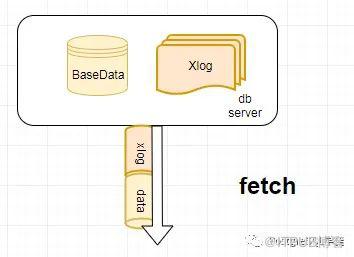
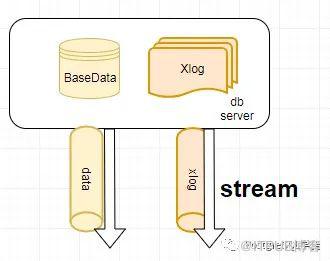
分别是串行备份和并行备份的方式。fetch模式也就是串行备份需要保证在备份数据的过程中,备份开始时刻的日志需要一直保存下来, 也就是要将wal_keep_segments设置的足够大,如果备份数据期间,日志开始时刻的日志已经被移除,那么备份就会失败。而stream模式,也就是并行备份过程中wal_max_sender必须保证不小于2。而stream模式不支持,将数据和日志以流的方式输出到标准输出。
pg_basebackup会在备份文件中输出一个backup_label文件,注意在备份中不要手动删除backup_label,不然就找不到redo点了
Note that it is very important to never remove the backup_label file when restoring a backup, because this will result in corruption. Confusion about when it is appropriate to remove this file is a common cause of data corruption when using this method; be very certain that you remove the file only on an existing master and never when building a standby or restoring a backup, even if you are building a standby that will subsequently be promoted to a new master.
对于其他备份工具,比如pg_probackup,假如将对应的备份文件中的backup_label删了,你使用
pg_probackup show -B xxx
就会看到备份是corrupt的状态了,另外提一下,对于普通的xlog,也就是非备份块(非FPI)是非幂等的,多次重放是不一致的。
另外,对于pg_basebackup,我们可能在归档目录中看到xxxx.backup文件
[postgres@xiongcc ~]$ ll archive_dir/
total 81924
-rw------- 1 postgres postgres 16777216 Aug  5 20:33 000000010000000900000050
-rw------- 1 postgres postgres 16777216 Aug  5 20:33 000000010000000900000051
-rw------- 1 postgres postgres      340 Aug  5 20:33 000000010000000900000051.00000028.backup
-rw------- 1 postgres postgres 16777216 Aug  5 20:33 000000010000000900000052
-rw------- 1 postgres postgres 16777216 Aug  5 20:33 000000010000000900000053
-rw------- 1 postgres postgres 16777216 Aug  5 20:33 000000010000000900000054
这个是一个很小的文件,基础备份过程会创建一个备份历史文件,存储到归档目录中。该文件以文件系统备份中需要的第一个WAL段文件命名。例如,如果开始的WAL文件是0000000100001234000055CD,则备份历史文件将被命名为0000000100001234000055CD.007C9330.backup。文件名的第二部分表明WAL文件中的一个准确位置,一般可以被忽略,有了这个文件,意味着小于0000000100001234000055CD之前的WAL日志都可以删除了,后面的WAL日志再加上这个基础备份即可实现PITR。
同理,pg_basebackup可以在备库上执行,不过有几个限制,直接就引用官网了
不会在被备份的数据库集簇中创建备份历史文件,也就是不会创建 xxxx.backup了
如果正在使用
-X none,不保证备份所需的所有 WAL 文件在备份结束时被归档。如果在在线备份期间后备机被提升为主机,备份会失败。
备份所需的所有 WAL 记录必须包含足够的全页写,这要求你在主控机上启用
full_page_writes并且不使用一个类似pg_compresslog的工具以archive_command从 WAL 文件中移除全页写。
虽然备库不支持创建复制槽,但是pg_basebackup会使用到临时的复制槽,这一点也需要注意
-[ RECORD 1 ]-------+--------------------
slot_name           | pg_basebackup_27104
plugin              |
slot_type           | physical
datoid              |
database            |
temporary           | t
active              | t
active_pid          | 27104
xmin                |
catalog_xmin        |
restart_lsn         | 9/6F000000
confirmed_flush_lsn |
wal_status          | reserved
safe_wal_size
备库上的备份
对于备库上的备份,记住几个基本原则就行:
不能写
不能执行pg_switch_wal()
checkpoint location是从主库同步过来的
对于非排它模式的备份,是可以在备库上进行的
postgres=# select pg_start_backup('mytest',false,true);
ERROR:  recovery is in progress
HINT:  WAL control functions cannot be executed during recovery.

postgres=# select pg_start_backup('mytest',false,false);
 pg_start_backup
-----------------
 9/6E000028
(1 row)

postgres=# select * from pg_stop_backup('f');
NOTICE:  WAL archiving is not enabled; you must ensure that all required WAL segments are copied through other means to complete the backup
    lsn     |                           labelfile                            | spcmapfile
------------+----------------------------------------------------------------+------------
 9/6F000060 | START WAL LOCATION: 9/6E000028 (file 00000001000000090000006E)+|
            | CHECKPOINT LOCATION: 9/6E000060                               +|
            | BACKUP METHOD: streamed                                       +|
            | BACKUP FROM: standby                                          +|
            | START TIME: 2021-08-05 21:08:29 CST                           +|
            | LABEL: mytest                                                 +|
            | START TIMELINE: 1                                             +|
            |                                                                |
(1 row)
但是备库假如开启了归档,要注意可能的问题
postgres=# show archive_mode ;
 archive_mode
--------------
 always
(1 row)
[postgres@xiongcc ~]$ psql -p 5433
psql (13.2)
Type "help" for help.

postgres=# select pg_start_backup('mytest',false,false);
 pg_start_backup
-----------------
 9/77000028
(1 row)

postgres=# select * from pg_stop_backup('f');
NOTICE:  base backup done, waiting for required WAL segments to be archived
---等待中
---后面就告警了
NOTICE:  base backup done, waiting for required WAL segments to be archived
WARNING:  still waiting for all required WAL segments to be archived (60 seconds elapsed)
HINT:  Check that your archive_command is executing properly.  You can safely cancel this backup, but the database backup will not be usable without all the WAL segments.
可以在主库上切换一下
postgres=# select pg_start_backup('mytest',false,false);
 pg_start_backup
-----------------
 9/77000028
(1 row)

postgres=# select * from pg_stop_backup('f');
NOTICE:  base backup done, waiting for required WAL segments to be archived
NOTICE:  all required WAL segments have been archived
    lsn     |                           labelfile                            | spcmapfile
------------+----------------------------------------------------------------+------------
 9/79000060 | START WAL LOCATION: 9/77000028 (file 000000010000000900000077)+|
            | CHECKPOINT LOCATION: 9/77000060                               +|
            | BACKUP METHOD: streamed                                       +|
            | BACKUP FROM: standby                                          +|
            | START TIME: 2021-08-05 21:40:07 CST                           +|
            | LABEL: mytest                                                 +|
            | START TIMELINE: 1                                             +|
            |                                                                |
(1 row)
另外,备库上的checkpoint位点,是从主库同步过来的,意味着你多次做,location是不会变的
postgres=# select pg_start_backup('mytest',false,false);
 pg_start_backup
-----------------
 9/7B000028
(1 row)

postgres=# select * from pg_stop_backup('f');
NOTICE:  WAL archiving is not enabled; you must ensure that all required WAL segments are copied through other means to complete the backup
    lsn     |                           labelfile                            | spcmapfile
------------+----------------------------------------------------------------+------------
 9/7B0000D8 | START WAL LOCATION: 9/7B000028 (file 00000001000000090000007B)+|
            | CHECKPOINT LOCATION: 9/7B000060                               +|
            | BACKUP METHOD: streamed                                       +|
            | BACKUP FROM: standby                                          +|
            | START TIME: 2021-08-05 21:46:44 CST                           +|
            | LABEL: mytest                                                 +|
            | START TIMELINE: 1                                             +|
            |                                                                |
(1 row)

postgres=# checkpoint ;
CHECKPOINT
postgres=# select pg_start_backup('mytest',false,false);
 pg_start_backup
-----------------
 9/7B000028
(1 row)

postgres=# select * from pg_stop_backup('f');
NOTICE:  WAL archiving is not enabled; you must ensure that all required WAL segments are copied through other means to complete the backup
    lsn     |                           labelfile                            | spcmapfile
------------+----------------------------------------------------------------+------------
 9/7C000060 | START WAL LOCATION: 9/7B000028 (file 00000001000000090000007B)+|
            | CHECKPOINT LOCATION: 9/7B000060                               +|
            | BACKUP METHOD: streamed                                       +|
            | BACKUP FROM: standby                                          +|
            | START TIME: 2021-08-05 21:46:51 CST                           +|
            | LABEL: mytest                                                 +|
            | START TIMELINE: 1                                             +|
            |                                                                |
(1 row)

postgres=# select pg_start_backup('mytest',false,false);
 pg_start_backup
-----------------
 9/7B000028
(1 row)

postgres=# select * from pg_stop_backup('f');
NOTICE:  WAL archiving is not enabled; you must ensure that all required WAL segments are copied through other means to complete the backup
    lsn     |                           labelfile                            | spcmapfile
------------+----------------------------------------------------------------+------------
 9/7C000060 | START WAL LOCATION: 9/7B000028 (file 00000001000000090000007B)+|
            | CHECKPOINT LOCATION: 9/7B000060                               +|
            | BACKUP METHOD: streamed                                       +|
            | BACKUP FROM: standby                                          +|
            | START TIME: 2021-08-05 21:46:59 CST                           +|
            | LABEL: mytest                                                 +|
            | START TIMELINE: 1                                             +|
            |                                                                |
(1 row)
其他注意事项
这里就直接引用官网了,我太懒了
如果一个CREATE DATABASE命令在基础备份时被执行,然后在基础备份进行时
CREATE DATABASE所复制的模板数据库被修改,恢复中可能会导致这些修改也被传播到已创建的数据库中。这当然是我们不希望的。为了避免这种风险,最好不要在创建基础备份时修改任何模板数据库。CREATE TABLESPACE命令会WAL以其字面绝对路径记录,并且因此将在重放时以相同的绝对路径来创建表空间。当日志在一台不同的机器上被重放时,这可能也不是我们希望的。即使日志在同一台机器上被重放也是危险的,就算是恢复到一个新的数据目录重放过程也会覆盖原来表空间的内容。为了避免这种潜在的陷阱,最佳做法是在创建或丢弃表空间后创建一个新的基础备份。
另外,当有复制槽的时候,可以删除目录pg_replslot,因为复制槽也会复制过去,会导致一些不必要的麻烦,比如表膨胀、冻结等等。
还有比如 pgsql_tmp 这一类的文件,也可以删除,因为数据库重启就没了。
其他的就参考官网吧:
The contents of the directories
pg_dynshmem/,pg_notify/,pg_serial/,pg_snapshots/,pg_stat_tmp/, andpg_subtrans/(but not the directories themselves) can be omitted from the backup as they will be initialized on postmaster startup. If stats_temp_directory is set and is under the data directory then the contents of that directory can also be omitted.Any file or directory beginning with
pgsql_tmpcan be omitted from the backup. These files are removed on postmaster start and the directories will be recreated as needed.
pg_internal.initfiles can be omitted from the backup whenever a file of that name is found. These files contain relation cache data that is always rebuilt when recovering.
小结
建议使用pg_basebackup
在v9.6以前,只有排它式的备份模式,会生成backup_label文件,9.6以后,提供了非排它式的,并且官方准备移除排它式的
排它和非排它的都有各自的毛病,当然非排它模式的备份可以参照cybertc提供的脚本,实现类似于一个守护进程的机制,不过相较而言,还是不要使用排它的备份方式
在备库上可以执行非排它的备份,同理pg_basebackup也可以
从基础备份恢复的话,需要backup_label,不然数据可能会不一致,不如pg_probackup,没有的话就会显示corrupted
对于正常的数据目录,一定要删除backup_label
切记backup_label的坑,因为PostgreSQL还没有Oracle那么智能,如下是大致的回放流程,引自阿里内核月报《PgSQL · 特性分析 · 数据库崩溃恢复(上)》

参考
https://git.postgresql.org/gitweb/?p=postgresql.git;a=blob;f=src/include/access/xlog.h
https://www.postgresql.org/docs/current/continuous-archiving.html
https://www.postgresql.org/docs/current/app-pgbasebackup.html
https://www.postgresql.org/docs/current/functions-admin.html
https://www.interdb.jp/pg/pgsql10.html
https://www.cybertec-postgresql.com/en/exclusive-backup-deprecated-what-now/
原文作者:PostgreSQL学徒;如有侵权,请联系管理员删除。

