如何高效处理/索引 JSON
如何高效处理/索引Jsonb数据
JSON是JavaScript Object Notation的缩写。它是一种开放的标准格式,将数据组织成键/值对和数组,详见RFC 7159。JSON是网络服务用来交换数据、存储文档、非结构化数据等的最常见格式。在这篇文章中,我们将向你展示如何在PostgreSQL中高效存储和索引 JSON数据的技巧和方法。
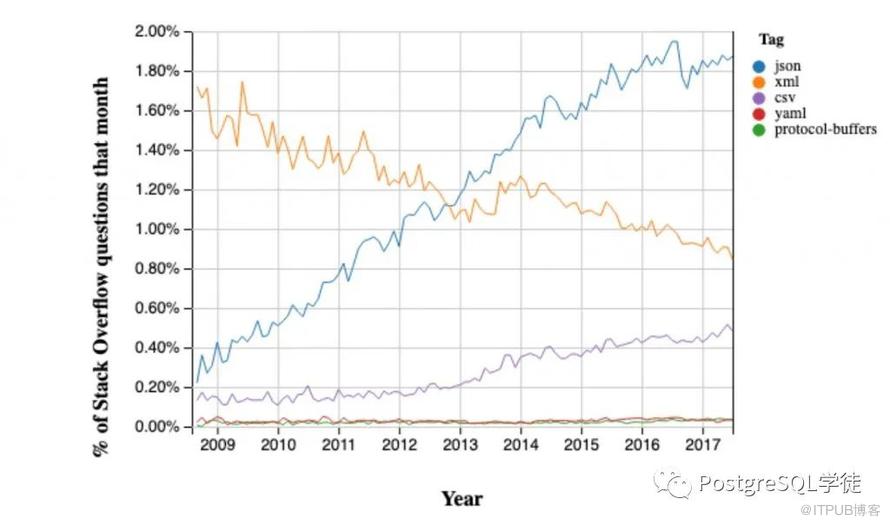
你也可以查看我们与PostgresConf合作举办的《在PostgreSQL与MongoDB中处理JSON数据》的网络研讨会,以了解更多相关信息,并查看我们的SlideShare主页以下载幻灯片。
文章目录
•Why Store JSON in PostgreSQL?•Timeline of JSON Support in PostgreSQL•JSONB Patterns & Antipatterns•JSONB Data Structures•JSONB Operators & Functions•JSONB Indexes•SQL/JSON & JSONPath
为什么要存储JSON?
为什么一个关系型数据库还要去关心非结构化数据?事实证明,在一些情况下,它是有用的。
1.Schema flexibility:使用JSON格式存储数据的主要原因之一是模式上的灵活性。当你的模式是不定的并且经常变化时,用JSON存储你的数据是很有用的。如果你把每个键都按列存储,就会导致频繁的DML操作—当你的数据集很大时,这就很难了—例如,事件跟踪、分析、标签等。注意:如果一个特定的键总是出现在你的文档中,把它存储为第一类列可能是有意义的。我们在下面的 "JSON Patterns & Antipatterns "一节中讨论更多关于这种方法。2.Nested objects:如果你的数据集有嵌套对象(单层或多层),在某些情况下,用JSON处理它们比将数据反规范化(denormalizing )为列或多个表更容易。3.Syncing with external data sources:很多时候,外部系统是以JSON形式提供数据的,所以它可能是在数据被摄入系统的其他部分之前的一个临时存储。例如,Stripe transactions。
Timeline of JSON Support
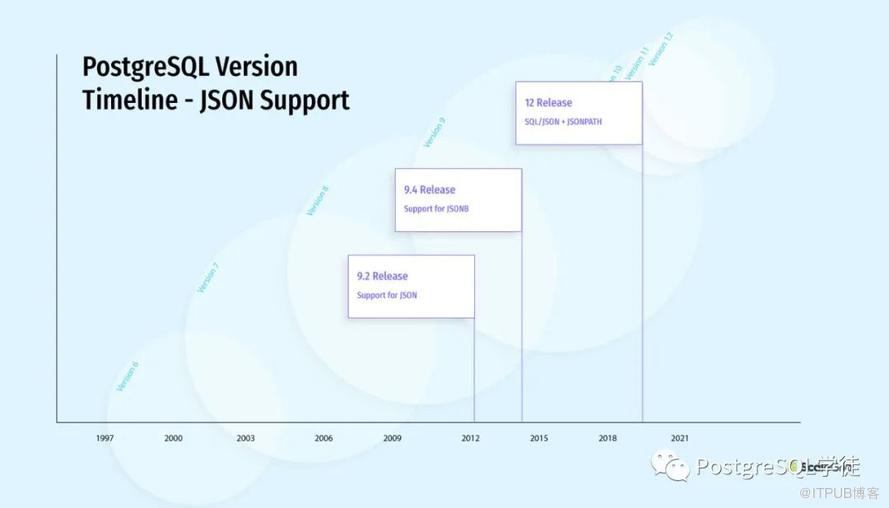
PostgreSQL的JSON支持是在9.2版本中引入的,并且在以后的每个版本中都有稳定的提升。
1.历程1:PostgreSQL 9.2(2012)增加了对JSON数据类型的支持,9.2中的JSON数据库是相当有限的(在那个时候可能被过度夸大了)—基本上是一个美化的字符串,并加入了一些JSON验证。它对于验证传入的JSON并存储在数据库中是很有用的。下面提供了更多的细节。2.历程2:PostgreSQL 9.4(2014)增加了对JSONB数据类型的支持,JSONB代表 "JSON Binary "或 "JSON better",取决于你问谁。它是一种分解的二进制格式来存储JSON。JSONB支持对JSON数据进行索引,并且在解析和查询JSON数据方面非常有效。在大多数情况下,当你在PostgreSQL中处理JSON时,你应该使用JSONB。3.历程3:PostgreSQL 12(2019)增加了对SQL/JSON标准和JSONPATH查询的支持,JSONPath为PostgreSQL带来了一个强大的JSON查询引擎。
什么时候该用JSON和JSONB?
在大多数情况下,JSONB是你应该使用的。然而,在一些特殊情况下,JSON的效果更好。
1.JSON保留了原始格式(又称whitespace[^2])和键的顺序。2.JSON保留了重复的键。3.JSON与JSONB相比,插入速度更快——但是,如果你做任何进一步的处理,JSONB会更快。
例如,如果你只是插入JSON日志,而不是以任何方式查询它们,那么JSON对你来说可能是一个更好的选择。在本博客中,当我们提到PostgreSQL中的JSON支持时,我们也会在后续提到 JSONB。
JSONB Patterns & Antipatterns
如果PostgreSQL对JSONB有很好的支持,为什么我们还需要列呢?为什么不直接用JSONB blob创建一个表,然后像下面的模式一样摆脱所有的列。
CREATE TABLE test(id int, data JSONB, PRIMARY KEY (id));截至今日,列仍然是处理数据的最有效技术。与传统的列相比,JSONB存储有一些缺点。
1.PostreSQL不存储JSONB列的列统计信息:PostgreSQL维护着关于表中每一列数值分布的统计数据——最常见的数值(MCV)、NULL条目、分布的直方图。基于这些数据,PostgreSQL查询计划器会对查询的计划做出明智的决定。然后在这一点上,PostgreSQL没有为JSONB列或键存储任何统计信息。这有时会导致糟糕的选择,如使用嵌套循环连接与哈希连接,等等。在这篇博文中提供了一个更详细的例子——何时在PostgreSQL模式中避免使用JSONB。2.JSONB存储导致更大的存储空间占用:JSONB存储不会重复存储 JSON中的键名。与WiredTiger上的MongoDB BSON或传统的列存储相比,这可能导致相当大的存储空间占用。我用下面的JSONB模型进行了一个简单的测试,存储了大约1000万行的数据,下面是结果—在某些方面,这与MongoDB MMAPV1存储模型相似,JSONB中的键被原样存储,没有任何压缩。一个长期的解决方法是将键名移到一个表级字典中,并引用这个字典,而不是重复存储键名。在那之前,解决方法可能是使用更紧凑的名字(unix风格)而不是更多的描述性名字。例如,如果你要存储一个特定键的数百万个实例,从存储的角度来说,将其命名为 "pb"而不是 "publisherName "会更好。
在PostgreSQL中利用JSONB的最有效方法是结合列和JSONB。如果一个键在你的JSONB blobs中出现的频率很高,它可能最好被存储为一个列。使用JSONB来一把抓,处理模式的可变部分,同时利用传统列来处理更稳定的字段。
JSONB数据结构
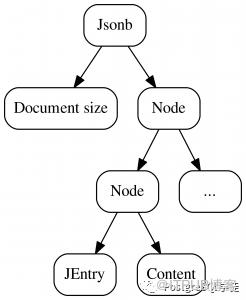
JSONB和MongoDB BSON本质上都是树形结构,使用多级节点来存储解析后的JSONB数据。MongoDB BSON有一个非常类似的结构。

JSONB与TOAST
存储的另一个重要考虑是JSONB如何与TOAST(The Oversize Attribute Storage Technique)交互。通常情况下,当你的列的大小超过TOAST_TUPLE_THRESHOLD(默认为2KB)时,PostgreSQL会尝试压缩数据以使其大小适合2KB。如果不起作用,数据会被移到行外存储。这就是他们所说的 "TOASTing "数据。当需要检索数据时,需要发生相反的过程 "deTOASTting"。你也可以控制TOAST存储策略。
•Extended :允许行外存储和压缩(使用 pglz),这是默认选项。•External:允许行外存储,但不允许压缩。
如果你遇到了由于TOAST压缩或解压造成的延迟,一个选择是主动将列存储设置为 "EXTENDED"。关于所有的细节,请参考PostgreSQL文档。
JSONB操作符和函数
PostgreSQL提供了一系列的操作符以操作JSONB。
| Operator | Description |
| -> | Get JSON array element (indexed from zero, negative integers count from the end) |
| -> | Get JSON object field by key |
| ->> | Get JSON array element as text |
| ->> | Get JSON object field as text |
| #> | Get JSON object at the specified path |
| #>> | Get JSON object at the specified path as text |
| @> | Does the left JSON value contain the right JSON path/value entries at the top level? |
| <@ | Are the left JSON path/value entries contained at the top level within the right JSON value? |
| ? | Does the string exist as a top-level key within the JSON value? |
| ?| | Do any of these array strings exist as top-level keys? |
| ?& | Do all of these array strings exist as top-level keys? |
| || | Concatenate two jsonb values into a new jsonb value |
| - | Delete key/value pair or string element from left operand. Key/value pairs are matched based on their key value. |
| - | Delete multiple key/value pairs or string elements from left operand. Key/value pairs are matched based on their key value. |
| - | Delete the array element with specified index (Negative integers count from the end). Throws an error if top level container is not an array. |
| #- | Delete the field or element with specified path (for JSON arrays, negative integers count from the end) |
| @? | Does JSON path return any item for the specified JSON value? |
| @@ | Returns the result of JSON path predicate check for the specified JSON value. Only the first item of the result is taken into account. If the result is not Boolean, then null is returned. |
PostgreSQL也提供各种Create Functions和Processing Functions来处理JSONB数据。
JSONB Indexes
JSONB提供了大量的选项来为你的JSON数据建立索引。在高层次上,我们将深入研究3种不同类型的索引—GIN、BTREE和HASH。不是所有的索引类型都支持所有的运算符类,所以需要根据你计划使用的运算符和查询类型来设计你的索引。
GIN Indexes
GIN是 "Generalized Inverted indexes"的缩写。根据文档:
GIN is designed for handling cases where the items to be indexed are composite values, and the queries to be handled by the index need to search for element values that appear within the composite items. For example, the items could be documents, and the queries could be searches for documents containing specific words.
GIN支持两个运算符类。
1.jsonb_ops(默认):?, ?|, ?&, @>, @@, @? [对JSONB元素中的每个键和值进行索引] 。2.jsonb_pathops:@>, @@, @? [只对JSONB元素中的值进行索引]
CREATE INDEX datagin ON books USING gin (data);Existence Operators (?, ?|, ?& )
这些操作符可以用来检查JSONB中顶层键的存在。让我们在数据JSONB列上创建一个GIN索引。例如,找到所有有盲文(braille)的书籍。JSON看起来像这样。
{"tags": {"nk594127": {"ik71786": "iv678771"}},"braille": false,"keywords": ["abc","kef","keh"],"hardcover": true,"publisher": "EfgdxUdvB0","criticrating": 1}
demo=# select * from books where data ? 'braille';id | author | isbn | rating | data---------+-----------------+------------+--------+------------------------------------------------------------------------------------------------------------------------------------------------------------------------1000005 | XEI7xShT8bPu6H7 | 2kD5XJDZUF | 0 | {"tags": {"nk455671": {"ik937456": "iv506075"}}, "braille": true, "keywords": ["abc", "kef", "keh"], "hardcover": false, "publisher": "zSfZIAjGGs", "criticrating": 4}.....demo=# explain analyze select * from books where data ? 'braille';QUERY PLAN---------------------------------------------------------------------------------------------------------------------Bitmap Heap Scan on books (cost=12.75..1005.25 rows=1000 width=158) (actual time=0.033..0.039 rows=15 loops=1)Recheck Cond: (data ? 'braille'::text)Heap Blocks: exact=2-> Bitmap Index Scan on datagin (cost=0.00..12.50 rows=1000 width=0) (actual time=0.022..0.022 rows=15 loops=1)Index Cond: (data ? 'braille'::text)Planning Time: 0.102 msExecution Time: 0.067 ms(7 rows)
从explain的输出中可以看到,我们创建的GIN索引被用于搜索。如果我们想找到盲文版或精装版的书呢?
demo=# explain analyze select * from books where data ?| array['braille','hardcover'];QUERY PLAN---------------------------------------------------------------------------------------------------------------------Bitmap Heap Scan on books (cost=16.75..1009.25 rows=1000 width=158) (actual time=0.029..0.035 rows=15 loops=1)Recheck Cond: (data ?| '{braille,hardcover}'::text[])Heap Blocks: exact=2-> Bitmap Index Scan on datagin (cost=0.00..16.50 rows=1000 width=0) (actual time=0.023..0.023 rows=15 loops=1)Index Cond: (data ?| '{braille,hardcover}'::text[])Planning Time: 0.138 msExecution Time: 0.057 ms(7 rows)
GIN索引只支持 "顶层"键的"existence"操作。如果键不在顶层,那么该索引将不会被使用。会使用一个顺序扫描。
demo=# select * from books where data->'tags' ? 'nk455671';id | author | isbn | rating | data---------+-----------------+------------+--------+------------------------------------------------------------------------------------------------------------------------------------------------------------------------1000005 | XEI7xShT8bPu6H7 | 2kD5XJDZUF | 0 | {"tags": {"nk455671": {"ik937456": "iv506075"}}, "braille": true, "keywords": ["abc", "kef", "keh"], "hardcover": false, "publisher": "zSfZIAjGGs", "criticrating": 4}685122 | GWfuvKfQ1PCe1IL | jnyhYYcF66 | 3 | {"tags": {"nk455671": {"ik615925": "iv253423"}}, "publisher": "b2NwVg7VY3", "criticrating": 0}(2 rows)demo=# explain analyze select * from books where data->'tags' ? 'nk455671';QUERY PLAN----------------------------------------------------------------------------------------------------------Seq Scan on books (cost=0.00..38807.29 rows=1000 width=158) (actual time=0.018..270.641 rows=2 loops=1)Filter: ((data -> 'tags'::text) ? 'nk455671'::text)Rows Removed by Filter: 1000017Planning Time: 0.078 msExecution Time: 270.728 ms(5 rows)
检查嵌套文档中是否存在的方法是使用 "表达式索引"。让我们在 data->tags 上创建一个索引。
CREATE INDEX datatagsgin ON books USING gin (data->'tags');demo=# select * from books where data->'tags' ? 'nk455671';id | author | isbn | rating | data---------+-----------------+------------+--------+------------------------------------------------------------------------------------------------------------------------------------------------------------------------1000005 | XEI7xShT8bPu6H7 | 2kD5XJDZUF | 0 | {"tags": {"nk455671": {"ik937456": "iv506075"}}, "braille": true, "keywords": ["abc", "kef", "keh"], "hardcover": false, "publisher": "zSfZIAjGGs", "criticrating": 4}685122 | GWfuvKfQ1PCe1IL | jnyhYYcF66 | 3 | {"tags": {"nk455671": {"ik615925": "iv253423"}}, "publisher": "b2NwVg7VY3", "criticrating": 0}(2 rows)demo=# explain analyze select * from books where data->'tags' ? 'nk455671';QUERY PLAN------------------------------------------------------------------------------------------------------------------------Bitmap Heap Scan on books (cost=12.75..1007.75 rows=1000 width=158) (actual time=0.031..0.035 rows=2 loops=1)Recheck Cond: ((data ->'tags'::text) ? 'nk455671'::text)Heap Blocks: exact=2-> Bitmap Index Scan on datatagsgin (cost=0.00..12.50 rows=1000 width=0) (actual time=0.021..0.021 rows=2 loops=1)Index Cond: ((data ->'tags'::text) ? 'nk455671'::text)Planning Time: 0.098 msExecution Time: 0.061 ms(7 rows)
注意:这里的另一种选择是使用@>操作符
select * from books where data @> '{"tags":{"nk455671":{}}}'::jsonb;然而,这只在值是一个对象的情况下起作用。因此,如果你不确定该值是一个对象还是一个原始值,可能会导致不正确的结果。
Path Operators @>, <@
"path"操作符可以用于对JSONB数据的多级查询。我们可以使用类似于上面的?操作符
select * from books where data @> '{"braille":true}'::jsonb;demo=# explain analyze select * from books where data @> '{"braille":true}'::jsonb;QUERY PLAN---------------------------------------------------------------------------------------------------------------------Bitmap Heap Scan on books (cost=16.75..1009.25 rows=1000 width=158) (actual time=0.040..0.048 rows=6 loops=1)Recheck Cond: (data @> '{"braille": true}'::jsonb)Rows Removed by Index Recheck: 9Heap Blocks: exact=2-> Bitmap Index Scan on datagin (cost=0.00..16.50 rows=1000 width=0) (actual time=0.030..0.030 rows=15 loops=1)Index Cond: (data @> '{"braille": true}'::jsonb)Planning Time: 0.100 msExecution Time: 0.076 ms(8 rows)
"path"操作符支持查询嵌套对象或顶层对象
demo=# select * from books where data @> '{"publisher":"XlekfkLOtL"}'::jsonb;id | author | isbn | rating | data-----+-----------------+------------+--------+-------------------------------------------------------------------------------------346 | uD3QOvHfJdxq2ez | KiAaIRu8QE | 1 | {"tags": {"nk88": {"ik37": "iv161"}}, "publisher": "XlekfkLOtL", "criticrating": 3}(1 row)demo=# explain analyze select * from books where data @> '{"publisher":"XlekfkLOtL"}'::jsonb;QUERY PLAN--------------------------------------------------------------------------------------------------------------------Bitmap Heap Scan on books (cost=16.75..1009.25 rows=1000 width=158) (actual time=0.491..0.492 rows=1 loops=1)Recheck Cond: (data @> '{"publisher": "XlekfkLOtL"}'::jsonb)Heap Blocks: exact=1-> Bitmap Index Scan on datagin (cost=0.00..16.50 rows=1000 width=0) (actual time=0.092..0.092 rows=1 loops=1)Index Cond: (data @> '{"publisher": "XlekfkLOtL"}'::jsonb)Planning Time: 0.090 msExecution Time: 0.523 ms
查询也可以像如下的多层结构
demo=# select * from books where data @> '{"tags":{"nk455671":{"ik937456":"iv506075"}}}'::jsonb;id | author | isbn | rating | data---------+-----------------+------------+--------+------------------------------------------------------------------------------------------------------------------------------------------------------------------------1000005 | XEI7xShT8bPu6H7 | 2kD5XJDZUF | 0 | {"tags": {"nk455671": {"ik937456": "iv506075"}}, "braille": true, "keywords": ["abc", "kef", "keh"], "hardcover": false, "publisher": "zSfZIAjGGs", "criticrating": 4}(1 row)
GIN Index "pathops" Operator Class
GIN还支持"pathops"选项,以减少GIN索引的大小。当你使用pathops选项时,唯一支持的运算符是"@>",所以你需要谨慎地进行查询。根据文档:
The technical difference between a jsonb_ops and a jsonb_path_ops GIN index is that the former creates independent index items for each key and value in the data, while the latter creates index items only for each value in the data
你可以按以下方式创建一个GIN pathops索引。
CREATE INDEX dataginpathops ON books USING gin (data jsonb_path_ops);在我的100万本书的小型数据集上,您可以看到pathops GIN索引更小,你应该测试自己的数据集,以了解节省的成本
public | dataginpathops | index | sgpostgres | books | 67 MB |public | datatagsgin | index | sgpostgres | books | 84 MB |
让我们使用pathops索引重新运行之前的查询
demo=# select * from books where data @> '{"tags":{"nk455671":{"ik937456":"iv506075"}}}'::jsonb;id | author | isbn | rating | data---------+-----------------+------------+--------+------------------------------------------------------------------------------------------------------------------------------------------------------------------------1000005 | XEI7xShT8bPu6H7 | 2kD5XJDZUF | 0 | {"tags": {"nk455671": {"ik937456": "iv506075"}}, "braille": true, "keywords": ["abc", "kef", "keh"], "hardcover": false, "publisher": "zSfZIAjGGs", "criticrating": 4}(1 row)demo=# explain select * from books where data @> '{"tags":{"nk455671":{"ik937456":"iv506075"}}}'::jsonb;QUERY PLAN-----------------------------------------------------------------------------------------Bitmap Heap Scan on books (cost=12.75..1005.25 rows=1000 width=158)Recheck Cond: (data @> '{"tags": {"nk455671": {"ik937456": "iv506075"}}}'::jsonb)-> Bitmap Index Scan on dataginpathops (cost=0.00..12.50 rows=1000 width=0)Index Cond: (data @> '{"tags": {"nk455671": {"ik937456": "iv506075"}}}'::jsonb)(4 rows)
然而,如上所述,"pathops"选项并不支持默认运算符类所支持的所有情况。有了 "pathops"GIN索引,所有下面这些查询就不能利用GIN索引了。总而言之,你有一个较小的索引,但它支持的使用情况更有限。
select * from books where data ? 'tags'; => Sequential scanselect * from books where data @> '{"tags" :{}}'; => Sequential scanselect * from books where data @> '{"tags" :{"k7888":{}}}' => Sequential scan
BTree Indexes
B树索引是关系型数据库中最常见的索引类型。然而,如果你用B树索引来索引整个JSONB列,唯一有用的运算符是=、<、<=、>、>=。基本上,这只能用于整个对象的比较,其使用情况非常有限。
一个更常见的情况是使用B树的"表达式索引"。关于入门知识,请参考这里 - Indexes on Expressions。B树表达式索引可以支持常见的比较运算符"="、"<"、">"、">="、"<="。你可能记得,GIN索引不支持这些运算符。让我们考虑一下,当我们想检索所有 data->criticrating > 4 的书籍时,因此,你会使用一个类似这样的查询。
demo=# select * from books where data->'criticrating' > 4;ERROR: operator does not exist: jsonb >= integerLINE 1: select * from books where data->'criticrating' >= 4;^HINT: No operator matches the given name and argument types. You might need to add explicit type casts.
好吧,这不起作用,因为->操作符返回一个JSONB类型。所以我们需要用这样的东西
demo=# select * from books where (data->'criticrating')::int4 > 4;如果您使用的是PostgreSQL 11之前的版本,它会变得更加丑陋。首先需要以文本形式查询,然后再将其转换为整数
demo=# select * from books where (data->'criticrating')::int4 > 4;对于表达式索引,索引需要与查询表达式精确匹配。因为,我们的索引看起来像这样:
demo=# CREATE INDEX criticrating ON books USING BTREE (((data->'criticrating')::int4));CREATE INDEXdemo=# explain analyze select * from books where (data->'criticrating')::int4 = 3;QUERY PLAN----------------------------------------------------------------------------------------------------------------------------------Index Scan using criticrating on books (cost=0.42..4626.93 rows=5000 width=158) (actual time=0.069..70.221 rows=199883 loops=1)Index Cond: (((data -> 'criticrating'::text))::integer = 3)Planning Time: 0.103 msExecution Time: 79.019 ms(4 rows)demo=# explain analyze select * from books where (data->'criticrating')::int4 = 3;QUERY PLAN----------------------------------------------------------------------------------------------------------------------------------Index Scan using criticrating on books (cost=0.42..4626.93 rows=5000 width=158) (actual time=0.069..70.221 rows=199883 loops=1)Index Cond: (((data -> 'criticrating'::text))::integer = 3)Planning Time: 0.103 msExecution Time: 79.019 ms(4 rows)1From above we can see that the BTREE index is being used as expected.
Hash Indexes
如果只对"="操作符感兴趣,那么哈希索引就变得有趣了。例如,考虑这样一种情况,我们正在寻找一本书上的特定标签。要索引的元素可以是顶层元素,也可以是深度嵌套的。
比如 tags->publisher = XlekfkLOtL
CREATE INDEX publisherhash ON books USING HASH ((data->'publisher'));哈希索引的大小也往往小于B树索引或GIN索引。当然,这最终取决于您的数据集。
demo=# select * from books where data->'publisher' = 'XlekfkLOtL'demo-# ;id | author | isbn | rating | data-----+-----------------+------------+--------+-------------------------------------------------------------------------------------346 | uD3QOvHfJdxq2ez | KiAaIRu8QE | 1 | {"tags": {"nk88": {"ik37": "iv161"}}, "publisher": "XlekfkLOtL", "criticrating": 3}(1 row)demo=# explain analyze select * from books where data->'publisher' = 'XlekfkLOtL';QUERY PLAN-----------------------------------------------------------------------------------------------------------------------Index Scan using publisherhash on books (cost=0.00..2.02 rows=1 width=158) (actual time=0.016..0.017 rows=1 loops=1)Index Cond: ((data -> 'publisher'::text) = 'XlekfkLOtL'::text)Planning Time: 0.080 msExecution Time: 0.035 ms(4 rows)
GIN Trigram Indexes
PostgreSQL支持使用Trigram索引进行字符串匹配。Trigram索引的工作原理是将文本分解为三元组合。Trigrams 基本上是被分解成3个字母的序列的单词。更多信息可以在文档中找到。GIN索引支持'gin_trgm_ops"类,可以用它来索引JSONB中的数据。您可以选择使用表达式索引在特定列上构建三元组合索引。
CREATE EXTENSION pg_trgm;CREATE INDEX publisher ON books USING GIN ((data->'publisher') gin_trgm_ops);demo=# select * from books where data->'publisher' LIKE '%I0UB%';id | author | isbn | rating | data----+-----------------+------------+--------+---------------------------------------------------------------------------------4 | KiEk3xjqvTpmZeS | EYqXO9Nwmm | 0 | {"tags": {"nk3": {"ik1": "iv1"}}, "publisher": "MI0UBqZJDt", "criticrating": 1}(1 row)
正如你在上面的查询中看到的,我们可以搜索在任何位置中出现的任意字符串。与B树索引不同,我们并不局限于left anchored expressions[^1]
demo=# explain analyze select * from books where data->'publisher' LIKE '%I0UB%';QUERY PLAN--------------------------------------------------------------------------------------------------------------------Bitmap Heap Scan on books (cost=9.78..111.28 rows=100 width=158) (actual time=0.033..0.033 rows=1 loops=1)Recheck Cond: ((data -> 'publisher'::text) ~~ '%I0UB%'::text)Heap Blocks: exact=1-> Bitmap Index Scan on publisher (cost=0.00..9.75 rows=100 width=0) (actual time=0.025..0.025 rows=1 loops=1)Index Cond: ((data -> 'publisher'::text) ~~ '%I0UB%'::text)Planning Time: 0.213 msExecution Time: 0.058 ms(7 rows)
GIN Array Indexes
JSONB内置了对数组进行索引的强大支持。让我们考虑一个使用GIN索引对字符串数组进行索引的例子,当我们的JSONB数据包含一个"keyword"元素,并且我们希望找到具有特定关键字的行
{"tags": {"nk780341": {"ik397357": "iv632731"}},"keywords": ["abc","kef","keh"],"publisher": "fqaJuAdjP5","criticrating": 2}CREATE INDEX keywords ON books USING GIN ((data->'keywords') jsonb_path_ops);demo=# select * from books where data->'keywords' @> '["abc", "keh"]'::jsonb;id | author | isbn | rating | data---------+-----------------+------------+--------+-----------------------------------------------------------------------------------------------------------------------------------1000003 | zEG406sLKQ2IU8O | viPdlu3DZm | 4 | {"tags": {"nk263020": {"ik203820": "iv817928"}}, "keywords": ["abc", "kef", "keh"], "publisher": "7NClevxuTM", "criticrating": 2}1000004 | GCe9NypHYKDH4rD | so6TQDYzZ3 | 4 | {"tags": {"nk780341": {"ik397357": "iv632731"}}, "keywords": ["abc", "kef", "keh"], "publisher": "fqaJuAdjP5", "criticrating": 2}(2 rows)demo=# explain analyze select * from books where data->'keywords' @> '["abc", "keh"]'::jsonb;QUERY PLAN---------------------------------------------------------------------------------------------------------------------Bitmap Heap Scan on books (cost=54.75..1049.75 rows=1000 width=158) (actual time=0.026..0.028 rows=2 loops=1)Recheck Cond: ((data -> 'keywords'::text) @> '["abc", "keh"]'::jsonb)Heap Blocks: exact=1-> Bitmap Index Scan on keywords (cost=0.00..54.50 rows=1000 width=0) (actual time=0.014..0.014 rows=2 loops=1)Index Cond: ((data -> 'keywords'::text) @&amp;amp;amp;amp;amp;amp;amp;amp;gt; '["abc", "keh"]'::jsonb)Planning Time: 0.131 msExecution Time: 0.063 ms(7 rows)
数组中右边项的顺序无关紧要。例如,以下查询将返回与前一个相同的结果
demo=# explain analyze select * from books where data->'keywords' @> '["keh","abc"]'::jsonb;包括操作符,右侧数组中的所有元素都需要出现—基本上就像"AND"操作符一样。如果想要"OR"行为,可以在WHERE子句中构造它
demo=# explain analyze select * from books where (data->'keywords' @> '["abc"]'::jsonb OR data->'keywords' @> '["keh"]'::jsonb);关于数组的包括运算符行为的更多细节,可以在文档中找到。
SQL/JSON & JSONPath
SQL标准在SQL中增加了对JSON的支持—SQL/JSON标准-2016。随着PostgreSQL 12/13的发布,PostgreSQL拥有SQL/JSON标准的最佳实现之一。更多细节请参考PostgreSQL 12发布声明。
SQL/JSON的核心功能之一是支持JSONPath语言来查询JSONB数据。JSONPath允许你指定一个表达式(使用类似于Javascript中的属性访问符号的语法)来查询你的JSONB数据。这使得它简单而直观,但也是非常强大的查询你的JSONB数据。把JSONPath看成是XML的XPath的逻辑等价物。
| .key | Returns an object member with the specified key. |
| [*] | Wildcard array element accessor that returns all array elements. 通配符数组元素访问器,返回所有数组元素。 |
| .* | Wildcard member accessor that returns the values of all members located at the top level of the current object. 通配符成员访问器,返回位于当前对象顶层的所有成员的值。 |
| .** | Recursive wildcard member accessor that processes all levels of the JSON hierarchy of the current object and returns all the member values, regardless of their nesting level. 递归通配符成员访问器,处理当前对象的JSON层次结构的所有级别,并返回所有成员值,无论其嵌套级别如何。 |
有关操作符的完整列表,请参阅JSONPath文档。JSONPath还支持各种过滤表达式。
JSONPath Functions
PostgreSQL 12提供了几个函数来使用JSONPath查询您的JSONB数据。根据文档
•jsonb_path_exists - Checks whether JSONB path returns any item for the specified JSON value.•jsonb_path_match - Returns the result of JSONB path predicate check for the specified JSONB value. Only the first item of the result is taken into account. If the result is not Boolean, then null is returned.•jsonb_path_query - Gets all JSONB items returned by JSONB path for the specified JSONB value. There are also a couple of other variants of this function that handle arrays of objects.
让我们从一个简单的查询开始,按出版商publisher查找图书
demo=# select * from books where data @@ '$.publisher == "ktjKEZ1tvq"';id | author | isbn | rating | data---------+-----------------+------------+--------+----------------------------------------------------------------------------------------------------------------------------------1000001 | 4RNsovI2haTgU7l | GwSoX67gLS | 2 | {"tags": {"nk542369": {"ik55240": "iv305393"}}, "keywords": ["abc", "def", "geh"], "publisher": "ktjKEZ1tvq", "criticrating": 0}(1 row)demo=# explain analyze select * from books where data @@ '$.publisher == "ktjKEZ1tvq"';QUERY PLAN--------------------------------------------------------------------------------------------------------------------Bitmap Heap Scan on books (cost=21.75..1014.25 rows=1000 width=158) (actual time=0.123..0.124 rows=1 loops=1)Recheck Cond: (data @@ '($."publisher" == "ktjKEZ1tvq")'::jsonpath)Heap Blocks: exact=1-> Bitmap Index Scan on datagin (cost=0.00..21.50 rows=1000 width=0) (actual time=0.110..0.110 rows=1 loops=1)Index Cond: (data @@ '($."publisher" == "ktjKEZ1tvq")'::jsonpath)Planning Time: 0.137 msExecution Time: 0.194 ms(7 rows)
您可以将该表达式重写为JSONPath过滤器
demo=# select * from books where jsonb_path_exists(data,'$.publisher ?(@ == "ktjKEZ1tvq")');您也可以使用非常复杂的查询表达式。例如,让我们选择印刷风格是精装本和价格等于100的书籍
select * from books where jsonb_path_exists(data, '$.prints[*] ?(@.style=="hc" &amp;amp;amp;&amp;amp;amp; @.price == 100)');然而,目前对JSONPath的索引支持非常有限—这使得在where子句中使用JSONPath很危险。JSONPath对索引的支持将在后续版本中得到改进。
demo=# explain analyze select * from books where jsonb_path_exists(data,'$.publisher ?(@ == "ktjKEZ1tvq")');QUERY PLAN------------------------------------------------------------------------------------------------------------Seq Scan on books (cost=0.00..36307.24 rows=333340 width=158) (actual time=0.019..480.268 rows=1 loops=1)Filter: jsonb_path_exists(data, '$."publisher"?(@ == "ktjKEZ1tvq")'::jsonpath, '{}'::jsonb, false)Rows Removed by Filter: 1000028Planning Time: 0.095 msExecution Time: 480.348 ms(5 rows)
Projecting Partial JSON
JSONPath的另一个很好的用法是从匹配的行中投射出部分JSONB。考虑一下下面的JSONB样本。
demo=# select jsonb_pretty(data) from books where id = 1000029;jsonb_pretty-----------------------------------{"tags": {"nk678947": {"ik159670": "iv32358}},"prints": [{"price": 100,"style": "hc"},{"price": 50,"style": "pb"}],"braille": false,"keywords": ["abc","kef","keh"],"hardcover": true,"publisher": "ppc3YXL8kK","criticrating": 3}
只选择publisher字段
demo=# select jsonb_path_query(data, '$.publisher') from books where id = 1000029;jsonb_path_query------------------"ppc3YXL8kK"(1 row)
选择prints字段(它是一个对象数组)
demo=# select jsonb_path_query(data, '$.prints') from books where id = 1000029;jsonb_path_query---------------------------------------------------------------[{"price": 100, "style": "hc"}, {"price": 50, "style": "pb"}](1 row)
选择prints数组的第一个元素
demo=# select jsonb_path_query(data, '$.prints[0]') from books where id = 1000029;jsonb_path_query-------------------------------{"price": 100, "style": "hc"}(1 row)
选择prints数组的最后一个元素
demo=# select jsonb_path_query(data, '$.prints[$.size()]') from books where id = 1000029;jsonb_path_query------------------------------{"price": 50, "style": "pb"}(1 row)
只从prints数组中选择精装本
demo=# select jsonb_path_query(data, '$.prints[*] ?(@.style=="hc")') from books where id = 1000029;jsonb_path_query-------------------------------{"price": 100, "style": "hc"}(1 row)
我们也可以链接过滤器
demo=# select jsonb_path_query(data, '$.prints[*] ?(@.style=="hc") ?(@.price ==100)') from books where id = 1000029;jsonb_path_query-------------------------------{"price": 100, "style": "hc"}(1 row)
总之,PostgreSQL提供了一个强大的、通用的平台来存储和处理JSON数据。有几个问题您需要注意,但我们乐观地认为它将在未来的版本中得到修复。
注释
[^1]: 原文是Unlike the B-tree indexes, we are not restricted to left anchored expressions,翻译出来比较生硬,就保留了英文,意思是Btree索引要进行模糊查询的话,%得放在字符串后面,即select info from test where info like 'postgres%'
[^2]: whitespace ,在一般的书籍中表示那些不可打印字符,此处应该是指JSON串中key之间多余的空格也会被保留下来
参考
https://erthalion.info/2017/12/21/advanced-json-benchmarks/
https://scalegrid.io/blog/using-jsonb-in-postgresql-how-to-effectively-store-index-json-data-in-postgresql/
https://heap.io/blog/when-to-avoid-jsonb-in-a-postgresql-schema
原文作者:PostgreSQL学徒;如有侵权,请联系管理员删除。

