如何优雅地计算表大小
前言
今天上午在向xx企业培训的时候,讲到了表膨胀和vacuum truncate,在实验过程中发现了一个十分有趣的现象。小知识,大趣味。
现象
起因是在向学员讲表膨胀的时候,提到了vacuum truncate,也就是在vacuum的最后一个阶段,在默认情况下,假如位于表末尾的文件页里都是死元组,那么清理过后这些数据页便可以被截断,回收空间,表的大小会缩小。
为了演示这个特性,我做了如下演示
postgres=# create table test(id int,info text);
CREATE TABLE
postgres=# insert into test select n,'test' from generate_series(1,10000) as n;
INSERT 0 10000
postgres=# \dt+ test
                                   List of relations
 Schema | Name | Type  |  Owner   | Persistence | Access method |  Size  | Description
--------+------+-------+----------+-------------+---------------+--------+-------------
 public | test | table | postgres | permanent   | heap          | 472 kB |
(1 row)

postgres=# delete from test;
DELETE 10000
postgres=# vacuum test;
VACUUM
postgres=# \dt+ test
                                  List of relations
 Schema | Name | Type  |  Owner   | Persistence | Access method | Size  | Description
--------+------+-------+----------+-------------+---------------+-------+-------------
 public | test | table | postgres | permanent   | heap          | 24 kB |
(1 row)
可以看到,确实如我们所说,表的大小缩小到了24KB。
但是,在某些场景下,我们不需要这个特性,比如读写分离,vacuum截断末尾的页是排它锁,会同步到备库,会导致不必要的锁冲突,所以在12以后,这个截断动作可以被控制了,即表级参数vacuum_truncate,若设置为false,那么末尾的垃圾页不会被回收。
postgres=# drop table test;
DROP TABLE
postgres=# create table test(id int,info text);
CREATE TABLE
postgres=# alter table test set (vacuum_truncate = off);
ALTER TABLE
postgres=# insert into test select n,'test' from generate_series(1,10000) as n;
INSERT 0 10000
postgres=# \dt+ test
                                   List of relations
 Schema | Name | Type  |  Owner   | Persistence | Access method |  Size  | Description
--------+------+-------+----------+-------------+---------------+--------+-------------
 public | test | table | postgres | permanent   | heap          | 472 kB |
(1 row)

postgres=# delete from test;
DELETE 10000
postgres=# vacuum test;
VACUUM
postgres=# \dt+ test
                                   List of relations
 Schema | Name | Type  |  Owner   | Persistence | Access method |  Size  | Description
--------+------+-------+----------+-------------+---------------+--------+-------------
 public | test | table | postgres | permanent   | heap          | 480 kB |
(1 row)各位可能也注意到了,表的大小反而增大了?不知为何原因,表的大小没有缩减反而增大了,这引起了我的极大兴趣。
除此之外,假如对步骤分解的话,还可以得出
postgres=# drop table test;
DROP TABLE
postgres=# create table test(id int,info text);
CREATE TABLE
postgres=# select pg_relation_filepath('test');
 pg_relation_filepath
----------------------
 base/13890/22652
(1 row)

[postgres@xiongcc 13890]$ ls -lrt | grep 22652
-rw------- 1 postgres postgres        0 Mar 13 19:39 22652

postgres=# insert into test select n,'test' from generate_series(1,10000) as n;
INSERT 0 10000

[postgres@xiongcc 13890]$ ls -lrt | grep 22652
-rw------- 1 postgres postgres    24576 Mar 13 19:40 22652_fsm
-rw------- 1 postgres postgres   450560 Mar 13 19:40 22652

postgres=# vacuum test;
VACUUM

[postgres@xiongcc 13890]$ ls -lrt | grep 22652
-rw------- 1 postgres postgres    24576 Mar 13 19:40 22652_fsm
-rw------- 1 postgres postgres   450560 Mar 13 19:40 22652
-rw------- 1 postgres postgres 8192 Mar 13 19:40 22652_vm•FSM文件是执行VACUUM操作时,或者是为了插入行而第一次查询FSM文件时才会创建•VM文件在VACUUM时创建
分析
首先,我们先看一下这个表的大小是如何计算的,我们可以使用\set ECHO_HIDDEN on或者psql -E的方式,观察元命令的后台SQL,当我们执行元命令的时候,其实论原理也是调用的一系列SQL,不难理解,元命令也是会阻塞的,比如显式lock table pg_class,再去执行\d就会卡住。那么让我们看一下
postgres=# \set ECHO_HIDDEN on
postgres=# \dt+ test
********* QUERY **********
SELECT n.nspname as "Schema",
  c.relname as "Name",
  CASE c.relkind WHEN 'r' THEN 'table' WHEN 'v' THEN 'view' WHEN 'm' THEN 'materialized view' WHEN 'i' THEN 'index' WHEN 'S' THEN 'sequence' WHEN 's' THEN 'special' WHEN 't' THEN 'TOAST table' WHEN 'f' THEN 'foreign table' WHEN 'p' THEN 'partitioned table' WHEN 'I' THEN 'partitioned index' END as "Type",
  pg_catalog.pg_get_userbyid(c.relowner) as "Owner",
  CASE c.relpersistence WHEN 'p' THEN 'permanent' WHEN 't' THEN 'temporary' WHEN 'u' THEN 'unlogged' END as "Persistence",
  am.amname as "Access method",
  pg_catalog.pg_size_pretty(pg_catalog.pg_table_size(c.oid)) as "Size",
  pg_catalog.obj_description(c.oid, 'pg_class') as "Description"
FROM pg_catalog.pg_class c
     LEFT JOIN pg_catalog.pg_namespace n ON n.oid = c.relnamespace
     LEFT JOIN pg_catalog.pg_am am ON am.oid = c.relam
WHERE c.relkind IN ('r','p','t','s','')
  AND c.relname OPERATOR(pg_catalog.~) '^(test)$' COLLATE pg_catalog.default
  AND pg_catalog.pg_table_is_visible(c.oid)
ORDER BY 1,2;
**************************

                                   List of relations
 Schema | Name | Type  |  Owner   | Persistence | Access method |  Size  | Description
--------+------+-------+----------+-------------+---------------+--------+-------------
 public | test | table | postgres | permanent   | heap          | 480 kB |
(1 row)可以看到,这个Size是由pg_catalog.pg_table_size计算而来,翻一下手册
Disk space used by the specified table, excluding indexes (but including TOAST, free space map, and visibility map)
指定表所使用的磁盘大小,不包括索引(但包括 TOAST、空闲空间映射和可见性映射)
那看一下磁盘上的大小
postgres=# select pg_relation_filepath('test');
 pg_relation_filepath
----------------------
 base/13890/22626
(1 row)
[postgres@xiongcc 13890]$ ls -lrt | grep 22626
-rw------- 1 postgres postgres 450560 Mar 13 18:59 22626
-rw------- 1 postgres postgres 24576 Mar 13 18:59 22626_fsm
-rw------- 1 postgres postgres 8192 Mar 13 18:59 22626_vm可以看到,有了fsm和vm文件,我们算一下总大小
postgres=# select 24576 + 450560 + 8192 ;
?column?
----------
483328
(1 row)
postgres=# select (24576 + 450560 + 8192)/1024 ||' KB' as size;
size
--------
472 KB
(1 row)为什么我们自己算出来的大小和PostgreSQL自己算出来的大小差了8KB呢?回过头看一下,注释里还差个TOAST,貌似好像是漏了对TOAST表的计算。让我们看一下,先查询对应的TOAST表是哪一个
postgres=# select relname from pg_class where oid = (select reltoastrelid from pg_class where relname='test');
relname
----------------
pg_toast_22626
(1 row)对应的TOAST表是pg_toast_22626,看看大小
postgres=# \dt+ pg_toast.pg_toast_22626
List of relations
Schema | Name | Type | Owner | Persistence | Access method | Size | Description
----------+----------------+-------------+----------+-------------+---------------+---------+-------------
pg_toast | pg_toast_22626 | TOAST table | postgres | permanent | heap | 0 bytes |
(1 row)
postgres=# select pg_relation_filepath('pg_toast.pg_toast_22626');
pg_relation_filepath
----------------------
base/13890/22629
(1 row)
[postgres@xiongcc 13890]$ ls -lrt | grep 22629
-rw------- 1 postgres postgres 0 Mar 13 18:42 22629奇了怪,TOAST表的大小也是0啊,所以表文件(main)+ FSM + VM + TOAST = 472KB,那差的8KB去了哪里?
源码分析
当通过思考琢磨不出来的时候,我们就需要去翻一下源码了
Datum
pg_table_size(PG_FUNCTION_ARGS)
{
Oid relOid = PG_GETARG_OID(0);
Relation rel;
int64 size;
rel = try_relation_open(relOid, AccessShareLock);
if (rel == NULL)
PG_RETURN_NULL();
size = calculate_table_size(rel);
relation_close(rel, AccessShareLock);
PG_RETURN_INT64(size);
}pg_table_size函数里面使用的是calculate_table_size去计算的大小
/*
* Calculate total on-disk size of a given table,
* including FSM and VM, plus TOAST table if any.
* Indexes other than the TOAST table's index are not included.
*
* Note that this also behaves sanely if applied to an index or toast table;
* those won't have attached toast tables, but they can have multiple forks.
*/
static int64
calculate_table_size(Relation rel)
{
int64 size = 0;
ForkNumber forkNum;
/*
* heap size, including FSM and VM
*/
for (forkNum = 0; forkNum <= MAX_FORKNUM; forkNum++)
size += calculate_relation_size(&(rel->rd_node), rel->rd_backend,
forkNum);
/*
* Size of toast relation
*/
if (OidIsValid(rel->rd_rel->reltoastrelid))
size += calculate_toast_table_size(rel->rd_rel->reltoastrelid);
return size;
}calculate_relation_size则是计算表的大小,而我们经常查看表大小的另外一个函数pg_relation_size,也是使用的这个函数。
代码里面提到了ForkNumber,这个ForkNumber表示"副本"(也可以叫做分支),Fork在PostgreSQL 中被认为是表/索引数据文件的副本,其中_fsm结尾的文件为该表/索引的数据文件副本1,__vm结尾的文件为该表/索引的数据文件副本2,而不带这两种后缀的文件为该表/索引的数据文件副本0。还有一个3,代表那些unlogged表,注意索引是不含有VM的,因为不包含可见性。
The fork numbers of tables, freespace maps and visibility maps are defined in 0, 1 and 2, respectively.
The initialization fork is only available for unlogged tables (created with UNLOGGED specified) and their indexes. Objects like these are no way different from regular objects except that operations with them are not logged in the write-ahead log (WAL). Because of this, it is faster to work with them, but it is impossible to recover the data in the consistent state in case of a failure. Therefore, during a recovery PostgreSQL just removes all the forks of such objects and writes the initialization fork in place of the main fork. This results in an empty object. We will discuss logging in detail, but in another series.
/*
* calculate size of (one fork of) a relation
*
* Note: we can safely apply this to temp tables of other sessions, so there
* is no check here or at the call sites for that.
*/
static int64
calculate_relation_size(RelFileNode *rfn, BackendId backend, ForkNumber forknum)
{
int64 totalsize = 0;
char *relationpath;
char pathname[MAXPGPATH];
unsigned int segcount = 0;
...
...
Datum
pg_relation_size(PG_FUNCTION_ARGS)
{
Oid relOid = PG_GETARG_OID(0);
text *forkName = PG_GETARG_TEXT_PP(1);
Relation rel;
int64 size;
rel = try_relation_open(relOid, AccessShareLock);
/*
* Before 9.2, we used to throw an error if the relation didn't exist, but
* that makes queries like "SELECT pg_relation_size(oid) FROM pg_class"
* less robust, because while we scan pg_class with an MVCC snapshot,
* someone else might drop the table. It's better to return NULL for
* already-dropped tables than throw an error and abort the whole query.
*/
if (rel == NULL)
PG_RETURN_NULL();
size = calculate_relation_size(&(rel->rd_node), rel->rd_backend,
forkname_to_number(text_to_cstring(forkName)));
relation_close(rel, AccessShareLock);
PG_RETURN_INT64(size);
}这里我们暂时不需要关心calculate_relation_size,看下第二个函数calculate_toast_table_size
/*
* Calculate total on-disk size of a TOAST relation, including its indexes.
* Must not be applied to non-TOAST relations.
*/
static int64
calculate_toast_table_size(Oid toastrelid)
{
int64 size = 0;
Relation toastRel;
ForkNumber forkNum;
ListCell *lc;
List *indexlist;
toastRel = relation_open(toastrelid, AccessShareLock);
/* toast heap size, including FSM and VM size */
for (forkNum = 0; forkNum <= MAX_FORKNUM; forkNum++)
size += calculate_relation_size(&(toastRel->rd_node),
toastRel->rd_backend, forkNum);
/* toast index size, including FSM and VM size */
indexlist = RelationGetIndexList(toastRel);
/* Size is calculated using all the indexes available */
foreach(lc, indexlist)
{
Relation toastIdxRel;
toastIdxRel = relation_open(lfirst_oid(lc),
AccessShareLock);
for (forkNum = 0; forkNum <= MAX_FORKNUM; forkNum++)
size += calculate_relation_size(&(toastIdxRel->rd_node),
toastIdxRel->rd_backend, forkNum);
relation_close(toastIdxRel, AccessShareLock);
}
list_free(indexlist);
relation_close(toastRel, AccessShareLock);
return size;
}豁然开朗,十分清晰,还包括索引的大小!
/* toast index size, including FSM and VM size */
indexlist = RelationGetIndexList(toastRel);那么,让我们再来瞅瞅,是不是这个gap
postgres=# \d+ pg_toast.pg_toast_22626
TOAST table "pg_toast.pg_toast_22626"
Column | Type | Storage
------------+---------+---------
chunk_id | oid | plain
chunk_seq | integer | plain
chunk_data | bytea | plain
Owning table: "public.test"
Indexes:
"pg_toast_22626_index" PRIMARY KEY, btree (chunk_id, chunk_seq)
Access method: heap果然,这个TOAST表上有一个pg_toast_22626_index的复合索引,此处需要一点TOAST的知识
•chunk_id:用来表示特定TOAST值的OID,具有同样chunk_id值的所有行组成原表的TOAST字段的一行数据。•chunk_seq:用来表示该行数据在整个数据中的位置。
理解了这个,也就不难理解这个复合主键的作用了。再看看这个索引的大小
postgres=# select pg_relation_filepath('pg_toast.pg_toast_22626_index');
pg_relation_filepath
----------------------
base/13890/22630
(1 row)
[postgres@xiongcc 13890]$ ls -lrt | grep 22630
-rw------- 1 postgres postgres 8192 Mar 13 18:42 22630可以看到,这个索引8KB,也正是那个消失了的8KB!
postgres=# select (24576 + 450560 + 8192 + 8192)/1024 ||' KB' as size;
size
--------
480 KB
(1 row)
postgres=# \dt+ test
List of relations
Schema | Name | Type | Owner | Persistence | Access method | Size | Description
--------+------+-------+----------+-------------+---------------+--------+-------------
public | test | table | postgres | permanent | heap | 480 kB |
(1 row)为了印证我们的想法,让我们追一下代码
(gdb) b calculate_table_size
Breakpoint 1 at 0x94834b: file dbsize.c, line 391.
(gdb) info b
Num Type Disp Enb Address What
1 breakpoint keep y 0x000000000094834b in calculate_table_size at dbsize.c:391postgres=# select pg_backend_pid();
pg_backend_pid
----------------
8701
(1 row)
postgres=# \dt+ test
---卡在断点处梳理一下流程
(gdb) c
Continuing.
Breakpoint 1, calculate_table_size (rel=0x7fb5048a9a58) at dbsize.c:391
391 int64 size = 0;
(gdb) n
397 for (forkNum = 0; forkNum <= MAX_FORKNUM; forkNum++)
(gdb) n
398 size += calculate_relation_size(&(rel->rd_node), rel->rd_backend,
(gdb) p forkNum
$13 = MAIN_FORKNUM ---主分支,大小是450560
(gdb) n
397 for (forkNum = 0; forkNum <= MAX_FORKNUM; forkNum++)
(gdb) p size
$14 = 450560
(gdb) n
398 size += calculate_relation_size(&(rel->rd_node), rel->rd_backend,
(gdb) p forkNum
$15 = FSM_FORKNUM ---FSM,大小是24576
(gdb) n
397 for (forkNum = 0; forkNum <= MAX_FORKNUM; forkNum++)
(gdb) p size
$16 = 475136
(gdb) n
398 size += calculate_relation_size(&(rel->rd_node), rel->rd_backend,
(gdb) p forkNum
$17 = VISIBILITYMAP_FORKNUM ---VM,大小是8192
(gdb) n
397 for (forkNum = 0; forkNum <= MAX_FORKNUM; forkNum++)
(gdb) p size
$18 = 483328
(gdb) n
398 size += calculate_relation_size(&(rel->rd_node), rel->rd_backend,
(gdb) p forkNum
$19 = INIT_FORKNUM ---没有unlogged
(gdb) n
397 for (forkNum = 0; forkNum <= MAX_FORKNUM; forkNum++)
(gdb) n
404 if (OidIsValid(rel->rd_rel->reltoastrelid))
(gdb) n
405 size += calculate_toast_table_size(rel->rd_rel->reltoastrelid);
(gdb) n
407 return size;
(gdb) p size
$20 = 491520 ---加上了TOAST索引,等于表的480KB先遍历每个分支,然后累积计算大小。嗯,十分之清晰。
[postgres@xiongcc 13890]$ ls -lrt | grep 22626
-rw------- 1 postgres postgres   450560 Mar 13 18:59 22626
-rw------- 1 postgres postgres    24576 Mar 13 18:59 22626_fsm
-rw------- 1 postgres postgres 8192 Mar 13 18:59 22626_vm小结
通过这么一个小案例,可以看到,其实很多地方都隐藏了不少的知识,只是在于我们是否用心去观察和思考了~
另外,官方提供的计算表大小的函数还挺多的,要注意每种函数的计算差异。
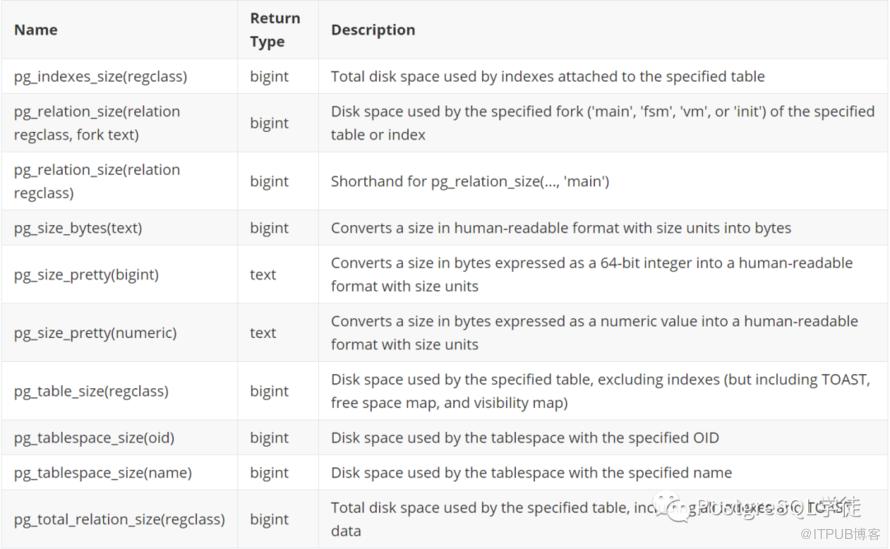
可以参照这个图。另外Wiki也有挺多查看表大小的SQL,https://wiki.postgresql.org/wiki/Disk_Usage
参考
https://wiki.postgresql.org/wiki/Disk_Usage
https://www.postgresql.org/docs/current/storage-file-layout.html
https://habr.com/en/company/postgrespro/blog/469087/
原文作者:PostgreSQL学徒;如有侵权,请联系管理员删除。

