现象描述:
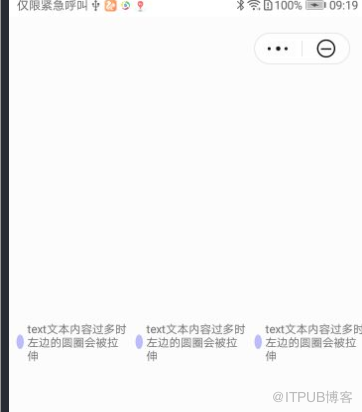
当text 组件的内容较多且显示多行的时候,相邻的div 样式会显示异常,会从正常的圆形变为椭圆。
问题代码如下:
<template>
  <div class="container">
    <div style="align-items: center;">
       <div class="typscolor" style="background-color: blue; opacity: 0.26; margin-left: 16px;">
</div>
      <text>{{text}}</text>
       <div class="typscolor" style="background-color: blue; opacity: 0.26; margin-left: 16px;">
</div>
      <text>{{text}}</text>
       <div class="typscolor" style="background-color: blue; opacity: 0.26; margin-left: 16px;">
</div>
      <text>{{text}}</text>
    </div>
  </div>
</template>
<style>
  .container {
    flex-direction: column;
    justify-content: center;
    height: 100%;
  }
   text {
    font-size: 24px;
  }
  .typscolor {
      border-radius: 50%;
      width: 30px;
      height: 30px;
      background-color: red;
      margin-right: 8px;
  }
</style>
<script>
  module.exports = {
    data: {
      text:'text文本内容过多时左边的圆圈会被拉伸'
    },
    onInit() {
    },
  }
</script>
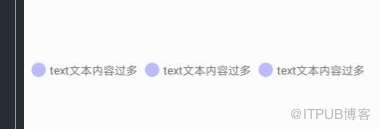
代码运行效果,如下图所示:
|
|
|
|
图1 异常 |
图2 正常 |
问题分析:
当text 组件内容过多时,text 组件宽度增加,相邻div 宽度不够,flex 布局宽度超出会自动压缩,从而导致div 标签被拉伸了。
解决方法:
可以给div 标签设置flex-shrink: 0 属性,显示指定不压缩,即可解决该问题。
修改代码如下:
<template>
  <div class="container">
    <div style="align-items: center;">
       <div class="typscolor" style="background-color: blue; opacity: 0.26; margin-left: 16px;"></div>
      <text>{{text}}</text>
       <div class="typscolor" style="background-color: blue; opacity: 0.26; margin-left: 16px;"></div>
      <text>{{text}}</text>
       <div class="typscolor" style="background-color: blue; opacity: 0.26; margin-left: 16px;"></div>
      <text>{{text}}</text>
    </div>
  </div>
</template>
<style>
  .container {
    flex-direction: column;
    justify-content: center;
    height: 100%;
  }
   text {
    font-size: 24px;
  }
  .typscolor {
      border-radius: 50%;
      width: 30px;
      height: 30px;
      background-color: red;
      margin-right: 8px;
      flex-shrink: 0;   /*加上该属性即可解决拉伸问题*/
  }
</style>
<script>
  module.exports = {
    data: {
      text:'text文本内容过多时左边的圆圈会被拉伸'
    },
    onInit() {
    },
  }
</script>
修改后代码运行效果如下图所示:

欲了解更多详情,请参见:
快应用通用样式介绍:
原文链接: https://developer.huawei.com/consumer/cn/forum/topic/0201454978326300783?fid=0101271690375130218
原作者:Mayism
来自 “ ITPUB博客 ” ,链接:https://blog.itpub.net/69970551/viewspace-2782711/ ,如需转载,请注明出处,否则将追究法律责任。
上一篇:
玩转AR,让电商营销锦上添花
下一篇:
页面生命周期onShow没有触发

请登录后发表评论
登录
全部评论
