很多应用提供了账号登录、注册功能,在输入密码时,开发者为了安全性,当用户输入密码时,一般都显示 …… 的密文。但是,这个体验也给用户造成了不便,用户不知道当前输入的字符是否是自己期望的,也无法知道当前输入到哪个字符。针对这个问题,开发者进行了优化,在输入框旁边提供了小图标,点击可切换显示明文和密文。快应用开发也是可以实现上述功能的。
解决方案
-
密码输入框使用input 组件,input 组件提供了多种type 值,密文使用type 类型为 password,明文类型可使用text类型,type字段需要绑定动态变量。
-
在明文和密文切换时,需要显示设置光标位置在末尾,要不切换后光标会显示在开始位置。设置光标位置可以通过 setSelectionRange()方法,方法中的start和end参数都设置成当前输入的文字长度。
示例代码如下:
<template>
  <div class="container">
    <stack class="input-item">
      <input class="input-text" type="{{inputtype}}" id="inputpsdID" placeholder="please enter password" onchange="showChangePrompt"></input>
      <image src="../Common/lock.png"  class="lock" onclick="switchpassandshow"></image>
    </stack>
  </div>
</template>

<style>
  .container {
    flex: 1;
    padding: 20px;
    flex-direction: column;
    align-items: center;
  }

  .input-item {
    margin-bottom: 80px;
    margin-top: 10px;
    margin-left: 16px;
    margin-right: 16px;
     align-items: center;
     justify-content: flex-end;
  }

  .lock{
     width: 40px;
     height:40px;
  }

  .input-text {
    height: 80px;
    width: 100%;
    line-height: 80px;
    border-top-width: 1px;
    border-bottom-width: 1px;
    border-color: #999999;
    font-size: 30px;
    background-color: #ffffff;
    padding-right: 42px;
  }

  .input-text:focus {
    border-color: #f76160;
  }
</style>

<script>
  export default {
    data: {
      inputtype: 'password',
      lenth: 0
    },
    onInit() {
      this.$page.setTitleBar({ text: 'Switching between plaintext and ciphertext' });
    },

    showChangePrompt(e) {
      this.lenth = e.value.length;
      console.info("showChangePrompt   this.lenth= " + this.lenth);

    },

    switchpassandshow: function () {
      var com = this.$element('inputpsdID');
      if (this.inputtype === 'password') {
        this.inputtype = 'text';
      } else {
        this.inputtype = 'password';
      }
       com.setSelectionRange({ start: this.lenth, end: this.lenth});
    }
  }
</script>
上述代码实现了一个简易的密码明文和密文切换显示功能,点击右边的锁图标,可以切换显示明文和密文。效果如下图所示:

图 1 密码明文显示
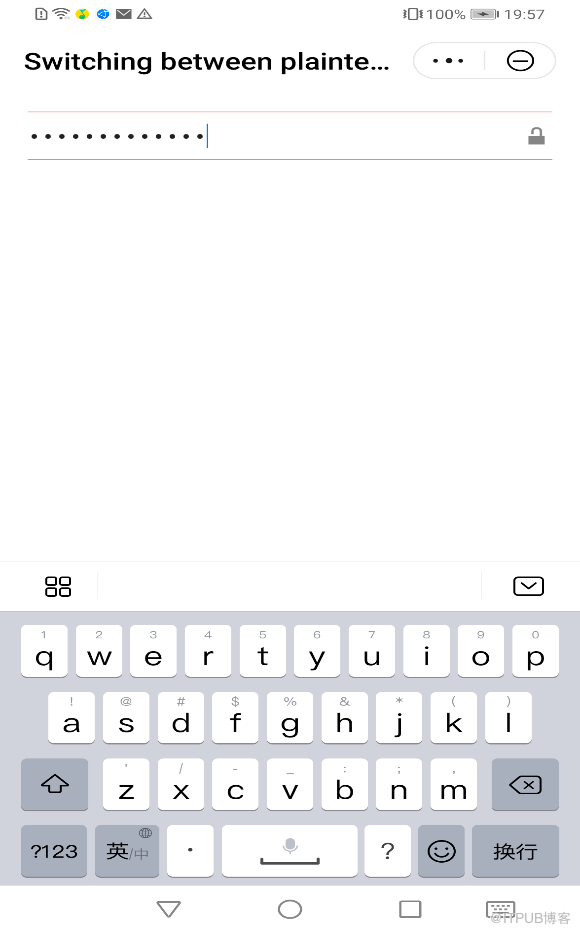
图 2 密码密文显示
欲了解更多详情,请参见:
快应用 input组件开发指导:
原文链接: https://developer.huawei.com/consumer/cn/forum/topic/0201460277979560908?fid=0101271690375130218
原作者:Mayism
来自 “ ITPUB博客 ” ,链接:https://blog.itpub.net/69970551/viewspace-2779936/ ,如需转载,请注明出处,否则将追究法律责任。

