当前华为应用市场(
AppGallery,以下简称AG)的功能越来越全,页面也越来越多,随着而来的,是对于个各种页面跳转的需求越来越旺盛。
但是,华为 AppGallery所提供的链接的种类、功能、使用场景越来越多,不熟悉的人看到这各种链接,肯定会非常头大。下面根据我的使用是理解,做了一些AppGallery常用链接与跳转场景的整理,仅供大家参考。
下面各种链接的介绍,主要按照使用场景来划分,如有错误,还请大家指正。
1 、跳转到AG 首页
典型使用场景: 需要从开发者应用内,拉起跳转到应用市场首页,让用户自行搜索相关的应用或者活动。
使用方法: 使用 Intent的action方法,具体动作为:
action:com.huawei.appmarket.intent.action.MainActivity
相关代码示例 :
public void launchAGHomePage() {
     Intent intent = new Intent("com.huawei.appmarket.intent.action.MainActivity");
     startActivity(intent);
 }
2 、跳转到AG 应用详情页
2.1 应用内通过Intent 跳转
典型使用场景: 应用内拉起跳转到应用详情页,应用用户进行评分评论等操作。
使用方法: 使用 Intent的action方法,具体可分为两类:
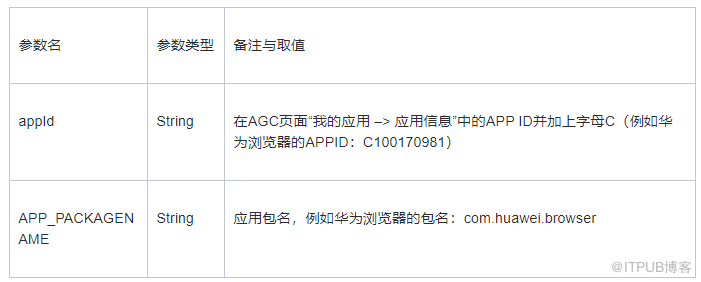
1、 通过 APPID:
action:com.huawei.appmarket.appmarket.intent.action.AppDetail. withid
setPackage("com.huawei.appmarket");
name: “appId”, value: “C100170981”
2、通过包名:
action:com.huawei.appmarket.intent.action.AppDetail
setPackage("com.huawei.appmarket");
name: “APP_PACKAGENAME”, value: “com.huawei.browser”
注意点: 如果使用方式 1即APPID的方式,比使用包名的方式,action中多了appmarket以及withid参数。
参数介绍
相关代码示例 :
// 1、通过APPID:
public void launchAppDetilPage1() {
     Intent intent = new Intent("com.huawei.appmarket.appmarket.intent.action.AppDetail.withid");
     intent.setPackage("com.huawei.appmarket");
     intent.putExtra("appId", "C100170981");
     startActivity(intent);
 }
// 2、通过包名packageName”
public void launchAppDetilPage2() {
     Intent intent = new Intent("com.huawei.appmarket.intent.action.AppDetail");
     intent.setPackage("com.huawei.appmarket");
     intent.putExtra("APP_PACKAGENAME", "com.huawei.browser");
     startActivity(intent);
 }
2.2 通过URL 跳转
典型使用场景: 用户通过分享的 URL链接等场景,直接点击URL跳转到应用详情页。
具体方法: 链接地址为:
hiapplink://com.huawei.appmarket?appId=yourAppID&channelId=yourChannelId&referrer=yourReferrer
相关代码示例 :
public void launchAGHomePage() {
     Intent intent = new Intent("com.huawei.appmarket.intent.action.MainActivity");
     startActivity(intent);
 }
2 、跳转到AG 应用详情页
2.1 应用内通过Intent 跳转
典型使用场景: 应用内拉起跳转到应用详情页,应用用户进行评分评论等操作。
使用方法: 使用 Intent的action方法,具体可分为两类:
1、 通过 APPID:
action:com.huawei.appmarket.appmarket.intent.action.AppDetail. withid
setPackage("com.huawei.appmarket");
name: “appId”, value: “C100170981”
2、通过包名:
action:com.huawei.appmarket.intent.action.AppDetail
setPackage("com.huawei.appmarket");
name: “APP_PACKAGENAME”, value: “com.huawei.browser”
注意点: 如果使用方式 1即APPID的方式,比使用包名的方式,action中多了appmarket以及withid参数。
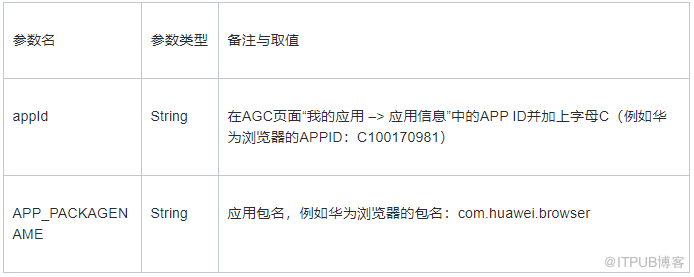
参数介绍
相关代码示例 :
// 1、通过APPID:
public void launchAppDetilPage1() {
     Intent intent = new Intent("com.huawei.appmarket.appmarket.intent.action.AppDetail.withid");
     intent.setPackage("com.huawei.appmarket");
     intent.putExtra("appId", "C100170981");
     startActivity(intent);
 }
// 2、通过包名packageName”
public void launchAppDetilPage2() {
     Intent intent = new Intent("com.huawei.appmarket.intent.action.AppDetail");
     intent.setPackage("com.huawei.appmarket");
     intent.putExtra("APP_PACKAGENAME", "com.huawei.browser");
     startActivity(intent);
 }
2.2 通过URL 跳转
典型使用场景: 用户通过分享的 URL链接等场景,直接点击URL跳转到应用详情页。
具体方法: 链接地址为:
hiapplink://com.huawei.appmarket?appId=yourAppID&channelId=yourChannelId&referrer=yourReferrer
注意点: 斜体加粗部分为手动修改的变量,其余为固定值。
参数介绍

相关代码示例 :
1. 通过APPID
public void launchAppDetilWithURL1() {
     String text1 = "hiapplink://com.huawei.appmarket?appId=C100170981&channelId=HwBrowserSearch&referrer=Keywords";
     Uri uri = Uri.parse(text1);
     Intent intent = new Intent(Intent.ACTION_VIEW, uri);
     startActivity(intent);
 }
3 、market 拉起所有本地商店并跳转详情页
典型使用场景: 传入包名或者 APPID,拉起设备上所有的应用商店,让用户自行选择打开方式,即引导用户选择使用哪个应用市场拉起。选择好打开的应用商店后可以直接跳转到应用的详情页。
使用方法: 通过传入 scheme 为 market:// 的链接,Android支持的标准的market协议,可拉起Android设备上的所有应用商店。有如下两种方式:
1、market://details?id= pkgName // 支持所有商店
2、appmarket://details?id= pkgName // 仅支持华为应用商店。
3、market://com.huawei.appmarket.applink?appId= APPID" // 仅支持华为应用商店。
注意点: 方法 1通过 market://传入包名的方式,为Android标准方法, 在所有应用商店中均可使用,例如GP,应用包等;。
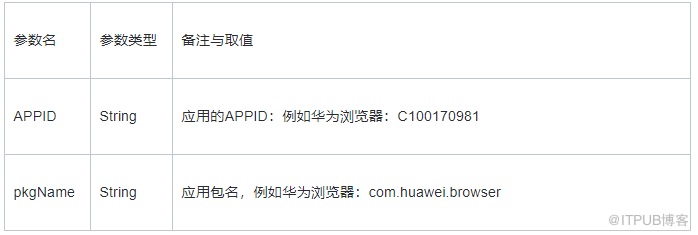
参数介绍
相关代码示例 :
// 1、方式1:market:// + 包名
public void launchAppDetilOnMarket1() {
     String text1 = "market://details?id=com.huawei.browser";
     Uri uri = Uri.parse(text1);
     Intent intent = new Intent(Intent.ACTION_VIEW, uri);
     startActivity(intent);
 }
// 2、方式2:appmarket:// + 包名
public void launchAppDetilOnMarket2() {
     String text1 = "appmarket://details?id=com.huawei.browser";
     Uri uri = Uri.parse(text1);
     Intent intent = new Intent(Intent.ACTION_VIEW, uri);
     startActivity(intent);
 }
3、方式3:market:// + 华为商店 + APPID
public void launchAppDetilOnMarket3() {
     String text1 = "market://com.huawei.appmarket.applink?appId=C100170981";
     Uri uri = Uri.parse(text1);
     Intent intent = new Intent(Intent.ACTION_VIEW, uri);
     startActivity(intent);
 }
4 、 链接到web AG 的应用详情页
典型使用场景: 应用的官网或者 web投放等场景,用户点击web链接,直接拉起AppGallery中应用的详情页面,引导用户安装。
使用方法:
-
方法 1: https://appgallery.huawei.com/#/app/ YOUR_APPID
-
方法 2: https://appgallery.cloud.huawei.com/appDetail?pkgName= pkgName
-
方法 4: https://appgallery.huawei.com/#/app/ YOUR_APPID?pkgName= pkgName
-
方法 3: https://appgallery.cloud.huawei.com/marketshare/app/ YOUR_APPID ?locale= LOCALE &shareTo= WAP&shareFrom= channeID
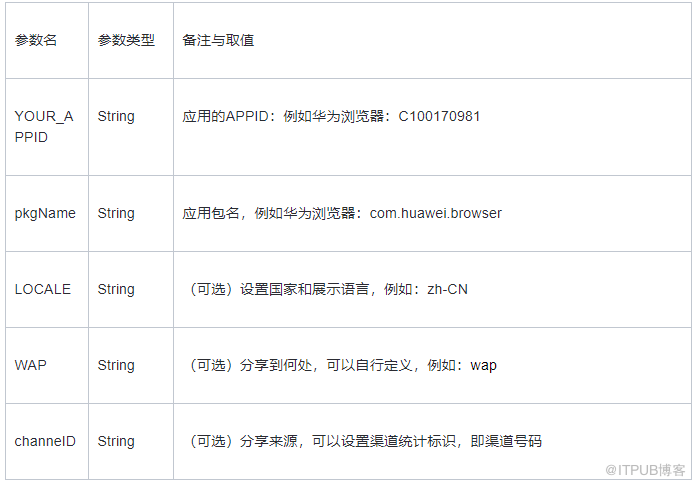
参数介绍
示例 :
// 1、最短链接:通过APPID
https://appgallery.huawei.com/#/app/C100170981
// 2、通过包名
https://appgallery.cloud.huawei.com/appDetail?pkgName=com.huawei.browser
// 3、APPID与包名组合使用
https://appgallery.huawei.com/#/app/C100170981?pkgName=com.huawei.browser
// 4、详细链接并且加上可选参数(不常用,一般在图章中使用)
https://appgallery.cloud.huawei.com/marketshare/app/C100170981?locale=en_US&shareTo=wap&shareFrom=52656
5 、图章链接到AG 的应用详情页
图章链接,简单来说,就是有一个 AppGallery的图,点击这个图,可以超链接到华为应用市场的应用详情页。应用的营销人员,可以直接将这个图用于投放(其链接的本质,与上述方法4的web链接相同)。
典型使用场景: 对于与上架的应用,营销人员希望通过图章链接,在官网上导流到应用商店,或者直接用于投放。
创建方法: 在 AGC首页 -> 点击“应用内分发”-> 即可在应用内分发的界面“制作图章”, 即可为已上架的应用制作图章链接。
注意点: 仅已上架的应用才能制作图章,并且每个应用只能创建一个图章;如果应用已创建图章,则只能在 “图章查询”中查看。
使用指南:
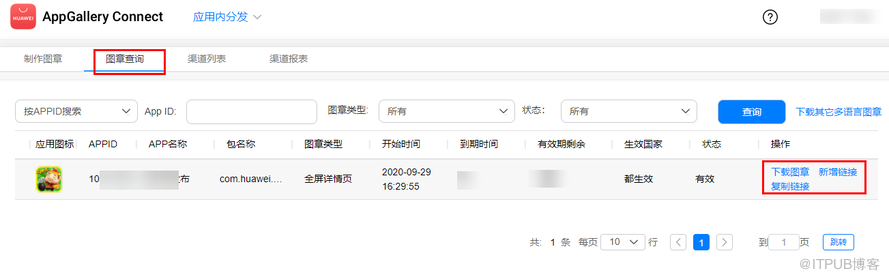
图章创建以后,即可在“图章查询”页签中,查看当前已经创建的图章, 你可以在该界面,下载图章或者复制链接:
-
下载图章:下载的结果是一个 png图片,可以挂在官网或者营销H5页面里。
-
新增链接:用于标识不同的渠道,例如: Facebook,baidu等
-
复制链接:可根据不同的渠道下载不同的链接
使用示例:
// 1、典型的链接
https://appgallery.huawei.com/#/app/C100170981?channelId=baidu&referrer=TestBaidu&id=fa09e0f0f3de489386a7180d7b4b3585&s=6E90164FC0CED39CD11D9BE25BE6D1B333FEDCCBCD90A86F29A8DA2400AA4163&detailType=0&v =
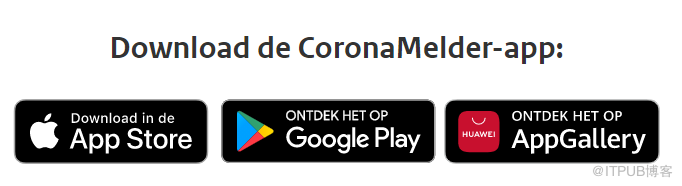
// 2、使用典型的图章,在网站中嵌入该图章,点击即可跳转到应用详情下载页,使用实例如下:
6 、跨平台的App Linking 链接
App Linking 是华为AppGallery Connect推出的一项新的服务,大家知道和接触的比较少,因此下面的介绍会更加详细并且更加通俗,帮助大家更好的理解这个
AppLinking是什么: App Linking就是一个可以跨平台(Android,iOS,PC-Browser)使用的链接,对标于Firebase的Dynamic Link功能,帮助应用开发者快速构建跨平台的分享链接。
AppLinking用在哪: 比如说一个应用在 Android和iOS都有发布,此时有个促销活动需要各个平台的用户参与;该活动的邀请链接,在Android和iOS上都要能够生效,并且对于在PC浏览器打开的用户,也能够浏览相应的活动H5页面。
使用 AppLinking后有什么效果:
-
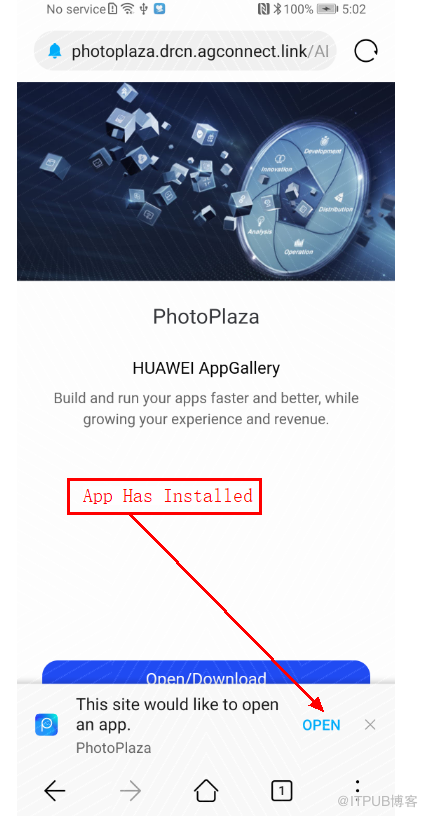
手机上已安装该应用: AppLinking链接将自动拉起应用,并且跳转到指定页面,
-
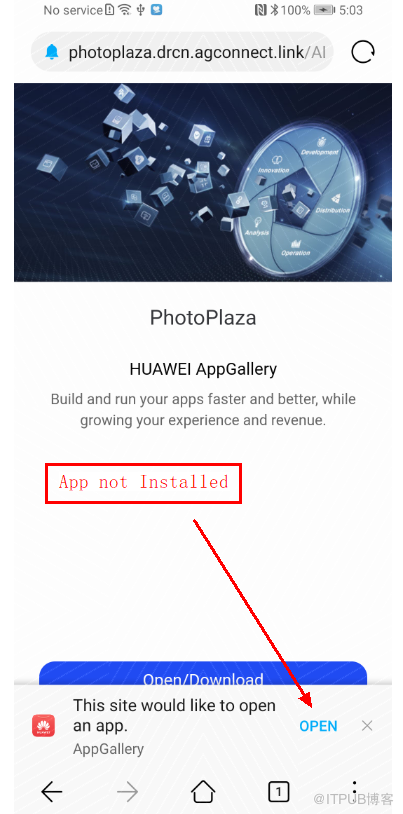
手机上未安装该应用: 链接将提示你通过应用市场打开,可配置为华为 AppGallery或者本地应用商店,下载并安装好应用以后,仍可打开指定页面。
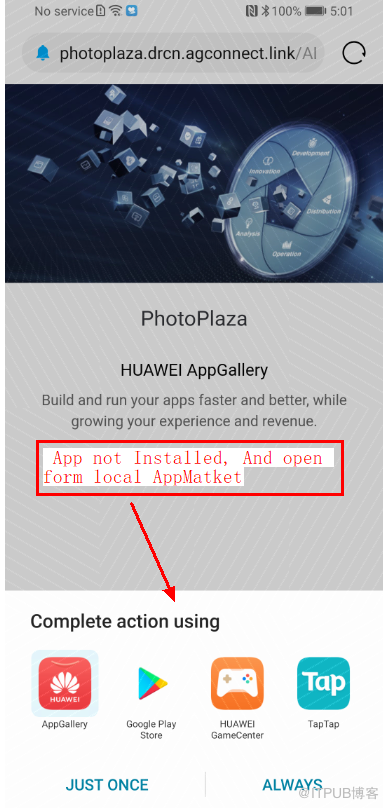
AppLinking怎么用: AppLinking有三种创建方式:适用于不同的场景:
-
AGC界面创建: 在 AGC首页 -> 点击“我的项目”并选择相应的项目-> 在左侧菜单栏找到“增长”-“ App Linking”。在AppLinking界面先创建链接前缀,然后在创建AppLinking.
该方式主要给不懂代码的营销同事使用,但里面使用到的深度链接地址,还是需要跟开发同事获取。
-
Android应用内创建: 在 Android应用内,集成AppLinking SDK,并且通过build.buildAppLinking()等相关代码进行链接的实时创建。
该方式主要提供给 Android用户的实时创建,比如应用内的活动页面,添加一个分享按钮,点击分享按钮,就创建一个AppLinking链接。
-
iOS应用内创建: 和 Android应用一样,这个就是在iOS应用内,使用代码进行链接创建。
该方式主要提供给 iOS用户,让iOS用户在应用通过代码实时创建并且分享。
非华为手机上怎么用:
AppLinking是跨平台的,也即适用于所有Android和iOS,那肯定很多同学关心“在非华为的Android手机上怎么使用AppLinking?”这个问题,下面这方面问题做相应的解答:
1、 非华为手机能否使用 AppLinking?—— App Linking不依赖HMS Core,可以在所有Android设备上使用,GMS和HMS设备通用。
2、 应用未安装且手机上未安装华为应用市场, AppLinking怎么用? —— 对于没有安装AppGallery的Android手机,可以将AppLinking配置为 本地应用市场打开,这样Android系统就会引导让你选择通过哪个商店商店打开,只要你的包名一致,可以任何商店的应用详情页。
使用示例
// 1、典型的链接前缀
https://photoplaza.drcn.agconnect.link // 其中photoplaza为应用唯一参数,drcn.agconnect.link为系统固定参数。
// 2、典型的AppLinking链接:
https://photoplaza.drcn.agconnect.link/vm3Y
// 3、 典型的Android创建AppLinking
private static final String DOMAIN_URI_PREFIX = "https://photoplaza.drcn.agconnect.link";private static final String DEEP_LINK = "https://developer.huawei.com";public void createAppLinking() {
     AppLinking.Builder builder = new AppLinking.Builder()
             .setUriPrefix(DOMAIN_URI_PREFIX)
             .setDeepLink(Uri.parse(DEEP_LINK))
             .setAndroidLinkInfo(new AppLinking.AndroidLinkInfo.Builder().build());
     String LongAppLinking = builder.buildAppLinking().getUri().toString();
 }
// 4、典型的iOS创建AppLinking
- (IBAction)CreatLink:(id)sender {AGCAppLinkingComponents *component = [[AGCAppLinkingComponents alloc] init];component.uriPrefix = @"https://photoplaza.drcn.agconnect.link"; component.deepLink = @"https://www.developer.huawei.com"; component.iosBundleId = @"com.lucky.agc.demo"; component.iosDeepLink = @"agckit://ios/detail"; self.longlink.text = component.buildLongLink.absoluteString;
7 、相关参考链接
App Linking官方文档: https://developer.huawei.com/consumer/cn/doc/development/AppGallery-connect-Guides/agc-applinking-introduction-0000001054143215
添加归因参数文档: https://developer.huawei.com/consumer/cn/doc/development/AppGallery-connect-Guides/appgallery-referrer-createlink
原作者:Mayism
来自 “ ITPUB博客 ” ,链接:https://blog.itpub.net/69970551/viewspace-2775024/ ,如需转载,请注明出处,否则将追究法律责任。

