现象描述:
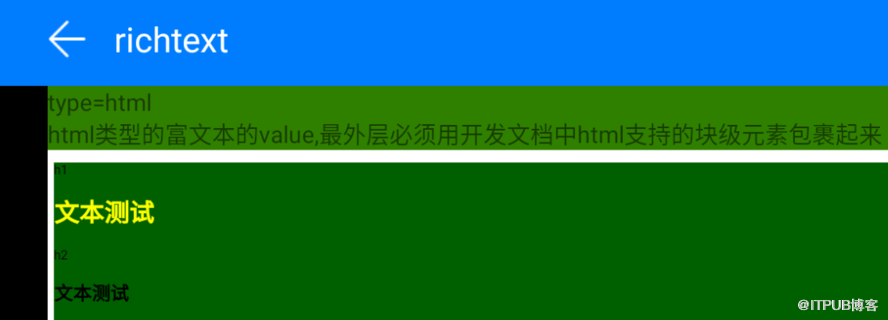
车机上是深色背景模式,使用richtext 包裹网页内容时,出现白色背景边框,影响整体深色背景,问题截图如下:
问题代码:
<richtext type="html" class="rich-text">{{content}}</richtext>
<script>
    export default {
        private: {
            content:
                 <body style="background-color: #006000;">
                    <div class="item-content"  style="background-color: #006000;">
                        <style>h1{color: yellow;}</style>
                        <p class="item-title">h1</p>
                        <h1>文本测试</h1>
                        <p class="item-title">h2</p>
                        <h2>文本测试</h2>
                    </div>
                </body>
            },
        }
</script>
<style>
.rich-text {
        background-color: #cd853f;
    }
</style>
问题分析:
车机上在使用richtext 组件包裹html 内容后,在快应用里通过class 设置 background-color 是不生效的。如果richtext 包裹的内容只含网页的body 部分,即使在body 上设置了背景色,在展示富文本时周围也会出现一圈白色边框。需要在richtext 里写完整的html ,且在其html 标签上设置背景色,背景色在展示时才能覆盖边框,不会出现白色的空隙。
解决方法:
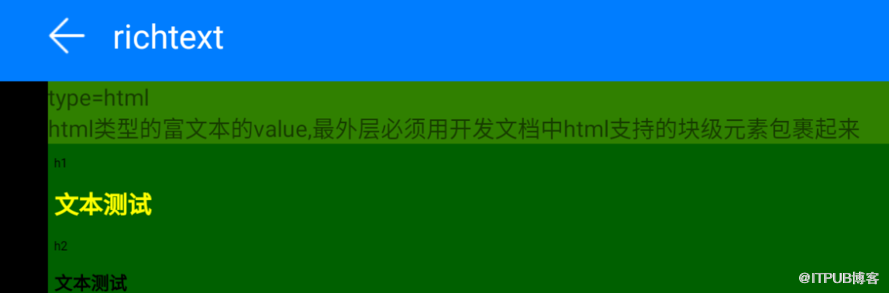
在richtext 里包裹一个完整的html 格式的网页,html 标签中设置背景色。
<richtext type="html">{{content}}</richtext>
<script>
    export default {
        private: {

            content:
                `<!DOCTYPE html>
                <html style="background-color: #006000;">
                    <head>
                    <meta charset="UTF-8" />
                    <meta name="viewport" content="width=device-width, initial-scale=1.0" />
                    <title>Document</title>
                    </head>
                    <body>
                        <div>
                            <style>h1{color: yellow;}</style>
                            <p>h1</p>
                            <h1>文本测试</h1>
                            <p>h2</p>
                            <h2>文本测试</h2>
                        </div>
                    </body>
                </html>`
        },
    }
</script>
<style>
.rich-text {
        background-color: #cd853f;
}
</style>
修改后效果图如下:
原文链接: https://developer.huawei.com/consumer/cn/forum/topic/0204429221972080033?fid=18
原作者:Mayism
来自 “ ITPUB博客 ” ,链接:https://blog.itpub.net/69970551/viewspace-2774616/ ,如需转载,请注明出处,否则将追究法律责任。

请登录后发表评论
登录
全部评论
