水平居中
1.text-align:center;
此用法需要满足:父元素为块级元素(block)
可以实现块级元素内样式居中,子元素可以为:inline-block,inline,inline-flex

1 <!DOCTYPE html> 2 <html lang="en"> 3 <head> 4 <meta charset="UTF-8"> 5 <title>Document</title> 6 <style type="text/css"> 7 .main { 8 text-align: center; 9 background-color: green; 10 } 11 .box1 { 12 display: inline-flex; 13 width: 60px; 14 height: 60px; 15 border: 1px solid #ccc; 16 } 17 .box2 { 18 display: inline-block; 19 width: 60px; 20 height: 60px; 21 border: 1px solid #ccc; 22 } 23 </style> 24 </head> 25 <body> 26 <div class="main"> 27 <div class="box1"></div> 28 <div class="box2"></div> 29 </div> 30 </body> 31 </html>

2.margin:0 auto;
设置要求:块级元素(block)
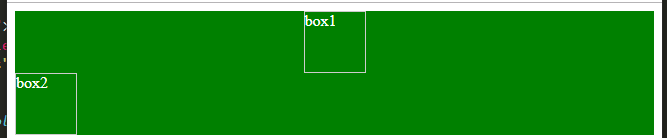
1 <!DOCTYPE html> 2 <html lang="en"> 3 <head> 4 <meta charset="UTF-8"> 5 <title>Document</title> 6 <style type="text/css"> 7 .main { 8 9 background-color: green; 10 } 11 .box1 { 12 width: 60px; 13 height: 60px; 14 border: 1px solid #ccc; 15 margin: 0 auto; 16 } 17 .box2 { 18 display: inline-block; 19 width: 60px; 20 height: 60px; 21 border: 1px solid #ccc; 22 margin: 0 auto; 23 } 24 </style> 25 </head> 26 <body> 27 <div class="main"> 28 <div class="box1"></div> 29 <div class="box2"></div> 30 </div> 31 </body> 32 </html>
3.利用弹性布局实现居中
通过弹性布局设置主轴的对齐方式( justify-content: center;)实现
1 <!DOCTYPE html> 2 <html lang="en"> 3 <head> 4 <meta charset="UTF-8"> 5 <title>Document</title> 6 <style type="text/css"> 7 .main { 8 display: flex; 9 color: #fff; 10 background-color: green; 11 justify-content: center; 12 } 13 .box1 { 14 width: 60px; 15 height: 60px; 16 border: 1px solid #ccc; 17 } 18 .box2 { 19 width: 60px; 20 height: 60px; 21 border: 1px solid #ccc; 22 } 23 </style> 24 </head> 25 <body> 26 <div class="main"> 27 <div class="box1">box1</div> 28 <div class="box2">box2</div> 29 </div> 30 </body> 31 </html>

来自 “ ITPUB博客 ” ,链接:https://blog.itpub.net/69969648/viewspace-2683865/ ,如需转载,请注明出处,否则将追究法律责任。
上一篇:
HTML 字符实体/HTML
下一篇:
常见form表单5种input输入类型

请登录后发表评论
登录
全部评论
