有大佬会问,图形化方式部署多流畅,干嘛自虐非要倒腾命令行方式,那是因为我们的环境要通过VPN再到堡垒机最后才能xshell登录,而且VPN、堡垒机不定时频繁超时断开。
KingbaseES读写分离集群简介
在多数据库实例的热备模式下,通过标准化配置(满足最低要求)、特定的部署方式等手段达到KingbaseES MAA(最大可用性架构)的架构要求:满足初级架构要求的基础上,能够处理硬件故障(不能是所有设备的硬件故障),具有更强的数据保护能力;同时能具有处理复杂故障场景(软硬件、网络等故障)的能力、具有更短的故障恢复时间,能够保证数据库服务持续对外提供服务。
安装前准备
服务器环境信息收集
|
ip |
os |
cpu架构 |
内存 |
角色 |
|
192.168.40.111 |
UOS Server 20 |
x86_64 |
4G |
主 |
|
192.168.40.112 |
UOS Server 20 |
x86_64 |
4G |
从 |
操作系统环境配置(所有节点)
关闭防火墙
--停止并关闭防火墙自启
systemctl stop firewalld
systemctl disable firewalld
调整ssh参数
UOS 20不用改,默认值已经是以下值
vi /etc/ssh/sshd_config
找到以下开关改为
USEDNS=no
GSSAPIAuthentication=no
重启sshd服务
systemctl restart sshd
配置主机名
--节点1
hostnamectl set-hostname node1
exec bash
--节点2
hostnamectl set-hostname node2
exec bash
配置/etc/hosts文件
vi /etc/hosts
192.168.40.111 node1
192.168.40.112 node2
安装介质下载并上传
登录官网
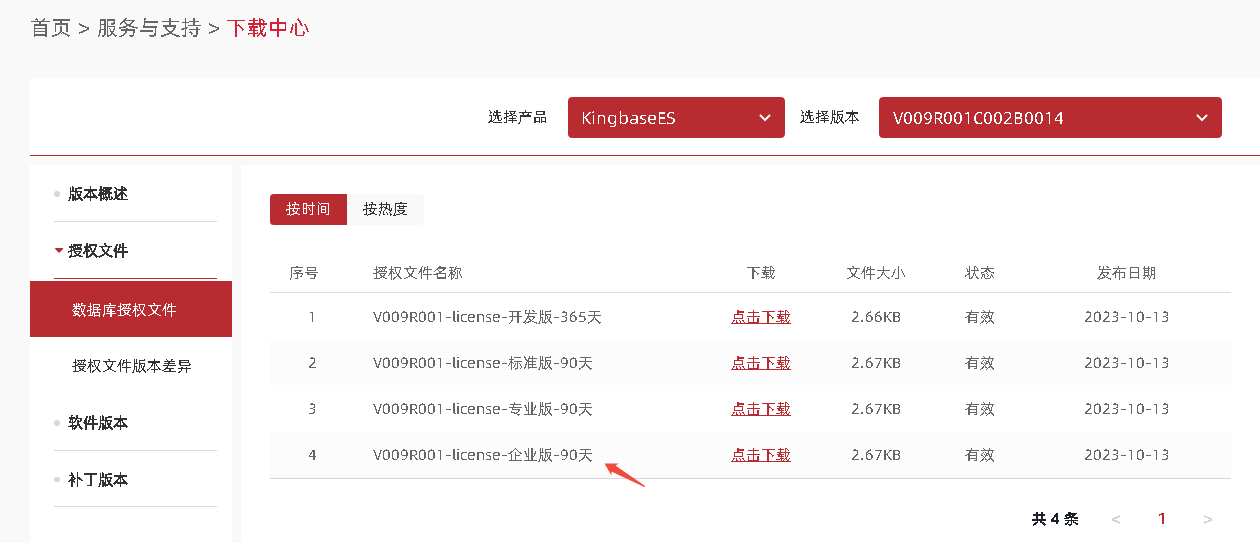
- 下载授权文件--- 授权文件部分操作系统版本和CPU架构
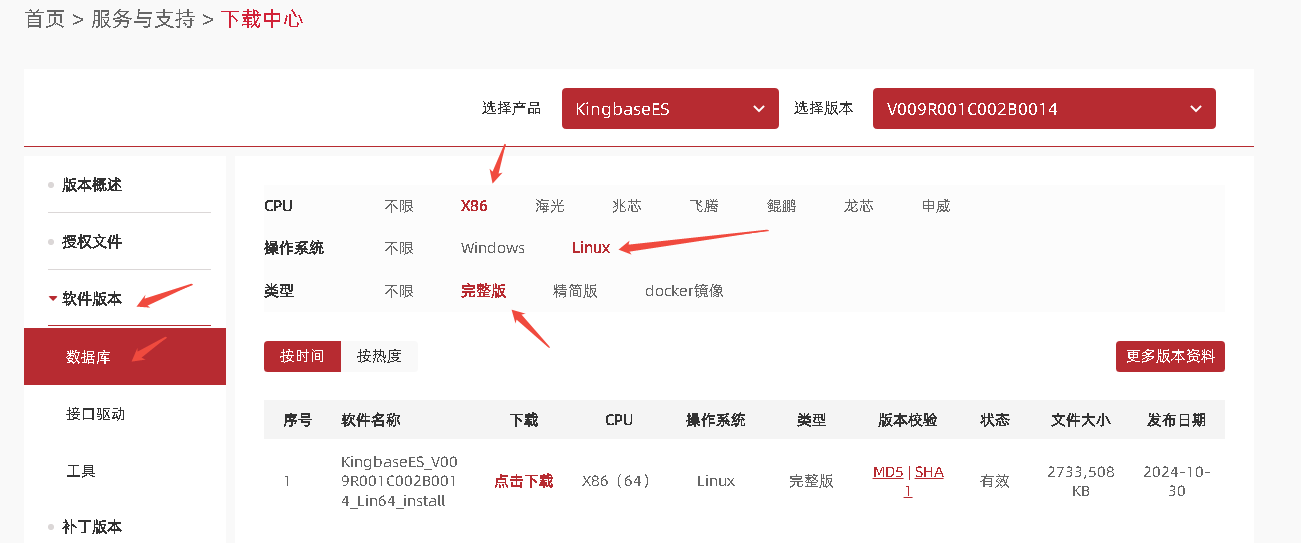
- 下载数据库软件版本--- 注意选择对应的操作系统版本和CPU架构
服务器上创建/install目录,将以上文件上传至服务器/install目录下。该步骤可自行选择做或不做,因为有的人习惯上传到/opt目录下或者是其他磁盘空间比较大的数据盘下。
mkdir -p /install
查看已上传的安装介质,输出如下:
[root@node1 ~]# ls -lhtr /install/
-rw-r--r-- 1 root     root     2.7K  5月 21 16:36 license_企业版.zip
-rw-r--r-- 1 root     root     2.6G  5月 21 16:42 KingbaseES_V009R001C002B0014_Lin64_install.iso
创建用户(所有节点)
cat /etc/passwd | grep kingbase(是否存在,存在则执行下条命令删除)
userdel -rf kingbase
groupadd -g 1010 kingbase
useradd -d /home/kingbase -g kingbase -u 1010 kingbase
echo 'kingbase' | passwd --stdin kingbase                      # 更改kingbase 即操作系统kingbase账户密码
id kingbase
用户id=1010(kingbase) 组id=1010(kingbase) 组=1010(kingbase)
创建目录(所有节点)
--集群部署软件安装目录  主节点操作即可
mkdir -p /data/kesclusterinstall
chown -R kingbase:kingbase /data/kesclusterinstall
chmod -R 775 /data/kesclusterinstall
--集群安装目录
mkdir -p /data/kescluster
chown -R kingbase:kingbase /data/kescluster
chmod -R 775 /data/kescluster
--集群数据目录
mkdir -p /data/kesdata
chown -R kingbase:kingbase /data/kesdata
chmod -R 700 /data/kesdata
挂载安装介质(主节点)
mount /install/KingbaseES_V009R001C002B0014_Lin64_install.iso /mnt
安装数据库集群部署软件(主节点)
切换到kingbase用户
该步骤必须操作
su - kingbase
执行安装软件
cd /mnt
./setup.sh -i console
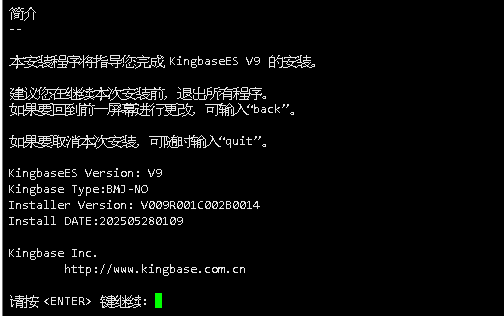
简介
以下是介绍,回车即可
许可协议
以下是许可协议,回车即可

输入Y,继续

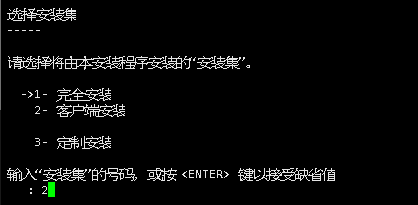
选择安装集
选择客户端安装,一路回车
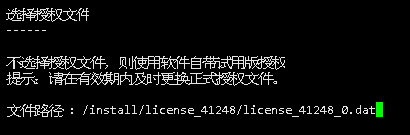
选择授权文件
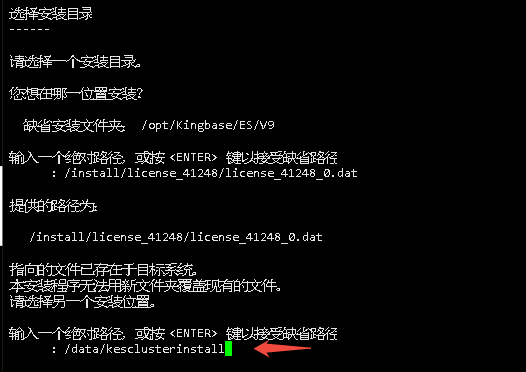
选择安装目录
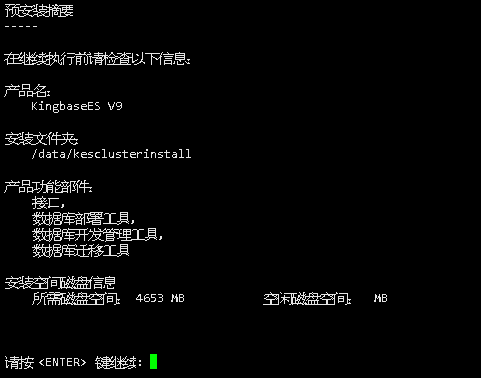
预安装摘要
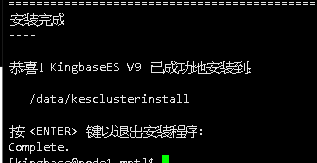
安装完成
修改集群安装配置文件install.conf
su - kingbase
cd /data/kesclusterinstall/KESRealPro/V009R001C002B0014/ClientTools/guitools/DeployTools/zip
cp install.conf install.conf_20250528bak
vi install.conf
分别修改以下内容:
- [install]组下面的所有节点ip参数更改 多个ip地址之间用空格隔开
[install]
## whether it is BMJ, if so, on_bmj=1, if not on_bmj=0, defaults to on_bmj=0
on_bmj=0
## the cluster node IP which needs to be deployed, is separated by spaces, for example:  all_ip=(192.168.1.10 192.168.1.11)
## or all_ip=(host1 host2)
## means deployed cluster of DG ==> ha_running_mode='DG'
all_ip=(192.168.40.111 192.168.40.112)
- [install]组下面的数据库集群安装位置参数更改
install_dir="/data/kescluster"
- [install]组下面的数据库集群安装zip文件参数更改
zip_package="/data/kesclusterinstall/KESRealPro/V009R001C002B0014/ClientTools/guitools/DeployTools/zip/db.zip"
- [install]组下面的授权文件参数更改 如果是用同一个授权文件该参数可不更改
license_file=(license.dat)
- [install]组下面的数据库安装用户信息配置 以下参数可自行更改,该场景选择默认 密码默认是12345678ab
db_user="system"                 # the user name of database
#db_password=""                  # the password of database.
db_port="54321"                  # the port of database, defaults is 54321
db_mode="oracle"                 # database mode: pg, oracle, mysql
db_auth="scram-sha-256"          # database authority: scram-sha-256, md5, scram-sm3, sm4, default is scram-sha-256
db_case_sensitive="yes"          # database case sensitive settings: yes, no. default is yes - case sensitive; no - case insensitive
                                 # (NOTE. cannot set to 'no' when db_mode="pg", and cannot set to 'yes' when db_mode="mysql").
db_checksums="yes"               # the checksum for data: yes, no. default is yes - a checksum is calculated for each data block to prevent corruption; no - nothing to do.
archive_mode="always"                # enables archiving; off, on, or always
encoding="UTF8"                  # set default encoding for new databases. must be one of ('default' 'UTF8' 'GBK' 'GB2312' 'GB18030')
locale="zh_CN.UTF-8"             # set default locale for new databases.
- [install]组下面的网关ip参数,两台或者多台机器的网关必须保持一
trusted_servers="192.168.40.2"
- [install]组下面的数据目录参数,建议不用修改,默认为安装目录下
data_directory="/data/kesdata"
- [install]组下面的虚拟ip参数 指向虚拟ip 即DBVIP 需是一个从未使用过的新ip地址 作用:数据库公共访问入口
## the vitural IP, for example: virtual_ip="192.168.28.188/24"
virtual_ip="192.168.40.115"
- [install]组下面的网关参数 多个网关名称空格隔开
net_device=(ens192 ens192)
- [install]组下面的网关对应的ip参数 所有节点的
net_device_ip=(192.168.40.111 192.168.40.112)
修改集群安装配置文件cluster_install.sh
su - kingbase
cd /data/kesclusterinstall/KESRealPro/V009R001C002B0014/ClientTools/guitools/DeployTools/zip
cp cluster_install.sh cluster_install.sh_20250528bak
vi cluster_install.sh
修改以下内容:
- # normal configuration中all_ip=() 所有节点的ip 用空格隔开
all_ip=(192.168.40.111 192.168.40.112)
- # normal configuration中install_dir="" 集群安装位置
install_dir="/data/kescluster"
- # normal configuration中zip_package="" 集群安装需要的zip包
zip_package="/data/kesclusterinstall/KESRealPro/V009R001C002B0014/ClientTools/guitools/DeployTools/zip/db.zip"
- # normal configuration中trusted_servers="" 网关ip地址
trusted_servers="192.168.40.2"
- # normal configuration中virtual_ip="" 虚拟ip 即DBVIP 数据库公共访问入口
virtual_ip="192.168.40.115"
- # normal configuration中virtual_ip="" 中net_device=()
net_device=(ens192 ens192)
- # normal configuration中net_device_ip=()
net_device_ip=(192.168.40.111 192.168.40.112)
- # db configuration中更改以下参数:
db_user="system"
db_password="12345678ab"  #本案例采用默认密码 12345678ab
db_port="54321"
db_mode="oracle"
db_auth=""
db_case_sensitive=""   #YES 大小写敏感   NO 不敏感
db_checksums=""
archive_mode="always"
拷贝授权文件至集群配置文件目录
su - root
cd /data/kesclusterinstall/KESRealPro/V009R001C002B0014/ClientTools/guitools/DeployTools/zip
cp /install/license_41248/license_41248_0.dat ./license.dat
chown -R kingbase:kingbase license.dat
配置服务器间免密操作
su - root
cd /data/kesclusterinstall/KESRealPro/V009R001C002B0014/ClientTools/guitools/DeployTools/zip
./trust_cluster.sh
分别在所有节点测试ssh 对方主机名 验证没问题则正常。
数据库集群安装
最后输出[INSTALL] start up the whole cluster ... OK 说明集群部署完成
su - kingbase
cd /data/kesclusterinstall/KESRealPro/V009R001C002B0014/ClientTools/guitools/DeployTools/zip
./cluster_install.sh
详细输出如下:
[kingbase@node1 zip]$ sh cluster_install.sh
[CONFIG_CHECK] will deploy the cluster of DG
[CONFIG_CHECK] file format is correct ... OK
[CONFIG_CHECK] encoding: UTF8 OK
[CONFIG_CHECK] locale: zh_CN.UTF-8 OK
[CONFIG_CHECK] the number of net_device matches the length of all_ip or the number of net_device is 1 ... OK
[CONFIG_CHECK] the number of license_num matches the length of all_ip or the number of license_num is 1 ... OK
[CONFIG_CHECK] success to access license_file: /data/kesclusterinstall/KESRealPro/V009R001C002B0014/ClientTools/guitools/DeployTools/zip/license.dat
[RUNNING] check if the host can be reached from current node and between all nodes by ssh ...
[RUNNING] success connect to "192.168.40.111" from current node by 'ssh' ... OK
[RUNNING] success connect to "192.168.40.111" from "192.168.40.111" by 'ssh' ... OK
[RUNNING] success connect to "192.168.40.112" from "192.168.40.111" by 'ssh' ... OK
[RUNNING] success connect to "192.168.40.112" from current node by 'ssh' ... OK
[RUNNING] success connect to "192.168.40.111" from "192.168.40.112" by 'ssh' ... OK
[RUNNING] success connect to "192.168.40.112" from "192.168.40.112" by 'ssh' ... OK
[RUNNING] chmod /bin/ping ...
[RUNNING] chmod /bin/ping ... Done
[RUNNING] ping access rights OK
[RUNNING] check if the virtual ip "192.168.40.115" already exist ...
[RUNNING] there is no "192.168.40.115" on any host, OK
[RUNNING] check the [net_device_ip] on dev [net_device] ...
[RUNNING] 192.168.40.111 on host "192.168.40.111" on dev "ens192" ..... OK
[RUNNING] 192.168.40.112 on host "192.168.40.112" on dev "ens192" ..... OK
[RUNNING] check the db is running or not...
[RUNNING] the db is not running on "192.168.40.111:54321" ..... OK
[RUNNING] the db is not running on "192.168.40.112:54321" ..... OK
[RUNNING] check the sys_securecmdd is running or not...
[RUNNING] the sys_securecmdd is not running on "192.168.40.111:8890" ..... OK
[RUNNING] the sys_securecmdd is not running on "192.168.40.112:8890" ..... OK
[RUNNING] check if the install dir (create dir and check it's owner/permission) ...
[RUNNING] check if the install dir (create dir and check it's owner/permission) on "192.168.40.111" ... OK
[RUNNING] check if the install dir (create dir and check it's owner/permission) on "192.168.40.112" ... OK
[RUNNING] check if the dir "/data/kescluster/kingbase" is already exist ...
[RUNNING] the dir "/data/kescluster/kingbase" is not exist on "192.168.40.111" ..... OK
[RUNNING] the dir "/data/kescluster/kingbase" is not exist on "192.168.40.112" ..... OK
[RUNNING] check the data directory (create it and check whether it is empty) ...
[RUNNING] when use_exist_data=0, create the empty data directory on "192.168.40.111" ..... OK
[RUNNING] when use_exist_data=0, create the empty data directory on "192.168.40.112" ..... OK
2025-05-28 17:31:07 [INFO] start to check system parameters on 192.168.40.111 ...
2025-05-28 17:31:08 [INFO] [GSSAPIAuthentication] no on 192.168.40.111
2025-05-28 17:31:08 [INFO] [UseDNS] no  on 192.168.40.111
2025-05-28 17:31:08 [INFO] [UsePAM] yes  on 192.168.40.111
2025-05-28 17:31:09 [INFO] [ulimit.open files] 65536 on 192.168.40.111
2025-05-28 17:31:09 [INFO] [ulimit.open proc] 65536 on 192.168.40.111
2025-05-28 17:31:09 [INFO] [ulimit.core size] unlimited on 192.168.40.111
2025-05-28 17:31:09 [INFO] [ulimit.mem lock] 64 (less than 50000000) on 192.168.40.111
2025-05-28 17:31:09 [INFO] the value of [ulimit.mem lock] is wrong, now will change it on 192.168.40.111 ...
2025-05-28 17:31:10 [INFO] change ulimit.mem lock on 192.168.40.111 ...
2025-05-28 17:31:10 [INFO] change ulimit.mem lock on 192.168.40.111 ... Done
2025-05-28 17:31:11 [INFO] [ulimit.mem lock] 50000000 on 192.168.40.111
2025-05-28 17:31:12 [INFO] [kernel.sem] 5010 641280 5010 256 on 192.168.40.111
2025-05-28 17:31:12 [INFO] [RemoveIPC] no on 192.168.40.111
2025-05-28 17:31:12 [INFO] [DefaultTasksAccounting] no on 192.168.40.111
2025-05-28 17:31:12 [INFO] write file "/etc/udev/rules.d/kingbase.rules" on 192.168.40.111
2025-05-28 17:31:14 [INFO] [crontab] chmod /usr/bin/crontab ...
2025-05-28 17:31:14 [INFO] [crontab] chmod /usr/bin/crontab ... Done
2025-05-28 17:31:14 [INFO] [crontab access] OK
2025-05-28 17:31:15 [INFO] [cron.deny] kingbase not exists in cron.deny
2025-05-28 17:31:15 [INFO] [crontab auth] crontab is accessible by kingbase now on 192.168.40.111
2025-05-28 17:31:15 [INFO] [SELINUX] disabled on 192.168.40.111
2025-05-28 17:31:16 [INFO] [firewall] down on 192.168.40.111
2025-05-28 17:31:17 [INFO] [The memory] OK on 192.168.40.111
2025-05-28 17:31:17 [INFO] [The hard disk] OK on 192.168.40.111
2025-05-28 17:31:17 [INFO] [ping] chmod /bin/ping ...
2025-05-28 17:31:17 [INFO] [ping] chmod /bin/ping ... Done
2025-05-28 17:31:18 [INFO] [ping access] OK
2025-05-28 17:31:18 [INFO] [/bin/cp --version] on 192.168.40.111 OK
2025-05-28 17:31:18 [INFO] [ip command path] on 192.168.40.111 OK
2025-05-28 17:31:18 [INFO] start to check system parameters on 192.168.40.112 ...
2025-05-28 17:31:18 [INFO] [GSSAPIAuthentication] no on 192.168.40.112
2025-05-28 17:31:19 [INFO] [UseDNS] no  on 192.168.40.112
2025-05-28 17:31:19 [INFO] [UsePAM] yes  on 192.168.40.112
2025-05-28 17:31:19 [INFO] [ulimit.open files] 65536 on 192.168.40.112
2025-05-28 17:31:20 [INFO] [ulimit.open proc] 65536 on 192.168.40.112
2025-05-28 17:31:20 [INFO] [ulimit.core size] unlimited on 192.168.40.112
2025-05-28 17:31:20 [INFO] [ulimit.mem lock] 64 (less than 50000000) on 192.168.40.112
2025-05-28 17:31:20 [INFO] the value of [ulimit.mem lock] is wrong, now will change it on 192.168.40.112 ...
2025-05-28 17:31:20 [INFO] change ulimit.mem lock on 192.168.40.112 ...
2025-05-28 17:31:21 [INFO] change ulimit.mem lock on 192.168.40.112 ... Done
2025-05-28 17:31:21 [INFO] [ulimit.mem lock] 50000000 on 192.168.40.112
2025-05-28 17:31:22 [INFO] [kernel.sem] 5010 641280 5010 256 on 192.168.40.112
2025-05-28 17:31:22 [INFO] [RemoveIPC] no on 192.168.40.112
2025-05-28 17:31:23 [INFO] [DefaultTasksAccounting] no on 192.168.40.112
2025-05-28 17:31:23 [INFO] write file "/etc/udev/rules.d/kingbase.rules" on 192.168.40.112
2025-05-28 17:31:24 [INFO] [crontab] chmod /usr/bin/crontab ...
2025-05-28 17:31:24 [INFO] [crontab] chmod /usr/bin/crontab ... Done
2025-05-28 17:31:25 [INFO] [crontab access] OK
2025-05-28 17:31:25 [INFO] [cron.deny] kingbase not exists in cron.deny
2025-05-28 17:31:26 [INFO] [crontab auth] crontab is accessible by kingbase now on 192.168.40.112
2025-05-28 17:31:26 [INFO] [SELINUX] disabled on 192.168.40.112
2025-05-28 17:31:27 [INFO] [firewall] down on 192.168.40.112
2025-05-28 17:31:27 [INFO] [The memory] OK on 192.168.40.112
2025-05-28 17:31:28 [INFO] [The hard disk] OK on 192.168.40.112
2025-05-28 17:31:28 [INFO] [ping] chmod /bin/ping ...
2025-05-28 17:31:28 [INFO] [ping] chmod /bin/ping ... Done
2025-05-28 17:31:28 [INFO] [ping access] OK
2025-05-28 17:31:29 [INFO] [/bin/cp --version] on 192.168.40.112 OK
2025-05-28 17:31:29 [INFO] [ip command path] on 192.168.40.112 OK
[INSTALL] create the install dir "/data/kescluster/kingbase" on every host ...
[INSTALL] success to create the install dir "/data/kescluster/kingbase" on "192.168.40.111" ..... OK
[INSTALL] success to create the install dir "/data/kescluster/kingbase" on "192.168.40.112" ..... OK
[INSTALL] success to access the zip_package "/data/kesclusterinstall/KESRealPro/V009R001C002B0014/ClientTools/guitools/DeployTools/zip/db.zip" on "192.168.40.111" ..... OK
[INSTALL] decompress the "/data/kesclusterinstall/KESRealPro/V009R001C002B0014/ClientTools/guitools/DeployTools/zip/db.zip" to "/data/kescluster/kingbase/__tmp_decompress__"
[INSTALL] success to recreate the tmp dir "/data/kescluster/kingbase/__tmp_decompress__" on "192.168.40.111" ..... OK
[INSTALL] success to decompress the "/data/kesclusterinstall/KESRealPro/V009R001C002B0014/ClientTools/guitools/DeployTools/zip/db.zip" to "/data/kescluster/kingbase/__tmp_decompress__" on "192.168.40.111"..... OK
[INSTALL] scp the dir "/data/kescluster/kingbase/__tmp_decompress__" to "/data/kescluster/kingbase" on all host
[INSTALL] try to copy the install dir "/data/kescluster/kingbase" to "192.168.40.111" .....
[INSTALL] success to scp the install dir "/data/kescluster/kingbase" to "192.168.40.111" ..... OK
[INSTALL] try to copy the install dir "/data/kescluster/kingbase" to "192.168.40.112" .....
[INSTALL] success to scp the install dir "/data/kescluster/kingbase" to "192.168.40.112" ..... OK
[INSTALL] remove the dir "/data/kescluster/kingbase/__tmp_decompress__"
[INSTALL] change the auth of bin directory on 192.168.40.111 ...
[INSTALL] change the auth of bin directory on 192.168.40.112 ...
[RUNNING] chmod u+s and a+x for "/sbin" and "/opt/kes/bin"
[RUNNING] chmod u+s and a+x /sbin/ip on "192.168.40.111" ..... OK
[RUNNING] chmod u+s and a+x /opt/kes/bin/arping on "192.168.40.111" ..... OK
[RUNNING] chmod u+s and a+x /sbin/ip on "192.168.40.112" ..... OK
[RUNNING] chmod u+s and a+x /opt/kes/bin/arping on "192.168.40.112" ..... OK
[INSTALL] check license_file ...
[INSTALL] Copy license to /data/kescluster/kingbase/../: license.dat
[INSTALL] success to copy /data/kesclusterinstall/KESRealPro/V009R001C002B0014/ClientTools/guitools/DeployTools/zip/license.dat to /data/kescluster/kingbase/../ on 192.168.40.111
[INSTALL] check license_file ...
[INSTALL] Copy license to /data/kescluster/kingbase/../: license.dat
[INSTALL] success to copy /data/kesclusterinstall/KESRealPro/V009R001C002B0014/ClientTools/guitools/DeployTools/zip/license.dat to /data/kescluster/kingbase/../ on 192.168.40.112
[INSTALL] set the archive_command to "exit 0" and the archive dir is NULL
[INSTALL] the archive dir is NULL, not do archive ...
[INSTALL] create the dir "etc" "log" on all host
[RUNNING] config sys_securecmdd and start it ...
[RUNNING] config the sys_securecmdd port to 8890 ...
[RUNNING] success to config the sys_securecmdd port on 192.168.40.111 ... OK
successfully initialized the sys_securecmdd, please use "/data/kescluster/kingbase/bin/sys_HAscmdd.sh start" to start the sys_securecmdd
[RUNNING] success to config sys_securecmdd on 192.168.40.111 ... OK
Created symlink /etc/systemd/system/multi-user.target.wants/securecmdd.service → /etc/systemd/system/securecmdd.service.
[RUNNING] success to start sys_securecmdd on 192.168.40.111 ... OK
[RUNNING] config sys_securecmdd and start it ...
[RUNNING] config the sys_securecmdd port to 8890 ...
[RUNNING] success to config the sys_securecmdd port on 192.168.40.112 ... OK
successfully initialized the sys_securecmdd, please use "/data/kescluster/kingbase/bin/sys_HAscmdd.sh start" to start the sys_securecmdd
[RUNNING] success to config sys_securecmdd on 192.168.40.112 ... OK
Created symlink /etc/systemd/system/multi-user.target.wants/securecmdd.service → /etc/systemd/system/securecmdd.service.
[RUNNING] success to start sys_securecmdd on 192.168.40.112 ... OK
[RUNNING] check if the host can be reached between all nodes by scmd ...
[RUNNING] success connect to "192.168.40.111" from "192.168.40.111" by '/data/kescluster/kingbase/bin/sys_securecmd' ... OK
[RUNNING] success connect to "192.168.40.112" from "192.168.40.111" by '/data/kescluster/kingbase/bin/sys_securecmd' ... OK
[RUNNING] success connect to "192.168.40.111" from "192.168.40.112" by '/data/kescluster/kingbase/bin/sys_securecmd' ... OK
[RUNNING] success connect to "192.168.40.112" from "192.168.40.112" by '/data/kescluster/kingbase/bin/sys_securecmd' ... OK
[INSTALL] begin to init the database on "192.168.40.111" ...
The database cluster will be initialized with locales
  COLLATE:  zh_CN.UTF-8
  CTYPE:    zh_CN.UTF-8
  MESSAGES: C
  MONETARY: zh_CN.UTF-8
  NUMERIC:  zh_CN.UTF-8
  TIME:     zh_CN.UTF-8
The files belonging to this database system will be owned by user "kingbase".
This user must also own the server process.
The default text search configuration will be set to "simple".
The comparision of strings is case-sensitive.
Data page checksums are enabled.
fixing permissions on existing directory /data/kesdata ... ok
creating subdirectories ... ok
selecting dynamic shared memory implementation ... posix
selecting default max_connections ... initdb: could not find suitable text search configuration for locale "zh_CN.UTF-8"
100
selecting default shared_buffers ... 128MB
selecting default time zone ... Asia/Shanghai
creating configuration files ... ok
Begin setup encrypt device
initializing the encrypt device ... ok
running bootstrap script ... ok
performing post-bootstrap initialization ... ok
create security database ... ok
load security database ... ok
syncing data to disk ... ok
Success. You can now start the database server using:
    /data/kescluster/kingbase/bin/sys_ctl -D /data/kesdata -l logfile start
[INSTALL] end to init the database on "192.168.40.111" ... OK
[INSTALL] wirte the kingbase.conf on "192.168.40.111" ...
[INSTALL] wirte the kingbase.conf on "192.168.40.111" ... OK
[INSTALL] wirte the es_rep.conf on "192.168.40.111" ...
[INSTALL] wirte the es_rep.conf on "192.168.40.111" ... OK
[INSTALL] wirte the sys_hba.conf on "192.168.40.111" ...
[INSTALL] wirte the sys_hba.conf on "192.168.40.111" ... OK
[INSTALL] wirte the .encpwd on every host
[INSTALL] write the repmgr.conf on every host
[INSTALL] write the repmgr.conf on "192.168.40.111" ...
[INSTALL] write the repmgr.conf on "192.168.40.111" ... OK
[INSTALL] write the repmgr.conf on "192.168.40.112" ...
[INSTALL] write the repmgr.conf on "192.168.40.112" ... OK
[INSTALL] start up the database on "192.168.40.111" ...
[INSTALL] /data/kescluster/kingbase/bin/sys_ctl -w -t 60 -l /data/kescluster/kingbase/logfile -D /data/kesdata start
waiting for server to start.... done
server started
[INSTALL] start up the database on "192.168.40.111" ... OK
[INSTALL] create the database "esrep" and user "esrep" for repmgr ...
CREATE DATABASE
CREATE ROLE
GRANT
GRANT ROLE
[INSTALL] create the database "esrep" and user "esrep" for repmgr ... OK
[INSTALL] register the primary on "192.168.40.111" ...
[INFO] connecting to primary database...
[NOTICE] attempting to install extension "repmgr"
[NOTICE] "repmgr" extension successfully installed
[NOTICE] PING 192.168.40.115 (192.168.40.115) 56(84) bytes of data.
--- 192.168.40.115 ping statistics ---
2 packets transmitted, 0 received, 100% packet loss, time 1004ms
[WARNING] ping host"192.168.40.115" failed
[DETAIL] average RTT value is not greater than zero
[INFO] loadvip result: true, arping result: true
[NOTICE] node (ID: 1) acquire the virtual ip 192.168.40.115 success
[NOTICE] primary node record (ID: 1) registered
[INSTALL] register the primary on "192.168.40.111" ... OK
[INSTALL] clone and start up the standby ...
clone the standby on "192.168.40.112" ...
/data/kescluster/kingbase/bin/repmgr -h 192.168.40.111 -U esrep -d esrep -p 54321 --fast-checkpoint --upstream-node-id 1 standby clone
[NOTICE] destination directory "/data/kesdata" provided
[INFO] connecting to source node
[DETAIL] connection string is: host=192.168.40.111 user=esrep port=54321 dbname=esrep
[DETAIL] current installation size is 87 MB
[NOTICE] checking for available walsenders on the source node (2 required)
[NOTICE] checking replication connections can be made to the source server (2 required)
[INFO] checking and correcting permissions on existing directory "/data/kesdata"
[INFO] creating replication slot as user "esrep"
[NOTICE] starting backup (using sys_basebackup)...
[INFO] executing:
  /data/kescluster/kingbase/bin/sys_basebackup -l "repmgr base backup"  -D /data/kesdata -h 192.168.40.111 -p 54321 -U esrep -c fast -X stream -S repmgr_slot_2
[NOTICE] standby clone (using sys_basebackup) complete
[NOTICE] you can now start your Kingbase server
[HINT] for example: sys_ctl -D /data/kesdata start
[HINT] after starting the server, you need to register this standby with "repmgr standby register"
clone the standby on "192.168.40.112" ... OK
start up the standby on "192.168.40.112" ...
/data/kescluster/kingbase/bin/sys_ctl -w -t 60 -l /data/kescluster/kingbase/logfile -D /data/kesdata start
waiting for server to start.... done
server started
start up the standby on "192.168.40.112" ... OK
register the standby on "192.168.40.112" ...
[INFO] connecting to local node "node2" (ID: 2)
[INFO] connecting to primary database
[INFO] standby registration complete
[NOTICE] standby node "node2" (ID: 2) successfully registered
[INSTALL] register the standby on "192.168.40.112" ... OK
[INSTALL] start up the whole cluster ...
2025-05-28 17:33:26 Ready to start all DB ...
2025-05-28 17:33:26 begin to start DB on "[192.168.40.111]".
2025-05-28 17:33:27 DB on "[192.168.40.111]" already started, connect to check it.
2025-05-28 17:33:29 DB on "[192.168.40.111]" start success.
2025-05-28 17:33:29 Try to ping trusted_servers on host 192.168.40.111 ...
2025-05-28 17:33:31 Try to ping trusted_servers on host 192.168.40.112 ...
2025-05-28 17:33:34 begin to start DB on "[192.168.40.112]".
2025-05-28 17:33:35 DB on "[192.168.40.112]" already started, connect to check it.
2025-05-28 17:33:36 DB on "[192.168.40.112]" start success.
 ID | Name  | Role    | Status    | Upstream | Location | Priority | Timeline | LSN_Lag | Connection string
----+-------+---------+-----------+----------+----------+----------+----------+---------+-------------------------------------------------------------------------------------------------------------------------------------------------------------------------
 1  | node1 | primary | * running |          | default  | 100      | 1        |         | host=192.168.40.111 user=esrep dbname=esrep port=54321 connect_timeout=10 keepalives=1 keepalives_idle=2 keepalives_interval=2 keepalives_count=3 tcp_user_timeout=9000
 2  | node2 | standby |   running | node1    | default  | 100      | 1        | 0 bytes | host=192.168.40.112 user=esrep dbname=esrep port=54321 connect_timeout=10 keepalives=1 keepalives_idle=2 keepalives_interval=2 keepalives_count=3 tcp_user_timeout=9000
2025-05-28 17:33:36 The primary DB is started.
2025-05-28 17:33:40 Success to load virtual ip [192.168.40.115] on primary host [192.168.40.111].
2025-05-28 17:33:40 Try to ping vip on host 192.168.40.111 ...
2025-05-28 17:33:43 Try to ping vip on host 192.168.40.112 ...
2025-05-28 17:33:46 begin to start repmgrd on "[192.168.40.111]".
[2025-05-28 17:33:46] [NOTICE] using provided configuration file "/data/kescluster/kingbase/bin/../etc/repmgr.conf"
[2025-05-28 17:33:46] [NOTICE] redirecting logging output to "/data/kescluster/kingbase/log/hamgr.log"
2025-05-28 17:33:48 repmgrd on "[192.168.40.111]" start success.
2025-05-28 17:33:48 begin to start repmgrd on "[192.168.40.112]".
[2025-05-28 17:33:49] [NOTICE] using provided configuration file "/data/kescluster/kingbase/bin/../etc/repmgr.conf"
[2025-05-28 17:33:49] [NOTICE] redirecting logging output to "/data/kescluster/kingbase/log/hamgr.log"
2025-05-28 17:33:51 repmgrd on "[192.168.40.112]" start success.
 ID | Name  | Role    | Status    | Upstream | repmgrd | PID   | Paused? | Upstream last seen
----+-------+---------+-----------+----------+---------+-------+---------+--------------------
 1  | node1 | primary | * running |          | running | 46621 | no      | n/a
 2  | node2 | standby |   running | node1    | running | 33864 | no      | 1 second(s) ago
[2025-05-28 17:33:53] [NOTICE] redirecting logging output to "/data/kescluster/kingbase/log/kbha.log"
[2025-05-28 17:33:57] [NOTICE] redirecting logging output to "/data/kescluster/kingbase/log/kbha.log"
2025-05-28 17:33:59 Done.
[INSTALL] start up the whole cluster ... OK
配置环境变量(所有节点)
--配置环境变量,尾部增加集群安装目录
vi .bashrc
尾部增加
export PATH=$PATH:/data/kescluster/kingbase/bin
--环境变量生效
source .bashrc
集群管理
查询集群状态
[kingbase@node1 ~]$ repmgr cluster show
 ID | Name  | Role    | Status    | Upstream | Location | Priority | Timeline | LSN_Lag | Connection string
----+-------+---------+-----------+----------+----------+----------+----------+---------+-------------------------------------------------------------------------------------------------------------------------------------------------------------------------
 1  | node1 | primary | * running |          | default  | 100      | 1        |         | host=192.168.40.111 user=esrep dbname=esrep port=54321 connect_timeout=10 keepalives=1 keepalives_idle=2 keepalives_interval=2 keepalives_count=3 tcp_user_timeout=9000
 2  | node2 | standby |   running | node1    | default  | 100      | 1        | 0 bytes | host=192.168.40.112 user=esrep dbname=esrep port=54321 connect_timeout=10 keepalives=1 keepalives_idle=2 keepalives_interval=2 keepalives_count=3 tcp_user_timeout=9000
[kingbase@node2 ~]$
集群启停
集群的启停通常有两种方式:一键启停和单个节点独立启停。
方式1:一键启停
一键停止
sys_monitor.sh stop
一键启动
sys_monitor.sh start
问题处理
问题描述:一键启动提示logfile: Permission denied
该问题推测是只在数据目录和集群安装目录彼此独立存在的场景下,如果数据目录是在集群安装目录下则不会有该报错。其他该报错可以优化下,毕竟集群安装过程是很顺利的,就一键停止后再一键启动会发生该错误。
[kingbase@node2 ~]$ sys_monitor.sh start
2025-05-29 13:36:57 Ready to start all DB ...
2025-05-29 13:36:57 begin to start DB on "[192.168.40.112]".
waiting for server to start..../bin/sh: line 1: /data/kesdata/../logfile: Permission denied
 stopped waiting
sys_ctl: could not start server
Examine the log output.
2025-05-29 13:36:58 execute to start DB on "[192.168.40.112]" failed.
2025-05-29 13:36:58 Start DB on localhost(192.168.40.112) failed, will do nothing and exit.
解决办法
--手动创建logfile文件并赋予权限
su - root
cd /data
touch logfile
chown kingbase:kingbase logfile
--一键启动集群正常
sys_monitor start
方式2:手动启停
停止
使用root权限在集群所有节点上注释或删除启动时创建的CRON定时任务
# 进入定时任务编辑模式,通过crontab注释(句首使用#)以下语句:
# * 1 * * * * $user . /etc/profile;$bin_path/kbha -A daemon -f $rep_conf
停止集群所有节点中的守护进程
停止集群所有节点中的守护进程 -- 依次kill守护进程kbha和repmgrd
kill -9 `pidof kbha repmgrd`
停止集群中所有节点的数据库
--语法
sys_ctl -D $data_directory -l logfile stop
--node1
[kingbase@node1 ~]$ sys_ctl -D /data/kesdata -l logfile stop
等待服务器进程关闭 .... 完成
服务器进程已经关闭
--node2
[kingbase@node2 ~]$ sys_ctl -D /data/kesdata -l logfile stop
等待服务器进程关闭 ........ 完成
服务器进程已经关闭
启动
检查所有节点目录中是否存在standby.signal文件
检查集群关闭时的状态是否正常,避免后续启动过程中出现双主情况,具体的检查过程如下:
1、查看集群中每个节点数据库的data目录, 目录中存在standby.signal文件的节点为备库,反之为主库;
2、集群中可以同时存在多个备库,但是 只能存在一个主库,如果检查过程中存在多个主库,切勿贸然启动集群。
--节点1  主节点
[kingbase@node1 ~]$ ls -l /data/kesdata/standby.signal
ls: 无法访问 '/data/kesdata/standby.signal': 没有那个文件或目录
--节点2  备节点
[kingbase@node2 ~]$ ls -l /data/kesdata/standby.signal
-rwx------ 1 kingbase kingbase 20  5月 30 10:26 /data/kesdata/standby.signal
依次启动集群中所有节点上的数据库
如果集群状态检查结果无误,执行以下命令依次启动集群中所有数据库。
--语法
sys_ctl -D $data_directory -l logfile start
--节点1
[kingbase@node1 ~]$ sys_ctl -D /data/kesdata/ -l logfile start
等待服务器进程启动 .... 完成
服务器进程已经启动
--节点2
[kingbase@node2 ~]$ sys_ctl -D /data/kesdata/ -l logfile start
等待服务器进程启动 .... 完成
服务器进程已经启动
依次启动所有节点上的repmgrd守护进程
确定repmgr.conf 文件位置
repmgr.conf 文件位置在集群安装目录的kingbase子目录下的etc子目录中,如下:
[kingbase@node1 kingbase]$ ps -ef | grep repmgr.conf
kingbase    1944       1  0 10:25 ?        00:00:01 /data/kescluster/kingbase/bin/kbha -A daemon -f /data/kescluster/kingbase/bin/../etc/repmgr.conf
kingbase    2211       1  0 10:26 ?        00:00:02 /data/kescluster/kingbase/bin/repmgrd -d -v -f /data/kescluster/kingbase/bin/../etc/repmgr.conf
[kingbase@node1 kingbase]$ ls -l /data/kescluster/kingbase/etc/repmgr.conf
-rw-rw-r-- 1 kingbase kingbase 1370  5月 28 17:33 /data/kescluster/kingbase/etc/repmgr.conf
依次启动所有节点上的repmgrd守护进程
--语法
repmgrd -d -v -f $rep_conf
--节点1
[kingbase@node1 ~]$ repmgrd -d -v -f /data/kescluster/kingbase/etc/repmgr.conf
[2025-05-30 15:31:13] [NOTICE] using provided configuration file "/data/kescluster/kingbase/etc/repmgr.conf"
[2025-05-30 15:31:13] [NOTICE] redirecting logging output to "/data/kescluster/kingbase/log/hamgr.log"
--节点2
[kingbase@node2 ~]$ repmgrd -d -v -f /data/kescluster/kingbase/etc/repmgr.conf
[2025-05-30 15:32:02] [NOTICE] using provided configuration file "/data/kescluster/kingbase/etc/repmgr.conf"
[2025-05-30 15:32:02] [NOTICE] redirecting logging output to "/data/kescluster/kingbase/log/hamgr.log"
依次启动所有节点的kbha守护进程
--语法
kbha -A daemon -f $rep_conf
--节点1
[kingbase@node1 ~]$ kbha -A daemon -f /data/kescluster/kingbase/etc/repmgr.conf
[2025-05-30 15:34:43] [NOTICE] redirecting logging output to "/data/kescluster/kingbase/log/kbha.log"
--节点2
[kingbase@node2 ~]$ kbha -A daemon -f /data/kescluster/kingbase/etc/repmgr.conf
[2025-05-30 15:34:50] [NOTICE] redirecting logging output to "/data/kescluster/kingbase/log/kbha.log"
依次在所有节点上添加CRON定时任务
需要使用root权限在集群所有节点上添加CRON定时任务
# 进入定时任务编辑模式,通过crontab写入语句:
crontab -e
* 1 * * * * $user . /etc/profile;$bin_path/kbha -A daemon -f $rep_conf
集群主备切换
集群主备切换时指 主动让主备角色互换,这种场景和故障自动转移的情况有所不同。自动故障转移是主库故障后,备库升主以替代原主库,这个流程是意外发生、不受控制的。而 主备切换一般是在运维过程中由运维人员手动触发的,使主备角色互换。
命令以及详细参数请参考: repmgr standby switchover章节。
查询集群状态
[kingbase@node1 ~]$ repmgr service status
 ID | Name  | Role    | Status    | Upstream | repmgrd | PID   | Paused? | Upstream last seen
----+-------+---------+-----------+----------+---------+-------+---------+--------------------
 1  | node1 | primary | * running |          | running | 17463 | no      | n/a
 2  | node2 | standby |   running | node1    | running | 22541 | no      | 0 second(s) ago
node1节点是主节点,node2节点是备节点
查询集群同步情况
test=# select client_addr,write_lsn,flush_lsn,replay_lsn,sync_state,sync_priority from sys_stat_replication;
  client_addr   | write_lsn | flush_lsn | replay_lsn | sync_state | sync_priority
----------------+-----------+-----------+------------+------------+---------------
 192.168.40.112 | 0/E0006E8 | 0/E0006E8 | 0/E0006E8  | quorum     |             1
(1 行记录)
手动将备节点切换为主节点
选择备节点 node2 为新的 primary, 在 备节点node2 运行切换命令
--手动将备节点切换为主节点
[kingbase@node2 ~]$ repmgr standby switchover --siblings-follow
参数说明:
--siblings-follow            让跟随旧主节点的standby节点跟随新的主节点
输出如下:
[NOTICE] executing switchover on node "node2" (ID: 2)
[INFO] set the primary to the readonly mode
[WARNING] option "--sibling-nodes" specified, but no sibling nodes exist
[INFO] The output from primary check cmd "repmgr node check --terse -LERROR --archive-ready --optformat" is: "--status=OK --files=0
"
[INFO] LSN delay of primary and standby: max LSN delay 0MB on node2, LSN delay 0MB on local node
[NOTICE] attempting to pause repmgrd on 2 nodes
[INFO] pausing repmgrd on node "node1" (ID 1)
[INFO] pausing repmgrd on node "node2" (ID 2)
[NOTICE] local node "node2" (ID: 2) will be promoted to primary; current primary "node1" (ID: 1) will be demoted to standby
[NOTICE] stopping current primary node "node1" (ID: 1)
[NOTICE] issuing CHECKPOINT on node "node1" (ID: 1)
[NOTICE] node (ID: 1) release the virtual ip 192.168.40.115 success
[DETAIL] executing server command "/data/kescluster/kingbase/bin/sys_ctl  -D '/data/kesdata' -l /data/kescluster/kingbase/bin/logfile -W -m fast stop"
[INFO] checking for primary shutdown; 1 of 60 attempts ("shutdown_check_timeout")
[INFO] checking for primary shutdown; 2 of 60 attempts ("shutdown_check_timeout")
[NOTICE] current primary has been cleanly shut down at location 0/F000028
[DETAIL] cancel read-only mode
[DETAIL] success to cancel read-only mode
[NOTICE] please confirm that the primary server is normally connected
[NOTICE] PING 192.168.40.115 (192.168.40.115) 56(84) bytes of data.
--- 192.168.40.115 ping statistics ---
2 packets transmitted, 0 received, 100% packet loss, time 1009ms
[WARNING] ping host"192.168.40.115" failed
[DETAIL] average RTT value is not greater than zero
[INFO] loadvip result: true, arping result: true
[NOTICE] new primary node (ID: 2) acquire the virtual ip 192.168.40.115 success
[NOTICE] promoting standby to primary
[DETAIL] promoting server "node2" (ID: 2) using sys_promote()
[NOTICE] waiting for promotion to complete, replay lsn: 0/F0000A0
[NOTICE] STANDBY PROMOTE successful
[DETAIL] server "node2" (ID: 2) was successfully promoted to primary
[NOTICE] issuing CHECKPOINT
[NOTICE] node "node2" (ID: 2) promoted to primary, node "node1" (ID: 1) demoted to standby
[NOTICE] switchover was successful
[DETAIL] node "node2" is now primary and node "node1" is attached as standby
[INFO] unpausing repmgrd on node "node1" (ID 1)
[INFO] unpause node "node1" (ID 1) successfully
[INFO] unpausing repmgrd on node "node2" (ID 2)
[INFO] unpause node "node2" (ID 2) successfully
[NOTICE] STANDBY SWITCHOVER has completed successfully
从执行切换命令打印的日志信息中不难看出,其大致步骤如下:
- 尝试暂停集群中各节点的 repmgrd,因为主备切换过程中需要关闭主库,如果没有暂停 repmgrd,关闭的主库会被再次拉起
- node1 上的主库做一次 checkpoint,然后运行 sys_ctl stop,关闭数据库
- 移除 node1 节点上的虚拟 IP,并将虚拟 IP 挂载到需要升主的 node2 节点
- 在 node2 节点上运行 promote 命令,将数据库提升为 primary
- 启动 node1 节点数据库,将其降级为 standby
- node3 运行 repmgr standby follow,跟随 node2 上的新主
- 取消暂停,将集群中各个节点被暂停的repmgrd恢复正常,主备切换完成
repmgr standby switchover参数解释
描述
只能在备节点执行,把主节点降级为备库,把当前备节点提升为主库。
选项
--always-promote             在任何时候都将备用数据库提升为主数据库,即使它数据落后或偏离原主数据库
                             原主数据库将关闭,需要手动操作才能重新加入集群
--dry_run                    检查先决条件,模拟完整switchover过程,但不会对数据做任何的修改
-F, --force                  忽略warnings信息,继续switchover操作
--force-rewind[=VALUE]       如有必要,会执行sys_rewind把数据同步为跟原主库一致
-R, --remote-user=USERNAME   远程SSH/securecmdd操作的系统用户名(默认为当前操作系统用户)
-S, --superuser=USERNAME     使用超级用户代替普通流复制用户执行需要超级用户权限的操作
--repmgrd-no-pause           不要在执行切换时暂停repmgrd
--siblings-follow            让跟随旧主节点的standby节点跟随新的主节点
--archive-mode={ignore|default|archive}
                             指定执行主备切换时对未归档文件处理方式
                             ignore:忽略未归档的WAL文件并快速关闭archive进程
                             default:未归档WAL文件数量不能超过限制(默认128个)
                             archive:等待所有未归档WAL文件归档完成,如果归档文件长时间(60秒)未减少将中止切换流程
--lsnpending=VALUE           主备之间允许的最大LSN延迟(默认512MB),超过此限制则不允许切换,单位:MB
--wait                       等待WAL文件传输完成,使用此参数时,--lsnpending参数不再有效
--choose                     检查哪些备库可以执行“repmgr standby switchover”命令
退出码
SUCCESS (0) :切换成功。
ERR_SWITCHOVER_FAIL (18) :切换命令执行失败。
ERR_SWITCHOVER_INCOMPLETE (22) :已执行切换,但遇到了问题。通常是以前的主数据库无法作为备数据库重新加入集群。
事件通知
standby_switchover
查看集群状态
[kingbase@node1 ~]$ repmgr service status
 ID | Name  | Role    | Status    | Upstream | repmgrd | PID   | Paused? | Upstream last seen
----+-------+---------+-----------+----------+---------+-------+---------+--------------------
 1  | node1 | standby |   running | node2    | running | 17463 | no      | 1 second(s) ago
 2  | node2 | primary | * running |          | running | 22541 | no      | n/a
来自 “ ITPUB博客 ” ,链接:https://blog.itpub.net/69963491/viewspace-3086758/ ,如需转载,请注明出处,否则将追究法律责任。

