openGauss 6.0高可用测试,系统上线前很关键
作者:IT邦德
中国DBA联盟(ACDU)成员,10余年DBA工作经验,
Oracle、PostgreSQL ACE
CSDN博客专家及B站知名UP主,全网粉丝10万+
擅长主流Oracle、MySQL、PG、高斯及Greenplum备份恢复,
安装迁移,性能优化、故障应急处理
文章目录
前言
openGauss 6.0高可用测试,系统上线前很关键,这里分享一下测试的结果
📣 1.实例switchover切换
主备切换为维护操作,确保openGauss状态正常,所有业务结束后,再进行切换操作。
操作步骤如下:
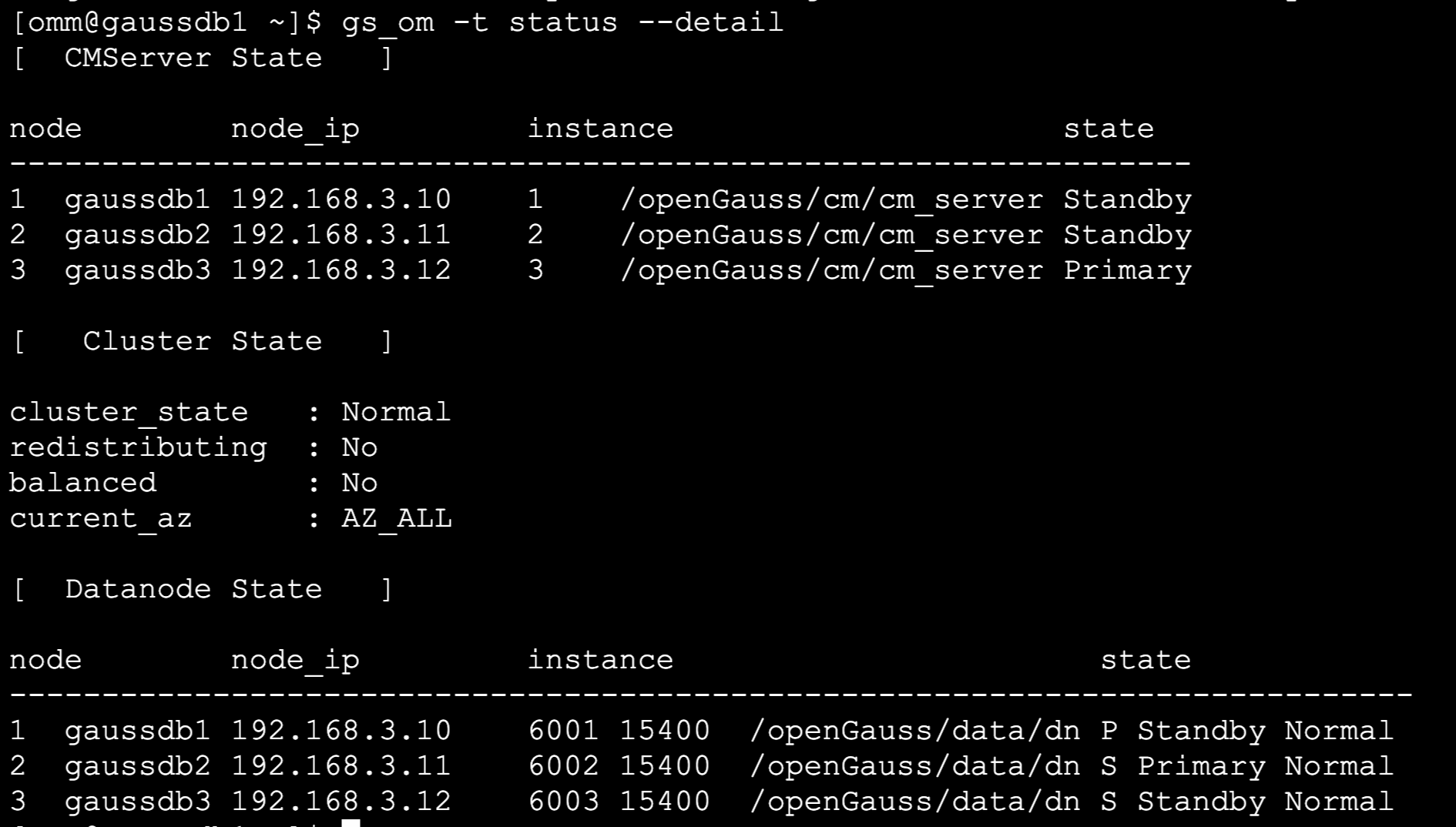
1.以操作系统用户omm登录数据库任意节点,执行如下命令,查看主备情况。
[omm@gaussdb1 ~]$ gs_om -t status --detail
[  CMServer State   ]
node        node_ip         instance                     state
----------------------------------------------------------------
1  gaussdb1 192.168.3.10    1    /openGauss/cm/cm_server Standby
2  gaussdb2 192.168.3.11    2    /openGauss/cm/cm_server Standby
3  gaussdb3 192.168.3.12    3    /openGauss/cm/cm_server Primary
[   Cluster State   ]
cluster_state   : Normal
redistributing  : No
balanced        : Yes
current_az      : AZ_ALL
[  Datanode State   ]
node        node_ip         instance                       state
----------------------------------------------------------------------------
1  gaussdb1 192.168.3.10    6001 15400  /openGauss/data/dn P Primary Normal
2  gaussdb2 192.168.3.11    6002 15400  /openGauss/data/dn S Standby Normal
3  gaussdb3 192.168.3.12    6003 15400  /openGauss/data/dn S Standby Normal
2.以操作系统用户omm登录准备切换为主节点的备节点,执行如下命令。
[omm@gaussdb2 ~]$ gs_ctl switchover -D /openGauss/data/dn/
[2024-06-17 19:09:22.259][49407][][gs_ctl]: gs_ctl switchover ,datadir is /openGauss/data/dn
[2024-06-17 19:09:22.259][49407][][gs_ctl]: switchover term (1)
[2024-06-17 19:09:22.270][49407][][gs_ctl]: waiting for server to switchover........
[2024-06-17 19:09:27.561][49407][][gs_ctl]: done
[2024-06-17 19:09:27.561][49407][][gs_ctl]: switchover completed (/openGauss/data/dn)
注意:/openGauss/data/dn/为备数据库节点的数据目录。
须知: 对于同一数据库,上一次主备切换未完成,不能执行下一次切换。当业务正在操作时,发起switchover,
可能主机的线程无法停止导致switchover显示超时,实际后台仍然在运行,等主机线程停止后,switchover即可完成。
比如在主机删除一个大的分区表时,可能无法响应switchover发起的信号。
主机故障时,可以在备机执行如下命令。
gs_ctl failover -D /openGauss/data/dn/
3.switchover或failover成功后,执行如下命令记录当前主备机器信息,备机执行
[omm@gaussdb2 ~]$ gs_om -t refreshconf
Generating dynamic configuration file for all nodes.
Successfully generated dynamic configuration file.
📣 2.CM两节点特性
高可用:CM支持VIP管理
通过VIP可以直接找到主机,连接重连更准更快(毫秒级别);
支持主机故障,CM选出新主时,VIP漂移到新的主上;
当出现双主时,依然可以通过VIP访问到唯一一个主机,降低了双主丢数据的风险。
高可用:CM磁盘只读检测能力增强
只读状态从数据库获取,保证准确性;
只读仲裁只仲裁当前超过阈值的实例,其他节点不受影响;
主机只读保护后自动主备切换,选可用备机升主保证集群能正常提供工作。
高可用:CM易用性提升
支持一键式关闭CM集群服务;
支持和内核的安装部署解耦;
支持按事件调用用户自定义脚本;
支持CM组件单独升级,增强数据库集群可靠性;
CM根据配置信息,支持用户自定义组件的监控和管
✨ 2.1 CM状态
[omm@gaussdb1 ~]$ cm_ctl query -Cv
[  CMServer State   ]
node        instance state
----------------------------
1  gaussdb1 1        Standby
2  gaussdb2 2        Standby
3  gaussdb3 3        Primary
[   Cluster State   ]
cluster_state   : Normal
redistributing  : No
balanced        : No
current_az      : AZ_ALL
[  Datanode State   ]
node        instance state            | node        instance state            | node        instance state
------------------------------------------------------------------------------------------------------------------------
1  gaussdb1 6001     P Standby Normal | 2  gaussdb2 6002     S Primary Normal | 3  gaussdb3 6003     S Standby Normal
✨ 2.2 VIP添加
1.给omm用户增加sudo权限,3台机器都执行
echo "omm ALL=(ALL) NOPASSWD:ALL">>/etc/sudoers
echo "Cmnd_Alias COMMAND_FLAG = /usr/sbin/ifconfig" >> /etc/sudoers
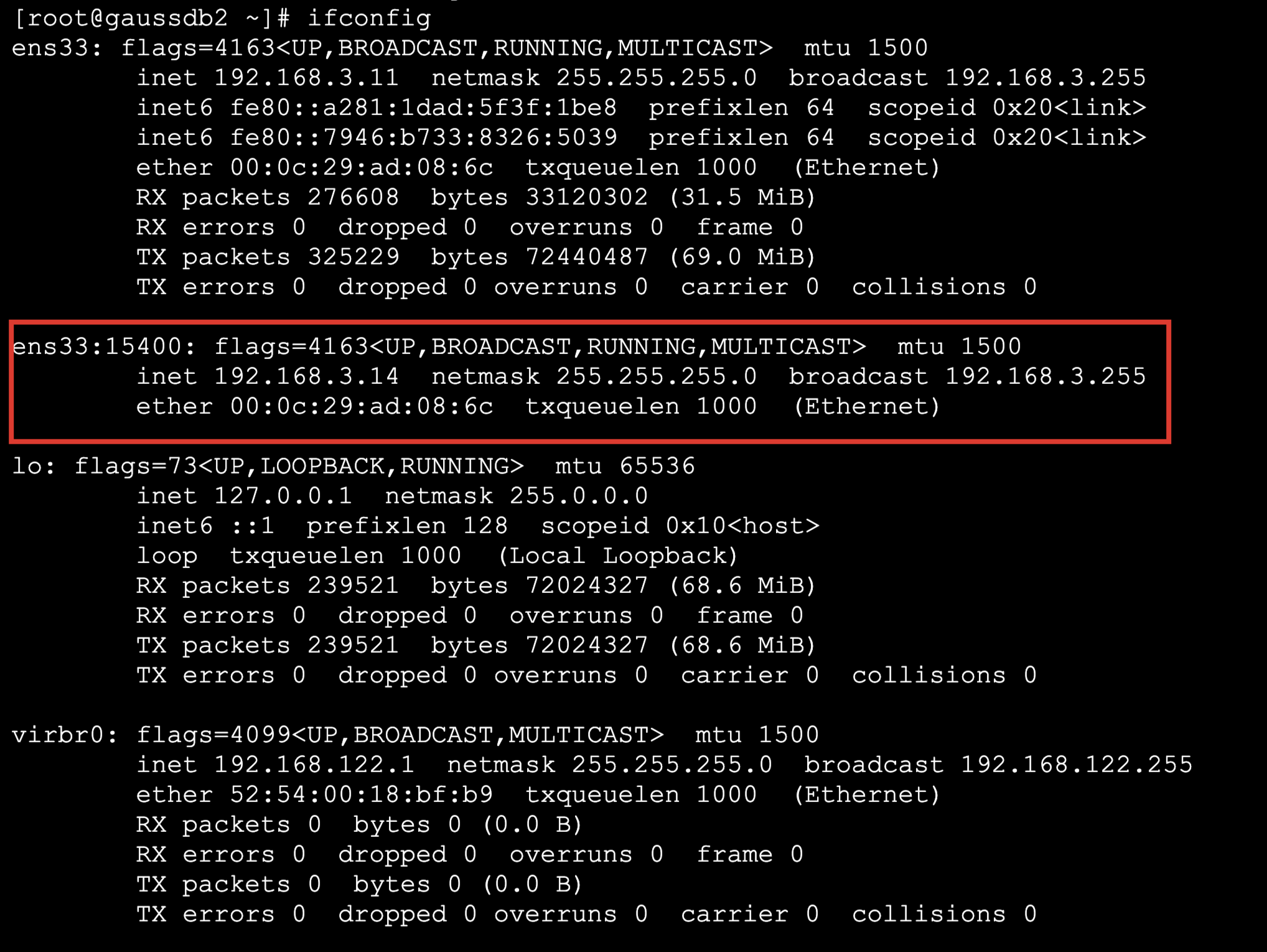
2.添加VIP,以端口号标记,便于区分
[root@gaussdb2 ~]# ifconfig ens33:15400 192.168.3.14 netmask 255.255.255.0 up
3.给集群添加VIP资源 VIP作为openGauss的资源管理
[root@gaussdb1 ~]# su - omm
[omm@gaussdb1 ~]# cm_ctl res --add --res_name="VIP_az1" --res_attr="resources_type=VIP,float_ip=192.168.3.14"

4.将每个实例加到资源中
cm_ctl res --edit --res_name="VIP_az1" --add_inst="node_id=1,res_instance_id=6001" --inst_attr=base_ip=192.168.3.10
cm_ctl res --edit --res_name="VIP_az1" --add_inst="node_id=2,res_instance_id=6002" --inst_attr=base_ip=192.168.3.11
cm_ctl res --edit --res_name="VIP_az1" --add_inst="node_id=3,res_instance_id=6003" --inst_attr=base_ip=192.168.3.12

执行完成后,建议使用cm_ctl res –-check命令进行检查,自定义资源文件要求每个节点都要有且一致
[omm@gaussdb1 ~]$ cm_ctl res --check
cm_ctl: resource config is valid.
执行check完成后,在cmdataPath/cm_agent/目录下会生成一个自定义资源配置文件cm_resource.json,
检查完成没有错误后,需要手动scp将该文件分发到其他节点
分发完成后需要重启集群才能生效。该配置文件对格式要求比较严格,所以该操作不建议使用直接修改文件的方式配置,
建议配置后使用cm_ctl res –check命令进其他节点校验。
[root@gaussdb1 ~]# find / -name cm_resource.json
/openGauss/cm/cm_agent/cm_resource.json
[omm@gaussdb1 ~]$ scp /openGauss/cm/cm_agent/cm_resource.json gaussdb2:/openGauss/cm/cm_agent/
[omm@gaussdb1 ~]$ scp /openGauss/cm/cm_agent/cm_resource.json gaussdb3:/openGauss/cm/cm_agent/
5.重启集群
[omm@gaussdb1 ~]$ gs_om -t stop
Stopping cluster.
=========================================
Successfully stopped cluster.
=========================================
End stop cluster.
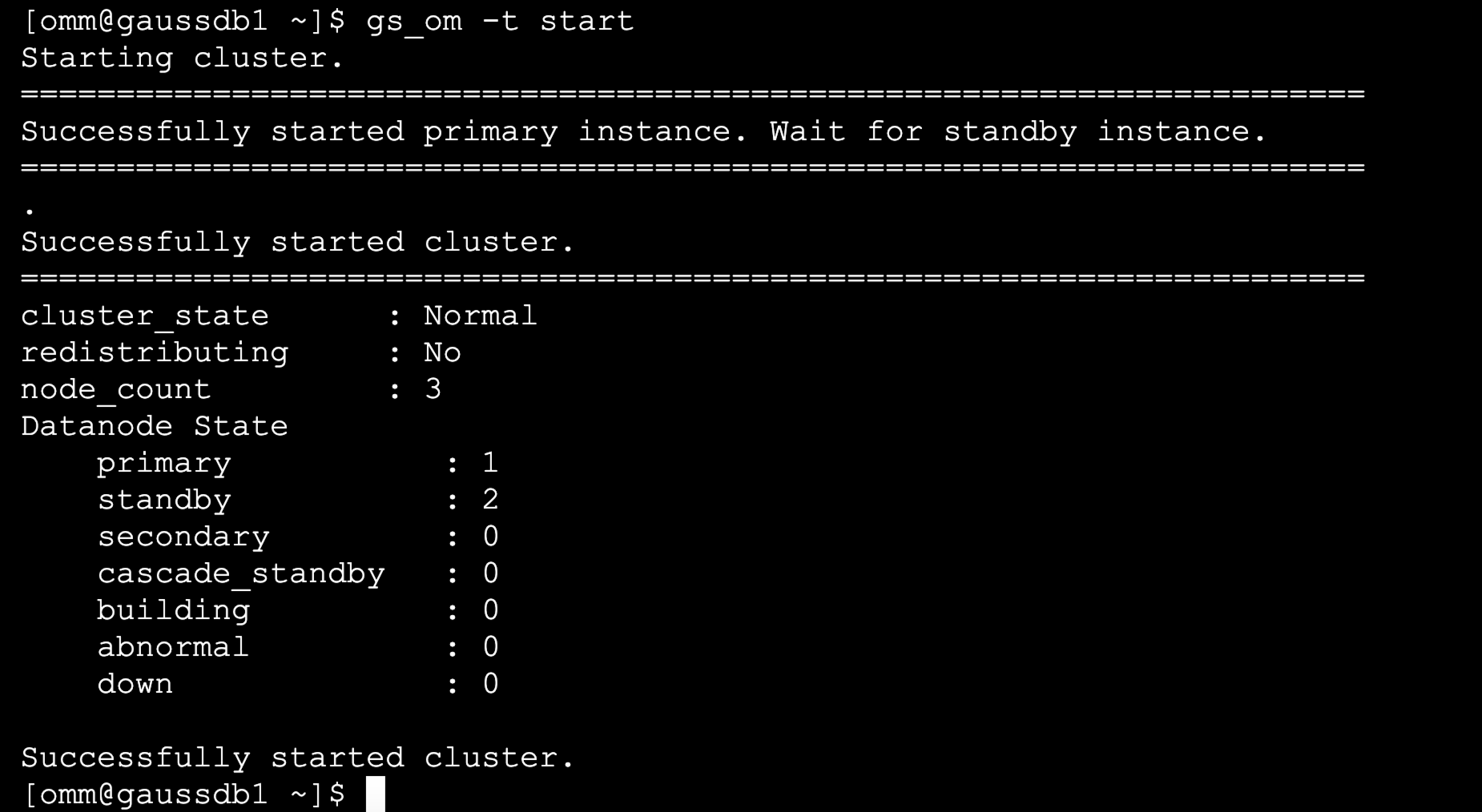
[omm@gaussdb1 ~]$ gs_om -t start
Starting cluster.
======================================================================
Successfully started primary instance. Wait for standby instance.
======================================================================
.
Successfully started cluster.
======================================================================
cluster_state      : Normal
redistributing     : No
node_count         : 3
Datanode State
    primary           : 1
    standby           : 2
    secondary         : 0
    cascade_standby   : 0
    building          : 0
    abnormal          : 0
    down              : 0
Successfully started cluster.
✨ 2.3 查询VIP
配置/openGauss/data/dn/pg_hba.conf
在数据库pg_hba.conf文件中以sha256方式添加floatIp
host    all    all    192.168.3.14/32     sha256
--此时我们发现主库在节点1
[omm@gaussdb1 ~]$ cm_ctl show
[  Network Connect State  ]
Network timeout:       6s
Current CMServer time: 2024-06-17 19:56:02
Network stat('Y' means connected, otherwise 'N'):
|  \  |  Y  |  Y  |
|  Y  |  \  |  Y  |
|  Y  |  Y  |  \  |
[  Node Disk HB State  ]
Node disk hb timeout:    200s
Current CMServer time: 2024-06-17 19:56:03
Node disk hb stat('Y' means connected, otherwise 'N'):
|  N  |  N  |  N  |
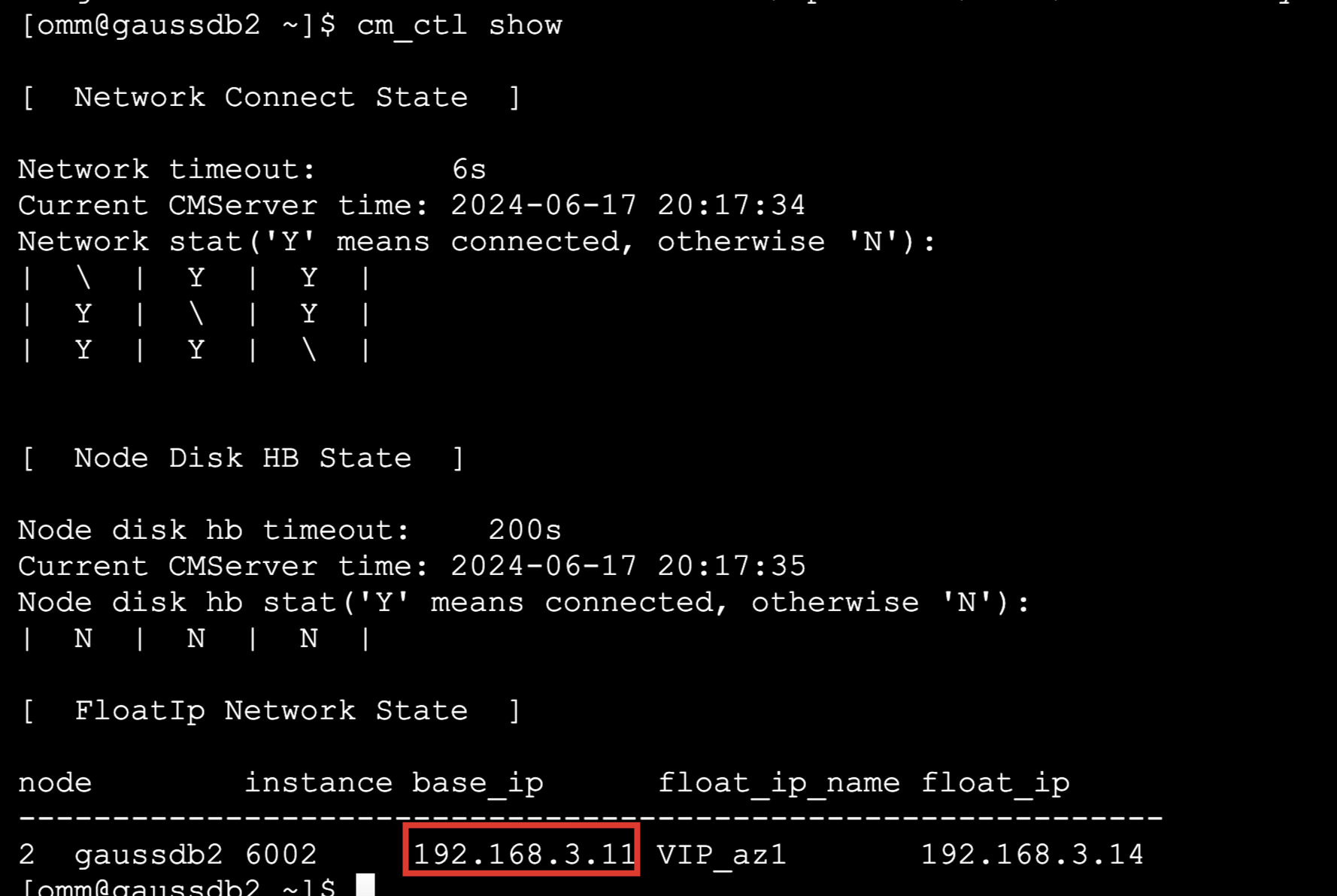
[  FloatIp Network State  ]
node        instance base_ip      float_ip_name float_ip
-------------------------------------------------------------
2  gaussdb2 6002     192.168.3.11 VIP_az1       192.168.3.14
[omm@gaussdb1 ~]$
📣 3.实例failover切换
1.主库在节点1
[omm@gaussdb1 ~]$ gs_om -t status --detail
[  CMServer State   ]
node        node_ip         instance                     state
----------------------------------------------------------------
1  gaussdb1 192.168.3.10    1    /openGauss/cm/cm_server Standby
2  gaussdb2 192.168.3.11    2    /openGauss/cm/cm_server Standby
3  gaussdb3 192.168.3.12    3    /openGauss/cm/cm_server Primary
[   Cluster State   ]
cluster_state   : Normal
redistributing  : No
balanced        : Yes
current_az      : AZ_ALL
[  Datanode State   ]
node        node_ip         instance                       state
----------------------------------------------------------------------------
1  gaussdb1 192.168.3.10    6001 15400  /openGauss/data/dn P Primary Normal
2  gaussdb2 192.168.3.11    6002 15400  /openGauss/data/dn S Standby Normal
3  gaussdb3 192.168.3.12    6003 15400  /openGauss/data/dn S Standby Normal
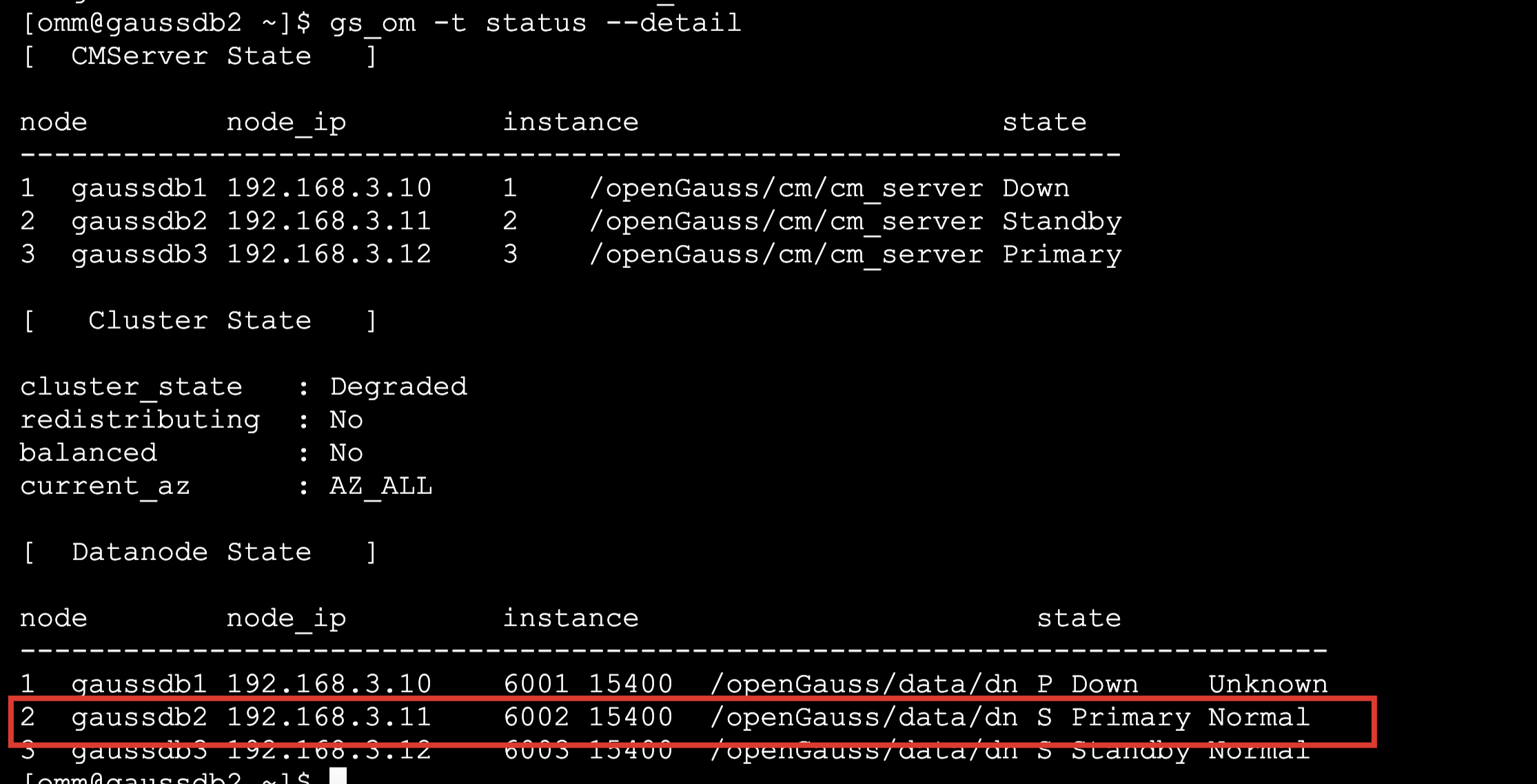
2.主库服务器关机
此时我们发现主库挂了之后,备库变为主库,VIP也飘逸过来了
3.恢复主备恢复OK
[omm@gaussdb2 ~]$ gs_om -t status --detail
[omm@gaussdb2 ~]$ cm_ctl show
📣 4.备库写重定向
原理是:是通过将备库上的 DML 重定向到主库上执行,然后备库应用 DML 变化数据,至此完成备库 DML 操作。
有个控制参数 enable_remote_excute在所有节点配置即可
vi /openGauss/data/dn/postgresql.conf
enable_remote_excute=on
--接着重启集群
[omm@gaussdb1 ~]$ gs_om -t stop
[omm@gaussdb1 ~]$ gs_om -t start
[omm@gaussdb1 ~]$ gs_om -t status --detail
[  CMServer State   ]
node        node_ip         instance                     state
----------------------------------------------------------------
1  gaussdb1 192.168.3.10    1    /openGauss/cm/cm_server Standby
2  gaussdb2 192.168.3.11    2    /openGauss/cm/cm_server Standby
3  gaussdb3 192.168.3.12    3    /openGauss/cm/cm_server Primary
[   Cluster State   ]
cluster_state   : Normal
redistributing  : No
balanced        : No
current_az      : AZ_ALL
[  Datanode State   ]
node        node_ip         instance                       state
----------------------------------------------------------------------------
1  gaussdb1 192.168.3.10    6001 15400  /openGauss/data/dn P Standby Normal
2  gaussdb2 192.168.3.11    6002 15400  /openGauss/data/dn S Primary Normal
3  gaussdb3 192.168.3.12    6003 15400  /openGauss/data/dn S Standby Normal
[omm@gaussdb3 ~]$ psql
bash: psql: command not found...
[omm@gaussdb3 ~]$ gsql
gsql ((openGauss 6.0.0-RC1 build ed7f8e37) compiled at 2024-03-31 11:59:31 commit 0 last mr  )
Non-SSL connection (SSL connection is recommended when requiring high-security)
Type "help" for help.
openGauss=# \t
Showing only tuples.
openGauss=# \l
 postgres  | omm   | SQL_ASCII | C       | C     |
 template0 | omm   | SQL_ASCII | C       | C     | =c/omm           +
           |       |           |         |       | omm=CTc/omm
 template1 | omm   | SQL_ASCII | C       | C     | =c/omm           +
           |       |           |         |       | omm=CTc/omm
openGauss=# create table test(id int);
CREATE TABLE
openGauss=# \d test
 id     | integer |
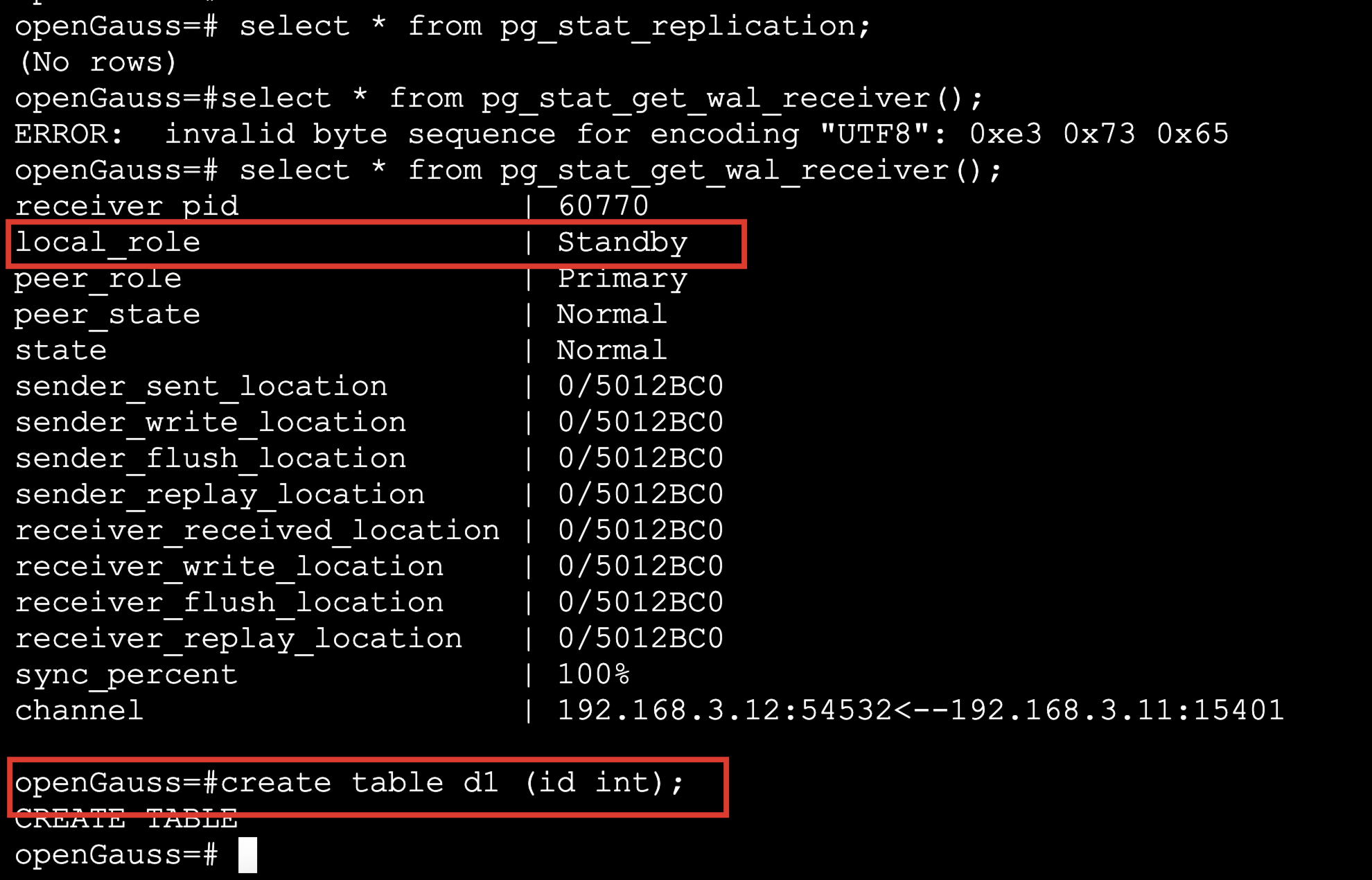
openGauss=#select * from pg_stat_get_wal_receiver();
ERROR:  invalid byte sequence for encoding "UTF8": 0xe3 0x73 0x65
openGauss=# select * from pg_stat_get_wal_receiver();
receiver_pid               | 60770
local_role                 | Standby
peer_role                  | Primary
peer_state                 | Normal
state                      | Normal
sender_sent_location       | 0/5012BC0
sender_write_location      | 0/5012BC0
sender_flush_location      | 0/5012BC0
sender_replay_location     | 0/5012BC0
receiver_received_location | 0/5012BC0
receiver_write_location    | 0/5012BC0
receiver_flush_location    | 0/5012BC0
receiver_replay_location   | 0/5012BC0
sync_percent               | 100%
channel                    | 192.168.3.12:54532<--192.168.3.11:15401
openGauss=# select pg_is_in_recovery();
-[ RECORD 1 ]-----+--
pg_is_in_recovery | t
来自 “ ITPUB博客 ” ,链接:https://blog.itpub.net/69947868/viewspace-3019459/ ,如需转载,请注明出处,否则将追究法律责任。

