重磅!openGauss6.0创新版本,带着新特性正式发布了!
文章目录
前言
1.版本说明
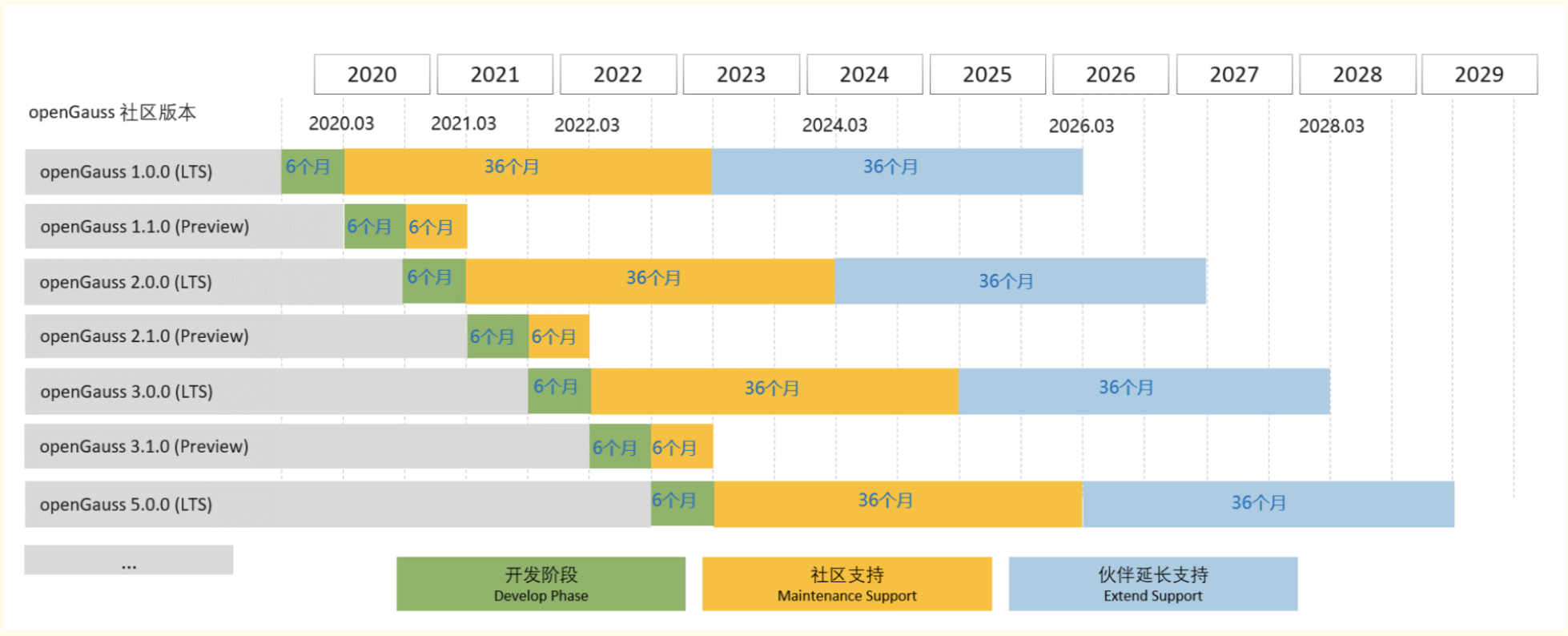
openGauss社区版本分为长期支持版本和创新版本: 长期支持版本 (LTS) :规模上线使用,openGauss 6.0.0 LTS及后续LTS版本发布间隔周期为2年,社区提供3年支持,社区OGSP伙伴提供3年以后维护支持服务。 创新版本 (RCx) :作为LTS版本发布前的阶段性特性体验版本,仅供联创测试使用,提供6个月社区支持。 openGauss 6.0.0-RC1 是社区最新发布的创新版本,版本生命周期为 0.5 年。(创新版本命名:由原方案 XX.1.0 Preview (例:5.1.0 preview),调整为现方案 XX.0.0-RCx),本次发布包含 2 个数据库服务端安装版本:企业版、轻量版,用户可根据使用场景需要下载不同版本,并基于此进行场景化验证,提前发现问题并反馈社区,社区将在下个 LTS 版本发布前进行问题修复,openGauss 6.0.0 LTS 版本将在 2024 年 9 月 30 日进行发布。 openGauss社区版本生命周期管理如下
2.新特性介绍
1.内核能力增强 企业级特性:存储过程增强 内核四高能力:高性能、高可用、高智能、高安全 2.DataPod 三层资源池化架构持续创新 支持 SPQ 多机并行查询框架 新增 DMS 资源统计视图 DSS 功能增强 容灾能力增强 3.DataKit 数据全生命周期管理平台能力增强 迁移能力、对象管理、智能运维、安装部署 4.生态兼容性增强 MySQL 兼容
3.安装包下载
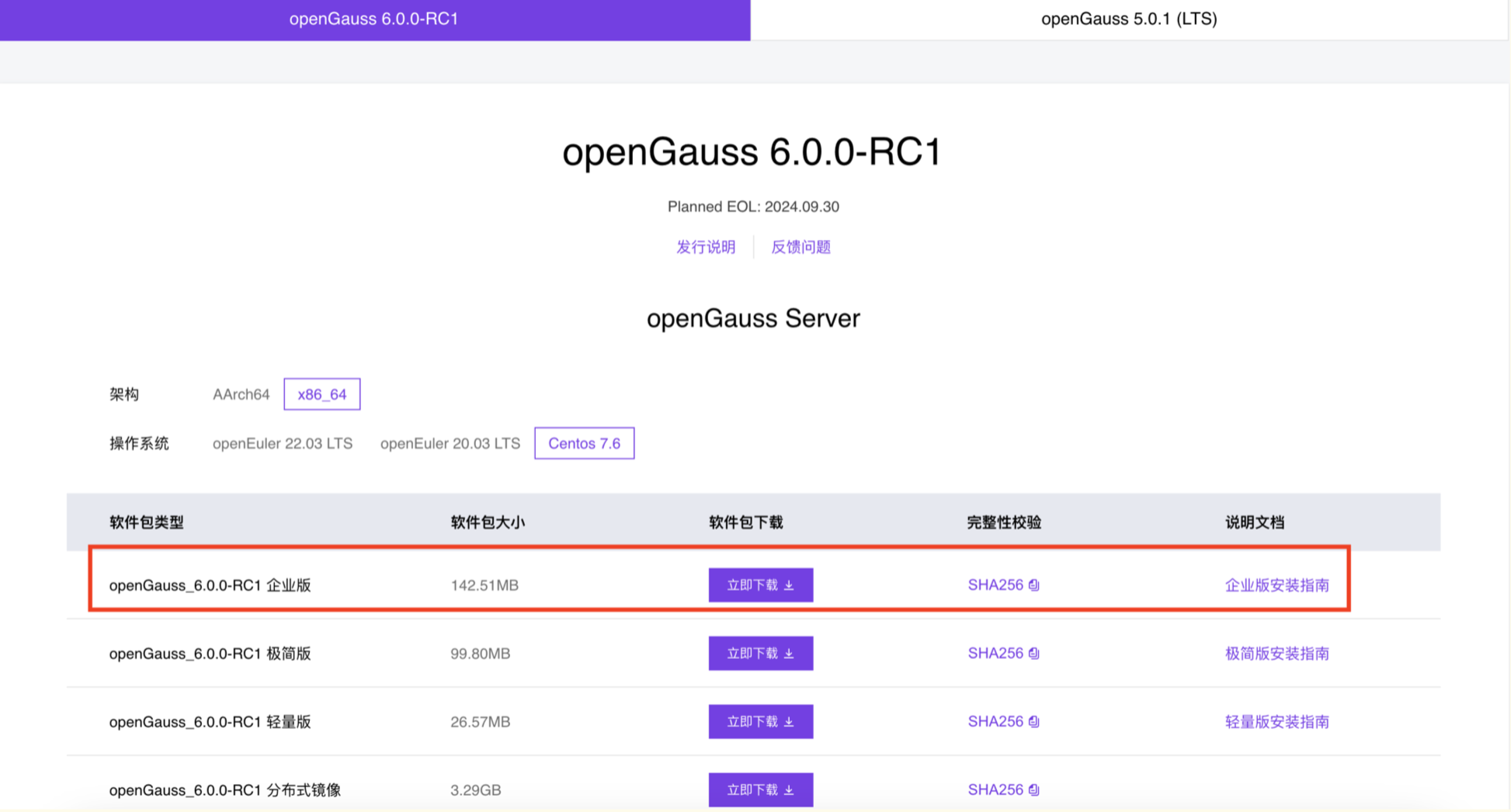
更多具体发行说明请参考官网: https://docs-opengauss.osinfra.cn/zh/docs/latest/docs/ReleaseNotes/Releasenotes.html 6.0.0 RC1版本下载地址 https://opengauss.org/zh/download/ openGauss-6.0.0-RC1-CentOS-64bit-all.tar.gz
4.部署前准备
4.1 关闭安全服务
修改/etc/selinux/config文件中的“SELINUX”值为“disabled”。
4.2 防火墙关闭
systemctl status firewalld 若防火墙状态显示为active (running),则表示防火墙未关闭,请关闭防火墙。 systemctl stop firewalld.service systemctl disable firewalld.service systemctl status firewalld.service 临时关闭selinux setenforce 0 查看selinux状态 getenforce
4.3 host配置
[root@centos79 ~]# cat /etc/hosts 127.0.0.1 localhost localhost.localdomain localhost4 localhost4.localdomain4 ::1 localhost localhost.localdomain localhost6 localhost6.localdomain6 192.168.6.20 centos79
4.4 安装依赖包
##创建挂载目录 mkdir /cdrom ##挂载目录 mount -t iso9660 -o ro /dev/cdrom /cdrom ##yum源配置文件 cd /etc/yum.repos.d/ mkdir bak mv CentOS* bak ##配置yum文件 vi local.repo cat>/etc/yum.repos.d/local.repo<<EOF [base-local] name=CentOS7-local baseurl=file:///cdrom enabled=1 gpgcheck=0 EOF #清空并重载yum yum clean all yum makecache ##安装依赖 yum -y install libaio-devel flex bison ncurses-devel \ glibc-devel patch redhat-lsb-core readline-devel openssl-devel sqlite-devel libnsl
4.5 安装python3
Python3安装还依赖zlib,如果没有先安装依赖,这里我们安装python3.6的版本 [root@centos79 ~]# yum install -y zlib [root@centos79 ~]# rpm -qa | grep zlib zlib-devel-1.2.7-18.el7.x86_64 zlib-1.2.7-18.el7.x86_64 python官网 https://www.python.org/downloads/release/python-3615/下载安装包即可 安装包为:Python-3.6.15.tgz [root@centos79 ~]# tar -zxvf Python-3.6.15.tgz [root@centos79 ~]# cd Python-3.6.15/ [root@centos79 ~]# ./configure --prefix=/usr/local/python3 --enable-shared [root@centos79 ~]# make [root@centos79 ~]# make install 注意:make编译时间比较长,耐心等待 configure: error: no acceptable C compiler found in $PATH yum install gcc 注意此时还需要设置下OS上python的软连接 [root@centos79 ~]# ln -s /usr/local/python3/bin/python3.6 /usr/bin/python3 [root@centos79 ~]# ln -s /usr/local/python3/bin/pip3 /usr/bin/pip [root@centos79 Python-3.6.15]# python -V python: error while loading shared libraries: libpython3.6m.so.1.0: cannot open shared object file: No such file or directory [root@centos79 Python-3.6.15]# find / -name libpython3.6m.so.1.0 /usr/local/python3/lib/libpython3.6m.so.1.0 /opt/Python-3.6.15/libpython3.6m.so.1.0 cp /opt/Python-3.6.15/libpython3.6m.so.1.0 /usr/lib64/ [root@centos79 Python-3.6.15]# python Python 3.6.15 (default, Apr 5 2024, 09:38:03) [GCC 4.8.5 20150623 (Red Hat 4.8.5-44)] on linux Type "help", "copyright", "credits" or "license" for more information. >>>
5.单机安装
5.1 前提条件
前提条件: 已完成用户组和普通用户的创建。 所有服务器操作系统和网络均正常运行。 普通用户必须有数据库包解压路径、安装路径的读、写和执行操作权限,并且安装路径必须为空。 普通用户对下载的openGauss压缩包有执行权限。 安装前请检查指定的openGauss端口矩阵中所有端口是否被占用,如果被占用请更改端口或者停止当前使用端口进程。
5.2 安装包解压
注意:上传安装包到服务器/opt/openGauss mkdir -p /opt/openGauss --openGauss安装目录 mkdir -p /openGauss ##解压安装包 chmod 755 -R /opt/openGauss cd /opt/openGauss [root@centos79 openGauss]# tar -zxvf openGauss-6.0.0-RC1-CentOS-64bit-all.tar.gz [root@centos79 openGauss]# ll openGauss-6.0.0-RC1-CentOS-64bit-cm.tar.gz openGauss-6.0.0-RC1-CentOS-64bit-om.tar.gz openGauss-6.0.0-RC1-CentOS-64bit.tar.bz2 openGauss-6.0.0-RC1-CentOS-64bit-cm.sha256 openGauss-6.0.0-RC1-CentOS-64bit-om.sha256 openGauss-6.0.0-RC1-CentOS-64bit.sha256 upgrade_sql.tar.gz upgrade_sql.sha256 [root@centos79 openGauss]# tar -zxvf openGauss-6.0.0-RC1-CentOS-64bit-om.tar.gz [root@centos79 openGauss]# ll total 293256 drwxr-xr-x. 19 root root 4096 Mar 31 12:15 lib -rwxr-xr-x. 1 root root 149449208 Apr 5 09:31 openGauss-6.0.0-RC1-CentOS-64bit-all.tar.gz -rw-r--r--. 1 root root 109 Mar 31 12:16 openGauss-6.0.0-RC1-CentOS-64bit-cm.sha256 -rw-r--r--. 1 root root 22466710 Mar 31 12:16 openGauss-6.0.0-RC1-CentOS-64bit-cm.tar.gz -rw-r--r--. 1 root root 65 Mar 31 12:15 openGauss-6.0.0-RC1-CentOS-64bit-om.sha256 -rw-r--r--. 1 root root 23122340 Mar 31 12:15 openGauss-6.0.0-RC1-CentOS-64bit-om.tar.gz -rw-r--r--. 1 root root 65 Mar 31 12:16 openGauss-6.0.0-RC1-CentOS-64bit.sha256 -rw-r--r--. 1 root root 104672194 Mar 31 12:16 openGauss-6.0.0-RC1-CentOS-64bit.tar.bz2 drwxr-xr-x. 11 root root 4096 Mar 31 12:15 script -rw-------. 1 root root 65 Mar 31 12:14 upgrade_sql.sha256 -rw-------. 1 root root 541779 Mar 31 12:14 upgrade_sql.tar.gz -rw-r--r--. 1 root root 36 Mar 31 12:15 version.cfg
5.3 XML配置文件
安装openGauss前需要创建cluster_config.xml文件。 cluster_config.xml文件包含部署openGauss的服务器信息、安装路径、IP地址以及端口号等。 本次部署以单节点配置的方式创建XML配置文件 编辑配置XML文件: vi /opt/openGauss/db_config.xml <?xml version="1.0" encoding="UTF-8"?> <ROOT> <!-- openGauss整体信息 --> <CLUSTER> <!-- 数据库名称 --> <PARAM name="clusterName" value="dbCluster" /> <!-- 数据库节点名称(hostname) --> <PARAM name="nodeNames" value="centos79" /> <!-- 数据库安装目录--> <PARAM name="gaussdbAppPath" value="/openGauss/app" /> <!-- 日志目录--> <PARAM name="gaussdbLogPath" value="/openGauss/log/omm" /> <!-- 临时文件目录--> <PARAM name="tmpMppdbPath" value="/openGauss/tmp" /> <!-- 数据库工具目录--> <PARAM name="gaussdbToolPath" value="/openGauss/om" /> <!-- 数据库core文件目录--> <PARAM name="corePath" value="/openGauss/corefile" /> <!-- 节点IP,与数据库节点名称列表一一对应 --> <PARAM name="backIp1s" value="192.168.6.20"/> </CLUSTER> <!-- 每台服务器上的节点部署信息 --> <DEVICELIST> <!-- 节点1上的部署信息 --> <DEVICE sn="centos79"> <!-- 节点1的主机名称 --> <PARAM name="name" value="centos79"/> <!-- 节点1所在的AZ及AZ优先级 --> <PARAM name="azName" value="AZ1"/> <PARAM name="azPriority" value="1"/> <!-- 节点1的IP,如果服务器只有一个网卡可用,将backIP1和sshIP1配置成同一个IP --> <PARAM name="backIp1" value="192.168.6.20"/> <PARAM name="sshIp1" value="192.168.6.20"/> <!--dbnode--> <PARAM name="dataNum" value="1"/> <PARAM name="dataPortBase" value="15400"/> <PARAM name="dataNode1" value="/openGauss/data/dn"/> <PARAM name="dataNode1_syncNum" value="0"/> </DEVICE> </DEVICELIST> </ROOT>
5.4 用户及组创建
##创建用户组dbgrp [root@centos79 ~]# groupadd dbgroup ##创建用户组dbgroup下的普通用户omm,并设置密码为Gauss_123 useradd -g dbgroup omm
5.5 初始化安装
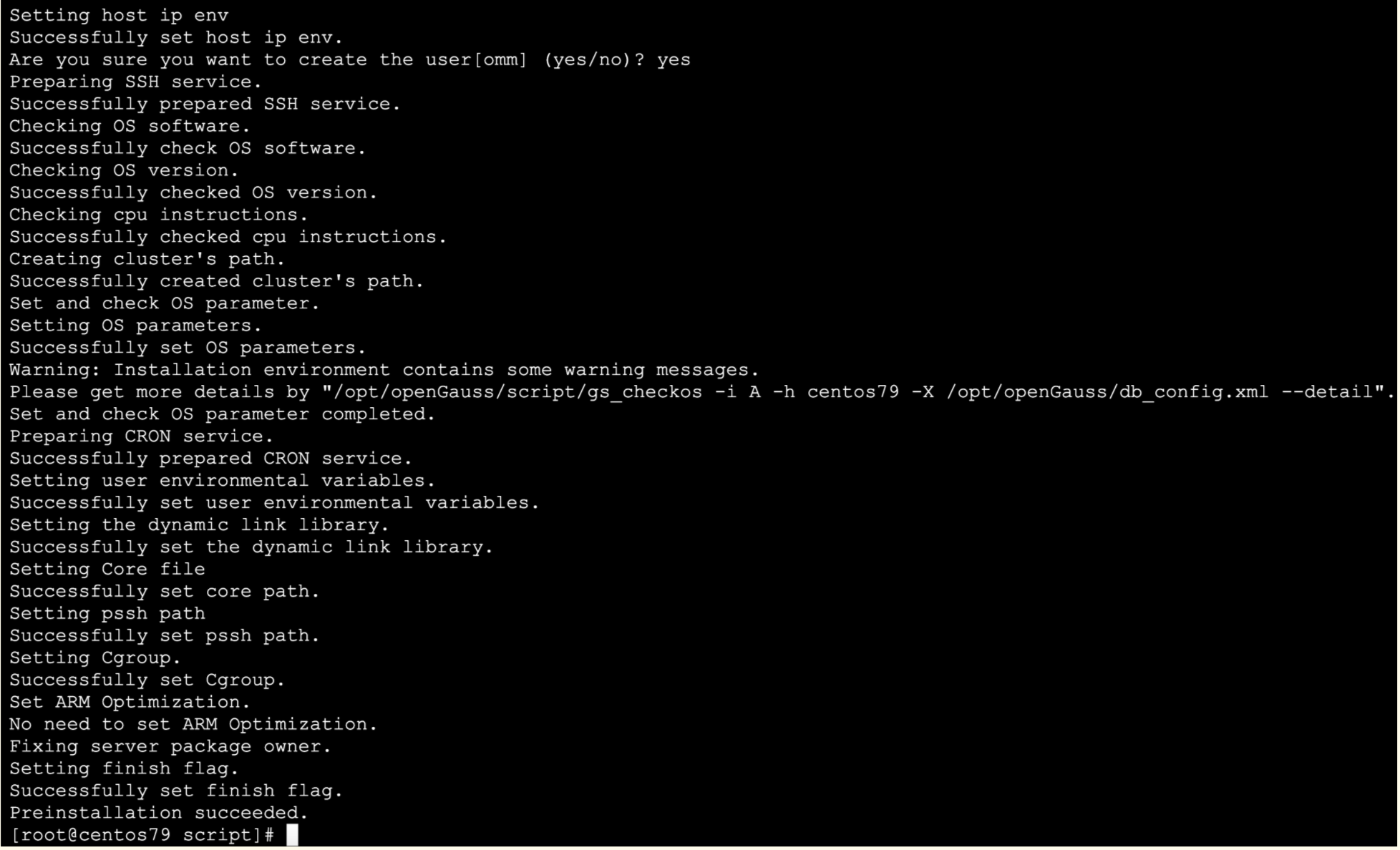
chmod 775 /openGauss -R chown omm:dbgroup /openGauss -R [root@centos79 ~]# cd /opt/openGauss/script [root@centos79 ~]# export LD_LIBRARY_PATH=/opt/openGauss/script/gspylib/clib:$LD_LIBRARY_PATH [root@centos79 script]# ./gs_preinstall -U omm -G dbgroup -X /opt/openGauss/db_config.xml 安装集群过程中,输入omm用户密码:Gauss_123 [root@centos79 script]# /opt/openGauss/script/gs_checkos -i A -h centos79 --detail Checking items: A1. [ OS version status ] : Normal [centos79] centos_7.9.2009_64bit A2. [ Kernel version status ] : Normal The names about all kernel versions are same. The value is "3.10.0-1160.el7.x86_64". A3. [ Unicode status ] : Normal The values of all unicode are same. The value is "LANG=en_US.UTF-8". A4. [ Time zone status ] : Normal The informations about all timezones are same. The value is "+0800". A5. [ Swap memory status ] : Warning [centos79] SwapMemory 5238681600 TotalMemory 3953942528 A6. [ System control parameters status ] : Warning [centos79] Warning reason: variable 'net.ipv4.tcp_retries1' RealValue '3' ExpectedValue '5'. Warning reason: variable 'net.ipv4.tcp_syn_retries' RealValue '6' ExpectedValue '5'. Check_SysCtl_Parameter warning. A7. [ File system configuration status ] : Warning [centos79] Warning reason: variable 'open files' RealValue '1024' ExpectedValue '1000000' Warning reason: variable 'max user processes' RealValue '14950' ExpectedValue 'unlimited' A8. [ Disk configuration status ] : Normal The value about XFS mount parameters is correct. A9. [ Pre-read block size status ] : Normal The value about Pre-read block size is correct. A10.[ IO scheduler status ] : Normal The value of IO scheduler is correct. A11.[ Network card configuration status ] : Warning [centos79] BondMode Null Warning reason: network 'ens33' 'mtu' RealValue '1500' ExpectedValue '8192' A12.[ Time consistency status ] : Warning [centos79] The NTPD not detected on machine and local time is "2024-04-05 09:57:04". A13.[ Firewall service status ] : Normal The firewall service is stopped. A14.[ THP service status ] : Normal The THP service is stopped. Total numbers:14. Abnormal numbers:0. Warning numbers:5.
5.6 正式安装
#切换到omm用户 [root@centos79 ~]# su - omm [omm@centos79 ~]$ gs_install -X /opt/openGauss/db_config.xml 此处指定数据库密码:Gauss_123
6.安装验证
6.1 DB状态检查
# 通过openGauss提供的gs_om工具可以完成数据库状态检查 以omm用户身份登录服务器。 执行如下命令检查数据库状态是否正常,"cluster_state"显示"Normal"表示数据库可正常使用 [root@centos79 ~]# su - omm [omm@centos79 ~]$ gs_om -t status ----------------------------------------------------------------------- cluster_name : dbCluster cluster_state : Normal redistributing : No ----------------------------------------------------------------------- [omm@centos79 ~]$ gs_om -t status --detail [ Cluster State ] cluster_state : Normal redistributing : No current_az : AZ_ALL [ Datanode State ] node node_ip port instance state -------------------------------------------------------------------------------------- 1 centos79 192.168.6.20 15400 6001 /openGauss/data/dn P Primary Normal
6.2 数据库登陆
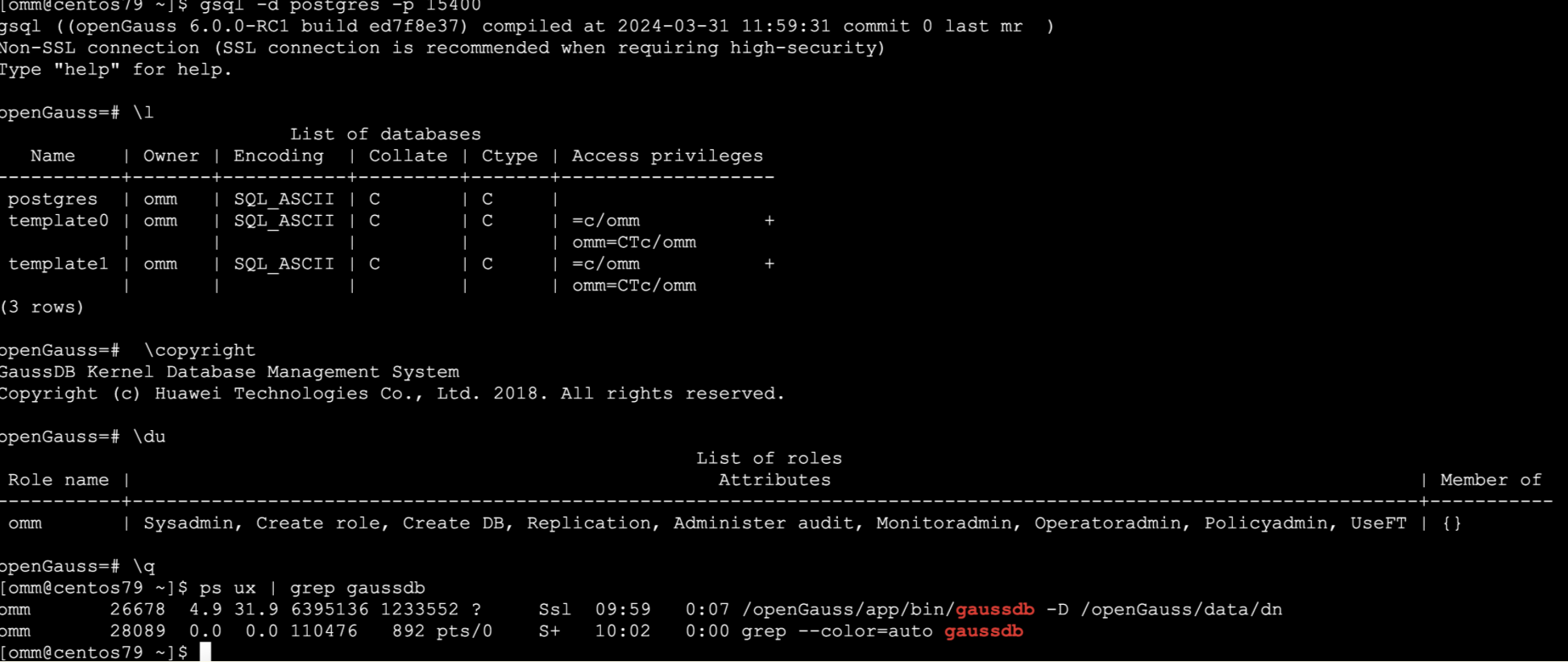
[omm@centos79 ~]$ gsql -d postgres -p 15400 gsql ((openGauss 6.0.0-RC1 build ed7f8e37) compiled at 2024-03-31 11:59:31 commit 0 last mr ) Non-SSL connection (SSL connection is recommended when requiring high-security) Type "help" for help. openGauss=# \l List of databases Name | Owner | Encoding | Collate | Ctype | Access privileges -----------+-------+-----------+---------+-------+------------------- postgres | omm | SQL_ASCII | C | C | template0 | omm | SQL_ASCII | C | C | =c/omm + | | | | | omm=CTc/omm template1 | omm | SQL_ASCII | C | C | =c/omm + | | | | | omm=CTc/omm (3 rows) [omm@centos79 ~]$ gsql -V gsql (openGauss 6.0.0-RC1 build ed7f8e37) compiled at 2024-03-31 11:59:31 commit 0 last mr
6.3 DB启动及关闭
[omm@centos79 ~]$ gs_om -t stop Stopping cluster. ========================================= Successfully stopped cluster. ========================================= End stop cluster. [omm@centos79 ~]$ gs_om -t start Starting cluster. ========================================= [SUCCESS] centos79 2024-04-05 10:03:40.426 660f5bfc.1 [unknown] 139722610186880 [unknown] 0 dn_6001 01000 0 [BACKEND] WARNING: could not create any HA TCP/IP sockets 2024-04-05 10:03:40.426 660f5bfc.1 [unknown] 139722610186880 [unknown] 0 dn_6001 01000 0 [BACKEND] WARNING: could not create any HA TCP/IP sockets 2024-04-05 10:03:40.428 660f5bfc.1 [unknown] 139722610186880 [unknown] 0 dn_6001 01000 0 [BACKEND] WARNING: Failed to initialize the memory protect for g_instance.attr.attr_storage.cstore_buffers (1024 Mbytes) or shared memory (3540 Mbytes) is larger. ========================================= Successfully started. [omm@centos79 ~]$ gs_om -t status --detail [ Cluster State ] cluster_state : Normal redistributing : No current_az : AZ_ALL [ Datanode State ] node node_ip port instance state -------------------------------------------------------------------------------------- 1 centos79 192.168.6.20 15400 6001 /openGauss/data/dn P Primary Normal
7.总结及故障处理
1.python3安装后报错 [root@centos79 ~]# python3 -V python3: error while loading shared libraries: libpython3.6m.so.1.0: cannot open shared object file: No such file or directory 出现以上报错处理方法,libpython3.6m.so.1.0复制到/usr/lib64/目录下即可 [root@centos79 ~]# find / -name libpython3.6m.so.1.0 /usr/local/python3/lib/libpython3.6m.so.1.0 /opt/Python-3.6.15/libpython3.6m.so.1.0 [root@centos79 ~]# cp /usr/local/python3/lib/libpython3.6m.so.1.0 /usr/lib64 2./usr/bin/env: python3: No such file or directory 注意此时还需要设置下OS上python的软连接 [root@centos79 ~]# ln -s /usr/local/python3/bin/python3.6 /usr/bin/python3 [root@centos79 ~]# ln -s /usr/local/python3/bin/pip3 /usr/bin/pip 复制
来自 “ ITPUB博客 ” ,链接:https://blog.itpub.net/69947868/viewspace-3011494/ ,如需转载,请注明出处,否则将追究法律责任。
下一篇:
DTC 2024完美落幕,感触颇丰...

请登录后发表评论
登录
全部评论
