刚入职部署了一套OB4.2单副本集群,群友进了核心部门
📣 1.社区版介绍
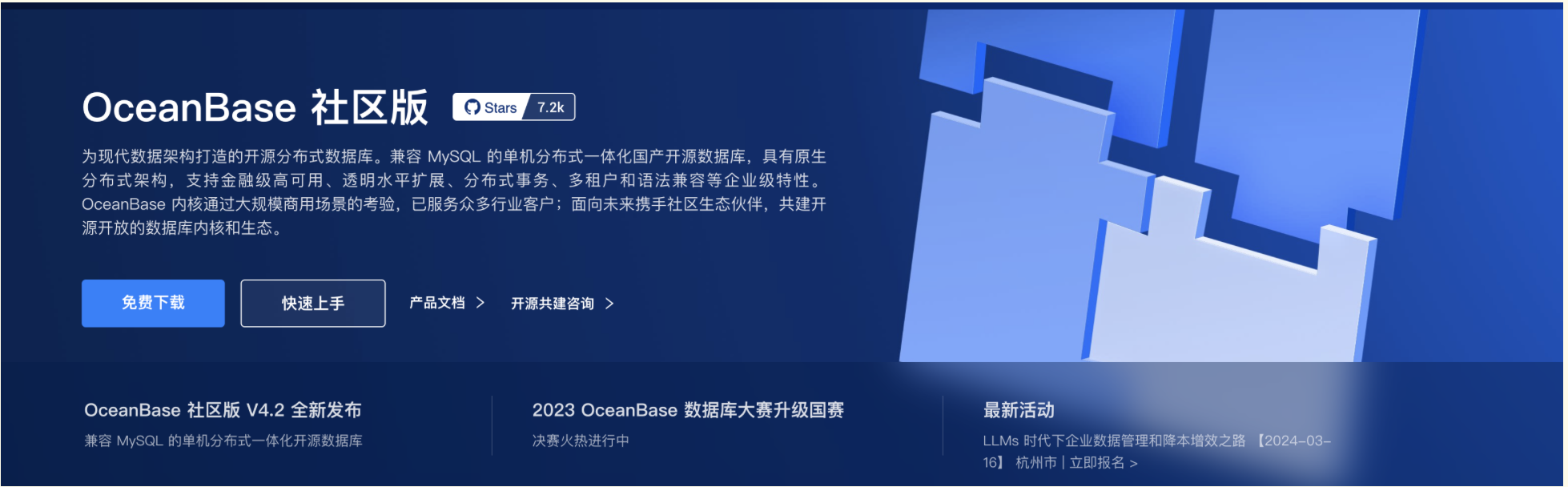
OceanBase 数据库社区版:兼容 MySQL 的单机分布式一体化数据库,具有原生分布式架构,
支持金融级高可用、透明水平扩展、分布式事务、多租户和语法兼容等企业级特性。
OceanBase 社区版数据库内核开源,与 MySQL 兼容,对接虚拟化和大数据技术及产品,
支持多种图形化的开发工具、运维监控工具和数据迁移工具;
同时社区版提供开放的接口和丰富的生态能力,支持企业或个人更好的实现定制化业务需求。
📣 2.部署环境
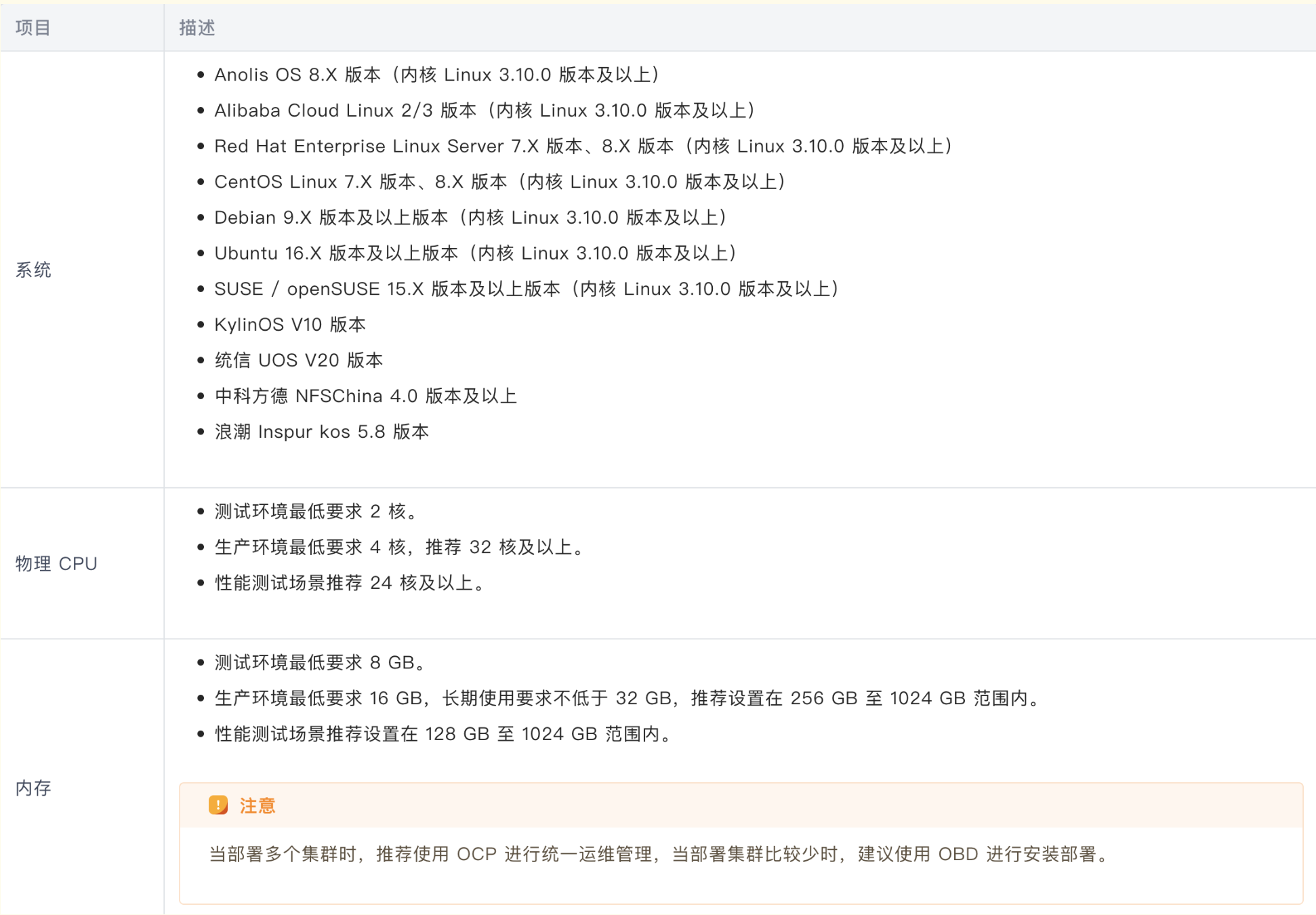
1.操作系统:
[root@centos79 ~]# cat /etc/redhat-release
CentOS Linux release 7.9.2009 (Core)
2.内存
测试环境最低要求 8 GB
[root@centos79 ~]# free -m
total used free shared buff/cache available
Mem: 11834 1017 10142 17 674 10547
Swap: 4995 0 4995
[root@centos79 ~]# vi /etc/fstab
[root@centos79 ~]# tmpfs /dev/shm tmpfs defaults,size=10G 0 0
[root@centos79 ~]# cat /etc/fstab | grep shm
tmpfs /dev/shm tmpfs defaults,size=10G 0 0
[root@centos79 ~]# mount -o remount /dev/shm
[root@centos79 ~]# df -TH /dev/shm
Filesystem Type Size Used Avail Use% Mounted on
tmpfs tmpfs 11G 0 11G 0% /dev/shm
3.OB运行目录
/data/{observer01,observer02,observer03,obproxy}
4.关闭防火墙和 SELinux
##查看防火墙状态:
systemctl status firewalld
systemctl disable firewalld
systemctl stop firewalld
systemctl status firewalld
##关闭 SELinux
vi /etc/selinux/config
确保:SELINUX=disabled
[root@centos79 ~]# setenforce 0
setenforce: SELinux is disabled
📣 3.服务器参数
✨ 3.1 配置 sysctl.conf
在 /etc/sysctl.conf 配置文件中添加以下内容:
#for oceanbase
#修改内核异步 I/O 限制
fs.aio-max-nr=1048576
#网络优化
net.core.somaxconn = 2048
net.core.netdev_max_backlog = 10000
net.core.rmem_default = 16777216
net.core.wmem_default = 16777216
net.core.rmem_max = 16777216
net.core.wmem_max = 16777216
net.ipv4.ip_local_port_range = 3500 65535
net.ipv4.ip_forward = 0
net.ipv4.conf.default.rp_filter = 1
net.ipv4.conf.default.accept_source_route = 0
net.ipv4.tcp_syncookies = 1
net.ipv4.tcp_rmem = 4096 87380 16777216
net.ipv4.tcp_wmem = 4096 65536 16777216
net.ipv4.tcp_max_syn_backlog = 16384
net.ipv4.tcp_fin_timeout = 15
net.ipv4.tcp_max_syn_backlog = 16384
net.ipv4.tcp_tw_reuse = 1
net.ipv4.tcp_tw_recycle = 1
net.ipv4.tcp_slow_start_after_idle=0
vm.swappiness = 0
vm.min_free_kbytes = 2097152
fs.file-max = 6573688
sysctl -p 生效
✨ 3.2 会话变量设置
将会话级别的最大栈空间大小设置为 unlimited,最大文件句柄数设置为 655350,Core 文件大小设置为 unlimited。
在 /etc/security/limits.conf 配置文件中添加以下内容:
root soft nofile 655350
root hard nofile 655350
* soft nofile 655350
* hard nofile 655350
* soft stack 20480
* hard stack 20480
* soft nproc 655360
* hard nproc 655360
* soft core unlimited
* hard core unlimited
您需查看 /etc/security/limits.d/20-nproc.conf 文件中是否存在 nproc 的配置,若存在需同步修改该文件中 nproc 的值。
退出当前会话,重新登录。执行以下命令,查看配置是否生效。
[root@centos79 ~]# ulimit -a
📣 4.软件下载
--安装包
oceanbase-all-in-one-4.2.2.0-100000192024011915.el7.x86_64.tar.gz

📣 5.用户及目录
1.执行以下命令,创建账户 admin。
useradd -U admin -d /home/admin -s /bin/bash
mkdir -p /home/admin
sudo chown -R admin:admin /home/admin
2.执行以下命令,为账户 admin 设置密码
echo 'admin:admin' | chpasswd
3.为账户 admin 设置 sudo 权限
在 /etc/sudoers 文件添加以下内容:
## Same thing without a password
# %wheel ALL=(ALL) NOPASSWD: ALL
admin ALL=(ALL) NOPASSWD: ALL
[admin@centos79 ~]$ id admin
uid=1001(admin) gid=1001(admin) groups=1001(admin)
2.创建目录
[admin@jeames ~]$ mkdir -p /home/admin/data
[admin@jeames ~]$ mkdir -p /home/admin/redo
📣 6.安装软件
在 all-in-one 安装包所在目录下执行如下命令解压安装包并安装。
[root@centos79 ~]# mkdir /opt/soft
[root@centos79 ~]# chown -R admin:admin /opt/soft
[root@centos79 ~]# su - admin
[admin@centos79 ~]$ cd /opt/soft
[admin@centos79 opt]$ tar -xzf oceanbase-all-in-one-*.tar.gz
[admin@centos79 soft]$ cd oceanbase-all-in-one/bin/
[admin@centos79 bin]$ ./install.sh
add auto set env logic to profile: /home/admin/.bash_profile
#########################################################################################
Install Finished
=========================================================================================
Setup Environment: source ~/.oceanbase-all-in-one/bin/env.sh
Quick Start: obd demo
Use Web Service to install: obd web
Use Web Service to upgrade: obd web upgrade
More Details: obd -h
=========================================================================================
[admin@centos79 bin]$ source ~/.oceanbase-all-in-one/bin/env.sh

📣 7.配置文件
可在 ~/.oceanbase-all-in-one/obd/usr/obd/example 目录下查看 OBD 提供的配置文件示例。
请根据您的资源条件选择相应的配置文件。
[admin@centos79 ~]$ cd ~/.oceanbase-all-in-one/obd/usr/obd/example
[admin@centos79 example]$ ll
total 144
-rw-r--r--. 1 admin admin 15449 Mar 14 21:45 all-components-min.yaml
-rw-r--r--. 1 admin admin 16102 Mar 14 21:45 all-components.yaml
drwxrwxr-x. 2 admin admin 4096 Mar 14 21:45 autodeploy
-rw-r--r--. 1 admin admin 7193 Mar 14 21:45 default-components-min.yaml
-rw-r--r--. 1 admin admin 7396 Mar 14 21:45 default-components.yaml
-rw-r--r--. 1 admin admin 4240 Mar 14 21:45 distributed-example.yaml
-rw-r--r--. 1 admin admin 5765 Mar 14 21:45 distributed-with-obproxy-example.yaml
drwxrwxr-x. 2 admin admin 4096 Mar 14 21:45 grafana
-rw-r--r--. 1 admin admin 2289 Mar 14 21:45 local-example.yaml
-rw-r--r--. 1 admin admin 4226 Mar 14 21:45 mini-distributed-example.yaml
-rw-r--r--. 1 admin admin 5736 Mar 14 21:45 mini-distributed-with-obproxy-example.yaml
-rwxr-xr-x. 1 admin admin 2453 Mar 14 21:45 mini-local-example.yaml
-rwxr-xr-x. 1 admin admin 2721 Mar 14 21:45 mini-single-example.yaml
-rw-r--r--. 1 admin admin 4197 Mar 14 21:45 mini-single-with-obproxy-example.yaml
drwxrwxr-x. 2 admin admin 4096 Mar 14 21:45 obagent
drwxrwxr-x. 2 admin admin 4096 Mar 14 21:45 ob-configserver
drwxrwxr-x. 2 admin admin 4096 Mar 14 21:45 oblogproxy
drwxrwxr-x. 2 admin admin 4096 Mar 14 21:45 obproxy
drwxrwxr-x. 2 admin admin 4096 Mar 14 21:45 oceanbase-3.x
drwxrwxr-x. 2 admin admin 4096 Mar 14 21:45 ocp-express
drwxrwxr-x. 2 admin admin 4096 Mar 14 21:45 prometheus
-rw-r--r--. 1 admin admin 2557 Mar 14 21:45 single-example.yaml
-rw-r--r--. 1 admin admin 4068 Mar 14 21:45 single-with-obproxy-example.yaml
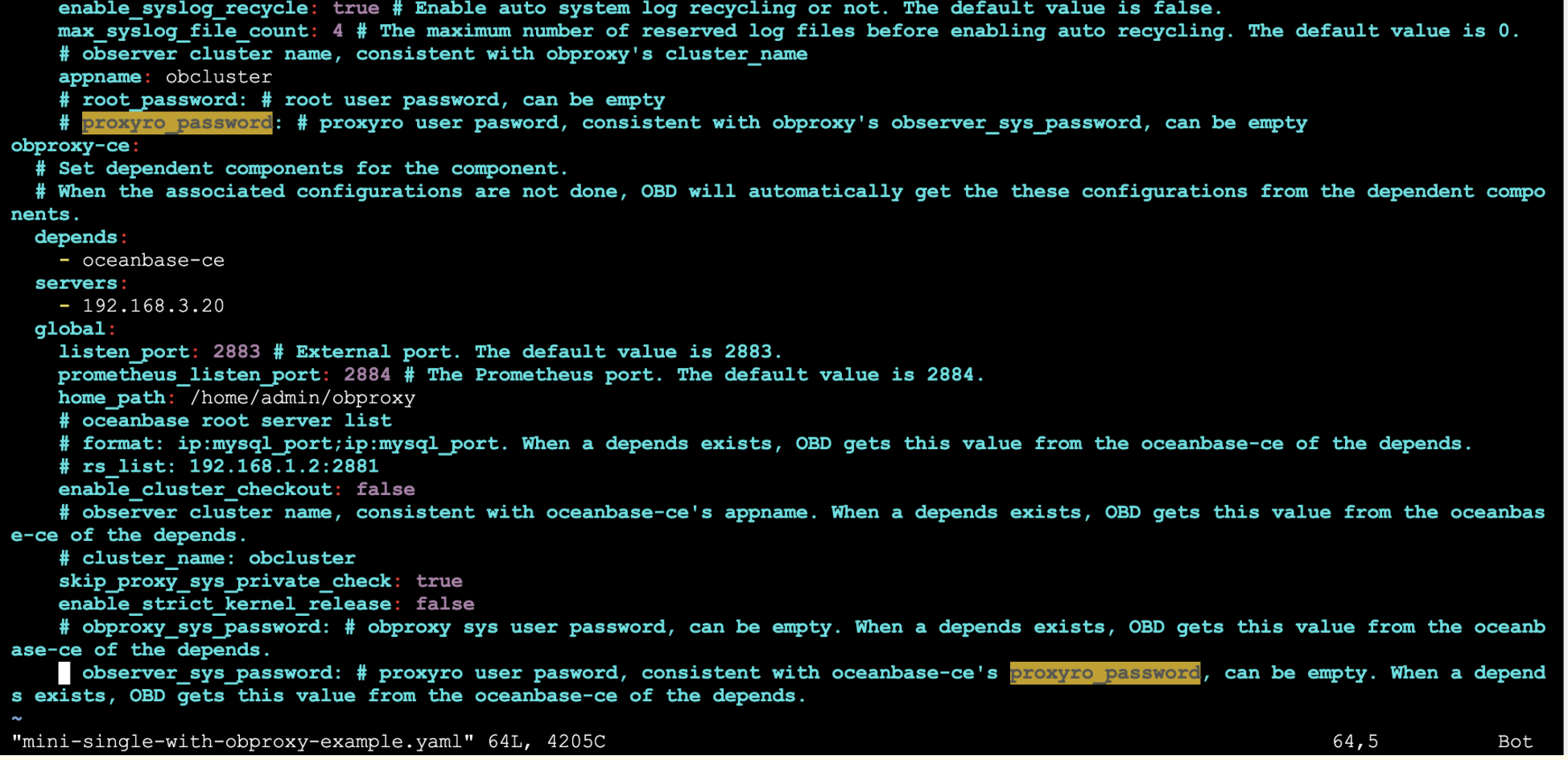
此处以单机部署 + ODP 配置(mini-single-with-obproxy-example.yaml)
📣 8.部署 OceanBase
1.安装集群
[admin@centos79 ~]$ cd ~/.oceanbase-all-in-one/obd/usr/obd/example
[admin@centos79 example]$ obd cluster deploy obtest -c mini-single-with-obproxy-example.yaml
[admin@centos79 example]$ obd cluster deploy obtest -c mini-single-with-obproxy-example.yaml
Package oceanbase-ce-4.2.2.0-100000192024011915.el7 is available.
Package obproxy-ce-4.2.1.0-11.el7 is available.
install oceanbase-ce-4.2.2.0 for local ok
install obproxy-ce-4.2.1.0 for local ok
+--------------------------------------------------------------------------------------------+
| Packages |
+--------------+---------+------------------------+------------------------------------------+
| Repository | Version | Release | Md5 |
+--------------+---------+------------------------+------------------------------------------+
| oceanbase-ce | 4.2.2.0 | 100000192024011915.el7 | aa3053da7370a6685a2ef457cd202d50e5ab75d3 |
| obproxy-ce | 4.2.1.0 | 11.el7 | 0aed4b782120e4248b749f67be3d2cc82cdcb70d |
+--------------+---------+------------------------+------------------------------------------+
Repository integrity check ok
Parameter check ok
Cluster status check ok
Initializes observer work home ok
Initializes obproxy work home ok
Remote oceanbase-ce-4.2.2.0-100000192024011915.el7-aa3053da7370a6685a2ef457cd202d50e5ab75d3 repository install ok
Remote oceanbase-ce-4.2.2.0-100000192024011915.el7-aa3053da7370a6685a2ef457cd202d50e5ab75d3 repository lib check !!
Remote obproxy-ce-4.2.1.0-11.el7-0aed4b782120e4248b749f67be3d2cc82cdcb70d repository install ok
Remote obproxy-ce-4.2.1.0-11.el7-0aed4b782120e4248b749f67be3d2cc82cdcb70d repository lib check ok
Try to get lib-repository
Package oceanbase-ce-libs-4.2.2.0-100000192024011915.el7 is available.
install oceanbase-ce-libs-4.2.2.0 for local ok
Remote oceanbase-ce-libs-4.2.2.0-100000192024011915.el7-3ef68164e36c5a344b257e57575833134d34a27a repository install ok
Remote oceanbase-ce-4.2.2.0-100000192024011915.el7-aa3053da7370a6685a2ef457cd202d50e5ab75d3 repository lib check ok
obtest deployed
Please execute ` obd cluster start obtest ` to start
Trace ID: a4159da4-e20e-11ee-bed7-000c29377d62
If you want to view detailed obd logs, please run: obd display-trace a4159da4-e20e-11ee-bed7-000c29377d62
2.启动 OceanBase 数据库
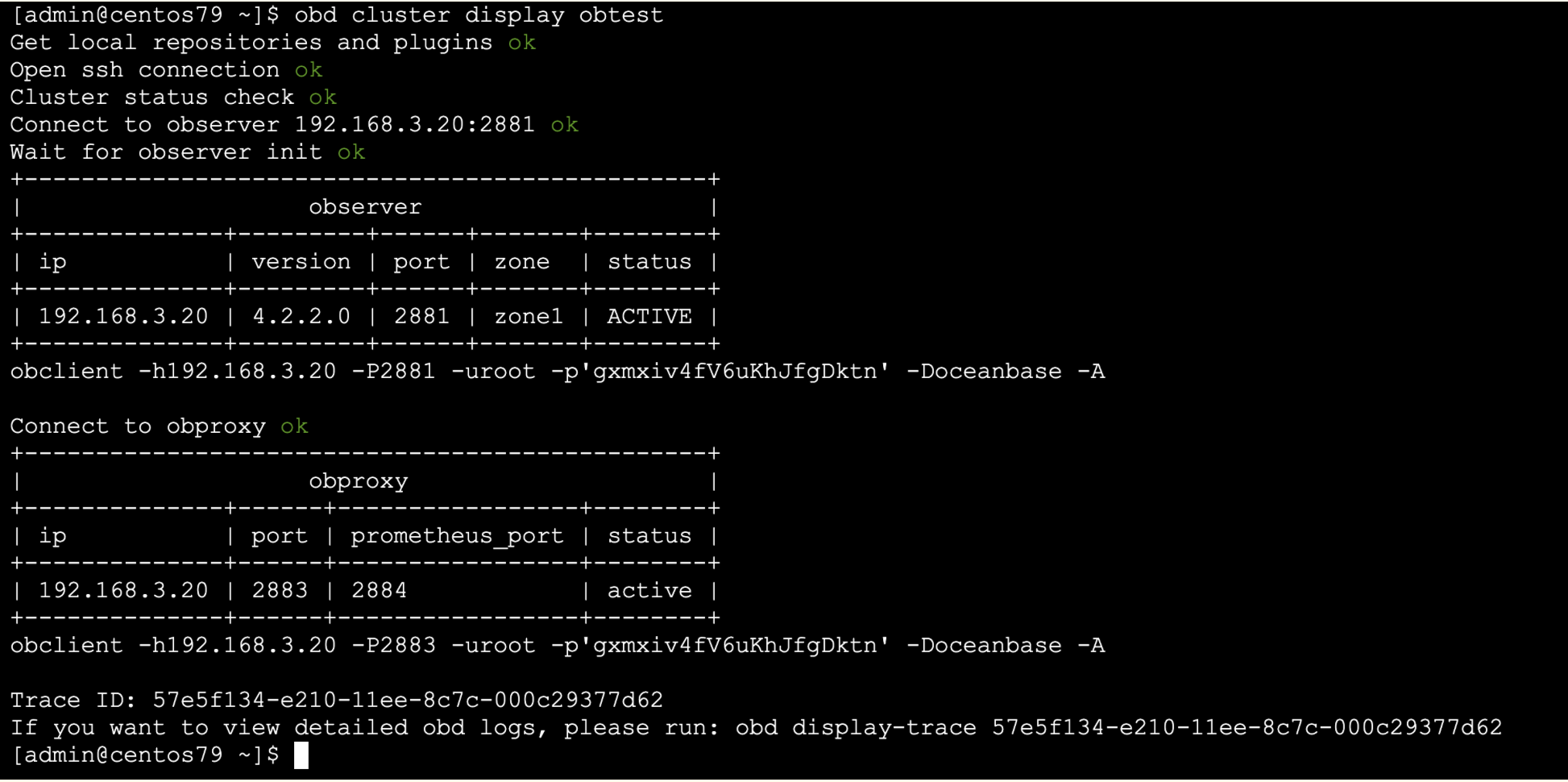
[admin@centos79 ~]$ obd cluster start obtest
📣 9.使用OB
✨ 9.1 连接 OceanBase
[admin@centos79 ~]$ obclient -h192.168.3.20 -uroot@sys -P2883 -p'gxmxiv4fV6uKhJfgDktn'
Welcome to the OceanBase. Commands end with ; or \g.
Your OceanBase connection id is 6
Server version: OceanBase_CE 4.2.2.0 (r100000192024011915-fac02c6690de9ff9f9f96c0bdf86ffe39ae0d7e7) (Built Jan 19 2024 15:14:05)
Copyright (c) 2000, 2018, OceanBase and/or its affiliates. All rights reserved.
Type 'help;' or '\h' for help. Type '\c' to clear the current input statement.
obclient [(none)]> show databases;
+--------------------+
| Database |
+--------------------+
| information_schema |
| LBACSYS |
| mysql |
| oceanbase |
| ocs |
| ORAAUDITOR |
| SYS |
| test |
+--------------------+
8 rows in set (0.003 sec)
✨ 9.2 租户创建
1.创建一个名称为 S1_unit_config 的资源规格,
其资源配置为 CPU 为 1 核,内存 4G,
日志盘空间 6G。
obclient [oceanbase]>
CREATE RESOURCE UNIT S1_unit_config
MEMORY_SIZE = '4G',
MAX_CPU = 1, MIN_CPU = 1,
LOG_DISK_SIZE = '6G',
MAX_IOPS = 10000, MIN_IOPS = 10000, IOPS_WEIGHT=1;
2.创建一个名为 mq_pool_01 的资源池,
在 zone1 里各创建 1 个 Unit,
每个 Unit 的资源规格为 S1_unit_config
obclient [oceanbase]> CREATE RESOURCE POOL mq_pool_01
UNIT='S1_unit_config',
UNIT_NUM=1,
ZONE_LIST=('zone1');
3.通过 CREATE TENANT 语句,创建租户
obclient [oceanbase]>
CREATE TENANT IF NOT EXISTS mq_t1
PRIMARY_ZONE='zone1',
RESOURCE_POOL_LIST=('mq_pool_01')
set OB_TCP_INVITED_NODES='%';
✨ 9.3 建库建表
默认管理员用户(MySQL 模式为 root,Oracle 模式为 sys)的密码为空,您需要及时修改管理员用户的密码。
MySQL 兼容模式
--登录 mq_t1 租户的 root 用户。
obclient -h192.168.3.20 -uroot@mq_t1 -P2883 -A
--执行以下语句修改 root 用户的密码
obclient [(none)]> ALTER USER root IDENTIFIED BY '123456';
--退出后重新登陆
obclient -uroot@mq_t1 -h127.1 -P2883 -p123456 -A
--创建数据库并指定字符集
CREATE DATABASE testdb DEFAULT CHARACTER SET UTF8;
obclient [(none)]> use testdb
--建表
CREATE TABLE course_tb(
course_id int(10) NOT NULL,
course_name char(10) NOT NULL,
course_datetime char(30) NOT NULL);
INSERT INTO course_tb VALUES(1, 'Python', '2021-12-1 19:00-21:00');
INSERT INTO course_tb VALUES(2, 'SQL', '2021-12-2 19:00-21:00');
INSERT INTO course_tb VALUES(3, 'R', '2021-12-3 19:00-21:00');
obclient [testdb]> desc course_tb
-> ;
+-----------------+----------+------+-----+---------+-------+
| Field | Type | Null | Key | Default | Extra |
+-----------------+----------+------+-----+---------+-------+
| course_id | int(10) | NO | | NULL | |
| course_name | char(10) | NO | | NULL | |
| course_datetime | char(30) | NO | | NULL | |
+-----------------+----------+------+-----+---------+-------+
obclient [testdb]> select * from course_tb;
+-----------+-------------+-----------------------+
| course_id | course_name | course_datetime |
+-----------+-------------+-----------------------+
| 1 | Python | 2021-12-1 19:00-21:00 |
| 2 | SQL | 2021-12-2 19:00-21:00 |
| 3 | R | 2021-12-3 19:00-21:00 |
+-----------+-------------+-----------------------+
📣 10.总结
>通过本文让大家快速掌握OceanBase集群的手动部署技能,理解进程的相关目录、集群初始化、OBProxy和 OB 集群关系等
来自 “ ITPUB博客 ” ,链接:https://blog.itpub.net/69947868/viewspace-3009477/ ,如需转载,请注明出处,否则将追究法律责任。

