GreatDB 备份方式
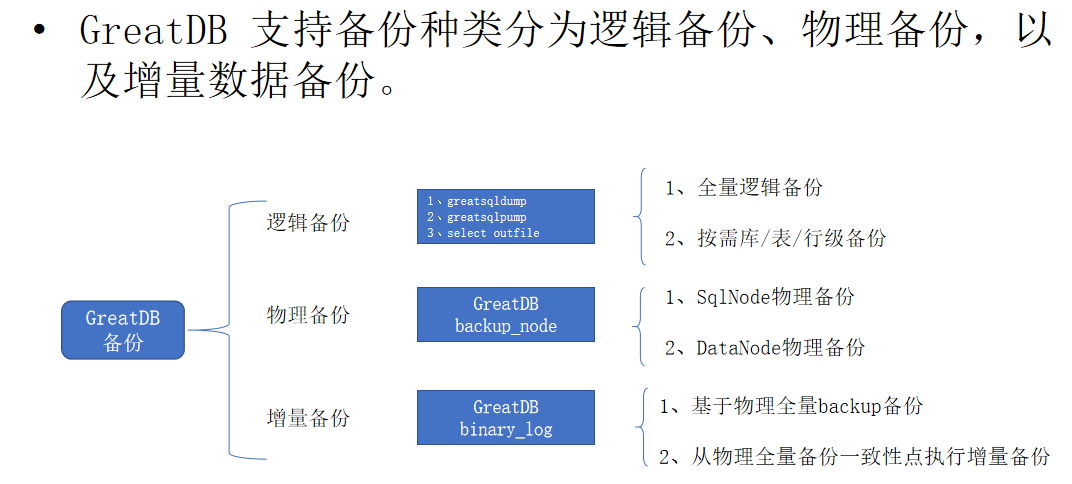
GreatDB 逻辑备份与恢复
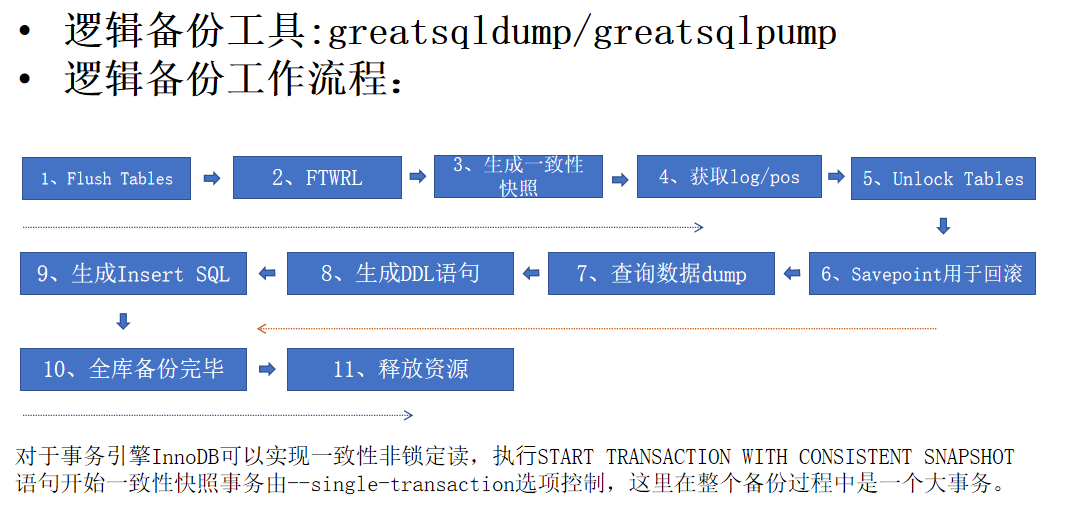
GreatDB 逻辑备份流程
通过 general_log 观察备份流程
[root@greatdb1 ~]# greatsql -ugreatdb -pgreatdb -h192.168.0.81 -P3306
-- general_log 默认是关闭的
GreatDB Cluster[(none)]> show variables like 'general%';
+------------------+-------------------------------+
| Variable_name    | Value                         |
+------------------+-------------------------------+
| general_log      | OFF                           |
| general_log_file | /greatdb/logs/general3306.log |
+------------------+-------------------------------+
2 rows in set (0.01 sec)
-- 清空log日志文件
GreatDB Cluster[(none)]> system > /greatdb/logs/general3306.log
-- 开启 general_log
GreatDB Cluster[(none)]> set global general_log=ON;
Query OK, 0 rows affected (0.00 sec)
-- 执行备份任务,后面有介绍各种备份场景
-- 关闭 general_log
GreatDB Cluster[(none)]> set global general_log=OFF;
Query OK, 0 rows affected (0.00 sec)
- 首先执行 FLUSH TABLES 语句把内存中的表结构同步到磁盘上(把表关闭之后再重新打开)。
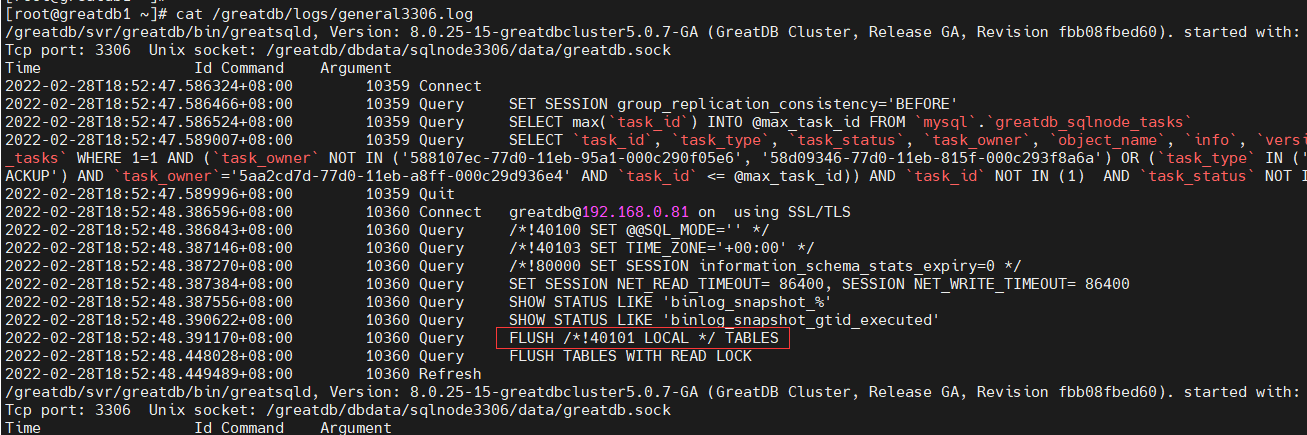
- 然后执行 FLUSH TABLES WITH READ LOCK 语句加一个全局共享锁,为后面执行一致性备份做准备。(这里以使用 --single-transaction 和 --master-data=2 选项执行一致性备份为例)。

- 对于事务引擎 InnoDB 可以实现一致性非锁定读,执行 START TRANSACTION WITH CONSISTENT SNAPSHOT 语句开始一个一致性快照事务,这里在整个备份过程中是一个大事务。

- 接着执行 SHOW MASTER STATUS 语句获取到 binlog 文件名和位置。


- 对于事务引擎,获取到 binlog 位置之后,执行 UNLOCK TABLES 语句解锁事务表,如果是非事务表,则在整个备份过程中会一直锁定直到备份完成才释放。

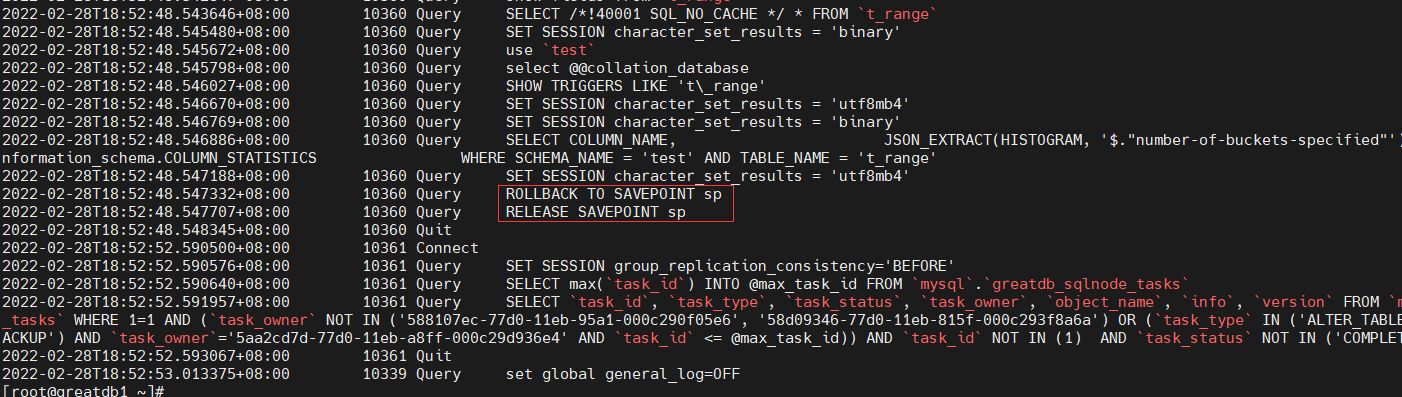
- 在一个库中的表备份开始之前会定义一个保存点,对每一个表的备份都是从这个保存点开始的,当每一个表备份完之后都会回滚到这个保存点,这样当发生问题时方便进行回滚。当一个库下的所有表都备份完之后就会释放这个保存点。
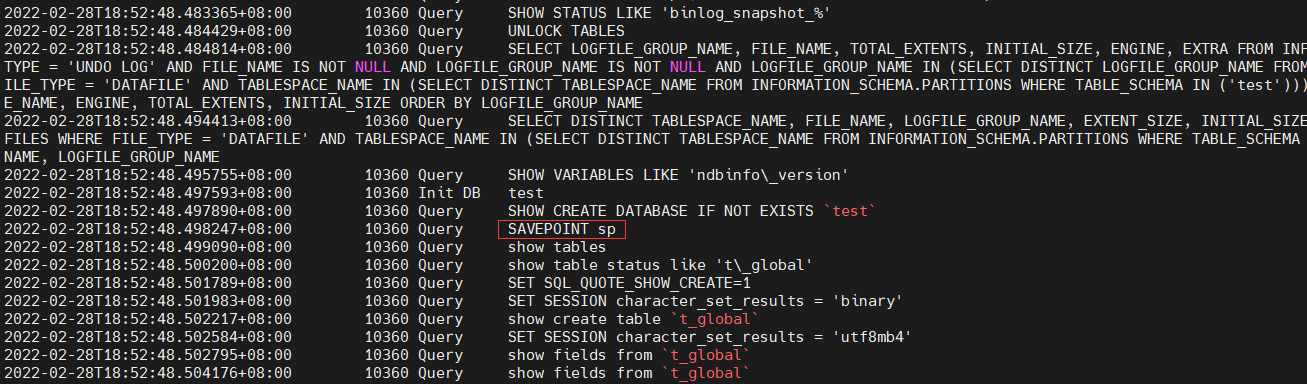
- 备份数据文件生产过程:
a) 首先查找出表结构的定义语句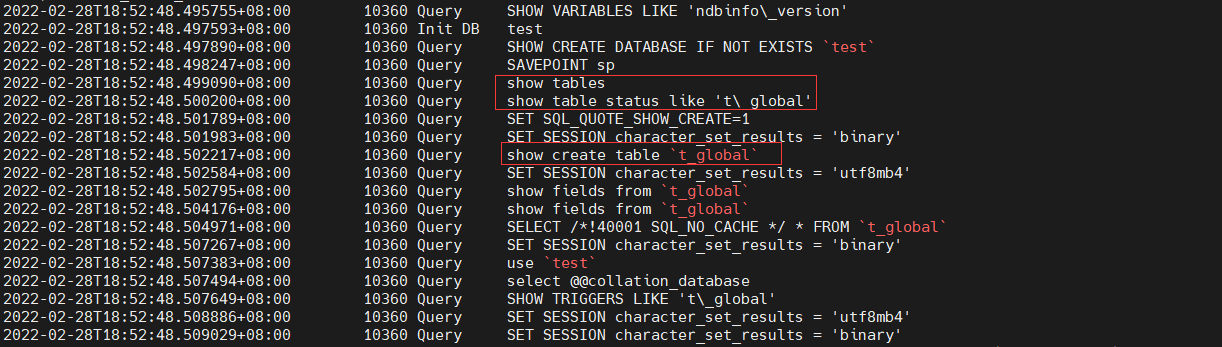
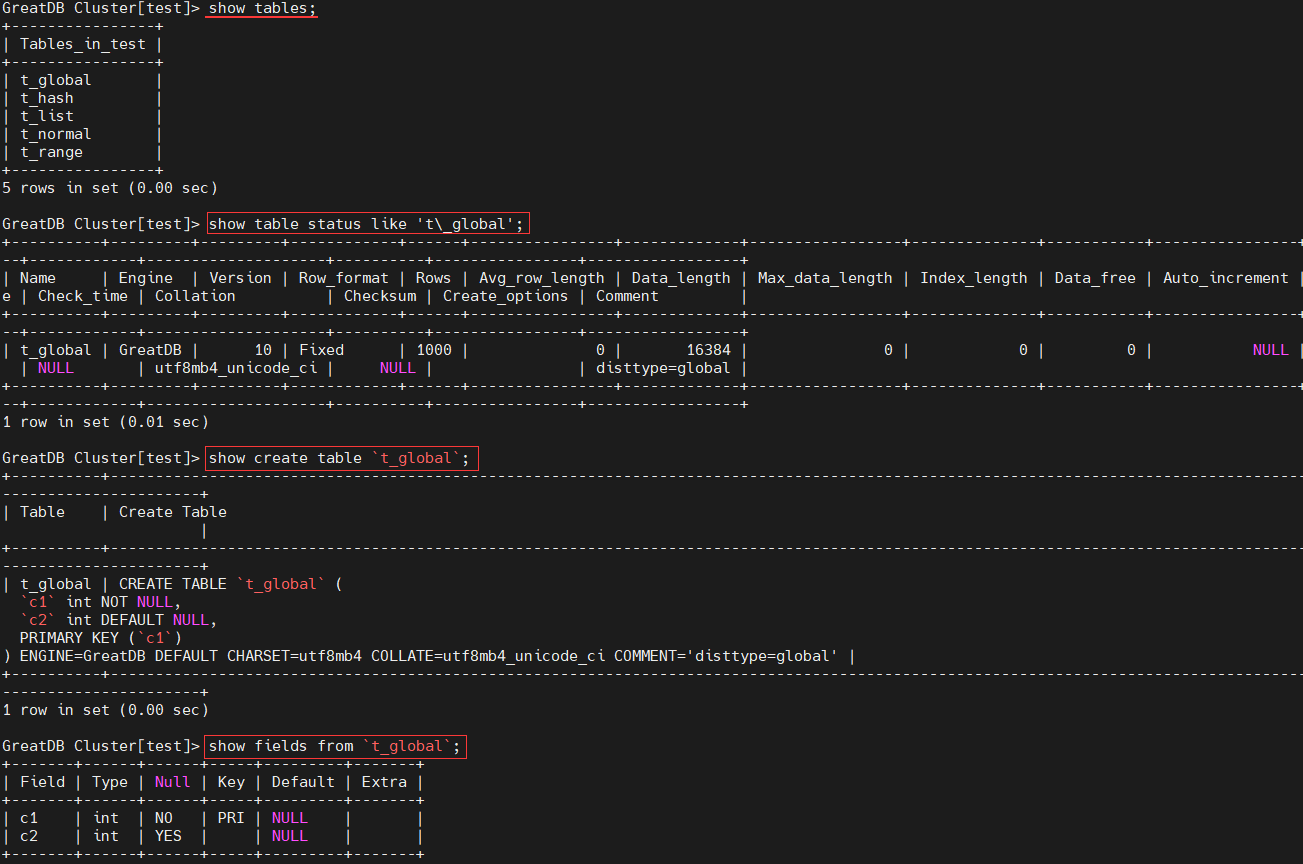
b) 然后对表执行SELECT * …语句获取全表的数据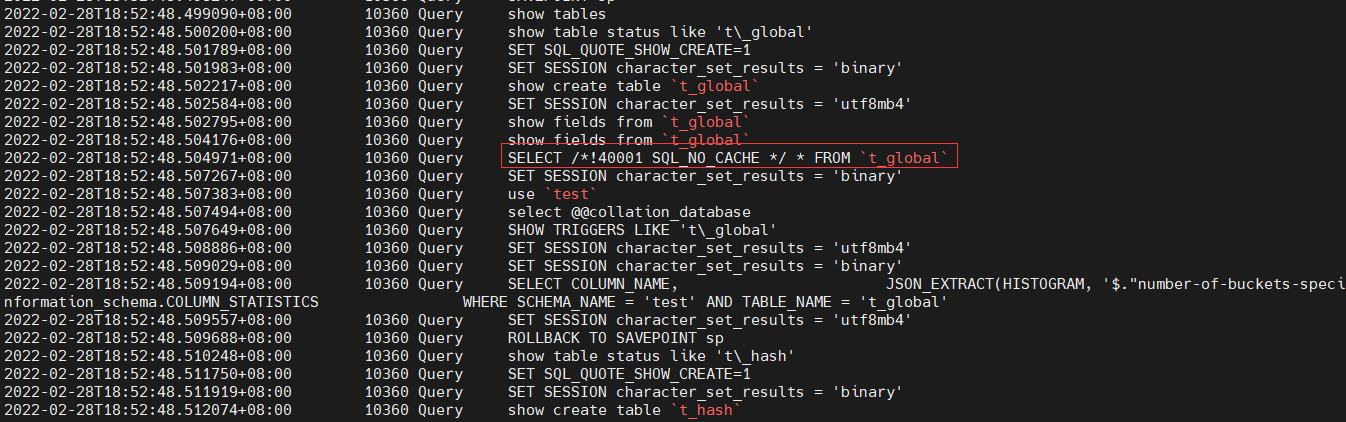

c) 最后使用表结构中的字段信息和所获取的表数据来生成INSERT语句 - 备份完成释放资源
逻辑备份优缺点
- 逻辑备份优点
1、将数据以SQL语句形式备份出来,SQL语句形式的备份文件具有通用性,便于数据恢复。
2、在单库、单表数据迁移以及备份恢复等场景中使用mysqldump工具命令简单、方便。
3、对于GreatDB引擎,InnoDB引擎表可以在线热备,执行局部备份时对前端业务影响相对较小。 - 逻辑备份不足
1、greatsqldump 是单线程,当数据量较多时备份速度比物理方式慢。
2、SQL形式的备份数据恢复时间较长,如果执行语句时有误可能导致中断需再次重导。
3、备份时会执行FTWRL,业务范繁忙时备份可能造成局部业务阻塞情况。
greatsqldump 和 greatsqlpump 区别
- greatsqldump 是单线程
- greatsqlpump 采用队列+线程,允许有多个队列 --default-parallelism=8 控制,每个队列下有多个线程,而一个队列可以绑定1个或者多个数据库–parallel-schemas=4:test1
1、greatsqlpump 特点是支持并行多线程备份。
2、可按需指定不同 schema 备份时的并行线程数。
3、支持压缩备份支持ZLIB和LZ4,支持备份进度条查看。 - greatsqlpump 备份的数据恢复时会先插入数据,再建索引,而 greatsqldump 备份的数据恢复是在建立表的时候就把索引加上了,所以前者备份的数据恢复时速度要快一点
- greatsqldump 完全兼容 greatsqldump,在默认情况下,greatsqldump 不转储除 mysql 系统库之外的information_schema、 performance_schema、sys 这三个系统库。
greatsqldump 备份恢复测试
实验环境
[root@greatdb1 ~]# greatsql -ugreatdb -pgreatdb -h192.168.0.81 -P3306
GreatDB Cluster[(none)]> use test
GreatDB Cluster[test]> show tables;
+----------------+
| Tables_in_test |
+----------------+
| t_global       |
| t_hash         |
| t_list         |
| t_normal       |
| t_range        |
+----------------+
5 rows in set (0.00 sec)

GreatDB Cluster[test]> select * from t_hash;
+----+------+
| c1 | c2   |
+----+------+
|  8 |    8 |
|  1 |    1 |
|  2 |    2 |
|  3 |    3 |
|  4 |    4 |
|  5 |    5 |
|  6 |    6 |
|  7 |    7 |
+----+------+
8 rows in set (0.05 sec)
greatsqldump 备份恢复数据库
- 备份数据库
[root@greatdb1 ~]# greatsqldump -h192.168.0.81 -ugreatdb -pgreatdb \
--single-transaction \
--sql-log-bin \
--set-gtid-purged=OFF \
--flush-logs \
--master-data=2 \
--databases test > /tmp/db_test_bak.sql
- 模拟数据库被误删除
[root@greatdb1 ~]# greatsql -ugreatdb -pgreatdb -h192.168.0.81 -P3306
GreatDB Cluster[test]> show databases;
+--------------------+
| Database           |
+--------------------+
| information_schema |
| mysql              |
| performance_schema |
| sys                |
| test               |
+--------------------+
5 rows in set (0.00 sec)

GreatDB Cluster[test]> drop database test;
Query OK, 5 rows affected (0.42 sec)

GreatDB Cluster[(none)]> show databases;
+--------------------+
| Database           |
+--------------------+
| information_schema |
| mysql              |
| performance_schema |
| sys                |
+--------------------+
4 rows in set (0.01 sec)
- 恢复数据库
[root@greatdb1 ~]# greatsql -ugreatdb -pgreatdb -h192.168.0.81 -P3306

GreatDB Cluster[(none)]> source /tmp/db_test_bak.sql
Query OK, 0 rows affected (0.00 sec)

Query OK, 0 rows affected (0.00 sec)

Query OK, 0 rows affected (0.00 sec)
... ...
Query OK, 0 rows affected (0.00 sec)

GreatDB Cluster[test]> show databases;
+--------------------+
| Database           |
+--------------------+
| information_schema |
| mysql              |
| performance_schema |
| sys                |
| test               |
+--------------------+
5 rows in set (0.00 sec)

GreatDB Cluster[test]> use test
Database changed
GreatDB Cluster[test]> show tables;
+----------------+
| Tables_in_test |
+----------------+
| t_global       |
| t_hash         |
| t_list         |
| t_normal       |
| t_range        |
+----------------+
5 rows in set (0.01 sec)

GreatDB Cluster[test]> select * from t_hash;
+----+------+
| c1 | c2   |
+----+------+
|  8 |    8 |
|  1 |    1 |
|  2 |    2 |
|  3 |    3 |
|  4 |    4 |
|  5 |    5 |
|  6 |    6 |
|  7 |    7 |
+----+------+
8 rows in set (0.01 sec)
greatsqldump 备份恢复表
- 备份表
[root@greatdb1 ~]# greatsqldump -h192.168.0.81 -ugreatdb -pgreatdb \
--single-transaction \
--sql-log-bin \
--set-gtid-purged=OFF \
--flush-logs \
--master-data=2 \
--databases test \
--tables t_hash > /tmp/table_t_hash_bak.sql
- 模拟表被误删除
[root@greatdb1 ~]# greatsql -ugreatdb -pgreatdb -h192.168.0.81 -P3306
GreatDB Cluster[(none)]> use test

GreatDB Cluster[test]> show tables;
+----------------+
| Tables_in_test |
+----------------+
| t_global       |
| t_hash         |
| t_list         |
| t_normal       |
| t_range        |
+----------------+
5 rows in set (0.00 sec)

GreatDB Cluster[test]> drop table t_hash;
Query OK, 0 rows affected (0.09 sec)

GreatDB Cluster[test]> show tables;
+----------------+
| Tables_in_test |
+----------------+
| t_global       |
| t_list         |
| t_normal       |
| t_range        |
+----------------+
4 rows in set (0.01 sec)
- 恢复表
[root@greatdb1 ~]# greatsql -ugreatdb -pgreatdb -h192.168.0.81 -P3306

GreatDB Cluster[(none)]> use test;
GreatDB Cluster[(none)]> source /tmp/table_t_hash_bak.sql
Query OK, 0 rows affected (0.00 sec)

Query OK, 0 rows affected (0.00 sec)

Query OK, 0 rows affected (0.00 sec)
... ...
Query OK, 0 rows affected (0.00 sec)

GreatDB Cluster[test]> show tables;
+----------------+
| Tables_in_test |
+----------------+
| t_global       |
| t_hash         |
| t_list         |
| t_normal       |
| t_range        |
+----------------+
5 rows in set (0.00 sec)

GreatDB Cluster[test]> select * from t_hash;
+----+------+
| c1 | c2   |
+----+------+
|  8 |    8 |
|  1 |    1 |
|  2 |    2 |
|  3 |    3 |
|  4 |    4 |
|  5 |    5 |
|  6 |    6 |
|  7 |    7 |
+----+------+
8 rows in set (0.00 sec)
greatsqldump 备份恢复行
- 备份行
[root@greatdb1 ~]# greatsqldump -h192.168.0.81 -ugreatdb -pgreatdb \
--single-transaction \
--sql-log-bin \
--set-gtid-purged=OFF \
--flush-logs \
--master-data=2 \
--no-create-info \
--databases test \
--tables t_hash \
--where='c1<4' > /tmp/row_t_hash_id4_bak.sql
注意:
- –no-create-info:在备份生成的脚本中不生成表的删除和创建语句
- –where=‘c1<4’:“=” 左右不能存在空格
- 模拟行被误删除
GreatDB Cluster[(none)]> select * from test.t_hash;
+----+------+
| c1 | c2   |
+----+------+
|  8 |    8 |
|  1 |    1 |
|  2 |    2 |
|  3 |    3 |
|  4 |    4 |
|  5 |    5 |
|  6 |    6 |
|  7 |    7 |
+----+------+
8 rows in set (0.01 sec)

GreatDB Cluster[(none)]> delete from test.t_hash where c1<4;
Query OK, 3 rows affected (0.01 sec)

GreatDB Cluster[(none)]> select * from test.t_hash;
+----+------+
| c1 | c2   |
+----+------+
|  8 |    8 |
|  4 |    4 |
|  5 |    5 |
|  6 |    6 |
|  7 |    7 |
+----+------+
5 rows in set (0.00 sec)
- 恢复行
[root@greatdb1 ~]# greatsql -ugreatdb -pgreatdb -h192.168.0.81 -P3306

GreatDB Cluster[(none)]> use test;
GreatDB Cluster[(none)]> source /tmp/row_t_hash_id4_bak.sql
Query OK, 0 rows affected (0.00 sec)

Query OK, 0 rows affected (0.00 sec)

Query OK, 0 rows affected (0.00 sec)
... ...
Query OK, 0 rows affected (0.00 sec)

GreatDB Cluster[test]> select * from test.t_hash;
+----+------+
| c1 | c2   |
+----+------+
|  8 |    8 |
|  1 |    1 |
|  2 |    2 |
|  3 |    3 |
|  4 |    4 |
|  5 |    5 |
|  6 |    6 |
|  7 |    7 |
+----+------+
8 rows in set (0.03 sec)
greatsqldump 备份恢复集群(不常用,这里只演示备份)
[root@greatdb1 ~]# greatsqldump -h192.168.0.81 -ugreatdb -pgreatdb \
--single-transaction \
--compact \
--set-gtid-purged=OFF \
--flush-logs \
--master-data=2 \
--all-databases > /tmp/greatdb_full_bak.sql
greatsqlpump 并行备份恢复测试
实验环境
[root@greatdb1 ~]# greatsql -ugreatdb -pgreatdb -h192.168.0.81 -P3306
GreatDB Cluster[(none)]> use test
GreatDB Cluster[test]> show tables;
+----------------+
| Tables_in_test |
+----------------+
| t_global       |
| t_hash         |
| t_list         |
| t_normal       |
| t_range        |
+----------------+
5 rows in set (0.00 sec)

GreatDB Cluster[test]> select * from t_hash;
+----+------+
| c1 | c2   |
+----+------+
|  8 |    8 |
|  1 |    1 |
|  2 |    2 |
|  3 |    3 |
|  4 |    4 |
|  5 |    5 |
|  6 |    6 |
|  7 |    7 |
+----+------+
8 rows in set (0.05 sec)
greatsqlpump 并行备份恢复数据库
- greatsqlpump的并行导出功能的架构为:队列+线程,允许有多个队列,每个队列下有多个线程,而一个队列可以绑定1个或者多个数据库。
[–default-parallelism=2 默认] 支持基于表的多线程导出功能
[–defer-table-indexes] 延迟索引
[–parallel-schemas=[N:]db_list] 控制并行导出的库
[–watch-progress,默认开启] 导出的时候带有进度条
[–compress-output=LZ4/ZLIB] 压缩备份 - 并行备份数据库
[root@greatdb1 ~]# greatsqlpump -h192.168.0.81 -ugreatdb -pgreatdb \
--default-parallelism=8 \
--parallel-schemas=4:test \
--default-character-set=utf8mb4 \
--set-gtid-purged=OFF \
--single-transaction \
--databases test > /tmp/db_test_pump.sql

greatsqlpump: [Warning] Using a password on the command line interface can be insecure.
Dump progress: 1/3 tables, 0/2005 rows
Dump completed in 151
- 模拟数据库被误删除
GreatDB Cluster[test]> drop database test;
- 恢复数据库,同 greatsqldump 一样使用 source
GreatDB Cluster[(none)]> source /tmp/db_test_pump.sql
greatsqlpump 并行压缩备份数据库
[root@greatdb1 ~]# greatsqlpump -h192.168.0.81 -ugreatdb -pgreatdb \
--default-parallelism=8 \
--parallel-schemas=4:test \
--parallel-schemas=2:mysql \
--default-character-set=utf8 \
--set-gtid-purged=OFF \
--single-transaction \
--compress-output=LZ4 \
--databases test mysql > /tmp/db_test_mysql_lz4_pump.sql

greatsqlpump: [Warning] Using a password on the command line interface can be insecure.
Dump progress: 1/1 tables, 0/0 rows
Dump completed in 356
Select outfile导出元数据
- 控制参数为:secure_file_priv ,该参数为静态参数对应的三个可选项:
1、secure_file_priv=null 不允许文件的导入导出
2、secure_file_priv=/tmp 只允许导入导出到/tmp路径
3、(默认)secure_file_priv 配置GreatDB的cnf配置文件,可导入到任意路径
GreatDB Cluster[(none)]> show variables like 'secure_file_priv';
+------------------+-------+
| Variable_name    | Value |
+------------------+-------+
| secure_file_priv |       |
+------------------+-------+
1 row in set (0.01 sec)
- 导出文件的存储位置是与登录时指定的节点有关,比如在 192.168.0.81 上使用 greatsql -h192.168.0.82 登录数据库,则 Select outfile 导出的文件会存储在 192.168.0.82 上的指定位置。
备份全表
[root@greatdb1 ~]# greatsql -ugreatdb -pgreatdb -h192.168.0.81 -P3306

GreatDB Cluster[(none)]> select * from test.t_hash into outfile '/tmp/t_hash_outfile.sql';
Query OK, 8 rows affected (0.03 sec)

[root@greatdb1 ~]# cat /tmp/t_hash_outfile.sql
8       8
1       1
2       2
3       3
4       4
5       5
6       6
7       7
导出指定的行
[root@greatdb1 ~]# greatsql -ugreatdb -pgreatdb -h192.168.0.81 -P3306

GreatDB Cluster[(none)]> select * from test.t_hash where c1<4 into outfile '/tmp/t_hash_c14_outfile.sql';
Query OK, 8 rows affected (0.03 sec)

[root@greatdb1 ~]# cat /tmp/t_hash_c14_outfile.sql
1       1
2       2
3       3
设置分隔符
[root@greatdb1 ~]# greatsql -ugreatdb -pgreatdb -h192.168.0.81 -P3306

GreatDB Cluster[(none)]> select * from test.t_hash into outfile '/tmp/t_hash_outfile_2.sql'
fields terminated by ',' enclosed by '"'  lines terminated by '\n';
Query OK, 8 rows affected (0.01 sec)

[root@greatdb1 ~]# cat /tmp/t_hash_outfile_2.sql
"8","8"
"1","1"
"2","2"
"3","3"
"4","4"
"5","5"
"6","6"
"7","7"
备份元数据恢复
无分隔符数据的导入
GreatDB Cluster[test]> load data infile '/tmp/t_hash_outfile.sql' into table t_hash;
有分隔符导入方式如下
GreatDB Cluster[test]> load data infile '/tmp/t_hash_outfile_2.sql' into table t_hash fields terminated by ',' enclosed by '"' lines terminated by '\n' ;
LOAD DATA INFILE能被用来读取从外部来源获得的文件。例如,以sql或txt格式的文件将有由逗号分隔并用双引号包围的字段,需要设置选项fields terminated ,enclosed ,line terminated等选项来设置加载方式。
GreatDB 物理备份与恢复
GreatDB 的物理备份原理和流程介绍
备份节点
GreatDB 的物理备份需要提前初始化一个备份节点,备份节点是除 SqlNode 节点、DataNode 节点之外的第三个角色节点。其作用是进行集群全量和增量备份的数据物理文件的复制克隆。通过调用 SqlNode 节点程序,执行远程 SqlNode,DataNode 节点物理文件备份到backup_node 节点。备份节点可以同时添加多个,支持并发多节点备份。backup_node 支持全量物理备份和增量备份2种方式。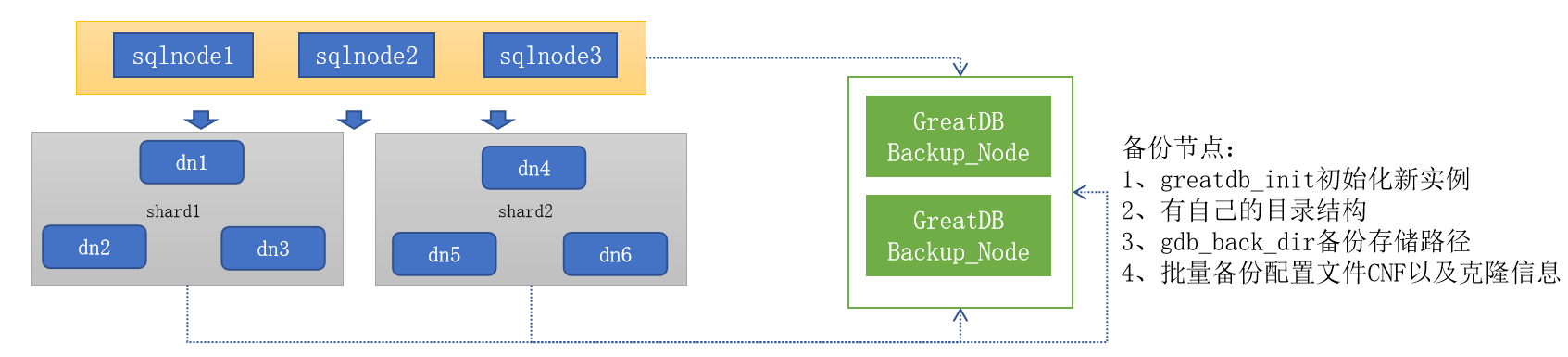
备份原理
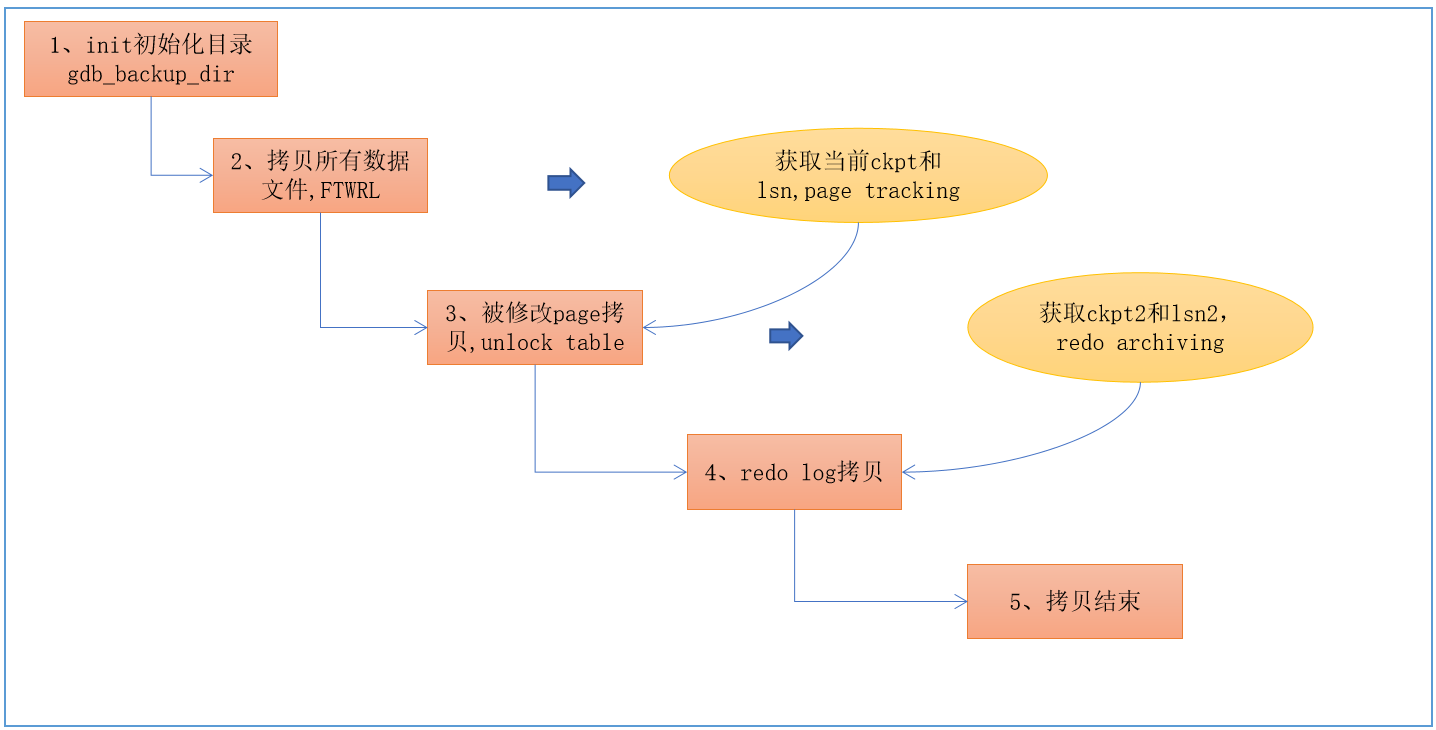
在 greatdb 集群中,采用延迟提交的技术获取一致性点。其基本操作流程为:
- 在 sqlnode 中记录当前处于事务提交状态的事务数量,committing_trxs,事务进⼊COMMIT阶段,committing_trxs++,完成提交时,committing_trxs–;
- 获取一致性点时,所有的 sqlnode 节点执行 DELAY_COMMIT 命令;
- sqlnode 处于 DELAY_COMMIT 状态时,仍可以正常执行读写语句,但进⼊ COMMIT 阶段时,会阻止读写事务向后端 datanode 节点发送 COMMIT 语句,但已经处于 COMMITTING 状态的事务会继续完成事务的提交操作;
- 当所有的 sqlnode 均没有 COMMITTING 状态的事务时,此时为全局一致性点,在 sqlnode 和所有 shard 中获取一致性点的 gtid
- 所有的 sqlnode 节点,释放 DELAY_COMMIT 命令
- 所有的 sqlnode 节点可以正常提交事务
备份节点工作流程
- 注册备份任务
Sqlnode 和每个 shard 均为一个备份子任务,子任务均匀分散到所有的备份节点中。 可通过information_schema.greatdb_backup_tasks 查看备份任务状态。 - 全量数据物理复制
在 SqlNode 调用 mysql.greatdb_start_full_backup,备份任务执行 SqlNode 和 DataNode 物理文件复制克隆,单备节点支持5个并发任务。 - 获取全局一致性点
GreatDB 在获取一致性点的过程中,采用延迟提交技术。即 SqlNode 可以接收读写请求,事务提交时被延迟执行。在50秒内连续探测10次获取一致性检查点,如果10次重试均判定为业务繁忙状态,本次备份任务撤销。 - 同步增量 binlog 日志
增量日志的结束位置为 sqlnode 和每个 shard 的全局一致性点的位置,备份一致性点的 binlog 到全量备份中。 - 更新任务状态,完成全量备份
配置物理备份节点
本次测试使用 192.168.0.82 作为备份一个节点。
初始化 backup_node 节点
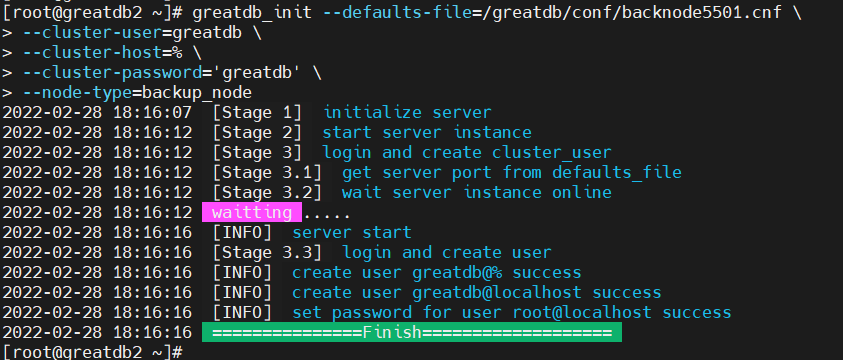
在新的主机部署备份节点,使用集群安装包中的 greatdb_init 执行初始化,参数文件中必须指定 gdb_backup_dir 备份目录路径。
# 创建目录
[root@greatdb2 ~]# mkdir -p /greatdb/dbdata/backnode5501/{data,log,tmp}
[root@greatdb2 ~]# chown -R greatdb:greatdb /greatdb/dbdata/backnode5501
# 创建配置文件
[root@greatdb2 ~]# cd /greatdb/conf
[root@greatdb2 conf]# cp sqlnode3306.cnf backnode5501.cnf
[root@greatdb2 conf]# sed -i "s/3306/5501/g" backnode5501.cnf
[root@greatdb2 conf]# sed -i "s/sqlnode/backnode/g" backnode5501.cnf
[root@greatdb2 conf]# sed -i "14i"gdb_backup_dir=/greatdb/dbbackup"" backnode5501.cnf
# 初始化 backup_node 节点
[root@greatdb2 ~]# greatdb_init --defaults-file=/greatdb/conf/backnode5501.cnf \
--cluster-user=greatdb \
--cluster-host=% \
--cluster-password='greatdb' \
--node-type=backup_node
添加 backup_node 节点
[root@greatdb1 ~]# greatsql -ugreatdb -pgreatdb -h192.168.0.81 -P3306

GreatDB Cluster[(none)]> call mysql.greatdb_add_backup_node('bk_node1','192.168.0.82',5501);
Query OK, 1 row affected (4.37 sec)

GreatDB Cluster[(none)]> select * from information_schema.GREATDB_BACKUP_NODES;
+---------+-----------+--------------------------------------+--------------+------+--------+
| NODE_ID | NODE_NAME | UUID                                 | HOST         | PORT | STATUS |
+---------+-----------+--------------------------------------+--------------+------+--------+
|     169 | bk_node1  | 72667064-987f-11ec-9256-000c290f05e6 | 192.168.0.82 | 5501 | ONLINE |
+---------+-----------+--------------------------------------+--------------+------+--------+
1 row in set (0.00 sec)
执行全量备份
[root@greatdb1 ~]# greatsql -ugreatdb -pgreatdb -h192.168.0.81 -P3306

GreatDB Cluster[(none)]> call mysql.greatdb_start_full_backup;
+---------------------------------+
| current_backup_task_name        |
+---------------------------------+
| full_backup_20220301-032132_176 |
+---------------------------------+
1 row in set (39.90 sec)

Query OK, 0 rows affected (39.90 sec)
登录到备份节点可以看到备份出来的文件
[root@greatdb2 ~]# cd /greatdb/dbbackup/
[root@greatdb2 dbbackup]# ll
total 0
drwxr-x--- 7 greatdb greatdb 99 Feb 28 19:22 full_backup_20220301-032132_176
[root@greatdb2 dbbackup]# cd full_backup_20220301-032132_176/
[root@greatdb2 full_backup_20220301-032132_176]# ll
total 0
drwxr-x--- 6 greatdb greatdb  81 Feb 28 19:22 inc_binlog
drwxr-x--- 6 greatdb greatdb 180 Feb 28 19:21 shard-shard1
drwxr-x--- 6 greatdb greatdb 180 Feb 28 19:21 shard-shard2
drwxr-x--- 6 greatdb greatdb 180 Feb 28 19:21 shard-shard3
drwxr-x--- 5 greatdb greatdb 168 Feb 28 19:21 sqlnode
执行增量备份
增量备份过程
GreatDB 的增量备份是基于上次全量备份的基础之上,针对各个节点进行的 binlog 的拷贝备份。调用 SqlNode 过程 greatdb_start_inc_backup 启动增量备份任务。
执行步骤如下:
- 获取上一次备份的全局一致性点。
- 注册备份任务可在 mysql.greatdb_sqlnode_tasks 查看当前备份 task_status。
- 获取新的全局一致性点,同步增量 binlog 日志。
- 更新任务状态,完成全量备份。
测试增量备份
- 增加一些增量数据
[root@greatdb1 ~]# greatsql -ugreatdb -pgreatdb -h192.168.0.81 -P3306
GreatDB Cluster[(none)]> use test
GreatDB Cluster[test]> show tables;
+----------------+
| Tables_in_test |
+----------------+
| t_global       |
| t_hash         |
| t_list         |
| t_normal       |
| t_range        |
+----------------+
5 rows in set (0.00 sec)

GreatDB Cluster[test]> select * from t_normal;
Empty set (0.00 sec)

GreatDB Cluster[test]> insert into t_normal values (1,1),(2,2),(3,3);
Query OK, 3 rows affected (0.01 sec)
Records: 3  Duplicates: 0  Warnings: 0

GreatDB Cluster[test]> select * from t_normal;
+----+------+
| c1 | c2   |
+----+------+
|  1 |    1 |
|  2 |    2 |
|  3 |    3 |
+----+------+
3 rows in set (0.00 sec)
- 查询从哪个备份的基础上做增量备份
-- 注意需要登录到备份节点的实例上查看
[root@greatdb2 ~]# greatsql -ugreatdb -pgreatdb -h192.168.0.82 -P5501

GreatDB Cluster[(none)]> select BACKUP_NAME,BACKUP_NODE_HOST,BACKUP_NODE_PORT,BACKUP_LEVEL,DATA_TYPE,SHARD_NAME,BACKUP_PATH,BACKUP_STAGE from information_schema.GREATDB_BACKUP_TASKS;
+---------------------------------+------------------+------------------+--------------+-----------+------------+-------------------+--------------+
| BACKUP_NAME                     | BACKUP_NODE_HOST | BACKUP_NODE_PORT | BACKUP_LEVEL | DATA_TYPE | SHARD_NAME | BACKUP_PATH       | BACKUP_STAGE |
+---------------------------------+------------------+------------------+--------------+-----------+------------+-------------------+--------------+
| full_backup_20220301-032132_176 | 192.168.0.82     |             5501 |            0 | DATANODE  | shard1     | /greatdb/dbbackup | COMPLETE     |
| full_backup_20220301-032132_176 | 192.168.0.82     |             5501 |            0 | DATANODE  | shard2     | /greatdb/dbbackup | COMPLETE     |
| full_backup_20220301-032132_176 | 192.168.0.82     |             5501 |            0 | DATANODE  | shard3     | /greatdb/dbbackup | COMPLETE     |
| full_backup_20220301-032132_176 | 192.168.0.82     |             5501 |            0 | SQLNODE   |            | /greatdb/dbbackup | COMPLETE     |
+---------------------------------+------------------+------------------+--------------+-----------+------------+-------------------+--------------+
4 rows in set (0.00 sec)
- 执行增量备份
GreatDB Cluster[test]> call mysql.greatdb_start_inc_backup('full_backup_20220301-032132_176');
+--------------------------------+
| current_backup_task_name       |
+--------------------------------+
| inc_backup_20220301-050855_183 |
+--------------------------------+
1 row in set (0.43 sec)

Query OK,  rows affected (0.44 sec)
- 登录到备份节点可以看到备份出来的文件
[root@greatdb2 ~]# cd /greatdb/dbbackup/
[root@greatdb2 dbbackup]# ll
total 0
drwxr-x--- 7 greatdb greatdb 99 Feb 28 19:22 full_backup_20220301-032132_176
drwxr-x--- 3 greatdb greatdb 24 Feb 28 21:08 inc_backup_20220301-050855_183
[root@greatdb2 dbbackup]#
[root@greatdb2 dbbackup]#
[root@greatdb2 dbbackup]# cd inc_backup_20220301-050855_183/
[root@greatdb2 inc_backup_20220301-050855_183]# ll
total 0
drwxr-x--- 6 greatdb greatdb 81 Feb 28 21:08 inc_binlog
[root@greatdb2 inc_backup_20220301-050855_183]# cd inc_binlog/
[root@greatdb2 inc_binlog]# ll
total 0
drwxr-x--- 2 greatdb greatdb 37 Feb 28 21:08 shard-shard1
drwxr-x--- 2 greatdb greatdb 37 Feb 28 21:08 shard-shard2
drwxr-x--- 2 greatdb greatdb 37 Feb 28 21:08 shard-shard3
drwxr-x--- 2 greatdb greatdb 58 Feb 28 21:08 sqlnode
注意:需要特别注意的是,上述示例中,集群中只有一个备份节点,因此,所有的备份数据均在同一台机器同一个基础备份路径之下。如果存在多个备份节点,彼此在不同的机器中,则所有SqlNode, Shard的全量clone和增量binlog可能分布在不同的主机上,此时,需要在不同的备份节点机器上,查找对应的备份数据。
查看备份任务执行状态
-- 在 sqlNode 实例上查询
[root@greatdb1 ~]# greatsql -ugreatdb -pgreatdb -h192.168.0.81 -P3306

GreatDB Cluster[test]> select *  from mysql.greatdb_sqlnode_tasks;
+---------+---------------+-------------+--------------------------------------+---------------------------------+-------------------------------------+---------------------+---------+
| task_id | task_type     | task_status | task_owner                           | object_name                     | info                                | create_time         | version |
+---------+---------------+-------------+--------------------------------------+---------------------------------+-------------------------------------+---------------------+---------+
|       1 | SHARD_RECOVER | RUNNING     | 58d09346-77d0-11eb-815f-000c293f8a6a | N/A                             | shard recover daemon task           | 2021-02-26 09:17:50 |       8 |
|      43 | MIGRATE_TABLE | COMPLETE    | 5aa2cd7d-77d0-11eb-a8ff-000c29d936e4 | test.t_normal                   | test.t_normal from shard2 to shard1 | 2022-02-27 20:39:26 |       0 |
|     148 | BACKUP        | COMPLETE    | 5aa2cd7d-77d0-11eb-a8ff-000c29d936e4 | full_backup_20220301-032132_176 | full_backup                         | 2022-03-01 03:21:32 |        |
|     155 | BACKUP        | COMPLETE    | 5aa2cd7d-77d0-11eb-a8ff-000c29d936e4 | inc_backup_20220301-050855_183  | inc_backup                          | 2022-03-01 05:08:55 |        |
+---------+---------------+-------------+--------------------------------------+---------------------------------+-------------------------------------+---------------------+---------+
4 rows in set (0.00 sec)
-- 在备份节点的实例上查看
[root@greatdb2 ~]# greatsql -ugreatdb -pgreatdb -h192.168.0.82 -P5501

GreatDB Cluster[(none)]> select BACKUP_NAME,BACKUP_NODE_HOST,BACKUP_NODE_PORT,BACKUP_LEVEL,DATA_TYPE,SHARD_NAME,BACKUP_PATH,BACKUP_STAGE from information_schema.GREATDB_BACKUP_TASKS;
+---------------------------------+------------------+------------------+--------------+-----------+------------+-------------------+--------------+
| BACKUP_NAME                     | BACKUP_NODE_HOST | BACKUP_NODE_PORT | BACKUP_LEVEL | DATA_TYPE | SHARD_NAME | BACKUP_PATH       | BACKUP_STAGE |
+---------------------------------+------------------+------------------+--------------+-----------+------------+-------------------+--------------+
| full_backup_20220301-032132_176 | 192.168.0.82     |             5501 |            0 | DATANODE  | shard1     | /greatdb/dbbackup | COMPLETE     |
| full_backup_20220301-032132_176 | 192.168.0.82     |             5501 |            0 | DATANODE  | shard2     | /greatdb/dbbackup | COMPLETE     |
| full_backup_20220301-032132_176 | 192.168.0.82     |             5501 |            0 | DATANODE  | shard3     | /greatdb/dbbackup | COMPLETE     |
| full_backup_20220301-032132_176 | 192.168.0.82     |             5501 |            0 | SQLNODE   |            | /greatdb/dbbackup | COMPLETE     |
| inc_backup_20220301-050855_183  | 192.168.0.82     |             5501 |            1 | DATANODE  | shard1     | /greatdb/dbbackup | COMPLETE     |
| inc_backup_20220301-050855_183  | 192.168.0.82     |             5501 |            1 | DATANODE  | shard2     | /greatdb/dbbackup | COMPLETE     |
| inc_backup_20220301-050855_183  | 192.168.0.82     |             5501 |            1 | DATANODE  | shard3     | /greatdb/dbbackup | COMPLETE     |
| inc_backup_20220301-050855_183  | 192.168.0.82     |             5501 |            1 | SQLNODE   |            | /greatdb/dbbackup | COMPLETE     |
+---------------------------------+------------------+------------------+--------------+-----------+------------+-------------------+--------------+
8 rows in set (0.00 sec)
GreatDB 物理备份的数据恢复
即使用备份数据进行集群回放重建的过程,恢复出完整的 GreatDB 集群,当然也可以按需缩减集群规模,如 SqlNode 原始3个,每个 Shard 中3个 DataNode,可在恢复时恢复1个 SqlNode,每个 Shard 中恢复一个 DataNode 即可。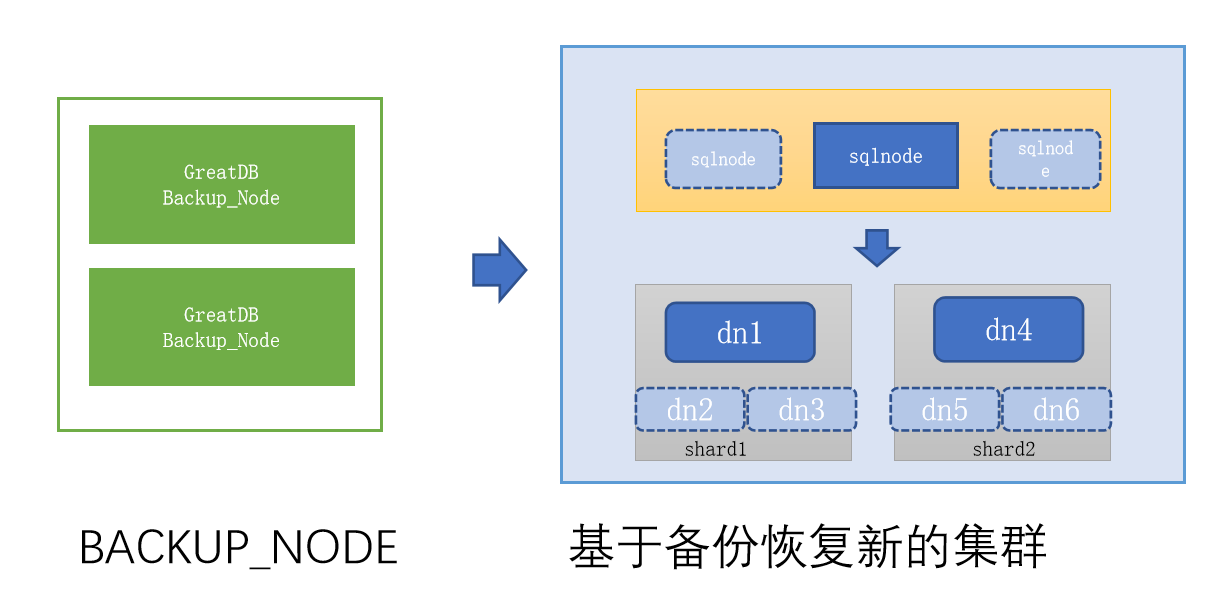
恢复实例步骤
分为 SqlNode 恢复和 Shard 中 DataNode 的恢复
SqlNode 和 DataNode 恢复过程相似,过程如下:
- 获取备份节点配置
将备份的 SqlNode/DataNode 数据 + sqlnodeXXX.cnf/datanodeXXX.cnf 参数拷贝到新恢复环境,并参考cnf参数创建必须的目录。 - 加载备份节点实例
使用同版本的 greatdb 包解压后,调用 greatdb_safe 启动实例加载 SqlNode/DataNode 备份的数据。 - 重置集群复制信息
使用 greatdb 用户登录, RESET REPLICA ALL 重置 paxos 组复制信息。 - 应用增量日志
全备目录中的 inc_binlog/sqlnode/datanode 的日志。
greatsqlbinlog sqlnode-bin.000001 |greatsql -ucluster_password -hnew_sqlnode_1 -P$port --init- command=“set greatdb_is_restore_binlog_applier=on” - 调用接口恢复集群结构信息
call mysql.greatdb_restore_sqlnode_from_backup;
call mysql.greatdb_restore_shard_from_backup
DataNode的恢复注意事项
- 恢复备份时,可按需缩减集群规模。
GreatDB 恢复时主要查看集群中 Shard 分片,恢复时 shard 组中的 datanode 从节点可以减少,但 Shard 组个数无法减少,每个 Shard 中都是集群的组成部分。 - 恢复集群时,如果考虑和原生产环境保持一致,则可以通过 greatdb_add_sqlnode,greatdb_add_datanode 方式灵活掌握集群的规模。
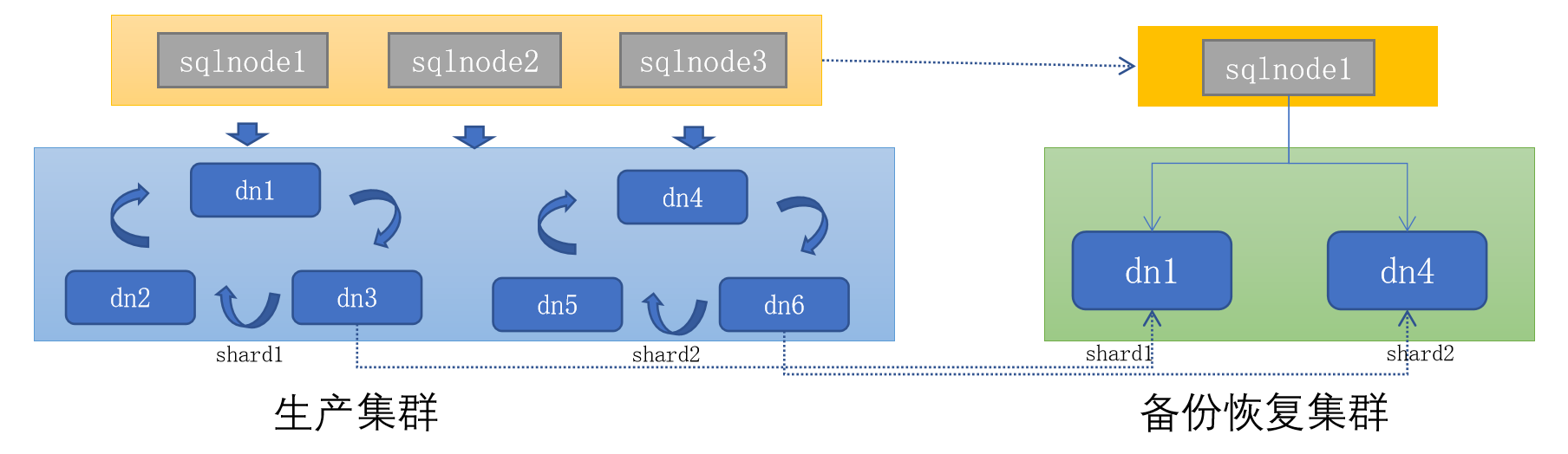
物理备份的恢复测试
由于资源有限,本次恢复测试使用源环境。
清理源环境,模拟故障
# 所有 SqlNode 和 DataNode kill 掉所有进程
ps -ef |grep greatdb |grep -v grep |awk '{print $2}' |xargs kill -9

# 所有 SqlNode 和 DataNode 清空数据目录
rm -rf /greatdb/dbdata/*/*/*
在备份节点恢复全量备份到 SqlNode 和 DataNode。
# 备份节点复制 SqlNode 数据
scp -rp /greatdb/dbbackup/full_backup_20220301-032132_176/sqlnode/* 192.168.0.81:/greatdb/dbdata/sqlnode3306/data/
scp -rp /greatdb/dbbackup/full_backup_20220301-032132_176/sqlnode/* 192.168.0.82:/greatdb/dbdata/sqlnode3306/data/
scp -rp /greatdb/dbbackup/full_backup_20220301-032132_176/sqlnode/* 192.168.0.83:/greatdb/dbdata/sqlnode3306/data/

# 备份节点复制 DataNode 数据
scp -rp /greatdb/dbbackup/full_backup_20220301-032132_176/shard-shard1/* 192.168.0.81:/greatdb/dbdata/datanode4406/data/
scp -rp /greatdb/dbbackup/full_backup_20220301-032132_176/shard-shard1/* 192.168.0.82:/greatdb/dbdata/datanode4406/data/
scp -rp /greatdb/dbbackup/full_backup_20220301-032132_176/shard-shard1/* 192.168.0.83:/greatdb/dbdata/datanode4406/data/

scp -rp /greatdb/dbbackup/full_backup_20220301-032132_176/shard-shard2/* 192.168.0.81:/greatdb/dbdata/datanode4407/data/
scp -rp /greatdb/dbbackup/full_backup_20220301-032132_176/shard-shard2/* 192.168.0.82:/greatdb/dbdata/datanode4407/data/
scp -rp /greatdb/dbbackup/full_backup_20220301-032132_176/shard-shard2/* 192.168.0.83:/greatdb/dbdata/datanode4407/data/

scp -rp /greatdb/dbbackup/full_backup_20220301-032132_176/shard-shard3/* 192.168.0.81:/greatdb/dbdata/datanode4408/data/
scp -rp /greatdb/dbbackup/full_backup_20220301-032132_176/shard-shard3/* 192.168.0.82:/greatdb/dbdata/datanode4408/data/
scp -rp /greatdb/dbbackup/full_backup_20220301-032132_176/shard-shard3/* 192.168.0.83:/greatdb/dbdata/datanode4408/data/
SqlNode 和 DataNode 处理恢复的文件
# 所有 SqlNode 和 DataNode 修改数据文件的权限
chown -R greatdb:greatdb /greatdb/dbdata/*/data/*

# 所有 SqlNode 和 DataNode 将 redo 文件和 undo 文件从 data 目录复制到 log 目录下
mv /greatdb/dbdata/sqlnode3306/data/{ib_logfile*,undo_*} /greatdb/dbdata/sqlnode3306/log
mv /greatdb/dbdata/datanode4406/data/{ib_logfile*,undo_*} /greatdb/dbdata/datanode4406/log
mv /greatdb/dbdata/datanode4407/data/{ib_logfile*,undo_*} /greatdb/dbdata/datanode4407/log
mv /greatdb/dbdata/datanode4408/data/{ib_logfile*,undo_*} /greatdb/dbdata/datanode4408/log
恢复所有 SqlNode 和 DataNode 的配置文件
# 恢复所有 SqlNode 和 DataNode 的配置文件,因为在原机恢复,此处省略,如果异机恢复,注意修改配置文件的IP等配置
[root@greatdb1 ~]# ll /greatdb/conf/
total 48
-rw-r--r--. 1 greatdb greatdb 8232 Feb 26  2021 datanode4406.cnf
-rw-r--r--. 1 greatdb greatdb 8232 Feb 26  2021 datanode4407.cnf
-rw-r--r--. 1 greatdb greatdb 8232 Feb 26  2021 datanode4408.cnf
-rw-r--r--. 1 greatdb greatdb 8209 Feb 26  2021 sqlnode3306.cnf
启动所有 SqlNode 和 DataNode
/greatdb/sh/sqlnode3306.sh start
/greatdb/sh/datanode4406.sh start
/greatdb/sh/datanode4407.sh start
/greatdb/sh/datanode4408.sh start
- 查询 SqlNode 和 DataNode 的状态
[root@greatdb1 ~]# greatsql -ugreatdb -pgreatdb -h192.168.0.81 -P3306
GreatDB Cluster[(none)]> select * from information_schema.GREATDB_SQLNODES;
GreatDB Cluster[(none)]> select * from information_schema.GREATDB_DATANODES;
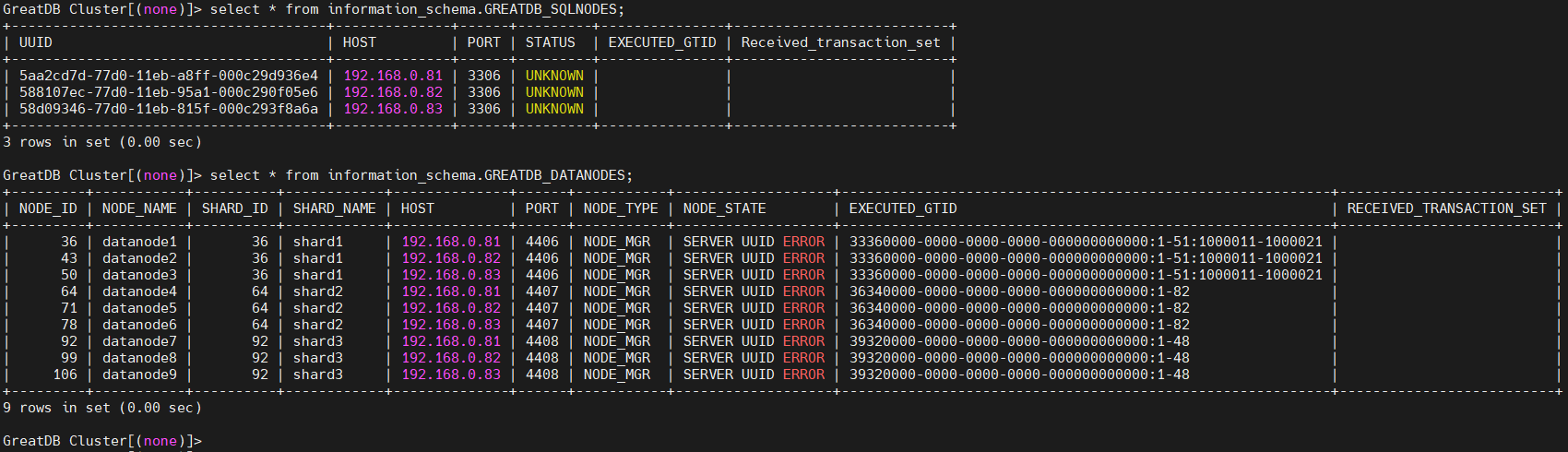
在备份节点恢复增量备份到 SqlNode 和 DataNode
需要在备份节点提前安装一个 MySQL 客户端,yum install -y mysql
# 在备份节点向 SqlNode 恢复全备里的增量 binlog
cd /greatdb/dbbackup/full_backup_20220301-032132_176/inc_binlog/sqlnode
greatsqlbinlog sqlnode-bin.000001 |mysql -ugreatdb -pgreatdb -h192.168.0.81 -P3306 --init-command="set greatdb_is_restore_binlog_applier=on"
greatsqlbinlog sqlnode-bin.000001 |mysql -ugreatdb -pgreatdb -h192.168.0.82 -P3306 --init-command="set greatdb_is_restore_binlog_applier=on"
greatsqlbinlog sqlnode-bin.000001 |mysql -ugreatdb -pgreatdb -h192.168.0.83 -P3306 --init-command="set greatdb_is_restore_binlog_applier=on"

# 在备份节点向 DataNode 恢复全备里的增量 binlog
cd /greatdb/dbbackup/full_backup_20220301-032132_176/inc_binlog/shard-shard1
greatsqlbinlog shard-shard1-bin.000001 |mysql -ugreatdb -pgreatdb -h192.168.0.81 -P4406
greatsqlbinlog shard-shard1-bin.000001 |mysql -ugreatdb -pgreatdb -h192.168.0.82 -P4406
greatsqlbinlog shard-shard1-bin.000001 |mysql -ugreatdb -pgreatdb -h192.168.0.83 -P4406

cd /greatdb/dbbackup/full_backup_20220301-032132_176/inc_binlog/shard-shard2
greatsqlbinlog shard-shard2-bin.000001 |mysql -ugreatdb -pgreatdb -h192.168.0.81 -P4407
greatsqlbinlog shard-shard2-bin.000001 |mysql -ugreatdb -pgreatdb -h192.168.0.82 -P4407
greatsqlbinlog shard-shard2-bin.000001 |mysql -ugreatdb -pgreatdb -h192.168.0.83 -P4407

cd /greatdb/dbbackup/full_backup_20220301-032132_176/inc_binlog/shard-shard3
greatsqlbinlog shard-shard3-bin.000001 |mysql -ugreatdb -pgreatdb -h192.168.0.81 -P4408
greatsqlbinlog shard-shard3-bin.000001 |mysql -ugreatdb -pgreatdb -h192.168.0.82 -P4408
greatsqlbinlog shard-shard3-bin.000001 |mysql -ugreatdb -pgreatdb -h192.168.0.83 -P4408

# 在备份节点向 SqlNode 恢复增量备份
cd /greatdb/dbbackup/inc_backup_20220301-050855_183/inc_binlog/sqlnode
# 这下面有两个文件 sqlnode-bin.000001 和 sqlnode-bin.000002
greatsqlbinlog sqlnode-bin.000001 |mysql -ugreatdb -pgreatdb -h192.168.0.81 -P3306 --init-command="set greatdb_is_restore_binlog_applier=on"
greatsqlbinlog sqlnode-bin.000001 |mysql -ugreatdb -pgreatdb -h192.168.0.82 -P3306 --init-command="set greatdb_is_restore_binlog_applier=on"
greatsqlbinlog sqlnode-bin.000001 |mysql -ugreatdb -pgreatdb -h192.168.0.83 -P3306 --init-command="set greatdb_is_restore_binlog_applier=on"
greatsqlbinlog sqlnode-bin.000002 |mysql -ugreatdb -pgreatdb -h192.168.0.81 -P3306 --init-command="set greatdb_is_restore_binlog_applier=on"
greatsqlbinlog sqlnode-bin.000002 |mysql -ugreatdb -pgreatdb -h192.168.0.82 -P3306 --init-command="set greatdb_is_restore_binlog_applier=on"
greatsqlbinlog sqlnode-bin.000002 |mysql -ugreatdb -pgreatdb -h192.168.0.83 -P3306 --init-command="set greatdb_is_restore_binlog_applier=on"

# 在备份节点向 DataNode 恢复增量备份
cd /greatdb/dbbackup/inc_backup_20220301-050855_183/inc_binlog/shard-shard1
greatsqlbinlog shard-shard1-bin.000001 |mysql -ugreatdb -pgreatdb -h192.168.0.81 -P4406
greatsqlbinlog shard-shard1-bin.000001 |mysql -ugreatdb -pgreatdb -h192.168.0.82 -P4406
greatsqlbinlog shard-shard1-bin.000001 |mysql -ugreatdb -pgreatdb -h192.168.0.83 -P4406

cd /greatdb/dbbackup/inc_backup_20220301-050855_183/inc_binlog/shard-shard2
greatsqlbinlog shard-shard2-bin.000001 |mysql -ugreatdb -pgreatdb -h192.168.0.81 -P4407
greatsqlbinlog shard-shard2-bin.000001 |mysql -ugreatdb -pgreatdb -h192.168.0.82 -P4407
greatsqlbinlog shard-shard2-bin.000001 |mysql -ugreatdb -pgreatdb -h192.168.0.83 -P4407

cd /greatdb/dbbackup/inc_backup_20220301-050855_183/inc_binlog/shard-shard3
greatsqlbinlog shard-shard3-bin.000001 |mysql -ugreatdb -pgreatdb -h192.168.0.81 -P4408
greatsqlbinlog shard-shard3-bin.000001 |mysql -ugreatdb -pgreatdb -h192.168.0.82 -P4408
greatsqlbinlog shard-shard3-bin.000001 |mysql -ugreatdb -pgreatdb -h192.168.0.83 -P4408
在 SqlNode 实例上调用接口恢复集群结构信息
[root@greatdb1 ~]# greatsql -ugreatdb -pgreatdb -h192.168.0.81 -P3306
# 恢复 SqlNode
GreatDB Cluster[(none)]> call mysql.greatdb_restore_sqlnode_from_backup;
Query OK, 1 row affected (3.94 sec)

GreatDB Cluster[(none)]> select * from information_schema.GREATDB_SQLNODES;
+--------------------------------------+--------------+------+--------+---------------+--------------------------+
| UUID                                 | HOST         | PORT | STATUS | EXECUTED_GTID | Received_transaction_set |
+--------------------------------------+--------------+------+--------+---------------+--------------------------+
| dc0e4eaf-7a26-11eb-8c6d-000c29d936e4 | 192.168.0.81 | 3306 | ONLINE |               |                          |
+--------------------------------------+--------------+------+--------+---------------+--------------------------+
1 row in set (0.00 sec)

# 恢复 DataNode
GreatDB Cluster[(none)]> call mysql.greatdb_restore_shard_from_backup('shard1','datanode1','192.168.0.81',4406,'NODE_MGR');
Query OK, 1 row affected (4.25 sec)

GreatDB Cluster[(none)]> call mysql.greatdb_restore_shard_from_backup('shard2','datanode4','192.168.0.81',4407,'NODE_MGR');
Query OK, 1 row affected (4.82 sec)

GreatDB Cluster[(none)]> call mysql.greatdb_restore_shard_from_backup('shard3','datanode7','192.168.0.81',4408,'NODE_MGR');
Query OK, 1 row affected (4.30 sec)

GreatDB Cluster[(none)]> select NODE_ID,NODE_NAME,SHARD_ID,SHARD_NAME,HOST,PORT,NODE_TYPE,NODE_STATE from information_schema.GREATDB_DATANODES;
+---------+-----------+----------+------------+--------------+------+-----------+--------------+
| NODE_ID | NODE_NAME | SHARD_ID | SHARD_NAME | HOST         | PORT | NODE_TYPE | NODE_STATE   |
+---------+-----------+----------+------------+--------------+------+-----------+--------------+
|     185 | datanode1 |       36 | shard1     | 192.168.0.81 | 4406 | NODE_MGR  | STATE_ACTIVE |
|     186 | datanode4 |       64 | shard2     | 192.168.0.81 | 4407 | NODE_MGR  | STATE_ACTIVE |
|     187 | datanode7 |       92 | shard3     | 192.168.0.81 | 4408 | NODE_MGR  | STATE_ACTIVE |
+---------+-----------+----------+------------+--------------+------+-----------+--------------+
3 rows in set (0.00 sec)
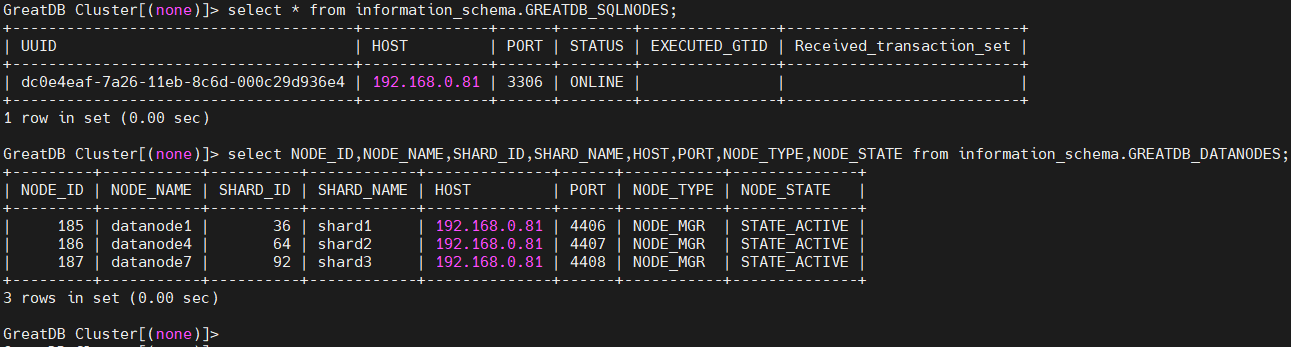
当前只恢复了一个 SqlNode,每个 Shard 中也只恢复一个 DataNode,如果还想加入其他 SqlNode 和 DataNode,参考如下。
添加其他 SqlNode 和 DataNode 实例
# 添加 SqlNode
GreatDB Cluster[(none)]> call mysql.greatdb_add_sqlnode('192.168.0.82',3306);
Query OK, 0 rows affected (2.46 sec)

GreatDB Cluster[(none)]> call mysql.greatdb_add_sqlnode('192.168.0.83',3306);
Query OK, 0 rows affected (3.25 sec)

GreatDB Cluster[(none)]> select * from information_schema.GREATDB_SQLNODES;
+--------------------------------------+--------------+------+--------+---------------+--------------------------+
| UUID                                 | HOST         | PORT | STATUS | EXECUTED_GTID | Received_transaction_set |
+--------------------------------------+--------------+------+--------+---------------+--------------------------+
| dc0e4eaf-7a26-11eb-8c6d-000c29d936e4 | 192.168.0.81 | 3306 | ONLINE |               |                          |
| de731ff9-7a26-11eb-935f-000c290f05e6 | 192.168.0.82 | 3306 | ONLINE |               |                          |
| e1f43eab-7a26-11eb-b240-000c293f8a6a | 192.168.0.83 | 3306 | ONLINE |               |                          |
+--------------------------------------+--------------+------+--------+---------------+--------------------------+
3 rows in set (0.01 sec)

# 添加 DataNode
GreatDB Cluster[(none)]> call mysql.greatdb_add_datanode('shard1','datanode2','192.168.0.82',4406,'NODE_MGR');
Query OK, 1 row affected (3.26 sec)

GreatDB Cluster[(none)]> call mysql.greatdb_add_datanode('shard1','datanode3','192.168.0.83',4406,'NODE_MGR');
Query OK, 1 row affected (3.01 sec)

GreatDB Cluster[(none)]> call mysql.greatdb_add_datanode('shard2','datanode5','192.168.0.82',4407,'NODE_MGR');
Query OK, 1 row affected (3.22 sec)

GreatDB Cluster[(none)]> call mysql.greatdb_add_datanode('shard2','datanode6','192.168.0.83',4407,'NODE_MGR');
Query OK, 1 row affected (2.52 sec)

GreatDB Cluster[(none)]> call mysql.greatdb_add_datanode('shard3','datanode8','192.168.0.82',4408,'NODE_MGR');
Query OK, 1 row affected (3.20 sec)

GreatDB Cluster[(none)]> call mysql.greatdb_add_datanode('shard3','datanode9','192.168.0.83',4408,'NODE_MGR');
Query OK, 1 row affected (3.05 sec)

GreatDB Cluster[(none)]> select NODE_ID,NODE_NAME,SHARD_ID,SHARD_NAME,HOST,PORT,NODE_TYPE,NODE_STATE from information_schema.GREATDB_DATANODES;
+---------+-----------+----------+------------+--------------+------+-----------+---------------+
| NODE_ID | NODE_NAME | SHARD_ID | SHARD_NAME | HOST         | PORT | NODE_TYPE | NODE_STATE    |
+---------+-----------+----------+------------+--------------+------+-----------+---------------+
|     185 | datanode1 |       36 | shard1     | 192.168.0.81 | 4406 | NODE_MGR  | STATE_ACTIVE  |
|     186 | datanode4 |       64 | shard2     | 192.168.0.81 | 4407 | NODE_MGR  | STATE_ACTIVE  |
|     187 | datanode7 |       92 | shard3     | 192.168.0.81 | 4408 | NODE_MGR  | STATE_ACTIVE  |
|     192 | datanode2 |       36 | shard1     | 192.168.0.82 | 4406 | NODE_MGR  | STATE_STANDBY |
|     193 | datanode3 |       36 | shard1     | 192.168.0.83 | 4406 | NODE_MGR  | STATE_STANDBY |
|     194 | datanode5 |       64 | shard2     | 192.168.0.82 | 4407 | NODE_MGR  | STATE_STANDBY |
|     195 | datanode6 |       64 | shard2     | 192.168.0.83 | 4407 | NODE_MGR  | STATE_STANDBY |
|     196 | datanode8 |       92 | shard3     | 192.168.0.82 | 4408 | NODE_MGR  | STATE_STANDBY |
|     197 | datanode9 |       92 | shard3     | 192.168.0.83 | 4408 | NODE_MGR  | STATE_STANDBY |
+---------+-----------+----------+------------+--------------+------+-----------+---------------+
9 rows in set (0.02 sec)
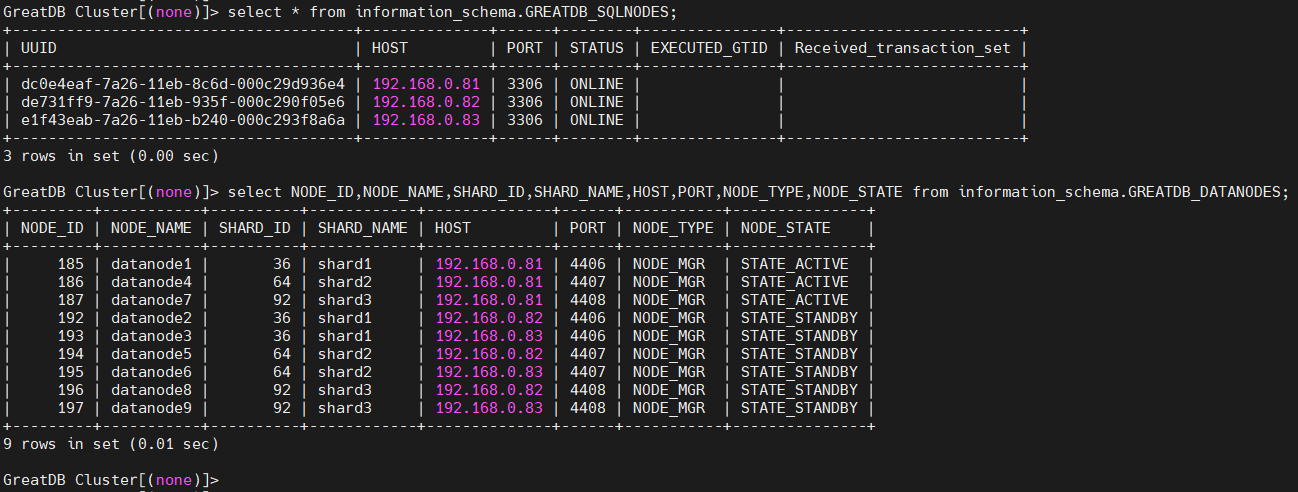
恢复完成,验证数据
[root@greatdb1 ~]# greatsql -ugreatdb -pgreatdb -h192.168.0.81 -P3306

GreatDB Cluster[(none)]> use test
Reading table information for completion of table and column names
You can turn off this feature to get a quicker startup with -A

Database changed
GreatDB Cluster[test]> show tables;
+----------------+
| Tables_in_test |
+----------------+
| t_global       |
| t_hash         |
| t_list         |
| t_normal       |
| t_range        |
+----------------+
5 rows in set (0.00 sec)

GreatDB Cluster[test]> select * from t_normal;
+----+------+
| c1 | c2   |
+----+------+
|  1 |    1 |
|  2 |    2 |
|  3 |    3 |
+----+------+
3 rows in set (0.00 sec)
GreatDB备份恢复兼容工具列表
GreatDB生态兼容备份工具:
- 逻辑备份工具
1、mysqldump
2、mysqlpump
3、mysqldumper
4、select into outfile - 物理备份工具:
1、xtrabackup
2、MySQL clone 插件 - 客户端程序
1、mysql
2、mysqlbinlog
来自 “ ITPUB博客 ” ,链接:https://blog.itpub.net/69946831/viewspace-3168261/ ,如需转载,请注明出处,否则将追究法律责任。

