查看 GreatDB 版本信息
- 查看客户端版本信息
[root@greatdb1 ~]# greatsqld --version
/greatdb/svr/greatdb-cluster-5.0.7-fbb08fbed60-Linux-glibc2.17-x86_64/bin/greatsqld  Ver 8.0.25-15-greatdbcluster5.0.7-GA for Linux on x86_64 (GreatDB Cluster, Release GA, Revision fbb08fbed60)
[root@greatdb1 ~]# greatdbd --version
/greatdb/svr/greatdb-cluster-5.0.7-fbb08fbed60-Linux-glibc2.17-x86_64/bin/greatsqld  Ver 8.0.25-15-greatdbcluster5.0.7-GA for Linux on x86_64 (GreatDB Cluster, Release GA, Revision fbb08fbed60)
- 查看当前集群版本号信息
[root@greatdb1 ~]# greatsql -ugreatdb -pgreatdb -h192.168.0.81 -P3306

GreatDB Cluster[(none)]> select version();
+----------------------------------+
| version()                        |
+----------------------------------+
| 8.0.25-15-greatdbcluster5.0.7-GA |
+----------------------------------+
1 row in set (0.00 sec)
- 通过全局变量查看版本
[root@greatdb1 ~]# greatsql -ugreatdb -pgreatdb -h192.168.0.81 -P3306

GreatDB Cluster[(none)]> show global variables like 'greatdb_version';
+-----------------+---------+
| Variable_name   | Value   |
+-----------------+---------+
| greatdb_version | 5.0.7.3 |
+-----------------+---------+
1 row in set (0.00 sec)
- 查看版本的详细信息
[root@greatdb1 ~]# greatsql -ugreatdb -pgreatdb -h192.168.0.81 -P3306

GreatDB Cluster[(none)]> \s
--------------
greatsql  Ver 8.0.25-15-greatdbcluster5.0.7-GA for Linux on x86_64 (GreatDB Cluster, Release GA, Revision fbb08fbed60)

Connection id:          389
Current database:
Current user:           greatdb@192.168.0.81
SSL:                    Cipher in use is ECDHE-RSA-AES128-GCM-SHA256
Current pager:          stdout
Using outfile:          ''
Using delimiter:        ;
Server version:         8.0.25-15-greatdbcluster5.0.7-GA GreatDB Cluster, Release GA, Revision fbb08fbed60
Protocol version:       10
Connection:             192.168.0.81 via TCP/IP
Server characterset:    utf8mb4
Db     characterset:    utf8mb4
Client characterset:    utf8mb4
Conn.  characterset:    utf8mb4
TCP port:               3306
Binary data as:         Hexadecimal
Uptime:                 29 min 43 sec

Threads: 14  Questions: 1562  Slow queries: 3  Opens: 406  Flush tables: 4  Open tables: 192  Queries per second avg: 0.876
--------------

GreatDB Cluster[(none)]>
GreatDB 集群节点启停方式
SqlNode 关闭方式
- 命令方式
[root@greatdb1 ~]# greatsqladmin -ugreatdb -pgreatdb -h192.168.0.81 -P3306 shutdown
或
[root@greatdb1 ~]# greatsql -ugreatdb -pgreatdb -h192.168.0.81 -P3306
GreatDB Cluster[(none)]> shutdown;
或
GreatDB Cluster[(none)]> CALL mysql.greatdb_stop_sqlnode_server('192.168.0.83', 3306);
Query OK, 1 row affected (0.04 sec)
- 脚本方式,推荐使用
[root@greatdb1 ~]# cat /greatdb/sh/sqlnode3306.sh
#!/bin/sh

MYSQL_BASE=/greatdb/svr/greatdb
MYSQL_CONF=/greatdb/conf/sqlnode3306.cnf
MYSQL_SOCKET=/greatdb/dbdata/sqlnode3306/data/greatdb.sock

export PATH=$MYSQL_BASE/bin:/usr/sbin:/usr/bin:/sbin:/bin
export LD_LIBRARY_PATH=$MYSQL_BASE/lib

if [ "$1" = "stop" ] ; then
    $MYSQL_BASE/bin/greatsqladmin --defaults-file=$MYSQL_CONF -uroot -p --socket=$MYSQL_SOCKET shutdown
elif [ "$1" = "restart" ]; then
    $MYSQL_BASE/bin/greatsqladmin --defaults-file=$MYSQL_CONF -uroot -p --socket=$MYSQL_SOCKET shutdown
    $MYSQL_BASE/bin/greatsqld_safe --defaults-file=$MYSQL_CONF &
elif [ "$1" = "start" ]; then
    $MYSQL_BASE/bin/greatsqld_safe --defaults-file=$MYSQL_CONF &
else
    echo "usage: $0 start|stop|restart"
fi
[root@greatdb1 ~]# /greatdb/sh/sqlnode3306.sh
usage: /greatdb/sh/sqlnode3306.sh start|stop|restart
[root@greatdb1 ~]# /greatdb/sh/sqlnode3306.sh stop
Enter password:

SqlNode 启动方式
- 命令方式
[root@greatdb1 ~]# greatsqld_safe --defaults-file=/greatdb/conf/sqlnode3306.cnf &
- 脚本方式,推荐使用
[root@greatdb1 ~]# /greatdb/sh/sqlnode3306.sh start

SqlNode 重启方式
- 命令方式
[root@greatdb1 ~]# greatsql -ugreatdb -pgreatdb -h192.168.0.81 -P3306
GreatDB Cluster[(none)]> restart;
或
GreatDB Cluster[(none)]> CALL mysql.greatdb_restart_sqlnode_server('192.168.0.83', 3306);
Query OK, 1 row affected (0.02 sec)
- 脚本方式,推荐使用
[root@greatdb1 ~]# /greatdb/sh/sqlnode3306.sh restart
Enter password:
DataNode 关闭方式
- 命令方式
[root@greatdb1 ~]# greatsqladmin -ugreatdb -pgreatdb -h192.168.0.81 -P4406 shutdown
或
[root@greatdb1 ~]# greatsql -ugreatdb -pgreatdb -h192.168.0.81 -P4406
GreatDB Cluster[(none)]> shutdown;
- sqlnode层调用程序接口关闭
[root@greatdb1 ~]# greatsql -ugreatdb -pgreatdb -h192.168.0.81 -P3306

GreatDB Cluster[(none)]> select NODE_ID,NODE_NAME,SHARD_ID,SHARD_NAME,HOST,PORT,NODE_STATE from information_schema.GREATDB_DATANODES;
+---------+-----------+----------+------------+--------------+------+---------------+
| NODE_ID | NODE_NAME | SHARD_ID | SHARD_NAME | HOST         | PORT | NODE_STATE    |
+---------+-----------+----------+------------+--------------+------+---------------+
|      36 | datanode1 |       36 | shard1     | 192.168.0.81 | 4406 | STATE_STANDBY |
|      43 | datanode2 |       36 | shard1     | 192.168.0.82 | 4406 | STATE_ACTIVE  |
|      50 | datanode3 |       36 | shard1     | 192.168.0.83 | 4406 | STATE_STANDBY |
|      64 | datanode4 |       64 | shard2     | 192.168.0.81 | 4407 | STATE_ACTIVE  |
|      71 | datanode5 |       64 | shard2     | 192.168.0.82 | 4407 | STATE_STANDBY |
|      78 | datanode6 |       64 | shard2     | 192.168.0.83 | 4407 | STATE_STANDBY |
|      92 | datanode7 |       92 | shard3     | 192.168.0.81 | 4408 | STATE_ACTIVE  |
|      99 | datanode8 |       92 | shard3     | 192.168.0.82 | 4408 | STATE_STANDBY |
|     106 | datanode9 |       92 | shard3     | 192.168.0.83 | 4408 | STATE_STANDBY |
+---------+-----------+----------+------------+--------------+------+---------------+
9 rows in set (0.01 sec)

GreatDB Cluster[(none)]> call mysql.greatdb_stop_datanode_server('datanode1');
Query OK, 1 row affected (0.02 sec)
- 脚本方式,推荐使用
[root@greatdb1 ~]# cat /greatdb/sh/datanode4406.sh
#!/bin/sh

MYSQL_BASE=/greatdb/svr/greatdb
MYSQL_CONF=/greatdb/conf/datanode4406.cnf
MYSQL_SOCKET=/greatdb/dbdata/datanode4406/data/greatdb.sock

export PATH=$MYSQL_BASE/bin:/usr/sbin:/usr/bin:/sbin:/bin
export LD_LIBRARY_PATH=$MYSQL_BASE/lib

if [ "$1" = "stop" ] ; then
    $MYSQL_BASE/bin/greatsqladmin --defaults-file=$MYSQL_CONF -uroot -p --socket=$MYSQL_SOCKET shutdown
elif [ "$1" = "restart" ]; then
    $MYSQL_BASE/bin/greatsqladmin --defaults-file=$MYSQL_CONF -uroot -p --socket=$MYSQL_SOCKET shutdown
    $MYSQL_BASE/bin/greatdbd_safe --defaults-file=$MYSQL_CONF &
elif [ "$1" = "start" ]; then
    $MYSQL_BASE/bin/greatdbd_safe --defaults-file=$MYSQL_CONF &
else
    echo "usage: $0 start|stop|restart"
fi
[root@greatdb1 ~]# /greatdb/sh/datanode4406.sh
usage: /greatdb/sh/datanode4406.sh start|stop|restart
[root@greatdb1 ~]# /greatdb/sh/datanode4406.sh stop
Enter password:

DataNode 启动方式
- 命令方式
[root@greatdb1 ~]# greatsqld_safe --defaults-file=/greatdb/conf/datanode4406.cnf &
- 脚本方式,推荐使用
[root@greatdb1 ~]# /greatdb/sh/datanode4406.sh start

DataNode 重启以后状态由原来的 ACTIVE 变为 STANDBY 。
DataNode 重启方式
- 命令方式
[root@greatdb1 ~]# greatsql -ugreatdb -pgreatdb -h192.168.0.81 -P4406
GreatDB Cluster[(none)]> restart;
- sqlnode层调用程序接口关闭
[root@greatdb1 ~]# greatsql -ugreatdb -pgreatdb -h192.168.0.81 -P3306

GreatDB Cluster[(none)]> select NODE_ID,NODE_NAME,SHARD_ID,SHARD_NAME,HOST,PORT,NODE_STATE from information_schema.GREATDB_DATANODES;
+---------+-----------+----------+------------+--------------+------+---------------+
| NODE_ID | NODE_NAME | SHARD_ID | SHARD_NAME | HOST         | PORT | NODE_STATE    |
+---------+-----------+----------+------------+--------------+------+---------------+
|      36 | datanode1 |       36 | shard1     | 192.168.0.81 | 4406 | STATE_STANDBY |
|      43 | datanode2 |       36 | shard1     | 192.168.0.82 | 4406 | STATE_ACTIVE  |
|      50 | datanode3 |       36 | shard1     | 192.168.0.83 | 4406 | STATE_STANDBY |
|      64 | datanode4 |       64 | shard2     | 192.168.0.81 | 4407 | STATE_ACTIVE  |
|      71 | datanode5 |       64 | shard2     | 192.168.0.82 | 4407 | STATE_STANDBY |
|      78 | datanode6 |       64 | shard2     | 192.168.0.83 | 4407 | STATE_STANDBY |
|      92 | datanode7 |       92 | shard3     | 192.168.0.81 | 4408 | STATE_ACTIVE  |
|      99 | datanode8 |       92 | shard3     | 192.168.0.82 | 4408 | STATE_STANDBY |
|     106 | datanode9 |       92 | shard3     | 192.168.0.83 | 4408 | STATE_STANDBY |
+---------+-----------+----------+------------+--------------+------+---------------+
9 rows in set (0.01 sec)

GreatDB Cluster[(none)]> call mysql.greatdb_restart_datanode_server('datanode1');
Query OK, 1 row affected (0.02 sec)
- 脚本方式,推荐使用
[root@greatdb1 ~]# /greatdb/sh/datanode4406.sh restart
Enter password:
GreatDB 集群启停某个节点的流程
启停的节点是 SqlNode
- 多个 SqlNode 都可以对外提供读写服务,如果 SqlNode 上层有负载均衡软件,例如F5,需要先从负载均衡软件上踢出要关闭的节点,防止新连接。
- 检查要关闭的节点是否有连接
[root@greatdb1 ~]# greatsql -ugreatdb -pgreatdb -h192.168.0.81 -P3306
GreatDB Cluster[(none)]> show processlist;

- 确认业务没有连接后,执行 shutdown 操作。
启停的节点是 DataNode
每个 SHARD 是一套主从复制,STATE_ACTIVE 状态的是主节点,可以对 SqlNode 提供读写服务,STATE_STANDBY 状态的为从节点,只提供只读服务。
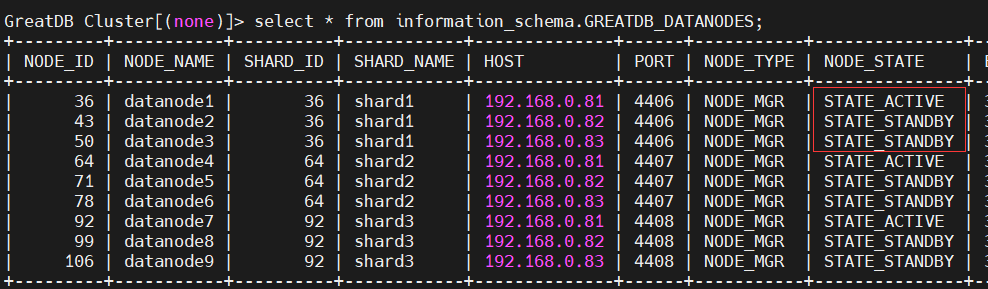
- 如果停的 DataNode 是从节点,可以在业务低峰期正常 shutdown。
- 如果停的 DataNode 是主节点,需要人工手动做主从角色切换后再正常 shutdown。
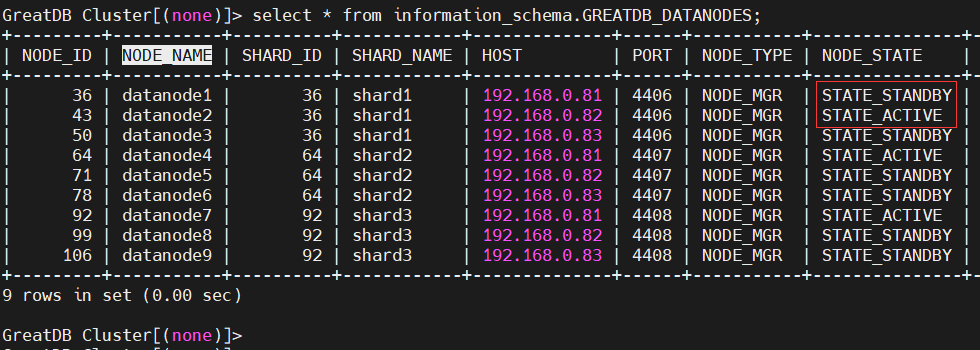
# 人工手动做主从角色切换,例如将 shard1 的主节点切换到 datanode2 上
[root@greatdb1 ~]# greatsql -ugreatdb -pgreatdb -h192.168.0.81 -P3306
# 传递两个参数,一个是要做主从角色切换的 SHARD_NAME,另一个是要将主节点切换到哪个 NODE_NAME 上。
GreatDB Cluster[(none)]> call mysql.greatdb_change_shard_primary_node('shard1','datanode2');
Query OK, 1 row affected (1.08 sec)
GreatDB 集群所有节点整体启停
停止 GreatDB 集群所有节点
- 停止 SqlNode 上层有负载均衡软件,防止新连接。
- 停止 所有 SqlNode
[root@greatdb1 ~]# /greatdb/sh/sqlnode3306.sh stop
[root@greatdb2 ~]# /greatdb/sh/sqlnode3306.sh stop
[root@greatdb3 ~]# /greatdb/sh/sqlnode3306.sh stop
- 停止 所有 DataNode
[root@greatdb1 ~]# /greatdb/sh/datanode4406.sh stop
[root@greatdb1 ~]# /greatdb/sh/datanode4407.sh stop
[root@greatdb1 ~]# /greatdb/sh/datanode4408.sh stop
[root@greatdb2 ~]# /greatdb/sh/datanode4406.sh stop
[root@greatdb2 ~]# /greatdb/sh/datanode4407.sh stop
[root@greatdb2 ~]# /greatdb/sh/datanode4408.sh stop
[root@greatdb3 ~]# /greatdb/sh/datanode4406.sh stop
[root@greatdb3 ~]# /greatdb/sh/datanode4407.sh stop
[root@greatdb3 ~]# /greatdb/sh/datanode4408.sh stop
启动 GreatDB 集群所有节点
- 先启动所有 DataNode
[root@greatdb1 ~]# /greatdb/sh/datanode4406.sh start
[root@greatdb1 ~]# /greatdb/sh/datanode4407.sh start
[root@greatdb1 ~]# /greatdb/sh/datanode4408.sh start
[root@greatdb2 ~]# /greatdb/sh/datanode4406.sh start
[root@greatdb2 ~]# /greatdb/sh/datanode4407.sh start
[root@greatdb2 ~]# /greatdb/sh/datanode4408.sh start
[root@greatdb3 ~]# /greatdb/sh/datanode4406.sh start
[root@greatdb3 ~]# /greatdb/sh/datanode4407.sh start
[root@greatdb3 ~]# /greatdb/sh/datanode4408.sh start
- 再启动所有 SqlNode
[root@greatdb1 ~]# /greatdb/sh/sqlnode3306.sh start
[root@greatdb2 ~]# /greatdb/sh/sqlnode3306.sh start
[root@greatdb3 ~]# /greatdb/sh/sqlnode3306.sh start
- 把所有实例启动起来后,登陆任意 SqlNode 执行以下存储过程
[root@greatdb1 ~]# greatsql -ugreatdb -pgreatdb -h192.168.0.81 -P3306
GreatDB Cluster[(none)]> call mysql.greatdb_restart_cluster;
Query OK, 1 row affected (11.15 sec)
GreatDB 集群目录结构与日志文件介绍
GreatDB 集群目录结构
- GreatDB集群初始化完成后,数据目录分布如下
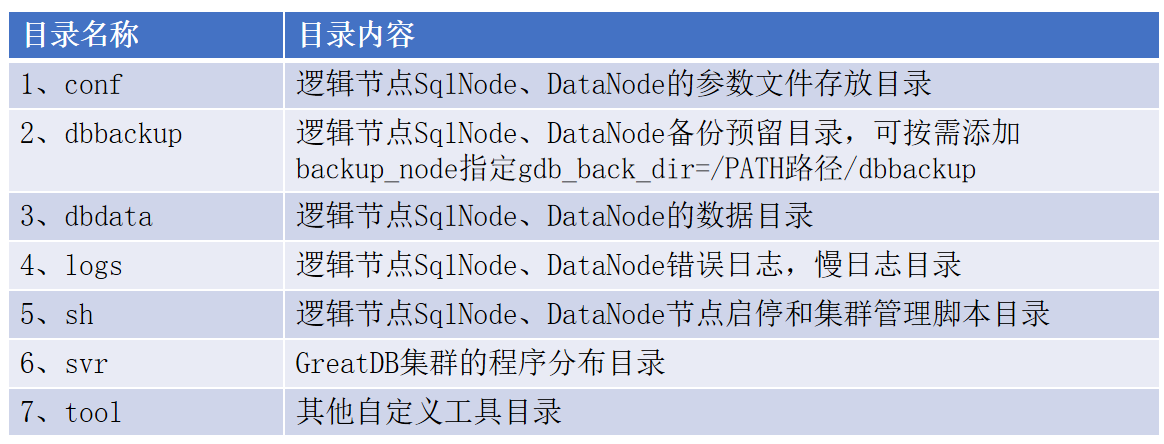
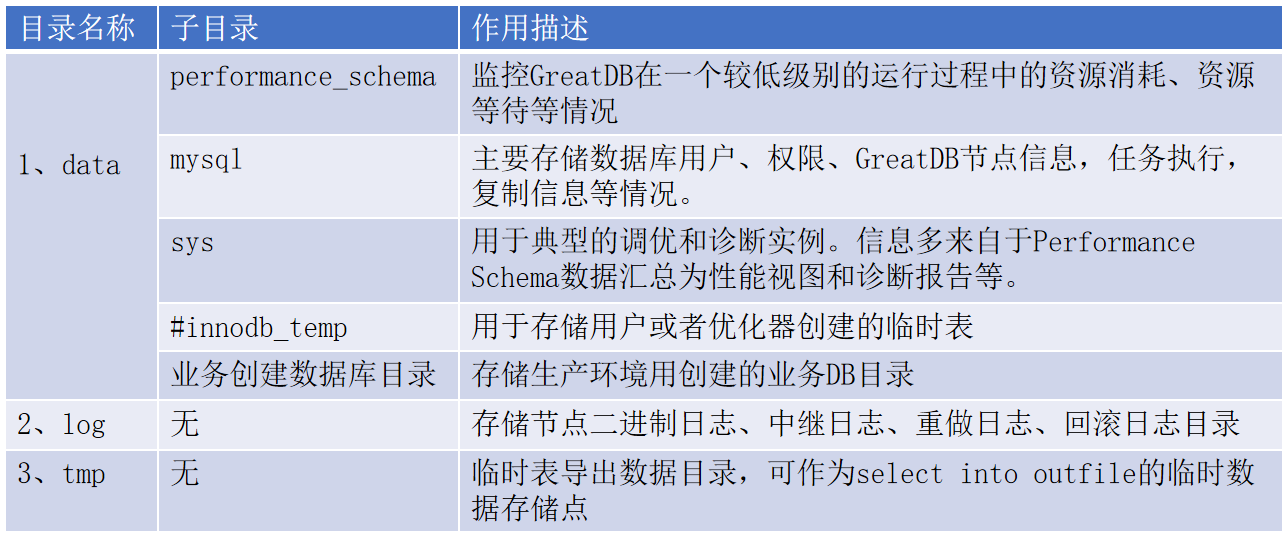
- 各个节点数据中到3个子目录
GreatDB 数据库文件介绍
- GreatDB 实例数据文件列表
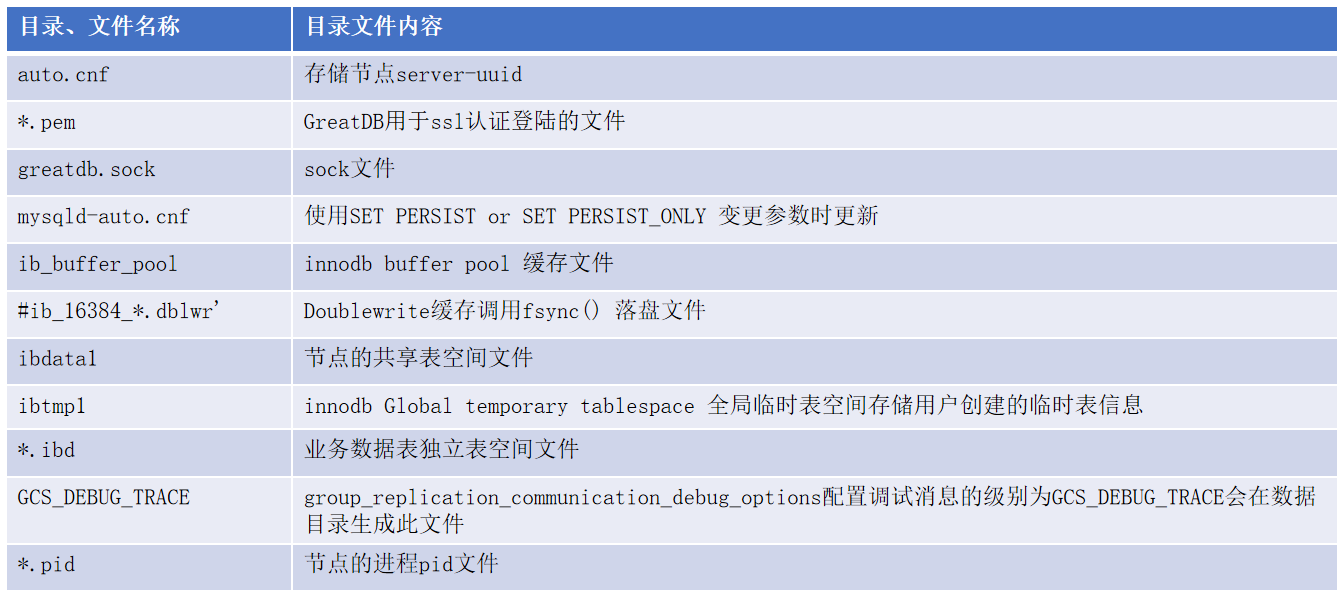
GreatDB 实例之间进行数据同步的数据日志
- GreatDB 数据日志类型文件介绍
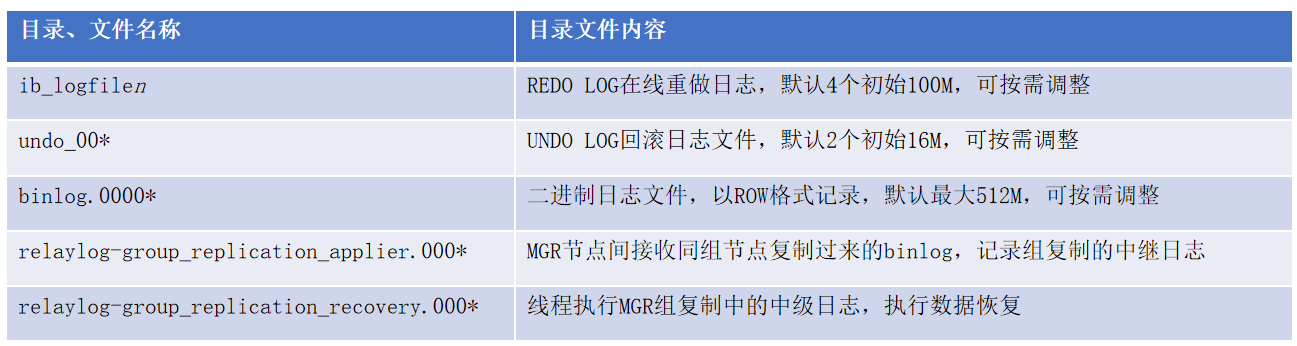
[root@greatdb1 log]# pwd
/greatdb/dbdata/datanode4406/log
[root@greatdb1 log]# ll
total 4227132
# BINLOG
-rw-r-----  1 greatdb greatdb        232 Feb 27 01:38 binlog.000011
-rw-r-----  1 greatdb greatdb        211 Feb 27 01:38 binlog.000012
-rw-r-----  1 greatdb greatdb        894 Feb 27 01:42 binlog.000013
-rw-r-----  1 greatdb greatdb        141 Feb 27 01:40 binlog.index
# REDO LOG
-rw-r-----. 1 greatdb greatdb 1073741824 Feb 27 01:44 ib_logfile0
-rw-r-----. 1 greatdb greatdb 1073741824 Feb 26  2021 ib_logfile1
-rw-r-----. 1 greatdb greatdb 1073741824 Feb 26  2021 ib_logfile2
-rw-r-----. 1 greatdb greatdb 1073741824 Feb 26  2021 ib_logfile3
# RELAY LOG
-rw-r-----  1 greatdb greatdb        220 Feb 27 01:40 relaylog-group_replication_applier.000021
-rw-r-----  1 greatdb greatdb        341 Feb 27 01:42 relaylog-group_replication_applier.000022
-rw-r-----  1 greatdb greatdb        967 Feb 27 01:42 relaylog-group_replication_applier.000023
-rw-r-----  1 greatdb greatdb        225 Feb 27 01:42 relaylog-group_replication_applier.index
-rw-r-----. 1 greatdb greatdb        221 Feb 26  2021 relaylog-group_replication_recovery.000001
-rw-r-----. 1 greatdb greatdb        342 Feb 26  2021 relaylog-group_replication_recovery.000002
-rw-r-----. 1 greatdb greatdb        292 Feb 26  2021 relaylog-group_replication_recovery.000003
-rw-r-----  1 greatdb greatdb        221 Feb 27 01:38 relaylog-group_replication_recovery.000004
-rw-r-----  1 greatdb greatdb        171 Feb 27 01:38 relaylog-group_replication_recovery.000005
-rw-r-----  1 greatdb greatdb        152 Feb 27 01:40 relaylog-group_replication_recovery.000006
-rw-r-----  1 greatdb greatdb        456 Feb 27 01:40 relaylog-group_replication_recovery.index
# UNDO LOG
-rw-r-----. 1 greatdb greatdb   16777216 Feb 27 01:44 undo_001
-rw-r-----. 1 greatdb greatdb   16777216 Feb 27 01:44 undo_002
GreatDB 集群日志文件介绍
集群故障排查的ERROR日志
[root@greatdb1 logs]# pwd
/greatdb/logs
[root@greatdb1 logs]# ls -lrt error*
-rw-r-----. 1 greatdb greatdb 246739 Feb 26  2021 error3306.log
-rw-r-----. 1 greatdb greatdb  26872 Feb 26  2021 error4408.log
-rw-r-----. 1 greatdb greatdb 280950 Feb 26  2021 error4406.log
-rw-r-----. 1 greatdb greatdb  41437 Feb 26  2021 error4407.log
SQL捕获的慢日志 SLOW LOG
[root@greatdb1 logs]# pwd
/greatdb/logs
[root@greatdb1 logs]# ls -lrt slow*
-rw-r-----. 1 greatdb greatdb 3430 Feb 27 01:40 slow4406.log
-rw-r-----. 1 greatdb greatdb 1581 Feb 27 01:40 slow4407.log
-rw-r-----. 1 greatdb greatdb 1317 Feb 27 01:40 slow4408.log
-rw-r-----. 1 greatdb greatdb 4445 Feb 27 01:42 slow3306.log
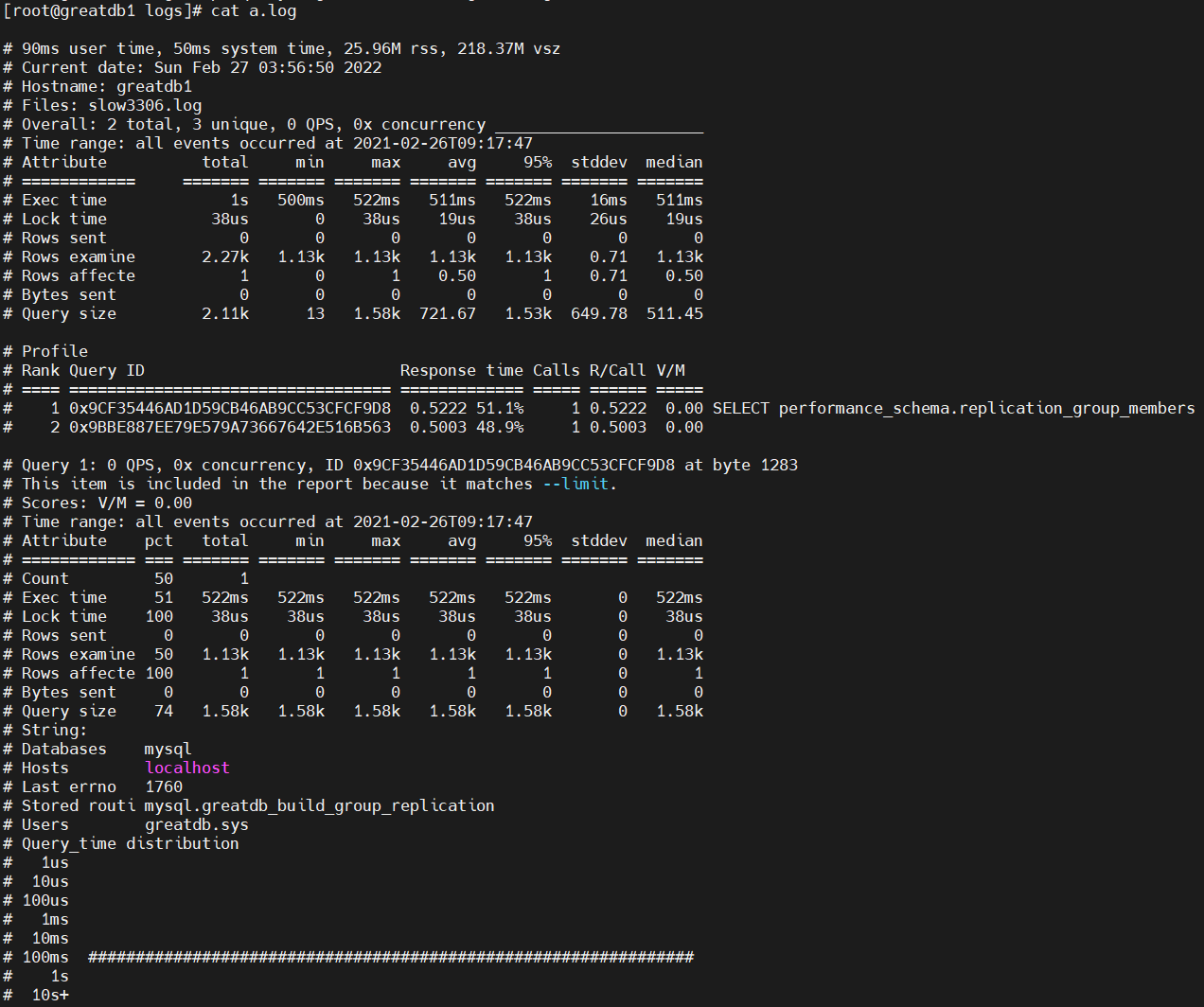
- pt-query-digest 工具可以用来分析慢日志,将慢日志格式化后更易于阅读
[root@greatdb1 logs]# yum -y groupinstall perl*
[root@greatdb1 logs]# pt-query-digest slow3306.log > a.log
[root@greatdb1 logs]# cat a.log
general log 记录实例中所有执行的SQL
general log 默认是关闭的,可以设置 general_log 参数开启
[root@greatdb1 ~]# greatsql -ugreatdb -pgreatdb -h192.168.0.81 -P3306
GreatDB Cluster[(none)]> show variables like 'general%';
+------------------+-------------------------------+
| Variable_name    | Value                         |
+------------------+-------------------------------+
| general_log      | OFF                           |
| general_log_file | /greatdb/logs/general3306.log |
+------------------+-------------------------------+
2 rows in set (0.06 sec)

# 配置参数开启 general_log
GreatDB Cluster[(none)]> set global general_log=ON;
Query OK,  rows affected (0.00 sec)

# 配置参数关闭 general_log
GreatDB Cluster[(none)]> set global general_log=ON;
Query OK,  rows affected (0.00 sec)
GreatDB 支持的表类型
GreatDB 引入新的 GreatDB 存储引擎,支持多种表分布策略。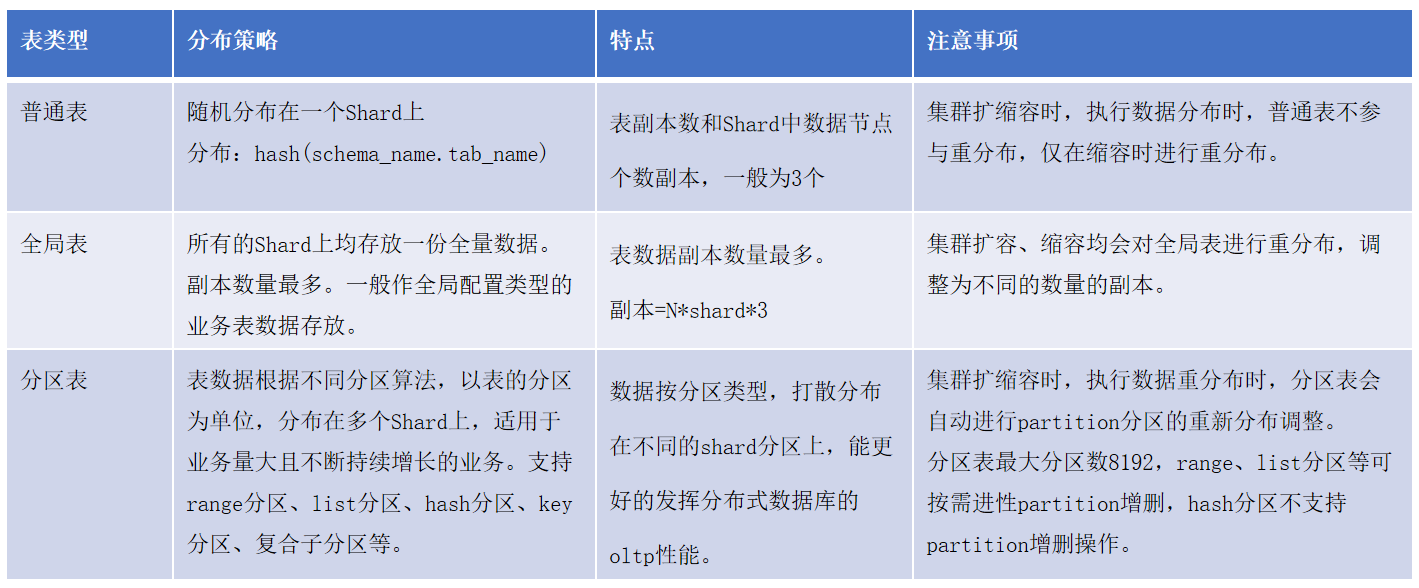
Normal表:普通表,comment “disttype=normal”
- 普通表适用于数据量中小规模的配置表
- 普通表创建命令,通过在 comment 中加入 disttype=normal(默认) 进行指定
[root@greatdb1 ~]# greatsql -ugreatdb -pgreatdb -h192.168.0.81 -P3306
GreatDB Cluster> create table test.t_normal(c1 int primary key, c2 int) engine=greatdb comment "disttype=normal";
- 只存储在数据节点层中的一个Shard上,后端shard表名字和sqlnode名字保持一致。
GreatDB Cluster[(none)]> select * from information_schema.greatdb_table_distribution;
+-------------+------------+----------------+-----------------+------------+----------------+--------------+
| SCHEMA_NAME | TABLE_NAME | BACKEND_ENGINE | DISTRIBUTE_MODE | SHARD_NAME | PARTITION_NAME | PARTITION_ID |
+-------------+------------+----------------+-----------------+------------+----------------+--------------+
| test        | t_normal   | InnoDB         | NORMAL          | shard2     |                |            0 |
+-------------+------------+----------------+-----------------+------------+----------------+--------------+
1 row in set (0.02 sec)
information_schema.greatdb_table_distribution 可以查询表在 Shard 上的分布情况,可以发现 t_normal 表只分布在 shard2 上。
- 普通表分布所在shard计算方法:
计算公式:SHARD_M=HASH(DATABASE_NAME+TABLE_NAME)%N(N为shard个数)
1、在进行表创建时,对表名字以及表所在的库名整体做HASH运算,结果记为H1.
2、针对H1%N取模求余操作,得出余数为M,即普通表分布对应shard号。
3、表创建后,其分布策略不会随着shard数量的增加或减少而发生变更。除非用户主动对表进行手动迁移重分布,迁移到指定的shard中。
Global表:全局表(广播表),comment disttype=global"
- 全局表适用于数据基本不变的属性表或者维度表
- 全局表创建命令,通过在 comment 中加入 disttype=global 来指定
GreatDB Cluster> create table test.t_global(c1 int primary key, c2 int) engine=greatdb comment "disttype=global";
- 全局表存储在后端所有的 Shard 上,每个 Shard 上的数据完全一致,经常与 partition 表进行关联查询。
GreatDB Cluster[(none)]> select * from information_schema.greatdb_table_distribution where TABLE_NAME='t_global';
+-------------+------------+----------------+-----------------+------------+----------------+--------------+
| SCHEMA_NAME | TABLE_NAME | BACKEND_ENGINE | DISTRIBUTE_MODE | SHARD_NAME | PARTITION_NAME | PARTITION_ID |
+-------------+------------+----------------+-----------------+------------+----------------+--------------+
| test        | t_global   | InnoDB         | GLOBAL          | shard1     |                |            0 |
| test        | t_global   | InnoDB         | GLOBAL          | shard2     |                |            0 |
| test        | t_global   | InnoDB         | GLOBAL          | shard3     |                |            0 |
+-------------+------------+----------------+-----------------+------------+----------------+--------------+
3 rows in set (0.01 sec)
由此可见,Global表被分到了所有的 Shard 上,下面向Global表插入数据,观察数据在 Shard 上的存储情况
GreatDB Cluster[(none)]> insert into test.t_global values (1,1),(2,2),(3,3);
Query OK, 3 rows affected (0.06 sec)
Records: 3  Duplicates: 0  Warnings: 0

GreatDB Cluster[(none)]> select * from test.t_global;
+----+------+
| c1 | c2   |
+----+------+
|  1 |    1 |
|  2 |    2 |
|  3 |    3 |
+----+------+
3 rows in set (0.00 sec)
连接到 DataNode 节点查看表的数据
[root@greatdb1 ~]# greatsql -ugreatdb -pgreatdb -h192.168.0.81 -P4406 -e 'select * from test.t_global'
greatsql: [Warning] Using a password on the command line interface can be insecure.
+-------------+----+------+
| _hidden_pk_ | c1 | c2   |
+-------------+----+------+
|           1 |  1 |    1 |
|           8 |  2 |    2 |
|          15 |  3 |    3 |
+-------------+----+------+
[root@greatdb1 ~]# greatsql -ugreatdb -pgreatdb -h192.168.0.81 -P4407 -e 'select * from test.t_global'
greatsql: [Warning] Using a password on the command line interface can be insecure.
+-------------+----+------+
| _hidden_pk_ | c1 | c2   |
+-------------+----+------+
|           1 |  1 |    1 |
|           8 |  2 |    2 |
|          15 |  3 |    3 |
+-------------+----+------+
[root@greatdb1 ~]# greatsql -ugreatdb -pgreatdb -h192.168.0.81 -P4408 -e 'select * from test.t_global'
greatsql: [Warning] Using a password on the command line interface can be insecure.
+-------------+----+------+
| _hidden_pk_ | c1 | c2   |
+-------------+----+------+
|           1 |  1 |    1 |
|           8 |  2 |    2 |
|          15 |  3 |    3 |
+-------------+----+------+
由此可见,Global表在每个 Shard 上的数据完全一致。
- 全局表分布所在 shard 计算方法
全局表在后端所有shard中均存储一份完整数据,后端shard中表名字和sqlnode名字保持一致。
TABLE副本数量 = N*(每个shard内DataNode个数)
1、建表时,集群结构中-共有N个shard分片。
2、全局表会分布到N个shard中,所有shard的DataNode节点均存放一份完整数据。
3、需要注意的是,当添加新的shard后,新shard中不会存储全局表数据,需要用户执行数据重分布后,全局表会自动分布到新shard。
Partition表:分区表(分布式表), partition by
- 分区表适用数据量大,频繁操作的业务表
- GreatDB 支持的分区表类型有 hash、list、range、key、复合分区等,优点是数据存储量大,查询快,查询范围精准,方便分区数据增删,以及表的分片扩展管理。
- 分区表创建命令
-- hash分区:
create table test.t_hash(c1 int primary key, c2 int) partition by hash(c1) partitions 8;

-- range分区:
create table test.t_range(c1 int primary key, c2 int) partition by range(c1)
(partition p0 values less than (10),
partition p1 values less than (100),
partition p4 values less than maxvalue);

-- list分区:
create table test.t_list(c1 int primary key, c2 varchar(20)) partition by list(c1)
(partition beijing values in (1,2,3),
partition shanghai values in (4,5,6));
- 数据水平分散在存储层的多个 Shard 中
GreatDB Cluster[(none)]> select * from information_schema.greatdb_table_distribution where TABLE_NAME='t_hash';
+-------------+------------+----------------+-----------------+------------+----------------+--------------+
| SCHEMA_NAME | TABLE_NAME | BACKEND_ENGINE | DISTRIBUTE_MODE | SHARD_NAME | PARTITION_NAME | PARTITION_ID |
+-------------+------------+----------------+-----------------+------------+----------------+--------------+
| test        | t_hash     | InnoDB         | PARTITION       | shard1     | p0             |            0 |
| test        | t_hash     | InnoDB         | PARTITION       | shard1     | p4             |            4 |
| test        | t_hash     | InnoDB         | PARTITION       | shard2     | p1             |            1 |
| test        | t_hash     | InnoDB         | PARTITION       | shard2     | p3             |            3 |
| test        | t_hash     | InnoDB         | PARTITION       | shard2     | p5             |            5 |
| test        | t_hash     | InnoDB         | PARTITION       | shard2     | p7             |            7 |
| test        | t_hash     | InnoDB         | PARTITION       | shard3     | p2             |            2 |
| test        | t_hash     | InnoDB         | PARTITION       | shard3     | p6             |            6 |
+-------------+------------+----------------+-----------------+------------+----------------+--------------+
8 rows in set (0.01 sec)
由此可见,分区被分散在存储层的多个 Shard 中,插入数据,查看 Shard 中的数据存储情况
GreatDB Cluster[(none)]> insert into test.t_hash values (1,1),(2,2),(3,3),(4,4),(5,5),(6,6),(7,7),(8,8);
Query OK, 8 rows affected (0.02 sec)
Records: 8  Duplicates: 0  Warnings: 0

GreatDB Cluster[(none)]> select * from test.t_hash partition (p0);
+----+------+
| c1 | c2   |
+----+------+
|  8 |    8 |
+----+------+
1 row in set (0.00 sec)

GreatDB Cluster[(none)]> select * from test.t_hash partition (p4);
+----+------+
| c1 | c2   |
+----+------+
|  4 |    4 |
+----+------+
1 row in set (0.00 sec)
登录到 DataNode 查看表的存储情况
# 分区表的 p0 和 p4 分区在 shard1 上,登录到 shard1 所在的 DataNode 上
[root@greatdb1 ~]# greatsql -ugreatdb -pgreatdb -h192.168.0.81 -P4406
GreatDB Cluster[(none)]> use test
Reading table information for completion of table and column names
You can turn off this feature to get a quicker startup with -A

Database changed
GreatDB Cluster[test]> show tables like 't_hash%';
+--------------------------+
| Tables_in_test (t_hash%) |
+--------------------------+
| t_hash#p#0               |
| t_hash#p#4               |
+--------------------------+
2 rows in set (0.00 sec)

GreatDB Cluster[test]> select * from `t_hash#p#0`;
+-------------+----+------+
| _hidden_pk_ | c1 | c2   |
+-------------+----+------+
|           1 |  8 |    8 |
+-------------+----+------+
1 row in set (0.00 sec)

GreatDB Cluster[test]> select * from `t_hash#p#4`;
+-------------+----+------+
| _hidden_pk_ | c1 | c2   |
+-------------+----+------+
|           1 |  4 |    4 |
+-------------+----+------+
1 row in set (0.00 sec)
- 分区表将表数据按照不同算法分布在不同shard中
分区表计算节点和后端shard中存储表名不同,前端创建test分区表,后端shard一般显示为test.pt1#0 , test.pt1#1形式。
1、集群共有N个shard。
2、针对shard做2的幂次方V值。
3、则每个表的Partition对应的分片号。当表分区数小于或等于shard个数时,按p0-pn顺序分布在shard中。当分区数大于shard个数时采用shard分布编号=N% (2^n幂次方值)。
注意:如果分区表的分区键使用唯一性约束,需考虑NULL值的影响,可能导致NULL值数据重复的分布在同一shard,引起数据分布不均情况。
GreatDB 数据重分布
- 数据重分布使用场景
1、数据重分布在新扩展或者缩容shard后,进行数据重分布。
2、在业务热点表数据集中访问,造成节点压力较大时手动迁移重分布。 - 重分布的2种方式
1、自动重分布:
CALL mysql.greatdb_auto_migrate_tables_after_upscale;
2、手动重分布:
CALLmysql.greatdb_migrate_table(‘db_name’, ‘table_name’, part_id, ‘shard_name’ ); - 数据重分布规则
1、扩容shard迁移重分布时,不迁移普通表。
2、扩容、缩容操作针对全局数据的分片路由会有更新。
3、迁移执行过程可以是指定单表、单个表分区进行的。 - 自动重分布迁移过程
1、create table 创建表结构。
2、copy remote data 导入导出方式。
3、apply remote log 应用日志。
4、完成迁移,计算节点拓扑变更。
5、新的路由映射信息直接写入新的shard分片。
手动执行数据重分布
- 查看数据表在 Shard 上的分布情况
GreatDB Cluster[(none)]> select * from information_schema.greatdb_table_distribution where TABLE_NAME='t_normal';
+-------------+------------+----------------+-----------------+------------+----------------+--------------+
| SCHEMA_NAME | TABLE_NAME | BACKEND_ENGINE | DISTRIBUTE_MODE | SHARD_NAME | PARTITION_NAME | PARTITION_ID |
+-------------+------------+----------------+-----------------+------------+----------------+--------------+
| test        | t_normal   | InnoDB         | NORMAL          | shard2     |                |            0 |
+-------------+------------+----------------+-----------------+------------+----------------+--------------+
1 row in set (0.00 sec)
- 测试表 t_normal 分布在 shard2,要将其手动重分布到 shard1
CALL `mysql`.`greatdb_migrate_table`('SCHEMA_NAME', 'TABLE_NAME', PARTITION_ID, 'SHARD_NAME' );
-- 例如:
CALL `mysql`.`greatdb_migrate_table`('test', 't_normal', , 'shard1' );
- 查看当前执行的迁移任务
GreatDB Cluster[(none)]> SELECT * FROM information_schema.greatdb_task WHERE task_type='MIGRATE_TABLE';
+---------+---------------+-------------------------------------+----------+---------------------+---------------------+
| TASK_ID | TASK_TYPE     | INFO                                | STATUS   | OWNER_INSTANCE_HOST | OWNER_INSTANCE_PORT |
+---------+---------------+-------------------------------------+----------+---------------------+---------------------+
|      43 | MIGRATE_TABLE | test.t_normal from shard2 to shard1 | COMPLETE | 192.168.0.81        |                3306 |
+---------+---------------+-------------------------------------+----------+---------------------+---------------------+
1 row in set (0.00 sec)
- 再次查看数据表 t_normal 分布在 shard1
GreatDB Cluster[(none)]> select * from information_schema.greatdb_table_distribution where TABLE_NAME='t_normal';
+-------------+------------+----------------+-----------------+------------+----------------+--------------+
| SCHEMA_NAME | TABLE_NAME | BACKEND_ENGINE | DISTRIBUTE_MODE | SHARD_NAME | PARTITION_NAME | PARTITION_ID |
+-------------+------------+----------------+-----------------+------------+----------------+--------------+
| test        | t_normal   | InnoDB         | NORMAL          | shard1     |                |             |
+-------------+------------+----------------+-----------------+------------+----------------+--------------+
1 row in set (0.01 sec)
- 查看迁移的历史记录和状态信息
GreatDB Cluster[(none)]> SELECT * FROM information_schema.greatdb_migrate_table_task;
+---------+---------------+-------------------------------------+----------------+----------------+------------------+-----------------------+---------------------+-------------+
| TASK_ID | OBJECT_NAME   | INFO                                | MIGRATE_STATUS | STAGE_SEQUENCE | STAGE            | COMPLETED_SUBTASK_NUM | UNKNOWN_SUBTASK_NUM | SUBTASK_NUM |
+---------+---------------+-------------------------------------+----------------+----------------+------------------+-----------------------+---------------------+-------------+
|      43 | test.t_normal | test.t_normal from shard2 to shard1 | COMPLETE       |              1 | CREATE TABLE     |                     1 |                    |           1 |
|      43 | test.t_normal | test.t_normal from shard2 to shard1 | COMPLETE       |              2 | COPY REMOTE DATA |                     1 |                    |           1 |
|      43 | test.t_normal | test.t_normal from shard2 to shard1 | COMPLETE       |              3 | APPLY_REMOTE_LOG |                     1 |                    |           1 |
|      43 | test.t_normal | test.t_normal from shard2 to shard1 | COMPLETE       |              4 | CATCH_REMOTE_LOG |                     1 |                    |           1 |
|      43 | test.t_normal | test.t_normal from shard2 to shard1 | COMPLETE       |              5 | CHANGE_TOPOLOGY  |                     1 |                    |           1 |
+---------+---------------+-------------------------------------+----------------+----------------+------------------+-----------------------+---------------------+-------------+
5 rows in set (0.03 sec)
来自 “ ITPUB博客 ” ,链接:https://blog.itpub.net/69946831/viewspace-3163844/ ,如需转载,请注明出处,否则将追究法律责任。

请登录后发表评论
登录
全部评论
