Prerequisites:
CentOS Linux release 7.2.1511 (Core)
Download
[root@citus1 ~]# wget https://s3-us-west-2.amazonaws.com/download.pipelinedb.com/pipelinedb-0.9.7u4-centos7-x86_64.rpm
[root@citus1 ~]# sudo rpm -ivh pipelinedb-0.9.7u4-centos7-x86_64.rpm
This will install PipelineDB at /usr/lib/pipelinedb.
To install at a prefix of your choosing, use the --prefix argument:
[root@citus1 ~]# rpm -ivh --prefix=/path/to/pipelinedb pipelinedb-0.9.7u4-centos7-x86_64.rpmInitializing PipelineDB
Once PipelineDB is installed, you can initialize a database directory. This is where PipelineDB will store all the files and data associated with a database.
[root@citus1 ~]# useradd pipeline
[root@citus1 ~]# su - pipeline
[pipeline@citus1 ~]$ pipeline-init -D /data/pipelinedata
where /data/pipelinedata is a nonexistent directory.
Running PipelineDB
To run the PipelineDB server in the background, use the pipeline-ctl driver and point it to your newly initialized data directory:
[root@citus1 ~]# mkdir /var/log/pipelinedb
[root@citus1 ~]# chown pipeline:root /var/log/pipelinedb

[pipeline@citus1 ~]$ pipeline-ctl -D /data/pipelinedata -l /var/log/pipelinedb/pipelinedb.log start

[pipeline@citus1 ~]$ cat /var/log/pipelinedb/pipelinedb.log
LOG:  could not bind IPv4 socket: Address already in use
HINT:  Is another postmaster already running on port 5432? If not, wait a few seconds and retry.
LOG:  could not bind IPv6 socket: Cannot assign requested address
HINT:  Is another postmaster already running on port 5432? If not, wait a few seconds and retry.
WARNING:  could not create listen socket for "localhost"
FATAL:  could not create any TCP/IP sockets
Because I’ve installed citusDB for port 5432,So change the pipelinedb port.
[pipeline@citus1 pipelinedata]$ vi pipelinedb.conf
[pipeline@citus1 pipelinedata]$ pipeline-ctl -D /data/pipelinedata -l /var/log/pipelinedb/pipelinedb.log start
server starting
The -l option specifies the path of a logfile to log to. The pipeline-ctl driver can also be used to stop running servers:
[pipeline@citus1 pipelinedata]$ pipeline-ctl -D /data/pipelinedata stop
waiting for server to shut down.... done
server stopped
The PipelineDB server can also be run in the foreground directly:
[pipeline@citus1 pipelinedata]$ pipelinedb -D /data/pipelinedata
Now enable continuous query execution. This only needs to be done once and is remembered across restarts.
[pipeline@citus1 ~]$ psql -h localhost -p 5433 -d pipeline -c "ACTIVATE"
ACTIVATE
[pipeline@citus1 ~]$ psql -h localhost -p 5433 -d pipeline -c "CREATE STREAM wiki_stream (hour timestamp, project text, title text, view_count bigint, size bigint);CREATE CONTINUOUS VIEW wiki_stats ASSELECT hour, project, count(*) AS total_pages, sum(view_count) AS total_views, min(view_count) AS min_views, max(view_count) AS max_views, avg(view_count) AS avg_views, percentile_cont(0.99) WITHIN GROUP (ORDER BY view_count) AS p99_views, sum(size) AS total_bytes_servedFROM wiki_streamGROUP BY hour, project;"
Now we’ll decompress the dataset as a stream and write it to stdin, which can be used as an input to COPY:
curl -sL http://pipelinedb.com/data/wiki-pagecounts | gunzip | \
        psql -h localhost -p 5433 -d pipeline -c "        COPY wiki_stream (hour, project, title, view_count, size) FROM STDIN"
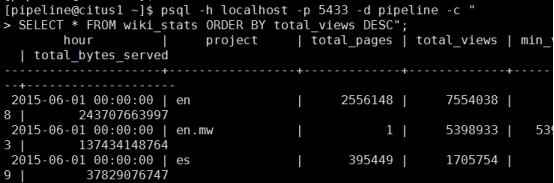
Note that this dataset is large, so the above command will run for quite a while (cancel it whenever you’d like). As it’s running, select from the continuous view as it ingests data from the input stream:
[pipeline@citus1 ~]$ psql -h localhost -p 5433 -d pipeline -c "SELECT * FROM wiki_stats ORDER BY total_views DESC";
来自 “ ITPUB博客 ” ,链接:https://blog.itpub.net/69946831/viewspace-3151022/ ,如需转载,请注明出处,否则将追究法律责任。

