K8S将pod调度到指定nodes上运行
两种方式
方式1:强制固定
- 编写yaml,添加参数(node节点名)
vim text.yaml
nodeName: worker01 #添加节点名参数- 具体yaml
apiVersion: v1
kind: Pod
metadata:
  name: text
  namespace: text
spec:
  nodeName: worker01   #添加节点名参数
  containers:
  - name: hello
    image: centos:7
    imagePullPolicy: IfNotPresent
    command: ["bash","-c","--"]
args: ["while true; do sleep 3;done;"]- 创建改pod
kubectl create -f text.yaml
- 查看pod,运行成功

- 查看是否在worker01上运行
kubectl describe pod text -n text
方式2:使用标签选择器(label-selector)
- 给节点添加标签
kubectl label nodes worker03 type=node_type
- 查看标签是否添加成功
kubectl get node --show-labels #获取所有节点的标签,得到worker03设置的标签
- 编写yaml创建pod,添加标签选择器参数
vim text1.yaml- 内容如下
apiVersion: v1
kind: Pod
metadata:
  name: text1
  namespace: text
spec:
  nodeSelector:    #标签选择器参数
    type: node_type #刚刚添加的类型
  containers:
  - name: hello1
    image: centos:7
    imagePullPolicy: IfNotPresent
    command: ["bash","-c","--"]
    args: ["while true; do sleep 3;done;"]
- 查看是否运行
kubectl get pod -n text
- 查看是否成功在worker03上运行
kubectl describe pod text1 -n text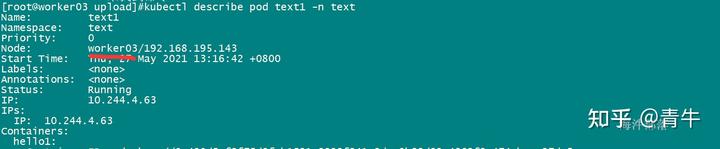
来自 “ ITPUB博客 ” ,链接:https://blog.itpub.net/69946831/viewspace-3143703/ ,如需转载,请注明出处,否则将追究法律责任。
上一篇:
kubelet 远程调试方法

请登录后发表评论
登录
全部评论
